Windows Security Center won't turn on

Status
Not open for further replies.

My Computer My Computer

At a glance

Microsoft Windows 7 Home Premium 64-bits 7601...Intel(R) Core(TM) i3 CPU M 370 @ 2.40GHz4,00 GBATI Mobility Radeon HD 5400 Series
Computer type
Laptop
Computer Manufacturer/Model Number
ACER ASPIRE 5742G
OS
Microsoft Windows 7 Home Premium 64-bits 7601 Multiprocessor Free Service Pack 1
CPU
Intel(R) Core(TM) i3 CPU M 370 @ 2.40GHz
Motherboard
Acer Aspire 5742G
Memory
4,00 GB
Graphics Card(s)
ATI Mobility Radeon HD 5400 Series
Sound Card
(1) AMD High Definition Audio Device (2) Realtek High Defi
Screen Resolution
1366 x 768 x 32 bits (4294967296 colors) @ 60 Hz
Hard Drives
WDC WD5000BEVT-22ZAT0
Code:
dism /image:D:\ /get-packages |more
What has been installed last few days? Which one are pending?

how do I make that |more character??? The "|"

Also, I found a dism log file in windows/logs? Want me to attach?
 

My Computer My Computer

At a glance

windows 7 64 bitAMD Athalon II 645 Quad Core14 gig (upgraded from 6 gig)on board/integrated ati radeon HD 4200
Computer type
PC/Desktop
Computer Manufacturer/Model Number
HP Pavillion p6837c
OS
windows 7 64 bit
CPU
AMD Athalon II 645 Quad Core
Memory
14 gig (upgraded from 6 gig)
Graphics Card(s)
on board/integrated ati radeon HD 4200
Monitor(s) Displays
Samsung 245bw
Hard Drives
1.5 tb wd
Internet Speed
100mb down
Antivirus
Windows Secuity Essentials, Windows defender, Malwarebytes
Browser
IE & firefox
It's on your keyboard. On mine it's above the \ sign.
Maybe better:
Code:
dism /image:D:\ /get-packages >d:\package.txt

Put file d:\package.txt on usb stick and post it here
 

My Computer My Computer

At a glance

Microsoft Windows 7 Home Premium 64-bits 7601...Intel(R) Core(TM) i3 CPU M 370 @ 2.40GHz4,00 GBATI Mobility Radeon HD 5400 Series
Computer type
Laptop
Computer Manufacturer/Model Number
ACER ASPIRE 5742G
OS
Microsoft Windows 7 Home Premium 64-bits 7601 Multiprocessor Free Service Pack 1
CPU
Intel(R) Core(TM) i3 CPU M 370 @ 2.40GHz
Motherboard
Acer Aspire 5742G
Memory
4,00 GB
Graphics Card(s)
ATI Mobility Radeon HD 5400 Series
Sound Card
(1) AMD High Definition Audio Device (2) Realtek High Defi
Screen Resolution
1366 x 768 x 32 bits (4294967296 colors) @ 60 Hz
Hard Drives
WDC WD5000BEVT-22ZAT0
After post #58.... sfc /scannow /offbootdir=d:\ /offwindir=d:\windows still same problem?
 

My Computer My Computer

At a glance

Microsoft Windows 7 Home Premium 64-bits 7601...Intel(R) Core(TM) i3 CPU M 370 @ 2.40GHz4,00 GBATI Mobility Radeon HD 5400 Series
Computer type
Laptop
Computer Manufacturer/Model Number
ACER ASPIRE 5742G
OS
Microsoft Windows 7 Home Premium 64-bits 7601 Multiprocessor Free Service Pack 1
CPU
Intel(R) Core(TM) i3 CPU M 370 @ 2.40GHz
Motherboard
Acer Aspire 5742G
Memory
4,00 GB
Graphics Card(s)
ATI Mobility Radeon HD 5400 Series
Sound Card
(1) AMD High Definition Audio Device (2) Realtek High Defi
Screen Resolution
1366 x 768 x 32 bits (4294967296 colors) @ 60 Hz
Hard Drives
WDC WD5000BEVT-22ZAT0
It's on your keyboard. On mine it's above the \ sign.
Maybe better:
Code:
dism /image:D:\ /get-packages >d:\package.txt

Put file d:\package.txt on usb stick and post it here

I couldn't get that command to work, but I copied windows/logs/dism/dism.log, hope this is same thing? Also, I haven't rebooted yet. DISM.LOG below
 

My Computer My Computer

At a glance

windows 7 64 bitAMD Athalon II 645 Quad Core14 gig (upgraded from 6 gig)on board/integrated ati radeon HD 4200
Computer type
PC/Desktop
Computer Manufacturer/Model Number
HP Pavillion p6837c
OS
windows 7 64 bit
CPU
AMD Athalon II 645 Quad Core
Memory
14 gig (upgraded from 6 gig)
Graphics Card(s)
on board/integrated ati radeon HD 4200
Monitor(s) Displays
Samsung 245bw
Hard Drives
1.5 tb wd
Internet Speed
100mb down
Antivirus
Windows Secuity Essentials, Windows defender, Malwarebytes
Browser
IE & firefox

Attachments

My Computer My Computer

At a glance

windows 7 64 bitAMD Athalon II 645 Quad Core14 gig (upgraded from 6 gig)on board/integrated ati radeon HD 4200
Computer type
PC/Desktop
Computer Manufacturer/Model Number
HP Pavillion p6837c
OS
windows 7 64 bit
CPU
AMD Athalon II 645 Quad Core
Memory
14 gig (upgraded from 6 gig)
Graphics Card(s)
on board/integrated ati radeon HD 4200
Monitor(s) Displays
Samsung 245bw
Hard Drives
1.5 tb wd
Internet Speed
100mb down
Antivirus
Windows Secuity Essentials, Windows defender, Malwarebytes
Browser
IE & firefox
Jackie -

There must have been a hundred times before where I have stepped back to watch files attempting to be repaired sometimes for days in an HP Factory Preinstalled Win7 and there is nothing that is ever done to resolve it other than breaking free of the corrupt bloatware to do a Clean Reinstall - Factory OEM Windows 7.

In this case it's due to serious infection that may not even be cleaned up yet, which must be done first anyway before files can be repaired.

Even if you cleaned up the infection and miraculously repaired all the files to get back to what you had before, with HP that's the worst possible install of Win7 one can have. Why not invest the same amount of time now in getting a perfect install to experience for the first time native Window 7 performance?
 
After post #58.... sfc /scannow /offbootdir=d:\ /offwindir=d:\windows still same problem?

When I do that I get... see below. I don't know if I'm doing something wrong... That what I'm going screenshots. Please read carefully and see if I did commands correctly
 

Attachments

  • sfc_info.jpg
    sfc_info.jpg
    43.2 KB · Views: 14

My Computer My Computer

At a glance

windows 7 64 bitAMD Athalon II 645 Quad Core14 gig (upgraded from 6 gig)on board/integrated ati radeon HD 4200
Computer type
PC/Desktop
Computer Manufacturer/Model Number
HP Pavillion p6837c
OS
windows 7 64 bit
CPU
AMD Athalon II 645 Quad Core
Memory
14 gig (upgraded from 6 gig)
Graphics Card(s)
on board/integrated ati radeon HD 4200
Monitor(s) Displays
Samsung 245bw
Hard Drives
1.5 tb wd
Internet Speed
100mb down
Antivirus
Windows Secuity Essentials, Windows defender, Malwarebytes
Browser
IE & firefox
you did offboodir+ instead of offbootdir=


The packagelist didn't show any relevant info. As Greg said.... heavily corrupt system. Backup inmportant files and do a clean install
 

My Computer My Computer

At a glance

Microsoft Windows 7 Home Premium 64-bits 7601...Intel(R) Core(TM) i3 CPU M 370 @ 2.40GHz4,00 GBATI Mobility Radeon HD 5400 Series
Computer type
Laptop
Computer Manufacturer/Model Number
ACER ASPIRE 5742G
OS
Microsoft Windows 7 Home Premium 64-bits 7601 Multiprocessor Free Service Pack 1
CPU
Intel(R) Core(TM) i3 CPU M 370 @ 2.40GHz
Motherboard
Acer Aspire 5742G
Memory
4,00 GB
Graphics Card(s)
ATI Mobility Radeon HD 5400 Series
Sound Card
(1) AMD High Definition Audio Device (2) Realtek High Defi
Screen Resolution
1366 x 768 x 32 bits (4294967296 colors) @ 60 Hz
Hard Drives
WDC WD5000BEVT-22ZAT0
When you get done with Kactussoft and gregrocker, please do the following:

RogueKiller did not identify malware, so let's press on with FRST64, and run another fix.

Please open notepad (Start > All Programs > Accessories > Notepad)
Copy the entire contents of the code box below (Do not copy the word 'code') to Notepad.
Save it to the pen drive where FRST64 is located, and name it: fixlist.txt

Code:
[COLOR=black]start[/COLOR]
[COLOR=black]S2 WindowsSVC; C:\Windows\SysWOW64\winthemes.dll [151552 2014-04-11] ()[/COLOR]
[COLOR=black]2014-04-11 06:40 - 2014-04-11 06:40 - 00151552 _____ () C:\Windows\SysWOW64\winthemes.dll[/COLOR]
[COLOR=black]2014-04-11 06:40 - 2014-04-11 06:40 - 00062464 _____ () C:\Windows\SysWOW64\common2.dat[/COLOR]
[COLOR=black]2014-04-11 06:40 - 2014-04-11 06:40 - 00062464 _____ () C:\Windows\SysWOW64\common1.dat[/COLOR]
[COLOR=black]DisableService: MsMpSvc[/COLOR]
[COLOR=black]DisableService: NisSrv[/COLOR]
[COLOR=black]DisableService: MpFilter[/COLOR]
[COLOR=black]DisableService: NisDrv[/COLOR]
[COLOR=black]DisableService: MpNWMon[/COLOR]
[COLOR=black]HKLM\...\Run: [MSC] => c:\Program Files\Microsoft Security Client\msseces.exe [1271072 2014-03-11] (Microsoft Corporation)[/COLOR]
[COLOR=black]end[/COLOR]

NOTICE: This script is written specifically for this computer!!!
Running this on another computer may cause damage to the Operating System.


Now, with the pen drive( containing FRST64 and fixlist) connected, restart the computer, and once again enter System Recovery Options and select: Command Prompt

Get to FRST, as you did before, and press the Fix button, just once, and wait.


When done, the tool creates a report on the pen drive called: Fixlog.txt


Please post the Fixlog.txt in your reply.


Let us know if the computer boots to Windows.

Did it. This time is gave me options to do safe mode, or "start windows normally. I chose "start windows normally" same result. Black screen with pointer.
 

Attachments

My Computer My Computer

At a glance

windows 7 64 bitAMD Athalon II 645 Quad Core14 gig (upgraded from 6 gig)on board/integrated ati radeon HD 4200
Computer type
PC/Desktop
Computer Manufacturer/Model Number
HP Pavillion p6837c
OS
windows 7 64 bit
CPU
AMD Athalon II 645 Quad Core
Memory
14 gig (upgraded from 6 gig)
Graphics Card(s)
on board/integrated ati radeon HD 4200
Monitor(s) Displays
Samsung 245bw
Hard Drives
1.5 tb wd
Internet Speed
100mb down
Antivirus
Windows Secuity Essentials, Windows defender, Malwarebytes
Browser
IE & firefox
Does it offer Startup Repair? Accept it.

If it's Safe Mode then will it enter Safe Mode?

If you reboot and tap the F8 key vigorously, will it offer Repair My Computer? Try several times.

If repair is offered, accept and reboot. If not or it still won't start, reboot into Repair to open a Command Line to confirm Partition Marked Active is System REserved (preferred) or C, then run Startup Repair - Run 3 Separate Times.

Remember that it may not repair or start if not fully cleaned up so you'll want to complete the clean up with Cottonball as soon as he gets online.
 
f8 got me startup repair, but says couldn't detect any problems. Safe mode just goes to black screen with pointer after it loads files... That fix I applied... Is it lost everytime I reboot?
 

My Computer My Computer

At a glance

windows 7 64 bitAMD Athalon II 645 Quad Core14 gig (upgraded from 6 gig)on board/integrated ati radeon HD 4200
Computer type
PC/Desktop
Computer Manufacturer/Model Number
HP Pavillion p6837c
OS
windows 7 64 bit
CPU
AMD Athalon II 645 Quad Core
Memory
14 gig (upgraded from 6 gig)
Graphics Card(s)
on board/integrated ati radeon HD 4200
Monitor(s) Displays
Samsung 245bw
Hard Drives
1.5 tb wd
Internet Speed
100mb down
Antivirus
Windows Secuity Essentials, Windows defender, Malwarebytes
Browser
IE & firefox
It says no restore points still... I don't want to give up.
 

My Computer My Computer

At a glance

windows 7 64 bitAMD Athalon II 645 Quad Core14 gig (upgraded from 6 gig)on board/integrated ati radeon HD 4200
Computer type
PC/Desktop
Computer Manufacturer/Model Number
HP Pavillion p6837c
OS
windows 7 64 bit
CPU
AMD Athalon II 645 Quad Core
Memory
14 gig (upgraded from 6 gig)
Graphics Card(s)
on board/integrated ati radeon HD 4200
Monitor(s) Displays
Samsung 245bw
Hard Drives
1.5 tb wd
Internet Speed
100mb down
Antivirus
Windows Secuity Essentials, Windows defender, Malwarebytes
Browser
IE & firefox
I have a small rant... When I had windows Xp, there was a boot disk you could burn called "Roadstarter boot cd". This thing would boot any pc, pre windows 7. What the heck doesn't something like this exist for win 7.
 

My Computer My Computer

At a glance

windows 7 64 bitAMD Athalon II 645 Quad Core14 gig (upgraded from 6 gig)on board/integrated ati radeon HD 4200
Computer type
PC/Desktop
Computer Manufacturer/Model Number
HP Pavillion p6837c
OS
windows 7 64 bit
CPU
AMD Athalon II 645 Quad Core
Memory
14 gig (upgraded from 6 gig)
Graphics Card(s)
on board/integrated ati radeon HD 4200
Monitor(s) Displays
Samsung 245bw
Hard Drives
1.5 tb wd
Internet Speed
100mb down
Antivirus
Windows Secuity Essentials, Windows defender, Malwarebytes
Browser
IE & firefox
Does it offer Startup Repair? Accept it.

If it's Safe Mode then will it enter Safe Mode?

If you reboot and tap the F8 key vigorously, will it offer Repair My Computer? Try several times.

If repair is offered, accept and reboot. If not or it still won't start, reboot into Repair to open a Command Line to confirm Partition Marked Active is System REserved (preferred) or C, then run Startup Repair - Run 3 Separate Times.

Remember that it may not repair or start if not fully cleaned up so you'll want to complete the clean up with Cottonball as soon as he gets online.

I just saw this now.. I followed the Partition Marked Active link and followed instructions for cmd prompt. I made "partition 3" active, that's the one with the most space left and where windows in installed. That's the one you I was to select, yes? same issue after reboot, black screen mouse pointer

I ran startup repair 3 times after hitting F8, even though it says everytime that it "couldn't detect a problem"
 

My Computer My Computer

At a glance

windows 7 64 bitAMD Athalon II 645 Quad Core14 gig (upgraded from 6 gig)on board/integrated ati radeon HD 4200
Computer type
PC/Desktop
Computer Manufacturer/Model Number
HP Pavillion p6837c
OS
windows 7 64 bit
CPU
AMD Athalon II 645 Quad Core
Memory
14 gig (upgraded from 6 gig)
Graphics Card(s)
on board/integrated ati radeon HD 4200
Monitor(s) Displays
Samsung 245bw
Hard Drives
1.5 tb wd
Internet Speed
100mb down
Antivirus
Windows Secuity Essentials, Windows defender, Malwarebytes
Browser
IE & firefox
First Try System Restore from the System Recovery Options. Use the disk if required.

Do you have the 100mb System REserved partition which as I wrote is preferred to be marked Active. If so you should try it first?

In some HP's the Recovery partition could also be the partition marked Active. Did you note which one was already marked Active?

If not then mark each one Active and try 3 separate Startup REpairs to see if it will start.
 
This item S2 WindowsSVC; C:\Windows\SysWOW64\winthemes.dll is a part of the Win32/Sefnit family of trojans. It can give a malicious hacker access to your PC, download files, and use your PC and Internet connection for click fraud.
It can also use your PC to mine Litecoins.
This type of threat can be downloaded by other malware, or bundled with other software and downloaded through peer-to-peer file sharing networks.
 

My Computer My Computer

At a glance

Windows 7 Ultimate 32bit SP1Intel(R) Core(TM)2 Quad CPU @ 2.40GHz, 2400 MHz4 GBATI Radeon HD 2600 Pro
Computer type
PC/Desktop
Computer Manufacturer/Model Number
Bruce ... somewhere in his 40's
OS
Windows 7 Ultimate 32bit SP1
CPU
Intel(R) Core(TM)2 Quad CPU @ 2.40GHz, 2400 MHz
Motherboard
INTEL/D975XBX2
Memory
4 GB
Graphics Card(s)
ATI Radeon HD 2600 Pro
Monitor(s) Displays
Samsung SyncMaster 914v
Screen Resolution
1280 x 1024
Hard Drives
2/500GB each ... ST3500630AS ATA Device.
One is not connected
PSU
Rocketfish 700 W
Case
G.Skill Gigabyte Chassis
Keyboard
Standard PS/2 Keyboard
Mouse
Microsoft PS/2 Mouse
Internet Speed
DSL
Antivirus
Avira Internet Security
Browser
IE 11
Other Info
ATI HDMI Audio
System restore doesn't work. Startup repair doesn't find problems (system is booting fine). SFC says "patch install is pending". Display what's pending (offline with DISM) fails.

Not much we can do anymore in my opinion.

Expensive lesson... make backups!!
 

My Computer My Computer

At a glance

Microsoft Windows 7 Home Premium 64-bits 7601...Intel(R) Core(TM) i3 CPU M 370 @ 2.40GHz4,00 GBATI Mobility Radeon HD 5400 Series
Computer type
Laptop
Computer Manufacturer/Model Number
ACER ASPIRE 5742G
OS
Microsoft Windows 7 Home Premium 64-bits 7601 Multiprocessor Free Service Pack 1
CPU
Intel(R) Core(TM) i3 CPU M 370 @ 2.40GHz
Motherboard
Acer Aspire 5742G
Memory
4,00 GB
Graphics Card(s)
ATI Mobility Radeon HD 5400 Series
Sound Card
(1) AMD High Definition Audio Device (2) Realtek High Defi
Screen Resolution
1366 x 768 x 32 bits (4294967296 colors) @ 60 Hz
Hard Drives
WDC WD5000BEVT-22ZAT0
First Try System Restore from the System Recovery Options. Use the disk if required.

Do you have the 100mb System REserved partition which as I wrote is preferred to be marked Active. If so you should try it first?

In some HP's the Recovery partition could also be the partition marked Active. Did you note which one was already marked Active?

If not then mark each one Active and try 3 separate Startup REpairs to see if it will start.

There are no restore points shown in system restore.

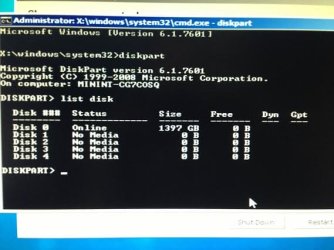
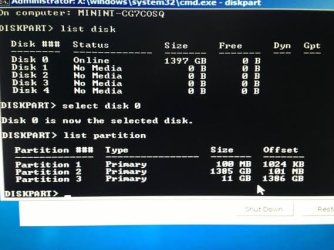
Ok, see screen shots. I manually selected each partition and made each active, all within the same cmd session. Correct? or did you want me to make partition 1 active first, then reboot and repair 3 times, then go back and makes 2 active, etc, and so on? This time, I made all 3 active together, then rebooted, hit f8 and ran startup repair 3 times. Same thing.
 

Attachments

  • diskpart.jpg
    diskpart.jpg
    29.9 KB · Views: 9
  • diskpart next.jpg
    diskpart next.jpg
    34.4 KB · Views: 20

My Computer My Computer

At a glance

windows 7 64 bitAMD Athalon II 645 Quad Core14 gig (upgraded from 6 gig)on board/integrated ati radeon HD 4200
Computer type
PC/Desktop
Computer Manufacturer/Model Number
HP Pavillion p6837c
OS
windows 7 64 bit
CPU
AMD Athalon II 645 Quad Core
Memory
14 gig (upgraded from 6 gig)
Graphics Card(s)
on board/integrated ati radeon HD 4200
Monitor(s) Displays
Samsung 245bw
Hard Drives
1.5 tb wd
Internet Speed
100mb down
Antivirus
Windows Secuity Essentials, Windows defender, Malwarebytes
Browser
IE & firefox
Status
Not open for further replies.
Back
Top