
Laptop wont connect to wifi

bigboi972

New member
Member
VIP
Local time
12:06 AM
Messages
319
Hello my friend has a laptop that will not connect or show any wireless networks. The wireless Icon in the toolbar just has an red x over it. He says he has tried to re install drivers from the manufacturer website but it did not help. I am not sure if he needs to uninstall the ones he has on his laptop at the moment before installing the newer ones or not cause I am sure he did not uninstall them the first time he tried to install new drivers. We attempted to trouble shoot with the windows internal troubleshooting tool for networks but was greeted with the message in the link below. What else should he try.


My Computer My Computer

At a glance

Microsoft Windows 7 Professional 64-bitIntel Xeon E3 @ 3.30GHzIntel(R) Xeon(R) CPU E...16.00GB Single-Channel DDR3 @ 666MHz (9-9-9-24)ATI Radeon HD 7950
Computer type
PC/Desktop
OS
Microsoft Windows 7 Professional 64-bit
CPU
Intel Xeon E3 @ 3.30GHzIntel(R) Xeon(R) CPU E3-1230 v3 @ 3.3
Motherboard
MSI Z97 GAMING 5 (MS-7917)
Memory
16.00GB Single-Channel DDR3 @ 666MHz (9-9-9-24)
Graphics Card(s)
ATI Radeon HD 7950
Sound Card
(1) AMD High Definition Audio Device (2) USB Audio Device
Hard Drives
(1) Samsung SSD 840 EVO 120GB ATA Device
(2) TOSHIBA MK7559GSM ATA Device
Other Info
TRENDnet Wireless AC1200 Dual Band USB 3.0 Adapter, TEW-805UB
Is the adapter turned on from the keyboard? does it connect using Ethernet?
Post snip of Device Manager with Network Adapters expanded.
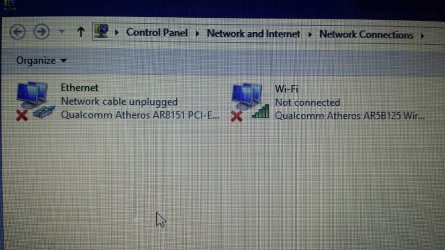
Also a snip of Control Panel\Network and Internet\Network Connections.

This is the preferred, best way to upload an image or a file to a post.

http://www.sevenforums.com/tutorials/9733-screenshots-files-upload-post-seven-forums.html#post93869

Press the ALT and PrntScrn keys at the same time, this will capture only the active window to use in Paint or your preferred graphics editor.


You may also upload a photo or image you already have on your PC, as you would a file, without using the Snipping tool.
 

My Computer My Computer

At a glance

Windows 7 Ultimate X64 SP1Intel i5-2550K, Differing ~4.4-4.8GHz No buil...16GB G.Skill Sniper 1866MHz @ 2133MHz 2x8GBASUS GTX650TIB-DC2OC-2GD5, (650TI Boost)
Computer type
PC/Desktop
Computer Manufacturer/Model Number
Home Built Desktop By DataTech
OS
Windows 7 Ultimate X64 SP1
CPU
Intel i5-2550K, Differing ~4.4-4.8GHz No built in GPU
Motherboard
ASUS P8Z68-V PRO/GEN3
Memory
16GB G.Skill Sniper 1866MHz @ 2133MHz 2x8GB
Graphics Card(s)
ASUS GTX650TIB-DC2OC-2GD5, (650TI Boost)
Sound Card
Onboard Realtek 5-1
Monitor(s) Displays
Samsung P2570HD
Screen Resolution
1920x1080
Hard Drives
Samsung 840 Pro 256GB SSD for OS, 500GB Seagate Constellation (Enterprise drive) for Data
PSU
Corsair HX650W
Case
Inwin Dragon Rider
Cooling
Hyper 212 EVO w/two Noctua fans, push-pull, @1300 RPM
Keyboard
E-Z Eyes, bright yellow keys with large characters
Mouse
steelseries SENSEI Laser Pro Gaming
Internet Speed
48-51Mbs Mbs down, 11 Mbs up Xfinity Cable
Antivirus
Norton Internet Security 2013
Browser
IE 10, Opera, Pale Moon if needed
Other Info
4 case fans, LG BluRay-RE, ASUS DVD-RW, Mr. Fusion power supply, 1.21 gigawatts.
Is the adapter turned on from the keyboard? does it connect using Ethernet?
Post snip of Device Manager with Network Adapters expanded.
Also a snip of Control Panel\Network and Internet\Network Connections.

This is the preferred, best way to upload an image or a file to a post.

http://www.sevenforums.com/tutorials/9733-screenshots-files-upload-post-seven-forums.html#post93869

Press the ALT and PrntScrn keys at the same time, this will capture only the active window to use in Paint or your preferred graphics editor.


You may also upload a photo or image you already have on your PC, as you would a file, without using the Snipping tool.


ok ill get him to send me pictures of that tomorrow
 

My Computer My Computer

At a glance

Microsoft Windows 7 Professional 64-bitIntel Xeon E3 @ 3.30GHzIntel(R) Xeon(R) CPU E...16.00GB Single-Channel DDR3 @ 666MHz (9-9-9-24)ATI Radeon HD 7950
Computer type
PC/Desktop
OS
Microsoft Windows 7 Professional 64-bit
CPU
Intel Xeon E3 @ 3.30GHzIntel(R) Xeon(R) CPU E3-1230 v3 @ 3.3
Motherboard
MSI Z97 GAMING 5 (MS-7917)
Memory
16.00GB Single-Channel DDR3 @ 666MHz (9-9-9-24)
Graphics Card(s)
ATI Radeon HD 7950
Sound Card
(1) AMD High Definition Audio Device (2) USB Audio Device
Hard Drives
(1) Samsung SSD 840 EVO 120GB ATA Device
(2) TOSHIBA MK7559GSM ATA Device
Other Info
TRENDnet Wireless AC1200 Dual Band USB 3.0 Adapter, TEW-805UB
Is the adapter turned on from the keyboard? does it connect using Ethernet?
Post snip of Device Manager with Network Adapters expanded.
Also a snip of Control Panel\Network and Internet\Network Connections.

This is the preferred, best way to upload an image or a file to a post.

http://www.sevenforums.com/tutorials/9733-screenshots-files-upload-post-seven-forums.html#post93869

Press the ALT and PrntScrn keys at the same time, this will capture only the active window to use in Paint or your preferred graphics editor.


You may also upload a photo or image you already have on your PC, as you would a file, without using the Snipping tool.
As he said, has your computer died? that also cause the laptop to turn on with the wireless off. Happens to me. just in case you did not know how, you press and hold the Fn button on your keyboard then press a button on the top of your computer (E.g F11) with a mini tower with waves next to it. i think that is how the sign looks like on your laptop.
 

My Computer My Computer

At a glance

Windows Vista Business 32bitIntel(R) Pentium(R) Daul CPU E2220 @ 2.40GHz2.00GBIntel Pentium
Computer type
PC/Desktop
Computer Manufacturer/Model Number
HP
OS
Windows Vista Business 32bit
CPU
Intel(R) Pentium(R) Daul CPU E2220 @ 2.40GHz
Memory
2.00GB
Graphics Card(s)
Intel Pentium
Sound Card
AudioESP SoundMAX
Monitor(s) Displays
Dell
Hard Drives
ST380815AS ATA Device 80 GB
Keyboard
Logitech Keyboard
Mouse
Logitech Mouse
Internet Speed
44 Mbps
Antivirus
AVG Free
Is the adapter turned on from the keyboard? does it connect using Ethernet?
Post snip of Device Manager with Network Adapters expanded.
Also a snip of Control Panel\Network and Internet\Network Connections.

This is the preferred, best way to upload an image or a file to a post.

http://www.sevenforums.com/tutorials/9733-screenshots-files-upload-post-seven-forums.html#post93869

Press the ALT and PrntScrn keys at the same time, this will capture only the active window to use in Paint or your preferred graphics editor.


You may also upload a photo or image you already have on your PC, as you would a file, without using the Snipping tool.
As he said, has your computer died? that also cause the laptop to turn on with the wireless off. Happens to me. just in case you did not know how, you press and hold the Fn button on your keyboard then press a button on the top of your computer (E.g F11) with a mini tower with waves next to it. i think that is how the sign looks like on your laptop.

I dont think my friends computer has died on him I will have to ask and here are the pictures you requested. he has attempted to turn on and off the wireless using the wireless button on his laptop that looks like an antenna.
 

Attachments

  • unnamed (2).jpg
    unnamed (2).jpg
    213.7 KB · Views: 1
  • unnamed (1).jpg
    unnamed (1).jpg
    203.6 KB · Views: 1

My Computer My Computer

At a glance

Microsoft Windows 7 Professional 64-bitIntel Xeon E3 @ 3.30GHzIntel(R) Xeon(R) CPU E...16.00GB Single-Channel DDR3 @ 666MHz (9-9-9-24)ATI Radeon HD 7950
Computer type
PC/Desktop
OS
Microsoft Windows 7 Professional 64-bit
CPU
Intel Xeon E3 @ 3.30GHzIntel(R) Xeon(R) CPU E3-1230 v3 @ 3.3
Motherboard
MSI Z97 GAMING 5 (MS-7917)
Memory
16.00GB Single-Channel DDR3 @ 666MHz (9-9-9-24)
Graphics Card(s)
ATI Radeon HD 7950
Sound Card
(1) AMD High Definition Audio Device (2) USB Audio Device
Hard Drives
(1) Samsung SSD 840 EVO 120GB ATA Device
(2) TOSHIBA MK7559GSM ATA Device
Other Info
TRENDnet Wireless AC1200 Dual Band USB 3.0 Adapter, TEW-805UB
First of all, let me say I didn't ask if the PC was dead, the other poster said that.

All looks fine from the snips. Is this machine in range of a WiFi source?

He could connect via Ethernet cable and uninstall the Qualcomm Wireless adapter including its drivers, then run Windows Update manually to reinstall them.
 

My Computer My Computer

At a glance

Windows 7 Ultimate X64 SP1Intel i5-2550K, Differing ~4.4-4.8GHz No buil...16GB G.Skill Sniper 1866MHz @ 2133MHz 2x8GBASUS GTX650TIB-DC2OC-2GD5, (650TI Boost)
Computer type
PC/Desktop
Computer Manufacturer/Model Number
Home Built Desktop By DataTech
OS
Windows 7 Ultimate X64 SP1
CPU
Intel i5-2550K, Differing ~4.4-4.8GHz No built in GPU
Motherboard
ASUS P8Z68-V PRO/GEN3
Memory
16GB G.Skill Sniper 1866MHz @ 2133MHz 2x8GB
Graphics Card(s)
ASUS GTX650TIB-DC2OC-2GD5, (650TI Boost)
Sound Card
Onboard Realtek 5-1
Monitor(s) Displays
Samsung P2570HD
Screen Resolution
1920x1080
Hard Drives
Samsung 840 Pro 256GB SSD for OS, 500GB Seagate Constellation (Enterprise drive) for Data
PSU
Corsair HX650W
Case
Inwin Dragon Rider
Cooling
Hyper 212 EVO w/two Noctua fans, push-pull, @1300 RPM
Keyboard
E-Z Eyes, bright yellow keys with large characters
Mouse
steelseries SENSEI Laser Pro Gaming
Internet Speed
48-51Mbs Mbs down, 11 Mbs up Xfinity Cable
Antivirus
Norton Internet Security 2013
Browser
IE 10, Opera, Pale Moon if needed
Other Info
4 case fans, LG BluRay-RE, ASUS DVD-RW, Mr. Fusion power supply, 1.21 gigawatts.
The troubleshooter in the screenshot says "Wireless capability is turned off" ... not fixed.

So ... is your wireless card disabled? Some laptops have a slide switch to turn the wireless card on and off. Others do it with a Fn key combination. Check that first.
 

My Computer My Computer

At a glance

Windows 10 x64i7-7700K16 GB 2400 MHzGTX 1060
Computer type
PC/Desktop
Computer Manufacturer/Model Number
Dell
OS
Windows 10 x64
CPU
i7-7700K
Memory
16 GB 2400 MHz
Graphics Card(s)
GTX 1060
Sound Card
Integrated, plus external Presonus Audiobox USB
Monitor(s) Displays
2x AOC 27"
Screen Resolution
1920x1080
Hard Drives
512 GB M.2 SSD
2 TB 7200 RPM disk
Internet Speed
110 Mbps
Browser
Firefox
The troubleshooter in the screenshot says "Wireless capability is turned off" ... not fixed.

So ... is your wireless card disabled? Some laptops have a slide switch to turn the wireless card on and off. Others do it with a Fn key combination. Check that first.

he said his other machine had a switch and this one did not so he has attempted to turn it on and off by using the button on the laptop keyboard. ill try your suggestions and get back with you
 
Last edited:

My Computer My Computer

At a glance

Microsoft Windows 7 Professional 64-bitIntel Xeon E3 @ 3.30GHzIntel(R) Xeon(R) CPU E...16.00GB Single-Channel DDR3 @ 666MHz (9-9-9-24)ATI Radeon HD 7950
Computer type
PC/Desktop
OS
Microsoft Windows 7 Professional 64-bit
CPU
Intel Xeon E3 @ 3.30GHzIntel(R) Xeon(R) CPU E3-1230 v3 @ 3.3
Motherboard
MSI Z97 GAMING 5 (MS-7917)
Memory
16.00GB Single-Channel DDR3 @ 666MHz (9-9-9-24)
Graphics Card(s)
ATI Radeon HD 7950
Sound Card
(1) AMD High Definition Audio Device (2) USB Audio Device
Hard Drives
(1) Samsung SSD 840 EVO 120GB ATA Device
(2) TOSHIBA MK7559GSM ATA Device
Other Info
TRENDnet Wireless AC1200 Dual Band USB 3.0 Adapter, TEW-805UB
First of all, let me say I didn't ask if the PC was dead, the other poster said that.

All looks fine from the snips. Is this machine in range of a WiFi source?

He could connect via Ethernet cable and uninstall the Qualcomm Wireless adapter including its drivers, then run Windows Update manually to reinstall them.


He is in range of the wifi source we uninstalled the drivers and attempted to reinstal the drivers before he rebooted using windows update. Their was no drivers available. We then thought if we rebooted then we would get a different result assuming that the driver installation would be finalized after the reboot. We noticed that in the network adapters tab in the device manager. The driver we uninstalled had installed automatically. then attempted to update the drivers via windows update again. Windows update said it we up to date. When we attempt to use the troubleshooting tool within windows to diagnose the problem. The laptop goes into airplane mode and windows tells us that the wifi is off.
 

My Computer My Computer

At a glance

Microsoft Windows 7 Professional 64-bitIntel Xeon E3 @ 3.30GHzIntel(R) Xeon(R) CPU E...16.00GB Single-Channel DDR3 @ 666MHz (9-9-9-24)ATI Radeon HD 7950
Computer type
PC/Desktop
OS
Microsoft Windows 7 Professional 64-bit
CPU
Intel Xeon E3 @ 3.30GHzIntel(R) Xeon(R) CPU E3-1230 v3 @ 3.3
Motherboard
MSI Z97 GAMING 5 (MS-7917)
Memory
16.00GB Single-Channel DDR3 @ 666MHz (9-9-9-24)
Graphics Card(s)
ATI Radeon HD 7950
Sound Card
(1) AMD High Definition Audio Device (2) USB Audio Device
Hard Drives
(1) Samsung SSD 840 EVO 120GB ATA Device
(2) TOSHIBA MK7559GSM ATA Device
Other Info
TRENDnet Wireless AC1200 Dual Band USB 3.0 Adapter, TEW-805UB
IT is difficult to remotely help someone with a PC, more so when the other person also is trying it remotely. It would seem to me there's some kind of hardware issue now. It could be as simple as a bad or sticking key or something else inside.
 

My Computer My Computer

At a glance

Windows 7 Ultimate X64 SP1Intel i5-2550K, Differing ~4.4-4.8GHz No buil...16GB G.Skill Sniper 1866MHz @ 2133MHz 2x8GBASUS GTX650TIB-DC2OC-2GD5, (650TI Boost)
Computer type
PC/Desktop
Computer Manufacturer/Model Number
Home Built Desktop By DataTech
OS
Windows 7 Ultimate X64 SP1
CPU
Intel i5-2550K, Differing ~4.4-4.8GHz No built in GPU
Motherboard
ASUS P8Z68-V PRO/GEN3
Memory
16GB G.Skill Sniper 1866MHz @ 2133MHz 2x8GB
Graphics Card(s)
ASUS GTX650TIB-DC2OC-2GD5, (650TI Boost)
Sound Card
Onboard Realtek 5-1
Monitor(s) Displays
Samsung P2570HD
Screen Resolution
1920x1080
Hard Drives
Samsung 840 Pro 256GB SSD for OS, 500GB Seagate Constellation (Enterprise drive) for Data
PSU
Corsair HX650W
Case
Inwin Dragon Rider
Cooling
Hyper 212 EVO w/two Noctua fans, push-pull, @1300 RPM
Keyboard
E-Z Eyes, bright yellow keys with large characters
Mouse
steelseries SENSEI Laser Pro Gaming
Internet Speed
48-51Mbs Mbs down, 11 Mbs up Xfinity Cable
Antivirus
Norton Internet Security 2013
Browser
IE 10, Opera, Pale Moon if needed
Other Info
4 case fans, LG BluRay-RE, ASUS DVD-RW, Mr. Fusion power supply, 1.21 gigawatts.
Back
Top