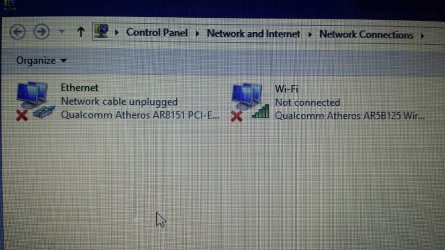
Hello my friend has a laptop that will not connect or show any wireless networks. The wireless Icon in the toolbar just has an red x over it. He says he has tried to re install drivers from the manufacturer website but it did not help. I am not sure if he needs to uninstall the ones he has on his laptop at the moment before installing the newer ones or not cause I am sure he did not uninstall them the first time he tried to install new drivers. We attempted to trouble shoot with the windows internal troubleshooting tool for networks but was greeted with the message in the link below. What else should he try.

My Computer
At a glance
Microsoft Windows 7 Professional 64-bitIntel Xeon E3 @ 3.30GHzIntel(R) Xeon(R) CPU E...16.00GB Single-Channel DDR3 @ 666MHz (9-9-9-24)ATI Radeon HD 7950
- Computer type
- PC/Desktop
- OS
- Microsoft Windows 7 Professional 64-bit
- CPU
- Intel Xeon E3 @ 3.30GHzIntel(R) Xeon(R) CPU E3-1230 v3 @ 3.3
- Motherboard
- MSI Z97 GAMING 5 (MS-7917)
- Memory
- 16.00GB Single-Channel DDR3 @ 666MHz (9-9-9-24)
- Graphics Card(s)
- ATI Radeon HD 7950
- Sound Card
- (1) AMD High Definition Audio Device (2) USB Audio Device
- Hard Drives
- (1) Samsung SSD 840 EVO 120GB ATA Device
(2) TOSHIBA MK7559GSM ATA Device
- Other Info
- TRENDnet Wireless AC1200 Dual Band USB 3.0 Adapter, TEW-805UB