Standard Account Windows 7 Is Allowing Installations: Why?

Red2010

New member
Local time
11:41 PM
Messages
6
Hi Everyone,

My father has a small office and recently I changed his 1998 Packard Bell desktop running Windows 1998 to a Windows 7 HP desktop.

Since changing it he realized that his secretary has installed a lot of junk and has been doing a lot of things she ought not to be doing on the desktop. She was unable to do such things on the extremely slow Packard Bell.

I went to his office today and created a Standard Account for her to use. However, to my surprize when I tested to see if I could install a program which was on my flash drive while logged in as the Standard user I was unable to install it without any prompt for the administrator password.

I googled and tried most things including logging back as an Admin and setting the UAC settings as high as possible etc. and still no dice.

How can I set up this standard account so that if the secretary tries to install anything it will ask for the administrator password?

Thanks in advance for your assistance.
 

My Computer My Computer

At a glance

Windows 7 Home Premium
Computer Manufacturer/Model Number
Sony Vaio VPCCW27FX
OS
Windows 7 Home Premium
Hi Everyone,

My father has a small office and recently I changed his 1998 Packard Bell desktop running Windows 1998 to a Windows 7 HP desktop.

Since changing it he realized that his secretary has installed a lot of junk and has been doing a lot of things she ought not to be doing on the desktop. She was unable to do such things on the extremely slow Packard Bell.

I went to his office today and created a Standard Account for her to use. However, to my surprize when I tested to see if I could install a program which was on my flash drive while logged in as the Standard user I was unable to install it without any prompt for the administrator password.

I googled and tried most things including logging back as an Admin and setting the UAC settings as high as possible etc. and still no dice.

How can I set up this standard account so that if the secretary tries to install anything it will ask for the administrator password?

Thanks in advance for your assistance.

I have never used "Program Blocker", but it appears to provide a solution to your problem;

Windows Program Blocker software free download

HTH
 

My Computer My Computer

At a glance

Windows 7 Professional x64Intel i5 quad processor16 GBRadeon HD 5770
Computer type
PC/Desktop
Computer Manufacturer/Model Number
Custom Built
OS
Windows 7 Professional x64
CPU
Intel i5 quad processor
Motherboard
DP67BG
Memory
16 GB
Graphics Card(s)
Radeon HD 5770
Sound Card
Realtek High Definition Audio
Monitor(s) Displays
Samsung SyncMaster
Screen Resolution
1920X1080
Hard Drives
WD 2TB (SATA Internal)
WD 1TB (USB External)
PSU
Corsair GS800
Case
Tower (Generic)
Cooling
3 Internal Fans
Keyboard
MS Wireless
Mouse
MS Optical Wired
Internet Speed
54 mbps
Antivirus
Emsisoft
Browser
IE-Version 9, Palemoon-Version 24.2.0
Hey Sir George I tried to block some programs using the parental blocker feature. However, all I really want is for the computer to prompt for the admin password once she tries to install anything on the standard account. I know it can be done because that is what happens on my work computer.
 

My Computer My Computer

At a glance

Windows 7 Home Premium
Computer Manufacturer/Model Number
Sony Vaio VPCCW27FX
OS
Windows 7 Home Premium
Hey Sir George I tried to block some programs using the parental blocker feature. However, all I really want is for the computer to prompt for the admin password once she tries to install anything on the standard account. I know it can be done because that is what happens on my work computer.

Are you using the same version of Windows 7 on both computers?
 

My Computer My Computer

At a glance

Windows 7 Professional x64Intel i5 quad processor16 GBRadeon HD 5770
Computer type
PC/Desktop
Computer Manufacturer/Model Number
Custom Built
OS
Windows 7 Professional x64
CPU
Intel i5 quad processor
Motherboard
DP67BG
Memory
16 GB
Graphics Card(s)
Radeon HD 5770
Sound Card
Realtek High Definition Audio
Monitor(s) Displays
Samsung SyncMaster
Screen Resolution
1920X1080
Hard Drives
WD 2TB (SATA Internal)
WD 1TB (USB External)
PSU
Corsair GS800
Case
Tower (Generic)
Cooling
3 Internal Fans
Keyboard
MS Wireless
Mouse
MS Optical Wired
Internet Speed
54 mbps
Antivirus
Emsisoft
Browser
IE-Version 9, Palemoon-Version 24.2.0
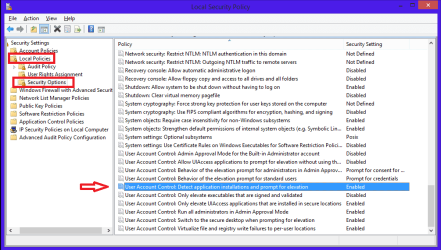
Take a look at the Local Security Policy setting I highlighted in the screen print.
Mine is set to Enabled by default ...
You can get to Local Security Policy by typing Local in the Start button search box.

LSPSP01.PNG
 

My Computer My Computer

At a glance

Multi-Boot W7_Pro_x64 W8.1_Pro_x64 W10_Pro_x6...AMD Athlon II x4 6206GB GSkill DDR2 800AMD 4670 GPU + AMD 4200 IGP
Computer type
PC/Desktop
Computer Manufacturer/Model Number
home built
OS
Multi-Boot W7_Pro_x64 W8.1_Pro_x64 W10_Pro_x64 +Linux_VMs +Chromium_VM
CPU
AMD Athlon II x4 620
Motherboard
Gigabyte GA-MA785G-UD3H
Memory
6GB GSkill DDR2 800
Graphics Card(s)
AMD 4670 GPU + AMD 4200 IGP
Sound Card
on board Realtek ALC889A
Monitor(s) Displays
RCA 40" LCD TV, Insignia 32" LCD TV, HP 15" LCD monitor
Screen Resolution
1680 x 1050
Hard Drives
OCZ Vertex 3 120GB,
Samsung F3 1TB (3),
Several others - WD, Seagate, Hitachi, ...
PSU
Corsair 500 W
Case
Rosewill mid tower
Cooling
CM 90mm rifle
Keyboard
Gyration wireless, Logitech wireless, Dell USB wired
Mouse
Gyration wireless, Logitech wireless, V7 USB wired
Internet Speed
Spectrum - 100Mbps D / 10Mbps U
Antivirus
Avast, MBAM3, EMET, WinPatrol
Browser
Pale Moon, Firefox, IE
Other Info
2 multi-boot PC's
Mainly HTPC/Office/Gen purpose (no gaming).
Trendnet USB KVM.
LG DVD burner/Blue Ray Player.
Tray system for removable SATA backup drives.

Not currently OCd, under-volted.
I use Hybrid sleep, rarely re-boot or shutdown.

Hauppauge HD-PVR, Avermedia PCIe TV Tuner, Hauppauge PCI TV Tuner.
Suggested reading

It depends on the software. Read the following:

Yes, Standard Users can Install Software

Also check this out:

Start> Run then type netplwiz then press enter.

Click the account name then properties then group membership.

Also look at UAC:

http://www.sevenforums.com/tutorials/299-user-account-control-uac-change-notification-settings.html

Check settings are the same as those in step 6.

Depending on the version of Windows 7 have a read of this too:

How to make a disallowed-by-default Software Restriction Policy
 

My Computer My Computer

At a glance

Microsoft Windows 7 Home Premium 64-bit 7601 ...AMD C-60 APU with Radeon(tm) HD Graphics4.00 GBAMD Radeon HD 6290 Graphics
Computer type
Laptop
Computer Manufacturer/Model Number
ASUS
OS
Microsoft Windows 7 Home Premium 64-bit 7601 Multiprocessor Free Service Pack 1
CPU
AMD C-60 APU with Radeon(tm) HD Graphics
Motherboard
ASUSTeK COMPUTER INC. X501U
Memory
4.00 GB
Graphics Card(s)
AMD Radeon HD 6290 Graphics
Sound Card
(1) AMD High Definition Audio Device (2) Realtek High Defi
Screen Resolution
1366 x 768 x 32 bits (4294967296 colors) @ 60 Hz
Hard Drives
Hitachi HTS545050A7E380 SATA Disk Device
Antivirus
Comodo CIS & FW, SecureAplus App Whitelisting, Threatfire
Browser
Cyberfox 64bit, Opera 64bit, Airfox
Other Info
Spy-The-Spy, HitmanPro.Alert, Norton Connect Safe, MJRegWatcher, BitDefender TrafficLight, Voodoo Shield, Zemana AntiMalware
Take a look at the Local Security Policy setting I highlighted in the screen print.
Mine is set to Enabled by default ...
You can get to Local Security Policy by typing Local in the Start button search box.

View attachment 320998

In Windows 7, the Local Security Policy will only be available in the Professional, Ultimate, and Enterpise editions.
 

My Computer My Computer

At a glance

Windows 7 Professional x64Intel i5 quad processor16 GBRadeon HD 5770
Computer type
PC/Desktop
Computer Manufacturer/Model Number
Custom Built
OS
Windows 7 Professional x64
CPU
Intel i5 quad processor
Motherboard
DP67BG
Memory
16 GB
Graphics Card(s)
Radeon HD 5770
Sound Card
Realtek High Definition Audio
Monitor(s) Displays
Samsung SyncMaster
Screen Resolution
1920X1080
Hard Drives
WD 2TB (SATA Internal)
WD 1TB (USB External)
PSU
Corsair GS800
Case
Tower (Generic)
Cooling
3 Internal Fans
Keyboard
MS Wireless
Mouse
MS Optical Wired
Internet Speed
54 mbps
Antivirus
Emsisoft
Browser
IE-Version 9, Palemoon-Version 24.2.0

My Computer My Computer

At a glance

Microsoft Windows 7 Home Premium 64-bit 7601 ...AMD C-60 APU with Radeon(tm) HD Graphics4.00 GBAMD Radeon HD 6290 Graphics
Computer type
Laptop
Computer Manufacturer/Model Number
ASUS
OS
Microsoft Windows 7 Home Premium 64-bit 7601 Multiprocessor Free Service Pack 1
CPU
AMD C-60 APU with Radeon(tm) HD Graphics
Motherboard
ASUSTeK COMPUTER INC. X501U
Memory
4.00 GB
Graphics Card(s)
AMD Radeon HD 6290 Graphics
Sound Card
(1) AMD High Definition Audio Device (2) Realtek High Defi
Screen Resolution
1366 x 768 x 32 bits (4294967296 colors) @ 60 Hz
Hard Drives
Hitachi HTS545050A7E380 SATA Disk Device
Antivirus
Comodo CIS & FW, SecureAplus App Whitelisting, Threatfire
Browser
Cyberfox 64bit, Opera 64bit, Airfox
Other Info
Spy-The-Spy, HitmanPro.Alert, Norton Connect Safe, MJRegWatcher, BitDefender TrafficLight, Voodoo Shield, Zemana AntiMalware
Thanks for all the replies everyone. I will update the thread when I go back to his office.
The computer in his office is running Windows 7 Home Premium.
 

My Computer My Computer

At a glance

Windows 7 Home Premium
Computer Manufacturer/Model Number
Sony Vaio VPCCW27FX
OS
Windows 7 Home Premium
Back
Top