
Hi everybody
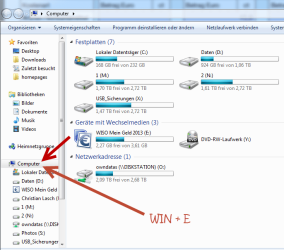
I usally try to use my keyboard as much as possible. To open the Explorer Window I use WIN + E - and it comes along with the correct window - in "my computer" view

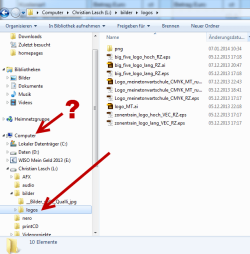
But when I worked a while I will be somewhere on my Explorer - and if I wonna jump back on "my Computer" I only know (without using a mouse) to open another instance of the explorer while I use WIN + E again. But this not the best way I think. Is there shortcut to come back to my computer in the running instance?

Any ideas from your side? I would appreciate to hear how who handle the explorer fast and easy!
Thanks for any suggestions!
greetings from Bonn - Germany
Thorsten
I usally try to use my keyboard as much as possible. To open the Explorer Window I use WIN + E - and it comes along with the correct window - in "my computer" view
But when I worked a while I will be somewhere on my Explorer - and if I wonna jump back on "my Computer" I only know (without using a mouse) to open another instance of the explorer while I use WIN + E again. But this not the best way I think. Is there shortcut to come back to my computer in the running instance?
Any ideas from your side? I would appreciate to hear how who handle the explorer fast and easy!
Thanks for any suggestions!
greetings from Bonn - Germany
Thorsten
Attachments
My Computer
At a glance
win7pro 64biti716GBnvidia
- Computer type
- PC/Desktop
- Computer Manufacturer/Model Number
- custom build
- OS
- win7pro 64bit
- CPU
- i7
- Motherboard
- asus p7
- Memory
- 16GB
- Graphics Card(s)
- nvidia
- Hard Drives
- System SSD, 5x3 TB Video Drives


