Tiles view missing from (My) Computer view?

PDSF

New member
Local time
9:36 PM
Messages
15
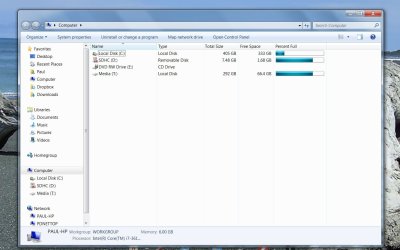
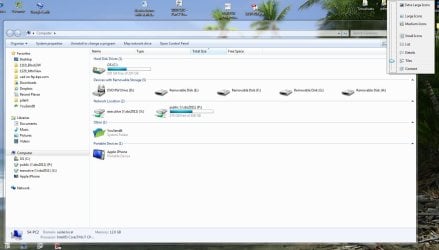
Hello all. Apologies if this has been asked before, but I searched and didn't find anything. I also searched Google, but everyone who complained of the problem had a different setup from me. I also posted this to Notebook Forum if any of you are there. Anyway, my preferred view for the old My Computer, called just Computer in Win7, is the default "Tiles" view, per the attached file Tiles.jpg which I screenshot off my work computer. But it's not available on my brand new machine. There is no Tiles view available in the dropdown. It has been replaced with an "Extended Tiles" view which is completely useless. I think this may have happened when I tried and failed to install Win8 over 7, but who knows, I just noticed it the other day. The best I can do is a custom "Details" view, per the attached Details.jpg. It has basically the same information about the drives but lacks the other hardware. I know this is not a big problem, but I would like to fix it anyway. All the posters in other forums where this issue arises installed some kind of aftermarket software which modified their folder views. I did install one called Folder Options X which disables full line selection within folders, but I have this installed on both computers so that can't be the culprit. I do not want to reset all my folder views unless absolutely necessary. Any help would be gratefully appreciated. TIA.
 

Attachments
  • Tiles.jpg
    Tiles.jpg
    110.3 KB · Views: 10
  • Details.jpg
    Details.jpg
    93.2 KB · Views: 14

My Computer

Computer Manufacturer/Model Number
Lenovo laptop
OS
Win7 Home Premium 32bit
CPU
Intel T5500 1.66G
Memory
2G
Graphics Card(s)
Intel integrated
Hello PDSF,

It sounds like something may have gone wrong using the disable full row select if that is the only thing you did that affected folder views.

Usually, it's required to reset folder views back to default to have "Tiles" instead of "Extended Tiles". :(

Folder View Settings - Reset to Default in Windows 8
 
Last edited:

My Computer

Computer type
PC/Desktop
Computer Manufacturer/Model Number
Self built custom
OS
64-bit Windows 11 Pro for Workstations
CPU
Intel i7-8700K OC'd to 5 GHz
Motherboard
ASUS ROG Maximus XI Formula Z390
Memory
64 GB (4x16GB) G.SKILL TridentZ RGB DDR4 3600 MHz
Graphics Card(s)
ASUS ROG-STRIX-GTX1080TI-O11G-GAMING
Sound Card
Integrated
Monitor(s) Displays
2 x Samsung Odyssey G7 27"
Screen Resolution
2560x1440
Hard Drives
1TB Samsung 990 PRO M.2,
4TB Samsung 990 PRO PRO M.2,
TerraMaster F8 SSD Plus NAS
PSU
Seasonic Prime Titanium 850W
Case
Thermaltake Core P3
Cooling
Corsair Hydro H115i
Keyboard
Logitech wireless K800
Mouse
Logitech MX Master 4
Internet Speed
2 Gb/s Download and 100 Mb/s Upload
Antivirus
Malwarebyte Anti-Malware Premium
Browser
Google Chrome
Other Info
Logitech Z625 speaker system,
Logitech BRIO 4K Pro webcam,
HP Color LaserJet Pro MFP M477fdn,
APC SMART-UPS RT 1000 XL - SURT1000XLI,
Galaxy S23 Plus phone
OK, I'll try it, then rerun Folder Options X and see if that is causing the problem on my home laptop. Weird that the work computer would be unchanged though.
 
Last edited:

My Computer

Computer Manufacturer/Model Number
Lenovo laptop
OS
Win7 Home Premium 32bit
CPU
Intel T5500 1.66G
Memory
2G
Graphics Card(s)
Intel integrated
Solution for Win7 on Win10

I've had exactly the same problem but only in Windows 10 for a whole week.
First there is an issue where all icons on my desktop are set the way I like, but when I click refresh/F5 all of my icons are allign to the left of my screen.

Even when I get them back, on the refresh, they are all again on the left.

Also File Explorer view was messed up on details view. I can set anything back on Extra Large Folder etc. but when I enter the same folder again, Details view is present.

Some people said that this is an ESET software issue/some update or something.

But today, MS offered me some update I don't know which KB (today is 2nd October 2015) and everything went back to normal except now I have Extended Tiles instead of regular Tiles view.


Then I did this:


https://sites.google.com/site/sysad...twindows7explorerviewfromextendedtilestotiles


HKey_Current User\Software\Classes\Local Settings\Software\Microsoft\Windows\Shell then Delete
BAGMRU & Bags


I've restarted my PC and everthing was normal again.

Folder view is on Tiles (best view ever) and icons on my desktop are not only on the left side, even after refresh.


So credit to Folder View goes to this solution with registry and I think that MS update/hotfix fixes my icons order issue.
 

My Computer

Computer type
PC/Desktop
Computer Manufacturer/Model Number
Custom
OS
Windows 10 Pro x64
CPU
Intel C2Q Q9550
Motherboard
ASUS P5Q
Memory
2 x GeIL DDR2-800 2GB; 2 x Corsair DDR2 667 1GB
Graphics Card(s)
ATi RADEON MSI MD R6770 1024/128 GDDR5
Hard Drives
WD 640 SATAII
WD 500GB SATA II
PSU
ThermalTake Smart 8 680W
Case
Cooler Master Elite420
Cooling
1 x Chieftec 120mm
Keyboard
Genius KB-220
Mouse
Genius DX-100 USB
Internet Speed
20Mbps
Antivirus
ESET Smart Security
Browser
Mozilla Firefox
Yep, that's what resetting folder views to default would do. :)
 

My Computer

Computer type
PC/Desktop
Computer Manufacturer/Model Number
Self built custom
OS
64-bit Windows 11 Pro for Workstations
CPU
Intel i7-8700K OC'd to 5 GHz
Motherboard
ASUS ROG Maximus XI Formula Z390
Memory
64 GB (4x16GB) G.SKILL TridentZ RGB DDR4 3600 MHz
Graphics Card(s)
ASUS ROG-STRIX-GTX1080TI-O11G-GAMING
Sound Card
Integrated
Monitor(s) Displays
2 x Samsung Odyssey G7 27"
Screen Resolution
2560x1440
Hard Drives
1TB Samsung 990 PRO M.2,
4TB Samsung 990 PRO PRO M.2,
TerraMaster F8 SSD Plus NAS
PSU
Seasonic Prime Titanium 850W
Case
Thermaltake Core P3
Cooling
Corsair Hydro H115i
Keyboard
Logitech wireless K800
Mouse
Logitech MX Master 4
Internet Speed
2 Gb/s Download and 100 Mb/s Upload
Antivirus
Malwarebyte Anti-Malware Premium
Browser
Google Chrome
Other Info
Logitech Z625 speaker system,
Logitech BRIO 4K Pro webcam,
HP Color LaserJet Pro MFP M477fdn,
APC SMART-UPS RT 1000 XL - SURT1000XLI,
Galaxy S23 Plus phone
Back
Top