how to jump back to "my computer" view in explorer

thwbn

New member
Local time
8:00 PM
Messages
3
Hi everybody

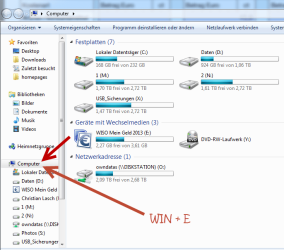
I usally try to use my keyboard as much as possible. To open the Explorer Window I use WIN + E - and it comes along with the correct window - in "my computer" view

attachment.php


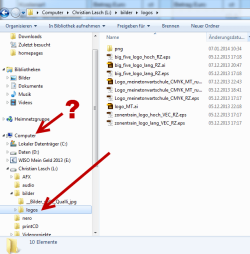
But when I worked a while I will be somewhere on my Explorer - and if I wonna jump back on "my Computer" I only know (without using a mouse) to open another instance of the explorer while I use WIN + E again. But this not the best way I think. Is there shortcut to come back to my computer in the running instance?

attachment.php


Any ideas from your side? I would appreciate to hear how who handle the explorer fast and easy!

Thanks for any suggestions!

greetings from Bonn - Germany

Thorsten
 

Attachments
  • Explorer_open.png
    Explorer_open.png
    36.1 KB · Views: 85
  • Explorer_back.png
    Explorer_back.png
    26.1 KB · Views: 85

My Computer My Computer

At a glance

win7pro 64biti716GBnvidia
Computer type
PC/Desktop
Computer Manufacturer/Model Number
custom build
OS
win7pro 64bit
CPU
i7
Motherboard
asus p7
Memory
16GB
Graphics Card(s)
nvidia
Hard Drives
System SSD, 5x3 TB Video Drives
Hi thwbn, welcome to 7F! :)

All I do is use the win key+c , If you are in any folder in the alphabetized A's or B's the highlight will jump to any in the C's until it finishes the C's then it will go straight to Computer.

If you are beyond the C folders (D to Z) it will go immediately to Computer.
a, b, c, ... Pressing the initial letter of the name of any objects will highlight the respective application or folder. Continue typing the object name if multiple objects start with the same letter

Source, scroll down a bit to the bottom of #4 Navigating Desktop:128 useful Keyboard Shortcuts for Windows 7.
Hope it works in Germany :zip:
 

My Computer My Computer

At a glance

Originally Win 7 Hm Prem x64 Ver 6.1.7600 Bui...Intel i3 530 2.93GHz, 2933MHz 2 Cores 4 Logic...6GB of 1,333MHz DDR3 SDRAM32MB Intel Graphics Media Accelerator HD IGChip
Computer type
PC/Desktop
Computer Manufacturer/Model Number
Gateway DX4831-01e (Mid-Tower Desktop)
OS
Originally Win 7 Hm Prem x64 Ver 6.1.7600 Build 7601-SP1 | Upgraded to Windows 10 December 14, 2019
CPU
Intel i3 530 2.93GHz, 2933MHz 2 Cores 4 Logical Processors
Motherboard
Gateway H57M01 133 megahertz
Memory
6GB of 1,333MHz DDR3 SDRAM
Graphics Card(s)
32MB Intel Graphics Media Accelerator HD IGChip
Sound Card
Realtek High Definition Audio
Monitor(s) Displays
Gateway HX2000 20inch TFT active matrix TN
Screen Resolution
1600 x 900 x 59 hertz
Hard Drives
WDC WD10EADS-00M2B0 [HDD] (1000.20 GB) -- drive 0,
HL-DT-ST DVDRAM GH41N [CD-ROM dr]
Four card readers, and Four USB 2.0
PSU
300watts.
Case
Mid-Tower Desktop
Cooling
Stock from Gateway
Keyboard
Natural Ergonomic Keyboard 4000, see Other Info
Mouse
Orig. Gateway wore out now using Insignia USB wired optical
Internet Speed
Vz FIOS 10ms png 57.64Mbps down 65.53Mbps up Speedtest.org
Antivirus
Zamana Anti-logger with Anti-malware, MSE, Windows Firewall,
Browser
IE11.0.9600.19399-Upd ver11.0.135, Firefox 68.0.1 x64
Other Info
System Specs by Belarc.

BIOS: American Megatrends Inc. P01-A0 11/17/2009

Replaced the MS 'Natural' Standard PS/2 Enhanced 101-102 Keyboard with a new Natural Ergonomic Keyboard 4000 on August 1st 2014.

Canon Pixma MG3222 Printer.

Updated to IE11 on 12102015 | Fios Quantum Router g1100

Additional AV: SpywareBlaster, manual Mbam, SAS
But when I [had] worked a while [..] and if I wonna wanna jump back on to "my Computer" I only know (without using a the mouse) to open another instance of the explorer while I use WIN + E again. [..] Is there a shortcut to come back to my computer "Computer" in the running instance?

All I do is use the win key+c , If you are in any folder in the alphabetized A's or B's the highlight will jump to any in the C's until it finishes the C's then it will go straight to Computer.

@Anak No response here, tryin' those shortcuts? :-0

Recently I've experimented w/tabbed Explorer & had 2 get rid of it, but it MIGHT not be a bad thing if it's possible to macro Win + e 2 actually reuse the window?..:)

*not exactly sure if it would be useful, or more of a hindrance, in fact; come to think of it
 

My Computer My Computer

At a glance

Windows 7 Professional x64 Service Pack 1i7-3770 Ivy, MSI OC genie OC'd (default)Vengeance 2x4GB 2133MHz (OC'd)GTX 650 Gainward
Computer type
PC/Desktop
Computer Manufacturer/Model Number
Custom
OS
Windows 7 Professional x64 Service Pack 1
CPU
i7-3770 Ivy, MSI OC genie OC'd (default)
Motherboard
Z68A-G43 (G3), MSI
Memory
Vengeance 2x4GB 2133MHz (OC'd)
Graphics Card(s)
GTX 650 Gainward
Monitor(s) Displays
BenQ E2200HD
Screen Resolution
1920x1080
Hard Drives
WD 1TB 64MB sATA; LC-Power LC-PRO-25WU; IT-350SA
PSU
LC7600v2.3
Case
ALTO winwin.rs/
Cooling
Stock / standard
Keyboard
Logitech Alto
Mouse
Genius DeathTaker
Internet Speed
25 (megabits / second) = 3125 KBps = (25.600/2.048)
Antivirus
Comodo
Browser
Mozilla
Other Info
http://valid.canardpc.com/mcdty0
Alt + Left Arrow

Have you tried using the "Alt + Left Arrow" key combo?

Alt + Left Arrow = Back
Alt + Right Arrow = Forward
Shift + Left Arrow = Up One Level
 

My Computer My Computer

At a glance

W7 Ultimate SP1, LM19.2 MATE, W10 Home 1703, ...AMD Phenom II x6 1100T, 3.3 GHz12GB DDR3 1333 G-Skill (4GB x 2), G-Skill (2G...NVIDIA GeForce GTX 660
Computer type
PC/Desktop
Computer Manufacturer/Model Number
n/a
OS
W7 Ultimate SP1, LM19.2 MATE, W10 Home 1703, W10 Pro 1703 VM, #All 64 bit
CPU
AMD Phenom II x6 1100T, 3.3 GHz
Motherboard
ASUS M4A88T-M/USB3 (AM3)
Memory
12GB DDR3 1333 G-Skill (4GB x 2), G-Skill (2GB x 2)
Graphics Card(s)
NVIDIA GeForce GTX 660
Sound Card
Realtek?
Monitor(s) Displays
Samsung S23B350
Screen Resolution
1920x1080
Hard Drives
WD Green 2TB (SATA), WD Green 3TB (SATA), WD Blue 4TB (SATA), WD Blue 6TB (SATA)
PSU
Cooler Master
Case
Antec GX300 Tower
Cooling
3x Antec TRICOOL 120mm Fans
Mouse
Wired Optical
Internet Speed
DSL
Antivirus
Avast
Browser
Pale Moon (64 bit)
Other Info
2018-12-27 Upgraded HDDs
2015-12-10 Upgraded case, graphics card, storage
2015-08-15 Upgraded motherboard & RAM
2015-07-15 Upgraded LM17.1 to LM17.2
@Anak No response here, tryin' those shortcuts? :-0


You're showing a custom build in your specs:

  • But, you don't show the make/model of keyboard.

  • Is it wireless?

  • Is it a Logitech, do you game with it? Some Logitech's have a PC/Gaming switch, if yours does make sure its switched to the PC setting. Even if it isn't a Logitech check to see if yours has that switch and set it accordingly.

  • Do you have more than one keyboard installed?

  • Have you tried lehnerus's suggestion, did it work or not?
 

My Computer My Computer

At a glance

Originally Win 7 Hm Prem x64 Ver 6.1.7600 Bui...Intel i3 530 2.93GHz, 2933MHz 2 Cores 4 Logic...6GB of 1,333MHz DDR3 SDRAM32MB Intel Graphics Media Accelerator HD IGChip
Computer type
PC/Desktop
Computer Manufacturer/Model Number
Gateway DX4831-01e (Mid-Tower Desktop)
OS
Originally Win 7 Hm Prem x64 Ver 6.1.7600 Build 7601-SP1 | Upgraded to Windows 10 December 14, 2019
CPU
Intel i3 530 2.93GHz, 2933MHz 2 Cores 4 Logical Processors
Motherboard
Gateway H57M01 133 megahertz
Memory
6GB of 1,333MHz DDR3 SDRAM
Graphics Card(s)
32MB Intel Graphics Media Accelerator HD IGChip
Sound Card
Realtek High Definition Audio
Monitor(s) Displays
Gateway HX2000 20inch TFT active matrix TN
Screen Resolution
1600 x 900 x 59 hertz
Hard Drives
WDC WD10EADS-00M2B0 [HDD] (1000.20 GB) -- drive 0,
HL-DT-ST DVDRAM GH41N [CD-ROM dr]
Four card readers, and Four USB 2.0
PSU
300watts.
Case
Mid-Tower Desktop
Cooling
Stock from Gateway
Keyboard
Natural Ergonomic Keyboard 4000, see Other Info
Mouse
Orig. Gateway wore out now using Insignia USB wired optical
Internet Speed
Vz FIOS 10ms png 57.64Mbps down 65.53Mbps up Speedtest.org
Antivirus
Zamana Anti-logger with Anti-malware, MSE, Windows Firewall,
Browser
IE11.0.9600.19399-Upd ver11.0.135, Firefox 68.0.1 x64
Other Info
System Specs by Belarc.

BIOS: American Megatrends Inc. P01-A0 11/17/2009

Replaced the MS 'Natural' Standard PS/2 Enhanced 101-102 Keyboard with a new Natural Ergonomic Keyboard 4000 on August 1st 2014.

Canon Pixma MG3222 Printer.

Updated to IE11 on 12102015 | Fios Quantum Router g1100

Additional AV: SpywareBlaster, manual Mbam, SAS
Back
Top