

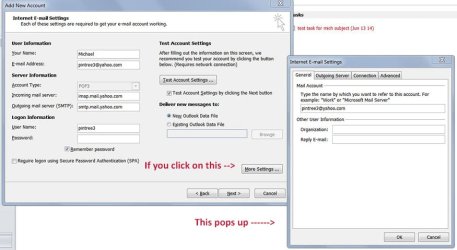
I tried to set up Microsoft Outlook to read my Yahoo POP 3 and IMAP and this is what i typed in for the required slots:
As account type I put in POP 3 (the 1st time and then did the below again this time with IMAP) then.
incoming mail server: imap.mail.yahoo.com
outgoing mail server: smtp.mail.yahoo.com
The above found on the yahoo page regarding this subject.
Followed by my correct username (the full email address and correct password but in testing the account settings in outlook
The message was: "Log onto incoming mail server (POP 3) failed" and the same thing for the testing of email sent/received.
I followed instructions made here:
Set up email in Outlook 2010 or Outlook 2013 - Office Online
What was done wrong?
As account type I put in POP 3 (the 1st time and then did the below again this time with IMAP) then.
incoming mail server: imap.mail.yahoo.com
outgoing mail server: smtp.mail.yahoo.com
The above found on the yahoo page regarding this subject.
Followed by my correct username (the full email address and correct password but in testing the account settings in outlook
The message was: "Log onto incoming mail server (POP 3) failed" and the same thing for the testing of email sent/received.
I followed instructions made here:
Set up email in Outlook 2010 or Outlook 2013 - Office Online
What was done wrong?
My Computer
At a glance
Windows 7 Home Premium 64Intel Core i5 760 @ 2800MHz12288MBAMD Radeon HD 7800 Series
- Computer type
- PC/Desktop
- Computer Manufacturer/Model Number
- OEM Designed by me :-)
- OS
- Windows 7 Home Premium 64
- CPU
- Intel Core i5 760 @ 2800MHz
- Motherboard
- Asus P7P55D-E LX
- Memory
- 12288MB
- Graphics Card(s)
- AMD Radeon HD 7800 Series
- Sound Card
- ASUS Xonar DG
- Monitor(s) Displays
- ViewSonic VX2453 Series, HDMI 1080p Full HD
- Screen Resolution
- 1920X1080
- Hard Drives
- Samsung SSD 840 EVO 250GB& two others
- PSU
- Tagan BZ Series, TG800-BZ 800W
- Keyboard
- Logitech MK250
- Mouse
- Logitech M310
- Internet Speed
- toppest, mostest :-) <-- bad, but fun English
- Browser
- Firefox, Crrome, IE

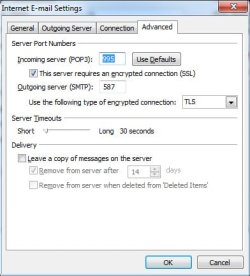


 it all had to do with one number. All works fine
