Install Windows on MSATA (SSD) Drive

How to Clean Install Windows on a MSATA (SSD) Drive

   Information
This tutorial would be applicable for any system shipped with a MSATA drive as a cache device using Intel Smart Response Technology (ISRT).

This tutorial will show you how to install Windows 7 or Windows 8 on the MSATA drive instead.

   Warning
Re-installation of Windows would delete everything stored on the system so make sure that you have backup of all your important data stored externally.


Here's how you can start:

First you need to prepare your BIOS for installing windows on the MSATA drive. We need to disable the Intel Smart Response Technology.

Tap F2 at the startup to enter BIOS. Under SATA OPERATION change to AHCI from ISRT.

   Note
For some systems it would be different combination to enter BIOS like pressing DEL key. Check your system manual for knowing how to enter BIOS.
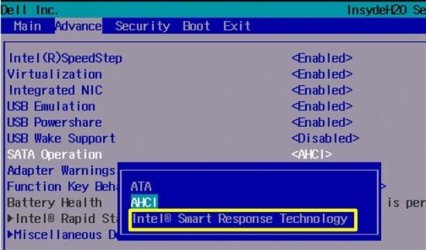

1.jpg

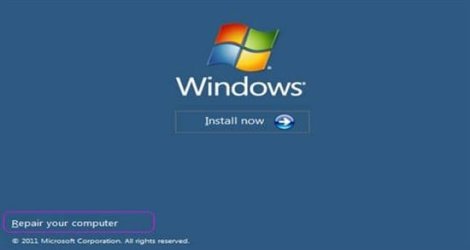
Once it is done we need to clean both the drives. Boot from your Windows 7 or Windows 8 installation DVD/USB.
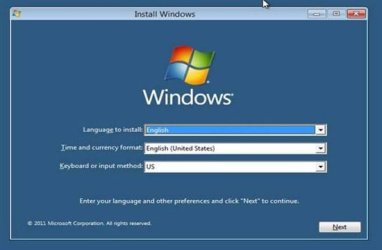
2.jpg

Open a command prompt at boot in Windows 7 or Windows 8.

5.png

Windows-8-advanced-options.jpg

Once you are in the Command Prompt perform the steps below to clean both the drives.

Type DISKPART and hit enter

Type LIST DISK and hit enter.
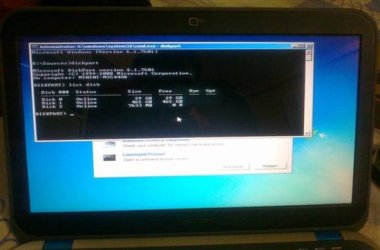
6.jpg

Type SELECT DISK 0 and hit enter.

Type CLEAN and hit enter

Type LIST DISK and hit enter

Type SELECT DISK 1 and hit enter.

Type CLEAN and hit enter
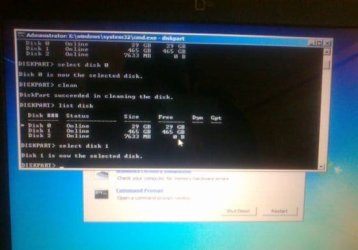
7.jpg

Type EXIT and hit enter to exit from Diskpart.

Type EXIT and hit enter to exit from Command Prompt.
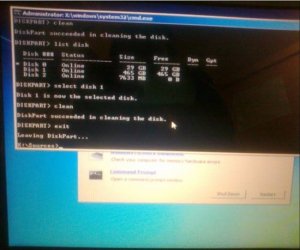
8.jpg

This would clean both the disks and would delete all the data stored on both the drives. Press Restart button on the below window.
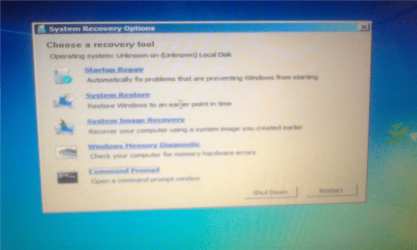
9.png

Boot from the OS disc or USB key and then you can install windows on either SATA or MSATA drive.

To clean install Windows 7 see this tutorial:

http://www.sevenforums.com/tutorials/1649-clean-install-windows-7-a.html

To clean install Windows 8 see this tutorial:

Clean Install - Windows 8

I hope this tutorial helps answers the question of many users about installing Windows on the MSATA drive.

Any suggestions would be highly appreciated. If anyone has any questions feel free to ask it here or send me a PM.


Attachments
  • 3.jpg
    3.jpg
    10.3 KB · Views: 53
  • 4.jpg
    4.jpg
    32.3 KB · Views: 41
Last edited by a moderator:
Very nice tutorial
 

My Computer

Computer type
Laptop
Computer Manufacturer/Model Number
Sager NP9170
OS
Win 7 Pro x64 / Win 10 Pro
CPU
Intel(R) Core(TM) i7-3630QM CPU @ 2.40GHz
Motherboard
CLEVO P170EM
Memory
12 GB
Graphics Card(s)
(1) Intel(R) HD Graphics 4000 (2) NVIDIA GeForce GTX 675M
Sound Card
(1) Realtek High Definition Audio (2) Intel(R) Display Aud
Monitor(s) Displays
17.3
Screen Resolution
1920x1080
Hard Drives
(1) Samsung 860 EVO 500GB(OS) (1) Samsung 860 EVO 500GB(Data)
Keyboard
Backlite
Antivirus
MSE, Malwarebytes Pro
Browser
Firefox
Other Info
DESKTOP: Custom-built.
OS: Win 10 Pro x64.
CASE: Rosewill R5.
CPU: Intel I5 4670K CPU @ 3.40GHz.
CPU COOLER: Cool Master Hyper 212 EVO.
MOTHERBOARD: Asus Z87-A.
MEMORY: Kingston HyperX 2x4 GB.
GPU: Nvidia Geforce 650 TI.
PSU: Corsair TX750.
DRIVES: (1) Samsung 840 120 GB SSD (2) Western Digital blue 500 GB 7200 RPM.
Good job!
 

My Computer

Computer type
Laptop
Computer Manufacturer/Model Number
MSI GE72VR Apache Pro-416
OS
Windows 10x64 Build 1709
CPU
Intel i7 7700HQ Kaby Lake
Motherboard
Micro-Star Intl. MS-179B (U3C1)
Memory
16 GB DDR4 @2400
Graphics Card(s)
Nvidia Geforce GTX 1060
Screen Resolution
1920x1080 120Hz
Hard Drives
256 GB Nvme M.2 SSD

1TB HDD@7200
Cooling
Cooler Blast 4
Keyboard
Steel Series
Antivirus
Bit Defender Free
Browser
Edge
Great work! :thumbsup:

I would have rep'd, but I must spread it around some more.
 

My Computer

Computer type
PC/Desktop
Computer Manufacturer/Model Number
Gateway DX4831-01e (Mid-Tower Desktop)
OS
Originally Win 7 Hm Prem x64 Ver 6.1.7600 Build 7601-SP1 | Upgraded to Windows 10 December 14, 2019
CPU
Intel i3 530 2.93GHz, 2933MHz 2 Cores 4 Logical Processors
Motherboard
Gateway H57M01 133 megahertz
Memory
6GB of 1,333MHz DDR3 SDRAM
Graphics Card(s)
32MB Intel Graphics Media Accelerator HD IGChip
Sound Card
Realtek High Definition Audio
Monitor(s) Displays
Gateway HX2000 20inch TFT active matrix TN
Screen Resolution
1600 x 900 x 59 hertz
Hard Drives
WDC WD10EADS-00M2B0 [HDD] (1000.20 GB) -- drive 0,
HL-DT-ST DVDRAM GH41N [CD-ROM dr]
Four card readers, and Four USB 2.0
PSU
300watts.
Case
Mid-Tower Desktop
Cooling
Stock from Gateway
Keyboard
Natural Ergonomic Keyboard 4000, see Other Info
Mouse
Orig. Gateway wore out now using Insignia USB wired optical
Internet Speed
Vz FIOS 10ms png 57.64Mbps down 65.53Mbps up Speedtest.org
Antivirus
Zamana Anti-logger with Anti-malware, MSE, Windows Firewall,
Browser
IE11.0.9600.19399-Upd ver11.0.135, Firefox 68.0.1 x64
Other Info
System Specs by Belarc.

BIOS: American Megatrends Inc. P01-A0 11/17/2009

Replaced the MS 'Natural' Standard PS/2 Enhanced 101-102 Keyboard with a new Natural Ergonomic Keyboard 4000 on August 1st 2014.

Canon Pixma MG3222 Printer.

Updated to IE11 on 12102015 | Fios Quantum Router g1100

Additional AV: SpywareBlaster, manual Mbam, SAS
Nicely done and you put Instructions down step by step makes it very easy :geek:
 

My Computer

Computer type
PC/Desktop
Computer Manufacturer/Model Number
CoreI7-6700K MrFingerIII Special Builds
OS
Windows 10 Home Premium 64bit sp1
CPU
Intel I7-6700K @ 4.6 Ghz 1.344 volts everyday OC
Motherboard
Asrock Fatality K6 Z170 Socket 1151
Memory
32GB G-Skill TridentZ 3200mhz 16-18-18-38 DDR4
Graphics Card(s)
Sli Gigabyte Windforce GTX 980 G1
Sound Card
AC97 Creative Rage Tactic 3D Headphones Bluetooth
Monitor(s) Displays
27" Asus ROG Swift PG278Q G-Sync 48" Vizio Smart HD TV
Screen Resolution
2560x1440p 27"- 48" Currently Gaming at 2560x1440p Res 2K
Hard Drives
250GB Samsung Evo840SSD Seagate baracuda 500 GB WD Mybook 500Gb 1TB Seagate Barracuda
PSU
HX1050w Corsair Silver 80plus certified crosfire/sli
Case
Enthod Pro Full Tower
Cooling
Corsair H110i GT 280 mm High Performance WaterBlock
Keyboard
Logitech wireless keyboard
Mouse
Logitech wireless mouse
Internet Speed
Cox Cable 100+ mb
Antivirus
WebRoot Spysweeper with Antivirus
Browser
IE-10, Chrome, Opera
Other Info
My Other Rig is a AMD FX8320E @4.6Ghz 16GB Ballistic Sport Ram
Mobo Asrock Fatality 990FX 120GB OCZ SSD 1TB Seagate Barracuda Corsair H75 Cooling PSU Corsair CX750
GPU GTX Gigabyte 970G1
f.y.i

if you are installing from flash drive make shure to connect it to usb2 inted of 3
;)
 

My Computer

Computer type
PC/Desktop
Computer Manufacturer/Model Number
toshiba
OS
win 7 ultimate 64
Hello, I'm trying to do a clean install of my Windows 8 Pro onto an SSD but when I do the clean install for some reason it keeps my wallpaper and certain functions from an older install. I was just reinstalling my Windows Pro because I was experiencing some issues with my Steam games. What can I do to fix this. I also have a "slave" drive which is for just backups and directing my install of programs to it.

Thank you.
 

My Computer

Computer type
PC/Desktop
Computer Manufacturer/Model Number
Custom built
OS
Windows Pro 8 64 bit
CPU
i7 4770
Motherboard
MSI Gaming board
Memory
16 gigs
Graphics Card(s)
GeForce GTX 660ti
Hard Drives
1- 240 GB SSD
2- 2TB HDD
Antivirus
Norton 360 2014
Browser
Firefox/Chrome and IE
Hi LCopJunior1973, welcome to 7F! :)

Hello, I'm trying to do a clean install of my Windows 8 Pro onto an SSD but when I do the clean install for some reason it keeps my wallpaper and certain functions from an older install.
Don't quote me on this, but I believe your clean install really isn't clean and your previous user account is being carried over. And, then there is the prospect of "how many drives do you have?" and where is the active, healthy boot drive, and are you trying to dual boot different OS's from the same drive?

We will need at the least a: http://www.sevenforums.com/tutorials/274797-disk-management-post-screen-capture-image.html

I was just reinstalling my Windows Pro because I was experiencing some issues with my Steam games. What can I do to fix this.
Not sure about the issuses, but until this gets straightened out you should get back to a bare-bones OS, 7 or 8.


I also have a "slave" drive which is for just backups and directing my install of programs to it.

Thank you.
Your welcome,

The slave drive may be part of this depending on how its set-up, but at first glance it does not look like it.

You may find better help if you want to stay with Windows 8 here: Installation & Setup - Windows 8 Forums

In either case you should have better System Specs, did you fill in yours from memory? These two will help immensely and do it for you automatically.

How to fill in your System Specs Tutorial for SevenForums. and EightForums.
 

My Computer

Computer type
PC/Desktop
Computer Manufacturer/Model Number
Gateway DX4831-01e (Mid-Tower Desktop)
OS
Originally Win 7 Hm Prem x64 Ver 6.1.7600 Build 7601-SP1 | Upgraded to Windows 10 December 14, 2019
CPU
Intel i3 530 2.93GHz, 2933MHz 2 Cores 4 Logical Processors
Motherboard
Gateway H57M01 133 megahertz
Memory
6GB of 1,333MHz DDR3 SDRAM
Graphics Card(s)
32MB Intel Graphics Media Accelerator HD IGChip
Sound Card
Realtek High Definition Audio
Monitor(s) Displays
Gateway HX2000 20inch TFT active matrix TN
Screen Resolution
1600 x 900 x 59 hertz
Hard Drives
WDC WD10EADS-00M2B0 [HDD] (1000.20 GB) -- drive 0,
HL-DT-ST DVDRAM GH41N [CD-ROM dr]
Four card readers, and Four USB 2.0
PSU
300watts.
Case
Mid-Tower Desktop
Cooling
Stock from Gateway
Keyboard
Natural Ergonomic Keyboard 4000, see Other Info
Mouse
Orig. Gateway wore out now using Insignia USB wired optical
Internet Speed
Vz FIOS 10ms png 57.64Mbps down 65.53Mbps up Speedtest.org
Antivirus
Zamana Anti-logger with Anti-malware, MSE, Windows Firewall,
Browser
IE11.0.9600.19399-Upd ver11.0.135, Firefox 68.0.1 x64
Other Info
System Specs by Belarc.

BIOS: American Megatrends Inc. P01-A0 11/17/2009

Replaced the MS 'Natural' Standard PS/2 Enhanced 101-102 Keyboard with a new Natural Ergonomic Keyboard 4000 on August 1st 2014.

Canon Pixma MG3222 Printer.

Updated to IE11 on 12102015 | Fios Quantum Router g1100

Additional AV: SpywareBlaster, manual Mbam, SAS
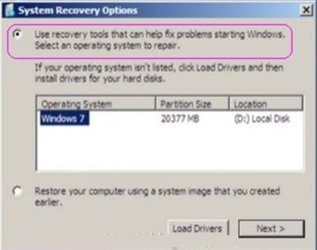
I think I've solved the issue. I just had to follow the steps somewhere within this website. I had to boot from the DVD then use the Repair Windows option. Once there, go to the Command Prompt and use DiskPart then list disk to clean the partition. That worked the best for me. Now, all of my settings that were stuck and reinstalling seemed to have gone away which is great. Also, the annoying thing is I'm in the build 9600 for some reason and had to call Microsoft twice, once for Win 8 and again for Win 8.1 just to verify my store bought Windows 8 Pro. Thank you for the help all. Later.
 

My Computer

Computer type
PC/Desktop
Computer Manufacturer/Model Number
Custom built
OS
Windows Pro 8 64 bit
CPU
i7 4770
Motherboard
MSI Gaming board
Memory
16 gigs
Graphics Card(s)
GeForce GTX 660ti
Hard Drives
1- 240 GB SSD
2- 2TB HDD
Antivirus
Norton 360 2014
Browser
Firefox/Chrome and IE
SandeepP, those steps worked big time!!! Thank you. Perfectly clean install. Just had to troubleshoot to get it validated via calling Microsoft which was a pain but worked. I appreciated it alot!!
 

My Computer

Computer type
PC/Desktop
Computer Manufacturer/Model Number
Custom built
OS
Windows Pro 8 64 bit
CPU
i7 4770
Motherboard
MSI Gaming board
Memory
16 gigs
Graphics Card(s)
GeForce GTX 660ti
Hard Drives
1- 240 GB SSD
2- 2TB HDD
Antivirus
Norton 360 2014
Browser
Firefox/Chrome and IE
I think I've solved the issue. I just had to follow the steps somewhere within this website. I had to boot from the DVD then use the Repair Windows option. Once there, go to the Command Prompt and use DiskPart then list disk to clean the partition. That worked the best for me. Now, all of my settings that were stuck and reinstalling seemed to have gone away which is great.
That's great that you were able to sort out your problem!

There is an extensive Tutorial section here at 7F: http://www.sevenforums.com/tutorials/257-windows-7-tutorial-index.html, and at 8F: Windows 8 - Tutorial Index

You may be referring to:
http://www.sevenforums.com/tutorials/119713-diskpart-pc-startup.html
http://www.sevenforums.com/tutorials/52129-disk-clean-clean-all-diskpart-command.html This one is the same for Windows 7 or Windows 8


Also, the annoying thing is I'm in the build 9600 for some reason and had to call Microsoft twice, once for Win 8 and again for Win 8.1 just to verify my store bought Windows 8 Pro. Thank you for the help all. Later.
Your welcome.

Both 8 and the 8.1 Pro that you have now are referred to as 9600 builds. (6.3.9600) Did you use just phone/computer activation? Next time try getting a hold of a live service rep.
How to activate a Microsoft product by using Microsoft Product Activation Center

If you want to remove the watermark: Windows 8 Edition and Build Version Watermark on Desktop, and if you're in Test Mode: “Test Mode Windows 8.1 Build 9600" Watermark - Remove

If you're having problems with Secure Boot isn't configured correctly:
Secure Boot isn't configured correctly: troubleshooting

http://www.eightforums.com/Secure Boot - Confirm Enabled or Disabled in Windows 8
http://www.eightforums.com/How to Enable or Disable Secure Boot in UEFI
Both of these links use an AsRock MB as an example, you may find it similar to your MSI MB. Look for the secure boot option in the UEFI section of your BIOS.

If you would have had your Specs filled out with the model of your MB I could have helped more, the best I can do for now is guide you here, if you don't have your MB manual: MSI Global - Computer, Laptop, Notebook, Desktop, Motherboard, Graphics and more


SandeepP, those steps worked big time!!! Thank you. Perfectly clean install. Just had to troubleshoot to get it validated via calling Microsoft which was a pain but worked. I appreciated it alot!!
SandeepP has had a job change earlier this year and hasn't been in-forum since the end of May, but he hasn't cut ties with 7F as far as I know, so his email notifications should still be working. Windows 7 Help Forums - View Profile: SandeepP

Knowing him, I know he appreciates your thanks!
 

My Computer

Computer type
PC/Desktop
Computer Manufacturer/Model Number
Gateway DX4831-01e (Mid-Tower Desktop)
OS
Originally Win 7 Hm Prem x64 Ver 6.1.7600 Build 7601-SP1 | Upgraded to Windows 10 December 14, 2019
CPU
Intel i3 530 2.93GHz, 2933MHz 2 Cores 4 Logical Processors
Motherboard
Gateway H57M01 133 megahertz
Memory
6GB of 1,333MHz DDR3 SDRAM
Graphics Card(s)
32MB Intel Graphics Media Accelerator HD IGChip
Sound Card
Realtek High Definition Audio
Monitor(s) Displays
Gateway HX2000 20inch TFT active matrix TN
Screen Resolution
1600 x 900 x 59 hertz
Hard Drives
WDC WD10EADS-00M2B0 [HDD] (1000.20 GB) -- drive 0,
HL-DT-ST DVDRAM GH41N [CD-ROM dr]
Four card readers, and Four USB 2.0
PSU
300watts.
Case
Mid-Tower Desktop
Cooling
Stock from Gateway
Keyboard
Natural Ergonomic Keyboard 4000, see Other Info
Mouse
Orig. Gateway wore out now using Insignia USB wired optical
Internet Speed
Vz FIOS 10ms png 57.64Mbps down 65.53Mbps up Speedtest.org
Antivirus
Zamana Anti-logger with Anti-malware, MSE, Windows Firewall,
Browser
IE11.0.9600.19399-Upd ver11.0.135, Firefox 68.0.1 x64
Other Info
System Specs by Belarc.

BIOS: American Megatrends Inc. P01-A0 11/17/2009

Replaced the MS 'Natural' Standard PS/2 Enhanced 101-102 Keyboard with a new Natural Ergonomic Keyboard 4000 on August 1st 2014.

Canon Pixma MG3222 Printer.

Updated to IE11 on 12102015 | Fios Quantum Router g1100

Additional AV: SpywareBlaster, manual Mbam, SAS
Sandeep
First you need to prepare your BIOS for installing windows on the MSATA drive. We need to disable the Intel Smart Response Technology.

Tap F2 at the startup to enter BIOS. Under SATA OPERATION change to AHCI from ISRT.

I am a new user to the Forum and started a thread that someone shifted to another thread and I am not sure to which one I reply to. I saw thread number 382240 in the URL so that is where i think I was transferred to. It was how to do a clean install of Win 7. Could you refer to this thread to get a background of my situation?
My C: HDD is flaky, getting intermittent errors running the Seagate SeaTools Disk diagnostics. System also started running very slow. No system crashes, no blue screen of death, no OS errors that I can see.
I want to replace my old HDD with a new 250 GB Samsung SSD and get rid of the old HDD. This is what I was told, in the thread I started, from one of the experts on this forum.

  • Step 1: Use WET to transfer your settings and data to an external hard disk or USB drive. I Did That to a USB HDD. No Problems.
  • Step 2: Clean install Windows 7 on your new SSD I did this, following thread 1649 that was referred to in the reply I got. How to do a clean install with Win 7. I used the DVD I purchased when I had to do a clean install a year ago when I went from Win XP to Win 7. I did nothing to my new SSD prior to starting and completing the clean custom install process. No errors or messages. When I tried to do a Windows Update the system went into a loop. I killed that with task mgr. Then I tried to reinstall my antivirus pgm, VIPRE, and the system went into a loop downloading files or something.
  • I am stuck and reading your thread it appears I was supposed to do something to my new SSD, but I did nothing prior to starting the clean install from DVD. Am I doing the correct thing by posting to this thread as it seems like the new SSD is my problem. Thank you.
  • Step 3: Use WET to restore your settings and data
 

My Computer

Computer type
PC/Desktop
Computer Manufacturer/Model Number
Lenovo Think Centre Model 812255U (A51)
OS
Windows 7 Home Premium on Tower PC and Windows 32 bit Professional on Laptop
CPU
Intel Pentium 4 CPU 3.4GHz
Memory
3.00 GB RAM
Graphics Card(s)
RADEON X600/X550 PRO Series MS Corp WDDM
Hard Drives
Internal C:/ WDC WD1600JS-08MHB0 160 GB
USB Connected Maxtor 3100 160GB
Antivirus
VIPRE Antivirus and Internet Secuity
Browser
Mozilla FireFox
Back
Top