Solved Have to turn off OUTLOOK.EXE manually when shutting down PC

DoctorObviously

Expert Coffee Maker
Local time
5:02 PM
Messages
27
As it says on the tin. Every time I try to shut down my PC, Windows asks if it can close off multiple instances of OUTLOOK.EXE for me. I don't know why it does this or why there are multiple instances of Outlook running in the background. Some help would be greatly appreciated!

Thanks in advance!
 

My Computer My Computer

At a glance

Windows 7 Home Premium 64-bitIntel Core i7 920 @ 2.67 GHz6Gb RAMMSI 660Ti OC PE
Computer type
PC/Desktop
Computer Manufacturer/Model Number
Custom build
OS
Windows 7 Home Premium 64-bit
CPU
Intel Core i7 920 @ 2.67 GHz
Motherboard
GA EX58-UD3R
Memory
6Gb RAM
Graphics Card(s)
MSI 660Ti OC PE
Monitor(s) Displays
1
Screen Resolution
1680x1050
Hard Drives
SATA MAXTOR STM310003 1TB
Intenso External Harddrive 1TB
PSU
Corsair GS800
Case
Antec Nine Hundred Ultimate
Cooling
Corsair GS800
Keyboard
Labtec Ultra Flat
Mouse
Logitech Proteus Core G502
Internet Speed
n/a
Antivirus
MSE
Browser
Google Chrome & Mozilla Firefox
Hi very weird,
Right click your Taskbar on a blank space,
Click on Start task manager
You should open into the Applications section please post a screen shot use the link above my signature if you need assistance in doing this,
Then go to the processes section and repeat,
Cheers.
 

My Computer My Computer

At a glance

Win-7-Pro64bit 7-H-Prem-64biti7-5930K 2nd i9-9940x both water blocked VRM'...Trident-z 3200C14 2nd Trident-z 3600C16EVGA 1080ti ftw3 2nd Titan Xp both water blocked
Computer type
PC/Desktop
Computer Manufacturer/Model Number
Custom assembled by me :}
OS
Win-7-Pro64bit 7-H-Prem-64bit
CPU
i7-5930K 2nd i9-9940x both water blocked VRM's too
Motherboard
ASUS SABERTOOTH X99 2nd ASUS x299 Apex
Memory
Trident-z 3200C14 2nd Trident-z 3600C16
Graphics Card(s)
EVGA 1080ti ftw3 2nd Titan Xp both water blocked
Sound Card
Built-in Realtek
Monitor(s) Displays
1-AOC G2460PG 24"G-Sync 144Hz/ 2nd 1-ASUS VG248QE 24" 144Hz
Screen Resolution
1920 x 1080 144Hz
Hard Drives
2-Samsung M.2 Evo & Evo Plus
2-Samsung 850 EVO 500GB SSD's/ 3-2.5 W.D. Black 1tb-&3-1tb/3-3.5 WD Black 1tb hdd's
PSU
EVGA SuperNOVA 1000-P2 2nd 1200-P2
Case
2-Corsair Obsidian Series 450D Black ATX Mid Tower
Cooling
Custom water loops
Keyboard
Logitech G710+/ 2nd Logitech G910
Mouse
2-RedDragon M901 Perdition 16400 dpi Gaming mouse = wired
Internet Speed
Comcast Ping 19ms 89.31mbps download speed 6.12mbps upload
Antivirus
Malwarebytes Pro/ Superantispyware Pro
Browser
FireFox & Pale moon
Other Info
2nd ASUS X299 Apex/Intel i9-9940x with Custom water loop/7H-Prem-x64/Corsair 450D case/Ram Trident-z 3600C16 4x8gb / Samsung970Evo plus 500gb SSD/Dual ssd EZ swap evo/PSU EVGA SuperNova 1200w-P2 80+Platinum/GPU Titan Xp /8-ML-140 on push-pull on 2-280GTX rads
Startup

You may be starting more than one instance while booting. To check what is starting use "power tool". Download zip file here and extract. No install required.

https://code.google.com/p/powertool-google/downloads/list

You can get the 32bit or 64bit here.

Once you get power tool started click on the startup tab and check what you are starting.
 

My Computer My Computer

At a glance

win 7 X64 Ultimate SP1I3770KG Skill F3-14900CL9-4GBXL x 4NVIDIA GeForce GTX670 + Intel 4000
Computer Manufacturer/Model Number
BGC (Bob's Garage Crew)
OS
win 7 X64 Ultimate SP1
CPU
I3770K
Motherboard
Asus P8Z77-V Deluxe
Memory
G Skill F3-14900CL9-4GBXL x 4
Graphics Card(s)
NVIDIA GeForce GTX670 + Intel 4000
Sound Card
Realtek HD 5.1 (MOB)
Monitor(s) Displays
Asus VW224T (1)
Screen Resolution
1920 x 1080
Hard Drives
SATA Corsair Force GT 2.5" 180GB (System) Sata 3
OCZ Vertex3 120GB
OCZ Vertex 2 120GB 2.5" SATA II
ST31000524AS 1000.2GB
WD15EARS (External)
PSU
CoolerMaster 1000 Watt
Case
CoolerMaster HAF X
Cooling
CPU -- CoolerMaster 520N
Keyboard
MS Wireless 3000 V2
Mouse
MS Wireless 3000 V2
Internet Speed
Cable
Antivirus
Norton Internet Security
Browser
IE9
Other Info
AMI Bios 1805
OC'd 3%
Hi very weird,
Right click your Taskbar on a blank space,
Click on Start task manager
You should open into the Applications section please post a screen shot use the link above my signature if you need assistance in doing this,
Then go to the processes section and repeat,
Cheers.

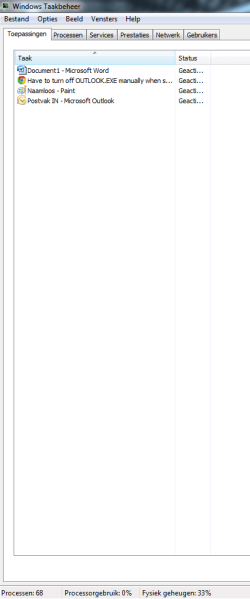
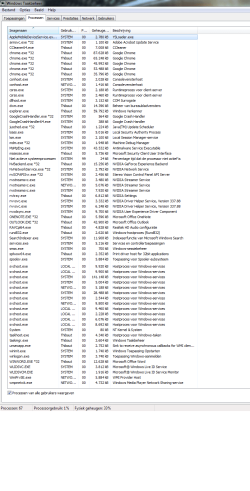
Here you go.
 

Attachments

  • Naamloos2.png
    Naamloos2.png
    10.7 KB · Views: 1
  • Naamloos.png
    Naamloos.png
    44.9 KB · Views: 5

My Computer My Computer

At a glance

Windows 7 Home Premium 64-bitIntel Core i7 920 @ 2.67 GHz6Gb RAMMSI 660Ti OC PE
Computer type
PC/Desktop
Computer Manufacturer/Model Number
Custom build
OS
Windows 7 Home Premium 64-bit
CPU
Intel Core i7 920 @ 2.67 GHz
Motherboard
GA EX58-UD3R
Memory
6Gb RAM
Graphics Card(s)
MSI 660Ti OC PE
Monitor(s) Displays
1
Screen Resolution
1680x1050
Hard Drives
SATA MAXTOR STM310003 1TB
Intenso External Harddrive 1TB
PSU
Corsair GS800
Case
Antec Nine Hundred Ultimate
Cooling
Corsair GS800
Keyboard
Labtec Ultra Flat
Mouse
Logitech Proteus Core G502
Internet Speed
n/a
Antivirus
MSE
Browser
Google Chrome & Mozilla Firefox
Hi thanks for the screen shots,
You seem to have 5 open Chrome tabs as well,

You may have done the screen shots which you were still browsing,
Close chrome/ all tabs
Then double check using task manager on if there's still open chrome.exe and outlook.exe Processes,

You also have an open .doc file,
I can see why Paint was open to access the screen shots ;)
In Chrome after double checking,
Change this Advanced setting,
chrome-apps%20run-a.jpg

Cheers.
 

My Computer My Computer

At a glance

Win-7-Pro64bit 7-H-Prem-64biti7-5930K 2nd i9-9940x both water blocked VRM'...Trident-z 3200C14 2nd Trident-z 3600C16EVGA 1080ti ftw3 2nd Titan Xp both water blocked
Computer type
PC/Desktop
Computer Manufacturer/Model Number
Custom assembled by me :}
OS
Win-7-Pro64bit 7-H-Prem-64bit
CPU
i7-5930K 2nd i9-9940x both water blocked VRM's too
Motherboard
ASUS SABERTOOTH X99 2nd ASUS x299 Apex
Memory
Trident-z 3200C14 2nd Trident-z 3600C16
Graphics Card(s)
EVGA 1080ti ftw3 2nd Titan Xp both water blocked
Sound Card
Built-in Realtek
Monitor(s) Displays
1-AOC G2460PG 24"G-Sync 144Hz/ 2nd 1-ASUS VG248QE 24" 144Hz
Screen Resolution
1920 x 1080 144Hz
Hard Drives
2-Samsung M.2 Evo & Evo Plus
2-Samsung 850 EVO 500GB SSD's/ 3-2.5 W.D. Black 1tb-&3-1tb/3-3.5 WD Black 1tb hdd's
PSU
EVGA SuperNOVA 1000-P2 2nd 1200-P2
Case
2-Corsair Obsidian Series 450D Black ATX Mid Tower
Cooling
Custom water loops
Keyboard
Logitech G710+/ 2nd Logitech G910
Mouse
2-RedDragon M901 Perdition 16400 dpi Gaming mouse = wired
Internet Speed
Comcast Ping 19ms 89.31mbps download speed 6.12mbps upload
Antivirus
Malwarebytes Pro/ Superantispyware Pro
Browser
FireFox & Pale moon
Other Info
2nd ASUS X299 Apex/Intel i9-9940x with Custom water loop/7H-Prem-x64/Corsair 450D case/Ram Trident-z 3600C16 4x8gb / Samsung970Evo plus 500gb SSD/Dual ssd EZ swap evo/PSU EVGA SuperNova 1200w-P2 80+Platinum/GPU Titan Xp /8-ML-140 on push-pull on 2-280GTX rads
Hi thanks for the screen shots,
You seem to have 5 open Chrome tabs as well,

You may have done the screen shots which you were still browsing,
Close chrome/ all tabs
Then double check using task manager on if there's still open chrome.exe and outlook.exe Processes,

You also have an open .doc file,
I can see why Paint was open to access the screen shots ;)
In Chrome after double checking,
Change this Advanced setting,

Cheers.

All instances of Chrome.exe were gone when I closed Google Chrome, but OUTLOOK.EXE was still there, even when I closed it. Oh yes, and I unchecked that box for you.
 

My Computer My Computer

At a glance

Windows 7 Home Premium 64-bitIntel Core i7 920 @ 2.67 GHz6Gb RAMMSI 660Ti OC PE
Computer type
PC/Desktop
Computer Manufacturer/Model Number
Custom build
OS
Windows 7 Home Premium 64-bit
CPU
Intel Core i7 920 @ 2.67 GHz
Motherboard
GA EX58-UD3R
Memory
6Gb RAM
Graphics Card(s)
MSI 660Ti OC PE
Monitor(s) Displays
1
Screen Resolution
1680x1050
Hard Drives
SATA MAXTOR STM310003 1TB
Intenso External Harddrive 1TB
PSU
Corsair GS800
Case
Antec Nine Hundred Ultimate
Cooling
Corsair GS800
Keyboard
Labtec Ultra Flat
Mouse
Logitech Proteus Core G502
Internet Speed
n/a
Antivirus
MSE
Browser
Google Chrome & Mozilla Firefox
Hi thanks,
Which version of Office do you have installed ?
So no more OneNote.exe and all chrome.exe processes were gone from task manager ?
No word.exe either ?
 

My Computer My Computer

At a glance

Win-7-Pro64bit 7-H-Prem-64biti7-5930K 2nd i9-9940x both water blocked VRM'...Trident-z 3200C14 2nd Trident-z 3600C16EVGA 1080ti ftw3 2nd Titan Xp both water blocked
Computer type
PC/Desktop
Computer Manufacturer/Model Number
Custom assembled by me :}
OS
Win-7-Pro64bit 7-H-Prem-64bit
CPU
i7-5930K 2nd i9-9940x both water blocked VRM's too
Motherboard
ASUS SABERTOOTH X99 2nd ASUS x299 Apex
Memory
Trident-z 3200C14 2nd Trident-z 3600C16
Graphics Card(s)
EVGA 1080ti ftw3 2nd Titan Xp both water blocked
Sound Card
Built-in Realtek
Monitor(s) Displays
1-AOC G2460PG 24"G-Sync 144Hz/ 2nd 1-ASUS VG248QE 24" 144Hz
Screen Resolution
1920 x 1080 144Hz
Hard Drives
2-Samsung M.2 Evo & Evo Plus
2-Samsung 850 EVO 500GB SSD's/ 3-2.5 W.D. Black 1tb-&3-1tb/3-3.5 WD Black 1tb hdd's
PSU
EVGA SuperNOVA 1000-P2 2nd 1200-P2
Case
2-Corsair Obsidian Series 450D Black ATX Mid Tower
Cooling
Custom water loops
Keyboard
Logitech G710+/ 2nd Logitech G910
Mouse
2-RedDragon M901 Perdition 16400 dpi Gaming mouse = wired
Internet Speed
Comcast Ping 19ms 89.31mbps download speed 6.12mbps upload
Antivirus
Malwarebytes Pro/ Superantispyware Pro
Browser
FireFox & Pale moon
Other Info
2nd ASUS X299 Apex/Intel i9-9940x with Custom water loop/7H-Prem-x64/Corsair 450D case/Ram Trident-z 3600C16 4x8gb / Samsung970Evo plus 500gb SSD/Dual ssd EZ swap evo/PSU EVGA SuperNova 1200w-P2 80+Platinum/GPU Titan Xp /8-ML-140 on push-pull on 2-280GTX rads
Hi thanks,
Which version of Office do you have installed ?
So no more OneNote.exe and all chrome.exe processes were gone from task manager ?
No word.exe either ?

Microsoft Office Outlook 2007 12.0.6687 SP3

When I close off everything, Chrome is gone, Word is gone, OneNote is gone, except for Outlook.
 

My Computer My Computer

At a glance

Windows 7 Home Premium 64-bitIntel Core i7 920 @ 2.67 GHz6Gb RAMMSI 660Ti OC PE
Computer type
PC/Desktop
Computer Manufacturer/Model Number
Custom build
OS
Windows 7 Home Premium 64-bit
CPU
Intel Core i7 920 @ 2.67 GHz
Motherboard
GA EX58-UD3R
Memory
6Gb RAM
Graphics Card(s)
MSI 660Ti OC PE
Monitor(s) Displays
1
Screen Resolution
1680x1050
Hard Drives
SATA MAXTOR STM310003 1TB
Intenso External Harddrive 1TB
PSU
Corsair GS800
Case
Antec Nine Hundred Ultimate
Cooling
Corsair GS800
Keyboard
Labtec Ultra Flat
Mouse
Logitech Proteus Core G502
Internet Speed
n/a
Antivirus
MSE
Browser
Google Chrome & Mozilla Firefox
Hi thanks for the information,
Click Start and type in the search box,
msconfig
Click on the suggestion on top or hit the Enter key,
Go to the Startup section and take some screen shots for a complete list,
Go to the Services section and on the bottom left Check the box to Hide All Microsoft services,
Repeat the screen shots,
See the links above my signature on how to take and upload screen shots here,
Also try cleanboot,
http://www.sevenforums.com/tutorial...ation-conflicts-performing-clean-startup.html
Cheers.
 

My Computer My Computer

At a glance

Win-7-Pro64bit 7-H-Prem-64biti7-5930K 2nd i9-9940x both water blocked VRM'...Trident-z 3200C14 2nd Trident-z 3600C16EVGA 1080ti ftw3 2nd Titan Xp both water blocked
Computer type
PC/Desktop
Computer Manufacturer/Model Number
Custom assembled by me :}
OS
Win-7-Pro64bit 7-H-Prem-64bit
CPU
i7-5930K 2nd i9-9940x both water blocked VRM's too
Motherboard
ASUS SABERTOOTH X99 2nd ASUS x299 Apex
Memory
Trident-z 3200C14 2nd Trident-z 3600C16
Graphics Card(s)
EVGA 1080ti ftw3 2nd Titan Xp both water blocked
Sound Card
Built-in Realtek
Monitor(s) Displays
1-AOC G2460PG 24"G-Sync 144Hz/ 2nd 1-ASUS VG248QE 24" 144Hz
Screen Resolution
1920 x 1080 144Hz
Hard Drives
2-Samsung M.2 Evo & Evo Plus
2-Samsung 850 EVO 500GB SSD's/ 3-2.5 W.D. Black 1tb-&3-1tb/3-3.5 WD Black 1tb hdd's
PSU
EVGA SuperNOVA 1000-P2 2nd 1200-P2
Case
2-Corsair Obsidian Series 450D Black ATX Mid Tower
Cooling
Custom water loops
Keyboard
Logitech G710+/ 2nd Logitech G910
Mouse
2-RedDragon M901 Perdition 16400 dpi Gaming mouse = wired
Internet Speed
Comcast Ping 19ms 89.31mbps download speed 6.12mbps upload
Antivirus
Malwarebytes Pro/ Superantispyware Pro
Browser
FireFox & Pale moon
Other Info
2nd ASUS X299 Apex/Intel i9-9940x with Custom water loop/7H-Prem-x64/Corsair 450D case/Ram Trident-z 3600C16 4x8gb / Samsung970Evo plus 500gb SSD/Dual ssd EZ swap evo/PSU EVGA SuperNova 1200w-P2 80+Platinum/GPU Titan Xp /8-ML-140 on push-pull on 2-280GTX rads
Hi thanks for the information,
Click Start and type in the search box,
msconfig
Click on the suggestion on top or hit the Enter key,
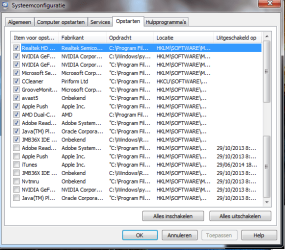
Go to the Startup section and take some screen shots for a complete list,
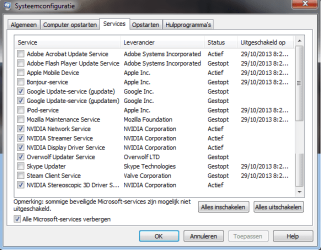
Go to the Services section and on the bottom left Check the box to Hide All Microsoft services,
Repeat the screen shots,
See the links above my signature on how to take and upload screen shots here,

Why do I need a cleanboot?
 

Attachments

  • Naamloos.png
    Naamloos.png
    20.7 KB · Views: 30
  • Naamloos2.png
    Naamloos2.png
    18.1 KB · Views: 29

My Computer My Computer

At a glance

Windows 7 Home Premium 64-bitIntel Core i7 920 @ 2.67 GHz6Gb RAMMSI 660Ti OC PE
Computer type
PC/Desktop
Computer Manufacturer/Model Number
Custom build
OS
Windows 7 Home Premium 64-bit
CPU
Intel Core i7 920 @ 2.67 GHz
Motherboard
GA EX58-UD3R
Memory
6Gb RAM
Graphics Card(s)
MSI 660Ti OC PE
Monitor(s) Displays
1
Screen Resolution
1680x1050
Hard Drives
SATA MAXTOR STM310003 1TB
Intenso External Harddrive 1TB
PSU
Corsair GS800
Case
Antec Nine Hundred Ultimate
Cooling
Corsair GS800
Keyboard
Labtec Ultra Flat
Mouse
Logitech Proteus Core G502
Internet Speed
n/a
Antivirus
MSE
Browser
Google Chrome & Mozilla Firefox
Clean boot is just to see if the behavior changes or stays the same with outlook.exe staying open,
Seems as though your a missing services page according to the scroll bar on your second screen shot ?
Cheers.
When using clean boot just start your computer using it,
Then do nothing for about 10-15 minutes and shut down and see what happens ;)
 

My Computer My Computer

At a glance

Win-7-Pro64bit 7-H-Prem-64biti7-5930K 2nd i9-9940x both water blocked VRM'...Trident-z 3200C14 2nd Trident-z 3600C16EVGA 1080ti ftw3 2nd Titan Xp both water blocked
Computer type
PC/Desktop
Computer Manufacturer/Model Number
Custom assembled by me :}
OS
Win-7-Pro64bit 7-H-Prem-64bit
CPU
i7-5930K 2nd i9-9940x both water blocked VRM's too
Motherboard
ASUS SABERTOOTH X99 2nd ASUS x299 Apex
Memory
Trident-z 3200C14 2nd Trident-z 3600C16
Graphics Card(s)
EVGA 1080ti ftw3 2nd Titan Xp both water blocked
Sound Card
Built-in Realtek
Monitor(s) Displays
1-AOC G2460PG 24"G-Sync 144Hz/ 2nd 1-ASUS VG248QE 24" 144Hz
Screen Resolution
1920 x 1080 144Hz
Hard Drives
2-Samsung M.2 Evo & Evo Plus
2-Samsung 850 EVO 500GB SSD's/ 3-2.5 W.D. Black 1tb-&3-1tb/3-3.5 WD Black 1tb hdd's
PSU
EVGA SuperNOVA 1000-P2 2nd 1200-P2
Case
2-Corsair Obsidian Series 450D Black ATX Mid Tower
Cooling
Custom water loops
Keyboard
Logitech G710+/ 2nd Logitech G910
Mouse
2-RedDragon M901 Perdition 16400 dpi Gaming mouse = wired
Internet Speed
Comcast Ping 19ms 89.31mbps download speed 6.12mbps upload
Antivirus
Malwarebytes Pro/ Superantispyware Pro
Browser
FireFox & Pale moon
Other Info
2nd ASUS X299 Apex/Intel i9-9940x with Custom water loop/7H-Prem-x64/Corsair 450D case/Ram Trident-z 3600C16 4x8gb / Samsung970Evo plus 500gb SSD/Dual ssd EZ swap evo/PSU EVGA SuperNova 1200w-P2 80+Platinum/GPU Titan Xp /8-ML-140 on push-pull on 2-280GTX rads
Clean boot is just to see if the behavior changes or stays the same with outlook.exe staying open,
Seems as though your a missing services page according to the scroll bar on your second screen shot ?
Cheers.
When using clean boot just start your computer using it,
Then do nothing for about 10-15 minutes and shut down and see what happens ;)

Hello. Don't mind the scroll bar, I just pasted two screenshots together, these are all my Services. I will try the clean boot tomorrow.
 

My Computer My Computer

At a glance

Windows 7 Home Premium 64-bitIntel Core i7 920 @ 2.67 GHz6Gb RAMMSI 660Ti OC PE
Computer type
PC/Desktop
Computer Manufacturer/Model Number
Custom build
OS
Windows 7 Home Premium 64-bit
CPU
Intel Core i7 920 @ 2.67 GHz
Motherboard
GA EX58-UD3R
Memory
6Gb RAM
Graphics Card(s)
MSI 660Ti OC PE
Monitor(s) Displays
1
Screen Resolution
1680x1050
Hard Drives
SATA MAXTOR STM310003 1TB
Intenso External Harddrive 1TB
PSU
Corsair GS800
Case
Antec Nine Hundred Ultimate
Cooling
Corsair GS800
Keyboard
Labtec Ultra Flat
Mouse
Logitech Proteus Core G502
Internet Speed
n/a
Antivirus
MSE
Browser
Google Chrome & Mozilla Firefox
All I can think of outlook is archiving emails... or is accessing the server for updates constantly ?

What's you inbox like,
thousands of unread emails :D
thousands of junk emails... ?
 

My Computer My Computer

At a glance

Win-7-Pro64bit 7-H-Prem-64biti7-5930K 2nd i9-9940x both water blocked VRM'...Trident-z 3200C14 2nd Trident-z 3600C16EVGA 1080ti ftw3 2nd Titan Xp both water blocked
Computer type
PC/Desktop
Computer Manufacturer/Model Number
Custom assembled by me :}
OS
Win-7-Pro64bit 7-H-Prem-64bit
CPU
i7-5930K 2nd i9-9940x both water blocked VRM's too
Motherboard
ASUS SABERTOOTH X99 2nd ASUS x299 Apex
Memory
Trident-z 3200C14 2nd Trident-z 3600C16
Graphics Card(s)
EVGA 1080ti ftw3 2nd Titan Xp both water blocked
Sound Card
Built-in Realtek
Monitor(s) Displays
1-AOC G2460PG 24"G-Sync 144Hz/ 2nd 1-ASUS VG248QE 24" 144Hz
Screen Resolution
1920 x 1080 144Hz
Hard Drives
2-Samsung M.2 Evo & Evo Plus
2-Samsung 850 EVO 500GB SSD's/ 3-2.5 W.D. Black 1tb-&3-1tb/3-3.5 WD Black 1tb hdd's
PSU
EVGA SuperNOVA 1000-P2 2nd 1200-P2
Case
2-Corsair Obsidian Series 450D Black ATX Mid Tower
Cooling
Custom water loops
Keyboard
Logitech G710+/ 2nd Logitech G910
Mouse
2-RedDragon M901 Perdition 16400 dpi Gaming mouse = wired
Internet Speed
Comcast Ping 19ms 89.31mbps download speed 6.12mbps upload
Antivirus
Malwarebytes Pro/ Superantispyware Pro
Browser
FireFox & Pale moon
Other Info
2nd ASUS X299 Apex/Intel i9-9940x with Custom water loop/7H-Prem-x64/Corsair 450D case/Ram Trident-z 3600C16 4x8gb / Samsung970Evo plus 500gb SSD/Dual ssd EZ swap evo/PSU EVGA SuperNova 1200w-P2 80+Platinum/GPU Titan Xp /8-ML-140 on push-pull on 2-280GTX rads
All I can think of outlook is archiving emails... or is accessing the server for updates constantly ?

What's you inbox like,
thousands of unread emails :D
thousands of junk emails... ?

Not at all. Actually, for fun, I went ahead and counted all my mails together.

6 in my Inbox;
560 mails that are important;
998 in the deleted folder;
994 in the sent folder;
0 junk, SPAM, or unread mails.

Do those last two count for much?

EDIT: I finally did the clean boot, like you told me earlier. I ran the clean boot for over an hour and a half. Starting up certain applications, closing them, playing a game or two... and I constantly checked my task manager. After about an hour of running, when I closed Outlook, the process still ran according to my task manager. I then checked the options in Outlook, because at first I thought it behaved like Skype (as in, when you close the window, the program still runs in the background) but I discovered there was no such an option marked in the options of Outlook.

So.... what can I do?
 
Last edited:

My Computer My Computer

At a glance

Windows 7 Home Premium 64-bitIntel Core i7 920 @ 2.67 GHz6Gb RAMMSI 660Ti OC PE
Computer type
PC/Desktop
Computer Manufacturer/Model Number
Custom build
OS
Windows 7 Home Premium 64-bit
CPU
Intel Core i7 920 @ 2.67 GHz
Motherboard
GA EX58-UD3R
Memory
6Gb RAM
Graphics Card(s)
MSI 660Ti OC PE
Monitor(s) Displays
1
Screen Resolution
1680x1050
Hard Drives
SATA MAXTOR STM310003 1TB
Intenso External Harddrive 1TB
PSU
Corsair GS800
Case
Antec Nine Hundred Ultimate
Cooling
Corsair GS800
Keyboard
Labtec Ultra Flat
Mouse
Logitech Proteus Core G502
Internet Speed
n/a
Antivirus
MSE
Browser
Google Chrome & Mozilla Firefox
The question I have is was outlook.exe open before you manually opened it ?
The last two items Spam only matter if you don't remove or clean it regularly which you do nice house cleaning there,
The deleted folder ?
Any large folder should be cleaned,
Deleted items should be emptied after a certain amount of time couple of weeks/ monthly..
But I doubt this is causing your issue,

How is office outlook configured what servers are you using godaddy.com......
Some how it's always checking for new content it would seem ?
 

My Computer My Computer

At a glance

Win-7-Pro64bit 7-H-Prem-64biti7-5930K 2nd i9-9940x both water blocked VRM'...Trident-z 3200C14 2nd Trident-z 3600C16EVGA 1080ti ftw3 2nd Titan Xp both water blocked
Computer type
PC/Desktop
Computer Manufacturer/Model Number
Custom assembled by me :}
OS
Win-7-Pro64bit 7-H-Prem-64bit
CPU
i7-5930K 2nd i9-9940x both water blocked VRM's too
Motherboard
ASUS SABERTOOTH X99 2nd ASUS x299 Apex
Memory
Trident-z 3200C14 2nd Trident-z 3600C16
Graphics Card(s)
EVGA 1080ti ftw3 2nd Titan Xp both water blocked
Sound Card
Built-in Realtek
Monitor(s) Displays
1-AOC G2460PG 24"G-Sync 144Hz/ 2nd 1-ASUS VG248QE 24" 144Hz
Screen Resolution
1920 x 1080 144Hz
Hard Drives
2-Samsung M.2 Evo & Evo Plus
2-Samsung 850 EVO 500GB SSD's/ 3-2.5 W.D. Black 1tb-&3-1tb/3-3.5 WD Black 1tb hdd's
PSU
EVGA SuperNOVA 1000-P2 2nd 1200-P2
Case
2-Corsair Obsidian Series 450D Black ATX Mid Tower
Cooling
Custom water loops
Keyboard
Logitech G710+/ 2nd Logitech G910
Mouse
2-RedDragon M901 Perdition 16400 dpi Gaming mouse = wired
Internet Speed
Comcast Ping 19ms 89.31mbps download speed 6.12mbps upload
Antivirus
Malwarebytes Pro/ Superantispyware Pro
Browser
FireFox & Pale moon
Other Info
2nd ASUS X299 Apex/Intel i9-9940x with Custom water loop/7H-Prem-x64/Corsair 450D case/Ram Trident-z 3600C16 4x8gb / Samsung970Evo plus 500gb SSD/Dual ssd EZ swap evo/PSU EVGA SuperNova 1200w-P2 80+Platinum/GPU Titan Xp /8-ML-140 on push-pull on 2-280GTX rads
The question I have is was outlook.exe open before you manually opened it ?

No.

Deleted items should be emptied after a certain amount of time couple of weeks/ monthly..
But I doubt this is causing your issue.

Me too.

How is office outlook configured what servers are you using godaddy.com......
Some how it's always checking for new content it would seem ?

I have absolutely no idea about how my Outlook is configured :S and I have even less of an idea how to fix it.

EDIT: I think I found it, but I'm not sure if this solution works yet.

http://www.slipstick.com/problems/outlook-exe-continues-running-after-you-exit-outlook/

http://support.microsoft.com/kb/914909

http://www.dslreports.com/forum/r19553214-Outlook-2007-always-running

I think I got it. It would seem that Outlook is constantly running in the background to check for new mails. I've read that you have to go to the Add-Ins of Outlook in the Trust Center of the program and tick off the Add-Ins one by one until you find out which Add-In is the culprit of this whole problem.
 
Last edited:

My Computer My Computer

At a glance

Windows 7 Home Premium 64-bitIntel Core i7 920 @ 2.67 GHz6Gb RAMMSI 660Ti OC PE
Computer type
PC/Desktop
Computer Manufacturer/Model Number
Custom build
OS
Windows 7 Home Premium 64-bit
CPU
Intel Core i7 920 @ 2.67 GHz
Motherboard
GA EX58-UD3R
Memory
6Gb RAM
Graphics Card(s)
MSI 660Ti OC PE
Monitor(s) Displays
1
Screen Resolution
1680x1050
Hard Drives
SATA MAXTOR STM310003 1TB
Intenso External Harddrive 1TB
PSU
Corsair GS800
Case
Antec Nine Hundred Ultimate
Cooling
Corsair GS800
Keyboard
Labtec Ultra Flat
Mouse
Logitech Proteus Core G502
Internet Speed
n/a
Antivirus
MSE
Browser
Google Chrome & Mozilla Firefox
Good links,
I suppose the easiest way if no add-ons are listed for Avast/ OneNote or iTunes cloud calendar... sync,
Is use Alt+FX or File/ Exit to close outlook ?
I guess you really don't use Alt just F and X no shift key ;)
 

My Computer My Computer

At a glance

Win-7-Pro64bit 7-H-Prem-64biti7-5930K 2nd i9-9940x both water blocked VRM'...Trident-z 3200C14 2nd Trident-z 3600C16EVGA 1080ti ftw3 2nd Titan Xp both water blocked
Computer type
PC/Desktop
Computer Manufacturer/Model Number
Custom assembled by me :}
OS
Win-7-Pro64bit 7-H-Prem-64bit
CPU
i7-5930K 2nd i9-9940x both water blocked VRM's too
Motherboard
ASUS SABERTOOTH X99 2nd ASUS x299 Apex
Memory
Trident-z 3200C14 2nd Trident-z 3600C16
Graphics Card(s)
EVGA 1080ti ftw3 2nd Titan Xp both water blocked
Sound Card
Built-in Realtek
Monitor(s) Displays
1-AOC G2460PG 24"G-Sync 144Hz/ 2nd 1-ASUS VG248QE 24" 144Hz
Screen Resolution
1920 x 1080 144Hz
Hard Drives
2-Samsung M.2 Evo & Evo Plus
2-Samsung 850 EVO 500GB SSD's/ 3-2.5 W.D. Black 1tb-&3-1tb/3-3.5 WD Black 1tb hdd's
PSU
EVGA SuperNOVA 1000-P2 2nd 1200-P2
Case
2-Corsair Obsidian Series 450D Black ATX Mid Tower
Cooling
Custom water loops
Keyboard
Logitech G710+/ 2nd Logitech G910
Mouse
2-RedDragon M901 Perdition 16400 dpi Gaming mouse = wired
Internet Speed
Comcast Ping 19ms 89.31mbps download speed 6.12mbps upload
Antivirus
Malwarebytes Pro/ Superantispyware Pro
Browser
FireFox & Pale moon
Other Info
2nd ASUS X299 Apex/Intel i9-9940x with Custom water loop/7H-Prem-x64/Corsair 450D case/Ram Trident-z 3600C16 4x8gb / Samsung970Evo plus 500gb SSD/Dual ssd EZ swap evo/PSU EVGA SuperNova 1200w-P2 80+Platinum/GPU Titan Xp /8-ML-140 on push-pull on 2-280GTX rads
I asked for more help although I do have office 2007 and do use outlook I don't have your issue,
OneNote could be the problem or iTunes if it in your outlook or Avast,
Are any of these have toolbars in outlook ?

It was suggested for you to Click the start button and post a screen shot of what's listed there ?
 

My Computer My Computer

At a glance

Win-7-Pro64bit 7-H-Prem-64biti7-5930K 2nd i9-9940x both water blocked VRM'...Trident-z 3200C14 2nd Trident-z 3600C16EVGA 1080ti ftw3 2nd Titan Xp both water blocked
Computer type
PC/Desktop
Computer Manufacturer/Model Number
Custom assembled by me :}
OS
Win-7-Pro64bit 7-H-Prem-64bit
CPU
i7-5930K 2nd i9-9940x both water blocked VRM's too
Motherboard
ASUS SABERTOOTH X99 2nd ASUS x299 Apex
Memory
Trident-z 3200C14 2nd Trident-z 3600C16
Graphics Card(s)
EVGA 1080ti ftw3 2nd Titan Xp both water blocked
Sound Card
Built-in Realtek
Monitor(s) Displays
1-AOC G2460PG 24"G-Sync 144Hz/ 2nd 1-ASUS VG248QE 24" 144Hz
Screen Resolution
1920 x 1080 144Hz
Hard Drives
2-Samsung M.2 Evo & Evo Plus
2-Samsung 850 EVO 500GB SSD's/ 3-2.5 W.D. Black 1tb-&3-1tb/3-3.5 WD Black 1tb hdd's
PSU
EVGA SuperNOVA 1000-P2 2nd 1200-P2
Case
2-Corsair Obsidian Series 450D Black ATX Mid Tower
Cooling
Custom water loops
Keyboard
Logitech G710+/ 2nd Logitech G910
Mouse
2-RedDragon M901 Perdition 16400 dpi Gaming mouse = wired
Internet Speed
Comcast Ping 19ms 89.31mbps download speed 6.12mbps upload
Antivirus
Malwarebytes Pro/ Superantispyware Pro
Browser
FireFox & Pale moon
Other Info
2nd ASUS X299 Apex/Intel i9-9940x with Custom water loop/7H-Prem-x64/Corsair 450D case/Ram Trident-z 3600C16 4x8gb / Samsung970Evo plus 500gb SSD/Dual ssd EZ swap evo/PSU EVGA SuperNova 1200w-P2 80+Platinum/GPU Titan Xp /8-ML-140 on push-pull on 2-280GTX rads
I asked for more help although I do have office 2007 and do use outlook I don't have your issue,
OneNote could be the problem or iTunes if it in your outlook or Avast,
Are any of these have toolbars in outlook ?

It was suggested for you to Click the start button and post a screen shot of what's listed there ?

I have ticked every Add-In off and it still didn't work: OUTLOOK.EXE remained on the task managed. Doing File -> Exit didn't work either.
 

My Computer My Computer

At a glance

Windows 7 Home Premium 64-bitIntel Core i7 920 @ 2.67 GHz6Gb RAMMSI 660Ti OC PE
Computer type
PC/Desktop
Computer Manufacturer/Model Number
Custom build
OS
Windows 7 Home Premium 64-bit
CPU
Intel Core i7 920 @ 2.67 GHz
Motherboard
GA EX58-UD3R
Memory
6Gb RAM
Graphics Card(s)
MSI 660Ti OC PE
Monitor(s) Displays
1
Screen Resolution
1680x1050
Hard Drives
SATA MAXTOR STM310003 1TB
Intenso External Harddrive 1TB
PSU
Corsair GS800
Case
Antec Nine Hundred Ultimate
Cooling
Corsair GS800
Keyboard
Labtec Ultra Flat
Mouse
Logitech Proteus Core G502
Internet Speed
n/a
Antivirus
MSE
Browser
Google Chrome & Mozilla Firefox
Hi thanks,
Do you also use outlook.com or Hotmail.com ?
Trying to figure out if you use office outlook connector to the two above services ?

It's also been advised to review your Avast settings for email scanning and disable it temporarily to test,

It's also been suggested that the unknown server might be over loaded with archived emails and outlook is still loading those emails ?
I have no way of saying how to check that issue because neither of us know how office outlook is getting your emails from,
Your employers email service..... ?

Now the fun part please click start and type in the search box,
Uninstall a program
Click on the suggestion and take screen shots of the programs list,
Cheers.
 

My Computer My Computer

At a glance

Win-7-Pro64bit 7-H-Prem-64biti7-5930K 2nd i9-9940x both water blocked VRM'...Trident-z 3200C14 2nd Trident-z 3600C16EVGA 1080ti ftw3 2nd Titan Xp both water blocked
Computer type
PC/Desktop
Computer Manufacturer/Model Number
Custom assembled by me :}
OS
Win-7-Pro64bit 7-H-Prem-64bit
CPU
i7-5930K 2nd i9-9940x both water blocked VRM's too
Motherboard
ASUS SABERTOOTH X99 2nd ASUS x299 Apex
Memory
Trident-z 3200C14 2nd Trident-z 3600C16
Graphics Card(s)
EVGA 1080ti ftw3 2nd Titan Xp both water blocked
Sound Card
Built-in Realtek
Monitor(s) Displays
1-AOC G2460PG 24"G-Sync 144Hz/ 2nd 1-ASUS VG248QE 24" 144Hz
Screen Resolution
1920 x 1080 144Hz
Hard Drives
2-Samsung M.2 Evo & Evo Plus
2-Samsung 850 EVO 500GB SSD's/ 3-2.5 W.D. Black 1tb-&3-1tb/3-3.5 WD Black 1tb hdd's
PSU
EVGA SuperNOVA 1000-P2 2nd 1200-P2
Case
2-Corsair Obsidian Series 450D Black ATX Mid Tower
Cooling
Custom water loops
Keyboard
Logitech G710+/ 2nd Logitech G910
Mouse
2-RedDragon M901 Perdition 16400 dpi Gaming mouse = wired
Internet Speed
Comcast Ping 19ms 89.31mbps download speed 6.12mbps upload
Antivirus
Malwarebytes Pro/ Superantispyware Pro
Browser
FireFox & Pale moon
Other Info
2nd ASUS X299 Apex/Intel i9-9940x with Custom water loop/7H-Prem-x64/Corsair 450D case/Ram Trident-z 3600C16 4x8gb / Samsung970Evo plus 500gb SSD/Dual ssd EZ swap evo/PSU EVGA SuperNova 1200w-P2 80+Platinum/GPU Titan Xp /8-ML-140 on push-pull on 2-280GTX rads
Back
Top