

Adobe Updates Downloading OK – But NOT Installing ?
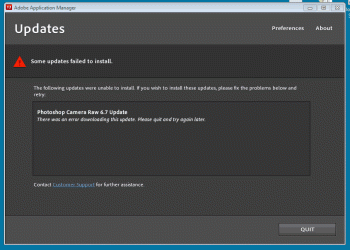
I am in the process of doing a completely fresh install of the operating system and everything else. All has been going OK and I have installed Photoshop CS55 from the CD, but when I try to get the latest updates it all goes wrong. My Bandwidth Monitor confirms the size of the down load and it’s speed. Then just at the end when it should then install the update, I get this error message to say that the update could not be downloaded, when I know full well it is sitting on my hard drive ??
Attached is the error message that is popping up ?
Any ideas ?
I am in the process of doing a completely fresh install of the operating system and everything else. All has been going OK and I have installed Photoshop CS55 from the CD, but when I try to get the latest updates it all goes wrong. My Bandwidth Monitor confirms the size of the down load and it’s speed. Then just at the end when it should then install the update, I get this error message to say that the update could not be downloaded, when I know full well it is sitting on my hard drive ??
Attached is the error message that is popping up ?
Any ideas ?
Attachments
My Computer
At a glance
Windows 7 Pro 64 Biti7 4790K32 GB DDR3 2400 mhzEVGA GeForce GTX 960 SuperSC ACX 2.0+ 4 GB, G...
- Computer type
- PC/Desktop
- Computer Manufacturer/Model Number
- Home Build
- OS
- Windows 7 Pro 64 Bit
- CPU
- i7 4790K
- Motherboard
- ASUS Z97 WS
- Memory
- 32 GB DDR3 2400 mhz
- Graphics Card(s)
- EVGA GeForce GTX 960 SuperSC ACX 2.0+ 4 GB, GDDR5
- Monitor(s) Displays
- iiyama ProLite E2607WSD 26in wide, ProLite E1906s 19in 5.4
- Screen Resolution
- Main 1920 X 1200, Other 1280 X 1024
- Hard Drives
- Main : 256 GB Samsung 850 PRO SSD | Other HDD's are normal SATA III- Seagate Barracuda
- PSU
- EVGA G2 850 W
- Case
- Microtower uATX
- Cooling
- Noctua NH-U9S Dual Fan + 2 X 120 mm NF-12 Fans
- Keyboard
- Windows
- Mouse
- Windows
- Internet Speed
- Dreadful, but getting better when 4g Dongles arrive
- Antivirus
- Windows Security Essentials
- Browser
- Chrome, Firefox, IE11, AVANT
- Other Info
- Speakers: M-AUDIO AV40 | WebCam: Logitech C920 |
External storage via eSATA X 2 | One port dedicated to file storage, and the other one dedicated to "Acronis Clone" as backup


