
Solved Windows update KB 3045999 installed but not installed

mcco

New member
Local time
10:16 AM
Messages
34
Location
Belfast
Hi,

Firstly thanks for your help.

I have a problem with windows update kb3045999. It has caused a lot of problems on my system, with programs not loaded after booting (eg notepad, IE etc return error code The application was unable to start (0xc0000018). I understand that this is a known error and many have posted about it online. I can reboot my computer a number of times and eventually the programmes will work as normal, however that is a bit of a pain.

From reading online it appears the way to fix the problem is to uninstall the update. I thought I had done that but the error kept happening. I then had the idea of reinstalling the update and uninstalling again in-case it did not uninstall correctly, however when I try to install the update it advises me that it is already installed and when I try to uninstall it using the wusa /uninstall command I am advised that the update is not installed.

Any ideas on what to do?

Thanks

Michael
 

My Computer My Computer

Computer Manufacturer/Model Number
Krypton Z68 600i
OS
Windows 7 64 bit
CPU
Intel Core i5 2500K 3.30GHz @ 4.60GHz
Motherboard
Asus P8Z68 DELUXE Intel Z68 (Socket 1155) DDR3 Motherboard
Memory
Kingston HyperX Genesis Grey 8GB (2x4GB) DDR3 PC3-12800C9 16
Graphics Card(s)
Nvidia GTX570HD
Sound Card
ASUS Xonar DG
Monitor(s) Displays
1
Hard Drives
Samsung SpinPoint F3 1TB SATA-II 32MB Cache - OEM (HD103SJ)
From your CheckSUR log...
Code:
Checking Component Store
(f)	CSI Missing Deployment Key	0x00000000	a6562cfa922..6d6096de0b7_31bf3856ad364e35_6.1.7601.18846_16108e677bb01de8	HKLM\Components\CanonicalData\Deployments	
(f)	CSI Missing Deployment Key	0x00000000	170aef91da5..bcd5a4992f7_31bf3856ad364e35_6.1.7601.18846_07b81509db0ef196	HKLM\Components\CanonicalData\Deployments	
(f)	CSI Missing Deployment Key	0x00000000	08820e22142..fc0a4cf716f_31bf3856ad364e35_6.1.7601.18846_21db2236a64375c9	HKLM\Components\CanonicalData\Deployments	
(f)	CSI Missing Deployment Key	0x00000000	b6953ce718e..9aa86774558_31bf3856ad364e35_6.1.7601.18846_b7417b0549aa5f1d	HKLM\Components\CanonicalData\Deployments	

Summary:
Seconds executed: 3601
 Found 4 errors
  CSI Missing Deployment Key Total count: 4

I need to have a look at your COMPONENTS registry hive

Please copy the C:\Windows\System32\config\COMPONENTS file (no extension) to your desktop and then compress it - upload the compressed file to your favoured fileshare site (preferably Dropbox or OneDrive) and post a link.
 

My Computer My Computer

Computer type
Laptop
Computer Manufacturer/Model Number
Asus K52F or Lenovo B51-80
OS
Win 7 x64 Home Premium (and x86 VirtualBox VM)/Win10
CPU
i3 370M/i7 6500U
Motherboard
Asus/Lenovo
Memory
8GB - finally :)/8GB
Graphics Card(s)
it's an i3, dude!/dual Intel&nVidia
Sound Card
onboard
Monitor(s) Displays
15.6" built-in
Screen Resolution
1366x768/1920x1080
Hard Drives
750GB Seagate internal
Sundry external drives attached to other computers on the local network
1TB SSD on the Lenovo
PSU
n/a
Internet Speed
as much as I can get - usually on a dongle/phone, so <1MB/s
Antivirus
MSE/Defender
Browser
IE11/12/Edge/Chrome/FF(if I must)

My Computer My Computer

Computer Manufacturer/Model Number
Krypton Z68 600i
OS
Windows 7 64 bit
CPU
Intel Core i5 2500K 3.30GHz @ 4.60GHz
Motherboard
Asus P8Z68 DELUXE Intel Z68 (Socket 1155) DDR3 Motherboard
Memory
Kingston HyperX Genesis Grey 8GB (2x4GB) DDR3 PC3-12800C9 16
Graphics Card(s)
Nvidia GTX570HD
Sound Card
ASUS Xonar DG
Monitor(s) Displays
1
Hard Drives
Samsung SpinPoint F3 1TB SATA-II 32MB Cache - OEM (HD103SJ)
All these 'bad' entries appear to originate from KB3035583.

Have you attempted to use one of the 'hacks' available to either force its install, or disable it?

If not, the best thing is probably to attempt to uninstall KB3035583 from the Installed Updates listing.

If it succeeds, please post a new CheckSUR log, and we'll see if it's done the job.
If it fails, please post the C:\Windows\windowsupdate.log file.
 

My Computer My Computer

Computer type
Laptop
Computer Manufacturer/Model Number
Asus K52F or Lenovo B51-80
OS
Win 7 x64 Home Premium (and x86 VirtualBox VM)/Win10
CPU
i3 370M/i7 6500U
Motherboard
Asus/Lenovo
Memory
8GB - finally :)/8GB
Graphics Card(s)
it's an i3, dude!/dual Intel&nVidia
Sound Card
onboard
Monitor(s) Displays
15.6" built-in
Screen Resolution
1366x768/1920x1080
Hard Drives
750GB Seagate internal
Sundry external drives attached to other computers on the local network
1TB SSD on the Lenovo
PSU
n/a
Internet Speed
as much as I can get - usually on a dongle/phone, so <1MB/s
Antivirus
MSE/Defender
Browser
IE11/12/Edge/Chrome/FF(if I must)
Ok done that, here is the log
 

Attachments

My Computer My Computer

Computer Manufacturer/Model Number
Krypton Z68 600i
OS
Windows 7 64 bit
CPU
Intel Core i5 2500K 3.30GHz @ 4.60GHz
Motherboard
Asus P8Z68 DELUXE Intel Z68 (Socket 1155) DDR3 Motherboard
Memory
Kingston HyperX Genesis Grey 8GB (2x4GB) DDR3 PC3-12800C9 16
Graphics Card(s)
Nvidia GTX570HD
Sound Card
ASUS Xonar DG
Monitor(s) Displays
1
Hard Drives
Samsung SpinPoint F3 1TB SATA-II 32MB Cache - OEM (HD103SJ)
- et voila!
CheckSUR is now clean.

Do a Check for Updates, and attempt to install ONLY the oldest update found. If it goes in OK, try the rest.
If it fails, post eh C:\Windows\windowsudpate.log file.
 

My Computer My Computer

Computer type
Laptop
Computer Manufacturer/Model Number
Asus K52F or Lenovo B51-80
OS
Win 7 x64 Home Premium (and x86 VirtualBox VM)/Win10
CPU
i3 370M/i7 6500U
Motherboard
Asus/Lenovo
Memory
8GB - finally :)/8GB
Graphics Card(s)
it's an i3, dude!/dual Intel&nVidia
Sound Card
onboard
Monitor(s) Displays
15.6" built-in
Screen Resolution
1366x768/1920x1080
Hard Drives
750GB Seagate internal
Sundry external drives attached to other computers on the local network
1TB SSD on the Lenovo
PSU
n/a
Internet Speed
as much as I can get - usually on a dongle/phone, so <1MB/s
Antivirus
MSE/Defender
Browser
IE11/12/Edge/Chrome/FF(if I must)
Ok, all worked fine for the first update, not for the next one
 

My Computer My Computer

Computer Manufacturer/Model Number
Krypton Z68 600i
OS
Windows 7 64 bit
CPU
Intel Core i5 2500K 3.30GHz @ 4.60GHz
Motherboard
Asus P8Z68 DELUXE Intel Z68 (Socket 1155) DDR3 Motherboard
Memory
Kingston HyperX Genesis Grey 8GB (2x4GB) DDR3 PC3-12800C9 16
Graphics Card(s)
Nvidia GTX570HD
Sound Card
ASUS Xonar DG
Monitor(s) Displays
1
Hard Drives
Samsung SpinPoint F3 1TB SATA-II 32MB Cache - OEM (HD103SJ)
I thinks a cleanout of the SoftwareDistribution folder will clear that...
Open an Elevated Command Prompt
Run the following commands
*
NET STOP WUAUSERV
REN C:\WINDOWS\SoftwareDistribution SDOLD
NET START WUAUSERV
*
reboot
then wait 10 minutes, and open Windows Updates, and run a Check for Updates.
*
Install only the oldest update found - and reboot once installed
then go back to Windows updates and install the others.
(You'll lose the Update History in the process, but all updates will remain installed and visible in the Installed Updates listing)
 

My Computer My Computer

Computer type
Laptop
Computer Manufacturer/Model Number
Asus K52F or Lenovo B51-80
OS
Win 7 x64 Home Premium (and x86 VirtualBox VM)/Win10
CPU
i3 370M/i7 6500U
Motherboard
Asus/Lenovo
Memory
8GB - finally :)/8GB
Graphics Card(s)
it's an i3, dude!/dual Intel&nVidia
Sound Card
onboard
Monitor(s) Displays
15.6" built-in
Screen Resolution
1366x768/1920x1080
Hard Drives
750GB Seagate internal
Sundry external drives attached to other computers on the local network
1TB SSD on the Lenovo
PSU
n/a
Internet Speed
as much as I can get - usually on a dongle/phone, so <1MB/s
Antivirus
MSE/Defender
Browser
IE11/12/Edge/Chrome/FF(if I must)
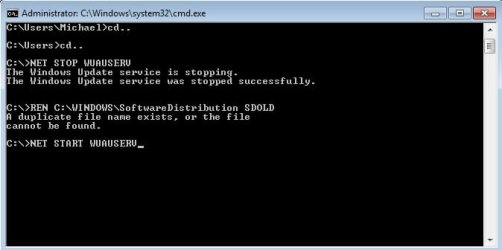
I am unable to get this command to work

REN C:\WINDOWS\SoftwareDistribution SDOLD

I don't have a SDOLD folder in C:\windows\Softwaredistrubtion, I do have SDOLD folder in C:\windows

also here is the latest CheckSUR file
 

Attachments

My Computer My Computer

Computer Manufacturer/Model Number
Krypton Z68 600i
OS
Windows 7 64 bit
CPU
Intel Core i5 2500K 3.30GHz @ 4.60GHz
Motherboard
Asus P8Z68 DELUXE Intel Z68 (Socket 1155) DDR3 Motherboard
Memory
Kingston HyperX Genesis Grey 8GB (2x4GB) DDR3 PC3-12800C9 16
Graphics Card(s)
Nvidia GTX570HD
Sound Card
ASUS Xonar DG
Monitor(s) Displays
1
Hard Drives
Samsung SpinPoint F3 1TB SATA-II 32MB Cache - OEM (HD103SJ)
It looks like that last update created even more problems - can you uninstall it?

As far as the above command is concerned - make sure that you get the spacing right
There are TWO spaces....

REN<space>C:\WINDOWS\SoftwareDistribution<space>SDOLD

...and the command must be run from an Elevated Command Prompt.
 

My Computer My Computer

Computer type
Laptop
Computer Manufacturer/Model Number
Asus K52F or Lenovo B51-80
OS
Win 7 x64 Home Premium (and x86 VirtualBox VM)/Win10
CPU
i3 370M/i7 6500U
Motherboard
Asus/Lenovo
Memory
8GB - finally :)/8GB
Graphics Card(s)
it's an i3, dude!/dual Intel&nVidia
Sound Card
onboard
Monitor(s) Displays
15.6" built-in
Screen Resolution
1366x768/1920x1080
Hard Drives
750GB Seagate internal
Sundry external drives attached to other computers on the local network
1TB SSD on the Lenovo
PSU
n/a
Internet Speed
as much as I can get - usually on a dongle/phone, so <1MB/s
Antivirus
MSE/Defender
Browser
IE11/12/Edge/Chrome/FF(if I must)
Ok I have uninstalled that update. I am still having problems running that command, see attached pic.

Thanks
 

Attachments

  • windows error.jpg
    windows error.jpg
    19.6 KB · Views: 26

My Computer My Computer

Computer Manufacturer/Model Number
Krypton Z68 600i
OS
Windows 7 64 bit
CPU
Intel Core i5 2500K 3.30GHz @ 4.60GHz
Motherboard
Asus P8Z68 DELUXE Intel Z68 (Socket 1155) DDR3 Motherboard
Memory
Kingston HyperX Genesis Grey 8GB (2x4GB) DDR3 PC3-12800C9 16
Graphics Card(s)
Nvidia GTX570HD
Sound Card
ASUS Xonar DG
Monitor(s) Displays
1
Hard Drives
Samsung SpinPoint F3 1TB SATA-II 32MB Cache - OEM (HD103SJ)
Ah - that's because someone has already run the command once...

Use this pair of commands instead...
(copy/paste them for ease!)

IF EXIST c:\wINDOWS\SDOLD DEL c:\WINDOWS\SDOLD
REN C:\Windows\SoftwareDistribution SDOLD
 

My Computer My Computer

Computer type
Laptop
Computer Manufacturer/Model Number
Asus K52F or Lenovo B51-80
OS
Win 7 x64 Home Premium (and x86 VirtualBox VM)/Win10
CPU
i3 370M/i7 6500U
Motherboard
Asus/Lenovo
Memory
8GB - finally :)/8GB
Graphics Card(s)
it's an i3, dude!/dual Intel&nVidia
Sound Card
onboard
Monitor(s) Displays
15.6" built-in
Screen Resolution
1366x768/1920x1080
Hard Drives
750GB Seagate internal
Sundry external drives attached to other computers on the local network
1TB SSD on the Lenovo
PSU
n/a
Internet Speed
as much as I can get - usually on a dongle/phone, so <1MB/s
Antivirus
MSE/Defender
Browser
IE11/12/Edge/Chrome/FF(if I must)
I have 26 updates to install now, 25 of they have todays date as the day they where published. The one with the older date is KB3035583 which we uninstalled that the start of this thread. Should I try to install that update?

Thanks for your help so far it has been invaluable
 

My Computer My Computer

Computer Manufacturer/Model Number
Krypton Z68 600i
OS
Windows 7 64 bit
CPU
Intel Core i5 2500K 3.30GHz @ 4.60GHz
Motherboard
Asus P8Z68 DELUXE Intel Z68 (Socket 1155) DDR3 Motherboard
Memory
Kingston HyperX Genesis Grey 8GB (2x4GB) DDR3 PC3-12800C9 16
Graphics Card(s)
Nvidia GTX570HD
Sound Card
ASUS Xonar DG
Monitor(s) Displays
1
Hard Drives
Samsung SpinPoint F3 1TB SATA-II 32MB Cache - OEM (HD103SJ)
Cross your fingers, toes, and other appendages, and go for it! :)
 

My Computer My Computer

Computer type
Laptop
Computer Manufacturer/Model Number
Asus K52F or Lenovo B51-80
OS
Win 7 x64 Home Premium (and x86 VirtualBox VM)/Win10
CPU
i3 370M/i7 6500U
Motherboard
Asus/Lenovo
Memory
8GB - finally :)/8GB
Graphics Card(s)
it's an i3, dude!/dual Intel&nVidia
Sound Card
onboard
Monitor(s) Displays
15.6" built-in
Screen Resolution
1366x768/1920x1080
Hard Drives
750GB Seagate internal
Sundry external drives attached to other computers on the local network
1TB SSD on the Lenovo
PSU
n/a
Internet Speed
as much as I can get - usually on a dongle/phone, so <1MB/s
Antivirus
MSE/Defender
Browser
IE11/12/Edge/Chrome/FF(if I must)
Ok that seemed to go ok, with no errors in the CheckSUR log. I am going to try the others. Fingers crossed
 

My Computer My Computer

Computer Manufacturer/Model Number
Krypton Z68 600i
OS
Windows 7 64 bit
CPU
Intel Core i5 2500K 3.30GHz @ 4.60GHz
Motherboard
Asus P8Z68 DELUXE Intel Z68 (Socket 1155) DDR3 Motherboard
Memory
Kingston HyperX Genesis Grey 8GB (2x4GB) DDR3 PC3-12800C9 16
Graphics Card(s)
Nvidia GTX570HD
Sound Card
ASUS Xonar DG
Monitor(s) Displays
1
Hard Drives
Samsung SpinPoint F3 1TB SATA-II 32MB Cache - OEM (HD103SJ)
Don't leave me hanging! :)
Did it work?
 

My Computer My Computer

Computer type
Laptop
Computer Manufacturer/Model Number
Asus K52F or Lenovo B51-80
OS
Win 7 x64 Home Premium (and x86 VirtualBox VM)/Win10
CPU
i3 370M/i7 6500U
Motherboard
Asus/Lenovo
Memory
8GB - finally :)/8GB
Graphics Card(s)
it's an i3, dude!/dual Intel&nVidia
Sound Card
onboard
Monitor(s) Displays
15.6" built-in
Screen Resolution
1366x768/1920x1080
Hard Drives
750GB Seagate internal
Sundry external drives attached to other computers on the local network
1TB SSD on the Lenovo
PSU
n/a
Internet Speed
as much as I can get - usually on a dongle/phone, so <1MB/s
Antivirus
MSE/Defender
Browser
IE11/12/Edge/Chrome/FF(if I must)
Hi Noel,

Sorry for keeping you hanging:o

After installing the first update this morning, I did a bit of testing and the pc loaded correctly at every reboot, with no "The application was unable to start (0xc0000018) . Press ok to close the application." errors.

Unfortunately after installing the remaining 25 updates, the errors have returned and to get a usable PC I must reboot windows 3 times.

Any ideas?

Michael
 

My Computer My Computer

Computer Manufacturer/Model Number
Krypton Z68 600i
OS
Windows 7 64 bit
CPU
Intel Core i5 2500K 3.30GHz @ 4.60GHz
Motherboard
Asus P8Z68 DELUXE Intel Z68 (Socket 1155) DDR3 Motherboard
Memory
Kingston HyperX Genesis Grey 8GB (2x4GB) DDR3 PC3-12800C9 16
Graphics Card(s)
Nvidia GTX570HD
Sound Card
ASUS Xonar DG
Monitor(s) Displays
1
Hard Drives
Samsung SpinPoint F3 1TB SATA-II 32MB Cache - OEM (HD103SJ)
`OK - post a new set of CBS/SFC/CheckSUR/windowsupdate logs, and I'll get to them when I can.
 

My Computer My Computer

Computer type
Laptop
Computer Manufacturer/Model Number
Asus K52F or Lenovo B51-80
OS
Win 7 x64 Home Premium (and x86 VirtualBox VM)/Win10
CPU
i3 370M/i7 6500U
Motherboard
Asus/Lenovo
Memory
8GB - finally :)/8GB
Graphics Card(s)
it's an i3, dude!/dual Intel&nVidia
Sound Card
onboard
Monitor(s) Displays
15.6" built-in
Screen Resolution
1366x768/1920x1080
Hard Drives
750GB Seagate internal
Sundry external drives attached to other computers on the local network
1TB SSD on the Lenovo
PSU
n/a
Internet Speed
as much as I can get - usually on a dongle/phone, so <1MB/s
Antivirus
MSE/Defender
Browser
IE11/12/Edge/Chrome/FF(if I must)
As requested

Thanks
 

My Computer My Computer

Computer Manufacturer/Model Number
Krypton Z68 600i
OS
Windows 7 64 bit
CPU
Intel Core i5 2500K 3.30GHz @ 4.60GHz
Motherboard
Asus P8Z68 DELUXE Intel Z68 (Socket 1155) DDR3 Motherboard
Memory
Kingston HyperX Genesis Grey 8GB (2x4GB) DDR3 PC3-12800C9 16
Graphics Card(s)
Nvidia GTX570HD
Sound Card
ASUS Xonar DG
Monitor(s) Displays
1
Hard Drives
Samsung SpinPoint F3 1TB SATA-II 32MB Cache - OEM (HD103SJ)
No problems in either SFC or CheckSUR logs - there's nothing in the background CBS data, mostly because the CBS log starts at the point the SFC started.
Can you post the latest CBSPersist files please?
 

My Computer My Computer

Computer type
Laptop
Computer Manufacturer/Model Number
Asus K52F or Lenovo B51-80
OS
Win 7 x64 Home Premium (and x86 VirtualBox VM)/Win10
CPU
i3 370M/i7 6500U
Motherboard
Asus/Lenovo
Memory
8GB - finally :)/8GB
Graphics Card(s)
it's an i3, dude!/dual Intel&nVidia
Sound Card
onboard
Monitor(s) Displays
15.6" built-in
Screen Resolution
1366x768/1920x1080
Hard Drives
750GB Seagate internal
Sundry external drives attached to other computers on the local network
1TB SSD on the Lenovo
PSU
n/a
Internet Speed
as much as I can get - usually on a dongle/phone, so <1MB/s
Antivirus
MSE/Defender
Browser
IE11/12/Edge/Chrome/FF(if I must)
Back
Top