Solved IE 11 back button not working on windows 7 machine

runestaff

New member
Member
Local time
4:55 PM
Messages
28
Hi Guys,
I am using IE11 version 11.0.9600.17105 on a Windows 7 machine. The back button does not work most of the time. I have found many old threads regarding this issue, however my issue is current, I'm wondering if there has been a fix and I have somehow missed it
 

My Computer My Computer

OS
MS Win7 home premium 64bit
CPU
Intel i3 530
Motherboard
Gigabyte GA-H55M-S2H
Memory
2 x 2G
Monitor(s) Displays
Acer T230H
Hard Drives
1Tb-SATA2-32Mb
Case
Awyun mid tower
Keyboard
Microsoft comfort curve keyboard 2000 v1.0
Mouse
Microsoft optical
Blocking Software

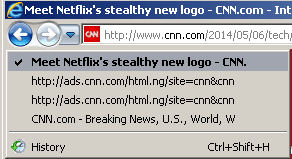
Do you have anything installed that might be blocking unwanted elements of a web page? If so, it could prevent the back button from working on some sites.

Try clicking the dropdown arrow next to the back button next time it happens and see if anything is listed there. Take a screenshot of the results and post it,
 

My Computer My Computer

Computer type
Laptop
Computer Manufacturer/Model Number
ASUS
OS
Microsoft Windows 7 Home Premium 64-bit 7601 Multiprocessor Free Service Pack 1
CPU
AMD C-60 APU with Radeon(tm) HD Graphics
Motherboard
ASUSTeK COMPUTER INC. X501U
Memory
4.00 GB
Graphics Card(s)
AMD Radeon HD 6290 Graphics
Sound Card
(1) AMD High Definition Audio Device (2) Realtek High Defi
Screen Resolution
1366 x 768 x 32 bits (4294967296 colors) @ 60 Hz
Hard Drives
Hitachi HTS545050A7E380 SATA Disk Device
Antivirus
Comodo CIS & FW, SecureAplus App Whitelisting, Threatfire
Browser
Cyberfox 64bit, Opera 64bit, Airfox
Other Info
Spy-The-Spy, HitmanPro.Alert, Norton Connect Safe, MJRegWatcher, BitDefender TrafficLight, Voodoo Shield, Zemana AntiMalware
Do you have anything installed that might be blocking unwanted elements of a web page? If so, it could prevent the back button from working on some sites.

Try clicking the dropdown arrow next to the back button next time it happens and see if anything is listed there. Take a screenshot of the results and post it,
In my case, it is the HOSTS file that causes this back button failure on certain websites:
Back.png

I generally open pages in a new tab...
...then close that new tab when I've finished with it
...thus, taking me "back" to the main page.
 
Last edited:

My Computer My Computer

Computer type
Laptop
Computer Manufacturer/Model Number
Employer provided Dell Latitude
OS
W7 Pro SP1 64bit
CPU
i7
Memory
8GB
Graphics Card(s)
Intel HD Graphics
Hard Drives
crappy SSD
Antivirus
Employer mandated Symantec Endpoint Protection
Browser
Pale Moon 64bit, IE11 64bit & Chrome 64bit
Possible workaround

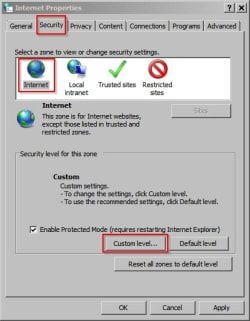
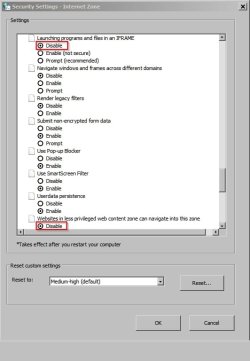
There's a possible workaround:

Control Panel > Internet Options > Security tab

Then set options highlighted:

Internet Properties.jpg

Security Settings - Internet Zone.jpg

In addition adding any sites listed in the back button dropdown list to the resticted zone is reported to work.

However the technique described by UsernameIssues is probably the easiest one to use!
 

My Computer My Computer

Computer type
Laptop
Computer Manufacturer/Model Number
ASUS
OS
Microsoft Windows 7 Home Premium 64-bit 7601 Multiprocessor Free Service Pack 1
CPU
AMD C-60 APU with Radeon(tm) HD Graphics
Motherboard
ASUSTeK COMPUTER INC. X501U
Memory
4.00 GB
Graphics Card(s)
AMD Radeon HD 6290 Graphics
Sound Card
(1) AMD High Definition Audio Device (2) Realtek High Defi
Screen Resolution
1366 x 768 x 32 bits (4294967296 colors) @ 60 Hz
Hard Drives
Hitachi HTS545050A7E380 SATA Disk Device
Antivirus
Comodo CIS & FW, SecureAplus App Whitelisting, Threatfire
Browser
Cyberfox 64bit, Opera 64bit, Airfox
Other Info
Spy-The-Spy, HitmanPro.Alert, Norton Connect Safe, MJRegWatcher, BitDefender TrafficLight, Voodoo Shield, Zemana AntiMalware

My Computer My Computer

Computer type
PC/Desktop
Computer Manufacturer/Model Number
Custom assembled by me :}
OS
Win-7-Pro64bit 7-H-Prem-64bit
CPU
i7-5930K 2nd i9-9940x both water blocked VRM's too
Motherboard
ASUS SABERTOOTH X99 2nd ASUS x299 Apex
Memory
Trident-z 3200C14 2nd Trident-z 3600C16
Graphics Card(s)
EVGA 1080ti ftw3 2nd Titan Xp both water blocked
Sound Card
Built-in Realtek
Monitor(s) Displays
1-AOC G2460PG 24"G-Sync 144Hz/ 2nd 1-ASUS VG248QE 24" 144Hz
Screen Resolution
1920 x 1080 144Hz
Hard Drives
2-Samsung M.2 Evo & Evo Plus
2-Samsung 850 EVO 500GB SSD's/ 3-2.5 W.D. Black 1tb-&3-1tb/3-3.5 WD Black 1tb hdd's
PSU
EVGA SuperNOVA 1000-P2 2nd 1200-P2
Case
2-Corsair Obsidian Series 450D Black ATX Mid Tower
Cooling
Custom water loops
Keyboard
Logitech G710+/ 2nd Logitech G910
Mouse
2-RedDragon M901 Perdition 16400 dpi Gaming mouse = wired
Internet Speed
Comcast Ping 19ms 89.31mbps download speed 6.12mbps upload
Antivirus
Malwarebytes Pro/ Superantispyware Pro
Browser
FireFox & Pale moon
Other Info
2nd ASUS X299 Apex/Intel i9-9940x with Custom water loop/7H-Prem-x64/Corsair 450D case/Ram Trident-z 3600C16 4x8gb / Samsung970Evo plus 500gb SSD/Dual ssd EZ swap evo/PSU EVGA SuperNova 1200w-P2 80+Platinum/GPU Titan Xp /8-ML-140 on push-pull on 2-280GTX rads
Thanks guys

Thank you for your great suggestions, I have changed the settings as per Callender's suggestions and will report back in a day or so.
 

My Computer My Computer

OS
MS Win7 home premium 64bit
CPU
Intel i3 530
Motherboard
Gigabyte GA-H55M-S2H
Memory
2 x 2G
Monitor(s) Displays
Acer T230H
Hard Drives
1Tb-SATA2-32Mb
Case
Awyun mid tower
Keyboard
Microsoft comfort curve keyboard 2000 v1.0
Mouse
Microsoft optical
~~~
In addition adding any sites listed in the back button dropdown list to the resticted zone is reported to work.

However the technique described by UsernameIssues is probably the easiest one to use!
I have modified my first post to this thread in the hopes of being clearer about the HOSTS file.

I used the new tab or new window scheme long before this back button issue showed up. I find that it helps me organize the windows that I have open.
 

My Computer My Computer

Computer type
Laptop
Computer Manufacturer/Model Number
Employer provided Dell Latitude
OS
W7 Pro SP1 64bit
CPU
i7
Memory
8GB
Graphics Card(s)
Intel HD Graphics
Hard Drives
crappy SSD
Antivirus
Employer mandated Symantec Endpoint Protection
Browser
Pale Moon 64bit, IE11 64bit & Chrome 64bit
Hi Guys,
Thanks again for your suggestions. I have disabled some of the custom settings listed above by Callender and this has improved the issue with the back button not working. Interestingly the back button still does not work on Mashable's web site www.mashable.com at all. I understand the issue with the back button in IE is a known problem going back several versions, so I am going to mark this issue as resolved.
I have also learned that if you type a message in the message box and click mark as solved before posting, you lose everything you just typed :D
 

My Computer My Computer

OS
MS Win7 home premium 64bit
CPU
Intel i3 530
Motherboard
Gigabyte GA-H55M-S2H
Memory
2 x 2G
Monitor(s) Displays
Acer T230H
Hard Drives
1Tb-SATA2-32Mb
Case
Awyun mid tower
Keyboard
Microsoft comfort curve keyboard 2000 v1.0
Mouse
Microsoft optical
......the issue with the back button in IE is a known problem......
My guess is that it works as designed. There won't be a fix for it.

Certain websites know/like this design and have presented their adverts in such a way as to be a pain to those that block their adverts. Or maybe I'm just too cynical :-)
 

My Computer My Computer

Computer type
Laptop
Computer Manufacturer/Model Number
Employer provided Dell Latitude
OS
W7 Pro SP1 64bit
CPU
i7
Memory
8GB
Graphics Card(s)
Intel HD Graphics
Hard Drives
crappy SSD
Antivirus
Employer mandated Symantec Endpoint Protection
Browser
Pale Moon 64bit, IE11 64bit & Chrome 64bit
Not surprising with all of these links listed,
Report it to the site,
View attachment 317900
Which is self explanatory on what to add to your restricted sites zone ;)
 
Last edited:

My Computer My Computer

Computer type
PC/Desktop
Computer Manufacturer/Model Number
Custom assembled by me :}
OS
Win-7-Pro64bit 7-H-Prem-64bit
CPU
i7-5930K 2nd i9-9940x both water blocked VRM's too
Motherboard
ASUS SABERTOOTH X99 2nd ASUS x299 Apex
Memory
Trident-z 3200C14 2nd Trident-z 3600C16
Graphics Card(s)
EVGA 1080ti ftw3 2nd Titan Xp both water blocked
Sound Card
Built-in Realtek
Monitor(s) Displays
1-AOC G2460PG 24"G-Sync 144Hz/ 2nd 1-ASUS VG248QE 24" 144Hz
Screen Resolution
1920 x 1080 144Hz
Hard Drives
2-Samsung M.2 Evo & Evo Plus
2-Samsung 850 EVO 500GB SSD's/ 3-2.5 W.D. Black 1tb-&3-1tb/3-3.5 WD Black 1tb hdd's
PSU
EVGA SuperNOVA 1000-P2 2nd 1200-P2
Case
2-Corsair Obsidian Series 450D Black ATX Mid Tower
Cooling
Custom water loops
Keyboard
Logitech G710+/ 2nd Logitech G910
Mouse
2-RedDragon M901 Perdition 16400 dpi Gaming mouse = wired
Internet Speed
Comcast Ping 19ms 89.31mbps download speed 6.12mbps upload
Antivirus
Malwarebytes Pro/ Superantispyware Pro
Browser
FireFox & Pale moon
Other Info
2nd ASUS X299 Apex/Intel i9-9940x with Custom water loop/7H-Prem-x64/Corsair 450D case/Ram Trident-z 3600C16 4x8gb / Samsung970Evo plus 500gb SSD/Dual ssd EZ swap evo/PSU EVGA SuperNova 1200w-P2 80+Platinum/GPU Titan Xp /8-ML-140 on push-pull on 2-280GTX rads
I forgot to mention that I have none of these problems with the back button when I use Google chrome, I prefer to stay with IE though - for now
 

My Computer My Computer

OS
MS Win7 home premium 64bit
CPU
Intel i3 530
Motherboard
Gigabyte GA-H55M-S2H
Memory
2 x 2G
Monitor(s) Displays
Acer T230H
Hard Drives
1Tb-SATA2-32Mb
Case
Awyun mid tower
Keyboard
Microsoft comfort curve keyboard 2000 v1.0
Mouse
Microsoft optical
Hi,
Read post# 10,
Gear symbol on the top right/ Internet options/ Security section/ Restricted sites Icon/ Sites button,
Clear the sites box and type the url of the problematic tripleclick listing in there and click on Add.
Save changes,
Close Internet explorer and reopen.
Cheers.
 

My Computer My Computer

Computer type
PC/Desktop
Computer Manufacturer/Model Number
Custom assembled by me :}
OS
Win-7-Pro64bit 7-H-Prem-64bit
CPU
i7-5930K 2nd i9-9940x both water blocked VRM's too
Motherboard
ASUS SABERTOOTH X99 2nd ASUS x299 Apex
Memory
Trident-z 3200C14 2nd Trident-z 3600C16
Graphics Card(s)
EVGA 1080ti ftw3 2nd Titan Xp both water blocked
Sound Card
Built-in Realtek
Monitor(s) Displays
1-AOC G2460PG 24"G-Sync 144Hz/ 2nd 1-ASUS VG248QE 24" 144Hz
Screen Resolution
1920 x 1080 144Hz
Hard Drives
2-Samsung M.2 Evo & Evo Plus
2-Samsung 850 EVO 500GB SSD's/ 3-2.5 W.D. Black 1tb-&3-1tb/3-3.5 WD Black 1tb hdd's
PSU
EVGA SuperNOVA 1000-P2 2nd 1200-P2
Case
2-Corsair Obsidian Series 450D Black ATX Mid Tower
Cooling
Custom water loops
Keyboard
Logitech G710+/ 2nd Logitech G910
Mouse
2-RedDragon M901 Perdition 16400 dpi Gaming mouse = wired
Internet Speed
Comcast Ping 19ms 89.31mbps download speed 6.12mbps upload
Antivirus
Malwarebytes Pro/ Superantispyware Pro
Browser
FireFox & Pale moon
Other Info
2nd ASUS X299 Apex/Intel i9-9940x with Custom water loop/7H-Prem-x64/Corsair 450D case/Ram Trident-z 3600C16 4x8gb / Samsung970Evo plus 500gb SSD/Dual ssd EZ swap evo/PSU EVGA SuperNova 1200w-P2 80+Platinum/GPU Titan Xp /8-ML-140 on push-pull on 2-280GTX rads
I see the same thing: only IE does this...
...but like I mentioned, I think that this is by design and won't be fixed.
 

My Computer My Computer

Computer type
Laptop
Computer Manufacturer/Model Number
Employer provided Dell Latitude
OS
W7 Pro SP1 64bit
CPU
i7
Memory
8GB
Graphics Card(s)
Intel HD Graphics
Hard Drives
crappy SSD
Antivirus
Employer mandated Symantec Endpoint Protection
Browser
Pale Moon 64bit, IE11 64bit & Chrome 64bit
Hi,
Read post# 10,
Gear symbol on the top right/ Internet options/ Security section/ Restricted sites Icon/ Sites button,
Clear the sites box and type the url of the problematic tripleclick listing in there and click on Add.
Save changes,
Close Internet explorer and reopen.
Cheers.

My father is having this same issue. He is far away from me, so I cannot try this solution yet. Can anyone confirm this fixes it? In his case the page his on seems to duplicate itself many times under the back button just like post 10 "Mashables". In Dad's case it is NBC.com. If I enter NBC.com under restricted sites won't it block all of NBC.com?
 
Last edited:

My Computer My Computer

Computer type
PC/Desktop
Computer Manufacturer/Model Number
Custom
OS
Microsoft Windows 7 Home Premium 64-bit 7601 Multiprocessor Free Service Pack 1
CPU
Intel(R) Core(TM) i7 CPU 860 @ 2.80GHz
Motherboard
ASRock P55 Pro
Memory
8.00 GB
Graphics Card(s)
NVIDIA GeForce GTX 670
Sound Card
(1) High Definition Audio Device (2) Logitech G930 Headset
Screen Resolution
1920 x 1080 x 32 bits (4294967296 colors) @ 60 Hz
Hard Drives
(1) Hitachi HDS5C3020ALA632 ATA Device (2) Samsung SSD 850 EVO 500GB ATA Device (3) EPSON Stylus Storage USB Device (4) (5) Generic- MS/MS-Pro USB Device (6) Generic- SD/MMC USB Device (7) Generic- SM/xD-Picture USB Device
Hi,
Yes it will block nbc.com so no you would not want to enter that url in the restricted zone,

You would want to enter which ever url that is duplicated because that's the site that's in the way,
So you do need to manually write that url down and enter it in the restricted zones add box,
Once that's done just that url is blocked and not nbc.com which is most likely unaware of the rouge site being an issue,
Then all you would need to do is close Internet explorer and re-open/ visit the site again and test the issue,
Cheers.
Code:
http://mashable.com/tripleclick.html
 

My Computer My Computer

Computer type
PC/Desktop
Computer Manufacturer/Model Number
Custom assembled by me :}
OS
Win-7-Pro64bit 7-H-Prem-64bit
CPU
i7-5930K 2nd i9-9940x both water blocked VRM's too
Motherboard
ASUS SABERTOOTH X99 2nd ASUS x299 Apex
Memory
Trident-z 3200C14 2nd Trident-z 3600C16
Graphics Card(s)
EVGA 1080ti ftw3 2nd Titan Xp both water blocked
Sound Card
Built-in Realtek
Monitor(s) Displays
1-AOC G2460PG 24"G-Sync 144Hz/ 2nd 1-ASUS VG248QE 24" 144Hz
Screen Resolution
1920 x 1080 144Hz
Hard Drives
2-Samsung M.2 Evo & Evo Plus
2-Samsung 850 EVO 500GB SSD's/ 3-2.5 W.D. Black 1tb-&3-1tb/3-3.5 WD Black 1tb hdd's
PSU
EVGA SuperNOVA 1000-P2 2nd 1200-P2
Case
2-Corsair Obsidian Series 450D Black ATX Mid Tower
Cooling
Custom water loops
Keyboard
Logitech G710+/ 2nd Logitech G910
Mouse
2-RedDragon M901 Perdition 16400 dpi Gaming mouse = wired
Internet Speed
Comcast Ping 19ms 89.31mbps download speed 6.12mbps upload
Antivirus
Malwarebytes Pro/ Superantispyware Pro
Browser
FireFox & Pale moon
Other Info
2nd ASUS X299 Apex/Intel i9-9940x with Custom water loop/7H-Prem-x64/Corsair 450D case/Ram Trident-z 3600C16 4x8gb / Samsung970Evo plus 500gb SSD/Dual ssd EZ swap evo/PSU EVGA SuperNova 1200w-P2 80+Platinum/GPU Titan Xp /8-ML-140 on push-pull on 2-280GTX rads
Not Just IE 11, It's a Feature In IE 9 and IE 10 Too!

Found this thread looking for the cause of the IE 10 Back Button not working. Was hoping it had been fixed in IE 11. Like others I discovered this has been a "feature" of Internet Exploder since IE 9. Reason I'd never noted it before is the nearly exclusive use of Firefox. Apparently IE 8 was the last version that didn’t suffer this, the IE supplied with the initial release of Windows 7. You’d think MicroSloth would have fixed it by now, two full release versions after it appeared!

Hadn’t used Internet Exploder in eons, but had kept it installed and ultimately updated it on all my Win7 machines to version 10 (four of them). Was in the process of finally updating desktop #1, my primary PC, from Windows XP Pro /x64 to Windows 7 Ultimate /x64, a task that should have been done months ago. It was the final holdout, but the other four don't have nearly the volume of legacy data or applications found on my primary.

In the process of putting Win 7 Ultimate onto an outboard alternate boot drive I updated the IE 8 it comes with to IE 10 to match the versions on all the other machines. Had not installed Firefox and transferred all the settings from the XP drive to it yet. Used IE 10 for a variety of online tasks getting utility software (e.g. Acrobat Reader, 7Zip, Firefox, Thunderbird, etc.) and that's when I noted the seemingly non-functional back button, a major annoyance.

Quickly discovered in actuality the IE back button is functional. It's fully functional. As already mentioned, the loading of various banner ads and other web page features (such as social media links) gets heaped into the browser history as it relates to the back button, requiring you to wade back through a half-dozen or more elements loaded onto the web page to get to the real previous page. That's if you can click fast enough before all those elements reload and get added back to the history list. I even tried using the little known “No Add-ons” Internet Exploder (found under Start --> Accessories --> System Tools), the “Safe Mode” equivalent of IE, to see if any add-ons or browser helper objects were responsible without success. Even a bare-bones IE suffers it.

One of the oft-touted solutions of adding ad-serving domains to the restricted list (to block them) doesn't work well. I tried this with the doubleclick.net domain, only to discover I needed to add more domains, and yet more domains, to a growing list of them. In addition, as one already observed, you could end up inadvertently blocking a domain that you do not want to, or perhaps should not, block.This IS NOT a proper solution.

I’ve verified this doesn’t occur with the latest versions of Firefox (31) or Opera (23). Although I’ve not tested Chrome or Safari, remarks by others in other forums and threads lead me to believe it doesn’t afflict them either. It’s a feature exclusive to Internet Exploder, through three full versions now. It’s truly amazing how all the other browsers haven’t managed to incorporate it yet. Yet M$ wonders, to the extent of having recently held an online event as a prelude to IE 12 development, why their browser has lost enormous “market share” in just a few years since IE 6, from nearly 90% to just barely over 50%. Notwithstanding its cumbersome GUI, it’s features like this that drives people from the default included with every Windoze distro to other browsers. M$ might just fix this in IE 12, but I'm not holding out much hope for it, as they've successfully ignored an enormous number of queries on the Internet about the "broken back button," including in their own forums, since the roll out of IE 9.

I do NOT recommend dialing back to IE 8, the last version not afflicted, as it’s been abandoned by M$ with no future security updates and would pose a potential security issue (a problem for XP holdouts), not to mention rapidly becoming incompatible with current web development. The real solution to Internet Exploder’s defective “back button” is abandoning it for Firefox, Opera, Chrome, or Safari. Take your pick.

John

 
Last edited:

My Computer My Computer

Computer type
PC/Desktop
Computer Manufacturer/Model Number
HP 6515b & HP 6455b laptops; three custom build desktops
OS
Win7 Pro x64 and Win7 Ultimate x64 (depends on machine)
CPU
Custom Desktops: FX 8350, FX 8150, Phenom II X6 1100T
Motherboard
Custom Desktops: 990FXA-UD3, A890FX Deluxe4, M4A79T
Memory
8GB RAM in all machines, except HP 6515b laptop (4GB max)
Graphics Card(s)
Custom Desktops: XFX R9 270X, XFX R7870, and XFX HD6870
Monitor(s) Displays
Various HP and one Samsung 26" TV/monitor combo
Screen Resolution
1920 x 1080
Hard Drives
500GB WD (laptops) 1TB WD (desktops)
Internet Speed
30 Mbps cable
Antivirus
Avast!
Browser
Firefox
I got my solution- Switched to Google Chrome
 

My Computer My Computer

Computer type
PC/Desktop
Computer Manufacturer/Model Number
Custom
OS
Microsoft Windows 7 Home Premium 64-bit 7601 Multiprocessor Free Service Pack 1
CPU
Intel(R) Core(TM) i7 CPU 860 @ 2.80GHz
Motherboard
ASRock P55 Pro
Memory
8.00 GB
Graphics Card(s)
NVIDIA GeForce GTX 670
Sound Card
(1) High Definition Audio Device (2) Logitech G930 Headset
Screen Resolution
1920 x 1080 x 32 bits (4294967296 colors) @ 60 Hz
Hard Drives
(1) Hitachi HDS5C3020ALA632 ATA Device (2) Samsung SSD 850 EVO 500GB ATA Device (3) EPSON Stylus Storage USB Device (4) (5) Generic- MS/MS-Pro USB Device (6) Generic- SD/MMC USB Device (7) Generic- SM/xD-Picture USB Device
I got my solution- Switched to Google Chrome
:D

Mine has been a combination of Firefox and Opera. There are personal historical reasons for using Opera directly related to the 2nd Browser Holy Wars. From a Norwegian company, it has more popularity in Europe than in North America. I haven't tried Chrome yet, nor Safari on a PC, which I may ultimately do just to see what they look like but that's way down the priority list (and likely to stay there). Safari is on my iPad, Touch and iPhone and those versions of it are quite good for that. No aversion to either one. With Firefox and Opera there just hasn't been a perceived need for either of them yet on any of my PCs.

John
 

My Computer My Computer

Computer type
PC/Desktop
Computer Manufacturer/Model Number
HP 6515b & HP 6455b laptops; three custom build desktops
OS
Win7 Pro x64 and Win7 Ultimate x64 (depends on machine)
CPU
Custom Desktops: FX 8350, FX 8150, Phenom II X6 1100T
Motherboard
Custom Desktops: 990FXA-UD3, A890FX Deluxe4, M4A79T
Memory
8GB RAM in all machines, except HP 6515b laptop (4GB max)
Graphics Card(s)
Custom Desktops: XFX R9 270X, XFX R7870, and XFX HD6870
Monitor(s) Displays
Various HP and one Samsung 26" TV/monitor combo
Screen Resolution
1920 x 1080
Hard Drives
500GB WD (laptops) 1TB WD (desktops)
Internet Speed
30 Mbps cable
Antivirus
Avast!
Browser
Firefox
Hi,
Ignoring the real issue of a website/s being corrupted via the advertisements they host really is interesting :/

Blocking content is a fine line to walk ;)
It is a tough one to report an issue to a website of the listings jamming the backwards button :)
Websites become hacked it's just a sign of poorly maintained websites.
Cheers.
 

My Computer My Computer

Computer type
PC/Desktop
Computer Manufacturer/Model Number
Custom assembled by me :}
OS
Win-7-Pro64bit 7-H-Prem-64bit
CPU
i7-5930K 2nd i9-9940x both water blocked VRM's too
Motherboard
ASUS SABERTOOTH X99 2nd ASUS x299 Apex
Memory
Trident-z 3200C14 2nd Trident-z 3600C16
Graphics Card(s)
EVGA 1080ti ftw3 2nd Titan Xp both water blocked
Sound Card
Built-in Realtek
Monitor(s) Displays
1-AOC G2460PG 24"G-Sync 144Hz/ 2nd 1-ASUS VG248QE 24" 144Hz
Screen Resolution
1920 x 1080 144Hz
Hard Drives
2-Samsung M.2 Evo & Evo Plus
2-Samsung 850 EVO 500GB SSD's/ 3-2.5 W.D. Black 1tb-&3-1tb/3-3.5 WD Black 1tb hdd's
PSU
EVGA SuperNOVA 1000-P2 2nd 1200-P2
Case
2-Corsair Obsidian Series 450D Black ATX Mid Tower
Cooling
Custom water loops
Keyboard
Logitech G710+/ 2nd Logitech G910
Mouse
2-RedDragon M901 Perdition 16400 dpi Gaming mouse = wired
Internet Speed
Comcast Ping 19ms 89.31mbps download speed 6.12mbps upload
Antivirus
Malwarebytes Pro/ Superantispyware Pro
Browser
FireFox & Pale moon
Other Info
2nd ASUS X299 Apex/Intel i9-9940x with Custom water loop/7H-Prem-x64/Corsair 450D case/Ram Trident-z 3600C16 4x8gb / Samsung970Evo plus 500gb SSD/Dual ssd EZ swap evo/PSU EVGA SuperNova 1200w-P2 80+Platinum/GPU Titan Xp /8-ML-140 on push-pull on 2-280GTX rads
I tried what post #4 suggested and it seemed to work as far as correcting the Back Button problem.

However, it a also changed quite a number of the icons on my Desktop. Short of undoing the settings does anyone know how to get the original icons back and keep the suggested settings?
 

My Computer My Computer

Computer type
PC/Desktop
Computer Manufacturer/Model Number
HP
OS
7-32 bit
Back
Top