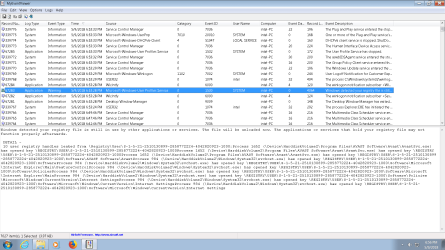
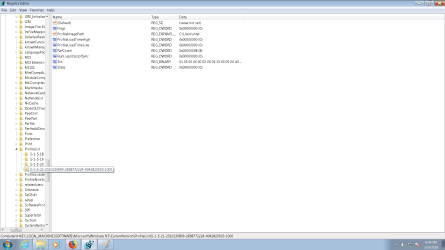
User Profile Service failed the logon. User profile cannot be loaded.

Fix "The User Profile Service failed the logon. User profile cannot be loaded." Error in Windows 7

   Information
A user profile is a collection of settings that make the computer look and work the way you want it to for a user account. It contains the account's settings for desktop backgrounds, screen savers, pointer preferences, sound settings, and other features. User profiles ensure that your personal preferences are used whenever you sign in to Windows.

A user profile is different from a user account, which you use to sign in to Windows. Each user account has at least one user profile associated with it.

This tutorial will show you how to fix when you log on to Windows 7 using a temporary profile, and get the following error message:

The User Profile Service failed the logon. User profile cannot be loaded.

This tutorial was updated from our Vista Forums tutorial created 02-10-2008:
The User Profile Service failed the logon. User profile cannot be loaded. - Vista Forums

For additional details on this user profile error, see also:
Error message: "The User Profile Service failed the logon. User profile cannot be loaded

   Note
Known Causes:
  • The C:\Users\(user-name) user profile folder was manually deleted instead of properly deleting the user account through User Accounts in the Control Panel. A user profile that is manually deleted does not remove the security identifier (SID) from the profile list in the registry. Since the SID is still present, Windows 7 will still try to load the profile by using the ProfileImagePath that points to a nonexistent path. Therefore, the profile cannot be loaded.
  • The C:\Users\(user-name) user profile folder itself was manually renamed, instead of using the proper method in this tutorial.
  • An unknown issue with the user profile entering into a backup state occurred.
  • Corrupted user profile.
  • Occasionally, Windows 7 might not read your user profile correctly, for example, if your antivirus software is scanning your computer while you try to log on. Try restarting your computer and logging on with your user account again to resolve the issue before following the options below.


In Preparation:

Log On to an Administrator Account


NOTE: You must be logged on to another administrator account using either step below before you will be able to move on to either OPTION ONEor OPTION TWO below.
1. To Log on to another Administrator account.
NOTE: If you do not have another Administrator account, then proceed to step 2.
A) Log off, and log on to an available administrator account that doesn't have this error.

B) Go to either OPTION ONEor OPTION TWO below for what you would like to do.
OR

2. To Boot into "Safe Mode" and Use the built-in Administrator account
A) Using your "retail" Windows 7 installation disc or a created system repair disc, boot into Safe Mode.

B) Do either step C or D below depending if Safe Mode booted into the built-in Administrator account by default or not.
NOTE: If this user account with the user profile error was the only administrator account you had created or enabled, then Safe Mode may automatically boot into the built-in Administrator account.

C) If Safe Mode did not boot into the built-in Administrator account by default, then enable the built-in Administrator account, log off in Safe Mode, and log on to the built-in Administrator account to logon to that account in Safe Mode.

D) If Safe Mode did boot into the built-in Administrator account by default, then go to either OPTION ONE or OPTION TWO below for what you would like to do.
OR

3. To Enable the Built-in Administrator account at Boot
A) For how, see: How to Enable the Built-in Elevated "Administrator" Account from WinRE

B) When enabled, log in to the built-in Administrator account, and go to either OPTION ONE or OPTION TWO below for what you would like to do


OPTION ONE

To Fix the User Account Profile


1. Before starting, it is highly recommended that you create a system restore point in case you make a mistake while in the registry. This way you will easily be able to do a system restore to use the created restore point to undo the mistake.

2. Open the Start Menu, type regedit in the search box, and press Enter.

3. If prompted by UAC, then click on Yes.

4. In regedit, navigate to the location below. (see screenshot below step 5A)
Code:
HKEY_LOCAL_MACHINE\SOFTWARE\Microsoft\Windows NT\CurrentVersion\ProfileList
5. In the left pane, click on a S-1-5 (SID) key with a long number.
A) In the right pane of the selected S-1-5 (SID) key, look at the Data value of ProfileImagePath to see if it is the user account (ex: Moderator) with the error.
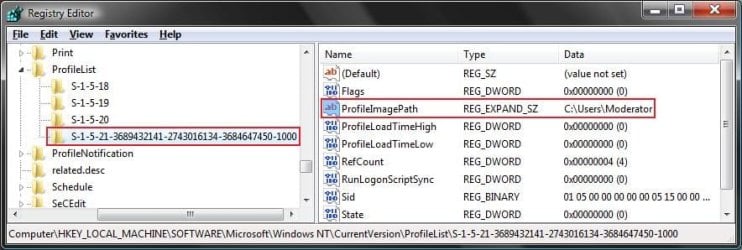
SID_Reg.jpg
B) If not, then repeat steps 5 and 5A until you have the correct S-1-5 (SID) key with a long number selected.

C) If it is, then continue on to step 6 or step 7 depending on if you have either one or two S-1-5 (SID) keys listed with the exact same long number. One without .bak, and one with .bak at the end.
6. If you have Two S-1-5 (SID) keys with the Same Long Numbers
NOTE: This is if you have two S-1-5 folders (SID key) with the exact same long numbers, but the second one has .bak at the end of the long numbers and the first one doesn't.
A) In the left pane, right click on the first (top) S-1-5..... folder (SID key) that does not have .bak at the end of the numbers and click Rename. (see screenshot below)
Repair.jpg
B) Add .bk to the end of the numbers. (see screenshot below)
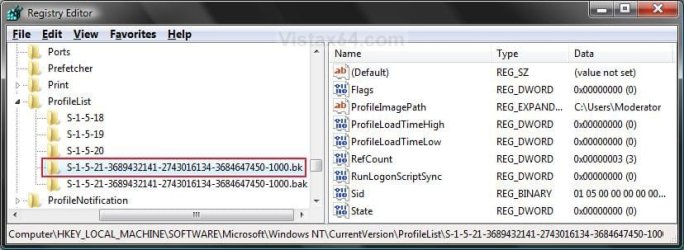
Repair_bk.jpg
C) In the left pane, right click on the second S-1-5..... folder (SID key) with .bak at the end of the numbers and click Rename. (see screenshot below step 6B)

D) Remove only .bak from the end of the numbers and press Enter. (see screenshot below step 6B)

E) Now go back and Rename the first one with .bk to .bak now at the end of the numbers and press Enter. (see screenshot below)
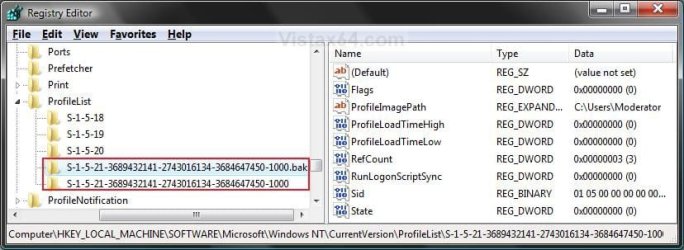
Repar_bak.jpg
F) Go to step 8.
7. If you have Only One S-1-5 (SID) key with .bak
NOTE: This is if you have only one S-1-5 folder (SID key) with long numbers and ended with .bak.
A) In the left pane, right click on the S-1-5..... folder (SID key) with .bak at the end of the numbers and click Rename. (see screenshot below step 7B)

B) Remove only .bak at the end of the numbers and press Enter. (see screenshot below and below step 10)
Repair_Reg2.jpg
8. In the right pane of the one without .bak now, right click on RefCount and click on Modify. (see screenshot below step 10)
NOTE: If you do not have RefCount, then right click on a empty space in the right pane and click New and DWORD (32 bit) Value, then type RefCount and press Enter. This value for this entry will reset and return back to the original value after you have restarted the computer and logged on to the account.
A) Type 0 (number) and click on OK. (see screenshot below)
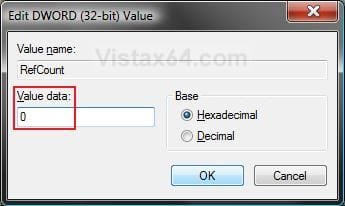
Modify_RefCount.jpg
9. In the right pane of the one without .bak now, right click on State and click on Modify. (see screenshot below step 10)
NOTE: This value for this entry will reset and return back to the original value after you have restarted the computer and logged on to the account.
A) Type 0 (number) and click on OK. (see screenshot below)
Modify_State.jpg
10. The registry will now look like this for the one without .bak now. (see screenshot below)
Repair_Reg2.jpg
11. Close regedit, and restart the computer.

12. See if you are able to log on to the use account now without getting this error.

   Tip
If this still does not help, then either try:


OPTION TWO

To Delete the User Account and Create a New User Account


NOTE: This option is only if you do not care about losing the user account with this error and possibly all contents of it's C:\Users\(user-name) user profile folder. Your programs will still be installed and unaffected.
1. Before starting, it is highly recommended that you create a system restore point in case you make a mistake while in the registry. This way you will easily be able to do a system restore to use the created restore point to undo the mistake.

2. Create a new user account that is the same type (standard or administrator) as the user account with this error.

3. If you are able to, you could copy the contents of the user folders from the old user account's C:\Users\(user-name) user profile folder with the error into the new account's (step 2) C:\Users\(user-name) user profile folder. Be sure to also copy any shortcuts in the Start Menu from the old user account into the new user account as well.

4. In User Accounts from the Control Panel, delete the user account with the error.

5. Open the Start Menu, type regedit in the search box, and press Enter.

6. If prompted by UAC, then click on Yes.

7. In regedit, navigate to the location below. (see screenshot below step 8A)
Code:
HKEY_LOCAL_MACHINE\SOFTWARE\Microsoft\Windows NT\CurrentVersion\ProfileList
8. In the left pane, click on a S-1-5 (SID) key with a long number.
A) In the right pane of the selected S-1-5 (SID) key, look at the Data value of ProfileImagePath to see if it is the user account (ex: Moderator) with the error.
SID_Reg.jpg
B) If not, then repeat steps 8 and 8A until you have the correct S-1-5 (SID) key with a long number selected.

C) If it is, then continue on to step 9.
9. Right click on the selected SID key with the long number, and click on Delete.

10. Click on Yes to confirm deletion. (see screenshot below)
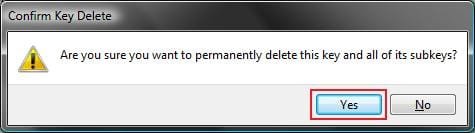
Confirm.jpg
11. If there is another SID key directly below the selected SID key (step 9) with the exact same long number with .bak at the end, then right click on this same SID key with .bak on it, and click on Delete. (see screenshot below)
Repair.jpg

A) Click on Yes to confirm deletion. (see screenshot below)
Confirm.jpg
12. When finished, close regedit.

13. Restart the computer, and log on to your new account.


That's it,
Shawn


Last edited:
Perfect

Hey Brink,

Option one worked like a charm. Thanks a lot. Simply followed it word to word.

Just to add, the little trouble i had was logging in. I only have one account and that's the admin. So i just started the laptop, pressed f8 several times, ran safe mode, and no trouble logging in.

After that, the option 1 in 'regedit' took care of the rest.

Thanks again!
 

My Computer My Computer

At a glance

Windows 7 ultimate x64
Computer type
PC/Desktop
OS
Windows 7 ultimate x64
For me the fix of renaming the SID has always worked to restore access to the correct profile, however what about the additional profiles I see under "C:\Users\" on the hard drive? Sometimes there are tmp profiles and/or profiles with variations on the user's name. Is it safe to delete these entries or is there some interaction or data sharing between them and the "real" user profile? TIA
 

My Computer My Computer

At a glance

Windows 7 x64Intel Core2 Extreme Q6850 3.00GHz8 GBRadeon R7 260X
Computer type
PC/Desktop
OS
Windows 7 x64
CPU
Intel Core2 Extreme Q6850 3.00GHz
Motherboard
EVGA 132-CK-NF79
Memory
8 GB
Graphics Card(s)
Radeon R7 260X
Sound Card
Xonar DS
Hard Drives
Hitachi Deskstar 1 tb
Hey Victek,

If you don't have a user account for a long SID key, then it would usually be safe to delete it. Just be sure not to delete any of the system accounts with the shorter SID key, or any accounts that may have been added by a program. :)
 

My Computer My Computer

At a glance

64-bit Windows 11 Pro for WorkstationsIntel i7-8700K OC'd to 5 GHz64 GB (4x16GB) G.SKILL TridentZ RGB DDR4 3600...ASUS ROG-STRIX-GTX1080TI-O11G-GAMING
Computer type
PC/Desktop
Computer Manufacturer/Model Number
Self built custom
OS
64-bit Windows 11 Pro for Workstations
CPU
Intel i7-8700K OC'd to 5 GHz
Motherboard
ASUS ROG Maximus XI Formula Z390
Memory
64 GB (4x16GB) G.SKILL TridentZ RGB DDR4 3600 MHz
Graphics Card(s)
ASUS ROG-STRIX-GTX1080TI-O11G-GAMING
Sound Card
Integrated
Monitor(s) Displays
2 x Samsung Odyssey G7 27"
Screen Resolution
2560x1440
Hard Drives
1TB Samsung 990 PRO M.2,
4TB Samsung 990 PRO PRO M.2,
TerraMaster F8 SSD Plus NAS
PSU
Seasonic Prime Titanium 850W
Case
Thermaltake Core P3
Cooling
Corsair Hydro H115i
Keyboard
Logitech wireless K800
Mouse
Logitech MX Master 4
Internet Speed
2 Gb/s Download and 100 Mb/s Upload
Antivirus
Malwarebyte Anti-Malware Premium
Browser
Google Chrome
Other Info
Logitech Z625 speaker system,
Logitech BRIO 4K Pro webcam,
HP Color LaserJet Pro MFP M477fdn,
APC SMART-UPS RT 1000 XL - SURT1000XLI,
Galaxy S23 Plus phone
Hey Victek,

If you don't have a user account for a long SID key, then it would usually be safe to delete it. Just be sure not to delete any of the system accounts with the shorter SID key, or any accounts that may have been added by a program. :)

Yes, I see that the short SIDs have system related Profile Image Paths while the long SIDs refer to user created accounts. I'm not sure what you mean by accounts added by a program though. Can you say more about how to identify this?
 

My Computer My Computer

At a glance

Windows 7 x64Intel Core2 Extreme Q6850 3.00GHz8 GBRadeon R7 260X
Computer type
PC/Desktop
OS
Windows 7 x64
CPU
Intel Core2 Extreme Q6850 3.00GHz
Motherboard
EVGA 132-CK-NF79
Memory
8 GB
Graphics Card(s)
Radeon R7 260X
Sound Card
Xonar DS
Hard Drives
Hitachi Deskstar 1 tb
Sometimes the account name will descriptive enough to help ID it. Otherwise you may need to Google the account name to see if any search results come back to a specific program. Usually, only an AV or security type program may do this though.
 

My Computer My Computer

At a glance

64-bit Windows 11 Pro for WorkstationsIntel i7-8700K OC'd to 5 GHz64 GB (4x16GB) G.SKILL TridentZ RGB DDR4 3600...ASUS ROG-STRIX-GTX1080TI-O11G-GAMING
Computer type
PC/Desktop
Computer Manufacturer/Model Number
Self built custom
OS
64-bit Windows 11 Pro for Workstations
CPU
Intel i7-8700K OC'd to 5 GHz
Motherboard
ASUS ROG Maximus XI Formula Z390
Memory
64 GB (4x16GB) G.SKILL TridentZ RGB DDR4 3600 MHz
Graphics Card(s)
ASUS ROG-STRIX-GTX1080TI-O11G-GAMING
Sound Card
Integrated
Monitor(s) Displays
2 x Samsung Odyssey G7 27"
Screen Resolution
2560x1440
Hard Drives
1TB Samsung 990 PRO M.2,
4TB Samsung 990 PRO PRO M.2,
TerraMaster F8 SSD Plus NAS
PSU
Seasonic Prime Titanium 850W
Case
Thermaltake Core P3
Cooling
Corsair Hydro H115i
Keyboard
Logitech wireless K800
Mouse
Logitech MX Master 4
Internet Speed
2 Gb/s Download and 100 Mb/s Upload
Antivirus
Malwarebyte Anti-Malware Premium
Browser
Google Chrome
Other Info
Logitech Z625 speaker system,
Logitech BRIO 4K Pro webcam,
HP Color LaserJet Pro MFP M477fdn,
APC SMART-UPS RT 1000 XL - SURT1000XLI,
Galaxy S23 Plus phone
Sometimes the account name will descriptive enough to help ID it. Otherwise you may need to Google the account name to see if any search results come back to a specific program. Usually, only an AV or security type program may do this though.

So some programs will create account profiles that are not actually "users"? Do these profiles only appear in the registry and in the file tree under "C:\Users\" ?
 

My Computer My Computer

At a glance

Windows 7 x64Intel Core2 Extreme Q6850 3.00GHz8 GBRadeon R7 260X
Computer type
PC/Desktop
OS
Windows 7 x64
CPU
Intel Core2 Extreme Q6850 3.00GHz
Motherboard
EVGA 132-CK-NF79
Memory
8 GB
Graphics Card(s)
Radeon R7 260X
Sound Card
Xonar DS
Hard Drives
Hitachi Deskstar 1 tb
That's correct. Usually they act like a system account.
 

My Computer My Computer

At a glance

64-bit Windows 11 Pro for WorkstationsIntel i7-8700K OC'd to 5 GHz64 GB (4x16GB) G.SKILL TridentZ RGB DDR4 3600...ASUS ROG-STRIX-GTX1080TI-O11G-GAMING
Computer type
PC/Desktop
Computer Manufacturer/Model Number
Self built custom
OS
64-bit Windows 11 Pro for Workstations
CPU
Intel i7-8700K OC'd to 5 GHz
Motherboard
ASUS ROG Maximus XI Formula Z390
Memory
64 GB (4x16GB) G.SKILL TridentZ RGB DDR4 3600 MHz
Graphics Card(s)
ASUS ROG-STRIX-GTX1080TI-O11G-GAMING
Sound Card
Integrated
Monitor(s) Displays
2 x Samsung Odyssey G7 27"
Screen Resolution
2560x1440
Hard Drives
1TB Samsung 990 PRO M.2,
4TB Samsung 990 PRO PRO M.2,
TerraMaster F8 SSD Plus NAS
PSU
Seasonic Prime Titanium 850W
Case
Thermaltake Core P3
Cooling
Corsair Hydro H115i
Keyboard
Logitech wireless K800
Mouse
Logitech MX Master 4
Internet Speed
2 Gb/s Download and 100 Mb/s Upload
Antivirus
Malwarebyte Anti-Malware Premium
Browser
Google Chrome
Other Info
Logitech Z625 speaker system,
Logitech BRIO 4K Pro webcam,
HP Color LaserJet Pro MFP M477fdn,
APC SMART-UPS RT 1000 XL - SURT1000XLI,
Galaxy S23 Plus phone
Thank you so much for this tutorial. This really saved my day. I just followed the steps that was relevant to my situation and it worked. Thanks again and kudos. BTW, I used the severforums app on my android (Samsung Galaxy S5). While the app had a lot of errors, especially when you click on a link (which closes the page), I was able to follow along while working on my laptop with the problem.
 

My Computer My Computer

At a glance

Windows 7 Professional 64-bit SP1Intel Core i7 Q740 @1.73GHz12 GBATI FirePro M7820
Computer Manufacturer/Model Number
Dell Precision M6500
OS
Windows 7 Professional 64-bit SP1
CPU
Intel Core i7 Q740 @1.73GHz
Memory
12 GB
Graphics Card(s)
ATI FirePro M7820
Monitor(s) Displays
17" UltraSharp WXGA+ (1440x900) LED Display
Hard Drives
500GB Hard Drive 9.5MM 7200RPM
Darn .sqm files in Default user directory

Sometimes the problem is related to a file in the Default user folder that fails to copy into the a new user account, and nothing to do with malware or corrupted registry ProfileLists.
In my case removing .sqm files like C:\Users\Default\AppData\Local\Microsoft\VSCommon\12.0\SQM\sqmdata00.sqm solved my “The User Profile Service service failed the logon. the user profile cannot be loaded” error.

Administrative Tools->Event Viewer listed errors under the Custom Views->Administrative Events group as a Warning in the "User Profile General" Source column, Event ID 1509, like this:

Windows cannot copy file \\?\C:\Users\Default\AppData\Local\Microsoft\VSCommon\12.0\SQM\sqmdata-6068-039-00000.sqm to location \\?\C:\Users\Classic .NETAppPool\AppData\Local\Microsoft\VSCommon\12.0\SQM\sqmdata-6068-039-00000.sqm. This error may be caused by network problems or insufficient security rights.

DETAIL - Access is denied.


So you may want to look for 1509 errors in the Event Viewer.
 

My Computer My Computer

At a glance

Windows 7 Home Premium 64 bitQ67006 GB8800GT
Computer Manufacturer/Model Number
Dell XPS 420
OS
Windows 7 Home Premium 64 bit
CPU
Q6700
Motherboard
XPS 420
Memory
6 GB
Graphics Card(s)
8800GT
Monitor(s) Displays
24" 16:10
Hard Drives
Intel 520 SSD
Seagate 320 GB 7200 SATA
PSU
374 Watt
Case
XPS 420
Cooling
XPS 420
I have 2 users on our computer and had this same problem. My account...the admin account...works fine...my wife is the second user and she could not log in...getting the "user profiler service failed the logon" error message.

I followed your tutorial here...and went into the registry...found the 2 SID keys with the same numbers...one had .bak and the other did not...proceeded as instructed...renaming them both...and the login now works....thank you.

But I do have a question...after renaming the 2 SID keys....and getting them back on track with the .bak extension etc....am I supposed to delete the one with the .bak extension?

It is not clear in the tutorial...and I ask this question because in the portion of the tutorial covering if you only have 1 SID key...they key is renamed to remove the .bak extension.....which leaves you with only one SID key for that user...and no .bak extension.

Also...when I did the fix to this issue...and located the 2 SID keys that pertained to my wife's account...I noticed that one had her name attached to it...and the other had TEMP attached to it. Does that TEMP SID key ...the one that now carried the .bak extension...need to remain....does it have a purpose?? Should it be deleted??

I am unclear if the TEMP SID key stays or goes since your second scenario does not leave the user with a .bak SID key....indicating to me that it is not needed.

Please clarify and let me know what is correct.

Thanks!
 

My Computer My Computer

At a glance

Windows 7 Professional 64 bit
Computer type
PC/Desktop
Computer Manufacturer/Model Number
Custom
OS
Windows 7 Professional 64 bit
Hello McScalise, and welcome to Seven Forums. :)

You do not need to delete the key renamed with .bak at the end unless you just wanted to, but it's no longer needed if the profile is working properly now. I just opted to leave it there in the tutorial incase you may need it to undo the steps if it didn't work well using the other key.
 

My Computer My Computer

At a glance

64-bit Windows 11 Pro for WorkstationsIntel i7-8700K OC'd to 5 GHz64 GB (4x16GB) G.SKILL TridentZ RGB DDR4 3600...ASUS ROG-STRIX-GTX1080TI-O11G-GAMING
Computer type
PC/Desktop
Computer Manufacturer/Model Number
Self built custom
OS
64-bit Windows 11 Pro for Workstations
CPU
Intel i7-8700K OC'd to 5 GHz
Motherboard
ASUS ROG Maximus XI Formula Z390
Memory
64 GB (4x16GB) G.SKILL TridentZ RGB DDR4 3600 MHz
Graphics Card(s)
ASUS ROG-STRIX-GTX1080TI-O11G-GAMING
Sound Card
Integrated
Monitor(s) Displays
2 x Samsung Odyssey G7 27"
Screen Resolution
2560x1440
Hard Drives
1TB Samsung 990 PRO M.2,
4TB Samsung 990 PRO PRO M.2,
TerraMaster F8 SSD Plus NAS
PSU
Seasonic Prime Titanium 850W
Case
Thermaltake Core P3
Cooling
Corsair Hydro H115i
Keyboard
Logitech wireless K800
Mouse
Logitech MX Master 4
Internet Speed
2 Gb/s Download and 100 Mb/s Upload
Antivirus
Malwarebyte Anti-Malware Premium
Browser
Google Chrome
Other Info
Logitech Z625 speaker system,
Logitech BRIO 4K Pro webcam,
HP Color LaserJet Pro MFP M477fdn,
APC SMART-UPS RT 1000 XL - SURT1000XLI,
Galaxy S23 Plus phone
Hi,

I have resolved this issue i was having using Option 1, and am now able to log in to my main account.

However, none of the files i had on my desktop are showing, but i can see the files i had before in the user under

C:\Users\James

It seems to have created another user file under C:\ titled James.James-PC which i can view my files in?

(On the log on screen it only shows the James user and the Guest account)

Any ideas?

Thanks
 

My Computer My Computer

At a glance

Windows 7
Computer type
PC/Desktop
OS
Windows 7
Hello James, and welcome to Seven Forums. :)

It sounds like you or it created a new user profile folder somehow for your account.

If you like, you can safely copy back the files you wanted from the other folder to the new one.
 

My Computer My Computer

At a glance

64-bit Windows 11 Pro for WorkstationsIntel i7-8700K OC'd to 5 GHz64 GB (4x16GB) G.SKILL TridentZ RGB DDR4 3600...ASUS ROG-STRIX-GTX1080TI-O11G-GAMING
Computer type
PC/Desktop
Computer Manufacturer/Model Number
Self built custom
OS
64-bit Windows 11 Pro for Workstations
CPU
Intel i7-8700K OC'd to 5 GHz
Motherboard
ASUS ROG Maximus XI Formula Z390
Memory
64 GB (4x16GB) G.SKILL TridentZ RGB DDR4 3600 MHz
Graphics Card(s)
ASUS ROG-STRIX-GTX1080TI-O11G-GAMING
Sound Card
Integrated
Monitor(s) Displays
2 x Samsung Odyssey G7 27"
Screen Resolution
2560x1440
Hard Drives
1TB Samsung 990 PRO M.2,
4TB Samsung 990 PRO PRO M.2,
TerraMaster F8 SSD Plus NAS
PSU
Seasonic Prime Titanium 850W
Case
Thermaltake Core P3
Cooling
Corsair Hydro H115i
Keyboard
Logitech wireless K800
Mouse
Logitech MX Master 4
Internet Speed
2 Gb/s Download and 100 Mb/s Upload
Antivirus
Malwarebyte Anti-Malware Premium
Browser
Google Chrome
Other Info
Logitech Z625 speaker system,
Logitech BRIO 4K Pro webcam,
HP Color LaserJet Pro MFP M477fdn,
APC SMART-UPS RT 1000 XL - SURT1000XLI,
Galaxy S23 Plus phone
Ah ok, thanks!

Copied most of my files across, is there a way to copy my bookmarks etc across? Not sure if i can access them via the C:\Users folder?

Stupidly i hadnt backed them up to Chrome, not the end of the world if i cant though

Cheers
 

My Computer My Computer

At a glance

Windows 7
Computer type
PC/Desktop
OS
Windows 7
I have a ProfileList anomaly!!

Hi! After an AVG update, I began receiving this same error message when logging into my profile, which is the only profile I have with admin privileges. Here is the issue with my ProfileList that I haven't found addressed in the tutorial:

In the ProfileList, I have two S-1-5 accounts with the same number but that refer to two different user profiles.
One account has the .bak at the end. This refers to the admin account that is corrupted. The other refers to the temporary account I'm using to access my computer.

So far, I've tried to access the built in administrator through the command prompt, but each time I try to make any of the recommended changes it asks me to sign in with the corrupt account profile which always fails.

I also performed a system restore, but that didn't solve any of the issues.

Any guidance is greatly appreciated!!! Thank you!
 
Last edited:

My Computer My Computer

At a glance

Windows 7 Home Premium 64bit
Computer type
Laptop
Computer Manufacturer/Model Number
HP Pavilion dv7-4080
OS
Windows 7 Home Premium 64bit
Antivirus
ESET Security 2014, TuneUp Utilities 2012
Browser
Firefox (Preferred) and IE
Hello Jessie, and welcome to Seven Forums.

See if you may be able to enable the built-in Administrator account using one of the other options in the "In Preparation" section.
 

My Computer My Computer

At a glance

64-bit Windows 11 Pro for WorkstationsIntel i7-8700K OC'd to 5 GHz64 GB (4x16GB) G.SKILL TridentZ RGB DDR4 3600...ASUS ROG-STRIX-GTX1080TI-O11G-GAMING
Computer type
PC/Desktop
Computer Manufacturer/Model Number
Self built custom
OS
64-bit Windows 11 Pro for Workstations
CPU
Intel i7-8700K OC'd to 5 GHz
Motherboard
ASUS ROG Maximus XI Formula Z390
Memory
64 GB (4x16GB) G.SKILL TridentZ RGB DDR4 3600 MHz
Graphics Card(s)
ASUS ROG-STRIX-GTX1080TI-O11G-GAMING
Sound Card
Integrated
Monitor(s) Displays
2 x Samsung Odyssey G7 27"
Screen Resolution
2560x1440
Hard Drives
1TB Samsung 990 PRO M.2,
4TB Samsung 990 PRO PRO M.2,
TerraMaster F8 SSD Plus NAS
PSU
Seasonic Prime Titanium 850W
Case
Thermaltake Core P3
Cooling
Corsair Hydro H115i
Keyboard
Logitech wireless K800
Mouse
Logitech MX Master 4
Internet Speed
2 Gb/s Download and 100 Mb/s Upload
Antivirus
Malwarebyte Anti-Malware Premium
Browser
Google Chrome
Other Info
Logitech Z625 speaker system,
Logitech BRIO 4K Pro webcam,
HP Color LaserJet Pro MFP M477fdn,
APC SMART-UPS RT 1000 XL - SURT1000XLI,
Galaxy S23 Plus phone
Hi, Brink,
Please see the tutorial 7 point. You have said the solution to a user profile with one .bak file. But what to do , if the registry contains, one long s-1-5 key without a .bak. Does that mean, that the user profile is not corrupted?
Is the .bak, (usually denotes duplicate created) the sign of corruption in the user profile. Please provide solution
I ask this query because, i get error 1530 user profile , error messages containing registry leaks while closing down the pc
 

Attachments

  • avastsvcexelog.png
    avastsvcexelog.png
    62 KB · Views: 84
Last edited:

My Computer My Computer

At a glance

Microsoft Windows 7 Ultimate 64-bit 7601 Mult...Intel(R) Core(TM)2 Duo CPU E7200 @ 2.53GHz4.00 GBNVIDIA GeForce 210
Computer type
PC/Desktop
Computer Manufacturer/Model Number
custom build
OS
Microsoft Windows 7 Ultimate 64-bit 7601 Multiprocessor Free Service Pack 1
CPU
Intel(R) Core(TM)2 Duo CPU E7200 @ 2.53GHz
Motherboard
To be filled by O.E.M. To be filled by O.E.M.
Memory
4.00 GB
Graphics Card(s)
NVIDIA GeForce 210
Sound Card
(1) NVIDIA High Definition Audio (2) Realtek High Definiti
Screen Resolution
1920 x 1080 x 32 bits (4294967296 colors) @ 60 Hz
Hard Drives
ST3500312CS ATA Device
here is the screen shot of registry containing the S-1-5 without .bak extension. Are the values in the right side shows any corruption. Only one item, extends ,that could not be print screened.
 

Attachments

  • profilelistnew.png
    profilelistnew.png
    44.7 KB · Views: 77

My Computer My Computer

At a glance

Microsoft Windows 7 Ultimate 64-bit 7601 Mult...Intel(R) Core(TM)2 Duo CPU E7200 @ 2.53GHz4.00 GBNVIDIA GeForce 210
Computer type
PC/Desktop
Computer Manufacturer/Model Number
custom build
OS
Microsoft Windows 7 Ultimate 64-bit 7601 Multiprocessor Free Service Pack 1
CPU
Intel(R) Core(TM)2 Duo CPU E7200 @ 2.53GHz
Motherboard
To be filled by O.E.M. To be filled by O.E.M.
Memory
4.00 GB
Graphics Card(s)
NVIDIA GeForce 210
Sound Card
(1) NVIDIA High Definition Audio (2) Realtek High Definiti
Screen Resolution
1920 x 1080 x 32 bits (4294967296 colors) @ 60 Hz
Hard Drives
ST3500312CS ATA Device
Hi, expecting reply from Brink,

There is instructions to fix corrupted user profile, by creating a new user account and then log on to another account to copy the contents of mydoucments without ntuser*. files (3files). But, after enabling folder options to show all files, and copying, i do not find the new user account,(as i have not logged in to the new account). How then copy it . please
If suppose, i just log in to the new user acccount, corrupt ntuser files also get copied resulting in the old corrupted profiles being copied again.
Is there any way out, please
 

My Computer My Computer

At a glance

Microsoft Windows 7 Ultimate 64-bit 7601 Mult...Intel(R) Core(TM)2 Duo CPU E7200 @ 2.53GHz4.00 GBNVIDIA GeForce 210
Computer type
PC/Desktop
Computer Manufacturer/Model Number
custom build
OS
Microsoft Windows 7 Ultimate 64-bit 7601 Multiprocessor Free Service Pack 1
CPU
Intel(R) Core(TM)2 Duo CPU E7200 @ 2.53GHz
Motherboard
To be filled by O.E.M. To be filled by O.E.M.
Memory
4.00 GB
Graphics Card(s)
NVIDIA GeForce 210
Sound Card
(1) NVIDIA High Definition Audio (2) Realtek High Definiti
Screen Resolution
1920 x 1080 x 32 bits (4294967296 colors) @ 60 Hz
Hard Drives
ST3500312CS ATA Device
Hello jraju, :)

If the method in the tutorial is unable to repair the profile of your user account, then it would be better to create and use a new account instead. Trying to copy the old profile over to the new one is very problematic and not reliable.

You will be able to copy over any files you wanted to keep to the new profile, and create new shortcuts for any programs if needed. You will have to manually change your settings to what you want though.
 

My Computer My Computer

At a glance

64-bit Windows 11 Pro for WorkstationsIntel i7-8700K OC'd to 5 GHz64 GB (4x16GB) G.SKILL TridentZ RGB DDR4 3600...ASUS ROG-STRIX-GTX1080TI-O11G-GAMING
Computer type
PC/Desktop
Computer Manufacturer/Model Number
Self built custom
OS
64-bit Windows 11 Pro for Workstations
CPU
Intel i7-8700K OC'd to 5 GHz
Motherboard
ASUS ROG Maximus XI Formula Z390
Memory
64 GB (4x16GB) G.SKILL TridentZ RGB DDR4 3600 MHz
Graphics Card(s)
ASUS ROG-STRIX-GTX1080TI-O11G-GAMING
Sound Card
Integrated
Monitor(s) Displays
2 x Samsung Odyssey G7 27"
Screen Resolution
2560x1440
Hard Drives
1TB Samsung 990 PRO M.2,
4TB Samsung 990 PRO PRO M.2,
TerraMaster F8 SSD Plus NAS
PSU
Seasonic Prime Titanium 850W
Case
Thermaltake Core P3
Cooling
Corsair Hydro H115i
Keyboard
Logitech wireless K800
Mouse
Logitech MX Master 4
Internet Speed
2 Gb/s Download and 100 Mb/s Upload
Antivirus
Malwarebyte Anti-Malware Premium
Browser
Google Chrome
Other Info
Logitech Z625 speaker system,
Logitech BRIO 4K Pro webcam,
HP Color LaserJet Pro MFP M477fdn,
APC SMART-UPS RT 1000 XL - SURT1000XLI,
Galaxy S23 Plus phone
Back
Top