
User Profile Service failed the logon. User profile cannot be loaded.

Fix "The User Profile Service failed the logon. User profile cannot be loaded." Error in Windows 7

   Information
A user profile is a collection of settings that make the computer look and work the way you want it to for a user account. It contains the account's settings for desktop backgrounds, screen savers, pointer preferences, sound settings, and other features. User profiles ensure that your personal preferences are used whenever you sign in to Windows.

A user profile is different from a user account, which you use to sign in to Windows. Each user account has at least one user profile associated with it.

This tutorial will show you how to fix when you log on to Windows 7 using a temporary profile, and get the following error message:

The User Profile Service failed the logon. User profile cannot be loaded.

This tutorial was updated from our Vista Forums tutorial created 02-10-2008:
The User Profile Service failed the logon. User profile cannot be loaded. - Vista Forums

For additional details on this user profile error, see also:
Error message: "The User Profile Service failed the logon. User profile cannot be loaded

   Note
Known Causes:
  • The C:\Users\(user-name) user profile folder was manually deleted instead of properly deleting the user account through User Accounts in the Control Panel. A user profile that is manually deleted does not remove the security identifier (SID) from the profile list in the registry. Since the SID is still present, Windows 7 will still try to load the profile by using the ProfileImagePath that points to a nonexistent path. Therefore, the profile cannot be loaded.
  • The C:\Users\(user-name) user profile folder itself was manually renamed, instead of using the proper method in this tutorial.
  • An unknown issue with the user profile entering into a backup state occurred.
  • Corrupted user profile.
  • Occasionally, Windows 7 might not read your user profile correctly, for example, if your antivirus software is scanning your computer while you try to log on. Try restarting your computer and logging on with your user account again to resolve the issue before following the options below.


In Preparation:

Log On to an Administrator Account


NOTE: You must be logged on to another administrator account using either step below before you will be able to move on to either OPTION ONEor OPTION TWO below.
1. To Log on to another Administrator account.
NOTE: If you do not have another Administrator account, then proceed to step 2.
A) Log off, and log on to an available administrator account that doesn't have this error.

B) Go to either OPTION ONEor OPTION TWO below for what you would like to do.
OR

2. To Boot into "Safe Mode" and Use the built-in Administrator account
A) Using your "retail" Windows 7 installation disc or a created system repair disc, boot into Safe Mode.

B) Do either step C or D below depending if Safe Mode booted into the built-in Administrator account by default or not.
NOTE: If this user account with the user profile error was the only administrator account you had created or enabled, then Safe Mode may automatically boot into the built-in Administrator account.

C) If Safe Mode did not boot into the built-in Administrator account by default, then enable the built-in Administrator account, log off in Safe Mode, and log on to the built-in Administrator account to logon to that account in Safe Mode.

D) If Safe Mode did boot into the built-in Administrator account by default, then go to either OPTION ONE or OPTION TWO below for what you would like to do.
OR

3. To Enable the Built-in Administrator account at Boot
A) For how, see: How to Enable the Built-in Elevated "Administrator" Account from WinRE

B) When enabled, log in to the built-in Administrator account, and go to either OPTION ONE or OPTION TWO below for what you would like to do


OPTION ONE

To Fix the User Account Profile


1. Before starting, it is highly recommended that you create a system restore point in case you make a mistake while in the registry. This way you will easily be able to do a system restore to use the created restore point to undo the mistake.

2. Open the Start Menu, type regedit in the search box, and press Enter.

3. If prompted by UAC, then click on Yes.

4. In regedit, navigate to the location below. (see screenshot below step 5A)
Code:
HKEY_LOCAL_MACHINE\SOFTWARE\Microsoft\Windows NT\CurrentVersion\ProfileList
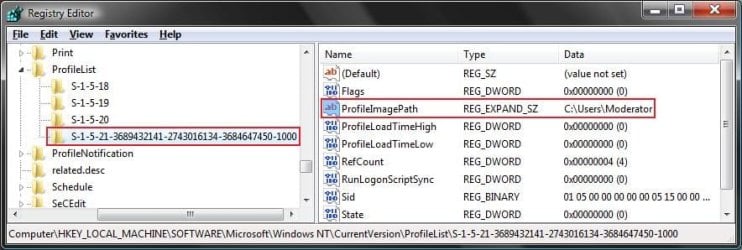
5. In the left pane, click on a S-1-5 (SID) key with a long number.
A) In the right pane of the selected S-1-5 (SID) key, look at the Data value of ProfileImagePath to see if it is the user account (ex: Moderator) with the error.
SID_Reg.jpg
B) If not, then repeat steps 5 and 5A until you have the correct S-1-5 (SID) key with a long number selected.

C) If it is, then continue on to step 6 or step 7 depending on if you have either one or two S-1-5 (SID) keys listed with the exact same long number. One without .bak, and one with .bak at the end.
6. If you have Two S-1-5 (SID) keys with the Same Long Numbers
NOTE: This is if you have two S-1-5 folders (SID key) with the exact same long numbers, but the second one has .bak at the end of the long numbers and the first one doesn't.
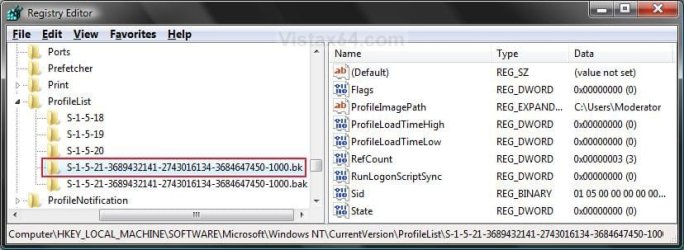
A) In the left pane, right click on the first (top) S-1-5..... folder (SID key) that does not have .bak at the end of the numbers and click Rename. (see screenshot below)
Repair.jpg
B) Add .bk to the end of the numbers. (see screenshot below)
Repair_bk.jpg
C) In the left pane, right click on the second S-1-5..... folder (SID key) with .bak at the end of the numbers and click Rename. (see screenshot below step 6B)

D) Remove only .bak from the end of the numbers and press Enter. (see screenshot below step 6B)

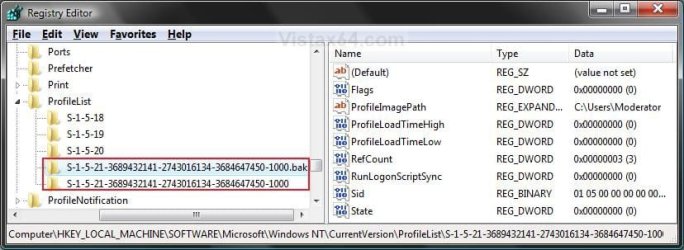
E) Now go back and Rename the first one with .bk to .bak now at the end of the numbers and press Enter. (see screenshot below)
Repar_bak.jpg
F) Go to step 8.
7. If you have Only One S-1-5 (SID) key with .bak
NOTE: This is if you have only one S-1-5 folder (SID key) with long numbers and ended with .bak.
A) In the left pane, right click on the S-1-5..... folder (SID key) with .bak at the end of the numbers and click Rename. (see screenshot below step 7B)

B) Remove only .bak at the end of the numbers and press Enter. (see screenshot below and below step 10)
Repair_Reg2.jpg
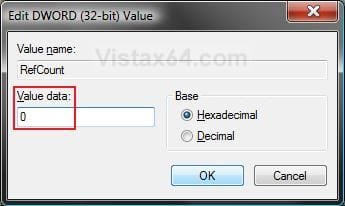
8. In the right pane of the one without .bak now, right click on RefCount and click on Modify. (see screenshot below step 10)
NOTE: If you do not have RefCount, then right click on a empty space in the right pane and click New and DWORD (32 bit) Value, then type RefCount and press Enter. This value for this entry will reset and return back to the original value after you have restarted the computer and logged on to the account.
A) Type 0 (number) and click on OK. (see screenshot below)
Modify_RefCount.jpg
9. In the right pane of the one without .bak now, right click on State and click on Modify. (see screenshot below step 10)
NOTE: This value for this entry will reset and return back to the original value after you have restarted the computer and logged on to the account.
A) Type 0 (number) and click on OK. (see screenshot below)
Modify_State.jpg
10. The registry will now look like this for the one without .bak now. (see screenshot below)
Repair_Reg2.jpg
11. Close regedit, and restart the computer.

12. See if you are able to log on to the use account now without getting this error.

   Tip
If this still does not help, then either try:


OPTION TWO

To Delete the User Account and Create a New User Account


NOTE: This option is only if you do not care about losing the user account with this error and possibly all contents of it's C:\Users\(user-name) user profile folder. Your programs will still be installed and unaffected.
1. Before starting, it is highly recommended that you create a system restore point in case you make a mistake while in the registry. This way you will easily be able to do a system restore to use the created restore point to undo the mistake.

2. Create a new user account that is the same type (standard or administrator) as the user account with this error.

3. If you are able to, you could copy the contents of the user folders from the old user account's C:\Users\(user-name) user profile folder with the error into the new account's (step 2) C:\Users\(user-name) user profile folder. Be sure to also copy any shortcuts in the Start Menu from the old user account into the new user account as well.

4. In User Accounts from the Control Panel, delete the user account with the error.

5. Open the Start Menu, type regedit in the search box, and press Enter.

6. If prompted by UAC, then click on Yes.

7. In regedit, navigate to the location below. (see screenshot below step 8A)
Code:
HKEY_LOCAL_MACHINE\SOFTWARE\Microsoft\Windows NT\CurrentVersion\ProfileList
8. In the left pane, click on a S-1-5 (SID) key with a long number.
A) In the right pane of the selected S-1-5 (SID) key, look at the Data value of ProfileImagePath to see if it is the user account (ex: Moderator) with the error.
SID_Reg.jpg
B) If not, then repeat steps 8 and 8A until you have the correct S-1-5 (SID) key with a long number selected.

C) If it is, then continue on to step 9.
9. Right click on the selected SID key with the long number, and click on Delete.

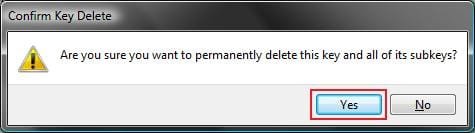
10. Click on Yes to confirm deletion. (see screenshot below)
Confirm.jpg
11. If there is another SID key directly below the selected SID key (step 9) with the exact same long number with .bak at the end, then right click on this same SID key with .bak on it, and click on Delete. (see screenshot below)
Repair.jpg

A) Click on Yes to confirm deletion. (see screenshot below)
Confirm.jpg
12. When finished, close regedit.

13. Restart the computer, and log on to your new account.


That's it,
Shawn


Last edited:
Thanks pres pol. I'll try that and let you know if it works.
 

My Computer My Computer

At a glance

windows 7 home premium 64 bitintel core I36 gb
Computer type
PC/Desktop
Computer Manufacturer/Model Number
Dell Inspiron i620
OS
windows 7 home premium 64 bit
CPU
intel core I3
Memory
6 gb
Antivirus
AVG free
Browser
Firefox
Thank you Brink. It fixed my admin account! Hurray! My first actual repair on a computer! For some random reason though, my admin account worked in safe mode so I did the regedit in there. (Well because it was my first problem I encountered on my PC)
 

My Computer My Computer

At a glance

Windows 7 Professional 32-bit/Windows 8 64-bi...Intel Core 2 Quad Q6600/Intel Core i7 4790/In...2GB/16GB/4GBIntel G33/G31 Express(Vostro)/NVIDIA GeForce ...
Computer type
PC/Desktop
Computer Manufacturer/Model Number
Dell Vostro 400/Dell XPS 8700(Slightly Customized for me by Dell)/Toshiba Satellite T135
OS
Windows 7 Professional 32-bit/Windows 8 64-bit/Win7 Pro64-bit
CPU
Intel Core 2 Quad Q6600/Intel Core i7 4790/Intel Pentium
Memory
2GB/16GB/4GB
Graphics Card(s)
Intel G33/G31 Express(Vostro)/NVIDIA GeForce GTX 745(XPS)
Monitor(s) Displays
HP 2009m(Vostro)/ViewSonic VX2250wm-LED(XPS)
Screen Resolution
1600x900(Vostro)/1920x1080(XPS)
Hard Drives
Seagate ST3160815AS(Vostro)/Western Digital Blue(Satellite)
External:
Western Digital My Passport 0748
Samsung HM121HC
Keyboard
Dell L100)(Vostro)/Dell KB2133p(XPS)
Mouse
Dell M-UAV-DEL8(XPS)
Internet Speed
100 Mbit/s(Only when IPTV is plugged out)
Antivirus
Avast, Malwarebytes PRO
Browser
Internet Explorer 11
Other Info
Note: Names with slashes between two different parts mean that the left is my old desktop and the right is my old laptop and the middle is my new desktop.(Unless specified)
Ping is horrible for servers overseas in US and Europe.
New laptop:LG Gram(Not available in US) Processor:Intel Core i3 4th Gen Ultra Low Power RAM:4GB Hard Drive:SK Hynix OEM MSATA or M.2 Graphics:Intel HD
Thank you Brink. It fixed my admin account! Hurray! My first actual repair on a computer! For some random reason though, my admin account worked in safe mode so I did the regedit in there. (Well because it was my first problem I encountered on my PC)

Glad it could help. :)
 

My Computer My Computer

At a glance

64-bit Windows 11 Pro for WorkstationsIntel i7-8700K OC'd to 5 GHz64 GB (4x16GB) G.SKILL TridentZ RGB DDR4 3600...ASUS ROG-STRIX-GTX1080TI-O11G-GAMING
Computer type
PC/Desktop
Computer Manufacturer/Model Number
Self built custom
OS
64-bit Windows 11 Pro for Workstations
CPU
Intel i7-8700K OC'd to 5 GHz
Motherboard
ASUS ROG Maximus XI Formula Z390
Memory
64 GB (4x16GB) G.SKILL TridentZ RGB DDR4 3600 MHz
Graphics Card(s)
ASUS ROG-STRIX-GTX1080TI-O11G-GAMING
Sound Card
Integrated
Monitor(s) Displays
2 x Samsung Odyssey G7 27"
Screen Resolution
2560x1440
Hard Drives
1TB Samsung 990 PRO M.2,
4TB Samsung 990 PRO PRO M.2,
TerraMaster F8 SSD Plus NAS
PSU
Seasonic Prime Titanium 850W
Case
Thermaltake Core P3
Cooling
Corsair Hydro H115i
Keyboard
Logitech wireless K800
Mouse
Logitech MX Master 4
Internet Speed
2 Gb/s Download and 100 Mb/s Upload
Antivirus
Malwarebyte Anti-Malware Premium
Browser
Google Chrome
Other Info
Logitech Z625 speaker system,
Logitech BRIO 4K Pro webcam,
HP Color LaserJet Pro MFP M477fdn,
APC SMART-UPS RT 1000 XL - SURT1000XLI,
Galaxy S23 Plus phone
I've done this fix for a dozen or more people so far. It seems to be happening more often which is kind of weird (I don't think the customers are corrupting their profile, I think it has something to do with windows update possibly).

Problem is, abou 3-4 of those people have come back to me saying the issue has come back (in some cases after a month, others after a few months). Any idea why this might be? I was thinking it might be because I didnt set RefCount and State to 0 on a couple of them, would this cause it to come back?
 

My Computer My Computer

At a glance

Windows 7 64
Computer type
PC/Desktop
OS
Windows 7 64
Hello Bascotie,

The RefCount and State values set to 0 just to make sure it's set to the default setting.

Usually this corruption is caused by user error by renaming or moving the user profile folder. If it keeps happening, then it may be best to create a new user account to use instead, or reinstall Windows if that doesn't help.
 

My Computer My Computer

At a glance

64-bit Windows 11 Pro for WorkstationsIntel i7-8700K OC'd to 5 GHz64 GB (4x16GB) G.SKILL TridentZ RGB DDR4 3600...ASUS ROG-STRIX-GTX1080TI-O11G-GAMING
Computer type
PC/Desktop
Computer Manufacturer/Model Number
Self built custom
OS
64-bit Windows 11 Pro for Workstations
CPU
Intel i7-8700K OC'd to 5 GHz
Motherboard
ASUS ROG Maximus XI Formula Z390
Memory
64 GB (4x16GB) G.SKILL TridentZ RGB DDR4 3600 MHz
Graphics Card(s)
ASUS ROG-STRIX-GTX1080TI-O11G-GAMING
Sound Card
Integrated
Monitor(s) Displays
2 x Samsung Odyssey G7 27"
Screen Resolution
2560x1440
Hard Drives
1TB Samsung 990 PRO M.2,
4TB Samsung 990 PRO PRO M.2,
TerraMaster F8 SSD Plus NAS
PSU
Seasonic Prime Titanium 850W
Case
Thermaltake Core P3
Cooling
Corsair Hydro H115i
Keyboard
Logitech wireless K800
Mouse
Logitech MX Master 4
Internet Speed
2 Gb/s Download and 100 Mb/s Upload
Antivirus
Malwarebyte Anti-Malware Premium
Browser
Google Chrome
Other Info
Logitech Z625 speaker system,
Logitech BRIO 4K Pro webcam,
HP Color LaserJet Pro MFP M477fdn,
APC SMART-UPS RT 1000 XL - SURT1000XLI,
Galaxy S23 Plus phone
Thanks Brink, I was thinking the same thing. In fact, on my most recent customer's computer I set up a new account just in case. This particular customer reported the issue happening after seeing the "Configuring windows" message when trying to login. I'm thinking that may have been caused by Windows update as all my customers say they've never touched the user profile or done anything differently
 

My Computer My Computer

At a glance

Windows 7 64
Computer type
PC/Desktop
OS
Windows 7 64
Yeah, I agree. "Configuring windows" is usually for an update.
 

My Computer My Computer

At a glance

64-bit Windows 11 Pro for WorkstationsIntel i7-8700K OC'd to 5 GHz64 GB (4x16GB) G.SKILL TridentZ RGB DDR4 3600...ASUS ROG-STRIX-GTX1080TI-O11G-GAMING
Computer type
PC/Desktop
Computer Manufacturer/Model Number
Self built custom
OS
64-bit Windows 11 Pro for Workstations
CPU
Intel i7-8700K OC'd to 5 GHz
Motherboard
ASUS ROG Maximus XI Formula Z390
Memory
64 GB (4x16GB) G.SKILL TridentZ RGB DDR4 3600 MHz
Graphics Card(s)
ASUS ROG-STRIX-GTX1080TI-O11G-GAMING
Sound Card
Integrated
Monitor(s) Displays
2 x Samsung Odyssey G7 27"
Screen Resolution
2560x1440
Hard Drives
1TB Samsung 990 PRO M.2,
4TB Samsung 990 PRO PRO M.2,
TerraMaster F8 SSD Plus NAS
PSU
Seasonic Prime Titanium 850W
Case
Thermaltake Core P3
Cooling
Corsair Hydro H115i
Keyboard
Logitech wireless K800
Mouse
Logitech MX Master 4
Internet Speed
2 Gb/s Download and 100 Mb/s Upload
Antivirus
Malwarebyte Anti-Malware Premium
Browser
Google Chrome
Other Info
Logitech Z625 speaker system,
Logitech BRIO 4K Pro webcam,
HP Color LaserJet Pro MFP M477fdn,
APC SMART-UPS RT 1000 XL - SURT1000XLI,
Galaxy S23 Plus phone
Hi, I've been having the same problem, but none of the recommendations work. Can anybody help me? It does not create a new user (when I click, nothing happens, as if it was blocked), changing the User profile on Registry Edit (whose path was wrong, by the way) doesn't work. When I try to start using a restore point, it stops and tells it is impossible to continue with the operation. I'm using the Administrator account now, and though I can access my files, I can't run various programs (including the Office ones).
 

My Computer My Computer

At a glance

x64
Computer type
Laptop
Computer Manufacturer/Model Number
HP
OS
x64
Hello Moacir, and welcome to Seven Forums.

Since you have access, I would recommend to back up anything that you do not want to lose to be safe.

With that many issues, you might consider doing a clean install of Windows. You might also do a full scan of your system with a program like Malwarebytes Free to help make sure that your system is clean.
 

My Computer My Computer

At a glance

64-bit Windows 11 Pro for WorkstationsIntel i7-8700K OC'd to 5 GHz64 GB (4x16GB) G.SKILL TridentZ RGB DDR4 3600...ASUS ROG-STRIX-GTX1080TI-O11G-GAMING
Computer type
PC/Desktop
Computer Manufacturer/Model Number
Self built custom
OS
64-bit Windows 11 Pro for Workstations
CPU
Intel i7-8700K OC'd to 5 GHz
Motherboard
ASUS ROG Maximus XI Formula Z390
Memory
64 GB (4x16GB) G.SKILL TridentZ RGB DDR4 3600 MHz
Graphics Card(s)
ASUS ROG-STRIX-GTX1080TI-O11G-GAMING
Sound Card
Integrated
Monitor(s) Displays
2 x Samsung Odyssey G7 27"
Screen Resolution
2560x1440
Hard Drives
1TB Samsung 990 PRO M.2,
4TB Samsung 990 PRO PRO M.2,
TerraMaster F8 SSD Plus NAS
PSU
Seasonic Prime Titanium 850W
Case
Thermaltake Core P3
Cooling
Corsair Hydro H115i
Keyboard
Logitech wireless K800
Mouse
Logitech MX Master 4
Internet Speed
2 Gb/s Download and 100 Mb/s Upload
Antivirus
Malwarebyte Anti-Malware Premium
Browser
Google Chrome
Other Info
Logitech Z625 speaker system,
Logitech BRIO 4K Pro webcam,
HP Color LaserJet Pro MFP M477fdn,
APC SMART-UPS RT 1000 XL - SURT1000XLI,
Galaxy S23 Plus phone
Thanks Brink. The scan detected 2 threats, but no progress after deleting them. I did the backup, but while I can't fix the problem, I am concerned whether it's safe to use my passwords on internet or not. That was so unexpected, I left the laptop perfectly working and, a week later, when I turned on, it was all messed up... And I noticed that when I was running a disk defraggment, this EFI\MICROSOFT\BOOT\BCD failed to defrag (don't know if it's related or not).
 
Last edited:

My Computer My Computer

At a glance

x64
Computer type
Laptop
Computer Manufacturer/Model Number
HP
OS
x64
Thanks Brink. The scan detected 2 threats, but no progress after deleting them. I did the backup, but while I can't fix the problem, I am concerned whether it's safe to use my passwords on internet or not. That was so unexpected, I left the laptop perfectly working and, a week later, when I turned on, it was all messed up... And I noticed that when I was running a disk defraggment, this EFI\MICROSOFT\BOOT\BCD failed to defrag (don't know if it's related or not).

Probably best to clean install, scan your system afterwards to make sure it's clean, and change all passwords just to be safe.
 
Last edited:

My Computer My Computer

At a glance

64-bit Windows 11 Pro for WorkstationsIntel i7-8700K OC'd to 5 GHz64 GB (4x16GB) G.SKILL TridentZ RGB DDR4 3600...ASUS ROG-STRIX-GTX1080TI-O11G-GAMING
Computer type
PC/Desktop
Computer Manufacturer/Model Number
Self built custom
OS
64-bit Windows 11 Pro for Workstations
CPU
Intel i7-8700K OC'd to 5 GHz
Motherboard
ASUS ROG Maximus XI Formula Z390
Memory
64 GB (4x16GB) G.SKILL TridentZ RGB DDR4 3600 MHz
Graphics Card(s)
ASUS ROG-STRIX-GTX1080TI-O11G-GAMING
Sound Card
Integrated
Monitor(s) Displays
2 x Samsung Odyssey G7 27"
Screen Resolution
2560x1440
Hard Drives
1TB Samsung 990 PRO M.2,
4TB Samsung 990 PRO PRO M.2,
TerraMaster F8 SSD Plus NAS
PSU
Seasonic Prime Titanium 850W
Case
Thermaltake Core P3
Cooling
Corsair Hydro H115i
Keyboard
Logitech wireless K800
Mouse
Logitech MX Master 4
Internet Speed
2 Gb/s Download and 100 Mb/s Upload
Antivirus
Malwarebyte Anti-Malware Premium
Browser
Google Chrome
Other Info
Logitech Z625 speaker system,
Logitech BRIO 4K Pro webcam,
HP Color LaserJet Pro MFP M477fdn,
APC SMART-UPS RT 1000 XL - SURT1000XLI,
Galaxy S23 Plus phone
Oh, okay, will do that. Thanks for your fast response!
 

My Computer My Computer

At a glance

x64
Computer type
Laptop
Computer Manufacturer/Model Number
HP
OS
x64
I finally found out the problem with my pc. I was using a program called advanced system care, and when the program tried to defrag a particular file, it simply crashed, and I had to do a recovery (luckily I could backup my files in time). I found out because after the recovery, I downloaded again (thinking that it could identify a remanescent virus), but the computer crashed again. Note to self: ASC never again.
 

My Computer My Computer

At a glance

x64
Computer type
Laptop
Computer Manufacturer/Model Number
HP
OS
x64
Thank you posting back with your results Moacir. :)
 

My Computer My Computer

At a glance

64-bit Windows 11 Pro for WorkstationsIntel i7-8700K OC'd to 5 GHz64 GB (4x16GB) G.SKILL TridentZ RGB DDR4 3600...ASUS ROG-STRIX-GTX1080TI-O11G-GAMING
Computer type
PC/Desktop
Computer Manufacturer/Model Number
Self built custom
OS
64-bit Windows 11 Pro for Workstations
CPU
Intel i7-8700K OC'd to 5 GHz
Motherboard
ASUS ROG Maximus XI Formula Z390
Memory
64 GB (4x16GB) G.SKILL TridentZ RGB DDR4 3600 MHz
Graphics Card(s)
ASUS ROG-STRIX-GTX1080TI-O11G-GAMING
Sound Card
Integrated
Monitor(s) Displays
2 x Samsung Odyssey G7 27"
Screen Resolution
2560x1440
Hard Drives
1TB Samsung 990 PRO M.2,
4TB Samsung 990 PRO PRO M.2,
TerraMaster F8 SSD Plus NAS
PSU
Seasonic Prime Titanium 850W
Case
Thermaltake Core P3
Cooling
Corsair Hydro H115i
Keyboard
Logitech wireless K800
Mouse
Logitech MX Master 4
Internet Speed
2 Gb/s Download and 100 Mb/s Upload
Antivirus
Malwarebyte Anti-Malware Premium
Browser
Google Chrome
Other Info
Logitech Z625 speaker system,
Logitech BRIO 4K Pro webcam,
HP Color LaserJet Pro MFP M477fdn,
APC SMART-UPS RT 1000 XL - SURT1000XLI,
Galaxy S23 Plus phone
User profile error - fix

If there is a default user profile (unhide your hidden folders), delete the temporary internet files and any files in the temp folder ( close example: c:\users\default\appdata\local\microsoft\windows\temporary internet files)

This has worked many times!!! Cheers.
 

My Computer My Computer

At a glance

Windows 7 pro
Computer type
PC/Desktop
OS
Windows 7 pro
Simple solution

Hi guys, don't worry too much. Just restart your computer in 'Safe Mode'. Go to Accessories>System Tools>System Restore, and restore your computer for a recent restore point. That's all.
 

My Computer My Computer

At a glance

Windows XP SP2
Computer type
PC/Desktop
OS
Windows XP SP2
If there is a default user profile (unhide your hidden folders), delete the temporary internet files and any files in the temp folder ( close example: c:\users\default\appdata\local\microsoft\windows\temporary internet files)

This has worked many times!!! Cheers.

This is exactly the cause of the issue I was experiencing with a PC on a domain. Microsoft simply say "log in with another user account", yeah of course why didn't I think of that? Numpties!

Anyway my issue was a security/permissions issue with a file called iesqmdata_setup0.sqm in the directory C:\Users\Default\AppData\Local\Microsoft\Windows\Temporary Internet Files\SQM. By browsing to the machine remotely via the "$ share" method I changed the permissions on the enclosing folder to everyone and I was able to log in.

Very strange error but thank you for pointing me in the right direction! :party:
 

My Computer My Computer

At a glance

Windows 7 Enterprise/Professional x64
Computer type
PC/Desktop
Computer Manufacturer/Model Number
Custom
OS
Windows 7 Enterprise/Professional x64
Recently, I did an update which included a Toshiba update. After rebooting the system, I discovered my computer was having some dynamic library errors or something which were annoying because I did not know where they originated from. So the next thing I did was do a system restore back to prior of the update and the problem appeared to have go away.

About a week later I discovered the errors reappeared and since I do a data file backup on my partitioned E: drive with Macrium Reflect and a Macrium differential system image backup of my C: drive each week, I decided to restore the latest C: drive image.

Well, that is where my problems continued, my profile appears to have gone only to have a temporary user account. I read your post Brink Fix "The User Profile Service failed the logon. User profile cannot be loaded." Error in Windows 7, but after rebooting my Laptop, I get the same problem with a message "Preparing your Desktop" and "You have been logged on with a temporary Profile. You cannot access your files and files created in this profile will be deleted when you log off. To fix this, log off and try logging on later. Please see the event log for details or contact your system administrator."

Having edited the Profilelist as per instructions, after rebooting, the system ignores the edited ProfileImagePath of E:\Users\my user name but adds .bak to the S-1-5-21- line, creates another line with ProfileImagePath with C:\Users\TEMP.Qosmio.000.

In addition to this, I cannot see my partitioned E:\Data however, I have discovered through administrative Tools/Computer Management/Disk Management the partition is there, files are in tacked but the has NO DRIVE LETTER and I am unable to assign one.

What have I done wrong? Should I have restored the full image backup then the latest differential backup? It would appear that all my system files are in tack, my user name is there but I am not sure what has happened with my profile and or why I cannot access my partitioned E:\ data.

Thank you in advance.
 

My Computer My Computer

At a glance

Windows 7 32bit Home
Computer type
Laptop
Computer Manufacturer/Model Number
Toshiba Qosimo
OS
Windows 7 32bit Home
Hello Seagasm,

Are you able to create a new user account that doesn't get this error when logging in to it? If so, then you could use the new account instead, and delete the broken account when you like.

You might see if one of the options in the tutorial below may help to assign a drive letter to the drive. If not, then go ahead and post some screenshots showing what you see instead to see what the issue may be.

http://www.sevenforums.com/tutorials/82994-drive-letter-add-change-remove-windows.html

Hope this helps for now, :)
Shawn
 

My Computer My Computer

At a glance

64-bit Windows 11 Pro for WorkstationsIntel i7-8700K OC'd to 5 GHz64 GB (4x16GB) G.SKILL TridentZ RGB DDR4 3600...ASUS ROG-STRIX-GTX1080TI-O11G-GAMING
Computer type
PC/Desktop
Computer Manufacturer/Model Number
Self built custom
OS
64-bit Windows 11 Pro for Workstations
CPU
Intel i7-8700K OC'd to 5 GHz
Motherboard
ASUS ROG Maximus XI Formula Z390
Memory
64 GB (4x16GB) G.SKILL TridentZ RGB DDR4 3600 MHz
Graphics Card(s)
ASUS ROG-STRIX-GTX1080TI-O11G-GAMING
Sound Card
Integrated
Monitor(s) Displays
2 x Samsung Odyssey G7 27"
Screen Resolution
2560x1440
Hard Drives
1TB Samsung 990 PRO M.2,
4TB Samsung 990 PRO PRO M.2,
TerraMaster F8 SSD Plus NAS
PSU
Seasonic Prime Titanium 850W
Case
Thermaltake Core P3
Cooling
Corsair Hydro H115i
Keyboard
Logitech wireless K800
Mouse
Logitech MX Master 4
Internet Speed
2 Gb/s Download and 100 Mb/s Upload
Antivirus
Malwarebyte Anti-Malware Premium
Browser
Google Chrome
Other Info
Logitech Z625 speaker system,
Logitech BRIO 4K Pro webcam,
HP Color LaserJet Pro MFP M477fdn,
APC SMART-UPS RT 1000 XL - SURT1000XLI,
Galaxy S23 Plus phone
Having given this further thought, my frustration got the better of me. The problem I think was due to net being able to see my partition drive E, where my user profile is. I found I could do very little with the partition except delete it which I did, recreated the partition, named it and assigned the letter E. Rebooted the system and could read it so I restored my data which will take a few hours.

What mystifies me though is why I could not see the partition E:\ after restoring C drive image file. There was a Microsoft command I used when I partitioned the drive so that user names were on the E partition and the system placed a shortcut on C:\username\me directing the system to E:\usernames but since E drive could not be recognized, she spat the dummy. We will see what happens after the restore!

Cheers Barry
 

My Computer My Computer

At a glance

Windows 7 32bit Home
Computer type
Laptop
Computer Manufacturer/Model Number
Toshiba Qosimo
OS
Windows 7 32bit Home
Back
Top