Solved Verizon Email mysteriously stopped working

Buratti

New member
Member
Local time
1:23 PM
Messages
52
Location
New Jersey
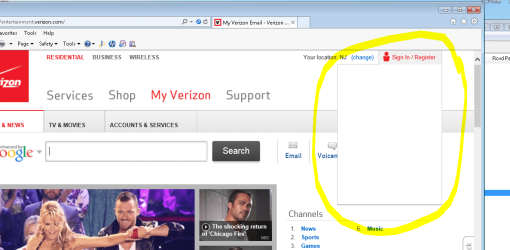
I recently had issues with my work computer, which I mostly solved already (assuming this problem is a reminisce of it still though). My problem is with my email connecting to the server. Obviously I have re-checked all the settings, servers, ports. passwords and etc. It was working just fine, then one day I come in and I cannot send or receive anything through my Verizon email in Outlook (other email accounts set up in Outlook work just fine though). Also strangely enough, if I try to log into the Verizon website to view my mail or account settings it will display the Verizon home page and all others sub pages, but if try to log into my account, the dropdown where I would enter my username and password, just wont display. The dropdown will "drop" but it is just a blank white box, prohibiting me to enter anything and log on. See attached photo1. This "blank dropdown" will happen on all computers in my office network (only a total of 3 in this small network). On my home computer, I can access my Verizon mail with Outlook and log on the Verizon website just fine. I have not tried setting up my account in outlook on other computers on the network to see if it will work on them.


My previous problem, as stated earlier, is still to be determined as rather a hacker invading my computer or a sneaky virus acting like a hacker. A brief explanation of what was happening is as follows: I come in one day and all my icons on my desktop are gone. I eventually discovered that they were moved to the recycle bin. I come in the next day and a lot of my software titles were now uninstalled. The following day my computer is suddenly password protected as well as 2 new users added to the login screen. One user named "Hack" and the other named "Lucas" (both also password protected). Through a lot of goggling I find a way to reset my logon password and gain access to my computer again. Nothing else seemed "wrong' with my computer once I regained access (besides now not being able to access my email), so I deleted the other new users, ran MBAM and added my own password to my account (previously without password). Now would be a good time to mention that I often use Remote desktop to access my computer from home. I know... using remote desktop without password protection is an open invitation for a hacker.

Now, with that back story of what was happening with my computer, is there any suggestions as to why my email is not working suddenly? Its almost like the Verizon POP and SMTP mail servers are being "blocked". Virus scan with MBAM comes up clean. I briefly looked at the firewall settings, and didn't find anything related to outlook or Verizon specifically, but like I said I only briefly looked and don't know how to specifically search for something in particular. And also, the problem that I cannot log on to the Verizon website from any computer in the network is baffling. I checked the router settings an nothing seems to be changed on that. Suggestions?
 

Attachments
  • photo1.PNG
    photo1.PNG
    72.8 KB · Views: 2

My Computer My Computer

At a glance

Windows 7 Home Premium 64 bitAMD Turion(tm) II Ultra Dual-Core Mobile M6004GB DIMM DDR-2AMD M880G with ATI Mobility Radeon HD 4200
Computer Manufacturer/Model Number
HP Pavilion dv7 notebook
OS
Windows 7 Home Premium 64 bit
CPU
AMD Turion(tm) II Ultra Dual-Core Mobile M600
Motherboard
Quanta 3638
Memory
4GB DIMM DDR-2
Graphics Card(s)
AMD M880G with ATI Mobility Radeon HD 4200
Screen Resolution
1600 x 900 x 32 bits (4294967296 colors) @ 60 Hz
Hard Drives
TOSHIBA MK5056GSY ATA Device
465.76GB
Internet Speed
Verizon Fios 20up/10down
Have you let your anti virus do a thorough and complete scan of your system; which can take as long as a few hours?
 

My Computer My Computer

At a glance

Windows 7 ultimate 64-bitIntel I7 2600K 3.4ghzCorsair 16gb ddr3 1600mhzNvidia Geforce gt 430
Computer type
PC/Desktop
Computer Manufacturer/Model Number
custom built
OS
Windows 7 ultimate 64-bit
CPU
Intel I7 2600K 3.4ghz
Motherboard
Asus Evo P8P67
Memory
Corsair 16gb ddr3 1600mhz
Graphics Card(s)
Nvidia Geforce gt 430
Sound Card
Sound Blaster Titanium x-fi pci express
Monitor(s) Displays
Dell E198WFP
Hard Drives
1 western digital 2TB drive.
PSU
Antec 1200 watt
Case
Inwin Dragon Rider
Cooling
6 case supplied cooling fans
Keyboard
logitech mk700
Mouse
logitech m705
Internet Speed
25-50mbps download; 10mbps upload(i think)
Antivirus
avg free 2014
Browser
mozilla firefox
Other Info
Also have a pretty bad speaker setup which is a klipsch promedia 5.1 surround speaker setup with huge subwoofer and lg blu ray player/writer. Also a hp officejet pro 8600 plus wireless all in one and a logitech s7500 webcam.
Hi and welcome to SevenForums,
Active x filtering is activated :(
active%20x-comp-view.jpg

Right click the blue circle symbol and click on Disable ;)
You can also go to Gear symbol and safety and Uncheck the option,
Cheers.
 

My Computer My Computer

At a glance

Win-7-Pro64bit 7-H-Prem-64biti7-5930K 2nd i9-9940x both water blocked VRM'...Trident-z 3200C14 2nd Trident-z 3600C16EVGA 1080ti ftw3 2nd Titan Xp both water blocked
Computer type
PC/Desktop
Computer Manufacturer/Model Number
Custom assembled by me :}
OS
Win-7-Pro64bit 7-H-Prem-64bit
CPU
i7-5930K 2nd i9-9940x both water blocked VRM's too
Motherboard
ASUS SABERTOOTH X99 2nd ASUS x299 Apex
Memory
Trident-z 3200C14 2nd Trident-z 3600C16
Graphics Card(s)
EVGA 1080ti ftw3 2nd Titan Xp both water blocked
Sound Card
Built-in Realtek
Monitor(s) Displays
1-AOC G2460PG 24"G-Sync 144Hz/ 2nd 1-ASUS VG248QE 24" 144Hz
Screen Resolution
1920 x 1080 144Hz
Hard Drives
2-Samsung M.2 Evo & Evo Plus
2-Samsung 850 EVO 500GB SSD's/ 3-2.5 W.D. Black 1tb-&3-1tb/3-3.5 WD Black 1tb hdd's
PSU
EVGA SuperNOVA 1000-P2 2nd 1200-P2
Case
2-Corsair Obsidian Series 450D Black ATX Mid Tower
Cooling
Custom water loops
Keyboard
Logitech G710+/ 2nd Logitech G910
Mouse
2-RedDragon M901 Perdition 16400 dpi Gaming mouse = wired
Internet Speed
Comcast Ping 19ms 89.31mbps download speed 6.12mbps upload
Antivirus
Malwarebytes Pro/ Superantispyware Pro
Browser
FireFox & Pale moon
Other Info
2nd ASUS X299 Apex/Intel i9-9940x with Custom water loop/7H-Prem-x64/Corsair 450D case/Ram Trident-z 3600C16 4x8gb / Samsung970Evo plus 500gb SSD/Dual ssd EZ swap evo/PSU EVGA SuperNova 1200w-P2 80+Platinum/GPU Titan Xp /8-ML-140 on push-pull on 2-280GTX rads
Yes. Have done several "full" scans. Even booted into safe mode and did another "full" scan from there. The very first scan there was 3 minor malware detected which have been cleaned. Nothing detected since.

And Active X filtering has had no difference
 
Last edited:

My Computer My Computer

At a glance

Windows 7 Home Premium 64 bitAMD Turion(tm) II Ultra Dual-Core Mobile M6004GB DIMM DDR-2AMD M880G with ATI Mobility Radeon HD 4200
Computer Manufacturer/Model Number
HP Pavilion dv7 notebook
OS
Windows 7 Home Premium 64 bit
CPU
AMD Turion(tm) II Ultra Dual-Core Mobile M600
Motherboard
Quanta 3638
Memory
4GB DIMM DDR-2
Graphics Card(s)
AMD M880G with ATI Mobility Radeon HD 4200
Screen Resolution
1600 x 900 x 32 bits (4294967296 colors) @ 60 Hz
Hard Drives
TOSHIBA MK5056GSY ATA Device
465.76GB
Internet Speed
Verizon Fios 20up/10down
Hi thanks for the edit :/
Prove it show another screen shot with it disabled ;)
 

My Computer My Computer

At a glance

Win-7-Pro64bit 7-H-Prem-64biti7-5930K 2nd i9-9940x both water blocked VRM'...Trident-z 3200C14 2nd Trident-z 3600C16EVGA 1080ti ftw3 2nd Titan Xp both water blocked
Computer type
PC/Desktop
Computer Manufacturer/Model Number
Custom assembled by me :}
OS
Win-7-Pro64bit 7-H-Prem-64bit
CPU
i7-5930K 2nd i9-9940x both water blocked VRM's too
Motherboard
ASUS SABERTOOTH X99 2nd ASUS x299 Apex
Memory
Trident-z 3200C14 2nd Trident-z 3600C16
Graphics Card(s)
EVGA 1080ti ftw3 2nd Titan Xp both water blocked
Sound Card
Built-in Realtek
Monitor(s) Displays
1-AOC G2460PG 24"G-Sync 144Hz/ 2nd 1-ASUS VG248QE 24" 144Hz
Screen Resolution
1920 x 1080 144Hz
Hard Drives
2-Samsung M.2 Evo & Evo Plus
2-Samsung 850 EVO 500GB SSD's/ 3-2.5 W.D. Black 1tb-&3-1tb/3-3.5 WD Black 1tb hdd's
PSU
EVGA SuperNOVA 1000-P2 2nd 1200-P2
Case
2-Corsair Obsidian Series 450D Black ATX Mid Tower
Cooling
Custom water loops
Keyboard
Logitech G710+/ 2nd Logitech G910
Mouse
2-RedDragon M901 Perdition 16400 dpi Gaming mouse = wired
Internet Speed
Comcast Ping 19ms 89.31mbps download speed 6.12mbps upload
Antivirus
Malwarebytes Pro/ Superantispyware Pro
Browser
FireFox & Pale moon
Other Info
2nd ASUS X299 Apex/Intel i9-9940x with Custom water loop/7H-Prem-x64/Corsair 450D case/Ram Trident-z 3600C16 4x8gb / Samsung970Evo plus 500gb SSD/Dual ssd EZ swap evo/PSU EVGA SuperNova 1200w-P2 80+Platinum/GPU Titan Xp /8-ML-140 on push-pull on 2-280GTX rads
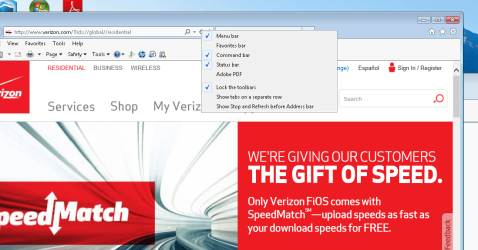
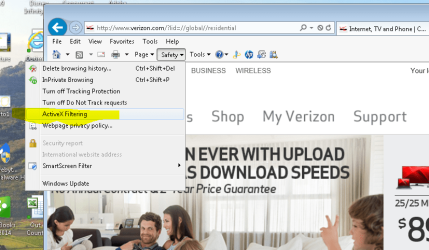
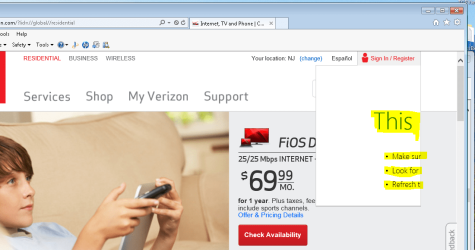
First of all right clicking the blue circle only pulls up menu bar options as shown in Capture1. Capture2 shows the Active X unchecked under the safety dropdown menu. Capture3 shows how its still "blank" after being unchecked. I just noticed something else however. if the page is up and loaded for a few minutes and I try to log in again, in the drop down I get the "This page cannot be displayed" message as if you are trying to open a web page that does not exist. This is shown in Capture4.

I appreciate your help in trying to solve the website issue, however my Verizon email not working in Outlook is a greater issue at the moment. However, this is just a hunch, but I do feel that the two are related somehow so fixing one may fix the other.
 

Attachments

  • Capture1.PNG
    Capture1.PNG
    89.3 KB · Views: 3
  • Capture2.PNG
    Capture2.PNG
    92.8 KB · Views: 2
  • Capture3.PNG
    Capture3.PNG
    134.3 KB · Views: 1
  • Capture4.PNG
    Capture4.PNG
    90.1 KB · Views: 1

My Computer My Computer

At a glance

Windows 7 Home Premium 64 bitAMD Turion(tm) II Ultra Dual-Core Mobile M6004GB DIMM DDR-2AMD M880G with ATI Mobility Radeon HD 4200
Computer Manufacturer/Model Number
HP Pavilion dv7 notebook
OS
Windows 7 Home Premium 64 bit
CPU
AMD Turion(tm) II Ultra Dual-Core Mobile M600
Motherboard
Quanta 3638
Memory
4GB DIMM DDR-2
Graphics Card(s)
AMD M880G with ATI Mobility Radeon HD 4200
Screen Resolution
1600 x 900 x 32 bits (4294967296 colors) @ 60 Hz
Hard Drives
TOSHIBA MK5056GSY ATA Device
465.76GB
Internet Speed
Verizon Fios 20up/10down
Hi,
The problem is the symbol still shows up,
Just because it's not blue anymore or checked it seems stuck on the address bar :/

I would suggest reset to see if the symbol Completely goes away ;)
Tutorial of Resetting Internet explorer,
http://www.sevenforums.com/tutorials/1222-internet-explorer-reset.html
Accessing Internet Options from the Start menu search,
Reset process first opening Internet explorer

http://www.sevenforums.com/tutorials/89919-troubleshooting-internet-explorer-issues.html
 

My Computer My Computer

At a glance

Win-7-Pro64bit 7-H-Prem-64biti7-5930K 2nd i9-9940x both water blocked VRM'...Trident-z 3200C14 2nd Trident-z 3600C16EVGA 1080ti ftw3 2nd Titan Xp both water blocked
Computer type
PC/Desktop
Computer Manufacturer/Model Number
Custom assembled by me :}
OS
Win-7-Pro64bit 7-H-Prem-64bit
CPU
i7-5930K 2nd i9-9940x both water blocked VRM's too
Motherboard
ASUS SABERTOOTH X99 2nd ASUS x299 Apex
Memory
Trident-z 3200C14 2nd Trident-z 3600C16
Graphics Card(s)
EVGA 1080ti ftw3 2nd Titan Xp both water blocked
Sound Card
Built-in Realtek
Monitor(s) Displays
1-AOC G2460PG 24"G-Sync 144Hz/ 2nd 1-ASUS VG248QE 24" 144Hz
Screen Resolution
1920 x 1080 144Hz
Hard Drives
2-Samsung M.2 Evo & Evo Plus
2-Samsung 850 EVO 500GB SSD's/ 3-2.5 W.D. Black 1tb-&3-1tb/3-3.5 WD Black 1tb hdd's
PSU
EVGA SuperNOVA 1000-P2 2nd 1200-P2
Case
2-Corsair Obsidian Series 450D Black ATX Mid Tower
Cooling
Custom water loops
Keyboard
Logitech G710+/ 2nd Logitech G910
Mouse
2-RedDragon M901 Perdition 16400 dpi Gaming mouse = wired
Internet Speed
Comcast Ping 19ms 89.31mbps download speed 6.12mbps upload
Antivirus
Malwarebytes Pro/ Superantispyware Pro
Browser
FireFox & Pale moon
Other Info
2nd ASUS X299 Apex/Intel i9-9940x with Custom water loop/7H-Prem-x64/Corsair 450D case/Ram Trident-z 3600C16 4x8gb / Samsung970Evo plus 500gb SSD/Dual ssd EZ swap evo/PSU EVGA SuperNova 1200w-P2 80+Platinum/GPU Titan Xp /8-ML-140 on push-pull on 2-280GTX rads
Is advanced protection mode ticked in Security on the Internet Options advanced tab?
 

My Computer My Computer

At a glance

x64 (6.3.9600) Win8.1 Pro & soon dual boot x6...AMD A6-3420M APU with Radeon(tm) HD Graphics6.00 GBAMD Radeon(TM) HD 6520G
Computer type
Laptop
Computer Manufacturer/Model Number
HP Pavilion dv6-6c10us
OS
x64 (6.3.9600) Win8.1 Pro & soon dual boot x64 (6.1.7601) Win7_SP1 HomePrem
CPU
AMD A6-3420M APU with Radeon(tm) HD Graphics
Motherboard
Hewlett-Packard 1805
Memory
6.00 GB
Graphics Card(s)
AMD Radeon(TM) HD 6520G
Sound Card
(1) AMD High Definition Audio Device (2) IDT High Definiti
Monitor(s) Displays
HP W2072a 20" LCD (1600 x 900) @ 60 Hz
Screen Resolution
1366 x 768 x 32 bits (4294967296 colors) @ 60 Hz
Hard Drives
ST640LM0 00 HM641JI SATA Disk Device
Keyboard
Logitech k520 wireless KB
Mouse
Logitech m320 wireless mouse (bundled with KB)
Internet Speed
15/5 | 54 MB Wireless 'n'
Antivirus
Realtime: Defender or Avast | On-demand: Malwarebytes, ESET
Browser
IE 11 on Win8, IE 10 on win 7
Other Info
Media: [Gimp, Audacity, VLC] || Comm: [WEmail 2012, Skype] || Productivity: [OpenOffice,| Textpad] || Utils: [Sysinternals, cCleaner, Speccy, Defraggler]
I did a "Reset' like suggested but the problem persists. I did not find a "Advanced Protection Mode" but there was an "Enhanced Protection Mode" that was unchecked. I tried checking it but no difference.

I do have more information though. If you view the Verizon page, next to the Sign in/Register dropdown I am having problems with, there is a link to switch to Spanish. if I click that, it obviously reloads the page in Spanish, but the dropdown is working correctly. if I switch back to English, it goes back to being blank.
 

My Computer My Computer

At a glance

Windows 7 Home Premium 64 bitAMD Turion(tm) II Ultra Dual-Core Mobile M6004GB DIMM DDR-2AMD M880G with ATI Mobility Radeon HD 4200
Computer Manufacturer/Model Number
HP Pavilion dv7 notebook
OS
Windows 7 Home Premium 64 bit
CPU
AMD Turion(tm) II Ultra Dual-Core Mobile M600
Motherboard
Quanta 3638
Memory
4GB DIMM DDR-2
Graphics Card(s)
AMD M880G with ATI Mobility Radeon HD 4200
Screen Resolution
1600 x 900 x 32 bits (4294967296 colors) @ 60 Hz
Hard Drives
TOSHIBA MK5056GSY ATA Device
465.76GB
Internet Speed
Verizon Fios 20up/10down
Try this page: https://www.verizon.com/foryourhome/myaccount/ngen/upr/nlogin.aspx

It's essentially the drop down login

Note that it is httpS

Yeah, sorry about my poor memory on the Protection mode option and thanks for the feedback re: your configuration

You might check the security tab in IE options

Try adding
*.verizon.com
*.verizon.net​
to the list of trusted sites.
Note: you'll have to untick the Require https check box to add these two sites. Tick the https requirement on again after adding them.

Try the sites that gave you problems with the drop down box again.

Try restarting Ie if the problem stillexists.

Then we should try figuring out the topic of the thread - eMail.
 

My Computer My Computer

At a glance

x64 (6.3.9600) Win8.1 Pro & soon dual boot x6...AMD A6-3420M APU with Radeon(tm) HD Graphics6.00 GBAMD Radeon(TM) HD 6520G
Computer type
Laptop
Computer Manufacturer/Model Number
HP Pavilion dv6-6c10us
OS
x64 (6.3.9600) Win8.1 Pro & soon dual boot x64 (6.1.7601) Win7_SP1 HomePrem
CPU
AMD A6-3420M APU with Radeon(tm) HD Graphics
Motherboard
Hewlett-Packard 1805
Memory
6.00 GB
Graphics Card(s)
AMD Radeon(TM) HD 6520G
Sound Card
(1) AMD High Definition Audio Device (2) IDT High Definiti
Monitor(s) Displays
HP W2072a 20" LCD (1600 x 900) @ 60 Hz
Screen Resolution
1366 x 768 x 32 bits (4294967296 colors) @ 60 Hz
Hard Drives
ST640LM0 00 HM641JI SATA Disk Device
Keyboard
Logitech k520 wireless KB
Mouse
Logitech m320 wireless mouse (bundled with KB)
Internet Speed
15/5 | 54 MB Wireless 'n'
Antivirus
Realtime: Defender or Avast | On-demand: Malwarebytes, ESET
Browser
IE 11 on Win8, IE 10 on win 7
Other Info
Media: [Gimp, Audacity, VLC] || Comm: [WEmail 2012, Skype] || Productivity: [OpenOffice,| Textpad] || Utils: [Sysinternals, cCleaner, Speccy, Defraggler]
interesting... when trying to open that link on the problematic computer I get what appears in the attached image, but if on a computer on a different network it loads just fine
 

Attachments

  • Capture1.PNG
    Capture1.PNG
    41.6 KB · Views: 2

My Computer My Computer

At a glance

Windows 7 Home Premium 64 bitAMD Turion(tm) II Ultra Dual-Core Mobile M6004GB DIMM DDR-2AMD M880G with ATI Mobility Radeon HD 4200
Computer Manufacturer/Model Number
HP Pavilion dv7 notebook
OS
Windows 7 Home Premium 64 bit
CPU
AMD Turion(tm) II Ultra Dual-Core Mobile M600
Motherboard
Quanta 3638
Memory
4GB DIMM DDR-2
Graphics Card(s)
AMD M880G with ATI Mobility Radeon HD 4200
Screen Resolution
1600 x 900 x 32 bits (4294967296 colors) @ 60 Hz
Hard Drives
TOSHIBA MK5056GSY ATA Device
465.76GB
Internet Speed
Verizon Fios 20up/10down

My Computer My Computer

At a glance

Win-7-Pro64bit 7-H-Prem-64biti7-5930K 2nd i9-9940x both water blocked VRM'...Trident-z 3200C14 2nd Trident-z 3600C16EVGA 1080ti ftw3 2nd Titan Xp both water blocked
Computer type
PC/Desktop
Computer Manufacturer/Model Number
Custom assembled by me :}
OS
Win-7-Pro64bit 7-H-Prem-64bit
CPU
i7-5930K 2nd i9-9940x both water blocked VRM's too
Motherboard
ASUS SABERTOOTH X99 2nd ASUS x299 Apex
Memory
Trident-z 3200C14 2nd Trident-z 3600C16
Graphics Card(s)
EVGA 1080ti ftw3 2nd Titan Xp both water blocked
Sound Card
Built-in Realtek
Monitor(s) Displays
1-AOC G2460PG 24"G-Sync 144Hz/ 2nd 1-ASUS VG248QE 24" 144Hz
Screen Resolution
1920 x 1080 144Hz
Hard Drives
2-Samsung M.2 Evo & Evo Plus
2-Samsung 850 EVO 500GB SSD's/ 3-2.5 W.D. Black 1tb-&3-1tb/3-3.5 WD Black 1tb hdd's
PSU
EVGA SuperNOVA 1000-P2 2nd 1200-P2
Case
2-Corsair Obsidian Series 450D Black ATX Mid Tower
Cooling
Custom water loops
Keyboard
Logitech G710+/ 2nd Logitech G910
Mouse
2-RedDragon M901 Perdition 16400 dpi Gaming mouse = wired
Internet Speed
Comcast Ping 19ms 89.31mbps download speed 6.12mbps upload
Antivirus
Malwarebytes Pro/ Superantispyware Pro
Browser
FireFox & Pale moon
Other Info
2nd ASUS X299 Apex/Intel i9-9940x with Custom water loop/7H-Prem-x64/Corsair 450D case/Ram Trident-z 3600C16 4x8gb / Samsung970Evo plus 500gb SSD/Dual ssd EZ swap evo/PSU EVGA SuperNova 1200w-P2 80+Platinum/GPU Titan Xp /8-ML-140 on push-pull on 2-280GTX rads
The link I posted is in the code box
and the address from the image you posted is shown below that.
Code:
https://www.verizon.com/foryourhome/myaccount/ngen/upr/nlogin.aspx
Capture1.PNG

after /foryourhome/, the path changes from /myaccount/ to /ordering/

but it's still on the Verizon.com site.

Q: You just clicked on the link ... or did you also make the security change?

Ok, so I typed as much of the address as I could see from the image you posted and got the same page you see
www.verizon.com/ForYourHome/Ordering/Common/LBO1.aspx?Message=4040

Could you try this: Go to the Verizon home page, click on My Verizon link
x7.PNG
That should take you to the address in the code box above.
 

My Computer My Computer

At a glance

x64 (6.3.9600) Win8.1 Pro & soon dual boot x6...AMD A6-3420M APU with Radeon(tm) HD Graphics6.00 GBAMD Radeon(TM) HD 6520G
Computer type
Laptop
Computer Manufacturer/Model Number
HP Pavilion dv6-6c10us
OS
x64 (6.3.9600) Win8.1 Pro & soon dual boot x64 (6.1.7601) Win7_SP1 HomePrem
CPU
AMD A6-3420M APU with Radeon(tm) HD Graphics
Motherboard
Hewlett-Packard 1805
Memory
6.00 GB
Graphics Card(s)
AMD Radeon(TM) HD 6520G
Sound Card
(1) AMD High Definition Audio Device (2) IDT High Definiti
Monitor(s) Displays
HP W2072a 20" LCD (1600 x 900) @ 60 Hz
Screen Resolution
1366 x 768 x 32 bits (4294967296 colors) @ 60 Hz
Hard Drives
ST640LM0 00 HM641JI SATA Disk Device
Keyboard
Logitech k520 wireless KB
Mouse
Logitech m320 wireless mouse (bundled with KB)
Internet Speed
15/5 | 54 MB Wireless 'n'
Antivirus
Realtime: Defender or Avast | On-demand: Malwarebytes, ESET
Browser
IE 11 on Win8, IE 10 on win 7
Other Info
Media: [Gimp, Audacity, VLC] || Comm: [WEmail 2012, Skype] || Productivity: [OpenOffice,| Textpad] || Utils: [Sysinternals, cCleaner, Speccy, Defraggler]
A few thoughts:

Have you restarted your machine? No? please do

IE has been reset, so if the malware scan doesn't show anything, then it's at a lower level - in the Winsock or TCP/IP stack

After you post back, I'll try to find my batch file to flush and reset the lower protocols.

If any other member has that readily handy - post away!
Thanks and goodnight.

Bill
.
 

My Computer My Computer

At a glance

x64 (6.3.9600) Win8.1 Pro & soon dual boot x6...AMD A6-3420M APU with Radeon(tm) HD Graphics6.00 GBAMD Radeon(TM) HD 6520G
Computer type
Laptop
Computer Manufacturer/Model Number
HP Pavilion dv6-6c10us
OS
x64 (6.3.9600) Win8.1 Pro & soon dual boot x64 (6.1.7601) Win7_SP1 HomePrem
CPU
AMD A6-3420M APU with Radeon(tm) HD Graphics
Motherboard
Hewlett-Packard 1805
Memory
6.00 GB
Graphics Card(s)
AMD Radeon(TM) HD 6520G
Sound Card
(1) AMD High Definition Audio Device (2) IDT High Definiti
Monitor(s) Displays
HP W2072a 20" LCD (1600 x 900) @ 60 Hz
Screen Resolution
1366 x 768 x 32 bits (4294967296 colors) @ 60 Hz
Hard Drives
ST640LM0 00 HM641JI SATA Disk Device
Keyboard
Logitech k520 wireless KB
Mouse
Logitech m320 wireless mouse (bundled with KB)
Internet Speed
15/5 | 54 MB Wireless 'n'
Antivirus
Realtime: Defender or Avast | On-demand: Malwarebytes, ESET
Browser
IE 11 on Win8, IE 10 on win 7
Other Info
Media: [Gimp, Audacity, VLC] || Comm: [WEmail 2012, Skype] || Productivity: [OpenOffice,| Textpad] || Utils: [Sysinternals, cCleaner, Speccy, Defraggler]
Hi,
Post 7 has Capt.Jack's tutorial in it ?
Pretty old tutorial but I believe it has manual flush instructions ?

Also Brink's reset ie tutorial has follow up tutorials listed under it which has ie Restorator listed ;)
 

My Computer My Computer

At a glance

Win-7-Pro64bit 7-H-Prem-64biti7-5930K 2nd i9-9940x both water blocked VRM'...Trident-z 3200C14 2nd Trident-z 3600C16EVGA 1080ti ftw3 2nd Titan Xp both water blocked
Computer type
PC/Desktop
Computer Manufacturer/Model Number
Custom assembled by me :}
OS
Win-7-Pro64bit 7-H-Prem-64bit
CPU
i7-5930K 2nd i9-9940x both water blocked VRM's too
Motherboard
ASUS SABERTOOTH X99 2nd ASUS x299 Apex
Memory
Trident-z 3200C14 2nd Trident-z 3600C16
Graphics Card(s)
EVGA 1080ti ftw3 2nd Titan Xp both water blocked
Sound Card
Built-in Realtek
Monitor(s) Displays
1-AOC G2460PG 24"G-Sync 144Hz/ 2nd 1-ASUS VG248QE 24" 144Hz
Screen Resolution
1920 x 1080 144Hz
Hard Drives
2-Samsung M.2 Evo & Evo Plus
2-Samsung 850 EVO 500GB SSD's/ 3-2.5 W.D. Black 1tb-&3-1tb/3-3.5 WD Black 1tb hdd's
PSU
EVGA SuperNOVA 1000-P2 2nd 1200-P2
Case
2-Corsair Obsidian Series 450D Black ATX Mid Tower
Cooling
Custom water loops
Keyboard
Logitech G710+/ 2nd Logitech G910
Mouse
2-RedDragon M901 Perdition 16400 dpi Gaming mouse = wired
Internet Speed
Comcast Ping 19ms 89.31mbps download speed 6.12mbps upload
Antivirus
Malwarebytes Pro/ Superantispyware Pro
Browser
FireFox & Pale moon
Other Info
2nd ASUS X299 Apex/Intel i9-9940x with Custom water loop/7H-Prem-x64/Corsair 450D case/Ram Trident-z 3600C16 4x8gb / Samsung970Evo plus 500gb SSD/Dual ssd EZ swap evo/PSU EVGA SuperNova 1200w-P2 80+Platinum/GPU Titan Xp /8-ML-140 on push-pull on 2-280GTX rads
Hi,
Post 7 has Capt.Jack's tutorial in it ?
Pretty old tutorial but I believe it has manual flush instructions ?

Also Brink's reset ie tutorial has follow up tutorials listed under it which has ie Restorator listed ;)

Thanks Mike, that's what I was looking for.

Now in a convenient bite bat size: View attachment TCPIPreset.bat

steps 6 and 7 from the tutorial condensed version:

Start -> All Programs -> Accessories -> Command Prompt (right Click, select Run as Administrator)
netsh winsock reset catalog
netsh int ipv4 reset
netsh int ipv6 reset
netsh int tcp reset

ipconfig /release
ipconfig /flushdns
ipconfig /renew

exit​

Restart the System and test the connection to see if the issue has been resolved.
 

My Computer My Computer

At a glance

x64 (6.3.9600) Win8.1 Pro & soon dual boot x6...AMD A6-3420M APU with Radeon(tm) HD Graphics6.00 GBAMD Radeon(TM) HD 6520G
Computer type
Laptop
Computer Manufacturer/Model Number
HP Pavilion dv6-6c10us
OS
x64 (6.3.9600) Win8.1 Pro & soon dual boot x64 (6.1.7601) Win7_SP1 HomePrem
CPU
AMD A6-3420M APU with Radeon(tm) HD Graphics
Motherboard
Hewlett-Packard 1805
Memory
6.00 GB
Graphics Card(s)
AMD Radeon(TM) HD 6520G
Sound Card
(1) AMD High Definition Audio Device (2) IDT High Definiti
Monitor(s) Displays
HP W2072a 20" LCD (1600 x 900) @ 60 Hz
Screen Resolution
1366 x 768 x 32 bits (4294967296 colors) @ 60 Hz
Hard Drives
ST640LM0 00 HM641JI SATA Disk Device
Keyboard
Logitech k520 wireless KB
Mouse
Logitech m320 wireless mouse (bundled with KB)
Internet Speed
15/5 | 54 MB Wireless 'n'
Antivirus
Realtime: Defender or Avast | On-demand: Malwarebytes, ESET
Browser
IE 11 on Win8, IE 10 on win 7
Other Info
Media: [Gimp, Audacity, VLC] || Comm: [WEmail 2012, Skype] || Productivity: [OpenOffice,| Textpad] || Utils: [Sysinternals, cCleaner, Speccy, Defraggler]
Still nothing... Actually I'm worse now. I ran several different Malware, Adware and junk removal tools, and now I cannot load the Verizon page at all. Verizon Wireless will open and any random other pages but Verizon.com/.net will not even load at all. its like something is blocking the Verizon domain specifically.
 

My Computer My Computer

At a glance

Windows 7 Home Premium 64 bitAMD Turion(tm) II Ultra Dual-Core Mobile M6004GB DIMM DDR-2AMD M880G with ATI Mobility Radeon HD 4200
Computer Manufacturer/Model Number
HP Pavilion dv7 notebook
OS
Windows 7 Home Premium 64 bit
CPU
AMD Turion(tm) II Ultra Dual-Core Mobile M600
Motherboard
Quanta 3638
Memory
4GB DIMM DDR-2
Graphics Card(s)
AMD M880G with ATI Mobility Radeon HD 4200
Screen Resolution
1600 x 900 x 32 bits (4294967296 colors) @ 60 Hz
Hard Drives
TOSHIBA MK5056GSY ATA Device
465.76GB
Internet Speed
Verizon Fios 20up/10down
Safe mode with networking,
Shut down your machine,
Power up and Tap the F8 key continuously until you see a black page with white text,
Use the down arrow key to toggle to safe mode with networking/ hit the enter key.
Login as usual and test the issue.

Clean boot,
http://www.sevenforums.com/tutorials/179159-troubleshoot-application-conflicts-performing-clean-startup.html
Click Start and type in the search box,
msconfig
Click on the suggestion on top or hit the Enter key,
Go to the Startup section and take some screen shots for a complete list,
Go to the Services section and on the bottom left Check the box to Hide All Microsoft services,
Repeat the screen shots,
See the links above my signature on how to take and upload screen shots here,
Cheers.
 

My Computer My Computer

At a glance

Win-7-Pro64bit 7-H-Prem-64biti7-5930K 2nd i9-9940x both water blocked VRM'...Trident-z 3200C14 2nd Trident-z 3600C16EVGA 1080ti ftw3 2nd Titan Xp both water blocked
Computer type
PC/Desktop
Computer Manufacturer/Model Number
Custom assembled by me :}
OS
Win-7-Pro64bit 7-H-Prem-64bit
CPU
i7-5930K 2nd i9-9940x both water blocked VRM's too
Motherboard
ASUS SABERTOOTH X99 2nd ASUS x299 Apex
Memory
Trident-z 3200C14 2nd Trident-z 3600C16
Graphics Card(s)
EVGA 1080ti ftw3 2nd Titan Xp both water blocked
Sound Card
Built-in Realtek
Monitor(s) Displays
1-AOC G2460PG 24"G-Sync 144Hz/ 2nd 1-ASUS VG248QE 24" 144Hz
Screen Resolution
1920 x 1080 144Hz
Hard Drives
2-Samsung M.2 Evo & Evo Plus
2-Samsung 850 EVO 500GB SSD's/ 3-2.5 W.D. Black 1tb-&3-1tb/3-3.5 WD Black 1tb hdd's
PSU
EVGA SuperNOVA 1000-P2 2nd 1200-P2
Case
2-Corsair Obsidian Series 450D Black ATX Mid Tower
Cooling
Custom water loops
Keyboard
Logitech G710+/ 2nd Logitech G910
Mouse
2-RedDragon M901 Perdition 16400 dpi Gaming mouse = wired
Internet Speed
Comcast Ping 19ms 89.31mbps download speed 6.12mbps upload
Antivirus
Malwarebytes Pro/ Superantispyware Pro
Browser
FireFox & Pale moon
Other Info
2nd ASUS X299 Apex/Intel i9-9940x with Custom water loop/7H-Prem-x64/Corsair 450D case/Ram Trident-z 3600C16 4x8gb / Samsung970Evo plus 500gb SSD/Dual ssd EZ swap evo/PSU EVGA SuperNova 1200w-P2 80+Platinum/GPU Titan Xp /8-ML-140 on push-pull on 2-280GTX rads
Still nothing... Actually I'm worse now. I ran several different Malware, Adware and junk removal tools, and now I cannot load the Verizon page at all. Verizon Wireless will open and any random other pages but Verizon.com/.net will not even load at all. its like something is blocking the Verizon domain specifically.

Please recap - Both Mike and I have suggested things and I'm not sure what suggestions were done, in what order.

Read the thread and just say in a post something like
Post 7 suggested ABC, DEF, and GHI - did ABC and DEF in that post, but not GHI

If you posted a screen shot in reposnse to one of our suggestions or requests for more information - post the current screen shot

If you ran a utility - and the is still a log available, please attach the log.

That will bring everyone up to date on the configuration and status.

After you run in safe mode and if the issue still exists following Mike's suggestions

See if there are system files that need to be repaired.
Please follow the instructions in OPTION TWO of http://www.sevenforums.com/tutorials/1538-sfc-scannow-command-system-file-checker.html

Copy C:\Windows\Logs\CBS\CBS.log to your Desktop (it is a protected file so you cannot attach the original)

Attach the copy of the entire CBS.log to a new post.

I'd also like you to reset your host file
This MS Fixit will do the trick for you:
How can I reset the Hosts file back to the default?

We're running out of things that might cause this issue.
I want to make sure that it is this one machine that exhibits the behavior. You have other machines on the same network and you also have another network that do not have the issue - right?

You mentioned that it seems to only affect Verizon - can you test another HTTPS site?

I figured any login page would be HTTPS
Staples login page: https://www.staples.com/office/supp...jWIDdup2rOkCC3YdcdyXeXpodJw7&ddkey=http:login

Yahoo login page: https://login.yahoo.com/config/login?.src=fpctx&.intl=us&.done=https://www.yahoo.com/

Comcast login page: https://login.comcast.net/login?for...ecure/Home.aspx&s=ccentral-cima&r=comcast.net

You don't have to have an account - just see if the secure page loads or shows any oddities.

If it is only Verizon, I'm leaning towards a certificate or, based on the URL, perhaps a .NET issue


After you post the recap, try safe mode and these suggestions, I'd like to see tab-by-tab screen shots of Internet options. Particularly the security tab and Advanced tab (this tab will take a few screen shots). I'm back tracking a bit - Mike suggested and you complied with an IE reset - I just want to make sure it stuck.

This truly is a sticky wicket!

You're doing great BTW - hanging in there as Mike and I lob things your way.

Thanks,

Bill
.
 

My Computer My Computer

At a glance

x64 (6.3.9600) Win8.1 Pro & soon dual boot x6...AMD A6-3420M APU with Radeon(tm) HD Graphics6.00 GBAMD Radeon(TM) HD 6520G
Computer type
Laptop
Computer Manufacturer/Model Number
HP Pavilion dv6-6c10us
OS
x64 (6.3.9600) Win8.1 Pro & soon dual boot x64 (6.1.7601) Win7_SP1 HomePrem
CPU
AMD A6-3420M APU with Radeon(tm) HD Graphics
Motherboard
Hewlett-Packard 1805
Memory
6.00 GB
Graphics Card(s)
AMD Radeon(TM) HD 6520G
Sound Card
(1) AMD High Definition Audio Device (2) IDT High Definiti
Monitor(s) Displays
HP W2072a 20" LCD (1600 x 900) @ 60 Hz
Screen Resolution
1366 x 768 x 32 bits (4294967296 colors) @ 60 Hz
Hard Drives
ST640LM0 00 HM641JI SATA Disk Device
Keyboard
Logitech k520 wireless KB
Mouse
Logitech m320 wireless mouse (bundled with KB)
Internet Speed
15/5 | 54 MB Wireless 'n'
Antivirus
Realtime: Defender or Avast | On-demand: Malwarebytes, ESET
Browser
IE 11 on Win8, IE 10 on win 7
Other Info
Media: [Gimp, Audacity, VLC] || Comm: [WEmail 2012, Skype] || Productivity: [OpenOffice,| Textpad] || Utils: [Sysinternals, cCleaner, Speccy, Defraggler]
Still nothing... Actually I'm worse now. I ran several different Malware, Adware and junk removal tools, and now I cannot load the Verizon page at all. Verizon Wireless will open and any random other pages but Verizon.com/.net will not even load at all. its like something is blocking the Verizon domain specifically.

Try: https://login.verizonwireless.com/amserver/UI/Login
 

My Computer My Computer

At a glance

x64 (6.3.9600) Win8.1 Pro & soon dual boot x6...AMD A6-3420M APU with Radeon(tm) HD Graphics6.00 GBAMD Radeon(TM) HD 6520G
Computer type
Laptop
Computer Manufacturer/Model Number
HP Pavilion dv6-6c10us
OS
x64 (6.3.9600) Win8.1 Pro & soon dual boot x64 (6.1.7601) Win7_SP1 HomePrem
CPU
AMD A6-3420M APU with Radeon(tm) HD Graphics
Motherboard
Hewlett-Packard 1805
Memory
6.00 GB
Graphics Card(s)
AMD Radeon(TM) HD 6520G
Sound Card
(1) AMD High Definition Audio Device (2) IDT High Definiti
Monitor(s) Displays
HP W2072a 20" LCD (1600 x 900) @ 60 Hz
Screen Resolution
1366 x 768 x 32 bits (4294967296 colors) @ 60 Hz
Hard Drives
ST640LM0 00 HM641JI SATA Disk Device
Keyboard
Logitech k520 wireless KB
Mouse
Logitech m320 wireless mouse (bundled with KB)
Internet Speed
15/5 | 54 MB Wireless 'n'
Antivirus
Realtime: Defender or Avast | On-demand: Malwarebytes, ESET
Browser
IE 11 on Win8, IE 10 on win 7
Other Info
Media: [Gimp, Audacity, VLC] || Comm: [WEmail 2012, Skype] || Productivity: [OpenOffice,| Textpad] || Utils: [Sysinternals, cCleaner, Speccy, Defraggler]
Back
Top