Solved I cannot Access the website "Speedtest.net"

Thanks for still reading :). I'm just really curious to why this is happening still. Should i try a fix by going back to a earlier restore point? i have heard this fixes a lot of things.
 

My Computer My Computer

Computer type
PC/Desktop
Computer Manufacturer/Model Number
Nooo idea... Custom built PC
OS
Windows 7 Professional X64
CPU
Intel(R) Core(TM) i7 CPU X990 @ 3.47GHz
Motherboard
Don't know the motherboard.. will look up
Memory
12GB RAM
Graphics Card(s)
GTX 780ti Overclocked
Sound Card
NVIDIA High Definition Audio/Realtek High Definition Audio
Monitor(s) Displays
32" LG 3D Full HD TV
Screen Resolution
1920x1080
Hard Drives
1T Hard Drive.
PSU
1000W
Case
Not Sure.
Cooling
Cool Master
Keyboard
MicroSoft Comfort Curve.
Mouse
logitec Mouse
Internet Speed
25mb
Antivirus
Avast-Anti Virus
Browser
FireFox/Chrome
Just as a side note, that may also be the problem.

Ever since i was unable to connect to speedtest.net, I have been experiencing a lot of connection problems every now and then. I would have trouble loading videos. Playing counter strike for example; my ping would tripple and sit at 135ping and not budge.

I also have a brother living here too that does not receive the same issues. He uses the same setup as me etc and doesing really doing anything but "destiny" or "LoL". So is it possible i may have some software issues with my pc? a virus? or just something faulty?
 

My Computer My Computer

Computer type
PC/Desktop
Computer Manufacturer/Model Number
Nooo idea... Custom built PC
OS
Windows 7 Professional X64
CPU
Intel(R) Core(TM) i7 CPU X990 @ 3.47GHz
Motherboard
Don't know the motherboard.. will look up
Memory
12GB RAM
Graphics Card(s)
GTX 780ti Overclocked
Sound Card
NVIDIA High Definition Audio/Realtek High Definition Audio
Monitor(s) Displays
32" LG 3D Full HD TV
Screen Resolution
1920x1080
Hard Drives
1T Hard Drive.
PSU
1000W
Case
Not Sure.
Cooling
Cool Master
Keyboard
MicroSoft Comfort Curve.
Mouse
logitec Mouse
Internet Speed
25mb
Antivirus
Avast-Anti Virus
Browser
FireFox/Chrome
I use restore points as a last resort. The restore process sometimes barfs other stuff.

The IPCONFIG info that you posted earlier did not show all of the extra junk that can sometimes cause problems. Please post the info as an attached text file. See this post for instructions on how to make that text file.

Please see this post and the one below it.
Run a constant ping against Google (and/or speedtest.net).
Run a constant ping against 192.168.1.254
If your ping times increase to Google...
...check to see if they have also increased to the router.


As a quick test, try turning off the W7 firewall.
 

My Computer My Computer

Computer type
Laptop
Computer Manufacturer/Model Number
Employer provided Dell Latitude
OS
W7 Pro SP1 64bit
CPU
i7
Memory
8GB
Graphics Card(s)
Intel HD Graphics
Hard Drives
crappy SSD
Antivirus
Employer mandated Symantec Endpoint Protection
Browser
Pale Moon 64bit, IE11 64bit & Chrome 64bit
I use restore points as a last resort. The restore process sometimes barfs other stuff.

The IPCONFIG info that you posted earlier did not show all of the extra junk that can sometimes cause problems. Please post the info as an attached text file. See this post for instructions on how to make that text file.

Please see this post and the one below it.
Run a constant ping against Google (and/or speedtest.net).
Run a constant ping against 192.168.1.254
If your ping times increase to Google...
...check to see if they have also increased to the router.


As a quick test, try turning off the W7 firewall.


Hey! i have good news. I did the W7 firewall part first. Boom, i can load Speedtest.net again. So what would be the step from here?
 

My Computer My Computer

Computer type
PC/Desktop
Computer Manufacturer/Model Number
Nooo idea... Custom built PC
OS
Windows 7 Professional X64
CPU
Intel(R) Core(TM) i7 CPU X990 @ 3.47GHz
Motherboard
Don't know the motherboard.. will look up
Memory
12GB RAM
Graphics Card(s)
GTX 780ti Overclocked
Sound Card
NVIDIA High Definition Audio/Realtek High Definition Audio
Monitor(s) Displays
32" LG 3D Full HD TV
Screen Resolution
1920x1080
Hard Drives
1T Hard Drive.
PSU
1000W
Case
Not Sure.
Cooling
Cool Master
Keyboard
MicroSoft Comfort Curve.
Mouse
logitec Mouse
Internet Speed
25mb
Antivirus
Avast-Anti Virus
Browser
FireFox/Chrome
Open the Windows Firewall with Advanced Security MMC.
Select Inbound Rules in the left hand pane.
Select Export List... in the right most pane.
Save the export as a CSV file to your desktop.

Open it and look for the column named Remote Address.
Let us know of any IP address(es) that you find in that column.

Do the steps above for Outbound Rules too.
 

My Computer My Computer

Computer type
Laptop
Computer Manufacturer/Model Number
Employer provided Dell Latitude
OS
W7 Pro SP1 64bit
CPU
i7
Memory
8GB
Graphics Card(s)
Intel HD Graphics
Hard Drives
crappy SSD
Antivirus
Employer mandated Symantec Endpoint Protection
Browser
Pale Moon 64bit, IE11 64bit & Chrome 64bit
Open the Windows Firewall with Advanced Security MMC.
Select Inbound Rules in the left hand pane.
Select Export List... in the right most pane.
Save the export as a CSV file to your desktop.

Open it and look for the column named Remote Address.
Let us know of any IP address(es) that you find in that column.

Do the steps above for Outbound Rules too.

This doesnt makes sense? also its easier to read inside Windows firewall with advanced security.
It doesnt make sense because there are no IP's in that column. It is jsut a bunch of ANY and Local Subnets.
 

My Computer My Computer

Computer type
PC/Desktop
Computer Manufacturer/Model Number
Nooo idea... Custom built PC
OS
Windows 7 Professional X64
CPU
Intel(R) Core(TM) i7 CPU X990 @ 3.47GHz
Motherboard
Don't know the motherboard.. will look up
Memory
12GB RAM
Graphics Card(s)
GTX 780ti Overclocked
Sound Card
NVIDIA High Definition Audio/Realtek High Definition Audio
Monitor(s) Displays
32" LG 3D Full HD TV
Screen Resolution
1920x1080
Hard Drives
1T Hard Drive.
PSU
1000W
Case
Not Sure.
Cooling
Cool Master
Keyboard
MicroSoft Comfort Curve.
Mouse
logitec Mouse
Internet Speed
25mb
Antivirus
Avast-Anti Virus
Browser
FireFox/Chrome
My original plan involved electronically searching the exported text/CSV info.

Since there are no IP addresses (or range of addresses), I'm not sure what to look for next.

You might have to:
...disable one rule
...test surfing to speedtest.net
...re-enable that one rule
Repeat until you find the culprit(s).
 

My Computer My Computer

Computer type
Laptop
Computer Manufacturer/Model Number
Employer provided Dell Latitude
OS
W7 Pro SP1 64bit
CPU
i7
Memory
8GB
Graphics Card(s)
Intel HD Graphics
Hard Drives
crappy SSD
Antivirus
Employer mandated Symantec Endpoint Protection
Browser
Pale Moon 64bit, IE11 64bit & Chrome 64bit
My original plan involved electronically searching the exported text/CSV info.

Since there are no IP addresses (or range of addresses), I'm not sure what to look for next.

You might have to:
...disable one rule
...test surfing to speedtest.net
...re-enable that one rule
Repeat until you find the culprit(s).

Yeah was really confusing to see nothing :P, but with your other info im not really sure how to do the test surfing/disable one rule. Youll have to put it in baby terms/steps, as it is my first time lol.
 

My Computer My Computer

Computer type
PC/Desktop
Computer Manufacturer/Model Number
Nooo idea... Custom built PC
OS
Windows 7 Professional X64
CPU
Intel(R) Core(TM) i7 CPU X990 @ 3.47GHz
Motherboard
Don't know the motherboard.. will look up
Memory
12GB RAM
Graphics Card(s)
GTX 780ti Overclocked
Sound Card
NVIDIA High Definition Audio/Realtek High Definition Audio
Monitor(s) Displays
32" LG 3D Full HD TV
Screen Resolution
1920x1080
Hard Drives
1T Hard Drive.
PSU
1000W
Case
Not Sure.
Cooling
Cool Master
Keyboard
MicroSoft Comfort Curve.
Mouse
logitec Mouse
Internet Speed
25mb
Antivirus
Avast-Anti Virus
Browser
FireFox/Chrome
Hi,

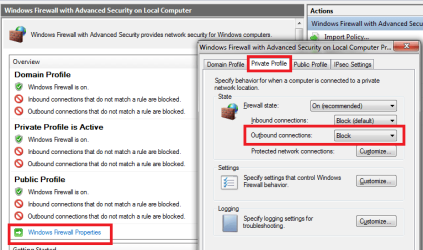
First I think we should ask: Are you using the default setting(allow) for outbound connections, or is it set to Block?
fwsettings.png
 

My Computer My Computer

Computer type
Laptop
Computer Manufacturer/Model Number
HP Elitebook 8540p
OS
Windows 7 Pro 32
CPU
Intel(R) Core(TM) i5 CPU M 540 @ 2.53GHz
Motherboard
Hewlett-Packard 1521
Memory
4,00 GB (Usable 2,98)
Graphics Card(s)
NVIDIA NVS 5100M
Sound Card
NVIDIA High Definition Audio
Screen Resolution
1600x900
Hard Drives
INTEL SSDSA2CW120G3
Antivirus
F-Secure Internet Security
Browser
IE, Firefox, Opera
Other Info
Sandboxie,
SRP (Software Restriction Policy),
EMET (Enhanced Mitigation Experience Toolkit),
WFC (Windows Firewall Control by BiniSoft),
Malwarebytes Premium
Hi,

First I think we should ask: Are you using the default setting(allow) for outbound connections, or is it set to Block?
View attachment 338088

This is set to allow outgoing. Does this have to be on the private tab? as i dont have that enabled. it has never been enabled.
 

My Computer My Computer

Computer type
PC/Desktop
Computer Manufacturer/Model Number
Nooo idea... Custom built PC
OS
Windows 7 Professional X64
CPU
Intel(R) Core(TM) i7 CPU X990 @ 3.47GHz
Motherboard
Don't know the motherboard.. will look up
Memory
12GB RAM
Graphics Card(s)
GTX 780ti Overclocked
Sound Card
NVIDIA High Definition Audio/Realtek High Definition Audio
Monitor(s) Displays
32" LG 3D Full HD TV
Screen Resolution
1920x1080
Hard Drives
1T Hard Drive.
PSU
1000W
Case
Not Sure.
Cooling
Cool Master
Keyboard
MicroSoft Comfort Curve.
Mouse
logitec Mouse
Internet Speed
25mb
Antivirus
Avast-Anti Virus
Browser
FireFox/Chrome
What profile do you use then? You configure every profile differently in the firewall.

You can view it from: Control Panel - Windows Firewall
You can change it from: Control Panel - Network and sharing center. Under "View your active networks" it should say Home or Public for example.

A quote from Windows Firewall - Microsoft Windows
"When you're connected to a public network like a library or a coffee shop, you may want to block all incoming connections. At home or work, this might be overkill. "
 

My Computer My Computer

Computer type
Laptop
Computer Manufacturer/Model Number
HP Elitebook 8540p
OS
Windows 7 Pro 32
CPU
Intel(R) Core(TM) i5 CPU M 540 @ 2.53GHz
Motherboard
Hewlett-Packard 1521
Memory
4,00 GB (Usable 2,98)
Graphics Card(s)
NVIDIA NVS 5100M
Sound Card
NVIDIA High Definition Audio
Screen Resolution
1600x900
Hard Drives
INTEL SSDSA2CW120G3
Antivirus
F-Secure Internet Security
Browser
IE, Firefox, Opera
Other Info
Sandboxie,
SRP (Software Restriction Policy),
EMET (Enhanced Mitigation Experience Toolkit),
WFC (Windows Firewall Control by BiniSoft),
Malwarebytes Premium
What profile do you use then? You configure every profile differently in the firewall.

You can view it from: Control Panel - Windows Firewall
You can change it from: Control Panel - Network and sharing center. Under "View your active networks" it should say Home or Public for example.

A quote from Windows Firewall - Microsoft Windows
"When you're connected to a public network like a library or a coffee shop, you may want to block all incoming connections. At home or work, this might be overkill. "


Ah the profile i use is HOME NETWORK, this the standard one i use all the time. Is there anything i should check?
 

My Computer My Computer

Computer type
PC/Desktop
Computer Manufacturer/Model Number
Nooo idea... Custom built PC
OS
Windows 7 Professional X64
CPU
Intel(R) Core(TM) i7 CPU X990 @ 3.47GHz
Motherboard
Don't know the motherboard.. will look up
Memory
12GB RAM
Graphics Card(s)
GTX 780ti Overclocked
Sound Card
NVIDIA High Definition Audio/Realtek High Definition Audio
Monitor(s) Displays
32" LG 3D Full HD TV
Screen Resolution
1920x1080
Hard Drives
1T Hard Drive.
PSU
1000W
Case
Not Sure.
Cooling
Cool Master
Keyboard
MicroSoft Comfort Curve.
Mouse
logitec Mouse
Internet Speed
25mb
Antivirus
Avast-Anti Virus
Browser
FireFox/Chrome

My Computer My Computer

Computer type
Laptop
Computer Manufacturer/Model Number
Samsung won't charge Now Dell Inspiron 17 3793
OS
Windows 7 Professional 32bit SP1, Windows 10 Home 64-bit at the moment
CPU
Intel Pentium B970 @ 2.30GHz, DELL DELL Intel 3793 Core i5 1
Motherboard
DELL 0C9WH2
Memory
8GB
Graphics Card(s)
NVIDIA GeForce MX230 (Dell)
Sound Card
Realtek High Definition Audio
Monitor(s) Displays
17.3" HD+ LED Display
Screen Resolution
1920x1040
Hard Drives
99GB (RAID SHIT SSD), Seagate 1TB SATA III DATA

Seagate ST1000LM048-2E7172 (SATA III)
Mouse
USB remote
Antivirus
Avast Free Antivirus 20.10.2442
Browser
Internet Explorer 11, FireFox
Other Info
DELL shit Its the worst laptop design ever made the laptop battery is inbuilt who the hell makes a laptop battery inbuilt DELL shit does, can't wait until the 1TB HDD is replaced and RAID shit is removed
"This is set to allow outgoing. Does this have to be on the private tab? as i dont have that enabled. it has never been enabled."

What did you mean by this? What is not enabled?
 

My Computer My Computer

Computer type
Laptop
Computer Manufacturer/Model Number
HP Elitebook 8540p
OS
Windows 7 Pro 32
CPU
Intel(R) Core(TM) i5 CPU M 540 @ 2.53GHz
Motherboard
Hewlett-Packard 1521
Memory
4,00 GB (Usable 2,98)
Graphics Card(s)
NVIDIA NVS 5100M
Sound Card
NVIDIA High Definition Audio
Screen Resolution
1600x900
Hard Drives
INTEL SSDSA2CW120G3
Antivirus
F-Secure Internet Security
Browser
IE, Firefox, Opera
Other Info
Sandboxie,
SRP (Software Restriction Policy),
EMET (Enhanced Mitigation Experience Toolkit),
WFC (Windows Firewall Control by BiniSoft),
Malwarebytes Premium

My Computer My Computer

Computer type
PC/Desktop
Computer Manufacturer/Model Number
Nooo idea... Custom built PC
OS
Windows 7 Professional X64
CPU
Intel(R) Core(TM) i7 CPU X990 @ 3.47GHz
Motherboard
Don't know the motherboard.. will look up
Memory
12GB RAM
Graphics Card(s)
GTX 780ti Overclocked
Sound Card
NVIDIA High Definition Audio/Realtek High Definition Audio
Monitor(s) Displays
32" LG 3D Full HD TV
Screen Resolution
1920x1080
Hard Drives
1T Hard Drive.
PSU
1000W
Case
Not Sure.
Cooling
Cool Master
Keyboard
MicroSoft Comfort Curve.
Mouse
logitec Mouse
Internet Speed
25mb
Antivirus
Avast-Anti Virus
Browser
FireFox/Chrome
"This is set to allow outgoing. Does this have to be on the private tab? as i dont have that enabled. it has never been enabled."

What did you mean by this? What is not enabled?


In your picture that you sent me of showing how to see if the outbound was enabled, Had a RED box around the Private tab. When i selected the PRIVATE TAB it was not even enabled. There were no settings.
 

My Computer My Computer

Computer type
PC/Desktop
Computer Manufacturer/Model Number
Nooo idea... Custom built PC
OS
Windows 7 Professional X64
CPU
Intel(R) Core(TM) i7 CPU X990 @ 3.47GHz
Motherboard
Don't know the motherboard.. will look up
Memory
12GB RAM
Graphics Card(s)
GTX 780ti Overclocked
Sound Card
NVIDIA High Definition Audio/Realtek High Definition Audio
Monitor(s) Displays
32" LG 3D Full HD TV
Screen Resolution
1920x1080
Hard Drives
1T Hard Drive.
PSU
1000W
Case
Not Sure.
Cooling
Cool Master
Keyboard
MicroSoft Comfort Curve.
Mouse
logitec Mouse
Internet Speed
25mb
Antivirus
Avast-Anti Virus
Browser
FireFox/Chrome
Then I'm confused. If you look at my previous picture you can see to the left in the picture, a menu. In Windows Firewall, click on Monitoring and you should see which one is active.
 

My Computer My Computer

Computer type
Laptop
Computer Manufacturer/Model Number
HP Elitebook 8540p
OS
Windows 7 Pro 32
CPU
Intel(R) Core(TM) i5 CPU M 540 @ 2.53GHz
Motherboard
Hewlett-Packard 1521
Memory
4,00 GB (Usable 2,98)
Graphics Card(s)
NVIDIA NVS 5100M
Sound Card
NVIDIA High Definition Audio
Screen Resolution
1600x900
Hard Drives
INTEL SSDSA2CW120G3
Antivirus
F-Secure Internet Security
Browser
IE, Firefox, Opera
Other Info
Sandboxie,
SRP (Software Restriction Policy),
EMET (Enhanced Mitigation Experience Toolkit),
WFC (Windows Firewall Control by BiniSoft),
Malwarebytes Premium
My original plan involved electronically searching the exported text/CSV info.

Since there are no IP addresses (or range of addresses), I'm not sure what to look for next.

You might have to:
...disable one rule
...test surfing to speedtest.net
...re-enable that one rule
Repeat until you find the culprit(s).

Yeah was really confusing to see nothing :P, but with your other info im not really sure how to do the test surfing/disable one rule. Youll have to put it in baby terms/steps, as it is my first time lol.

Sorry - I was not in a place where I could easily post images and I was in a rush. Also, I'm not an expert on the Windows Firewall. The info that you seeing me post is just what comes to mind. It is probably not the most efficient way to search for the rule that is blocking you from getting to sppedtest.net. But like I said, it is just what came to my mind. I'm learning about this right along with you. So don't be surprised if some of the stuff that I post is wrong and makes no sense at all :-)

As I recall, when you turned off the entire Windows firewall, you could surf to speedtest.net. So, my thinking is: you must turn the Windows firewall back on and then work thru each rule that could be blocking you from getting to speedtest.net.

You could use the half-splitting principle to find the offending rule (e.g. disable half of the rules that were enabled to see if the offending rule is in that half). But it is too easy to lose track of which rules should be disabled by default; thus, my suggestion that you work thru each applicable rule one at a time.


1) Open the MMC applet that lets you see the Windows Firewall with Advanced Security.

2) Sort the Outgoing Rules by the column named Action.

3) Look thru all of the rules for ones that say Block as the Action.

4) If there are no rules that say Block as the Action, then I'm not sure what to do next. You can stop doing these steps at this point. If there are "blocking" rules, then go on to step 5.

5) When firewall rules are enabled, they should have a green icon to the left of the rule in the center pane of the Windows Firewall with Advanced Security MMC. Locate the first enabled "blocking" Outgoing Rule, right click on that rule and select Disable from the context menu.
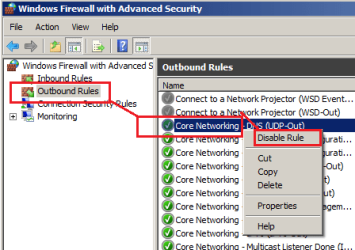
FW1.png

6) Open up any browser and try to surf to speedtest.net.

6a) If you can get to speedtest.net, then the rule that you just disabled is the one that is blocking your connection to speedtest.net. Please let us know what rule that is.

6b) If you can NOT get to speedtest.net, then the rule that you just disabled is the NOT one that is blocking your connection to speedtest.net.

7) Re-enable the rule that was disabled in step 5. Even if it is the one that is blocking you from getting to speedtes.net. We want to talk about that rule before you leave it disabled.
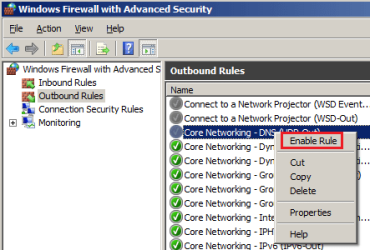
FW2.png

8) Repeat steps 5, 6 and 7 for each "blocking" rule that is enabled.

 

My Computer My Computer

Computer type
Laptop
Computer Manufacturer/Model Number
Employer provided Dell Latitude
OS
W7 Pro SP1 64bit
CPU
i7
Memory
8GB
Graphics Card(s)
Intel HD Graphics
Hard Drives
crappy SSD
Antivirus
Employer mandated Symantec Endpoint Protection
Browser
Pale Moon 64bit, IE11 64bit & Chrome 64bit
Hey, I am able to get back on to speedtest.net now. I just disabled and reenabled my W7 firewall.

Im not having another issue with Outlook.com Now that i have restarted W7 firewall.

IMG: VVCap Image
 

My Computer My Computer

Computer type
PC/Desktop
Computer Manufacturer/Model Number
Nooo idea... Custom built PC
OS
Windows 7 Professional X64
CPU
Intel(R) Core(TM) i7 CPU X990 @ 3.47GHz
Motherboard
Don't know the motherboard.. will look up
Memory
12GB RAM
Graphics Card(s)
GTX 780ti Overclocked
Sound Card
NVIDIA High Definition Audio/Realtek High Definition Audio
Monitor(s) Displays
32" LG 3D Full HD TV
Screen Resolution
1920x1080
Hard Drives
1T Hard Drive.
PSU
1000W
Case
Not Sure.
Cooling
Cool Master
Keyboard
MicroSoft Comfort Curve.
Mouse
logitec Mouse
Internet Speed
25mb
Antivirus
Avast-Anti Virus
Browser
FireFox/Chrome
Hey, I am able to get back on to speedtest.net now. I just disabled and reenabled my W7 firewall.
~~~
With the W7 firewall turned on:
Restart your computer.
Then try to get to speedtest.net.
Let us know the results.


~~~
Im not having another issue with Outlook.com Now that i have restarted W7 firewall.

IMG: VVCap Image

You should consider following these steps when posting an image to this forum:
http://www.sevenforums.com/tutorials/9733-screenshots-files-upload-post-seven-forums.html

I'm unable to see your screenshot...
View attachment 338406
...and external storage places might delete the image someday.
 

My Computer My Computer

Computer type
Laptop
Computer Manufacturer/Model Number
Employer provided Dell Latitude
OS
W7 Pro SP1 64bit
CPU
i7
Memory
8GB
Graphics Card(s)
Intel HD Graphics
Hard Drives
crappy SSD
Antivirus
Employer mandated Symantec Endpoint Protection
Browser
Pale Moon 64bit, IE11 64bit & Chrome 64bit
Back
Top