
USB 3.0 Ports not working: AMD Drivers cannot fix

ACMDogfight1997

New member
Member
VIP
Local time
1:06 AM
Messages
106
Location
Fairland, Indiana
Hi there.

If you've read in my BSOD forum (http://www.sevenforums.com/bsod-help-support/349751-bsod-vacation-cannot-log-windows.html), I had to reinstall Windows in order to fix the problem. Well, I did. However, as I was reinstalling the drivers, I found out that the AMD drivers, which were suppose to allow me to use the USB 3.0 ports on my laptop, didn't do their purpose for me. :huh: I uninstalled and reinstalled the drivers using both auto-detect and manual selection; restarted the PC; reinstalled Windows on my PC once yet again and installed the drivers from driverscollection.com, installed all of the Windows updates, then did the same thing to the AMD drivers and still no joy. :( I know what I'm doing because I have done it before several months ago and it all worked out okay (until the BSOD occurred while on vacation. :rolleyes:)

I don't know what the deal is because there are 4 USB ports on my laptop and 3 of them are USB 3.0 ports; therefore, I can only use the one USB 2.0 port which I plug my mouse in and have to unplug it if I need to export or import files from a flash drive (or whatever I need to plug in) which is tedious since I'm use more than one! :mad: Anybody knows why? Do I need to install another driver so that the AMD drivers work or is there something else out there? :confused:
 

My Computer My Computer

Computer type
Laptop
Computer Manufacturer/Model Number
HP Envy Dv7-7223cl
OS
Windows 10 Pro 64-Bit
CPU
AMD A8-4500M APU
Motherboard
I dunno, System Information won't tell me :P
Memory
8 GB
Graphics Card(s)
AMD Radeon HD Graphics 1.90 GHz
Sound Card
AMD High Definition Audio Device
Monitor(s) Displays
AMD Radeon HD 7640G
Screen Resolution
1600x900
Hard Drives
Hitachi HTS547575A9E384 ATA Device
PSU
HP/Compaq R33030 Charger
Case
Swiss Gear 17"
Cooling
HP CoolSense
Keyboard
Standard PS/2 Keyboard
Mouse
Microsoft Basic Optical Mouse v2.0
Internet Speed
135.0 Mbps
Antivirus
Microsoft Security Essentials
Browser
Internet Explorer 11, Google Chrome, Mozilla Firefox
Other Info
My spiritual successor to the Toshiba Satellite L645D-S2025 (my first laptop which died of mismanagement primarily involving food :( )
Hi

Please upload a "System Information Report" with your next reply. To do that ;

1.Open RUN dialogue and type "Msinfo32.exe" and press Enter key.

2. When the System Information Tool opens, choose "File -> Save" and give a name of your choice. Then zip the saved file ( Right Click -->Send To --> Compressed Folder ) and upload it with next reply.
 

My Computer My Computer

Computer type
PC/Desktop
OS
Windows 7 Ultimate x64

My Computer My Computer

Computer type
PC/Desktop
Computer Manufacturer/Model Number
Customs, Dell, Gateway, HP, Toshiba, Acer, ASUS
OS
Windows 7 Ultimate 64-bit, Windows 8.1 64-bit, Mac OS X 10.10, Linux Mint 17, Windows 10 Pro TP
Keyboard
Microsoft
Mouse
Microsoft
Hi

Please upload a "System Information Report" with your next reply. To do that ;

1.Open RUN dialogue and type "Msinfo32.exe" and press Enter key.

2. When the System Information Tool opens, choose "File -> Save" and give a name of your choice. Then zip the saved file ( Right Click -->Send To --> Compressed Folder ) and upload it with next reply.

Well, here it is:
 

Attachments

My Computer My Computer

Computer type
Laptop
Computer Manufacturer/Model Number
HP Envy Dv7-7223cl
OS
Windows 10 Pro 64-Bit
CPU
AMD A8-4500M APU
Motherboard
I dunno, System Information won't tell me :P
Memory
8 GB
Graphics Card(s)
AMD Radeon HD Graphics 1.90 GHz
Sound Card
AMD High Definition Audio Device
Monitor(s) Displays
AMD Radeon HD 7640G
Screen Resolution
1600x900
Hard Drives
Hitachi HTS547575A9E384 ATA Device
PSU
HP/Compaq R33030 Charger
Case
Swiss Gear 17"
Cooling
HP CoolSense
Keyboard
Standard PS/2 Keyboard
Mouse
Microsoft Basic Optical Mouse v2.0
Internet Speed
135.0 Mbps
Antivirus
Microsoft Security Essentials
Browser
Internet Explorer 11, Google Chrome, Mozilla Firefox
Other Info
My spiritual successor to the Toshiba Satellite L645D-S2025 (my first laptop which died of mismanagement primarily involving food :( )
Hi ... Your Laptop came with Windows 8 ? The reason why your USB Ports do not work is because the Chipset Driver is combined with the Graphics Controller .. Have you tried the Windows 8 Driver ?...
 

My Computer My Computer

Computer Manufacturer/Model Number
W530-3630QM1
OS
windows 7 home 64bit
CPU
INTEL-CORE I7
Memory
16GB
Hard Drives
750GB
Browser
Chrome
Try the Driver in the Link below ...

Chipset
 

My Computer My Computer

Computer Manufacturer/Model Number
W530-3630QM1
OS
windows 7 home 64bit
CPU
INTEL-CORE I7
Memory
16GB
Hard Drives
750GB
Browser
Chrome
Hi ... Your Laptop came with Windows 8 ? The reason why your USB Ports do not work is because the Chipset Driver is combined with the Graphics Controller .. Have you tried the Windows 8 Driver ?...

That's what I used, AMD Catalyst Control, and for some reason it doesn't work. Any other ideas?
 

My Computer My Computer

Computer type
Laptop
Computer Manufacturer/Model Number
HP Envy Dv7-7223cl
OS
Windows 10 Pro 64-Bit
CPU
AMD A8-4500M APU
Motherboard
I dunno, System Information won't tell me :P
Memory
8 GB
Graphics Card(s)
AMD Radeon HD Graphics 1.90 GHz
Sound Card
AMD High Definition Audio Device
Monitor(s) Displays
AMD Radeon HD 7640G
Screen Resolution
1600x900
Hard Drives
Hitachi HTS547575A9E384 ATA Device
PSU
HP/Compaq R33030 Charger
Case
Swiss Gear 17"
Cooling
HP CoolSense
Keyboard
Standard PS/2 Keyboard
Mouse
Microsoft Basic Optical Mouse v2.0
Internet Speed
135.0 Mbps
Antivirus
Microsoft Security Essentials
Browser
Internet Explorer 11, Google Chrome, Mozilla Firefox
Other Info
My spiritual successor to the Toshiba Satellite L645D-S2025 (my first laptop which died of mismanagement primarily involving food :( )
Go to the Device Manager / System Devices ... Post back the Chipset Version ...
 

My Computer My Computer

Computer Manufacturer/Model Number
W530-3630QM1
OS
windows 7 home 64bit
CPU
INTEL-CORE I7
Memory
16GB
Hard Drives
750GB
Browser
Chrome
Go to the Device Manager / System Devices ... Post back the Chipset Version ...

Which one? There's nearly 30 system devices.

There are however 4 devices under other devices with yellow signs:

PCI Device
SM Bus Controller
USB Controller (x2)

Doesn't tell me which versions they are however (says not available beside driver version) in the properties menu.
 

My Computer My Computer

Computer type
Laptop
Computer Manufacturer/Model Number
HP Envy Dv7-7223cl
OS
Windows 10 Pro 64-Bit
CPU
AMD A8-4500M APU
Motherboard
I dunno, System Information won't tell me :P
Memory
8 GB
Graphics Card(s)
AMD Radeon HD Graphics 1.90 GHz
Sound Card
AMD High Definition Audio Device
Monitor(s) Displays
AMD Radeon HD 7640G
Screen Resolution
1600x900
Hard Drives
Hitachi HTS547575A9E384 ATA Device
PSU
HP/Compaq R33030 Charger
Case
Swiss Gear 17"
Cooling
HP CoolSense
Keyboard
Standard PS/2 Keyboard
Mouse
Microsoft Basic Optical Mouse v2.0
Internet Speed
135.0 Mbps
Antivirus
Microsoft Security Essentials
Browser
Internet Explorer 11, Google Chrome, Mozilla Firefox
Other Info
My spiritual successor to the Toshiba Satellite L645D-S2025 (my first laptop which died of mismanagement primarily involving food :( )
Go to the Device Manager then System Devices ... You should see the Chipset Version there Please Post it ..
 

My Computer My Computer

Computer Manufacturer/Model Number
W530-3630QM1
OS
windows 7 home 64bit
CPU
INTEL-CORE I7
Memory
16GB
Hard Drives
750GB
Browser
Chrome
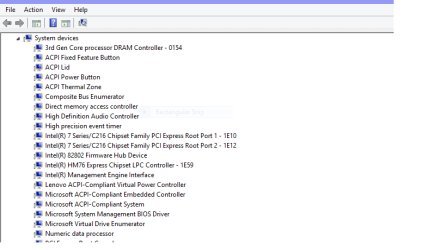
Here is a Pic of mine


Chip.png
 

My Computer My Computer

Computer Manufacturer/Model Number
W530-3630QM1
OS
windows 7 home 64bit
CPU
INTEL-CORE I7
Memory
16GB
Hard Drives
750GB
Browser
Chrome
Go to the Device Manager then System Devices ... You should see the Chipset Version there Please Post it ..

Well I'm looking at the properties of the system devices and it show the version of Windows 7 but in different exact numbers (for example Remote Desktop Device Redirector Bus says 6.1.7600.16385 but some others such as PCI bus say 6.1.7601.17514.) If I'm wrong, then I don't know what you're getting to. :confused:
 

My Computer My Computer

Computer type
Laptop
Computer Manufacturer/Model Number
HP Envy Dv7-7223cl
OS
Windows 10 Pro 64-Bit
CPU
AMD A8-4500M APU
Motherboard
I dunno, System Information won't tell me :P
Memory
8 GB
Graphics Card(s)
AMD Radeon HD Graphics 1.90 GHz
Sound Card
AMD High Definition Audio Device
Monitor(s) Displays
AMD Radeon HD 7640G
Screen Resolution
1600x900
Hard Drives
Hitachi HTS547575A9E384 ATA Device
PSU
HP/Compaq R33030 Charger
Case
Swiss Gear 17"
Cooling
HP CoolSense
Keyboard
Standard PS/2 Keyboard
Mouse
Microsoft Basic Optical Mouse v2.0
Internet Speed
135.0 Mbps
Antivirus
Microsoft Security Essentials
Browser
Internet Explorer 11, Google Chrome, Mozilla Firefox
Other Info
My spiritual successor to the Toshiba Satellite L645D-S2025 (my first laptop which died of mismanagement primarily involving food :( )
Looks as if your in the wrong place .... Open the Device Manager scroll down to System Devices expand it and Post a screenshot ...
 

My Computer My Computer

Computer Manufacturer/Model Number
W530-3630QM1
OS
windows 7 home 64bit
CPU
INTEL-CORE I7
Memory
16GB
Hard Drives
750GB
Browser
Chrome
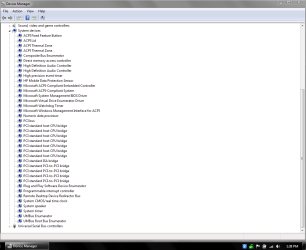
Well, see anything suspicious ?
Capture.PNG
 

My Computer My Computer

Computer type
Laptop
Computer Manufacturer/Model Number
HP Envy Dv7-7223cl
OS
Windows 10 Pro 64-Bit
CPU
AMD A8-4500M APU
Motherboard
I dunno, System Information won't tell me :P
Memory
8 GB
Graphics Card(s)
AMD Radeon HD Graphics 1.90 GHz
Sound Card
AMD High Definition Audio Device
Monitor(s) Displays
AMD Radeon HD 7640G
Screen Resolution
1600x900
Hard Drives
Hitachi HTS547575A9E384 ATA Device
PSU
HP/Compaq R33030 Charger
Case
Swiss Gear 17"
Cooling
HP CoolSense
Keyboard
Standard PS/2 Keyboard
Mouse
Microsoft Basic Optical Mouse v2.0
Internet Speed
135.0 Mbps
Antivirus
Microsoft Security Essentials
Browser
Internet Explorer 11, Google Chrome, Mozilla Firefox
Other Info
My spiritual successor to the Toshiba Satellite L645D-S2025 (my first laptop which died of mismanagement primarily involving food :( )
There is nothing there to Help us ... I have been searching for any clues what Chipset your Laptop uses ..

There is very little Information on it have even tried the Motherboard Model Number still nothing ...

Still searching though ...
 

My Computer My Computer

Computer Manufacturer/Model Number
W530-3630QM1
OS
windows 7 home 64bit
CPU
INTEL-CORE I7
Memory
16GB
Hard Drives
750GB
Browser
Chrome
Very well then, continue your search. I have to assume it's out there because it has worked under Windows 7 before.
 

My Computer My Computer

Computer type
Laptop
Computer Manufacturer/Model Number
HP Envy Dv7-7223cl
OS
Windows 10 Pro 64-Bit
CPU
AMD A8-4500M APU
Motherboard
I dunno, System Information won't tell me :P
Memory
8 GB
Graphics Card(s)
AMD Radeon HD Graphics 1.90 GHz
Sound Card
AMD High Definition Audio Device
Monitor(s) Displays
AMD Radeon HD 7640G
Screen Resolution
1600x900
Hard Drives
Hitachi HTS547575A9E384 ATA Device
PSU
HP/Compaq R33030 Charger
Case
Swiss Gear 17"
Cooling
HP CoolSense
Keyboard
Standard PS/2 Keyboard
Mouse
Microsoft Basic Optical Mouse v2.0
Internet Speed
135.0 Mbps
Antivirus
Microsoft Security Essentials
Browser
Internet Explorer 11, Google Chrome, Mozilla Firefox
Other Info
My spiritual successor to the Toshiba Satellite L645D-S2025 (my first laptop which died of mismanagement primarily involving food :( )
Yes i did see that you put Windows 7 on it back in January :)
 

My Computer My Computer

Computer Manufacturer/Model Number
W530-3630QM1
OS
windows 7 home 64bit
CPU
INTEL-CORE I7
Memory
16GB
Hard Drives
750GB
Browser
Chrome
Well if only if I knew this in the first place, we wouldn't be here now would we? I just found out that I just had to select the optional downloads in the AMD website and there it was, hidden in a menu that I didn't know even existed. I guess all that rebooting and uninstalling and reinstalling of the drivers and Windows was for nothing now, huh? Well I guess I'll have to reboot this thing yet more.

P.S.: Do you think the mouse plugged in the USB 2.0 port would've been a cause for USB 3.0 drivers to not install? I was thinking about that for a moment.
 

My Computer My Computer

Computer type
Laptop
Computer Manufacturer/Model Number
HP Envy Dv7-7223cl
OS
Windows 10 Pro 64-Bit
CPU
AMD A8-4500M APU
Motherboard
I dunno, System Information won't tell me :P
Memory
8 GB
Graphics Card(s)
AMD Radeon HD Graphics 1.90 GHz
Sound Card
AMD High Definition Audio Device
Monitor(s) Displays
AMD Radeon HD 7640G
Screen Resolution
1600x900
Hard Drives
Hitachi HTS547575A9E384 ATA Device
PSU
HP/Compaq R33030 Charger
Case
Swiss Gear 17"
Cooling
HP CoolSense
Keyboard
Standard PS/2 Keyboard
Mouse
Microsoft Basic Optical Mouse v2.0
Internet Speed
135.0 Mbps
Antivirus
Microsoft Security Essentials
Browser
Internet Explorer 11, Google Chrome, Mozilla Firefox
Other Info
My spiritual successor to the Toshiba Satellite L645D-S2025 (my first laptop which died of mismanagement primarily involving food :( )
No i do not think the Mouse had any thing to do with it ... The main thing is you got it sorted :)
 

My Computer My Computer

Computer Manufacturer/Model Number
W530-3630QM1
OS
windows 7 home 64bit
CPU
INTEL-CORE I7
Memory
16GB
Hard Drives
750GB
Browser
Chrome
Back
Top