Solved Laptop Memory Drop

adriansam

New member
Member
Local time
1:56 AM
Messages
69
Location
Tanza, Cavite
Hi Guys,
I have my Lenovo G560 Laptop running Win7 Ultimate 64 bit. And now it becomes slow and I think its because of ram
Before, my laptop's rating is 4.0 , and now after reformat(OEM factory) it becomes 2.3
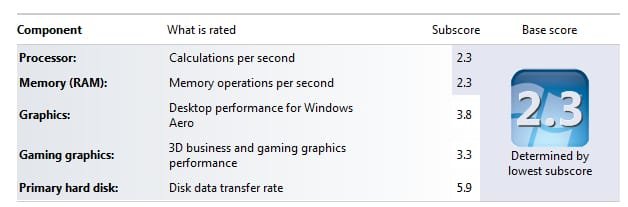
2014-11-05_124218.jpg

I didnt notice the changes on my laptop performance before because I was busy doing my thesis. The day after the completion of my paperworks, I play CS Source and its becomes laggy Ive set the resolution in 640x480 but the changes in gaming performance just increase a little bit, thats why I reformat it because I thought its because of malware, viruses etc.

After reformat, I open CS Source to check if reformat fix the problem, but still no luck, Ive tried to check the status of its memory using "Windows Memory Diagnostic" but evrytime the tool starts, the laptop just shutdown,

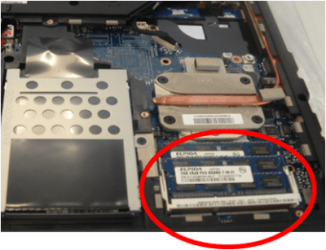
And now what Im planning, is to buy 4gb ram and mount it in my laptop's extra memory slot. Is it right?

Please help me, I dont know what Im doing.

Thanks :D
 

My Computer My Computer

At a glance

Microsoft Windows 7 Ultimate 64-bitIntel(R) Core(TM) i3 CPU M 370 @ 2.40GHz465.76 GBIntel(R) HD Graphics
Computer type
Laptop
Computer Manufacturer/Model Number
Lenovo
OS
Microsoft Windows 7 Ultimate 64-bit
CPU
Intel(R) Core(TM) i3 CPU M 370 @ 2.40GHz
Motherboard
LENOVO Base Board Product Name
Memory
465.76 GB
Graphics Card(s)
Intel(R) HD Graphics
Sound Card
(1) High Definition Audio Device (2) High Definition Audio
Hard Drives
(1) ST9500325AS
Hi ... Go to the Lenovo Website find your Model Number .... Click on Product&Parts ...

Hardware Maintenance Manual ... There you will see which type of Memory you need ...

Also will show you how to Install the Memory ....

Careful attention is needed if you are only going to Install one Stick of Ram ...

As most Lenovo Models the Memory will only work in slot 0
 

My Computer My Computer

At a glance

windows 7 home 64bitINTEL-CORE I716GB
Computer Manufacturer/Model Number
W530-3630QM1
OS
windows 7 home 64bit
CPU
INTEL-CORE I7
Memory
16GB
Hard Drives
750GB
Browser
Chrome

My Computer My Computer

At a glance

Windows 10x64 Build 1709Intel i7 7700HQ Kaby Lake16 GB DDR4 @2400Nvidia Geforce GTX 1060
Computer type
Laptop
Computer Manufacturer/Model Number
MSI GE72VR Apache Pro-416
OS
Windows 10x64 Build 1709
CPU
Intel i7 7700HQ Kaby Lake
Motherboard
Micro-Star Intl. MS-179B (U3C1)
Memory
16 GB DDR4 @2400
Graphics Card(s)
Nvidia Geforce GTX 1060
Screen Resolution
1920x1080 120Hz
Hard Drives
256 GB Nvme M.2 SSD

1TB HDD@7200
Cooling
Cooler Blast 4
Keyboard
Steel Series
Antivirus
Bit Defender Free
Browser
Edge
I don't think you should put memory into it right away, there may be another issue. If you look at the WEI score you posted, not only is your RAM rated at 2.3 but so is your processor. If you are sure that the system was previously rated at 4.0 then something changed, adding more RAM won't help. I suspect your clock speed or something changed. Does your BIOS provide for any kind of clock speed tuning? You may need to look into that.
 

My Computer My Computer

At a glance

W10 Pro desktop, W11 laptop, W11 Pro tablet (...3.7Ghz 8700K i7, i7-11800H, i7-1065G716G desktop, 16G laptop, 4G tabletAMD Radeon RX580, RTX 3060, Intel Iris Plus
Computer type
PC/Desktop
Computer Manufacturer/Model Number
Home Built desktop, Dell G15 5511 Gaming laptop,MS Surface Pro 7 tablet
OS
W10 Pro desktop, W11 laptop, W11 Pro tablet (all 64-bit)
CPU
3.7Ghz 8700K i7, i7-11800H, i7-1065G7
Motherboard
ASUS TUF Z370-Pro Gaming in desktop
Memory
16G desktop, 16G laptop, 4G tablet
Graphics Card(s)
AMD Radeon RX580, RTX 3060, Intel Iris Plus
Sound Card
High Definition Audio (Built-in to mobo)
Monitor(s) Displays
Samsung U32J59 32" (2x), 15.6", 12"
Screen Resolution
3840x2160, 3840x2160, 1920x1080, 2160x1440
Hard Drives
500G SSD for OS; 2T, 10T & 15T HDDs for Data on Desktop, 1TB SSD laptop, 128G SSD tablet.
PSU
Corsair CX 750M
Case
Antec 100
Cooling
CM 212+
Keyboard
IBM Model M - used continuously since 1986
Mouse
Microsoft Pro IntelliMouse
Internet Speed
400M down 8M up
Antivirus
Windows Defender
Browser
FireFox
Other Info
Built my first computer (8Mhz 8088cpu, 640K RAM, 20MB HDD, 2 360K floppy drives) in 1985 and have been building them for myself, relatives and friends ever since.
Hi ... Go to the Lenovo Website find your Model Number .... Click on Product&Parts ...

Hardware Maintenance Manual ... There you will see which type of Memory you need ...

Also will show you how to Install the Memory ....

Careful attention is needed if you are only going to Install one Stick of Ram ...

As most Lenovo Models the Memory will only work in slot 0

Thank you for replying :D
If ever that the new memory does not work in the extra slot, I just switch it :D
Is there an alternative way to check my ram aside from Windows Memory Diag?
medium.png


Heres a good easy way to check your memory and capacities/capabilities.

Welcome to Crucial USA

Thanks for the very informative site :D
 

My Computer My Computer

At a glance

Microsoft Windows 7 Ultimate 64-bitIntel(R) Core(TM) i3 CPU M 370 @ 2.40GHz465.76 GBIntel(R) HD Graphics
Computer type
Laptop
Computer Manufacturer/Model Number
Lenovo
OS
Microsoft Windows 7 Ultimate 64-bit
CPU
Intel(R) Core(TM) i3 CPU M 370 @ 2.40GHz
Motherboard
LENOVO Base Board Product Name
Memory
465.76 GB
Graphics Card(s)
Intel(R) HD Graphics
Sound Card
(1) High Definition Audio Device (2) High Definition Audio
Hard Drives
(1) ST9500325AS
I don't think you should put memory into it right away, there may be another issue. If you look at the WEI score you posted, not only is your RAM rated at 2.3 but so is your processor. If you are sure that the system was previously rated at 4.0 then something changed, adding more RAM won't help. I suspect your clock speed or something changed. Does your BIOS provide for any kind of clock speed tuning? You may need to look into that.

Thanks for replying, You're right the problem is in the processor not RAM :D
No, I havent seen anything about clock speed tuning.
Is there any relationship between RAM and Processor?
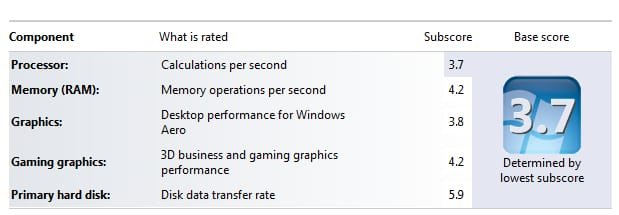
I think its now ok :D 2014-11-06_000232.jpg
 
Last edited:

My Computer My Computer

At a glance

Microsoft Windows 7 Ultimate 64-bitIntel(R) Core(TM) i3 CPU M 370 @ 2.40GHz465.76 GBIntel(R) HD Graphics
Computer type
Laptop
Computer Manufacturer/Model Number
Lenovo
OS
Microsoft Windows 7 Ultimate 64-bit
CPU
Intel(R) Core(TM) i3 CPU M 370 @ 2.40GHz
Motherboard
LENOVO Base Board Product Name
Memory
465.76 GB
Graphics Card(s)
Intel(R) HD Graphics
Sound Card
(1) High Definition Audio Device (2) High Definition Audio
Hard Drives
(1) ST9500325AS
Back
Top