UEFI (Unified Extensible Firmware Interface) - Install Windows 7 with

How to Install Windows 7 Using the "Unified Extensible Firmware Interface" (UEFI)


   Information
In addition to better interoperability, UEFI firmware provides several technical advantages:
  • Compatibility with operating systems that support only BIOS
  • Ability to boot from large disks
  • CPU-independent architecture
  • CPU-independent drivers
  • Flexible pre-OS environment
  • Modular design
Two of the most notable Windows features for UEFI systems are the following:
  • Multicast deployment, which enables large scale network-based image deployment in manufacturing and enterprise settings.
  • Fast boot and resume from hibernation, which improves user experience.
The rich UEFI interface provides ample room for innovation in the development of operating system features. Along with the other members of the Unified EFI Forum, Microsoft is investigating the following:
  • Rootkit prevention
  • Network authentication
-Microsoft Corporation
This method can also be used for the UEFI installation of Windows 8, Windows Server 2008 SP1, Windows Server 2008 R2, and Windows Vista SP1.

   Note
You will need to satisfy the following requirements in order to proceed:

  • A Windows 7 compatible system
  • A Windows 7 x64-bit installation media. 32-bit is not supported.
  • A UEFI v2.0+ compliant PC. Check your chipset manufacturer/firmware documentation.
  • A blank, partition-free, hard disk for installation.
   Warning

  • Disabling UEFI will make the system unbootable as there is no MBR on the disks.
  • You CANNOT make a sector-by-sector copy of GPT disks. The Disk and Partition GUIDs will no longer be unique. This must never happen. You can make a sector-by-sector copy of the contents of ESP or basic data partitions.
  • Disable secure boot before installing Windows 7.


Here's How:

1. Do step 2 or 3 below depending on what installation Media you are using.

2. If using a Retail 64-bit Windows 7 Installation DVD A) Insert the DVD, restart the computer, and go to step 4 below.
3. If using a 64-bit Windows 7 Installation USB Flash Drive with UEFI A) If you have not already, you will need to create a Windows 7 installation bootable USB flash drive for UEFI from either a Windows 7 installation ISO or DVD.

B) Connect the USB, restart the computer, and go to step 4 below.
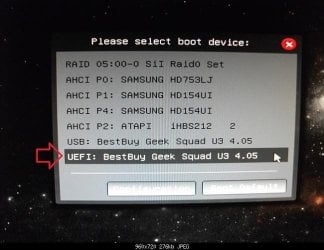
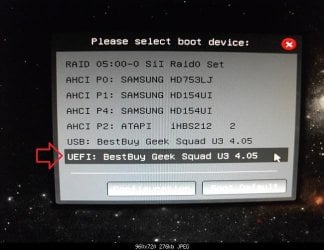
4. Press whatever key (ex: F11) it shows to boot to your motherboard's boot menu, and select to boot from the DVD or UEFI USB. (see screenshot below) UEFI_USB_Boot_Menu.jpg
5. Do steps 3 to 7 in the tutorial link below. http://www.sevenforums.com/tutorials/1649-clean-install-windows-7-a.html
6. Delete all partitions/volumes on the disk # (ex: Disk 0) that you want to install Windows 7 as UEFI on until that disk # shows as unallocated space. (see screenshot below) Step7.jpg
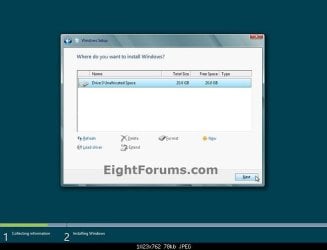
7. When you are finished, click/tap on New, Apply (for full size of disk), and OK. (see screenshot above)

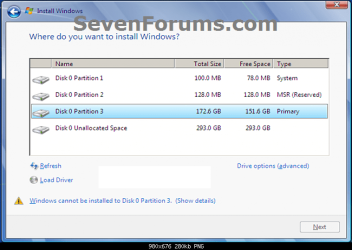
8. You will notice that the disk has now been formatted as GPT with 3 partitions. Select the "Primary" partition 3, and click/tap on Next. (see screenshot below)
NOTE: You might receive a "Windows can't be installed on drive 0" warning, but as long as you can click on the Next button, you're fine.
   Note
The 3 partitions are:
  • Partition 1 - System - The EFI System partition that contains the NTLDR, HAL, Boot.txt, and other files that are needed to boot the system, such as drivers.
  • Partition 2 - MSR - The Microsoft Reserved (MSR) partition that reserves space on each disk drive for subsequent use by operating system software.
  • Partition 3 - Primary - Where Windows is to be installed to.

    It is imperative that these 3 partitions remain in the exact order as they are


Windows7.PNG
9. You can now finish doing the steps in either tutorial below.

10. That's it. You have successfully installed Windows 7 on an UEFI system.


External Links:


Windows and GPT FAQ
Unified Extensible Firmware Interface - Wikipedia, the free encyclopedia
UEFI and Windows
 
Last edited by a moderator:
Thank you for this excellent guide. A couple of hopefully simple questions:

1. When I am trying to run Windows 7 setup off my DVD (with Secure Boot disabled in BIOS), it freezes during initialization. Now this seems to be a common problem and from what I understand it is because setup is loading from the "normal DVD drive" whereas you have to make it boot from the special "UEFI DVD drive". The problem is, however, that there is no such thing as a "UEFI DVD Drive" in my boot manager. There's only the normal DVD drive listed and that's it. What do I do?

2. Going the USB stick route yields the exact same result (There's only one USB boot option showing up in the boot manager and nothing like "UEFI USB"). Installer freezes on "Starting Windows screen".

3. From my understanding, it's impossible to install Windows 7 with Secure Boot enabled? When I have secure boot enabled, setup won't even load and I get an error message saying "Security Boot Failure".

For the record, my computer is a brand-new Acer Aspire Laptop. My Installation disc is an unaltered Windows 7 Prof. SP1 x64 ISO from Microsoft (X17-24281.ISO)

The bootmanager only gives me this:

2dj0y1d.jpg


And my BIOS looks like this:
1zp3c4k.jpg


28sbtbb.jpg


2hmd1c8.jpg

 
Last edited:

My Computer My Computer

Computer type
PC/Desktop
Computer Manufacturer/Model Number
Acer
OS
Windows 7 Ultimate x64
CPU
Intel core i5
Memory
4GB
Graphics Card(s)
Intel HD 4400

My Computer My Computer

Computer type
PC/Desktop
Computer Manufacturer/Model Number
Self built custom
OS
64-bit Windows 11 Pro for Workstations
CPU
Intel i7-8700K OC'd to 5 GHz
Motherboard
ASUS ROG Maximus XI Formula Z390
Memory
64 GB (4x16GB) G.SKILL TridentZ RGB DDR4 3600 MHz
Graphics Card(s)
ASUS ROG-STRIX-GTX1080TI-O11G-GAMING
Sound Card
Integrated
Monitor(s) Displays
2 x Samsung Odyssey G7 27"
Screen Resolution
2560x1440
Hard Drives
1TB Samsung 990 PRO M.2,
4TB Samsung 990 PRO PRO M.2,
TerraMaster F8 SSD Plus NAS
PSU
Seasonic Prime Titanium 850W
Case
Thermaltake Core P3
Cooling
Corsair Hydro H115i
Keyboard
Logitech wireless K800
Mouse
Logitech MX Master 4
Internet Speed
2 Gb/s Download and 100 Mb/s Upload
Antivirus
Malwarebyte Anti-Malware Premium
Browser
Google Chrome
Other Info
Logitech Z625 speaker system,
Logitech BRIO 4K Pro webcam,
HP Color LaserJet Pro MFP M477fdn,
APC SMART-UPS RT 1000 XL - SURT1000XLI,
Galaxy S23 Plus phone
Hello Brink,

Thank you and yes that is exactly the guide I followed to create the bootable UEFI USB Flash drive. Unfortunately setup just freezes during "Starting Windows" when booting from said Flash drive, just as with booting from the Windows 7 Installation DVD.
 

My Computer My Computer

Computer type
PC/Desktop
Computer Manufacturer/Model Number
Acer
OS
Windows 7 Ultimate x64
CPU
Intel core i5
Memory
4GB
Graphics Card(s)
Intel HD 4400
Are you able to install Windows 7 without using UEFI?
 

My Computer My Computer

Computer type
PC/Desktop
Computer Manufacturer/Model Number
Self built custom
OS
64-bit Windows 11 Pro for Workstations
CPU
Intel i7-8700K OC'd to 5 GHz
Motherboard
ASUS ROG Maximus XI Formula Z390
Memory
64 GB (4x16GB) G.SKILL TridentZ RGB DDR4 3600 MHz
Graphics Card(s)
ASUS ROG-STRIX-GTX1080TI-O11G-GAMING
Sound Card
Integrated
Monitor(s) Displays
2 x Samsung Odyssey G7 27"
Screen Resolution
2560x1440
Hard Drives
1TB Samsung 990 PRO M.2,
4TB Samsung 990 PRO PRO M.2,
TerraMaster F8 SSD Plus NAS
PSU
Seasonic Prime Titanium 850W
Case
Thermaltake Core P3
Cooling
Corsair Hydro H115i
Keyboard
Logitech wireless K800
Mouse
Logitech MX Master 4
Internet Speed
2 Gb/s Download and 100 Mb/s Upload
Antivirus
Malwarebyte Anti-Malware Premium
Browser
Google Chrome
Other Info
Logitech Z625 speaker system,
Logitech BRIO 4K Pro webcam,
HP Color LaserJet Pro MFP M477fdn,
APC SMART-UPS RT 1000 XL - SURT1000XLI,
Galaxy S23 Plus phone
I never understood turning secure boot off deal and never have done that one,
UEFI depends on if there are other existing partitions on the hdd or ssd that dictate if uefi will be there or not,
It seems on a New Acer it would indeed have existing partitions/ factory restore partition so uefi might fail to install with it there,
Cheers and sorry to butt in ;)
 

My Computer My Computer

Computer type
PC/Desktop
Computer Manufacturer/Model Number
Custom assembled by me :}
OS
Win-7-Pro64bit 7-H-Prem-64bit
CPU
i7-5930K 2nd i9-9940x both water blocked VRM's too
Motherboard
ASUS SABERTOOTH X99 2nd ASUS x299 Apex
Memory
Trident-z 3200C14 2nd Trident-z 3600C16
Graphics Card(s)
EVGA 1080ti ftw3 2nd Titan Xp both water blocked
Sound Card
Built-in Realtek
Monitor(s) Displays
1-AOC G2460PG 24"G-Sync 144Hz/ 2nd 1-ASUS VG248QE 24" 144Hz
Screen Resolution
1920 x 1080 144Hz
Hard Drives
2-Samsung M.2 Evo & Evo Plus
2-Samsung 850 EVO 500GB SSD's/ 3-2.5 W.D. Black 1tb-&3-1tb/3-3.5 WD Black 1tb hdd's
PSU
EVGA SuperNOVA 1000-P2 2nd 1200-P2
Case
2-Corsair Obsidian Series 450D Black ATX Mid Tower
Cooling
Custom water loops
Keyboard
Logitech G710+/ 2nd Logitech G910
Mouse
2-RedDragon M901 Perdition 16400 dpi Gaming mouse = wired
Internet Speed
Comcast Ping 19ms 89.31mbps download speed 6.12mbps upload
Antivirus
Malwarebytes Pro/ Superantispyware Pro
Browser
FireFox & Pale moon
Other Info
2nd ASUS X299 Apex/Intel i9-9940x with Custom water loop/7H-Prem-x64/Corsair 450D case/Ram Trident-z 3600C16 4x8gb / Samsung970Evo plus 500gb SSD/Dual ssd EZ swap evo/PSU EVGA SuperNova 1200w-P2 80+Platinum/GPU Titan Xp /8-ML-140 on push-pull on 2-280GTX rads
I never understood turning secure boot off deal and never have done that one,
UEFI depends on if there are other existing partitions on the hdd or ssd that dictate if uefi will be there or not,
It seems on a New Acer it would indeed have existing partitions/ factory restore partition so uefi might fail to install with it there,
Cheers and sorry to butt in ;)

No problem. :)

It's just that some motherboards will not boot from a USB unless secure boot is disabled first. However, after the Windows installation has finished, you could enable secure boot again.
 

My Computer My Computer

Computer type
PC/Desktop
Computer Manufacturer/Model Number
Self built custom
OS
64-bit Windows 11 Pro for Workstations
CPU
Intel i7-8700K OC'd to 5 GHz
Motherboard
ASUS ROG Maximus XI Formula Z390
Memory
64 GB (4x16GB) G.SKILL TridentZ RGB DDR4 3600 MHz
Graphics Card(s)
ASUS ROG-STRIX-GTX1080TI-O11G-GAMING
Sound Card
Integrated
Monitor(s) Displays
2 x Samsung Odyssey G7 27"
Screen Resolution
2560x1440
Hard Drives
1TB Samsung 990 PRO M.2,
4TB Samsung 990 PRO PRO M.2,
TerraMaster F8 SSD Plus NAS
PSU
Seasonic Prime Titanium 850W
Case
Thermaltake Core P3
Cooling
Corsair Hydro H115i
Keyboard
Logitech wireless K800
Mouse
Logitech MX Master 4
Internet Speed
2 Gb/s Download and 100 Mb/s Upload
Antivirus
Malwarebyte Anti-Malware Premium
Browser
Google Chrome
Other Info
Logitech Z625 speaker system,
Logitech BRIO 4K Pro webcam,
HP Color LaserJet Pro MFP M477fdn,
APC SMART-UPS RT 1000 XL - SURT1000XLI,
Galaxy S23 Plus phone
Are you able to install Windows 7 without using UEFI?

Yes. I can install Windows 7 just fine when switching from UEFI to Legacy Mode in BIOS. Unfortunately that raises another issue, because, for whatever reason Windows 7 then won't detect the Synaptics Touchpad hardware and so you are stuck with just a standard PS/2 mouse driver. It's a known problem on the Acer support forums and apparently the only way to get it working is to install Windows 7 in UEFI mode. Well if I can't get this working I will simply return this Acer laptop and get a Thinkpad instead.
 

My Computer My Computer

Computer type
PC/Desktop
Computer Manufacturer/Model Number
Acer
OS
Windows 7 Ultimate x64
CPU
Intel core i5
Memory
4GB
Graphics Card(s)
Intel HD 4400
Laptops are different,
Touchpads make them different,
You can install the touchpad stuff later did mine that way it's really no big deal after finding the correct file download at acer or in my case Gateway
Cheers.
 

My Computer My Computer

Computer type
PC/Desktop
Computer Manufacturer/Model Number
Custom assembled by me :}
OS
Win-7-Pro64bit 7-H-Prem-64bit
CPU
i7-5930K 2nd i9-9940x both water blocked VRM's too
Motherboard
ASUS SABERTOOTH X99 2nd ASUS x299 Apex
Memory
Trident-z 3200C14 2nd Trident-z 3600C16
Graphics Card(s)
EVGA 1080ti ftw3 2nd Titan Xp both water blocked
Sound Card
Built-in Realtek
Monitor(s) Displays
1-AOC G2460PG 24"G-Sync 144Hz/ 2nd 1-ASUS VG248QE 24" 144Hz
Screen Resolution
1920 x 1080 144Hz
Hard Drives
2-Samsung M.2 Evo & Evo Plus
2-Samsung 850 EVO 500GB SSD's/ 3-2.5 W.D. Black 1tb-&3-1tb/3-3.5 WD Black 1tb hdd's
PSU
EVGA SuperNOVA 1000-P2 2nd 1200-P2
Case
2-Corsair Obsidian Series 450D Black ATX Mid Tower
Cooling
Custom water loops
Keyboard
Logitech G710+/ 2nd Logitech G910
Mouse
2-RedDragon M901 Perdition 16400 dpi Gaming mouse = wired
Internet Speed
Comcast Ping 19ms 89.31mbps download speed 6.12mbps upload
Antivirus
Malwarebytes Pro/ Superantispyware Pro
Browser
FireFox & Pale moon
Other Info
2nd ASUS X299 Apex/Intel i9-9940x with Custom water loop/7H-Prem-x64/Corsair 450D case/Ram Trident-z 3600C16 4x8gb / Samsung970Evo plus 500gb SSD/Dual ssd EZ swap evo/PSU EVGA SuperNova 1200w-P2 80+Platinum/GPU Titan Xp /8-ML-140 on push-pull on 2-280GTX rads
You can get the latest Synaptics driver at the link below.

Drivers
 

My Computer My Computer

Computer type
PC/Desktop
Computer Manufacturer/Model Number
Self built custom
OS
64-bit Windows 11 Pro for Workstations
CPU
Intel i7-8700K OC'd to 5 GHz
Motherboard
ASUS ROG Maximus XI Formula Z390
Memory
64 GB (4x16GB) G.SKILL TridentZ RGB DDR4 3600 MHz
Graphics Card(s)
ASUS ROG-STRIX-GTX1080TI-O11G-GAMING
Sound Card
Integrated
Monitor(s) Displays
2 x Samsung Odyssey G7 27"
Screen Resolution
2560x1440
Hard Drives
1TB Samsung 990 PRO M.2,
4TB Samsung 990 PRO PRO M.2,
TerraMaster F8 SSD Plus NAS
PSU
Seasonic Prime Titanium 850W
Case
Thermaltake Core P3
Cooling
Corsair Hydro H115i
Keyboard
Logitech wireless K800
Mouse
Logitech MX Master 4
Internet Speed
2 Gb/s Download and 100 Mb/s Upload
Antivirus
Malwarebyte Anti-Malware Premium
Browser
Google Chrome
Other Info
Logitech Z625 speaker system,
Logitech BRIO 4K Pro webcam,
HP Color LaserJet Pro MFP M477fdn,
APC SMART-UPS RT 1000 XL - SURT1000XLI,
Galaxy S23 Plus phone
Do you have the latest BIOS firmware from Acer Support Downloads webpage?

You used an ISO download from MS? Download another from Windows 7 Direct Download Links and burn to DVD using Windows 7 USB-DVD Download Tool . Does this show up as a UEFI device now?

If that fails write the ISO to flash stick using only Option One from UEFI Bootable USB Flash Drive - Create in Windows

If these fail try to Bypass UEFI to Install WIn7 then install the touchpad driver from the Acer Support Downloads webpage. What happens exactly?
 
Last edited:
Hi All,
This is a great forum , and I've used a number of guides to help me understand Win 7 installation. I have a new PC with a 250gb SSD and a 2tb HDD. My mb is Asus P8Z77-V
I followed the instructions on how to install Win 7 using the UEFI tutorial, but didn't get the desired result. Firstly, at step 8., the SSD is only formatted with 2 options, not 3 as indicated. I have disabled secure boot, and both AHCI and CSM is enabled in the BIOS, so I don't know what's up. I did get Win 7 to install though from the DVD, albeit not through UEFI.
I then decided to create a bootable UEFI USB flash drive from my Win 7 DVD to see if this would be any better. I've followed the tutorial, and it boots fine as a UEFI USB, but as the Win 7 files are loading it says
"File: \windows\system32\boot\winload.efi
Status: 0xc000000f
Information:....not loaded...application is missing or corrupt".
I made a Win 7 recovery DVD to repair this installation, but it says no errors are found. This is really annoying as I twice made this UEFI USB using the original Win 7 DVD which I had successfully installed with.
So what am I doing wrong? I've trawled the forums looking for help, but I keep getting to the same solutions that I've already read!
Regards,
Linbury


I have same problem but i know problem reason. This problem appear because your install disk must be have \sources\boot.wim in \windows\system32\boot\winload.efi missing this file some install disk. You try another install disk.
 

My Computer My Computer

Computer type
Laptop
OS
Windows 8.1 64bit
Do you have the latest BIOS firmware from Acer Support Downloads webpage?

You used an ISO download from MS? Download another from Windows 7 Direct Download Links and burn to DVD using Windows 7 USB-DVD Download Tool . Does this show up as a UEFI device now?

If that fails write the ISO to flash stick using only Option One from UEFI (Unified Extensible Firmware Interface) - Install Windows 7 with - Windows 7 Forums

If these fail try to Bypass UEFI to Install WIn7 then install the touchpad driver from the Acer Support Downloads webpage. What happens exactly?

Thank you. I will try this and then get back to you.

As for the Synaptics driver, I can't just install it afterwards, because the Synaptics Driver Setup will not even detect any Synaptics Touchpad device.
 

My Computer My Computer

Computer type
PC/Desktop
Computer Manufacturer/Model Number
Acer
OS
Windows 7 Ultimate x64
CPU
Intel core i5
Memory
4GB
Graphics Card(s)
Intel HD 4400
Most manufacture searches go by the machines snid for all of the drivers that will also be listed near the oem activation key label
That's why the manufactures site is a better place to get drivers from for touchpads
Cheers.
 

My Computer My Computer

Computer type
PC/Desktop
Computer Manufacturer/Model Number
Custom assembled by me :}
OS
Win-7-Pro64bit 7-H-Prem-64bit
CPU
i7-5930K 2nd i9-9940x both water blocked VRM's too
Motherboard
ASUS SABERTOOTH X99 2nd ASUS x299 Apex
Memory
Trident-z 3200C14 2nd Trident-z 3600C16
Graphics Card(s)
EVGA 1080ti ftw3 2nd Titan Xp both water blocked
Sound Card
Built-in Realtek
Monitor(s) Displays
1-AOC G2460PG 24"G-Sync 144Hz/ 2nd 1-ASUS VG248QE 24" 144Hz
Screen Resolution
1920 x 1080 144Hz
Hard Drives
2-Samsung M.2 Evo & Evo Plus
2-Samsung 850 EVO 500GB SSD's/ 3-2.5 W.D. Black 1tb-&3-1tb/3-3.5 WD Black 1tb hdd's
PSU
EVGA SuperNOVA 1000-P2 2nd 1200-P2
Case
2-Corsair Obsidian Series 450D Black ATX Mid Tower
Cooling
Custom water loops
Keyboard
Logitech G710+/ 2nd Logitech G910
Mouse
2-RedDragon M901 Perdition 16400 dpi Gaming mouse = wired
Internet Speed
Comcast Ping 19ms 89.31mbps download speed 6.12mbps upload
Antivirus
Malwarebytes Pro/ Superantispyware Pro
Browser
FireFox & Pale moon
Other Info
2nd ASUS X299 Apex/Intel i9-9940x with Custom water loop/7H-Prem-x64/Corsair 450D case/Ram Trident-z 3600C16 4x8gb / Samsung970Evo plus 500gb SSD/Dual ssd EZ swap evo/PSU EVGA SuperNova 1200w-P2 80+Platinum/GPU Titan Xp /8-ML-140 on push-pull on 2-280GTX rads
Trying to install Win 7 on a HP laptop, model 15-1009wm, it has 8.1 on it, I really want to install 7.
I have tried every tutorial I have found online but nothing I do will help Win7 setup see the HDD, it ask's for drivers.
I tried to convert to MBR with diskpart before you would select the HDD, diskpart see's the drive, I have formated it, converted back to gpt or what ever it is.
Win 8 and 10 both see the HDD right away. Like I said, I have tried every tut I have found with no luck...

Any ideas??
 

My Computer My Computer

Computer Manufacturer/Model Number
ME
OS
Windows 7 Pro 64bit
CPU
AMD 1090t
Motherboard
Asus Crosshair IV Formula
Memory
4x4GB G.Skill Ripjaws
Graphics Card(s)
XFX 6950@6970 2GB
Sound Card
Creative Sound Blaster X-Fi Fatal1ty
Monitor(s) Displays
24" Dell LCD
Screen Resolution
1920*1080
Hard Drives
1x VelociRaptor WD2500HHTZ
1x WD Black WD1002FAEX 1TB
PSU
750 watt PCPower & Cooling
Case
Chieftech Dragon series full tower
Cooling
Megahalems Rev.B
Keyboard
Logitec
Mouse
Logitec MX518
Internet Speed
60mb up 5mb down
Browser
Opera
The prompt for drivers almost always means a bad installer. See Step 4 of Troubleshoot Windows 7 Installation Failures - Windows 7 Help Forums.

If that doesn't resolve it and you try all other steps, then the problem is most often the UEFI firmware settings, which need to have Secure Boot disabled always, then some level of CSM or Legacy BIOS enabled in most cases to install Win7. Look for the device's UEFI version in the Boot Menu to try UEFI install first, deleting all partitions to if necessary reset formatting to GPT.

If you get stuck here posting back pictures you take of these related settings, including Boot Priority settings, may help us help you better. Screenshots and Files - Upload and Post in Seven Forums - Windows 7 Forums
 
secure boot is disabled, legacy is enabled, image here...

All 3 options in Rufus, MBR for UEFI and BIOS, MBR for UEFI, and GPT for UEFI, I also tried them in my grandson's PC, the GPT version wouldnt boot in his, the others, the installer went right like it was supposed to, found the HDD, but not in the lappy....:cry:

EDIT:
Heres another image of the bios..
 

My Computer My Computer

Computer Manufacturer/Model Number
ME
OS
Windows 7 Pro 64bit
CPU
AMD 1090t
Motherboard
Asus Crosshair IV Formula
Memory
4x4GB G.Skill Ripjaws
Graphics Card(s)
XFX 6950@6970 2GB
Sound Card
Creative Sound Blaster X-Fi Fatal1ty
Monitor(s) Displays
24" Dell LCD
Screen Resolution
1920*1080
Hard Drives
1x VelociRaptor WD2500HHTZ
1x WD Black WD1002FAEX 1TB
PSU
750 watt PCPower & Cooling
Case
Chieftech Dragon series full tower
Cooling
Megahalems Rev.B
Keyboard
Logitec
Mouse
Logitec MX518
Internet Speed
60mb up 5mb down
Browser
Opera
Once again, are you booting the GPT/UEFI formatted stick as a UEFI device only? This is critical. You would only choose the non-UEFI specified stick to boot if the stick is formatted for MBR disk.

Once you're booting the stick as a UEFI device, if it still doesn't see drive or fails, try disabling legacy support to see if that matters.

Can your try a DVD install? Burn DVD with Windows 7 USB-DVD Download Tool
for either UEFI (try first) or Legacy install.
 
Once again, are you booting the GPT/UEFI formatted stick as a UEFI device only? This is critical. You would only choose the non-UEFI specified stick to boot if the stick is formatted for MBR disk.

Once you're booting the stick as a UEFI device, if it still doesn't see drive or fails, try disabling legacy support to see if that matters.

Can your try a DVD install? Burn DVD with Windows 7 USB-DVD Download Tool
for either UEFI (try first) or Legacy install.

Yes I did do the GPT for UEFI, I have tried to disable legacy, but I am at work right now so I don't recall what happened, it was either couldn't find a boot device, or it failed to see the HDD again.
There is no optical drive in the laptop, and I can't stick one in there...

EDIT:
When I get home.from work, I will try making the USB stick with the Win 7 USB tool, I usually use that for the USB for installing on my "normal" bios pc's.....:D
 

My Computer My Computer

Computer Manufacturer/Model Number
ME
OS
Windows 7 Pro 64bit
CPU
AMD 1090t
Motherboard
Asus Crosshair IV Formula
Memory
4x4GB G.Skill Ripjaws
Graphics Card(s)
XFX 6950@6970 2GB
Sound Card
Creative Sound Blaster X-Fi Fatal1ty
Monitor(s) Displays
24" Dell LCD
Screen Resolution
1920*1080
Hard Drives
1x VelociRaptor WD2500HHTZ
1x WD Black WD1002FAEX 1TB
PSU
750 watt PCPower & Cooling
Case
Chieftech Dragon series full tower
Cooling
Megahalems Rev.B
Keyboard
Logitec
Mouse
Logitec MX518
Internet Speed
60mb up 5mb down
Browser
Opera
But are you booting the stick you say you formatted UEFI for GPT as a UEFI Device in Boot menu? Note the difference between the two flash stick devices shown in the picture below from this tutorial. If your stick is bootable and UEFI is Enabled it should offer a UEFI boot choice unless another setting is being overlooked.

image.jpg

Once you try that if it won't see drive then try disabling Legacy in BIOS. Only if that doesn't work would I re enable Legacy and try MBR formatted stick not booted as a EFI device.
 
Last edited:
Back
Top