Solved Cannot see my data storage HDD (confession enclosed)

Minitool doesn't seem to like it either.
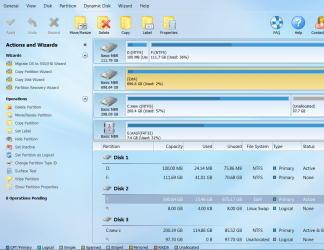
Partition Wizard seemed to find enough information to show that (a) it was formatted with EXT4, and (b) it had about 15GB of usage inside of it.

We don't know if that 15GB reflects your old data files, or new Linux OS files, or both, or what? But it would be helpful if there was a displayable file system table-of-contents in it, and your screenshot from PW suggests that there is.

If you select the large EXT4 partition in PW, on the left side of the window will be a list of operations you can select. One of those is "Explore partition". Can you please click on that operation, which will produce a new "Partition Explorer" window... hopefully.

Can you please post a screenshot of the contents of that "Partition Explorer" window. Do you see your folder/files in it? PW doesn't browse the files, it just explores the file system table-of-contents, which is really all we're trying to find out at this moment, i.e. exactly what is inside that EXT4 partition at the moment. If your data files are still there and their folder/file names can be seen, well that's at least somewhat encouraging as it speaks well for the integrity of the file system. Decent chance I would think of salvaging the data eventually.
 

My Computer My Computer

Computer type
PC/Desktop
Computer Manufacturer/Model Number
Home-built, two systems (1) and (2)
OS
Windows 7 Pro x64 (1), Win7 Pro X64 (2)
CPU
i5-3350p 3.1Ghz/6MB-cache (1); E8400 3.0Ghz/6MB-cache (2)
Motherboard
ASUS P8Z77-V Pro (1); ASUS P5Q3 (2)
Memory
8GB PC3-12800 DDR3 (1); 4GB PC3-10600 DDR3 (2)
Graphics Card(s)
ATI HD7750 (1), (see TV cards); ATI R7 250 (2)
Sound Card
Realtek ALC892 HD Audio (1); Realtek ALC1200 HD Audio (2)
Monitor(s) Displays
Eizo HD2441W LCD, Eizo S2433W (1); Eizo 24" S2433W (2)
Screen Resolution
1920x1200, 1920x1200 (1); 1920x1200 (2)
Hard Drives
(1) 1TB SATA-II (7200RPM), 2x2TB SATA-III (7200RPM), 250GB SATA-III (10000RPM) for OS; 2x2TB external USB 3.0

(2) 320GB SATA-II (7200RPM), 750GB SATA-II (7200RPM), 150GB SATA-II (10000RPM) for OS; 2TB external USB 3.0
PSU
Nesteq ECS-6001 600W (1); Nesteq ECS-5001 500W (2)
Case
Acousti-Case 360 (1) and (2)
Cooling
Noctua NH-U12P SE2 for CPU, 2x120mm case fans (1) and (2)
Keyboard
IBM PS/2 (1) and (2)
Mouse
Logitech MX Revolution wireless (1); Microsoft wired (2)
Internet Speed
100mbps down / 10mbps up
Antivirus
Microsoft Security Essentials; Malwarebyte Anti-Malware Pro
Browser
Firefox
Other Info
Ceton InfiniTV 4-tuner cablecard-enabled TV card as well as Hauppauge HVR-2250 OTA/ATSC 2-tuner TV card in (1), running under Win7 WMC
1 x quick scan >
 

Attachments

  • qs1.png
    qs1.png
    34.9 KB · Views: 0

My Computer My Computer

Computer type
PC/Desktop
Computer Manufacturer/Model Number
Generic - custom build
OS
Microsoft Windows 7 HomePremium 64-bit 7601 Multiprocessor Free Service Pack 1
CPU
Intel(R) Core(TM)2 Duo CPU E4500 @ 2.20GHz
Motherboard
Gigabyte Technology Co., Ltd. EP35-DS3P
Memory
8Gb
Graphics Card(s)
NVIDIA GeForce GT 710
Sound Card
(1) USB Audio Device (2) USB Audio Device (3) NVIDIA Hig
Monitor(s) Displays
older 21" thinkvision brand?
Screen Resolution
1680 x 1050
Hard Drives
WDC WD5000AAKS-22A7B0 ATA Device
ST3500418AS ATA Device
ST3320813AS ATA Device
PSU
ANTEC NEO ECO 520W
Case
generic tower
Cooling
couple of 4" fans
Keyboard
logitech k220
Mouse
logitech 305
Antivirus
malwarebytes premium
Browser
FireFox + opera
Can you please post a screenshot that I requested earlier, which is to be in PW and select the EXT4 partition, and then click on the "explore partition" item which should appear in the available operations list on the left side of the window.

This will (or hopefully should) pop up a second window showing the folder structure in that partition, same as Windows Explorer would. This will show us whether you've still got your data files in this partition, or maybe just Linux OS files, or both, or what. Your earlier PW screenshots show about 15GB in use, but we don't know what that content is. This new screenshot will show us what's actually inside the EXT4 partition... hopefully.
 

My Computer My Computer

Computer type
PC/Desktop
Computer Manufacturer/Model Number
Home-built, two systems (1) and (2)
OS
Windows 7 Pro x64 (1), Win7 Pro X64 (2)
CPU
i5-3350p 3.1Ghz/6MB-cache (1); E8400 3.0Ghz/6MB-cache (2)
Motherboard
ASUS P8Z77-V Pro (1); ASUS P5Q3 (2)
Memory
8GB PC3-12800 DDR3 (1); 4GB PC3-10600 DDR3 (2)
Graphics Card(s)
ATI HD7750 (1), (see TV cards); ATI R7 250 (2)
Sound Card
Realtek ALC892 HD Audio (1); Realtek ALC1200 HD Audio (2)
Monitor(s) Displays
Eizo HD2441W LCD, Eizo S2433W (1); Eizo 24" S2433W (2)
Screen Resolution
1920x1200, 1920x1200 (1); 1920x1200 (2)
Hard Drives
(1) 1TB SATA-II (7200RPM), 2x2TB SATA-III (7200RPM), 250GB SATA-III (10000RPM) for OS; 2x2TB external USB 3.0

(2) 320GB SATA-II (7200RPM), 750GB SATA-II (7200RPM), 150GB SATA-II (10000RPM) for OS; 2TB external USB 3.0
PSU
Nesteq ECS-6001 600W (1); Nesteq ECS-5001 500W (2)
Case
Acousti-Case 360 (1) and (2)
Cooling
Noctua NH-U12P SE2 for CPU, 2x120mm case fans (1) and (2)
Keyboard
IBM PS/2 (1) and (2)
Mouse
Logitech MX Revolution wireless (1); Microsoft wired (2)
Internet Speed
100mbps down / 10mbps up
Antivirus
Microsoft Security Essentials; Malwarebyte Anti-Malware Pro
Browser
Firefox
Other Info
Ceton InfiniTV 4-tuner cablecard-enabled TV card as well as Hauppauge HVR-2250 OTA/ATSC 2-tuner TV card in (1), running under Win7 WMC
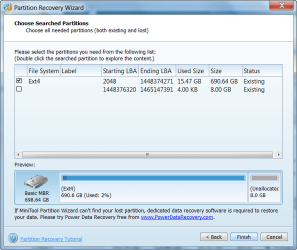
Yes, do it.

Then run Full Scan.

Partition Recovery Wizard >Select Disk > Next > Full Disk > Next > Full Scan > Next.

May take many hours to finish. When finished post the screenshot.
 

My Computer My Computer

OS
Windows 7 Home Premium 32 bit
Sorry. I'm confused. I don't how to locate 'explore partition'.
 

Attachments

  • explore part 1.png
    explore part 1.png
    202.3 KB · Views: 0

My Computer My Computer

Computer type
PC/Desktop
Computer Manufacturer/Model Number
Generic - custom build
OS
Microsoft Windows 7 HomePremium 64-bit 7601 Multiprocessor Free Service Pack 1
CPU
Intel(R) Core(TM)2 Duo CPU E4500 @ 2.20GHz
Motherboard
Gigabyte Technology Co., Ltd. EP35-DS3P
Memory
8Gb
Graphics Card(s)
NVIDIA GeForce GT 710
Sound Card
(1) USB Audio Device (2) USB Audio Device (3) NVIDIA Hig
Monitor(s) Displays
older 21" thinkvision brand?
Screen Resolution
1680 x 1050
Hard Drives
WDC WD5000AAKS-22A7B0 ATA Device
ST3500418AS ATA Device
ST3320813AS ATA Device
PSU
ANTEC NEO ECO 520W
Case
generic tower
Cooling
couple of 4" fans
Keyboard
logitech k220
Mouse
logitech 305
Antivirus
malwarebytes premium
Browser
FireFox + opera
Sorry. I'm confused. I don't how to locate 'explore partition'.
Well, disappointingly, there doesn't seem to be an "explore partition" function shown on the left side with the EXT4 partition selected as was hoped.

If you select one of your NTFS partitions you'll see "explore partition" on the left side. That's what I was hoping would also appear when you selected the EXT4 partition, so that we could see what the 15GB was composed of.

Sorry. I don't know how you can get to the contents now.

So, do you have a backup of your data files which used to be there when it was NTFS, before getting converted to EXT4?
 

My Computer My Computer

Computer type
PC/Desktop
Computer Manufacturer/Model Number
Home-built, two systems (1) and (2)
OS
Windows 7 Pro x64 (1), Win7 Pro X64 (2)
CPU
i5-3350p 3.1Ghz/6MB-cache (1); E8400 3.0Ghz/6MB-cache (2)
Motherboard
ASUS P8Z77-V Pro (1); ASUS P5Q3 (2)
Memory
8GB PC3-12800 DDR3 (1); 4GB PC3-10600 DDR3 (2)
Graphics Card(s)
ATI HD7750 (1), (see TV cards); ATI R7 250 (2)
Sound Card
Realtek ALC892 HD Audio (1); Realtek ALC1200 HD Audio (2)
Monitor(s) Displays
Eizo HD2441W LCD, Eizo S2433W (1); Eizo 24" S2433W (2)
Screen Resolution
1920x1200, 1920x1200 (1); 1920x1200 (2)
Hard Drives
(1) 1TB SATA-II (7200RPM), 2x2TB SATA-III (7200RPM), 250GB SATA-III (10000RPM) for OS; 2x2TB external USB 3.0

(2) 320GB SATA-II (7200RPM), 750GB SATA-II (7200RPM), 150GB SATA-II (10000RPM) for OS; 2TB external USB 3.0
PSU
Nesteq ECS-6001 600W (1); Nesteq ECS-5001 500W (2)
Case
Acousti-Case 360 (1) and (2)
Cooling
Noctua NH-U12P SE2 for CPU, 2x120mm case fans (1) and (2)
Keyboard
IBM PS/2 (1) and (2)
Mouse
Logitech MX Revolution wireless (1); Microsoft wired (2)
Internet Speed
100mbps down / 10mbps up
Antivirus
Microsoft Security Essentials; Malwarebyte Anti-Malware Pro
Browser
Firefox
Other Info
Ceton InfiniTV 4-tuner cablecard-enabled TV card as well as Hauppauge HVR-2250 OTA/ATSC 2-tuner TV card in (1), running under Win7 WMC
I don't see the explore partition option in the screen shot either.

I'll join you in confusion.
Maybe dsperber or jumanji can tell us both. You have the correct partition selected.

See if a right click on that partition offers you the explore partition feature, I doubt it will though.

Otherwise we wait for an answer.

Bill
.
 

My Computer My Computer

Computer type
Laptop
Computer Manufacturer/Model Number
HP Pavilion dv6-6c10us
OS
x64 (6.3.9600) Win8.1 Pro & soon dual boot x64 (6.1.7601) Win7_SP1 HomePrem
CPU
AMD A6-3420M APU with Radeon(tm) HD Graphics
Motherboard
Hewlett-Packard 1805
Memory
6.00 GB
Graphics Card(s)
AMD Radeon(TM) HD 6520G
Sound Card
(1) AMD High Definition Audio Device (2) IDT High Definiti
Monitor(s) Displays
HP W2072a 20" LCD (1600 x 900) @ 60 Hz
Screen Resolution
1366 x 768 x 32 bits (4294967296 colors) @ 60 Hz
Hard Drives
ST640LM0 00 HM641JI SATA Disk Device
Keyboard
Logitech k520 wireless KB
Mouse
Logitech m320 wireless mouse (bundled with KB)
Internet Speed
15/5 | 54 MB Wireless 'n'
Antivirus
Realtime: Defender or Avast | On-demand: Malwarebytes, ESET
Browser
IE 11 on Win8, IE 10 on win 7
Other Info
Media: [Gimp, Audacity, VLC] || Comm: [WEmail 2012, Skype] || Productivity: [OpenOffice,| Textpad] || Utils: [Sysinternals, cCleaner, Speccy, Defraggler]
Thanks for your efforts guys Much appreciated. I have about 40% backed up. And what's lost is lost. There's worse things in life. And again thanks for hanging in there to try & salvage my stuff.
 

My Computer My Computer

Computer type
PC/Desktop
Computer Manufacturer/Model Number
Generic - custom build
OS
Microsoft Windows 7 HomePremium 64-bit 7601 Multiprocessor Free Service Pack 1
CPU
Intel(R) Core(TM)2 Duo CPU E4500 @ 2.20GHz
Motherboard
Gigabyte Technology Co., Ltd. EP35-DS3P
Memory
8Gb
Graphics Card(s)
NVIDIA GeForce GT 710
Sound Card
(1) USB Audio Device (2) USB Audio Device (3) NVIDIA Hig
Monitor(s) Displays
older 21" thinkvision brand?
Screen Resolution
1680 x 1050
Hard Drives
WDC WD5000AAKS-22A7B0 ATA Device
ST3500418AS ATA Device
ST3320813AS ATA Device
PSU
ANTEC NEO ECO 520W
Case
generic tower
Cooling
couple of 4" fans
Keyboard
logitech k220
Mouse
logitech 305
Antivirus
malwarebytes premium
Browser
FireFox + opera
So u know I already have mint-mate 17.1 on its own seperate 120gb SSD. Can I use that? I'm new & green to linux. Think i opened 'my computer' like with win7 but linux couldn't open the sick drive.
Sure use what you have. If it causes difficulty, try the other way.

Have you revisited this?
Not to worry, there are other tools to try. No guarantees though, just more tools to TRY.
 

My Computer My Computer

Computer type
Laptop
Computer Manufacturer/Model Number
HP Pavilion dv6-6c10us
OS
x64 (6.3.9600) Win8.1 Pro & soon dual boot x64 (6.1.7601) Win7_SP1 HomePrem
CPU
AMD A6-3420M APU with Radeon(tm) HD Graphics
Motherboard
Hewlett-Packard 1805
Memory
6.00 GB
Graphics Card(s)
AMD Radeon(TM) HD 6520G
Sound Card
(1) AMD High Definition Audio Device (2) IDT High Definiti
Monitor(s) Displays
HP W2072a 20" LCD (1600 x 900) @ 60 Hz
Screen Resolution
1366 x 768 x 32 bits (4294967296 colors) @ 60 Hz
Hard Drives
ST640LM0 00 HM641JI SATA Disk Device
Keyboard
Logitech k520 wireless KB
Mouse
Logitech m320 wireless mouse (bundled with KB)
Internet Speed
15/5 | 54 MB Wireless 'n'
Antivirus
Realtime: Defender or Avast | On-demand: Malwarebytes, ESET
Browser
IE 11 on Win8, IE 10 on win 7
Other Info
Media: [Gimp, Audacity, VLC] || Comm: [WEmail 2012, Skype] || Productivity: [OpenOffice,| Textpad] || Utils: [Sysinternals, cCleaner, Speccy, Defraggler]
Hi AaLF,

You have still not run full scan with Partition Recovery Wizard.

Run Full Scan.

Partition Recovery Wizard >Select Disk > Next > Full Disk > Next > Full Scan > Next.

May take many hours to finish. When finished post the screenshot.

Quick Scan is very good to find the partition start provided your disk had not undergone any format process.

Since your disk has already gone through a formatting process, Partition Wizard Quick Scan happly found the existing partitions. What happens in Quick scan is once it finds the start of the first partition, it will jump farther ahead to the end of that first partition and start scanning from thereon in search of the start point of the next partition thus skipping all sectors inbetween. Only a full scan will dig through each and every sector and can bring out the buried partition data of the past deeds.

If the full scan also does not find the buried NTFS partitions, then and only then I will think of any data recovery procedure. Till then I am closing my eyes and retiring for the day, :)

If you are retiring from the contest without doing the full scan, I can only say you are giving up so easily. But that is your pleasure.:)
 

My Computer My Computer

OS
Windows 7 Home Premium 32 bit
Back
Top