Cannot run Windows Update and Receiving Non-Genuine Message

I did run the uninstaller before posting the last mcdiag report
 

My Computer My Computer

Computer type
PC/Desktop
OS
Windows 7 Ultimate 64 bit
Damn I'm lost again.
If this system can be activated properly and has been why is KMSpico being used? Why was KMSpico installed in the first place?
 

My Computer My Computer

Computer type
PC/Desktop
Computer Manufacturer/Model Number
Home made Desktop
OS
Windows 10 Pro. 64/ version 1709 Windows 7 Pro/64
CPU
Intel i7-6800K @ 4.3
Motherboard
ASUS X-99 Deluxe II
Memory
Corsair Platinum 16 gig @2400
Graphics Card(s)
EVGA GTX 1070 OC
Monitor(s) Displays
Asus 27" LED LCD/VE278Q
Screen Resolution
1920-1080 or 1280-720 HDMI
Hard Drives
INTEL SSD 730-240 Gb Sata 3.0/
PSU
EVGA Platium 1200W
Case
Phanteks Luxe Tempered Glass 8 fans/ one radiator
Cooling
XSPC/ Water Cooled CPU
Keyboard
Das 4 Professional
Mouse
Logitech M705/MX Anywhere 2-S
Internet Speed
100 mbits
Antivirus
Microsoft Security Essentials/ Malwarebytes Premium 3.0/ SAS
Browser
I.E. 11 default/Firefox/ ISP Time Warner Cable/Spectrum
Other Info
LG BluRay Burner/
Sound system-KLipsch-THX/
Icy Dock ssd Hot Swap bays.
I regret ever installing it. I read in some forums I found on Google that it might help here due to repeated activation messages. I never should've installed it, but was desperate. Again, this was following Microsoft saying the license was valid, I just couldn't figure out WHAT to do!

I'm so frustrated here. I rarely have these kinds of problems
 

My Computer My Computer

Computer type
PC/Desktop
OS
Windows 7 Ultimate 64 bit
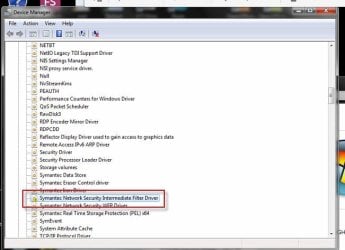
Please check Device Manager - make sure that you enable 'Show hidden devices' - and see if there are any devices flagged with yellow triangles or red crosses.

Please post a new set of event logs, as well.
 

My Computer My Computer

Computer type
Laptop
Computer Manufacturer/Model Number
Asus K52F or Lenovo B51-80
OS
Win 7 x64 Home Premium (and x86 VirtualBox VM)/Win10
CPU
i3 370M/i7 6500U
Motherboard
Asus/Lenovo
Memory
8GB - finally :)/8GB
Graphics Card(s)
it's an i3, dude!/dual Intel&nVidia
Sound Card
onboard
Monitor(s) Displays
15.6" built-in
Screen Resolution
1366x768/1920x1080
Hard Drives
750GB Seagate internal
Sundry external drives attached to other computers on the local network
1TB SSD on the Lenovo
PSU
n/a
Internet Speed
as much as I can get - usually on a dongle/phone, so <1MB/s
Antivirus
MSE/Defender
Browser
IE11/12/Edge/Chrome/FF(if I must)
done
 

Attachments

  • Appevt.zip
    Appevt.zip
    586.2 KB · Views: 2
  • device.jpg
    device.jpg
    37.1 KB · Views: 24

My Computer My Computer

Computer type
PC/Desktop
OS
Windows 7 Ultimate 64 bit
Thank you riddlemeright for answering my question.

I will go back to watching Noel do his magic.
 

My Computer My Computer

Computer type
PC/Desktop
Computer Manufacturer/Model Number
Home made Desktop
OS
Windows 10 Pro. 64/ version 1709 Windows 7 Pro/64
CPU
Intel i7-6800K @ 4.3
Motherboard
ASUS X-99 Deluxe II
Memory
Corsair Platinum 16 gig @2400
Graphics Card(s)
EVGA GTX 1070 OC
Monitor(s) Displays
Asus 27" LED LCD/VE278Q
Screen Resolution
1920-1080 or 1280-720 HDMI
Hard Drives
INTEL SSD 730-240 Gb Sata 3.0/
PSU
EVGA Platium 1200W
Case
Phanteks Luxe Tempered Glass 8 fans/ one radiator
Cooling
XSPC/ Water Cooled CPU
Keyboard
Das 4 Professional
Mouse
Logitech M705/MX Anywhere 2-S
Internet Speed
100 mbits
Antivirus
Microsoft Security Essentials/ Malwarebytes Premium 3.0/ SAS
Browser
I.E. 11 default/Firefox/ ISP Time Warner Cable/Spectrum
Other Info
LG BluRay Burner/
Sound system-KLipsch-THX/
Icy Dock ssd Hot Swap bays.
That driver problem could certainly cause this type of error.

You need to uninstall your AV completely - including use of the removal tool - and then reinstall it. (or install MSE temporarily until this is sorted)
 

My Computer My Computer

Computer type
Laptop
Computer Manufacturer/Model Number
Asus K52F or Lenovo B51-80
OS
Win 7 x64 Home Premium (and x86 VirtualBox VM)/Win10
CPU
i3 370M/i7 6500U
Motherboard
Asus/Lenovo
Memory
8GB - finally :)/8GB
Graphics Card(s)
it's an i3, dude!/dual Intel&nVidia
Sound Card
onboard
Monitor(s) Displays
15.6" built-in
Screen Resolution
1366x768/1920x1080
Hard Drives
750GB Seagate internal
Sundry external drives attached to other computers on the local network
1TB SSD on the Lenovo
PSU
n/a
Internet Speed
as much as I can get - usually on a dongle/phone, so <1MB/s
Antivirus
MSE/Defender
Browser
IE11/12/Edge/Chrome/FF(if I must)
Used Norton Removal Tool. Rebooting now and will try to run updates again.
 

My Computer My Computer

Computer type
PC/Desktop
OS
Windows 7 Ultimate 64 bit
Still can't run updates.
 

My Computer My Computer

Computer type
PC/Desktop
OS
Windows 7 Ultimate 64 bit
Has the error gone from the Device Manager?
 

My Computer My Computer

Computer type
Laptop
Computer Manufacturer/Model Number
Asus K52F or Lenovo B51-80
OS
Win 7 x64 Home Premium (and x86 VirtualBox VM)/Win10
CPU
i3 370M/i7 6500U
Motherboard
Asus/Lenovo
Memory
8GB - finally :)/8GB
Graphics Card(s)
it's an i3, dude!/dual Intel&nVidia
Sound Card
onboard
Monitor(s) Displays
15.6" built-in
Screen Resolution
1366x768/1920x1080
Hard Drives
750GB Seagate internal
Sundry external drives attached to other computers on the local network
1TB SSD on the Lenovo
PSU
n/a
Internet Speed
as much as I can get - usually on a dongle/phone, so <1MB/s
Antivirus
MSE/Defender
Browser
IE11/12/Edge/Chrome/FF(if I must)
OK - I think I've managed to find the critical error point...

Code:
Log Name:      Application
Source:        Windows Error Reporting
Date:          16/01/2015 00:04:52
Event ID:      1001
Task Category: None
Level:         Information
Keywords:      Classic
User:          N/A
Computer:      SteveServer
Description:
Fault bucket , type 0
Event Name: WindowsWcpOtherFailure3
Response: Not available
Cab Id: 0
Problem signature:
P1: 6.1.7601
P2: base\wcp\servicingapi\cmirepair.cpp
P3: Windows::ServicingAPI::CCSIRepairTransaction::LockComponent
P4: 312
P5: 80073701
P6: 0x5858a98f
P7: 
P8: 
P9: 
P10: 
Attached files:
C:\Windows\Logs\CBS\CbsPersist_20150114144605.cab
C:\Windows\Logs\CBS\CbsPersist_20150114205947.cab
C:\Windows\Logs\CBS\CbsPersist_20150115093137.cab
C:\Windows\Logs\CBS\CbsPersist_20150115140221.cab
C:\Windows\Logs\CBS\CbsPersist_20150115160721.cab
C:\Windows\Logs\CBS\CbsPersist_20150116000450.log
C:\Windows\Logs\CBS\CBS.log
C:\Windows\servicing\Sessions\Sessions.xml
C:\Windows\winsxs\poqexec.log
C:\Windows\System32\LogFiles\Scm\SCM.EVM
C:\Windows\Logs\CBS\FilterList.log
C:\Windows\Temp\WER1FBC.tmp.hdmp
C:\Windows\Temp\WER220E.tmp.mdmp
These files may be available here:
C:\ProgramData\Microsoft\Windows\WER\ReportQueue\Critical_6.1.7601_32657f657c59ef3581571884505742f8f280ac_cab_8f8823f0
Analysis symbol: 
Rechecking for solution: 0
Report Id: 4a526326-9d13-11e4-a7ea-b8ac6f41b283
Report Status: 4
Event Xml:
<Event xmlns="[URL]http://schemas.microsoft.com/win/2004/08/events/event[/URL]">
  <System>
    <Provider Name="Windows Error Reporting" />
    <EventID Qualifiers="0">1001</EventID>
    <Level>4</Level>
    <Task>0</Task>
    <Keywords>0x80000000000000</Keywords>
    <TimeCreated SystemTime="2015-01-16T00:04:52.000000000Z" />
    <EventRecordID>305937</EventRecordID>
    <Channel>Application</Channel>
    <Computer>SteveServer</Computer>
    <Security />
  </System>
  <EventData>
    <Data>
    </Data>
    <Data>0</Data>
    <Data>WindowsWcpOtherFailure3</Data>
    <Data>Not available</Data>
    <Data>0</Data>
    <Data>6.1.7601</Data>
    <Data>base\wcp\servicingapi\cmirepair.cpp</Data>
    <Data>Windows::ServicingAPI::CCSIRepairTransaction::LockComponent</Data>
    <Data>312</Data>
    <Data>80073701</Data>
    <Data>0x5858a98f</Data>
    <Data>
    </Data>
    <Data>
    </Data>
    <Data>
    </Data>
    <Data>
    </Data>
    <Data>
C:\Windows\Logs\CBS\CbsPersist_20150114144605.cab
C:\Windows\Logs\CBS\CbsPersist_20150114205947.cab
C:\Windows\Logs\CBS\CbsPersist_20150115093137.cab
C:\Windows\Logs\CBS\CbsPersist_20150115140221.cab
C:\Windows\Logs\CBS\CbsPersist_20150115160721.cab
C:\Windows\Logs\CBS\CbsPersist_20150116000450.log
C:\Windows\Logs\CBS\CBS.log
C:\Windows\servicing\Sessions\Sessions.xml
C:\Windows\winsxs\poqexec.log
C:\Windows\System32\LogFiles\Scm\SCM.EVM
C:\Windows\Logs\CBS\FilterList.log
C:\Windows\Temp\WER1FBC.tmp.hdmp
C:\Windows\Temp\WER220E.tmp.mdmp</Data>
    <Data>C:\ProgramData\Microsoft\Windows\WER\ReportQueue\Critical_6.1.7601_32657f657c59ef3581571884505742f8f280ac_cab_8f8823f0</Data>
    <Data>
    </Data>
    <Data>0</Data>
    <Data>4a526326-9d13-11e4-a7ea-b8ac6f41b283</Data>
    <Data>4</Data>
  </EventData>
</Event>
Please upload the following files - if you can find them...
C:\Windows\servicing\Sessions\Sessions.xml
C:\Windows\winsxs\poqexec.log
C:\Windows\System32\LogFiles\Scm\SCM.EVM
C:\Windows\Logs\CBS\FilterList.log
C:\Windows\Temp\WER1FBC.tmp.hdmp
C:\Windows\Temp\WER220E.tmp.mdmp

I'll see if I can make any sense of them!
 

My Computer My Computer

Computer type
Laptop
Computer Manufacturer/Model Number
Asus K52F or Lenovo B51-80
OS
Win 7 x64 Home Premium (and x86 VirtualBox VM)/Win10
CPU
i3 370M/i7 6500U
Motherboard
Asus/Lenovo
Memory
8GB - finally :)/8GB
Graphics Card(s)
it's an i3, dude!/dual Intel&nVidia
Sound Card
onboard
Monitor(s) Displays
15.6" built-in
Screen Resolution
1366x768/1920x1080
Hard Drives
750GB Seagate internal
Sundry external drives attached to other computers on the local network
1TB SSD on the Lenovo
PSU
n/a
Internet Speed
as much as I can get - usually on a dongle/phone, so <1MB/s
Antivirus
MSE/Defender
Browser
IE11/12/Edge/Chrome/FF(if I must)
To be honest, I can't make head nor tail out of that lot! :(
Jack - you have any experience with these?
 

My Computer My Computer

Computer type
Laptop
Computer Manufacturer/Model Number
Asus K52F or Lenovo B51-80
OS
Win 7 x64 Home Premium (and x86 VirtualBox VM)/Win10
CPU
i3 370M/i7 6500U
Motherboard
Asus/Lenovo
Memory
8GB - finally :)/8GB
Graphics Card(s)
it's an i3, dude!/dual Intel&nVidia
Sound Card
onboard
Monitor(s) Displays
15.6" built-in
Screen Resolution
1366x768/1920x1080
Hard Drives
750GB Seagate internal
Sundry external drives attached to other computers on the local network
1TB SSD on the Lenovo
PSU
n/a
Internet Speed
as much as I can get - usually on a dongle/phone, so <1MB/s
Antivirus
MSE/Defender
Browser
IE11/12/Edge/Chrome/FF(if I must)
Noel please check your PM's.

I don't see KB 971033.
 

My Computer My Computer

Computer type
PC/Desktop
Computer Manufacturer/Model Number
Home made Desktop
OS
Windows 10 Pro. 64/ version 1709 Windows 7 Pro/64
CPU
Intel i7-6800K @ 4.3
Motherboard
ASUS X-99 Deluxe II
Memory
Corsair Platinum 16 gig @2400
Graphics Card(s)
EVGA GTX 1070 OC
Monitor(s) Displays
Asus 27" LED LCD/VE278Q
Screen Resolution
1920-1080 or 1280-720 HDMI
Hard Drives
INTEL SSD 730-240 Gb Sata 3.0/
PSU
EVGA Platium 1200W
Case
Phanteks Luxe Tempered Glass 8 fans/ one radiator
Cooling
XSPC/ Water Cooled CPU
Keyboard
Das 4 Professional
Mouse
Logitech M705/MX Anywhere 2-S
Internet Speed
100 mbits
Antivirus
Microsoft Security Essentials/ Malwarebytes Premium 3.0/ SAS
Browser
I.E. 11 default/Firefox/ ISP Time Warner Cable/Spectrum
Other Info
LG BluRay Burner/
Sound system-KLipsch-THX/
Icy Dock ssd Hot Swap bays.
Thanks so much for jumping on Ladyback and Jack. Any ideas?
 

My Computer My Computer

Computer type
PC/Desktop
OS
Windows 7 Ultimate 64 bit
I'm not a expert on such matter like Noel is but I do have some thoughts.

1. Post #1 you post this.
Windows License Type: OEM System Builder

Then in post 37 you post this.
Faulting application path: C:\Program Files\KMSpico\Service_KMS.exe

I have no idea how that could happen without a hack of some kind.

2. If Microsoft while helping you would of seen KMSpico installed all help would of stopped from Microsoft.

3. To my understanding a KMS system must contact the host KMS computer after (X) amount of days in order to get updates and renew it's activation according to the policies the I.T. department have set up. You do not mention of trying to contact the host KMS computer.

4. You have so many mismatched and tampered files and had KMSpico their is no way of knowing what has and is going on with your activation.

Putting all this together in my opinion Noel's doesn't have enough magic to fix this. Any more time trying to fix this install would be a waste of time.

My recommendation would be a Clean Install of Window 7 with the proper COA key that matches the install.
 

My Computer My Computer

Computer type
PC/Desktop
Computer Manufacturer/Model Number
Home made Desktop
OS
Windows 10 Pro. 64/ version 1709 Windows 7 Pro/64
CPU
Intel i7-6800K @ 4.3
Motherboard
ASUS X-99 Deluxe II
Memory
Corsair Platinum 16 gig @2400
Graphics Card(s)
EVGA GTX 1070 OC
Monitor(s) Displays
Asus 27" LED LCD/VE278Q
Screen Resolution
1920-1080 or 1280-720 HDMI
Hard Drives
INTEL SSD 730-240 Gb Sata 3.0/
PSU
EVGA Platium 1200W
Case
Phanteks Luxe Tempered Glass 8 fans/ one radiator
Cooling
XSPC/ Water Cooled CPU
Keyboard
Das 4 Professional
Mouse
Logitech M705/MX Anywhere 2-S
Internet Speed
100 mbits
Antivirus
Microsoft Security Essentials/ Malwarebytes Premium 3.0/ SAS
Browser
I.E. 11 default/Firefox/ ISP Time Warner Cable/Spectrum
Other Info
LG BluRay Burner/
Sound system-KLipsch-THX/
Icy Dock ssd Hot Swap bays.
As I said before, in an effort to do anything to fix this, I stumbled upon some suggestions to install KMSpico. I have uninstalled it as it did not fix the problem and the license is most certainly valid.

I am very appreciative of everyone's time. Rebuilding would be a large effort that I'd very much like to avoid if at all possible.
 

My Computer My Computer

Computer type
PC/Desktop
OS
Windows 7 Ultimate 64 bit
Also, my copy of Windows indicates that it is valid and genuine at this point, I just can't get updates to run.
 

My Computer My Computer

Computer type
PC/Desktop
OS
Windows 7 Ultimate 64 bit
Back
Top
