Solved Can I find out what process has hooked my taskbar?

rovf

New member
Local time
2:20 PM
Messages
30
I'm on Windows 7, 64 bit, and I wanted to install a tray clock (??????? - TTClock), which needs to be run in XP compatibility mode on Windows 7.

I've set the compatibility flag in the ttclock.exe file, but when I start the clock, it says that it can not run, because another program "has already hooked the taskbar".

Can I find out, which process this would be?

I do have "7+ Taskbar Tweaker" and "VirtualWin" installed, but while both are somehow related to the taskbar, neither of these programs is supposed to touch the clock, so I guess the culprit is some different process. I could imagine, that two hooks competing about the area, where the clock is displayed, can not run together, but in general, the purpose of a hook is that several processes CAN register in parallel to be served by the hook, isn't it?
 

My Computer My Computer

At a glance

Windows 7
OS
Windows 7

My Computer My Computer

At a glance

Windows 10, Home Clean InstallIntel Core2 processsor Q8200(2.33Ghz 1333FSB)...6 gbATI Radeon 256MB HD3650
Computer type
PC/Desktop
Computer Manufacturer/Model Number
Dell XPS 420
OS
Windows 10, Home Clean Install
CPU
Intel Core2 processsor Q8200(2.33Ghz 1333FSB) Quad Core Tech
Motherboard
Dell
Memory
6 gb
Graphics Card(s)
ATI Radeon 256MB HD3650
Sound Card
Intergrated 7.1 Channel Audio
Monitor(s) Displays
Dell SP2009W 20"
Hard Drives
640 GB Serial ATA Hard drive
Cooling
Fan
Keyboard
Dell USB Keyboard
Mouse
Dell Premium Optical USB
Internet Speed
DSL 2.85
I had hoped for a simpler solution :-(

I would have go through everything which is autostarted, isn't it? There are many dozens of autostarted processes and services in our workstations, and if this is the only way, I think I will resist using the special clock. Thanks anyway for helping.
 

My Computer My Computer

At a glance

Windows 7
OS
Windows 7
It is not as difficult as it looks. You disable all. Then you can put a few back at a time. It should not take that long, but the call would be up to you. Others may come by with other solutions.
 

My Computer My Computer

At a glance

Windows 10, Home Clean InstallIntel Core2 processsor Q8200(2.33Ghz 1333FSB)...6 gbATI Radeon 256MB HD3650
Computer type
PC/Desktop
Computer Manufacturer/Model Number
Dell XPS 420
OS
Windows 10, Home Clean Install
CPU
Intel Core2 processsor Q8200(2.33Ghz 1333FSB) Quad Core Tech
Motherboard
Dell
Memory
6 gb
Graphics Card(s)
ATI Radeon 256MB HD3650
Sound Card
Intergrated 7.1 Channel Audio
Monitor(s) Displays
Dell SP2009W 20"
Hard Drives
640 GB Serial ATA Hard drive
Cooling
Fan
Keyboard
Dell USB Keyboard
Mouse
Dell Premium Optical USB
Internet Speed
DSL 2.85
T-Clock

You know there's a 32bit and 64bit version? Have you got the correct one?

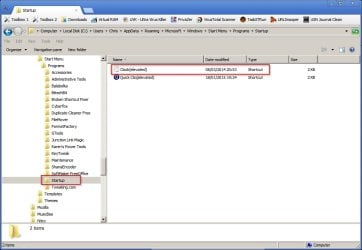
For me, T-Clock works only if run as administrator. However in order for it to run on startup it requires me to create an elevated shortcut to T-clock (clock.exe) in

%AppData%\Roaming\Microsoft\Windows\Start Menu\Programs\Startup

Without selecting the "run as administrator" option when creating the elevated shortcut.

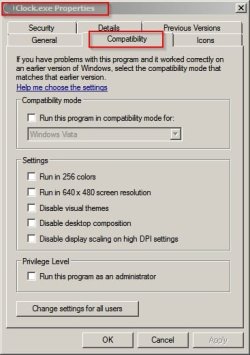
Im using the 64bit version. Here's screensots:

Startup - Clock Elevated.jpg

Clock.exe Properties.jpg
 
Last edited:

My Computer My Computer

At a glance

Microsoft Windows 7 Home Premium 64-bit 7601 ...AMD C-60 APU with Radeon(tm) HD Graphics4.00 GBAMD Radeon HD 6290 Graphics
Computer type
Laptop
Computer Manufacturer/Model Number
ASUS
OS
Microsoft Windows 7 Home Premium 64-bit 7601 Multiprocessor Free Service Pack 1
CPU
AMD C-60 APU with Radeon(tm) HD Graphics
Motherboard
ASUSTeK COMPUTER INC. X501U
Memory
4.00 GB
Graphics Card(s)
AMD Radeon HD 6290 Graphics
Sound Card
(1) AMD High Definition Audio Device (2) Realtek High Defi
Screen Resolution
1366 x 768 x 32 bits (4294967296 colors) @ 60 Hz
Hard Drives
Hitachi HTS545050A7E380 SATA Disk Device
Antivirus
Comodo CIS & FW, SecureAplus App Whitelisting, Threatfire
Browser
Cyberfox 64bit, Opera 64bit, Airfox
Other Info
Spy-The-Spy, HitmanPro.Alert, Norton Connect Safe, MJRegWatcher, BitDefender TrafficLight, Voodoo Shield, Zemana AntiMalware
You know there's a 32bit and 64bit version? Have you got the correct one?

Yes, I'm using the right one.

For me, T-Clock works only if run as administrator.

Ah, this is something I have not done.

What effects do you get, if you do not run it as admin?

Thanks a lot, I'll try your suggestion.
 

My Computer My Computer

At a glance

Windows 7
OS
Windows 7
T-Clock issues

I don't remember what happened when just clicking on the executable and running it. I seem to remember that it didn't work. For now just try running it from an elevated shortcut to see if it works. Also check that your taskbar isn't locked and that time & date settings hasn't been set to show additional clocks.

Actually the screenshot of T-clock properties that I posted is misleading as on my machine at home UAC is disabled and has been replaced by an alternative. However I aslo run T-Clock on my machine at work without any issues so tomorrow I'll take a look at settings on my work machine.
 

My Computer My Computer

At a glance

Microsoft Windows 7 Home Premium 64-bit 7601 ...AMD C-60 APU with Radeon(tm) HD Graphics4.00 GBAMD Radeon HD 6290 Graphics
Computer type
Laptop
Computer Manufacturer/Model Number
ASUS
OS
Microsoft Windows 7 Home Premium 64-bit 7601 Multiprocessor Free Service Pack 1
CPU
AMD C-60 APU with Radeon(tm) HD Graphics
Motherboard
ASUSTeK COMPUTER INC. X501U
Memory
4.00 GB
Graphics Card(s)
AMD Radeon HD 6290 Graphics
Sound Card
(1) AMD High Definition Audio Device (2) Realtek High Defi
Screen Resolution
1366 x 768 x 32 bits (4294967296 colors) @ 60 Hz
Hard Drives
Hitachi HTS545050A7E380 SATA Disk Device
Antivirus
Comodo CIS & FW, SecureAplus App Whitelisting, Threatfire
Browser
Cyberfox 64bit, Opera 64bit, Airfox
Other Info
Spy-The-Spy, HitmanPro.Alert, Norton Connect Safe, MJRegWatcher, BitDefender TrafficLight, Voodoo Shield, Zemana AntiMalware
T-Clock build

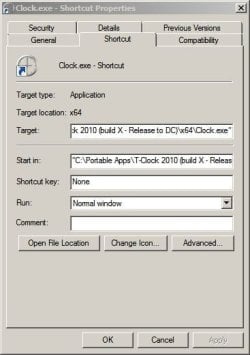
Okay here's a screenshot from my work machine - it's a different version og T-Clock to the one on my homne machine. Using a standard account.

Clock.exe - Shortcut Properties.jpg

Taget:

"C:\Portable Apps\T-Clock 2010 (build X - Release to DC)\x64\Clock.exe"

Start in:

"C:\Portable Apps\T-Clock 2010 (build X - Release to DC)\x64"
 

My Computer My Computer

At a glance

Microsoft Windows 7 Home Premium 64-bit 7601 ...AMD C-60 APU with Radeon(tm) HD Graphics4.00 GBAMD Radeon HD 6290 Graphics
Computer type
Laptop
Computer Manufacturer/Model Number
ASUS
OS
Microsoft Windows 7 Home Premium 64-bit 7601 Multiprocessor Free Service Pack 1
CPU
AMD C-60 APU with Radeon(tm) HD Graphics
Motherboard
ASUSTeK COMPUTER INC. X501U
Memory
4.00 GB
Graphics Card(s)
AMD Radeon HD 6290 Graphics
Sound Card
(1) AMD High Definition Audio Device (2) Realtek High Defi
Screen Resolution
1366 x 768 x 32 bits (4294967296 colors) @ 60 Hz
Hard Drives
Hitachi HTS545050A7E380 SATA Disk Device
Antivirus
Comodo CIS & FW, SecureAplus App Whitelisting, Threatfire
Browser
Cyberfox 64bit, Opera 64bit, Airfox
Other Info
Spy-The-Spy, HitmanPro.Alert, Norton Connect Safe, MJRegWatcher, BitDefender TrafficLight, Voodoo Shield, Zemana AntiMalware
T-Clock Portable

I've sent a PM with a link to the portable build that I use on my work machine - Windows 7 64bit PRO and using a standard user account.
 

My Computer My Computer

At a glance

Microsoft Windows 7 Home Premium 64-bit 7601 ...AMD C-60 APU with Radeon(tm) HD Graphics4.00 GBAMD Radeon HD 6290 Graphics
Computer type
Laptop
Computer Manufacturer/Model Number
ASUS
OS
Microsoft Windows 7 Home Premium 64-bit 7601 Multiprocessor Free Service Pack 1
CPU
AMD C-60 APU with Radeon(tm) HD Graphics
Motherboard
ASUSTeK COMPUTER INC. X501U
Memory
4.00 GB
Graphics Card(s)
AMD Radeon HD 6290 Graphics
Sound Card
(1) AMD High Definition Audio Device (2) Realtek High Defi
Screen Resolution
1366 x 768 x 32 bits (4294967296 colors) @ 60 Hz
Hard Drives
Hitachi HTS545050A7E380 SATA Disk Device
Antivirus
Comodo CIS & FW, SecureAplus App Whitelisting, Threatfire
Browser
Cyberfox 64bit, Opera 64bit, Airfox
Other Info
Spy-The-Spy, HitmanPro.Alert, Norton Connect Safe, MJRegWatcher, BitDefender TrafficLight, Voodoo Shield, Zemana AntiMalware
I've sent a PM with a link to the portable build that I use on my work machine - Windows 7 64bit PRO and using a standard user account.

Sorry, I'm noticing it only now: You are always talking about T-Clock, but my problem is related to TTClock (??????? - TTClock)
 

My Computer My Computer

At a glance

Windows 7
OS
Windows 7

My Computer My Computer

At a glance

Microsoft Windows 7 Home Premium 64-bit 7601 ...AMD C-60 APU with Radeon(tm) HD Graphics4.00 GBAMD Radeon HD 6290 Graphics
Computer type
Laptop
Computer Manufacturer/Model Number
ASUS
OS
Microsoft Windows 7 Home Premium 64-bit 7601 Multiprocessor Free Service Pack 1
CPU
AMD C-60 APU with Radeon(tm) HD Graphics
Motherboard
ASUSTeK COMPUTER INC. X501U
Memory
4.00 GB
Graphics Card(s)
AMD Radeon HD 6290 Graphics
Sound Card
(1) AMD High Definition Audio Device (2) Realtek High Defi
Screen Resolution
1366 x 768 x 32 bits (4294967296 colors) @ 60 Hz
Hard Drives
Hitachi HTS545050A7E380 SATA Disk Device
Antivirus
Comodo CIS & FW, SecureAplus App Whitelisting, Threatfire
Browser
Cyberfox 64bit, Opera 64bit, Airfox
Other Info
Spy-The-Spy, HitmanPro.Alert, Norton Connect Safe, MJRegWatcher, BitDefender TrafficLight, Voodoo Shield, Zemana AntiMalware
TTClock tested

Okay so I've tested the software that you provided a link to and guess what? I get exactly the same problem. There's no English Langauge help file.

Here's what I found: Error message "Another program has hooked the taskbar"

Action taken: Terminate "clock.exe" (that's the T-Clock executable that I use instead of the standard Windows Clock - not TTClock) and the clock in the system tray reverts to the standard windows clock.

I then run TTClock with the following settings applied. You can see that it's up and running in the screenshot:

TTClock.jpg

Re: Program has hooked taskbar.

What's your current clock and did you make any modifications to it?

I don't really see why you need this software. It's pretty basic. So it has a stopwatch and timer but then again so does T-Clock. I know you don't want to run T-Clock but from what I'm seeing it's a much better option!
 

My Computer My Computer

At a glance

Microsoft Windows 7 Home Premium 64-bit 7601 ...AMD C-60 APU with Radeon(tm) HD Graphics4.00 GBAMD Radeon HD 6290 Graphics
Computer type
Laptop
Computer Manufacturer/Model Number
ASUS
OS
Microsoft Windows 7 Home Premium 64-bit 7601 Multiprocessor Free Service Pack 1
CPU
AMD C-60 APU with Radeon(tm) HD Graphics
Motherboard
ASUSTeK COMPUTER INC. X501U
Memory
4.00 GB
Graphics Card(s)
AMD Radeon HD 6290 Graphics
Sound Card
(1) AMD High Definition Audio Device (2) Realtek High Defi
Screen Resolution
1366 x 768 x 32 bits (4294967296 colors) @ 60 Hz
Hard Drives
Hitachi HTS545050A7E380 SATA Disk Device
Antivirus
Comodo CIS & FW, SecureAplus App Whitelisting, Threatfire
Browser
Cyberfox 64bit, Opera 64bit, Airfox
Other Info
Spy-The-Spy, HitmanPro.Alert, Norton Connect Safe, MJRegWatcher, BitDefender TrafficLight, Voodoo Shield, Zemana AntiMalware
Okay so I've tested the software that you provided a link to and guess what? I get exactly the same problem. There's no English Langauge help file.
[...]
What's your current clock and did you make any modifications to it?

First, thanks a ***lot*** for going into so much trouble and trying out everything on your PC.

I didn't have a special clock installed before, but after seeing that you could get it work with the same settings as I have, I downloaded the "autoruns" utility (https://technet.microsoft.com/en-us/sysinternals/bb963902.aspx) and followe first suggestion I got on this thread and terminated one by one other utilities which were running at startup.

I finally found the culprit: It was "7+ Taskbar Tweaker", which I use to reduce the gap between the icons on the taskbar (so that I can pin more applications to the taskbar).

Playing around a bit, I find that the load order is important: If I load Taskbar Tweaker first and then TTClock, TTClock doesn't run, but if I load TTClock first, and Taskbar Tweaker next, it works well.

My interim solution is to not autrun Taskbar Tweaker, but to start it manually. Do you by chance know, what is the best way to impose a load order for those programs on startup? I was thinking to write a batch file which starts both, maybe with a sleep of a few seconds between them, and put this batch file into the startup folder, but maybe there is a more elegant solution to this problem.

I don't really see why you need this software. It's pretty basic. So it has a stopwatch and timer but then again so does T-Clock. I know you don't want to run T-Clock but from what I'm seeing it's a much better option!

I also considered T-Clock, but to be honest, and it's not that I dislike it. I wanted to use TTClock not just for its functionality, but for its design, and in this respect, you are right: I don't *need* it. I just like the way it looks.
 

My Computer My Computer

At a glance

Windows 7
OS
Windows 7
Delay Load

You can use Autoruns to delay startup items but personally I use a batch file in my startup folder for a couple of delayed start items and also AutoRun Organizer

If using Auorun Organizer it can go a bit wonky if you keep adding items on several different occasions. I found that the best way to manage Auorun Organizer entries when they don't work as expected is to use the Scheduled Tasks tab in Ccleaner and tick the "Advanced" checkbox to show all entries.
 

My Computer My Computer

At a glance

Microsoft Windows 7 Home Premium 64-bit 7601 ...AMD C-60 APU with Radeon(tm) HD Graphics4.00 GBAMD Radeon HD 6290 Graphics
Computer type
Laptop
Computer Manufacturer/Model Number
ASUS
OS
Microsoft Windows 7 Home Premium 64-bit 7601 Multiprocessor Free Service Pack 1
CPU
AMD C-60 APU with Radeon(tm) HD Graphics
Motherboard
ASUSTeK COMPUTER INC. X501U
Memory
4.00 GB
Graphics Card(s)
AMD Radeon HD 6290 Graphics
Sound Card
(1) AMD High Definition Audio Device (2) Realtek High Defi
Screen Resolution
1366 x 768 x 32 bits (4294967296 colors) @ 60 Hz
Hard Drives
Hitachi HTS545050A7E380 SATA Disk Device
Antivirus
Comodo CIS & FW, SecureAplus App Whitelisting, Threatfire
Browser
Cyberfox 64bit, Opera 64bit, Airfox
Other Info
Spy-The-Spy, HitmanPro.Alert, Norton Connect Safe, MJRegWatcher, BitDefender TrafficLight, Voodoo Shield, Zemana AntiMalware
TY for your comments. I am glad that we could help. I will mark this thread solved
 

My Computer My Computer

At a glance

Windows 10, Home Clean InstallIntel Core2 processsor Q8200(2.33Ghz 1333FSB)...6 gbATI Radeon 256MB HD3650
Computer type
PC/Desktop
Computer Manufacturer/Model Number
Dell XPS 420
OS
Windows 10, Home Clean Install
CPU
Intel Core2 processsor Q8200(2.33Ghz 1333FSB) Quad Core Tech
Motherboard
Dell
Memory
6 gb
Graphics Card(s)
ATI Radeon 256MB HD3650
Sound Card
Intergrated 7.1 Channel Audio
Monitor(s) Displays
Dell SP2009W 20"
Hard Drives
640 GB Serial ATA Hard drive
Cooling
Fan
Keyboard
Dell USB Keyboard
Mouse
Dell Premium Optical USB
Internet Speed
DSL 2.85
Back
Top