Extract Files from Windows 7 Installation DVD

How to Extract Files from the Windows 7 Installation DVD

   Information
This will show you how to extract original files from the retail Windows 7 installation DVD. You can then use these extracted files to replace missing or corrupted system files in your current Windows 7 installation.
   Note
Normally you will find out that you have corrupted system files that cannot be repaired after your run a sfc /scannow command and look at it's log report.
   Tip
If you do not have a Windows 7 with SP1 installation disc, then you can download the latest official Windows 7 with SP1 ISO file at the link below, then create an installation DVD or USB with it.

Microsoft: Windows 7 Direct Download Links


Here's How:
1. Download and install the same free 32-bit or 64-bit 7-Zip program version as your 32-bit or 64-bit Windows 7.

2. Use Compatibiliy Mode on the 7-Zip shortcut and check the Run this program as an administrator box.

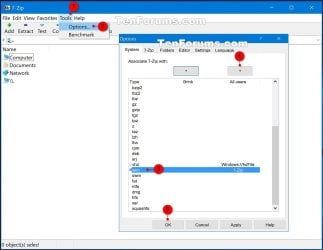
3. Run 7-Zip, then click on Tools and Options on the menu bar. Next, select (highlight) .wim, and click on the plus button for All users, and click on OK. (See screenshots below)
7-Zip.jpg
4. Insert your retail Windows 7 installation disc into the DVD drive and wait for it to be recognized.

5. In 7-Zip, navigate to your DVD drive letter (ex: E: ) that has the Windows 7 installation disc in it, and double click on the Sources folder. (See screenshot below)
Step2.jpg
6. Scroll down and double click on the install.wim file. (See screenshot below)
Step3.jpg
7. You will now see this for a few seconds as it opens. (See screenshot below)
Step4.jpg
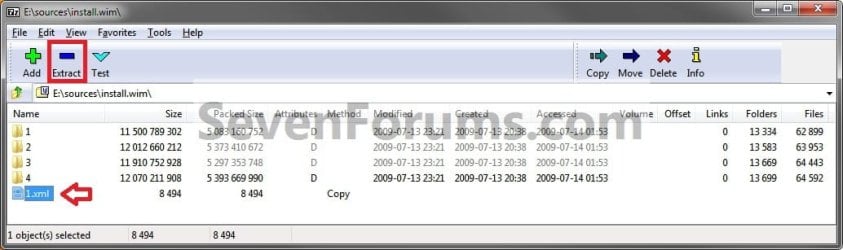
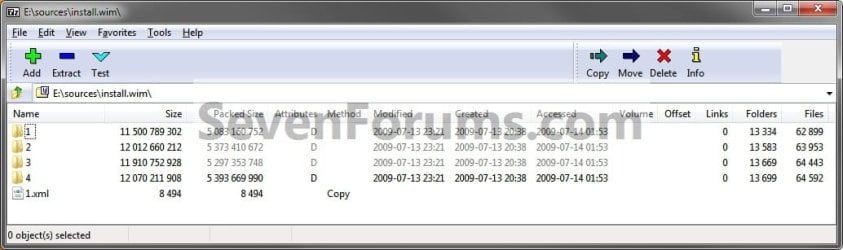
8. Each numbered folder is a different edition of Windows 7. They will vary depending on what type of Windows 7 installation DVD you have. To see what edition is for each numbered folder, select the 1.xml file and click on the Extract button on the toolbar. (See screenshots below)
Step5.jpg

Step6.jpg

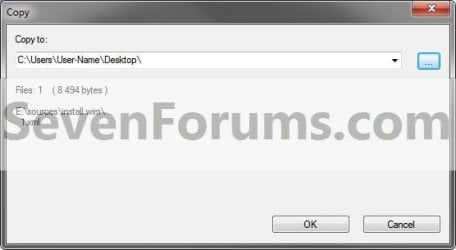
9. Copy the 1.xml file to your desktop. (See screenshot below)
Step7.jpg
10. Open the 1.xml file on the desktop. Look for the <IMAGE INDEX="#"> entry and the <NAME>edition</NAME> entry a bit under it in the code (highlighted in red below) to see what Windows 7 edition is for each numbered folder in step 8. (See code box below with an example 1.xml file)
NOTE: This file will open in Internet Explorer by default.
Code:
[URL="file:///C:/Users/User-Name/Desktop/1.xml#"]-[/URL] <WIM>
  <TOTALBYTES>2860826557</TOTALBYTES> 
[URL="file:///C:/Users/User-Name/Desktop/1.xml#"][B][COLOR=red]-[/COLOR][/B][/URL][B][COLOR=red] <IMAGE INDEX="1">[/COLOR][/B]
  <DIRCOUNT>13290</DIRCOUNT> 
  <FILECOUNT>62943</FILECOUNT> 
  <TOTALBYTES>11500789302</TOTALBYTES> 
[URL="file:///C:/Users/User-Name/Desktop/1.xml#"]-[/URL] <CREATIONTIME>
  <HIGHPART>0x01CA0446</HIGHPART> 
  <LOWPART>0xE89FF88A</LOWPART> 
  </CREATIONTIME>
[URL="file:///C:/Users/User-Name/Desktop/1.xml#"]-[/URL] <LASTMODIFICATIONTIME>
  <HIGHPART>0x01CA045F</HIGHPART> 
  <LOWPART>0x3C8C7A24</LOWPART> 
  </LASTMODIFICATIONTIME>
[URL="file:///C:/Users/User-Name/Desktop/1.xml#"]-[/URL] <WINDOWS>
  <ARCH>9</ARCH> 
  <PRODUCTNAME>Microsoft® Windows® Operating System</PRODUCTNAME> 
  <EDITIONID>HomeBasic</EDITIONID> 
  <INSTALLATIONTYPE>Client</INSTALLATIONTYPE> 
  <HAL>acpiapic</HAL> 
  <PRODUCTTYPE>WinNT</PRODUCTTYPE> 
  <PRODUCTSUITE>Terminal Server</PRODUCTSUITE> 
[URL="file:///C:/Users/User-Name/Desktop/1.xml#"]-[/URL] <LANGUAGES>
  <LANGUAGE>en-US</LANGUAGE> 
  <DEFAULT>en-US</DEFAULT> 
  </LANGUAGES>
[URL="file:///C:/Users/User-Name/Desktop/1.xml#"]-[/URL] <VERSION>
  <MAJOR>6</MAJOR> 
  <MINOR>1</MINOR> 
  <BUILD>7600</BUILD> 
  <SPBUILD>16385</SPBUILD> 
  <SPLEVEL>0</SPLEVEL> 
  </VERSION>
  <SYSTEMROOT>WINDOWS</SYSTEMROOT> 
  </WINDOWS>
[B][COLOR=red]<NAME>Windows 7 HOMEBASIC</NAME>[/COLOR][/B] 
  <DESCRIPTION>Windows 7 HOMEBASIC</DESCRIPTION> 
  <FLAGS>HomeBasic</FLAGS> 
  <HARDLINKBYTES>4516930990</HARDLINKBYTES> 
  <DISPLAYNAME>Windows 7 Home Basic</DISPLAYNAME> 
  <DISPLAYDESCRIPTION>Windows 7 Home Basic</DISPLAYDESCRIPTION> 
  </IMAGE>
[URL="file:///C:/Users/User-Name/Desktop/1.xml#"][B][COLOR=red]-[/COLOR][/B][/URL][B][COLOR=red] <IMAGE INDEX="2">[/COLOR][/B]
  <DIRCOUNT>13539</DIRCOUNT> 
  <FILECOUNT>63997</FILECOUNT> 
  <TOTALBYTES>12012660212</TOTALBYTES> 
[URL="file:///C:/Users/User-Name/Desktop/1.xml#"]-[/URL] <CREATIONTIME>
  <HIGHPART>0x01CA0446</HIGHPART> 
  <LOWPART>0xE89FF88A</LOWPART> 
  </CREATIONTIME>
[URL="file:///C:/Users/User-Name/Desktop/1.xml#"]-[/URL] <LASTMODIFICATIONTIME>
  <HIGHPART>0x01CA045F</HIGHPART> 
  <LOWPART>0x5C029E16</LOWPART> 
  </LASTMODIFICATIONTIME>
[URL="file:///C:/Users/User-Name/Desktop/1.xml#"]-[/URL] <WINDOWS>
  <ARCH>9</ARCH> 
  <PRODUCTNAME>Microsoft® Windows® Operating System</PRODUCTNAME> 
  <EDITIONID>HomePremium</EDITIONID> 
  <INSTALLATIONTYPE>Client</INSTALLATIONTYPE> 
  <HAL>acpiapic</HAL> 
  <PRODUCTTYPE>WinNT</PRODUCTTYPE> 
  <PRODUCTSUITE>Terminal Server</PRODUCTSUITE> 
[URL="file:///C:/Users/User-Name/Desktop/1.xml#"]-[/URL] <LANGUAGES>
  <LANGUAGE>en-US</LANGUAGE> 
  <DEFAULT>en-US</DEFAULT> 
  </LANGUAGES>
[URL="file:///C:/Users/User-Name/Desktop/1.xml#"]-[/URL] <VERSION>
  <MAJOR>6</MAJOR> 
  <MINOR>1</MINOR> 
  <BUILD>7600</BUILD> 
  <SPBUILD>16385</SPBUILD> 
  <SPLEVEL>0</SPLEVEL> 
  </VERSION>
  <SYSTEMROOT>WINDOWS</SYSTEMROOT> 
  </WINDOWS>
  [B][COLOR=red]<NAME>Windows 7 HOMEPREMIUM</NAME>[/COLOR][/B] 
  <DESCRIPTION>Windows 7 HOMEPREMIUM</DESCRIPTION> 
  <FLAGS>HomePremium</FLAGS> 
  <HARDLINKBYTES>4931998179</HARDLINKBYTES> 
  <DISPLAYNAME>Windows 7 Home Premium</DISPLAYNAME> 
  <DISPLAYDESCRIPTION>Windows 7 Home Premium</DISPLAYDESCRIPTION> 
  </IMAGE>
[URL="file:///C:/Users/User-Name/Desktop/1.xml#"][B][COLOR=red]-[/COLOR][/B][/URL][B][COLOR=red] <IMAGE INDEX="3">[/COLOR][/B]
  <DIRCOUNT>13625</DIRCOUNT> 
  <FILECOUNT>64487</FILECOUNT> 
  <TOTALBYTES>11910752928</TOTALBYTES> 
[URL="file:///C:/Users/User-Name/Desktop/1.xml#"]-[/URL] <CREATIONTIME>
  <HIGHPART>0x01CA0446</HIGHPART> 
  <LOWPART>0xE89FF88A</LOWPART> 
  </CREATIONTIME>
[URL="file:///C:/Users/User-Name/Desktop/1.xml#"]-[/URL] <LASTMODIFICATIONTIME>
  <HIGHPART>0x01CA045F</HIGHPART> 
  <LOWPART>0x79D2BCF7</LOWPART> 
  </LASTMODIFICATIONTIME>
[URL="file:///C:/Users/User-Name/Desktop/1.xml#"]-[/URL] <WINDOWS>
  <ARCH>9</ARCH> 
  <PRODUCTNAME>Microsoft® Windows® Operating System</PRODUCTNAME> 
  <EDITIONID>Professional</EDITIONID> 
  <INSTALLATIONTYPE>Client</INSTALLATIONTYPE> 
  <HAL>acpiapic</HAL> 
  <PRODUCTTYPE>WinNT</PRODUCTTYPE> 
  <PRODUCTSUITE>Terminal Server</PRODUCTSUITE> 
[URL="file:///C:/Users/User-Name/Desktop/1.xml#"]-[/URL] <LANGUAGES>
  <LANGUAGE>en-US</LANGUAGE> 
  <DEFAULT>en-US</DEFAULT> 
  </LANGUAGES>
[URL="file:///C:/Users/User-Name/Desktop/1.xml#"]-[/URL] <VERSION>
  <MAJOR>6</MAJOR> 
  <MINOR>1</MINOR> 
  <BUILD>7600</BUILD> 
  <SPBUILD>16385</SPBUILD> 
  <SPLEVEL>0</SPLEVEL> 
  </VERSION>
  <SYSTEMROOT>WINDOWS</SYSTEMROOT> 
  </WINDOWS>
  [B][COLOR=red]<NAME>Windows 7 PROFESSIONAL</NAME>[/COLOR][/B] 
  <DESCRIPTION>Windows 7 PROFESSIONAL</DESCRIPTION> 
  <FLAGS>Professional</FLAGS> 
  <HARDLINKBYTES>4804037542</HARDLINKBYTES> 
  <DISPLAYNAME>Windows 7 Professional</DISPLAYNAME> 
  <DISPLAYDESCRIPTION>Windows 7 Professional</DISPLAYDESCRIPTION> 
  </IMAGE>
[URL="file:///C:/Users/User-Name/Desktop/1.xml#"][B][COLOR=red]-[/COLOR][/B][/URL][B][COLOR=red] <IMAGE INDEX="4">[/COLOR][/B]
  <DIRCOUNT>13655</DIRCOUNT> 
  <FILECOUNT>64636</FILECOUNT> 
  <TOTALBYTES>12070211908</TOTALBYTES> 
[URL="file:///C:/Users/User-Name/Desktop/1.xml#"]-[/URL] <CREATIONTIME>
  <HIGHPART>0x01CA0446</HIGHPART> 
  <LOWPART>0xE89FF88A</LOWPART> 
  </CREATIONTIME>
[URL="file:///C:/Users/User-Name/Desktop/1.xml#"]-[/URL] <LASTMODIFICATIONTIME>
  <HIGHPART>0x01CA045F</HIGHPART> 
   <LOWPART>0x97ECC597</LOWPART> 
  </LASTMODIFICATIONTIME>
[URL="file:///C:/Users/User-Name/Desktop/1.xml#"]-[/URL] <WINDOWS>
  <ARCH>9</ARCH> 
  <PRODUCTNAME>Microsoft® Windows® Operating System</PRODUCTNAME> 
  <EDITIONID>Ultimate</EDITIONID> 
  <INSTALLATIONTYPE>Client</INSTALLATIONTYPE> 
  <HAL>acpiapic</HAL> 
  <PRODUCTTYPE>WinNT</PRODUCTTYPE> 
  <PRODUCTSUITE>Terminal Server</PRODUCTSUITE> 
[URL="file:///C:/Users/User-Name/Desktop/1.xml#"]-[/URL] <LANGUAGES>
  <LANGUAGE>en-US</LANGUAGE> 
  <DEFAULT>en-US</DEFAULT> 
  </LANGUAGES>
[URL="file:///C:/Users/User-Name/Desktop/1.xml#"]-[/URL] <VERSION>
  <MAJOR>6</MAJOR> 
  <MINOR>1</MINOR> 
  <BUILD>7600</BUILD> 
  <SPBUILD>16385</SPBUILD> 
  <SPLEVEL>0</SPLEVEL> 
  </VERSION>
  <SYSTEMROOT>WINDOWS</SYSTEMROOT> 
  </WINDOWS>
  [B][COLOR=red]<NAME>Windows 7 ULTIMATE</NAME>[/COLOR][/B] 
  <DESCRIPTION>Windows 7 ULTIMATE</DESCRIPTION> 
  <FLAGS>Ultimate</FLAGS> 
  <HARDLINKBYTES>4963044302</HARDLINKBYTES> 
  <DISPLAYNAME>Windows 7 Ultimate</DISPLAYNAME> 
  <DISPLAYDESCRIPTION>Windows 7 Ultimate</DISPLAYDESCRIPTION> 
  </IMAGE>
  </WIM>
11. Now open the numbered folder (step 8) that is the same edition as your currently installed Windows 7 edition, and navigate to the Windows\System32 folder. You can now select and extract the system files that you need to your desktop. (See screenshot below)
Step8.jpg
12. Verify that each extracted file is unblocked. You can now use the extracted files to copy and replace your missing or corrupted system files in your currently installed Windows 7.

   Tip
You will need to take ownership and set permissions to "Allow" your account "Full Control" of the original file in your current installation before you will be allowed to replace it with the extracted copy.

If the system file is in use and you are unable to replace it with the extracted copy, then:
  • Open a Command Prompt at boot.
  • Do steps 4B to 4D in this tutorial first to verify the drive letter of your Windows 7 drive. It's not always C: at boot.
  • Type in the command below to copy and replace the original file with the extracted replacement file.
Copy /Y "full path of extracted replacement file" "full path of original Windows 7 system file"

For example:
If the extracted replacement uDWM.DLL is on my desktop, then I would use type this in the command prompt at boot and press enter.

Copy /Y "C:\Users\User-name\Desktop\uDWM.dll" "C:\Windows\System32\uDWM.dll"


That's it,
Shawn


Last edited:
Hi Thank you Brink for pointing me. But, the analysis you could do may kindly be detailed, so that any could do it. I am really fascinated by your replies and tutorial. Daily i visit this site for tutorial .
What about my question on the 2nd step. How it will be helpful to the files that sfc could not repair. You are a valuable person and you could thro some light on the above subject.

How to find that these files are related to c:users. expecting

Personally, I wouldn't worry about trying to do that 2nd step there or to try and repair those files since the are not critical files, and are only sample files. If you must try to repair them, then you might try this below from the blue NOTE box under step 4 in Option Two of the tutorial below before trying to manually replace these unneeded files.

http://www.sevenforums.com/tutorials/1538-sfc-scannow-command-system-file-checker.html

Download and run the 32-bit (x86) or 64-bit (x64) System Update Readiness Tool for your same installed 32-bit or 64-bit Windows 7, restart the PC afterwards, and try the sfc /scannow command again.
 

My Computer My Computer

Computer type
PC/Desktop
Computer Manufacturer/Model Number
Self built custom
OS
64-bit Windows 11 Pro for Workstations
CPU
Intel i7-8700K OC'd to 5 GHz
Motherboard
ASUS ROG Maximus XI Formula Z390
Memory
64 GB (4x16GB) G.SKILL TridentZ RGB DDR4 3600 MHz
Graphics Card(s)
ASUS ROG-STRIX-GTX1080TI-O11G-GAMING
Sound Card
Integrated
Monitor(s) Displays
2 x Samsung Odyssey G7 27"
Screen Resolution
2560x1440
Hard Drives
1TB Samsung 990 PRO M.2,
4TB Samsung 990 PRO PRO M.2,
TerraMaster F8 SSD Plus NAS
PSU
Seasonic Prime Titanium 850W
Case
Thermaltake Core P3
Cooling
Corsair Hydro H115i
Keyboard
Logitech wireless K800
Mouse
Logitech MX Master 4
Internet Speed
2 Gb/s Download and 100 Mb/s Upload
Antivirus
Malwarebyte Anti-Malware Premium
Browser
Google Chrome
Other Info
Logitech Z625 speaker system,
Logitech BRIO 4K Pro webcam,
HP Color LaserJet Pro MFP M477fdn,
APC SMART-UPS RT 1000 XL - SURT1000XLI,
Galaxy S23 Plus phone
Thanks for the reply. But if suppose there are critical files missing then that step should be attempted. Is it not?. This forum is for all and this tutorial applies to all.
Even i commented this on that article. Normally person do not know that their windows protected files are removed by trojans.It just removes and the person infected by the trojan gets the trouble in so many ways, some of which could not be easily deciphered and decided upon.
Reinstalling of windows or repairing of windows , i think , is only the last step to be tried. But, the removed files could only be fixed if they know what sfc /scannow does to retrieve those.For anything and everything i only use this forum tutorial which is self explaining with tutorials very easy to understand.
Before writing, i tried the same copied instructions in the other site, and tried the option. Upto the 2nd it says , that successfully owned , and given admin rights also. But the third one could not be executed, as it says the syntax is incorrect or some error. I know the flaw and immediately resorted to system restore point , which i have created, so no problem. But if i had not created, i might have had some other errors for i have to search.
Once again thanks for quick responses
 

My Computer My Computer

Computer type
PC/Desktop
Computer Manufacturer/Model Number
custom build
OS
Microsoft Windows 7 Ultimate 64-bit 7601 Multiprocessor Free Service Pack 1
CPU
Intel(R) Core(TM)2 Duo CPU E7200 @ 2.53GHz
Motherboard
To be filled by O.E.M. To be filled by O.E.M.
Memory
4.00 GB
Graphics Card(s)
NVIDIA GeForce 210
Sound Card
(1) NVIDIA High Definition Audio (2) Realtek High Definiti
Screen Resolution
1920 x 1080 x 32 bits (4294967296 colors) @ 60 Hz
Hard Drives
ST3500312CS ATA Device
Yep, if they were needed system files, then you would want to run the System Update Readiness Tool to repair the component store so that SFC could hopefully be able to repair the files afterwards.
 

My Computer My Computer

Computer type
PC/Desktop
Computer Manufacturer/Model Number
Self built custom
OS
64-bit Windows 11 Pro for Workstations
CPU
Intel i7-8700K OC'd to 5 GHz
Motherboard
ASUS ROG Maximus XI Formula Z390
Memory
64 GB (4x16GB) G.SKILL TridentZ RGB DDR4 3600 MHz
Graphics Card(s)
ASUS ROG-STRIX-GTX1080TI-O11G-GAMING
Sound Card
Integrated
Monitor(s) Displays
2 x Samsung Odyssey G7 27"
Screen Resolution
2560x1440
Hard Drives
1TB Samsung 990 PRO M.2,
4TB Samsung 990 PRO PRO M.2,
TerraMaster F8 SSD Plus NAS
PSU
Seasonic Prime Titanium 850W
Case
Thermaltake Core P3
Cooling
Corsair Hydro H115i
Keyboard
Logitech wireless K800
Mouse
Logitech MX Master 4
Internet Speed
2 Gb/s Download and 100 Mb/s Upload
Antivirus
Malwarebyte Anti-Malware Premium
Browser
Google Chrome
Other Info
Logitech Z625 speaker system,
Logitech BRIO 4K Pro webcam,
HP Color LaserJet Pro MFP M477fdn,
APC SMART-UPS RT 1000 XL - SURT1000XLI,
Galaxy S23 Plus phone
Hello, Been reading through this thread and others here @ sevenforums.com cause I am having issues with files sfc cannot repair. Even after 3 after running it 3 times.

I checked my cbs log and was able to locate 11 files that could not be repaired:

C:\Windows\System32\autochk.exe

C:\Windows\System32\batmeter.dll

C:\Windows\System32\CompMgmtLauncher.exe

C:\Windows\System32\comres.dll

C:\Windows\System32\control.exe

C:\Windows\System32\localsec.dll

C:\Windows\System32\IMJP10.IME

C:\Windows\System32\wpccpl.dll

C:\Windows\System32\logoncli.dll

C:\Windows\SysWOW64\mfreadwrite.dll

C:\Windows\SysWOW64\devmgr.dll

Followed your instructions on using 7zip to extract those files from my Win7 SP1 disk and replace the existing ones. As you mentioned I had to take ownership of each file to do this.

Ran sfc after rebooting and still getting errors on the same files.

This started as a result of a bad HDD. I cloned and replaced the drive with a new one and started noticing issues with the Computer Managment Console and getting lsass.exe crashes that generated the following errors:

Event ID 1015 Wininit.
A critical system process, C:\Windows\system32\lsass.exe, failed with status code 255. The machine must now be restarted.


Event ID 1000 Application

Faulting application name: lsass.exe, version: 6.1.7601.18443, time stamp: 0x5348920c
Faulting module name: logoncli.dll, version: 6.1.7601.17514, time stamp: 0x4ce7c71e
Exception code: 0xc000001d
Fault offset: 0x000000000000fc70
Faulting process id: 0x380
Faulting application start time: 0x01d0110a0f51db65
Faulting application path: C:\Windows\system32\lsass.exe
Faulting module path: C:\Windows\system32\logoncli.dll
Report Id: dd4fd2b3-7d03-11e4-9bce-74d435754420

Event ID 1005 Application

Windows cannot access the file for one of the following reasons: there is a problem with the network connection, the disk that the file is stored on, or the storage drivers installed on this computer; or the disk is missing. Windows closed the program Local Security Authority Process because of this error.

Program: Local Security Authority Process
File:

The error value is listed in the Additional Data section.
User Action
1. Open the file again. This situation might be a temporary problem that corrects itself when the program runs again.
2. If the file still cannot be accessed and
- It is on the network, your network administrator should verify that there is not a problem with the network and that the server can be contacted.
- It is on a removable disk, for example, a floppy disk or CD-ROM, verify that the disk is fully inserted into the computer.
3. Check and repair the file system by running CHKDSK. To run CHKDSK, click Start, click Run, type CMD, and then click OK. At the command prompt, type CHKDSK /F, and then press ENTER.
4. If the problem persists, restore the file from a backup copy.
5. Determine whether other files on the same disk can be opened. If not, the disk might be damaged. If it is a hard disk, contact your administrator or computer hardware vendor for further assistance.

Additional Data
Error value: 00000000
Disk type: 0


Any advice is greatly appreciated.
 

My Computer My Computer

Computer type
PC/Desktop
Computer Manufacturer/Model Number
custom
OS
Windows 7 Pro x64
CPU
Core2 Quad Q9550 2.83GHz
Motherboard
Gigabyte GA-G41MT-S2PT
Memory
4 GB DDR3 1066
Graphics Card(s)
EVGA GT730
Hard Drives
WD 500GB system
WD 3TB data
Antivirus
AVG 2015
Browser
Firefox

My Computer My Computer

Computer type
PC/Desktop
Computer Manufacturer/Model Number
Self built custom
OS
64-bit Windows 11 Pro for Workstations
CPU
Intel i7-8700K OC'd to 5 GHz
Motherboard
ASUS ROG Maximus XI Formula Z390
Memory
64 GB (4x16GB) G.SKILL TridentZ RGB DDR4 3600 MHz
Graphics Card(s)
ASUS ROG-STRIX-GTX1080TI-O11G-GAMING
Sound Card
Integrated
Monitor(s) Displays
2 x Samsung Odyssey G7 27"
Screen Resolution
2560x1440
Hard Drives
1TB Samsung 990 PRO M.2,
4TB Samsung 990 PRO PRO M.2,
TerraMaster F8 SSD Plus NAS
PSU
Seasonic Prime Titanium 850W
Case
Thermaltake Core P3
Cooling
Corsair Hydro H115i
Keyboard
Logitech wireless K800
Mouse
Logitech MX Master 4
Internet Speed
2 Gb/s Download and 100 Mb/s Upload
Antivirus
Malwarebyte Anti-Malware Premium
Browser
Google Chrome
Other Info
Logitech Z625 speaker system,
Logitech BRIO 4K Pro webcam,
HP Color LaserJet Pro MFP M477fdn,
APC SMART-UPS RT 1000 XL - SURT1000XLI,
Galaxy S23 Plus phone
No I have not will try that now.
thanks

P.S. the wifi at the house I am in is very slow, so this may take some time to download. That is the next project after I get this fixed.:p
 
Last edited:

My Computer My Computer

Computer type
PC/Desktop
Computer Manufacturer/Model Number
custom
OS
Windows 7 Pro x64
CPU
Core2 Quad Q9550 2.83GHz
Motherboard
Gigabyte GA-G41MT-S2PT
Memory
4 GB DDR3 1066
Graphics Card(s)
EVGA GT730
Hard Drives
WD 500GB system
WD 3TB data
Antivirus
AVG 2015
Browser
Firefox
Hello Brink,
I ran the System Update Readiness Tool, extracted and copied the files again, and ran sfc.
Still no joy :( same files cannot be repaired.
 

My Computer My Computer

Computer type
PC/Desktop
Computer Manufacturer/Model Number
custom
OS
Windows 7 Pro x64
CPU
Core2 Quad Q9550 2.83GHz
Motherboard
Gigabyte GA-G41MT-S2PT
Memory
4 GB DDR3 1066
Graphics Card(s)
EVGA GT730
Hard Drives
WD 500GB system
WD 3TB data
Antivirus
AVG 2015
Browser
Firefox
If you are not having any issues, then I wouldn't worry about it. Otherwise, it looks like you'll need to reinstall Windows. :(
 

My Computer My Computer

Computer type
PC/Desktop
Computer Manufacturer/Model Number
Self built custom
OS
64-bit Windows 11 Pro for Workstations
CPU
Intel i7-8700K OC'd to 5 GHz
Motherboard
ASUS ROG Maximus XI Formula Z390
Memory
64 GB (4x16GB) G.SKILL TridentZ RGB DDR4 3600 MHz
Graphics Card(s)
ASUS ROG-STRIX-GTX1080TI-O11G-GAMING
Sound Card
Integrated
Monitor(s) Displays
2 x Samsung Odyssey G7 27"
Screen Resolution
2560x1440
Hard Drives
1TB Samsung 990 PRO M.2,
4TB Samsung 990 PRO PRO M.2,
TerraMaster F8 SSD Plus NAS
PSU
Seasonic Prime Titanium 850W
Case
Thermaltake Core P3
Cooling
Corsair Hydro H115i
Keyboard
Logitech wireless K800
Mouse
Logitech MX Master 4
Internet Speed
2 Gb/s Download and 100 Mb/s Upload
Antivirus
Malwarebyte Anti-Malware Premium
Browser
Google Chrome
Other Info
Logitech Z625 speaker system,
Logitech BRIO 4K Pro webcam,
HP Color LaserJet Pro MFP M477fdn,
APC SMART-UPS RT 1000 XL - SURT1000XLI,
Galaxy S23 Plus phone
No problems since the last lsass.exe crash about 8 hrs ago. That was around the time I found your threads on sfc and tried to copy the files. I have also applied some MS hotfixes for the lsass error. Guess I'll let it go for now and see what I can do for the wifi here.
Thanks for you help.
 

My Computer My Computer

Computer type
PC/Desktop
Computer Manufacturer/Model Number
custom
OS
Windows 7 Pro x64
CPU
Core2 Quad Q9550 2.83GHz
Motherboard
Gigabyte GA-G41MT-S2PT
Memory
4 GB DDR3 1066
Graphics Card(s)
EVGA GT730
Hard Drives
WD 500GB system
WD 3TB data
Antivirus
AVG 2015
Browser
Firefox
Hello Brink,

thanks for this tutorial! Windows 8 does not have an installation.wim anymore, instead it has an installation.esd in the same directory ([root-folder]\sources). installation.esd cannot be opened by 7-zip, but there is an easy solution using Windows' built-in tool called DISM (Deployment Image Servicing and Management). DISM is available for Windows 8, Windows 8.1, Windows Server 2012, Windows Server 2012 R2, according to its MSDN article. Many thanks to this article from deskmodder.de (German site) which explains the usage of DISM in order to extract installation.esd.

The instructions are as follows:

  1. Gain access to Windows' installation data using
    a) your Windows 8 installation disc,
    b) a downloaded ISO file, which you can mount by right-clicking in Explorer and selecting Mount, or using
    c) a USB Flash drive on which you have "burnt" the downloaded ISO file.

    See [URL="http://www.eightforums.com/tutorials/18309-windows-8-windows-8-1-iso-download-create.html"]Windows 8 and Windows 8.1 ISO - Download or Create[/URL] if you need help with creating/downloading a legal Windows 8 ISO file.

  2. Run the following commands in a console (cmd.exe or PowerShell) with elevated privileges (have a look at Command Prompt: frequently asked questions if you do not know how):
    Code:
    mkdir c:\...\mount
    dism /apply-image /imagefile:d:\sources\install.esd /index:1 /ApplyDir:c:\...\mount

    c:\...\mount is the directory into which you wish the Windows install.esd to be extracted. Command #1 creates this directory. Be sure to replace c:\...\mount by your path in the second command as well!
    d:\sources\install.esd is the path to install.esd of your Windows installation medium. Replace d by the drive letter of your disc, mounted ISO file, or USB Flash drive.
    Please avoid spaces in both paths! If you absolutely require them, then enclose all paths by double quotes (e.g. /ApplyDir:"c:\here is a space\my-directory").

  3. install.esd has been now extracted into the stated directory.

Maybe these instructions could be incorporated into the existing article or into a new one.
 

My Computer My Computer

Computer type
Tablet
OS
Windows 8.1 Pro 64-bit, 10 64-bit in VM
Hello ComFerek, and welcome to Seven Forums.

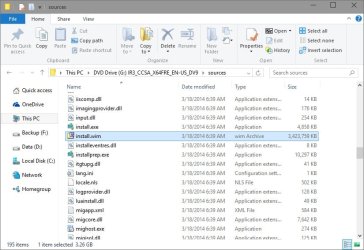
Thank you, but I still show it having an install.wim file in the latest Windows 7 ISO file. :confused:

installwim.jpg
 

My Computer My Computer

Computer type
PC/Desktop
Computer Manufacturer/Model Number
Self built custom
OS
64-bit Windows 11 Pro for Workstations
CPU
Intel i7-8700K OC'd to 5 GHz
Motherboard
ASUS ROG Maximus XI Formula Z390
Memory
64 GB (4x16GB) G.SKILL TridentZ RGB DDR4 3600 MHz
Graphics Card(s)
ASUS ROG-STRIX-GTX1080TI-O11G-GAMING
Sound Card
Integrated
Monitor(s) Displays
2 x Samsung Odyssey G7 27"
Screen Resolution
2560x1440
Hard Drives
1TB Samsung 990 PRO M.2,
4TB Samsung 990 PRO PRO M.2,
TerraMaster F8 SSD Plus NAS
PSU
Seasonic Prime Titanium 850W
Case
Thermaltake Core P3
Cooling
Corsair Hydro H115i
Keyboard
Logitech wireless K800
Mouse
Logitech MX Master 4
Internet Speed
2 Gb/s Download and 100 Mb/s Upload
Antivirus
Malwarebyte Anti-Malware Premium
Browser
Google Chrome
Other Info
Logitech Z625 speaker system,
Logitech BRIO 4K Pro webcam,
HP Color LaserJet Pro MFP M477fdn,
APC SMART-UPS RT 1000 XL - SURT1000XLI,
Galaxy S23 Plus phone
Thank you, but I still show it having an install.wim file in the latest Windows 7 ISO file. :confused:
I suppose Microsoft is using install.esd in Windows 8+ only.
 

My Computer My Computer

Computer type
Tablet
OS
Windows 8.1 Pro 64-bit, 10 64-bit in VM
LOL, I missed the part for Windows 8 instead, but it has an install.wim file as well.

This is from a en_windows_8.1_with_update_x64_dvd_4065090.iso file from MSDN.

w8.jpg

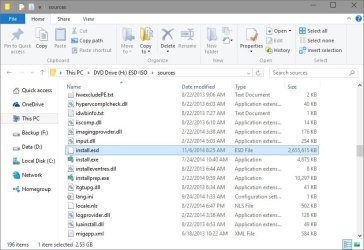
I did notice that the ISO from Option One in the link you posted does only have a install.esd file. Odd, that Microsoft would have it for that ISO and not others.

esd.jpg
 

My Computer My Computer

Computer type
PC/Desktop
Computer Manufacturer/Model Number
Self built custom
OS
64-bit Windows 11 Pro for Workstations
CPU
Intel i7-8700K OC'd to 5 GHz
Motherboard
ASUS ROG Maximus XI Formula Z390
Memory
64 GB (4x16GB) G.SKILL TridentZ RGB DDR4 3600 MHz
Graphics Card(s)
ASUS ROG-STRIX-GTX1080TI-O11G-GAMING
Sound Card
Integrated
Monitor(s) Displays
2 x Samsung Odyssey G7 27"
Screen Resolution
2560x1440
Hard Drives
1TB Samsung 990 PRO M.2,
4TB Samsung 990 PRO PRO M.2,
TerraMaster F8 SSD Plus NAS
PSU
Seasonic Prime Titanium 850W
Case
Thermaltake Core P3
Cooling
Corsair Hydro H115i
Keyboard
Logitech wireless K800
Mouse
Logitech MX Master 4
Internet Speed
2 Gb/s Download and 100 Mb/s Upload
Antivirus
Malwarebyte Anti-Malware Premium
Browser
Google Chrome
Other Info
Logitech Z625 speaker system,
Logitech BRIO 4K Pro webcam,
HP Color LaserJet Pro MFP M477fdn,
APC SMART-UPS RT 1000 XL - SURT1000XLI,
Galaxy S23 Plus phone
This is from a en_windows_8.1_with_update_x64_dvd_4065090.iso file.
Interesting, where do you have that ISO from?
Mine is from the Media Creation Tool, saved into an ISO and later burnt onto a USB flash drive. I cannot find installation.wim on it.
 

My Computer My Computer

Computer type
Tablet
OS
Windows 8.1 Pro 64-bit, 10 64-bit in VM
I've updated my post above, but that one was the latest from MSDN subscription.
 

My Computer My Computer

Computer type
PC/Desktop
Computer Manufacturer/Model Number
Self built custom
OS
64-bit Windows 11 Pro for Workstations
CPU
Intel i7-8700K OC'd to 5 GHz
Motherboard
ASUS ROG Maximus XI Formula Z390
Memory
64 GB (4x16GB) G.SKILL TridentZ RGB DDR4 3600 MHz
Graphics Card(s)
ASUS ROG-STRIX-GTX1080TI-O11G-GAMING
Sound Card
Integrated
Monitor(s) Displays
2 x Samsung Odyssey G7 27"
Screen Resolution
2560x1440
Hard Drives
1TB Samsung 990 PRO M.2,
4TB Samsung 990 PRO PRO M.2,
TerraMaster F8 SSD Plus NAS
PSU
Seasonic Prime Titanium 850W
Case
Thermaltake Core P3
Cooling
Corsair Hydro H115i
Keyboard
Logitech wireless K800
Mouse
Logitech MX Master 4
Internet Speed
2 Gb/s Download and 100 Mb/s Upload
Antivirus
Malwarebyte Anti-Malware Premium
Browser
Google Chrome
Other Info
Logitech Z625 speaker system,
Logitech BRIO 4K Pro webcam,
HP Color LaserJet Pro MFP M477fdn,
APC SMART-UPS RT 1000 XL - SURT1000XLI,
Galaxy S23 Plus phone
thank you Brink for this excellent tutorial, I wasn't aware of what you could do with 7-Zip keep up the good work.:geek:
 

My Computer My Computer

OS
Windows 7 Ultimate x64
CPU
AMD Phemom(tm)11x4 955 processor
Memory
2 GB
Graphics Card(s)
ATI Radeon hd 5700 series
Sound Card
ATI HDMI Audio
Monitor(s) Displays
SONY
Hard Drives
Hitachi 1TB
Glad it could help. :)
 

My Computer My Computer

Computer type
PC/Desktop
Computer Manufacturer/Model Number
Self built custom
OS
64-bit Windows 11 Pro for Workstations
CPU
Intel i7-8700K OC'd to 5 GHz
Motherboard
ASUS ROG Maximus XI Formula Z390
Memory
64 GB (4x16GB) G.SKILL TridentZ RGB DDR4 3600 MHz
Graphics Card(s)
ASUS ROG-STRIX-GTX1080TI-O11G-GAMING
Sound Card
Integrated
Monitor(s) Displays
2 x Samsung Odyssey G7 27"
Screen Resolution
2560x1440
Hard Drives
1TB Samsung 990 PRO M.2,
4TB Samsung 990 PRO PRO M.2,
TerraMaster F8 SSD Plus NAS
PSU
Seasonic Prime Titanium 850W
Case
Thermaltake Core P3
Cooling
Corsair Hydro H115i
Keyboard
Logitech wireless K800
Mouse
Logitech MX Master 4
Internet Speed
2 Gb/s Download and 100 Mb/s Upload
Antivirus
Malwarebyte Anti-Malware Premium
Browser
Google Chrome
Other Info
Logitech Z625 speaker system,
Logitech BRIO 4K Pro webcam,
HP Color LaserJet Pro MFP M477fdn,
APC SMART-UPS RT 1000 XL - SURT1000XLI,
Galaxy S23 Plus phone
Doesn't work on W10 install.wim?

I know this should work as I've done it before with a W7 ISO. :confused:

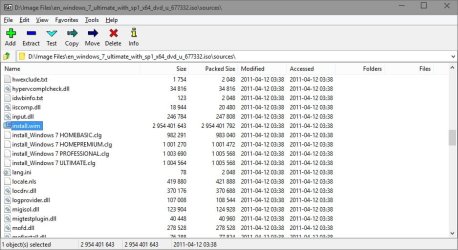
7-Zip refuses to open "install.wim" from the W10TP b10041 ISO I created (using Kari's tutorial on TenForums).
I started 7-Zip using the "Run as administrator" option.
Extract install.wim.png
 

My Computer My Computer

Computer type
PC/Desktop
Computer Manufacturer/Model Number
n/a
OS
W7 Ultimate SP1, LM19.2 MATE, W10 Home 1703, W10 Pro 1703 VM, #All 64 bit
CPU
AMD Phenom II x6 1100T, 3.3 GHz
Motherboard
ASUS M4A88T-M/USB3 (AM3)
Memory
12GB DDR3 1333 G-Skill (4GB x 2), G-Skill (2GB x 2)
Graphics Card(s)
NVIDIA GeForce GTX 660
Sound Card
Realtek?
Monitor(s) Displays
Samsung S23B350
Screen Resolution
1920x1080
Hard Drives
WD Green 2TB (SATA), WD Green 3TB (SATA), WD Blue 4TB (SATA), WD Blue 6TB (SATA)
PSU
Cooler Master
Case
Antec GX300 Tower
Cooling
3x Antec TRICOOL 120mm Fans
Mouse
Wired Optical
Internet Speed
DSL
Antivirus
Avast
Browser
Pale Moon (64 bit)
Other Info
2018-12-27 Upgraded HDDs
2015-12-10 Upgraded case, graphics card, storage
2015-08-15 Upgraded motherboard & RAM
2015-07-15 Upgraded LM17.1 to LM17.2

My Computer My Computer

Computer type
PC/Desktop
Computer Manufacturer/Model Number
Self built custom
OS
64-bit Windows 11 Pro for Workstations
CPU
Intel i7-8700K OC'd to 5 GHz
Motherboard
ASUS ROG Maximus XI Formula Z390
Memory
64 GB (4x16GB) G.SKILL TridentZ RGB DDR4 3600 MHz
Graphics Card(s)
ASUS ROG-STRIX-GTX1080TI-O11G-GAMING
Sound Card
Integrated
Monitor(s) Displays
2 x Samsung Odyssey G7 27"
Screen Resolution
2560x1440
Hard Drives
1TB Samsung 990 PRO M.2,
4TB Samsung 990 PRO PRO M.2,
TerraMaster F8 SSD Plus NAS
PSU
Seasonic Prime Titanium 850W
Case
Thermaltake Core P3
Cooling
Corsair Hydro H115i
Keyboard
Logitech wireless K800
Mouse
Logitech MX Master 4
Internet Speed
2 Gb/s Download and 100 Mb/s Upload
Antivirus
Malwarebyte Anti-Malware Premium
Browser
Google Chrome
Other Info
Logitech Z625 speaker system,
Logitech BRIO 4K Pro webcam,
HP Color LaserJet Pro MFP M477fdn,
APC SMART-UPS RT 1000 XL - SURT1000XLI,
Galaxy S23 Plus phone
Not any W10TP ISO

Hey Peter,

As a test, are you able to with an official Windows 10 ISO?

Download Windows 10 Technical Preview - Windows 10 Forums
W7 ISOs mounted in Virtual CloneDrive:

  • I can open "install.wim" in 7-Zip :)
W10 ISOs (b9841 & b9926 downloaded from MS) mounted in Virtual CloneDrive:

  • I can't open "install.wim" in 7-Zip :(
W10 ISOs (b9860 & b10041 created from ESD) mounted in Virtual CloneDrive:

  • I can't open "install.wim" in 7-Zip :(
 
Last edited:

My Computer My Computer

Computer type
PC/Desktop
Computer Manufacturer/Model Number
n/a
OS
W7 Ultimate SP1, LM19.2 MATE, W10 Home 1703, W10 Pro 1703 VM, #All 64 bit
CPU
AMD Phenom II x6 1100T, 3.3 GHz
Motherboard
ASUS M4A88T-M/USB3 (AM3)
Memory
12GB DDR3 1333 G-Skill (4GB x 2), G-Skill (2GB x 2)
Graphics Card(s)
NVIDIA GeForce GTX 660
Sound Card
Realtek?
Monitor(s) Displays
Samsung S23B350
Screen Resolution
1920x1080
Hard Drives
WD Green 2TB (SATA), WD Green 3TB (SATA), WD Blue 4TB (SATA), WD Blue 6TB (SATA)
PSU
Cooler Master
Case
Antec GX300 Tower
Cooling
3x Antec TRICOOL 120mm Fans
Mouse
Wired Optical
Internet Speed
DSL
Antivirus
Avast
Browser
Pale Moon (64 bit)
Other Info
2018-12-27 Upgraded HDDs
2015-12-10 Upgraded case, graphics card, storage
2015-08-15 Upgraded motherboard & RAM
2015-07-15 Upgraded LM17.1 to LM17.2
Back
Top