Solved PC automatically turrning on/waking up from sleep

zzxna

New member
Local time
9:16 AM
Messages
2
I have two PCs connected to the same router and also in the same Windows Home Group.

PC1 uses Windows 7 64 bit Home Premium

PC2 uses Windows 8.1 64 bit

Whenever I turn on or use PC2, it seems to trigger PC1 into waking up (if it was in sleep mode) or turning on (if it was turned off).

On a related note, PC2 seems to be incapable of sleeping - after I make it sleep, it just comes back on in 30 seconds.

Any advice on how to solve this is appreciated!
 

My Computer My Computer

At a glance

Windows 7 64 bit Home Premium
Computer type
PC/Desktop
Computer Manufacturer/Model Number
Custom build
OS
Windows 7 64 bit Home Premium
Antivirus
AVG
Browser
Chrome
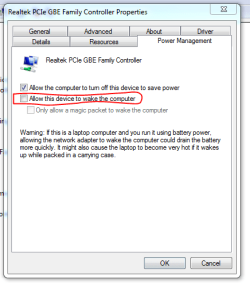
Check to see if you have the network adapter set to wake the computer. Go into device manager --> properties --> Power Management and check that this setting is unchecked:

Network.PNG

If it is unchecked you have another problem which we can deal with later. In the meantime see if that setting is unchecked.
 

My Computer My Computer

At a glance

Win 7 Pro x64/Win 10 Pro x64 dual bootAMD FX 8350 Vishera @ 420016 GB Mushkin Blackline DDR3-2400 @ 1866 (9-1...XFX Radeon R9 280 Double D Black Edition
Computer type
PC/Desktop
Computer Manufacturer/Model Number
Mellon Labs (custom build)
OS
Win 7 Pro x64/Win 10 Pro x64 dual boot
CPU
AMD FX 8350 Vishera @ 4200
Motherboard
ASUS M5A97 R2.0
Memory
16 GB Mushkin Blackline DDR3-2400 @ 1866 (9-10-10-10-31)
Graphics Card(s)
XFX Radeon R9 280 Double D Black Edition
Sound Card
Realtek HD Audio on MB. Sounds great.
Monitor(s) Displays
Acer 24", Acer 22"
Screen Resolution
3840 x 1080
Hard Drives
1 x Mushkin Chronos 120 GB SSD (Win 10)
1 x Samsung 850 EVO 250 GB SSD (Win 7)
1 x WD 1TB SATA Blue
1 x WD 1TB SATA Green
PSU
Corsair TX-750
Case
CoolerMaster HAF 912+
Cooling
Coolermaster Seidon 240M Liquid AIO. 6 case fans
Keyboard
Logitech G710+
Mouse
Logitech G500s
Internet Speed
Much better since I got fiber, but still way overpriced.
Antivirus
MSE, Malware Bytes for scanning
Browser
Firefox
Other Info
Corsair VOID USB headphones.

A Mellon Labs X-1 - LCD Smartie driven system status display.

Brought to you by the letter E
Also disable wake timers in the power options, also check your bios for anything letting it wake up.
 

My Computer My Computer

At a glance

Windows 10 Pro x64Intel Core i7 6700KGSkill TridentZ RGB 16GB 3600 16-16-16-36EVGA GTX 980 Ti SC x2
Computer type
PC/Desktop
Computer Manufacturer/Model Number
Skylake Special #666
OS
Windows 10 Pro x64
CPU
Intel Core i7 6700K
Motherboard
Asus Sabertooth Z170 Mark 1
Memory
GSkill TridentZ RGB 16GB 3600 16-16-16-36
Graphics Card(s)
EVGA GTX 980 Ti SC x2
Sound Card
Realtek High Definition
Monitor(s) Displays
AOC G2460PG
Screen Resolution
1920 x 1080 144Hz
Hard Drives
Samsung 860 Pro 256GB, Seagate Barracuda 4TB x2
PSU
EVGA 1000 P2, EVGA White Custom Braided Cables
Case
Corsair Vengeance C70 Gunmetal Black
Cooling
Corsair H100i v2, Corsair ML120 x2, Thermal Grizzly Kryonaut
Keyboard
Logitech G910 Orion Spectrum
Mouse
Logitech G700s
Internet Speed
Verizon Fios Quantum Gateway 75/75
Antivirus
Windows Defender, Malwarebytes Free 3.8.3
Browser
Chrome
Other Info
Corsair SP120 x4, LG Blu-ray Drive, Durabrand HT-395 100 Watt Dolby Digital Amp, Corsair H2100 Wireless 7.1 Headset
Check to see if you have the network adapter set to wake the computer. Go into device manager --> properties --> Power Management and check that this setting is unchecked:

View attachment 353076

If it is unchecked you have another problem which we can deal with later. In the meantime see if that setting is unchecked.

Seems to have solved it. Thanks!
 

My Computer My Computer

At a glance

Windows 7 64 bit Home Premium
Computer type
PC/Desktop
Computer Manufacturer/Model Number
Custom build
OS
Windows 7 64 bit Home Premium
Antivirus
AVG
Browser
Chrome
Back
Top