DVD Drive not being detected by Win 7 Ultimate

adt

New member
Member
VIP
Local time
3:08 AM
Messages
126
Location
London, UK
Hi guys I'm new here at Seven Forums,

I am a confirmed host of the Win 7 launch party and yesterday I received my copy of Win 7 Ultimate. I was running on Vista so I did an upgrade to 7. After I was done my DVD drive is no longer in My computer or the Device manager, just like if it's not even plugged in. The tray can be opened but it does not detect the discs I insert. I tried googling and I found a couple of solutions but none worked. Is there any way to fix this, I have also looked in Bios but I didn't know what to check.


Looking forward to your replies.
 

My Computer My Computer

At a glance

Windows 7 Ultimate 64 bitIntel Core 2 Quad CPU Q8300 @ 2.55GHz6 GB DDR2MSI GTX 570 TWIN FROZR III POWER EDITION
Computer Manufacturer/Model Number
Modified Packard Bell M5772
OS
Windows 7 Ultimate 64 bit
CPU
Intel Core 2 Quad CPU Q8300 @ 2.55GHz
Motherboard
Packard Bell EG43M
Memory
6 GB DDR2
Graphics Card(s)
MSI GTX 570 TWIN FROZR III POWER EDITION
Sound Card
XONAR DG
Monitor(s) Displays
Samsung T200HD
Screen Resolution
1680 x 1050
Hard Drives
Western Digital Caviar Green Hard Disk (1 TB)
Western Digital Caviar Green Hard Disk (500GB)
PSU
EzCool Tornado 800w PSU
Case
Packard Bell Case
Cooling
Stock
Keyboard
Microsoft sidewinder x6
Mouse
Microsoft sidewinder x8
Internet Speed
10 mb/s
Other Info
http://support.packardbell.com/uk/item/index.php?pn=PT.U4002.012&g=1400
Hi guys I'm new here at Seven Forums,

I am a confirmed host of the Win 7 launch party and yesterday I received my copy of Win 7 Ultimate. I was running on Vista so I did an upgrade to 7. After I was done my DVD drive is no longer in My computer or the Device manager, just like if it's not even plugged in. The tray can be opened but it does not detect the discs I insert. I tried googling and I found a couple of solutions but none worked. Is there any way to fix this, I have also looked in Bios but I didn't know what to check.


Looking forward to your replies.


driver for the dvd drive. internal? what make? what model?
 

My Computer My Computer

At a glance

Win 8 Release candidate 8400[email protected]4 gigsNvidia 9600M
Computer Manufacturer/Model Number
HP Pavillion dv-7 1005 Tx
OS
Win 8 Release candidate 8400
CPU
[email protected]
Memory
4 gigs
Graphics Card(s)
Nvidia 9600M
Sound Card
HD built-in
Monitor(s) Displays
17" Wxga
Screen Resolution
1440x900
Cooling
none
Internet Speed
45Mb down 5Mb up
  • Like
Reactions: adt
Hi guys I'm new here at Seven Forums,

I am a confirmed host of the Win 7 launch party and yesterday I received my copy of Win 7 Ultimate. I was running on Vista so I did an upgrade to 7. After I was done my DVD drive is no longer in My computer or the Device manager, just like if it's not even plugged in. The tray can be opened but it does not detect the discs I insert. I tried googling and I found a couple of solutions but none worked. Is there any way to fix this, I have also looked in Bios but I didn't know what to check.


Looking forward to your replies.


driver for the dvd drive. internal? what make? what model?

I'm sorry but I'm not really good with hardware. How can I find out the make and model?

My PC is a packard Bell iextreme 9610.
 

My Computer My Computer

At a glance

Windows 7 Ultimate 64 bitIntel Core 2 Quad CPU Q8300 @ 2.55GHz6 GB DDR2MSI GTX 570 TWIN FROZR III POWER EDITION
Computer Manufacturer/Model Number
Modified Packard Bell M5772
OS
Windows 7 Ultimate 64 bit
CPU
Intel Core 2 Quad CPU Q8300 @ 2.55GHz
Motherboard
Packard Bell EG43M
Memory
6 GB DDR2
Graphics Card(s)
MSI GTX 570 TWIN FROZR III POWER EDITION
Sound Card
XONAR DG
Monitor(s) Displays
Samsung T200HD
Screen Resolution
1680 x 1050
Hard Drives
Western Digital Caviar Green Hard Disk (1 TB)
Western Digital Caviar Green Hard Disk (500GB)
PSU
EzCool Tornado 800w PSU
Case
Packard Bell Case
Cooling
Stock
Keyboard
Microsoft sidewinder x6
Mouse
Microsoft sidewinder x8
Internet Speed
10 mb/s
Other Info
http://support.packardbell.com/uk/item/index.php?pn=PT.U4002.012&g=1400

My Computer My Computer

At a glance

Windows 7 ultimate 64 bit / XP Home sp3intel Core 2 Duo E8400 3.0ghz8 gigs 1066 OCZ Fata1tyEVGA GTX 580 Call of Duty Black Ops Edition
Computer Manufacturer/Model Number
Self Built
OS
Windows 7 ultimate 64 bit / XP Home sp3
CPU
intel Core 2 Duo E8400 3.0ghz
Motherboard
Asus P5ND bios 1401
Memory
8 gigs 1066 OCZ Fata1ty
Graphics Card(s)
EVGA GTX 580 Call of Duty Black Ops Edition
Sound Card
Creative Soundblaster Audigy 2zs
Monitor(s) Displays
Asus 24in LCD's 2MS X2
Screen Resolution
1920x1080p @60Hz
Hard Drives
WD Caviar 500 Black/ WD Caviar 200 Blue
PSU
OCZ 700W GameXtreme
Case
NZXT Apollo
Cooling
Corsair H50 CPU/120mm x3 /60mm x2 /Corsair Dominator Ram
Keyboard
Logitech Bluetooth Wireless MX5000
Mouse
Logitech Bluetooth Wireless MX1000
Internet Speed
Download 19.83 Upload 0.97
Other Info
Logitech Z2300 Speakers/ Bose Noise Cancelling Headphones/Avermedia PCI-e Hybrid TV Bravo/Epson NX415 all in one/ 4 Port Powered USB Hub/ LG 10x Bluray Burner /TSST Corp DVDRW External
thanks thefabe, Everest is not picking up any optical drives, any other way around it?
 

My Computer My Computer

At a glance

Windows 7 Ultimate 64 bitIntel Core 2 Quad CPU Q8300 @ 2.55GHz6 GB DDR2MSI GTX 570 TWIN FROZR III POWER EDITION
Computer Manufacturer/Model Number
Modified Packard Bell M5772
OS
Windows 7 Ultimate 64 bit
CPU
Intel Core 2 Quad CPU Q8300 @ 2.55GHz
Motherboard
Packard Bell EG43M
Memory
6 GB DDR2
Graphics Card(s)
MSI GTX 570 TWIN FROZR III POWER EDITION
Sound Card
XONAR DG
Monitor(s) Displays
Samsung T200HD
Screen Resolution
1680 x 1050
Hard Drives
Western Digital Caviar Green Hard Disk (1 TB)
Western Digital Caviar Green Hard Disk (500GB)
PSU
EzCool Tornado 800w PSU
Case
Packard Bell Case
Cooling
Stock
Keyboard
Microsoft sidewinder x6
Mouse
Microsoft sidewinder x8
Internet Speed
10 mb/s
Other Info
http://support.packardbell.com/uk/item/index.php?pn=PT.U4002.012&g=1400
thanks thefabe, Everest is not picking up any optical drives, any other way around it?
Hello ADT welcome to the forum, for starters since the drive is not visible in OS 7 we will have to do some trouble shooting. We need to track down your system specs. We will be back soon.
Regards,
Adrian
 

My Computer My Computer

At a glance

Windows 7 7600 1 X64AMD PHENOM II X 550 PROCESSOR 3.1 ghzCorsair 4 gig ddr 3ati radeon 3300
Computer Manufacturer/Model Number
Custom Build
OS
Windows 7 7600 1 X64
CPU
AMD PHENOM II X 550 PROCESSOR 3.1 ghz
Motherboard
ASUS M4A78-TE
Memory
Corsair 4 gig ddr 3
Graphics Card(s)
ati radeon 3300
Sound Card
ati hd
Monitor(s) Displays
syncmaster 2033sw
Screen Resolution
1600X900 60 hz refresh
Hard Drives
twin_seagates SATA's 1 TB & 500 Gig, hitachi_slimline 160 gig
PSU
antec_550 watt
Case
cooler master GLite
Cooling
stock_heat sink
Internet Speed
20mbs up/ 1.5mbs down
Other Info
favorite child "stewie"
favorite dog "brian"
iextreme 9610

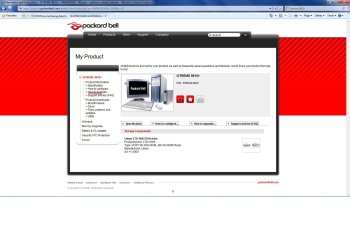
ADT, I'm seeing this screen shot of your system?
It appears you have an optical drive from Lite-On?
ADT, you may have issues concerning your optical drive. IE: If the PC info you posted is correct then you have a 4 -6 year old system, the drive spec for your particular system is a Lite-On 16X DVD
Model LTD-1665, lite on merged this particular drive w/JVC so the new model name is:
JLMS-X LTD 1665 to which no firmware or drivers exist.
OS 7 uses a standardized driver catalog since OS 7 does not see the drive what so ever I recommend you reboot to see if your BIOS recognises the drive and then we can trouble shoot further.
 

Attachments

  • PB.jpg
    PB.jpg
    115 KB · Views: 277
Last edited:

My Computer My Computer

At a glance

Windows 7 7600 1 X64AMD PHENOM II X 550 PROCESSOR 3.1 ghzCorsair 4 gig ddr 3ati radeon 3300
Computer Manufacturer/Model Number
Custom Build
OS
Windows 7 7600 1 X64
CPU
AMD PHENOM II X 550 PROCESSOR 3.1 ghz
Motherboard
ASUS M4A78-TE
Memory
Corsair 4 gig ddr 3
Graphics Card(s)
ati radeon 3300
Sound Card
ati hd
Monitor(s) Displays
syncmaster 2033sw
Screen Resolution
1600X900 60 hz refresh
Hard Drives
twin_seagates SATA's 1 TB & 500 Gig, hitachi_slimline 160 gig
PSU
antec_550 watt
Case
cooler master GLite
Cooling
stock_heat sink
Internet Speed
20mbs up/ 1.5mbs down
Other Info
favorite child "stewie"
favorite dog "brian"
  • Like
Reactions: adt
ADT, I'm seeing this screen shot of your system?
It appears you have an optical drive from Lite-On?
ADT, you may have issues concerning your optical drive. IE: If the PC info you posted is correct then you have a 4 -6 year old system, the drive spec for your particular system is a Lite-On 16X DVD
Model LTD-1665, lite on merged this particular drive w/JVC so the new model name is:
JLMS-X LTD 1665 to which no firmware or drivers exist.
OS 7 uses a standardized driver catalog since OS 7 does not see the drive what so ever I recommend you reboot to see if your BIOS recognises the drive and then we can trouble shoot further.


Thank you very much for replying Adrian, but this is my system:

Information and Instructions - IXTREME X9610 - PB81X14901 - iXtreme - platform_amadeus_ixtreme - Desktop

I bought it December 2008, I'm not really good with BIOS but when I looked in there there was an option about booting using CD-ROM and I clicked on it. It then showed this:

10102009313.jpg


So I suspect that BIOS is picking up the DVD Driver.
I have also tried removing the ATA cable to my DVD driver, turning on the PC, then exchanging the ATA cable with the one that links to my hard drive and still no luck.

Please let me know if you need any more information.
 

My Computer My Computer

At a glance

Windows 7 Ultimate 64 bitIntel Core 2 Quad CPU Q8300 @ 2.55GHz6 GB DDR2MSI GTX 570 TWIN FROZR III POWER EDITION
Computer Manufacturer/Model Number
Modified Packard Bell M5772
OS
Windows 7 Ultimate 64 bit
CPU
Intel Core 2 Quad CPU Q8300 @ 2.55GHz
Motherboard
Packard Bell EG43M
Memory
6 GB DDR2
Graphics Card(s)
MSI GTX 570 TWIN FROZR III POWER EDITION
Sound Card
XONAR DG
Monitor(s) Displays
Samsung T200HD
Screen Resolution
1680 x 1050
Hard Drives
Western Digital Caviar Green Hard Disk (1 TB)
Western Digital Caviar Green Hard Disk (500GB)
PSU
EzCool Tornado 800w PSU
Case
Packard Bell Case
Cooling
Stock
Keyboard
Microsoft sidewinder x6
Mouse
Microsoft sidewinder x8
Internet Speed
10 mb/s
Other Info
http://support.packardbell.com/uk/item/index.php?pn=PT.U4002.012&g=1400
Drive not seen

ADT, well done providing feedback on your system. Now we need to get to work getting the drive to be identified.
Your screen shot shows that the bios is using your dvd drive as boot priority 1. So I suggest that windows 7 is not seeing the drive.
I'm interested to know when you cable swapped the Hard drive and the dvd player and re-booted did the OS 7 re-install the dvd drive?
Regards,
Adrian
 

My Computer My Computer

At a glance

Windows 7 7600 1 X64AMD PHENOM II X 550 PROCESSOR 3.1 ghzCorsair 4 gig ddr 3ati radeon 3300
Computer Manufacturer/Model Number
Custom Build
OS
Windows 7 7600 1 X64
CPU
AMD PHENOM II X 550 PROCESSOR 3.1 ghz
Motherboard
ASUS M4A78-TE
Memory
Corsair 4 gig ddr 3
Graphics Card(s)
ati radeon 3300
Sound Card
ati hd
Monitor(s) Displays
syncmaster 2033sw
Screen Resolution
1600X900 60 hz refresh
Hard Drives
twin_seagates SATA's 1 TB & 500 Gig, hitachi_slimline 160 gig
PSU
antec_550 watt
Case
cooler master GLite
Cooling
stock_heat sink
Internet Speed
20mbs up/ 1.5mbs down
Other Info
favorite child "stewie"
favorite dog "brian"
View Drive in Device Manager

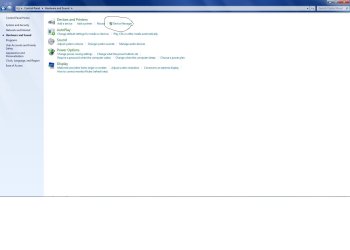
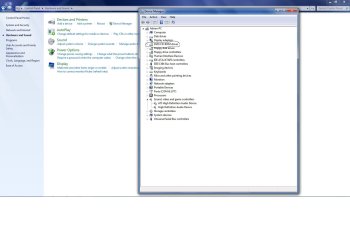
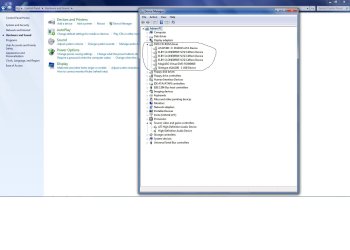
ADT, we now need to see if your DVD drive is recognised in Windows 7
We will need to do the following:
(Screen Shots Attached)
  1. Open device manager.
  2. You will now see all devices that OS 7 sees.
  3. Where I have circled you will see if your OS sees the drive?
If OS-7 does not see the drive then we will need to uninstall, then re-install, if we get no joy from that operation then you drive controller may be bad.
Try this ADT and let us know if this was helpful.
Regards,
Adrian
 

Attachments

  • 1.jpg
    1.jpg
    54.7 KB · Views: 1,204
  • 2.jpg
    2.jpg
    93.2 KB · Views: 1,262
  • 3.jpg
    3.jpg
    104.1 KB · Views: 1,469

My Computer My Computer

At a glance

Windows 7 7600 1 X64AMD PHENOM II X 550 PROCESSOR 3.1 ghzCorsair 4 gig ddr 3ati radeon 3300
Computer Manufacturer/Model Number
Custom Build
OS
Windows 7 7600 1 X64
CPU
AMD PHENOM II X 550 PROCESSOR 3.1 ghz
Motherboard
ASUS M4A78-TE
Memory
Corsair 4 gig ddr 3
Graphics Card(s)
ati radeon 3300
Sound Card
ati hd
Monitor(s) Displays
syncmaster 2033sw
Screen Resolution
1600X900 60 hz refresh
Hard Drives
twin_seagates SATA's 1 TB & 500 Gig, hitachi_slimline 160 gig
PSU
antec_550 watt
Case
cooler master GLite
Cooling
stock_heat sink
Internet Speed
20mbs up/ 1.5mbs down
Other Info
favorite child "stewie"
favorite dog "brian"
In BIOS, change the drive controller setting for the DVD from AHCI to SATA/IDE.

7 is not liking the AHCI
 
  • Like
Reactions: adt
ADT, well done providing feedback on your system. Now we need to get to work getting the drive to be identified.
Your screen shot shows that the bios is using your dvd drive as boot priority 1. So I suggest that windows 7 is not seeing the drive.
I'm interested to know when you cable swapped the Hard drive and the dvd player and re-booted did the OS 7 re-install the dvd drive?
Regards,
Adrian

Nothing came up about an installation, but windows asked me to restart for some reason and I did but nothing changed.

ADT, we now need to see if your DVD drive is recognised in Windows 7
We will need to do the following:
(Screen Shots Attached)
  1. Open device manager.
  2. You will now see all devices that OS 7 sees.
  3. Where I have circled you will see if your OS sees the drive?
If OS-7 does not see the drive then we will need to uninstall, then re-install, if we get no joy from that operation then you drive controller may be bad.
Try this ADT and let us know if this was helpful.
Regards,
Adrian

Thanks for helping me out again Adrian but in device manager the CD/DVD selection is completely gone. :confused:

Untitled-17.jpg


In BIOS, change the drive controller setting for the DVD from AHCI to SATA/IDE.

7 is not liking the AHCI

Thanks for the reply Antman, I read about this on microsoft answers and I tried to switch to SATA or IDE but I can't find the options to do that in BIOS.

CD/DVD drive does not appear in Windows Vista, or you receive this error during Windows Vista setup after booting from the DVD
 

My Computer My Computer

At a glance

Windows 7 Ultimate 64 bitIntel Core 2 Quad CPU Q8300 @ 2.55GHz6 GB DDR2MSI GTX 570 TWIN FROZR III POWER EDITION
Computer Manufacturer/Model Number
Modified Packard Bell M5772
OS
Windows 7 Ultimate 64 bit
CPU
Intel Core 2 Quad CPU Q8300 @ 2.55GHz
Motherboard
Packard Bell EG43M
Memory
6 GB DDR2
Graphics Card(s)
MSI GTX 570 TWIN FROZR III POWER EDITION
Sound Card
XONAR DG
Monitor(s) Displays
Samsung T200HD
Screen Resolution
1680 x 1050
Hard Drives
Western Digital Caviar Green Hard Disk (1 TB)
Western Digital Caviar Green Hard Disk (500GB)
PSU
EzCool Tornado 800w PSU
Case
Packard Bell Case
Cooling
Stock
Keyboard
Microsoft sidewinder x6
Mouse
Microsoft sidewinder x8
Internet Speed
10 mb/s
Other Info
http://support.packardbell.com/uk/item/index.php?pn=PT.U4002.012&g=1400
...Thanks for the reply Antman, I read about this on microsoft answers and I tried to switch to SATA or IDE but I can't find the options to do that in BIOS....
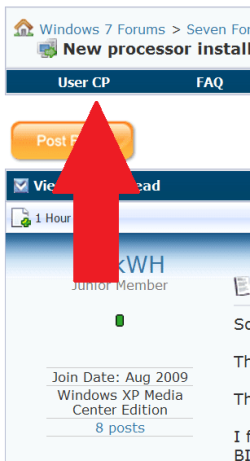
Provide system specs and we will show you where.

.
 

Attachments

  • 0 UserCP1.PNG
    0 UserCP1.PNG
    10.8 KB · Views: 15
  • 0 UserCP2.PNG
    0 UserCP2.PNG
    7.3 KB · Views: 12

My Computer My Computer

At a glance

Windows 7 Ultimate 64 bitIntel Core 2 Quad CPU Q8300 @ 2.55GHz6 GB DDR2MSI GTX 570 TWIN FROZR III POWER EDITION
Computer Manufacturer/Model Number
Modified Packard Bell M5772
OS
Windows 7 Ultimate 64 bit
CPU
Intel Core 2 Quad CPU Q8300 @ 2.55GHz
Motherboard
Packard Bell EG43M
Memory
6 GB DDR2
Graphics Card(s)
MSI GTX 570 TWIN FROZR III POWER EDITION
Sound Card
XONAR DG
Monitor(s) Displays
Samsung T200HD
Screen Resolution
1680 x 1050
Hard Drives
Western Digital Caviar Green Hard Disk (1 TB)
Western Digital Caviar Green Hard Disk (500GB)
PSU
EzCool Tornado 800w PSU
Case
Packard Bell Case
Cooling
Stock
Keyboard
Microsoft sidewinder x6
Mouse
Microsoft sidewinder x8
Internet Speed
10 mb/s
Other Info
http://support.packardbell.com/uk/item/index.php?pn=PT.U4002.012&g=1400
The Packard Bell forum is spam infested. The online docs suk. Reading the forum for clues.
 
The Packard Bell forum is spam infested. The online docs suk. Reading the forum for clues.


Okay thanks, but aren't the details I provided enough?
 

My Computer My Computer

At a glance

Windows 7 Ultimate 64 bitIntel Core 2 Quad CPU Q8300 @ 2.55GHz6 GB DDR2MSI GTX 570 TWIN FROZR III POWER EDITION
Computer Manufacturer/Model Number
Modified Packard Bell M5772
OS
Windows 7 Ultimate 64 bit
CPU
Intel Core 2 Quad CPU Q8300 @ 2.55GHz
Motherboard
Packard Bell EG43M
Memory
6 GB DDR2
Graphics Card(s)
MSI GTX 570 TWIN FROZR III POWER EDITION
Sound Card
XONAR DG
Monitor(s) Displays
Samsung T200HD
Screen Resolution
1680 x 1050
Hard Drives
Western Digital Caviar Green Hard Disk (1 TB)
Western Digital Caviar Green Hard Disk (500GB)
PSU
EzCool Tornado 800w PSU
Case
Packard Bell Case
Cooling
Stock
Keyboard
Microsoft sidewinder x6
Mouse
Microsoft sidewinder x8
Internet Speed
10 mb/s
Other Info
http://support.packardbell.com/uk/item/index.php?pn=PT.U4002.012&g=1400
Cable Swap

ADT, you mentioned in an earlier post that you opened up your PC and cable swapped?
You are familiar with SATA ports and SATA cable connections.
They are a group of four blue ports grouped together on your mother board.
As you know its a very tight fit, so I'm wondering if you accidently disconnected the power plug of the drive? Also your screen shot showed your drive as ACHI instead of SATA, Antman is asking that you reboot and access your bios and view your drive and change the setting to SATA.
So to sum up, check your cable connections, change your bios settings.
regards,
Adrian
 
Last edited:

My Computer My Computer

At a glance

Windows 7 7600 1 X64AMD PHENOM II X 550 PROCESSOR 3.1 ghzCorsair 4 gig ddr 3ati radeon 3300
Computer Manufacturer/Model Number
Custom Build
OS
Windows 7 7600 1 X64
CPU
AMD PHENOM II X 550 PROCESSOR 3.1 ghz
Motherboard
ASUS M4A78-TE
Memory
Corsair 4 gig ddr 3
Graphics Card(s)
ati radeon 3300
Sound Card
ati hd
Monitor(s) Displays
syncmaster 2033sw
Screen Resolution
1600X900 60 hz refresh
Hard Drives
twin_seagates SATA's 1 TB & 500 Gig, hitachi_slimline 160 gig
PSU
antec_550 watt
Case
cooler master GLite
Cooling
stock_heat sink
Internet Speed
20mbs up/ 1.5mbs down
Other Info
favorite child "stewie"
favorite dog "brian"
Mobo stata connections

This is the foxcon MOBO.
SATA ports are circled.
 

Attachments

  • foxconn.jpg
    foxconn.jpg
    140.9 KB · Views: 116

My Computer My Computer

At a glance

Windows 7 7600 1 X64AMD PHENOM II X 550 PROCESSOR 3.1 ghzCorsair 4 gig ddr 3ati radeon 3300
Computer Manufacturer/Model Number
Custom Build
OS
Windows 7 7600 1 X64
CPU
AMD PHENOM II X 550 PROCESSOR 3.1 ghz
Motherboard
ASUS M4A78-TE
Memory
Corsair 4 gig ddr 3
Graphics Card(s)
ati radeon 3300
Sound Card
ati hd
Monitor(s) Displays
syncmaster 2033sw
Screen Resolution
1600X900 60 hz refresh
Hard Drives
twin_seagates SATA's 1 TB & 500 Gig, hitachi_slimline 160 gig
PSU
antec_550 watt
Case
cooler master GLite
Cooling
stock_heat sink
Internet Speed
20mbs up/ 1.5mbs down
Other Info
favorite child "stewie"
favorite dog "brian"
ADT, you mentioned in an earlier post that you opened up your PC and cable swapped?
You are familiar with SATA ports and SATA cable connections.
They are a group of four blue ports grouped together on your mother board.
As you know its a very tight fit, so I'm wondering if you accidently disconnected the power plug of the drive? Also your screen shot showed your drive as ACHI instead of SATA, Antman is asking that you reboot and access your bios and view your drive and change the setting to SATA.
So to sum up, check your cable connections, change your bios settings.
regards,
Adrian

Thanks for replying Adrian, but I have checked the cables and they seem to be fine. As for the BIOS settings I think it's the main solution but the problem is I have the Phoenix BIOS, which doesn't allow me to alter any advanced BIOS options. Is there any way around this, I am sure that this is the solution to my problem.


UPDATE: When I turned on the PC today I have noticed that the DVD driver is back, I could see it in My Computer and in device manager. In device manager the DVD/CD-ROM was there and under it it had "Optiarc DVD RW AD-7200S SCSI CdRom Device".

I restarted and it's gone again :(
 
Last edited:

My Computer My Computer

At a glance

Windows 7 Ultimate 64 bitIntel Core 2 Quad CPU Q8300 @ 2.55GHz6 GB DDR2MSI GTX 570 TWIN FROZR III POWER EDITION
Computer Manufacturer/Model Number
Modified Packard Bell M5772
OS
Windows 7 Ultimate 64 bit
CPU
Intel Core 2 Quad CPU Q8300 @ 2.55GHz
Motherboard
Packard Bell EG43M
Memory
6 GB DDR2
Graphics Card(s)
MSI GTX 570 TWIN FROZR III POWER EDITION
Sound Card
XONAR DG
Monitor(s) Displays
Samsung T200HD
Screen Resolution
1680 x 1050
Hard Drives
Western Digital Caviar Green Hard Disk (1 TB)
Western Digital Caviar Green Hard Disk (500GB)
PSU
EzCool Tornado 800w PSU
Case
Packard Bell Case
Cooling
Stock
Keyboard
Microsoft sidewinder x6
Mouse
Microsoft sidewinder x8
Internet Speed
10 mb/s
Other Info
http://support.packardbell.com/uk/item/index.php?pn=PT.U4002.012&g=1400
Back
Top