HDD to SSD migration questions

vid4763

New member
Member
Local time
5:23 AM
Messages
94
Location
Niagara Falls/ Buffalo, NY
Hello,

Thanks for reading and any advice you can offer.

I have a Samsung NP-QX410 our college son gave us that he had left for dead. After many hours and a lot of frustration, research, self-education, freeware, and help from the experts here at 7Forums we were able to resurrect it (with recovery partition files and Samsung Recovery Data Disk) from a bad HDD and re install Windows 7 Home Premium SP1 onto an older Seagate 120G Sata 5400rpm HDD. Windows 7 is running pretty well and we are hoping to give the laptop to our 10 yr. old son as a gift in June for hard work in school and moving up from Elementary to Middle School.

The Win7 install went pretty smooth. The expected Samsung driver & MOBO issues have been addressed and all drivers and hardware are running correctly, albeit a little on the slow side for us (mainly probably bcz of older Seagate 120G HDD). We ran Windows update for the many hundreds of updates over the past 6 years to get the machine caught up to date. We also updated the BIOS.

We purchased a new Samsung SSD 850 EVO (250G) to replace the older temporary HDD (We did make sure it was compatible with the MOBO). We've been viewing online tutorials and again surfing thru the 7Forums tutorials and threads to make sure we were pretty comfortable with the process when the new SSD arrived.

While we waited for the arrival we learned it was a good idea to "clean up and streamline" the machine before we did the migration of the older Seagate HDD to the new Samsung 850 EVO SSD. Since this was a fairly recent and fresh install a few weeks ago and it has only been used getting it running and updated there wasn't much to do. We ran Disk Cleanup, Defrag, Ccleaner to wipe the free space, and I shrank the Volume.

HERE ARE MY CONCERNS AND QUESTIONS:

The new Samsung SSD comes with migration software. I have an extra enclosure with USB connection for the SSD and installed it for the migration process.

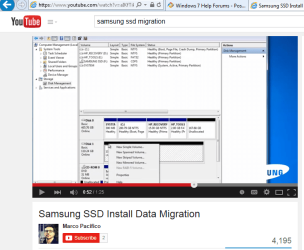
We watched some YouTube videos to understand the process. It looks pretty simple.

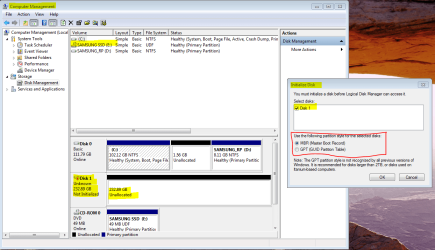
However when I follow the exact instructions I am not getting the same prompt screens. It is mostly what we expected, but after plugging in SSD a prompt screen appears that wants us to "Initialize Disk". The videos we watched don't show this, they instead show after plugging in, opening Disk Management (which we did), and right clicking on the "black header" of the SSD that appears in "DskMng" and a box appears with options such as "SIMPLE VOLUME" which is what they are instructing to do, at that point you should be ready and you can start the Samsung Migration Software in the DVD-rom and you're off and running. When it completes you are supposed to be able to swap the drives and boot right up like it's you old drive (but way faster!)

QUESTIONS:

-Should I initialize the Disk as prompted?? If so, will I be able to then make a "simple Volume" and run the migration software?

-Have I missed some other step?


I've attached 2 screenshots:

1 is what appears on my screen when I plug in the SSD(in enclosure case) with Disk Management in background

2 is the You Tube video screenshot showing what you're supposed to see in Disk Management when you plug the enclosed SSD in

We appreciate any advice! Thanks for reading.....
 

Attachments
  • Disk Manager  initialize disk.PNG
    Disk Manager initialize disk.PNG
    77.5 KB · Views: 0
  • Migration youtube video simple volume.PNG
    Migration youtube video simple volume.PNG
    58.3 KB · Views: 1
Last edited:

My Computer My Computer

Computer type
Laptop
Computer Manufacturer/Model Number
Toshiba Satellite c855-s5214
OS
windows 7 professional 64 bit Version 6.1.7601 Service Pack 1 Build 7601
CPU
Intel(R) Pentium(R) CPU B970 @ 2.30GHz, 2300 Mhz, 2 cores
Motherboard
Toshiba Portable BIOS Insyde Corp Version 1.60 Date 4/20/12
Memory
8Gb
Graphics Card(s)
Intel HD Graphics Driver Vers 9.17.10.3347 Date 10/31/20
Hard Drives
SanDisk Extreme Pro SSD 480 Gb (approx. 381gb free)
Firmware Version X21200RL
Migrated and Installed 4/3/2015
Antivirus
BitDefender AntiVirus Free Edition Version 1.0.21.1099
Browser
Internet Explorer 11 update version 11.0.16
Other Info
Additional Systems:

Samsung NP-QX410 Laptop Windows 7 Home Premium SP1
Samsung 850 EVO 250G 4G ram
Avast! Free 2015

Toshiba A205-S7468 Laptop Windows 7 Ultimate
WD 320G HDD 4G ram
AVG free 2015
I think you are on the right track.

Understand this: the Samsung migration software may or may not work. If it doesn't, you have to go to plan B--cloning or imaging using a third party product such as Macrium or Aomei.

But to continue with Samsung migration software:

You need to "initialize" a disc before you can create a volume on it. I'd assume the Youtube video does not show that step.

I'd proceed as shown in picture 1---initialize as MBR. When that is done, you should be immediately able to make a "new simple volume" as shown in the Youtube pic.

That's just my take. I've never used any Samsung migration software, but a drive cannot be used unless it is initialized, has a partition (volume), and has been formatted.
 

My Computer My Computer

Computer type
PC/Desktop
Computer Manufacturer/Model Number
Ignatz Special; 4 speed manual gearbox; factory air conditioning; one of one
OS
Windows 7 Home Premium SP1, 64-bit
CPU
Intel Skylake i5-6600K, not overclocked
Motherboard
AsRock Z170M Extreme 4, micro ATX
Memory
8 GB HyperX DDR4-2666 (2 x 4 GB)
Graphics Card(s)
none; graphics are integrated on CPU
Sound Card
onboard: Realtek ALC1150; external: USB Behringer UF0-202
Monitor(s) Displays
Dell S2340M 23 inch IPS
Screen Resolution
1600 x 900
Hard Drives
System: Crucial MX100 series SSD, 128 GB;
Data: Samsung Spinpoint 103SJ, 1 TB;
Backup: WD Caviar Green WD30EZRX-00D8PB0, 3 TB
PSU
Rosewill SilentNight 500 watt fanless, semi-modular
Case
Antec Solo II
Cooling
Noctua NH-U12S; Noctua F12 intake, Noctua S12A exhaust
Keyboard
Microsoft 200 6JH-00001 USB
Mouse
Dell or Microsoft optical wired; USB
Antivirus
Microsoft Security Essentials and Malwarebytes Premium
Browser
Pale Moon
Other Info
All fans PWM; speeds at idle: CPU circa 500 rpm; intake circa 600 rpm; exhaust circa 600 rpm; CPU temps 27 idle and 47 C load in a warm room (27 C/81 F) when running Intel Extreme Tuning Utility stress test.
IGNATZATSONIC,

Thanks for the reply and advice. I will try a bit later and post results.
 

My Computer My Computer

Computer type
Laptop
Computer Manufacturer/Model Number
Toshiba Satellite c855-s5214
OS
windows 7 professional 64 bit Version 6.1.7601 Service Pack 1 Build 7601
CPU
Intel(R) Pentium(R) CPU B970 @ 2.30GHz, 2300 Mhz, 2 cores
Motherboard
Toshiba Portable BIOS Insyde Corp Version 1.60 Date 4/20/12
Memory
8Gb
Graphics Card(s)
Intel HD Graphics Driver Vers 9.17.10.3347 Date 10/31/20
Hard Drives
SanDisk Extreme Pro SSD 480 Gb (approx. 381gb free)
Firmware Version X21200RL
Migrated and Installed 4/3/2015
Antivirus
BitDefender AntiVirus Free Edition Version 1.0.21.1099
Browser
Internet Explorer 11 update version 11.0.16
Other Info
Additional Systems:

Samsung NP-QX410 Laptop Windows 7 Home Premium SP1
Samsung 850 EVO 250G 4G ram
Avast! Free 2015

Toshiba A205-S7468 Laptop Windows 7 Ultimate
WD 320G HDD 4G ram
AVG free 2015

My Computer My Computer

Computer type
PC/Desktop
Computer Manufacturer/Model Number
Home made Desktop
OS
Windows 10 Pro. 64/ version 1709 Windows 7 Pro/64
CPU
Intel i7-6800K @ 4.3
Motherboard
ASUS X-99 Deluxe II
Memory
Corsair Platinum 16 gig @2400
Graphics Card(s)
EVGA GTX 1070 OC
Monitor(s) Displays
Asus 27" LED LCD/VE278Q
Screen Resolution
1920-1080 or 1280-720 HDMI
Hard Drives
INTEL SSD 730-240 Gb Sata 3.0/
PSU
EVGA Platium 1200W
Case
Phanteks Luxe Tempered Glass 8 fans/ one radiator
Cooling
XSPC/ Water Cooled CPU
Keyboard
Das 4 Professional
Mouse
Logitech M705/MX Anywhere 2-S
Internet Speed
100 mbits
Antivirus
Microsoft Security Essentials/ Malwarebytes Premium 3.0/ SAS
Browser
I.E. 11 default/Firefox/ ISP Time Warner Cable/Spectrum
Other Info
LG BluRay Burner/
Sound system-KLipsch-THX/
Icy Dock ssd Hot Swap bays.
@IGNATZATSONIC & @Layback Bear,

Thanks for your help! Samsung Migration software was successful! SSD is my primary C:\ drive now and working great and fast!

My complete shutown/restart time went from avg 85 seconds to 35 seconds. everything responding much faster!

If either of you have a moment to look at another thread I posted in another area of the 7forum regarding this machine, I'd be very grateful. It's regarding a problem with permissions....here is the thread. Thanks again!!!!!!

http://www.sevenforums.com/software/365854-permissions-please-help.html
 

My Computer My Computer

Computer type
Laptop
Computer Manufacturer/Model Number
Toshiba Satellite c855-s5214
OS
windows 7 professional 64 bit Version 6.1.7601 Service Pack 1 Build 7601
CPU
Intel(R) Pentium(R) CPU B970 @ 2.30GHz, 2300 Mhz, 2 cores
Motherboard
Toshiba Portable BIOS Insyde Corp Version 1.60 Date 4/20/12
Memory
8Gb
Graphics Card(s)
Intel HD Graphics Driver Vers 9.17.10.3347 Date 10/31/20
Hard Drives
SanDisk Extreme Pro SSD 480 Gb (approx. 381gb free)
Firmware Version X21200RL
Migrated and Installed 4/3/2015
Antivirus
BitDefender AntiVirus Free Edition Version 1.0.21.1099
Browser
Internet Explorer 11 update version 11.0.16
Other Info
Additional Systems:

Samsung NP-QX410 Laptop Windows 7 Home Premium SP1
Samsung 850 EVO 250G 4G ram
Avast! Free 2015

Toshiba A205-S7468 Laptop Windows 7 Ultimate
WD 320G HDD 4G ram
AVG free 2015
It's regarding a problem with permissions....here is the thread. Thanks again!!!!!!

http://www.sevenforums.com/software/365854-permissions-please-help.html

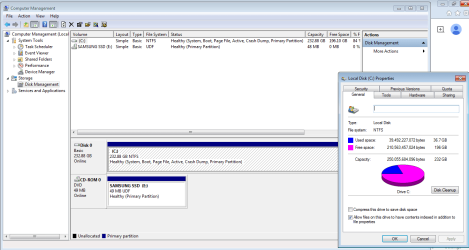
I can't help with your permissions issue, but I'd like to see a screen shot of Windows Disk Management after the Samsung migration software did its thing, as your drives stand right now. A number of people have had problems with it doing odd non-standard stuff that ought to be apparent in Windows Disk Management.
 

My Computer My Computer

Computer type
PC/Desktop
Computer Manufacturer/Model Number
Ignatz Special; 4 speed manual gearbox; factory air conditioning; one of one
OS
Windows 7 Home Premium SP1, 64-bit
CPU
Intel Skylake i5-6600K, not overclocked
Motherboard
AsRock Z170M Extreme 4, micro ATX
Memory
8 GB HyperX DDR4-2666 (2 x 4 GB)
Graphics Card(s)
none; graphics are integrated on CPU
Sound Card
onboard: Realtek ALC1150; external: USB Behringer UF0-202
Monitor(s) Displays
Dell S2340M 23 inch IPS
Screen Resolution
1600 x 900
Hard Drives
System: Crucial MX100 series SSD, 128 GB;
Data: Samsung Spinpoint 103SJ, 1 TB;
Backup: WD Caviar Green WD30EZRX-00D8PB0, 3 TB
PSU
Rosewill SilentNight 500 watt fanless, semi-modular
Case
Antec Solo II
Cooling
Noctua NH-U12S; Noctua F12 intake, Noctua S12A exhaust
Keyboard
Microsoft 200 6JH-00001 USB
Mouse
Dell or Microsoft optical wired; USB
Antivirus
Microsoft Security Essentials and Malwarebytes Premium
Browser
Pale Moon
Other Info
All fans PWM; speeds at idle: CPU circa 500 rpm; intake circa 600 rpm; exhaust circa 600 rpm; CPU temps 27 idle and 47 C load in a warm room (27 C/81 F) when running Intel Extreme Tuning Utility stress test.
A number of people have had problems with it doing odd non-standard stuff that ought to be apparent in Windows Disk Management.

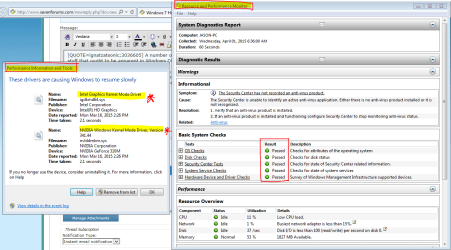
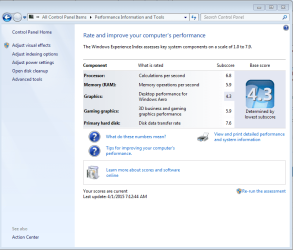
So far I've only noticed one "odd" thing since migration last night, that is when I tried to re-run the Windows Experience assessment (1st time since migration, HDD/SSD switcheroo)....It failed just before completion. Pop up window said a driver issue? Screenshots of Windows Experience, System Health Performance, and Disk Management below.

*update on Windows Experience, while working on this post, I ran Win Exp twice and did not get the error "failed to complete assessment - driver issue". Maybe that is working fine now?*

(NOTE, permissions issue began a week ago. In an effort to ready the laptop for migration, I frequently ran Win Update to get all updates current . After dozens of successful updates, 5 updates failed. While attempting to resolve this recurring issue with the 5 updates, working with NoelDP to fix the issues, permissions with certain folders made themselves known. I worked around some of the issues and managed to fix 2 of the 5 update issues. we're still working on the other 3 updates and now the permissions as well.)
 

Attachments

  • Ignatz Disk Management.PNG
    Ignatz Disk Management.PNG
    34.5 KB · Views: 3
  • Ignatz Health Report.PNG
    Ignatz Health Report.PNG
    50.1 KB · Views: 1
  • Ignatz Windows Experience.PNG
    Ignatz Windows Experience.PNG
    43.7 KB · Views: 0

My Computer My Computer

Computer type
Laptop
Computer Manufacturer/Model Number
Toshiba Satellite c855-s5214
OS
windows 7 professional 64 bit Version 6.1.7601 Service Pack 1 Build 7601
CPU
Intel(R) Pentium(R) CPU B970 @ 2.30GHz, 2300 Mhz, 2 cores
Motherboard
Toshiba Portable BIOS Insyde Corp Version 1.60 Date 4/20/12
Memory
8Gb
Graphics Card(s)
Intel HD Graphics Driver Vers 9.17.10.3347 Date 10/31/20
Hard Drives
SanDisk Extreme Pro SSD 480 Gb (approx. 381gb free)
Firmware Version X21200RL
Migrated and Installed 4/3/2015
Antivirus
BitDefender AntiVirus Free Edition Version 1.0.21.1099
Browser
Internet Explorer 11 update version 11.0.16
Other Info
Additional Systems:

Samsung NP-QX410 Laptop Windows 7 Home Premium SP1
Samsung 850 EVO 250G 4G ram
Avast! Free 2015

Toshiba A205-S7468 Laptop Windows 7 Ultimate
WD 320G HDD 4G ram
AVG free 2015
So far I've only noticed one "odd" thing since migration last night, that is when I tried to re-run the Windows Experience assessment (1st time since migration, HDD/SSD switcheroo)....It failed just before completion. Pop up window said a driver issue? Screenshots of Windows Experience, System Health Performance, and Disk Management below.

Windows Disk Management looks OK to me.
 

My Computer My Computer

Computer type
PC/Desktop
Computer Manufacturer/Model Number
Ignatz Special; 4 speed manual gearbox; factory air conditioning; one of one
OS
Windows 7 Home Premium SP1, 64-bit
CPU
Intel Skylake i5-6600K, not overclocked
Motherboard
AsRock Z170M Extreme 4, micro ATX
Memory
8 GB HyperX DDR4-2666 (2 x 4 GB)
Graphics Card(s)
none; graphics are integrated on CPU
Sound Card
onboard: Realtek ALC1150; external: USB Behringer UF0-202
Monitor(s) Displays
Dell S2340M 23 inch IPS
Screen Resolution
1600 x 900
Hard Drives
System: Crucial MX100 series SSD, 128 GB;
Data: Samsung Spinpoint 103SJ, 1 TB;
Backup: WD Caviar Green WD30EZRX-00D8PB0, 3 TB
PSU
Rosewill SilentNight 500 watt fanless, semi-modular
Case
Antec Solo II
Cooling
Noctua NH-U12S; Noctua F12 intake, Noctua S12A exhaust
Keyboard
Microsoft 200 6JH-00001 USB
Mouse
Dell or Microsoft optical wired; USB
Antivirus
Microsoft Security Essentials and Malwarebytes Premium
Browser
Pale Moon
Other Info
All fans PWM; speeds at idle: CPU circa 500 rpm; intake circa 600 rpm; exhaust circa 600 rpm; CPU temps 27 idle and 47 C load in a warm room (27 C/81 F) when running Intel Extreme Tuning Utility stress test.
@IGNATZATSONIC

Thanks for checking back. It seems to be working fine. Very well in fact, except for the Win Update/Permissions issues which I'll continue to address on the other thread.

If you get a chance later, please look for another thread i'll post regarding HDD to SSD migration of my primary Toshiba C855-S5214 Laptop. I have to run few errands, but briefly.....I also have a new SanDisk Extreme Pro 480G SSD I am trying to replace my orig Toshiba 640G with. Samsung Migration software won't recognize it and I am trying to do the migration with Clonezilla on a bootable USB.....and having some problems doing so....

THANKS A LOT FOR YOUR HELP HERE WITH THE SAMSUNG!!!
 

My Computer My Computer

Computer type
Laptop
Computer Manufacturer/Model Number
Toshiba Satellite c855-s5214
OS
windows 7 professional 64 bit Version 6.1.7601 Service Pack 1 Build 7601
CPU
Intel(R) Pentium(R) CPU B970 @ 2.30GHz, 2300 Mhz, 2 cores
Motherboard
Toshiba Portable BIOS Insyde Corp Version 1.60 Date 4/20/12
Memory
8Gb
Graphics Card(s)
Intel HD Graphics Driver Vers 9.17.10.3347 Date 10/31/20
Hard Drives
SanDisk Extreme Pro SSD 480 Gb (approx. 381gb free)
Firmware Version X21200RL
Migrated and Installed 4/3/2015
Antivirus
BitDefender AntiVirus Free Edition Version 1.0.21.1099
Browser
Internet Explorer 11 update version 11.0.16
Other Info
Additional Systems:

Samsung NP-QX410 Laptop Windows 7 Home Premium SP1
Samsung 850 EVO 250G 4G ram
Avast! Free 2015

Toshiba A205-S7468 Laptop Windows 7 Ultimate
WD 320G HDD 4G ram
AVG free 2015
Back
Top