Hello,
Thanks for reading and any advice you can offer.
I have a Samsung NP-QX410 our college son gave us that he had left for dead. After many hours and a lot of frustration, research, self-education, freeware, and help from the experts here at 7Forums we were able to resurrect it (with recovery partition files and Samsung Recovery Data Disk) from a bad HDD and re install Windows 7 Home Premium SP1 onto an older Seagate 120G Sata 5400rpm HDD. Windows 7 is running pretty well and we are hoping to give the laptop to our 10 yr. old son as a gift in June for hard work in school and moving up from Elementary to Middle School.
The Win7 install went pretty smooth. The expected Samsung driver & MOBO issues have been addressed and all drivers and hardware are running correctly, albeit a little on the slow side for us (mainly probably bcz of older Seagate 120G HDD). We ran Windows update for the many hundreds of updates over the past 6 years to get the machine caught up to date. We also updated the BIOS.
We purchased a new Samsung SSD 850 EVO (250G) to replace the older temporary HDD (We did make sure it was compatible with the MOBO). We've been viewing online tutorials and again surfing thru the 7Forums tutorials and threads to make sure we were pretty comfortable with the process when the new SSD arrived.
While we waited for the arrival we learned it was a good idea to "clean up and streamline" the machine before we did the migration of the older Seagate HDD to the new Samsung 850 EVO SSD. Since this was a fairly recent and fresh install a few weeks ago and it has only been used getting it running and updated there wasn't much to do. We ran Disk Cleanup, Defrag, Ccleaner to wipe the free space, and I shrank the Volume.
HERE ARE MY CONCERNS AND QUESTIONS:
The new Samsung SSD comes with migration software. I have an extra enclosure with USB connection for the SSD and installed it for the migration process.
We watched some YouTube videos to understand the process. It looks pretty simple.
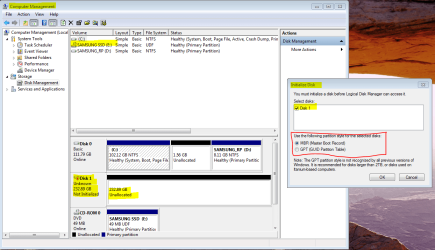
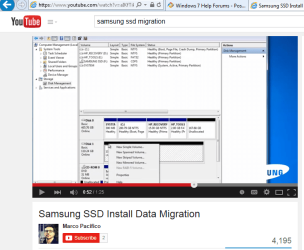
However when I follow the exact instructions I am not getting the same prompt screens. It is mostly what we expected, but after plugging in SSD a prompt screen appears that wants us to "Initialize Disk". The videos we watched don't show this, they instead show after plugging in, opening Disk Management (which we did), and right clicking on the "black header" of the SSD that appears in "DskMng" and a box appears with options such as "SIMPLE VOLUME" which is what they are instructing to do, at that point you should be ready and you can start the Samsung Migration Software in the DVD-rom and you're off and running. When it completes you are supposed to be able to swap the drives and boot right up like it's you old drive (but way faster!)
QUESTIONS:
-Should I initialize the Disk as prompted?? If so, will I be able to then make a "simple Volume" and run the migration software?
-Have I missed some other step?
I've attached 2 screenshots:
1 is what appears on my screen when I plug in the SSD(in enclosure case) with Disk Management in background
2 is the You Tube video screenshot showing what you're supposed to see in Disk Management when you plug the enclosed SSD in
We appreciate any advice! Thanks for reading.....
Thanks for reading and any advice you can offer.
I have a Samsung NP-QX410 our college son gave us that he had left for dead. After many hours and a lot of frustration, research, self-education, freeware, and help from the experts here at 7Forums we were able to resurrect it (with recovery partition files and Samsung Recovery Data Disk) from a bad HDD and re install Windows 7 Home Premium SP1 onto an older Seagate 120G Sata 5400rpm HDD. Windows 7 is running pretty well and we are hoping to give the laptop to our 10 yr. old son as a gift in June for hard work in school and moving up from Elementary to Middle School.
The Win7 install went pretty smooth. The expected Samsung driver & MOBO issues have been addressed and all drivers and hardware are running correctly, albeit a little on the slow side for us (mainly probably bcz of older Seagate 120G HDD). We ran Windows update for the many hundreds of updates over the past 6 years to get the machine caught up to date. We also updated the BIOS.
We purchased a new Samsung SSD 850 EVO (250G) to replace the older temporary HDD (We did make sure it was compatible with the MOBO). We've been viewing online tutorials and again surfing thru the 7Forums tutorials and threads to make sure we were pretty comfortable with the process when the new SSD arrived.
While we waited for the arrival we learned it was a good idea to "clean up and streamline" the machine before we did the migration of the older Seagate HDD to the new Samsung 850 EVO SSD. Since this was a fairly recent and fresh install a few weeks ago and it has only been used getting it running and updated there wasn't much to do. We ran Disk Cleanup, Defrag, Ccleaner to wipe the free space, and I shrank the Volume.
HERE ARE MY CONCERNS AND QUESTIONS:
The new Samsung SSD comes with migration software. I have an extra enclosure with USB connection for the SSD and installed it for the migration process.
We watched some YouTube videos to understand the process. It looks pretty simple.
However when I follow the exact instructions I am not getting the same prompt screens. It is mostly what we expected, but after plugging in SSD a prompt screen appears that wants us to "Initialize Disk". The videos we watched don't show this, they instead show after plugging in, opening Disk Management (which we did), and right clicking on the "black header" of the SSD that appears in "DskMng" and a box appears with options such as "SIMPLE VOLUME" which is what they are instructing to do, at that point you should be ready and you can start the Samsung Migration Software in the DVD-rom and you're off and running. When it completes you are supposed to be able to swap the drives and boot right up like it's you old drive (but way faster!)
QUESTIONS:
-Should I initialize the Disk as prompted?? If so, will I be able to then make a "simple Volume" and run the migration software?
-Have I missed some other step?
I've attached 2 screenshots:
1 is what appears on my screen when I plug in the SSD(in enclosure case) with Disk Management in background
2 is the You Tube video screenshot showing what you're supposed to see in Disk Management when you plug the enclosed SSD in
We appreciate any advice! Thanks for reading.....
Attachments
Last edited:
My Computer
- Computer type
- Laptop
- Computer Manufacturer/Model Number
- Toshiba Satellite c855-s5214
- OS
- windows 7 professional 64 bit Version 6.1.7601 Service Pack 1 Build 7601
- CPU
- Intel(R) Pentium(R) CPU B970 @ 2.30GHz, 2300 Mhz, 2 cores
- Motherboard
- Toshiba Portable BIOS Insyde Corp Version 1.60 Date 4/20/12
- Memory
- 8Gb
- Graphics Card(s)
- Intel HD Graphics Driver Vers 9.17.10.3347 Date 10/31/20
- Hard Drives
- SanDisk Extreme Pro SSD 480 Gb (approx. 381gb free)
Firmware Version X21200RL
Migrated and Installed 4/3/2015
- Antivirus
- BitDefender AntiVirus Free Edition Version 1.0.21.1099
- Browser
- Internet Explorer 11 update version 11.0.16
- Other Info
- Additional Systems:
Samsung NP-QX410 Laptop Windows 7 Home Premium SP1
Samsung 850 EVO 250G 4G ram
Avast! Free 2015
Toshiba A205-S7468 Laptop Windows 7 Ultimate
WD 320G HDD 4G ram
AVG free 2015