Solved Every browser I use crashes

If it was my computer I would run AdwCleaner from Bleeping Computer.

AdwCleaner Download


Tick on the blue box to get it from Bleeping Computer only.
 

My Computer My Computer

Computer type
PC/Desktop
Computer Manufacturer/Model Number
Home made Desktop
OS
Windows 10 Pro. 64/ version 1709 Windows 7 Pro/64
CPU
Intel i7-6800K @ 4.3
Motherboard
ASUS X-99 Deluxe II
Memory
Corsair Platinum 16 gig @2400
Graphics Card(s)
EVGA GTX 1070 OC
Monitor(s) Displays
Asus 27" LED LCD/VE278Q
Screen Resolution
1920-1080 or 1280-720 HDMI
Hard Drives
INTEL SSD 730-240 Gb Sata 3.0/
PSU
EVGA Platium 1200W
Case
Phanteks Luxe Tempered Glass 8 fans/ one radiator
Cooling
XSPC/ Water Cooled CPU
Keyboard
Das 4 Professional
Mouse
Logitech M705/MX Anywhere 2-S
Internet Speed
100 mbits
Antivirus
Microsoft Security Essentials/ Malwarebytes Premium 3.0/ SAS
Browser
I.E. 11 default/Firefox/ ISP Time Warner Cable/Spectrum
Other Info
LG BluRay Burner/
Sound system-KLipsch-THX/
Icy Dock ssd Hot Swap bays.
If it was my computer I would run AdwCleaner from Bleeping Computer.

AdwCleaner Download


Tick on the blue box to get it from Bleeping Computer only.
Hey thanks!

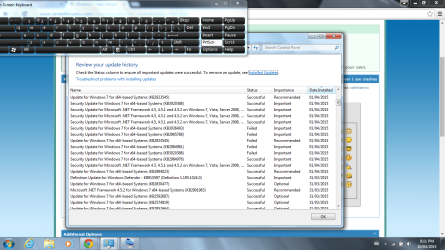
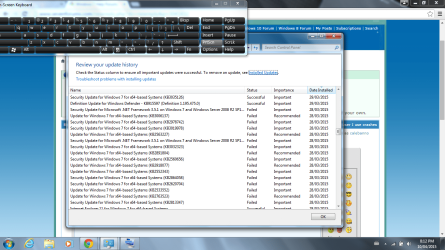
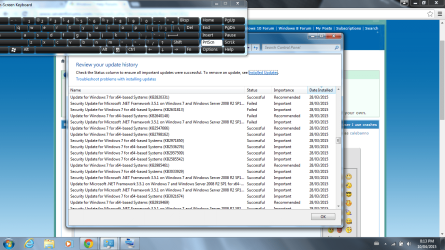
I found a major problem that may be causing the issues I'm having. Windows is failing to update several security updates!
Here's some screen shots for ya'll!!!


[/ATTACH][/ATTACH][/ATTACH]
 

Attachments

  • upate fail 1.png
    upate fail 1.png
    100.5 KB · Views: 2
  • update fail 2.png
    update fail 2.png
    97 KB · Views: 0
  • update fail 3.png
    update fail 3.png
    98.4 KB · Views: 1
Last edited:

My Computer My Computer

Computer type
PC/Desktop
Computer Manufacturer/Model Number
e machines, eME443
OS
64 bit ,windows 7 home premium
Memory
2.00 gb
Antivirus
windows defender
Browser
google chrome, internet explorer
If it was my computer I would run AdwCleaner from Bleeping Computer.

AdwCleaner Download


Tick on the blue box to get it from Bleeping Computer only.
Hey thanks!

I found a major problem that may be causing the issues I'm having. Windows is failing to update several security updates!
Here's some screen shots for ya'll!!!


[/ATTACH][/ATTACH][/ATTACH]
sorry for the on board keyboard. Mine's fried and i dont have a usb/wireless one yet. broke a**:o
 
Last edited:

My Computer My Computer

Computer type
PC/Desktop
Computer Manufacturer/Model Number
e machines, eME443
OS
64 bit ,windows 7 home premium
Memory
2.00 gb
Antivirus
windows defender
Browser
google chrome, internet explorer

My Computer My Computer

Computer type
PC/Desktop
Computer Manufacturer/Model Number
e machines, eME443
OS
64 bit ,windows 7 home premium
Memory
2.00 gb
Antivirus
windows defender
Browser
google chrome, internet explorer
[/ATTACH][/ATTACH][/ATTACH][/ATTACH]
Look forward to the screen shots :)
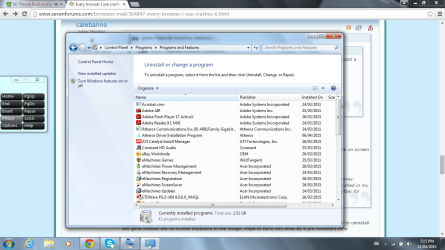
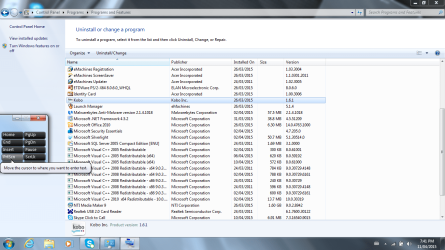
Here they are!:)
sorry I didn't get them on time. I wasn't feeling good.:sick: The last 2 screen shots were after uninstalling. * java and games app wasn't on there.
 

Attachments

  • uninstall1.png
    uninstall1.png
    114.3 KB · Views: 1
  • uninstall2.png
    uninstall2.png
    114.3 KB · Views: 1
  • uninstall3.png
    uninstall3.png
    116.6 KB · Views: 1
  • pic.png
    pic.png
    90.1 KB · Views: 1

My Computer My Computer

Computer type
PC/Desktop
Computer Manufacturer/Model Number
e machines, eME443
OS
64 bit ,windows 7 home premium
Memory
2.00 gb
Antivirus
windows defender
Browser
google chrome, internet explorer
[/ATTACH][/ATTACH][/ATTACH][/ATTACH]
Look forward to the screen shots :)
Here they are!:)
Sorry I didn't get them on time. I wasn't feeling good.:sick: The last 2 screen shots were after uninstalling.
* Java and games app wasn't on there.
Sorry for the on board keyboard don't have a real one. The lap top one's fried!:party::party::party:
 
Last edited:

My Computer My Computer

Computer type
PC/Desktop
Computer Manufacturer/Model Number
e machines, eME443
OS
64 bit ,windows 7 home premium
Memory
2.00 gb
Antivirus
windows defender
Browser
google chrome, internet explorer
If your having aWindows 7 Update problem; I will see if I can find someone to help with Updates.
 

My Computer My Computer

Computer type
PC/Desktop
Computer Manufacturer/Model Number
Home made Desktop
OS
Windows 10 Pro. 64/ version 1709 Windows 7 Pro/64
CPU
Intel i7-6800K @ 4.3
Motherboard
ASUS X-99 Deluxe II
Memory
Corsair Platinum 16 gig @2400
Graphics Card(s)
EVGA GTX 1070 OC
Monitor(s) Displays
Asus 27" LED LCD/VE278Q
Screen Resolution
1920-1080 or 1280-720 HDMI
Hard Drives
INTEL SSD 730-240 Gb Sata 3.0/
PSU
EVGA Platium 1200W
Case
Phanteks Luxe Tempered Glass 8 fans/ one radiator
Cooling
XSPC/ Water Cooled CPU
Keyboard
Das 4 Professional
Mouse
Logitech M705/MX Anywhere 2-S
Internet Speed
100 mbits
Antivirus
Microsoft Security Essentials/ Malwarebytes Premium 3.0/ SAS
Browser
I.E. 11 default/Firefox/ ISP Time Warner Cable/Spectrum
Other Info
LG BluRay Burner/
Sound system-KLipsch-THX/
Icy Dock ssd Hot Swap bays.
My Computer My Computer

Computer type
PC/Desktop
Computer Manufacturer/Model Number
e machines, eME443
OS
64 bit ,windows 7 home premium
Memory
2.00 gb
Antivirus
windows defender
Browser
google chrome, internet explorer
Please follow the Windows Update Posting Instructions and post the requested data

If the file is too large (8MB compressed), remove the older CBSPersist cab files until the final file is below the limit - you can always post them separately after zipping them. (the forum doesn't allow the upload of bare CAB files, for a number of reasons)

Please also post the C:\Windows\windowsudpate.log file
 

My Computer My Computer

Computer type
Laptop
Computer Manufacturer/Model Number
Asus K52F or Lenovo B51-80
OS
Win 7 x64 Home Premium (and x86 VirtualBox VM)/Win10
CPU
i3 370M/i7 6500U
Motherboard
Asus/Lenovo
Memory
8GB - finally :)/8GB
Graphics Card(s)
it's an i3, dude!/dual Intel&nVidia
Sound Card
onboard
Monitor(s) Displays
15.6" built-in
Screen Resolution
1366x768/1920x1080
Hard Drives
750GB Seagate internal
Sundry external drives attached to other computers on the local network
1TB SSD on the Lenovo
PSU
n/a
Internet Speed
as much as I can get - usually on a dongle/phone, so <1MB/s
Antivirus
MSE/Defender
Browser
IE11/12/Edge/Chrome/FF(if I must)
Thank you Noel for coming to help.
 

My Computer My Computer

Computer type
PC/Desktop
Computer Manufacturer/Model Number
Home made Desktop
OS
Windows 10 Pro. 64/ version 1709 Windows 7 Pro/64
CPU
Intel i7-6800K @ 4.3
Motherboard
ASUS X-99 Deluxe II
Memory
Corsair Platinum 16 gig @2400
Graphics Card(s)
EVGA GTX 1070 OC
Monitor(s) Displays
Asus 27" LED LCD/VE278Q
Screen Resolution
1920-1080 or 1280-720 HDMI
Hard Drives
INTEL SSD 730-240 Gb Sata 3.0/
PSU
EVGA Platium 1200W
Case
Phanteks Luxe Tempered Glass 8 fans/ one radiator
Cooling
XSPC/ Water Cooled CPU
Keyboard
Das 4 Professional
Mouse
Logitech M705/MX Anywhere 2-S
Internet Speed
100 mbits
Antivirus
Microsoft Security Essentials/ Malwarebytes Premium 3.0/ SAS
Browser
I.E. 11 default/Firefox/ ISP Time Warner Cable/Spectrum
Other Info
LG BluRay Burner/
Sound system-KLipsch-THX/
Icy Dock ssd Hot Swap bays.
Please follow the Windows Update Posting Instructions and post the requested data

If the file is too large (8MB compressed), remove the older CBSPersist cab files until the final file is below the limit - you can always post them separately after zipping them. (the forum doesn't allow the upload of bare CAB files, for a number of reasons)

Please also post the C:\Windows\windowsudpate.log file
Hey there!
I downloaded the hot fix update and did sfc scan with no integrity violations.
But Im stummped!
Do I just take screen shots of every error code from update history and post them? I read the tutorial. But, it's sort of confusing.
Also, I do not know what cab files are. I do not know how to zip cab files. And, I do not know how to remove cab files either.
Thanks!
 

My Computer My Computer

Computer type
PC/Desktop
Computer Manufacturer/Model Number
e machines, eME443
OS
64 bit ,windows 7 home premium
Memory
2.00 gb
Antivirus
windows defender
Browser
google chrome, internet explorer
If you follow the instructions in the tutorial, I think they go through everything you need to know
As far as zipping CAB files is concerned, just right-click on it the same as any other file, and select 'Send to... > Compressed file'

Once you have the fully-compressed copy of the CBS folder on your desktop (the zip file) double-click on it to open it in Windows Explorer You can then delete the older files inside, until the entire zip file shows as being less than 8MB.
 

My Computer My Computer

Computer type
Laptop
Computer Manufacturer/Model Number
Asus K52F or Lenovo B51-80
OS
Win 7 x64 Home Premium (and x86 VirtualBox VM)/Win10
CPU
i3 370M/i7 6500U
Motherboard
Asus/Lenovo
Memory
8GB - finally :)/8GB
Graphics Card(s)
it's an i3, dude!/dual Intel&nVidia
Sound Card
onboard
Monitor(s) Displays
15.6" built-in
Screen Resolution
1366x768/1920x1080
Hard Drives
750GB Seagate internal
Sundry external drives attached to other computers on the local network
1TB SSD on the Lenovo
PSU
n/a
Internet Speed
as much as I can get - usually on a dongle/phone, so <1MB/s
Antivirus
MSE/Defender
Browser
IE11/12/Edge/Chrome/FF(if I must)
If you follow the instructions in the tutorial, I think they go through everything you need to know
As far as zipping CAB files is concerned, just right-click on it the same as any other file, and select 'Send to... > Compressed file'

Once you have the fully-compressed copy of the CBS folder on your desktop (the zip file) double-click on it to open it in Windows Explorer You can then delete the older files inside, until the entire zip file shows as being less than 8MB.

K thanks.
How do I find C:\Windows\Logs in step 4?
It reads in the tutorial on step 4-1 to navigate to the following folder:
C:\Windows\Logs.
But, it doesn't say how to find it. How am I supposed to navigate to it, if I don't know how to get to it?
 

My Computer My Computer

Computer type
PC/Desktop
Computer Manufacturer/Model Number
e machines, eME443
OS
64 bit ,windows 7 home premium
Memory
2.00 gb
Antivirus
windows defender
Browser
google chrome, internet explorer
Hi,
Click the Start button and click on your user name listed near the top,
Then just expand Computer section on the left column,
View attachment 355968
 
Last edited:

My Computer My Computer

Computer type
PC/Desktop
Computer Manufacturer/Model Number
Custom assembled by me :}
OS
Win-7-Pro64bit 7-H-Prem-64bit
CPU
i7-5930K 2nd i9-9940x both water blocked VRM's too
Motherboard
ASUS SABERTOOTH X99 2nd ASUS x299 Apex
Memory
Trident-z 3200C14 2nd Trident-z 3600C16
Graphics Card(s)
EVGA 1080ti ftw3 2nd Titan Xp both water blocked
Sound Card
Built-in Realtek
Monitor(s) Displays
1-AOC G2460PG 24"G-Sync 144Hz/ 2nd 1-ASUS VG248QE 24" 144Hz
Screen Resolution
1920 x 1080 144Hz
Hard Drives
2-Samsung M.2 Evo & Evo Plus
2-Samsung 850 EVO 500GB SSD's/ 3-2.5 W.D. Black 1tb-&3-1tb/3-3.5 WD Black 1tb hdd's
PSU
EVGA SuperNOVA 1000-P2 2nd 1200-P2
Case
2-Corsair Obsidian Series 450D Black ATX Mid Tower
Cooling
Custom water loops
Keyboard
Logitech G710+/ 2nd Logitech G910
Mouse
2-RedDragon M901 Perdition 16400 dpi Gaming mouse = wired
Internet Speed
Comcast Ping 19ms 89.31mbps download speed 6.12mbps upload
Antivirus
Malwarebytes Pro/ Superantispyware Pro
Browser
FireFox & Pale moon
Other Info
2nd ASUS X299 Apex/Intel i9-9940x with Custom water loop/7H-Prem-x64/Corsair 450D case/Ram Trident-z 3600C16 4x8gb / Samsung970Evo plus 500gb SSD/Dual ssd EZ swap evo/PSU EVGA SuperNova 1200w-P2 80+Platinum/GPU Titan Xp /8-ML-140 on push-pull on 2-280GTX rads
Open Windows Explorer (Computer)
double-click on the C:\ drive icon
the navigate down the branch to the Windows folder and double-click on that
Then find the Logs folder and double-click on that.
 

My Computer My Computer

Computer type
Laptop
Computer Manufacturer/Model Number
Asus K52F or Lenovo B51-80
OS
Win 7 x64 Home Premium (and x86 VirtualBox VM)/Win10
CPU
i3 370M/i7 6500U
Motherboard
Asus/Lenovo
Memory
8GB - finally :)/8GB
Graphics Card(s)
it's an i3, dude!/dual Intel&nVidia
Sound Card
onboard
Monitor(s) Displays
15.6" built-in
Screen Resolution
1366x768/1920x1080
Hard Drives
750GB Seagate internal
Sundry external drives attached to other computers on the local network
1TB SSD on the Lenovo
PSU
n/a
Internet Speed
as much as I can get - usually on a dongle/phone, so <1MB/s
Antivirus
MSE/Defender
Browser
IE11/12/Edge/Chrome/FF(if I must)
Last edited:

My Computer My Computer

Computer type
PC/Desktop
Computer Manufacturer/Model Number
e machines, eME443
OS
64 bit ,windows 7 home premium
Memory
2.00 gb
Antivirus
windows defender
Browser
google chrome, internet explorer
Open Windows Explorer (Computer)
double-click on the C:\ drive icon
the navigate down the branch to the Windows folder and double-click on that
Then find the Logs folder and double-click on that.
I have the zipped CBS file icon on my desktop. But I'm really confused about the deleting older files to 8 mb part. Would you please tell me which older files I need to delete to make a 8 mb, zipped CBS file? And is there a certian way I need to delete them?:banghead::banghead::mad::grouphug::focus:
Thank you
 
Last edited:

My Computer My Computer

Computer type
PC/Desktop
Computer Manufacturer/Model Number
e machines, eME443
OS
64 bit ,windows 7 home premium
Memory
2.00 gb
Antivirus
windows defender
Browser
google chrome, internet explorer
Every CBSPersist file has a timestamp - simply look for the oldest one, highlight it, and hit the Del key (and confirm on request).
Then check the overall size of the folder.
 

My Computer My Computer

Computer type
Laptop
Computer Manufacturer/Model Number
Asus K52F or Lenovo B51-80
OS
Win 7 x64 Home Premium (and x86 VirtualBox VM)/Win10
CPU
i3 370M/i7 6500U
Motherboard
Asus/Lenovo
Memory
8GB - finally :)/8GB
Graphics Card(s)
it's an i3, dude!/dual Intel&nVidia
Sound Card
onboard
Monitor(s) Displays
15.6" built-in
Screen Resolution
1366x768/1920x1080
Hard Drives
750GB Seagate internal
Sundry external drives attached to other computers on the local network
1TB SSD on the Lenovo
PSU
n/a
Internet Speed
as much as I can get - usually on a dongle/phone, so <1MB/s
Antivirus
MSE/Defender
Browser
IE11/12/Edge/Chrome/FF(if I must)
Every CBSPersist file has a timestamp - simply look for the oldest one, highlight it, and hit the Del key (and confirm on request).
Then check the overall size of the folder.
Thanks NoelDP! I'll try it and let you know.
 

My Computer My Computer

Computer type
PC/Desktop
Computer Manufacturer/Model Number
e machines, eME443
OS
64 bit ,windows 7 home premium
Memory
2.00 gb
Antivirus
windows defender
Browser
google chrome, internet explorer
After you post the zip folder here,
Please tell us more about how your keyboard got "fried" as you stated earlier, = Spill ......?
But please finish the task Noel needs first :)
 

My Computer My Computer

Computer type
PC/Desktop
Computer Manufacturer/Model Number
Custom assembled by me :}
OS
Win-7-Pro64bit 7-H-Prem-64bit
CPU
i7-5930K 2nd i9-9940x both water blocked VRM's too
Motherboard
ASUS SABERTOOTH X99 2nd ASUS x299 Apex
Memory
Trident-z 3200C14 2nd Trident-z 3600C16
Graphics Card(s)
EVGA 1080ti ftw3 2nd Titan Xp both water blocked
Sound Card
Built-in Realtek
Monitor(s) Displays
1-AOC G2460PG 24"G-Sync 144Hz/ 2nd 1-ASUS VG248QE 24" 144Hz
Screen Resolution
1920 x 1080 144Hz
Hard Drives
2-Samsung M.2 Evo & Evo Plus
2-Samsung 850 EVO 500GB SSD's/ 3-2.5 W.D. Black 1tb-&3-1tb/3-3.5 WD Black 1tb hdd's
PSU
EVGA SuperNOVA 1000-P2 2nd 1200-P2
Case
2-Corsair Obsidian Series 450D Black ATX Mid Tower
Cooling
Custom water loops
Keyboard
Logitech G710+/ 2nd Logitech G910
Mouse
2-RedDragon M901 Perdition 16400 dpi Gaming mouse = wired
Internet Speed
Comcast Ping 19ms 89.31mbps download speed 6.12mbps upload
Antivirus
Malwarebytes Pro/ Superantispyware Pro
Browser
FireFox & Pale moon
Other Info
2nd ASUS X299 Apex/Intel i9-9940x with Custom water loop/7H-Prem-x64/Corsair 450D case/Ram Trident-z 3600C16 4x8gb / Samsung970Evo plus 500gb SSD/Dual ssd EZ swap evo/PSU EVGA SuperNova 1200w-P2 80+Platinum/GPU Titan Xp /8-ML-140 on push-pull on 2-280GTX rads
Back
Top