Solved Every browser I use crashes

calebanno

New member
Local time
9:56 PM
Messages
44
Hi
Every time I start web surfing on any available browser including explorer, chrome or fire fox they randomly crash!:mad:I've tried everything from reformatting to virus scans and come up with nothing. I dont know much about computers so any help would be great!specs.png
 
Last edited:

My Computer

Computer type
PC/Desktop
Computer Manufacturer/Model Number
e machines, eME443
OS
64 bit ,windows 7 home premium
Memory
2.00 gb
Antivirus
windows defender
Browser
google chrome, internet explorer
My Computer

Computer type
PC/Desktop
Computer Manufacturer/Model Number
n/a
OS
W7 Ultimate SP1, LM19.2 MATE, W10 Home 1703, W10 Pro 1703 VM, #All 64 bit
CPU
AMD Phenom II x6 1100T, 3.3 GHz
Motherboard
ASUS M4A88T-M/USB3 (AM3)
Memory
12GB DDR3 1333 G-Skill (4GB x 2), G-Skill (2GB x 2)
Graphics Card(s)
NVIDIA GeForce GTX 660
Sound Card
Realtek?
Monitor(s) Displays
Samsung S23B350
Screen Resolution
1920x1080
Hard Drives
WD Green 2TB (SATA), WD Green 3TB (SATA), WD Blue 4TB (SATA), WD Blue 6TB (SATA)
PSU
Cooler Master
Case
Antec GX300 Tower
Cooling
3x Antec TRICOOL 120mm Fans
Mouse
Wired Optical
Internet Speed
DSL
Antivirus
Avast
Browser
Pale Moon (64 bit)
Other Info
2018-12-27 Upgraded HDDs
2015-12-10 Upgraded case, graphics card, storage
2015-08-15 Upgraded motherboard & RAM
2015-07-15 Upgraded LM17.1 to LM17.2
Just a thought.
What do you mean by crash?

Windows 7 64 bit installed on a computer with only 2 gigs of ram will be hard pressed to do much of anything.

My system with just my security programs and this forum is using 1.7 gig of ram.
 

My Computer

Computer type
PC/Desktop
Computer Manufacturer/Model Number
Home made Desktop
OS
Windows 10 Pro. 64/ version 1709 Windows 7 Pro/64
CPU
Intel i7-6800K @ 4.3
Motherboard
ASUS X-99 Deluxe II
Memory
Corsair Platinum 16 gig @2400
Graphics Card(s)
EVGA GTX 1070 OC
Monitor(s) Displays
Asus 27" LED LCD/VE278Q
Screen Resolution
1920-1080 or 1280-720 HDMI
Hard Drives
INTEL SSD 730-240 Gb Sata 3.0/
PSU
EVGA Platium 1200W
Case
Phanteks Luxe Tempered Glass 8 fans/ one radiator
Cooling
XSPC/ Water Cooled CPU
Keyboard
Das 4 Professional
Mouse
Logitech M705/MX Anywhere 2-S
Internet Speed
100 mbits
Antivirus
Microsoft Security Essentials/ Malwarebytes Premium 3.0/ SAS
Browser
I.E. 11 default/Firefox/ ISP Time Warner Cable/Spectrum
Other Info
LG BluRay Burner/
Sound system-KLipsch-THX/
Icy Dock ssd Hot Swap bays.
Hi and welcome to SevenForums,
Use Clean boot,
http://www.sevenforums.com/tutorials/179159-troubleshoot-application-conflicts-performing-clean-startup.html
Click Start and type in the search box,
msconfig
Click on the suggestion on top or hit the Enter key,
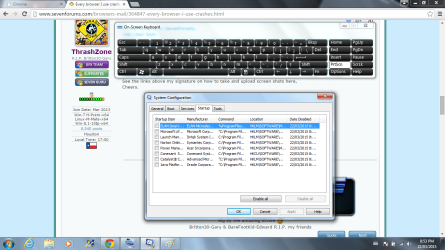
Go to the Startup section and take some screen shots for a complete list,
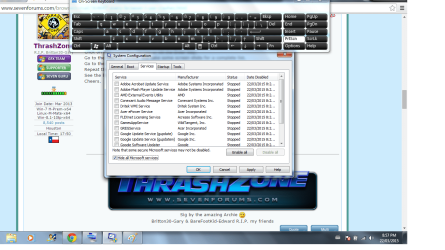
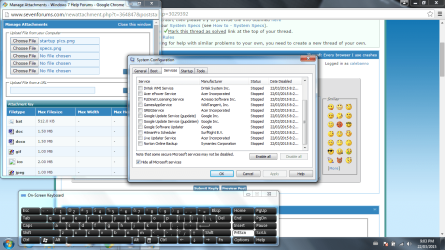
Go to the Services section and on the bottom left Check the box to Hide All Microsoft services,
Repeat the screen shots,
See the links above my signature on how to take and upload screen shots here,
Cheers.
 

My Computer

Computer type
PC/Desktop
Computer Manufacturer/Model Number
Custom assembled by me :}
OS
Win-7-Pro64bit 7-H-Prem-64bit
CPU
i7-5930K 2nd i9-9940x both water blocked VRM's too
Motherboard
ASUS SABERTOOTH X99 2nd ASUS x299 Apex
Memory
Trident-z 3200C14 2nd Trident-z 3600C16
Graphics Card(s)
EVGA 1080ti ftw3 2nd Titan Xp both water blocked
Sound Card
Built-in Realtek
Monitor(s) Displays
1-AOC G2460PG 24"G-Sync 144Hz/ 2nd 1-ASUS VG248QE 24" 144Hz
Screen Resolution
1920 x 1080 144Hz
Hard Drives
2-Samsung M.2 Evo & Evo Plus
2-Samsung 850 EVO 500GB SSD's/ 3-2.5 W.D. Black 1tb-&3-1tb/3-3.5 WD Black 1tb hdd's
PSU
EVGA SuperNOVA 1000-P2 2nd 1200-P2
Case
2-Corsair Obsidian Series 450D Black ATX Mid Tower
Cooling
Custom water loops
Keyboard
Logitech G710+/ 2nd Logitech G910
Mouse
2-RedDragon M901 Perdition 16400 dpi Gaming mouse = wired
Internet Speed
Comcast Ping 19ms 89.31mbps download speed 6.12mbps upload
Antivirus
Malwarebytes Pro/ Superantispyware Pro
Browser
FireFox & Pale moon
Other Info
2nd ASUS X299 Apex/Intel i9-9940x with Custom water loop/7H-Prem-x64/Corsair 450D case/Ram Trident-z 3600C16 4x8gb / Samsung970Evo plus 500gb SSD/Dual ssd EZ swap evo/PSU EVGA SuperNova 1200w-P2 80+Platinum/GPU Titan Xp /8-ML-140 on push-pull on 2-280GTX rads

My Computer

Computer type
PC/Desktop
Computer Manufacturer/Model Number
e machines, eME443
OS
64 bit ,windows 7 home premium
Memory
2.00 gb
Antivirus
windows defender
Browser
google chrome, internet explorer
My Computer

Computer type
PC/Desktop
Computer Manufacturer/Model Number
e machines, eME443
OS
64 bit ,windows 7 home premium
Memory
2.00 gb
Antivirus
windows defender
Browser
google chrome, internet explorer
Do the browsers:

  • Display any messages?
  • Just lock up?
  • Start and then vanish?
 

My Computer

Computer type
PC/Desktop
Computer Manufacturer/Model Number
n/a
OS
W7 Ultimate SP1, LM19.2 MATE, W10 Home 1703, W10 Pro 1703 VM, #All 64 bit
CPU
AMD Phenom II x6 1100T, 3.3 GHz
Motherboard
ASUS M4A88T-M/USB3 (AM3)
Memory
12GB DDR3 1333 G-Skill (4GB x 2), G-Skill (2GB x 2)
Graphics Card(s)
NVIDIA GeForce GTX 660
Sound Card
Realtek?
Monitor(s) Displays
Samsung S23B350
Screen Resolution
1920x1080
Hard Drives
WD Green 2TB (SATA), WD Green 3TB (SATA), WD Blue 4TB (SATA), WD Blue 6TB (SATA)
PSU
Cooler Master
Case
Antec GX300 Tower
Cooling
3x Antec TRICOOL 120mm Fans
Mouse
Wired Optical
Internet Speed
DSL
Antivirus
Avast
Browser
Pale Moon (64 bit)
Other Info
2018-12-27 Upgraded HDDs
2015-12-10 Upgraded case, graphics card, storage
2015-08-15 Upgraded motherboard & RAM
2015-07-15 Upgraded LM17.1 to LM17.2
On google chrome, it will freeze up and stay that way or it will say shockwave plugin has stopped working. Internet explorer does the same thing but just says such and such web page has stopped working then it will ask if I want to recover the page. When I reload the page on any browser they usually start cutting out again in the first few minutes. Sometimes I will even see my internet signal disconnect and reconnect when the web pages freeze or crash as well. For example: If you click a button on a page you're on, the button you click will take you to whatever its supposed to take you to. But, when I do the same thing, the page just keeps loading and loading forever or says shockwave stopped working, or page stopped working or responding.:mad:
 
Last edited:

My Computer

Computer type
PC/Desktop
Computer Manufacturer/Model Number
e machines, eME443
OS
64 bit ,windows 7 home premium
Memory
2.00 gb
Antivirus
windows defender
Browser
google chrome, internet explorer
How did clean boot work out ?
 

My Computer

Computer type
PC/Desktop
Computer Manufacturer/Model Number
Custom assembled by me :}
OS
Win-7-Pro64bit 7-H-Prem-64bit
CPU
i7-5930K 2nd i9-9940x both water blocked VRM's too
Motherboard
ASUS SABERTOOTH X99 2nd ASUS x299 Apex
Memory
Trident-z 3200C14 2nd Trident-z 3600C16
Graphics Card(s)
EVGA 1080ti ftw3 2nd Titan Xp both water blocked
Sound Card
Built-in Realtek
Monitor(s) Displays
1-AOC G2460PG 24"G-Sync 144Hz/ 2nd 1-ASUS VG248QE 24" 144Hz
Screen Resolution
1920 x 1080 144Hz
Hard Drives
2-Samsung M.2 Evo & Evo Plus
2-Samsung 850 EVO 500GB SSD's/ 3-2.5 W.D. Black 1tb-&3-1tb/3-3.5 WD Black 1tb hdd's
PSU
EVGA SuperNOVA 1000-P2 2nd 1200-P2
Case
2-Corsair Obsidian Series 450D Black ATX Mid Tower
Cooling
Custom water loops
Keyboard
Logitech G710+/ 2nd Logitech G910
Mouse
2-RedDragon M901 Perdition 16400 dpi Gaming mouse = wired
Internet Speed
Comcast Ping 19ms 89.31mbps download speed 6.12mbps upload
Antivirus
Malwarebytes Pro/ Superantispyware Pro
Browser
FireFox & Pale moon
Other Info
2nd ASUS X299 Apex/Intel i9-9940x with Custom water loop/7H-Prem-x64/Corsair 450D case/Ram Trident-z 3600C16 4x8gb / Samsung970Evo plus 500gb SSD/Dual ssd EZ swap evo/PSU EVGA SuperNova 1200w-P2 80+Platinum/GPU Titan Xp /8-ML-140 on push-pull on 2-280GTX rads
Last edited:

My Computer

Computer type
PC/Desktop
Computer Manufacturer/Model Number
e machines, eME443
OS
64 bit ,windows 7 home premium
Memory
2.00 gb
Antivirus
windows defender
Browser
google chrome, internet explorer
Good,
Also post add-ons pages Toolbars and extensions in ie make sure on the bottom left column it says Show All add-ons before you take the screen shots.
See what this does,
Use No Add-ons mode/
 

My Computer

Computer type
PC/Desktop
Computer Manufacturer/Model Number
Custom assembled by me :}
OS
Win-7-Pro64bit 7-H-Prem-64bit
CPU
i7-5930K 2nd i9-9940x both water blocked VRM's too
Motherboard
ASUS SABERTOOTH X99 2nd ASUS x299 Apex
Memory
Trident-z 3200C14 2nd Trident-z 3600C16
Graphics Card(s)
EVGA 1080ti ftw3 2nd Titan Xp both water blocked
Sound Card
Built-in Realtek
Monitor(s) Displays
1-AOC G2460PG 24"G-Sync 144Hz/ 2nd 1-ASUS VG248QE 24" 144Hz
Screen Resolution
1920 x 1080 144Hz
Hard Drives
2-Samsung M.2 Evo & Evo Plus
2-Samsung 850 EVO 500GB SSD's/ 3-2.5 W.D. Black 1tb-&3-1tb/3-3.5 WD Black 1tb hdd's
PSU
EVGA SuperNOVA 1000-P2 2nd 1200-P2
Case
2-Corsair Obsidian Series 450D Black ATX Mid Tower
Cooling
Custom water loops
Keyboard
Logitech G710+/ 2nd Logitech G910
Mouse
2-RedDragon M901 Perdition 16400 dpi Gaming mouse = wired
Internet Speed
Comcast Ping 19ms 89.31mbps download speed 6.12mbps upload
Antivirus
Malwarebytes Pro/ Superantispyware Pro
Browser
FireFox & Pale moon
Other Info
2nd ASUS X299 Apex/Intel i9-9940x with Custom water loop/7H-Prem-x64/Corsair 450D case/Ram Trident-z 3600C16 4x8gb / Samsung970Evo plus 500gb SSD/Dual ssd EZ swap evo/PSU EVGA SuperNova 1200w-P2 80+Platinum/GPU Titan Xp /8-ML-140 on push-pull on 2-280GTX rads
Just a thought.
What do you mean by crash?

Windows 7 64 bit installed on a computer with only 2 gigs of ram will be hard pressed to do much of anything.

My system with just my security programs and this forum is using 1.7 gig of ram.
View attachment 353437
This might help.
 

My Computer

Computer type
PC/Desktop
Computer Manufacturer/Model Number
e machines, eME443
OS
64 bit ,windows 7 home premium
Memory
2.00 gb
Antivirus
windows defender
Browser
google chrome, internet explorer
Google Chrome: Has it's own verion of flash player built in. IE uses a differnet version of flash player. If you've got other browsers like Firefox installed they use yet another version of flash player.

Suggest:

Check that all old versions of Chrome have been removed then reboot:

https://www.raymond.cc/blog/remove-outdated-google-chrome-files/

Run the flash player removal tool and delete everything mentioned then reboot:

https://helpx.adobe.com/flash-player/kb/uninstall-flash-player-windows.html

   Note

Delete

C:\Windows\system32\Macromed\Flash
C:\Windows\SysWOW64\Macromed\Flash
%appdata%\Adobe\Flash Player
%appdata%\Macromedia\Flash Player


After reboot test your browsers. If there's no crash download the required versions of flash player from

Adobe Flash Player Distribution | Adobe

and install one at a time.
 
Last edited:

My Computer

Computer type
Laptop
Computer Manufacturer/Model Number
ASUS
OS
Microsoft Windows 7 Home Premium 64-bit 7601 Multiprocessor Free Service Pack 1
CPU
AMD C-60 APU with Radeon(tm) HD Graphics
Motherboard
ASUSTeK COMPUTER INC. X501U
Memory
4.00 GB
Graphics Card(s)
AMD Radeon HD 6290 Graphics
Sound Card
(1) AMD High Definition Audio Device (2) Realtek High Defi
Screen Resolution
1366 x 768 x 32 bits (4294967296 colors) @ 60 Hz
Hard Drives
Hitachi HTS545050A7E380 SATA Disk Device
Antivirus
Comodo CIS & FW, SecureAplus App Whitelisting, Threatfire
Browser
Cyberfox 64bit, Opera 64bit, Airfox
Other Info
Spy-The-Spy, HitmanPro.Alert, Norton Connect Safe, MJRegWatcher, BitDefender TrafficLight, Voodoo Shield, Zemana AntiMalware
how did clean boot work out ?
startup pics.pngservices pic.pngservices pic 2.pngI tried the clean boot but it did't seem to help.When I go online web browsers still freeze up on me.
 

My Computer

Computer type
PC/Desktop
Computer Manufacturer/Model Number
e machines, eME443
OS
64 bit ,windows 7 home premium
Memory
2.00 gb
Antivirus
windows defender
Browser
google chrome, internet explorer
Device Manager

Have you checked your NIC in the Device Manager?

Maybe your network card has developed a fault.
Also your network driver may have become corrupted.

Make sure the NIC (if your PC has one) is properly seated in its socket.

Try a different cable to test if your current one is OK.
 
Last edited:

My Computer

Computer type
PC/Desktop
Computer Manufacturer/Model Number
n/a
OS
W7 Ultimate SP1, LM19.2 MATE, W10 Home 1703, W10 Pro 1703 VM, #All 64 bit
CPU
AMD Phenom II x6 1100T, 3.3 GHz
Motherboard
ASUS M4A88T-M/USB3 (AM3)
Memory
12GB DDR3 1333 G-Skill (4GB x 2), G-Skill (2GB x 2)
Graphics Card(s)
NVIDIA GeForce GTX 660
Sound Card
Realtek?
Monitor(s) Displays
Samsung S23B350
Screen Resolution
1920x1080
Hard Drives
WD Green 2TB (SATA), WD Green 3TB (SATA), WD Blue 4TB (SATA), WD Blue 6TB (SATA)
PSU
Cooler Master
Case
Antec GX300 Tower
Cooling
3x Antec TRICOOL 120mm Fans
Mouse
Wired Optical
Internet Speed
DSL
Antivirus
Avast
Browser
Pale Moon (64 bit)
Other Info
2018-12-27 Upgraded HDDs
2015-12-10 Upgraded case, graphics card, storage
2015-08-15 Upgraded motherboard & RAM
2015-07-15 Upgraded LM17.1 to LM17.2
From your list and thanks for that,
Your showing Norton and Hitman Pro
Disable or Uninstall Hitman Pro

How did No add-ons work out ?

Looking forward to your Browser add-ons screen shots Open Internet explorer
Use gear symbol/ Manage add-ons or you can type the underlined phrase in the start menus search box,
When it opens click on a Manage Add-ons button/ Toolbars and Extensions
Post screen shots.

Also on the images you posted there's a Flag Icon in Action center with a Red X please open and see what is going on there.
Check for updates if that's one of the messages.
 

My Computer

Computer type
PC/Desktop
Computer Manufacturer/Model Number
Custom assembled by me :}
OS
Win-7-Pro64bit 7-H-Prem-64bit
CPU
i7-5930K 2nd i9-9940x both water blocked VRM's too
Motherboard
ASUS SABERTOOTH X99 2nd ASUS x299 Apex
Memory
Trident-z 3200C14 2nd Trident-z 3600C16
Graphics Card(s)
EVGA 1080ti ftw3 2nd Titan Xp both water blocked
Sound Card
Built-in Realtek
Monitor(s) Displays
1-AOC G2460PG 24"G-Sync 144Hz/ 2nd 1-ASUS VG248QE 24" 144Hz
Screen Resolution
1920 x 1080 144Hz
Hard Drives
2-Samsung M.2 Evo & Evo Plus
2-Samsung 850 EVO 500GB SSD's/ 3-2.5 W.D. Black 1tb-&3-1tb/3-3.5 WD Black 1tb hdd's
PSU
EVGA SuperNOVA 1000-P2 2nd 1200-P2
Case
2-Corsair Obsidian Series 450D Black ATX Mid Tower
Cooling
Custom water loops
Keyboard
Logitech G710+/ 2nd Logitech G910
Mouse
2-RedDragon M901 Perdition 16400 dpi Gaming mouse = wired
Internet Speed
Comcast Ping 19ms 89.31mbps download speed 6.12mbps upload
Antivirus
Malwarebytes Pro/ Superantispyware Pro
Browser
FireFox & Pale moon
Other Info
2nd ASUS X299 Apex/Intel i9-9940x with Custom water loop/7H-Prem-x64/Corsair 450D case/Ram Trident-z 3600C16 4x8gb / Samsung970Evo plus 500gb SSD/Dual ssd EZ swap evo/PSU EVGA SuperNova 1200w-P2 80+Platinum/GPU Titan Xp /8-ML-140 on push-pull on 2-280GTX rads
Do the browsers:

  • Display any messages?
  • Just lock up?
  • Start and then vanish?
On google chrome, it will freeze up and stay that way or it will say shockwave plugin has stopped working. Internet explorer does the same thing but just says such and such web page has stopped working then it will ask if I want to recover the page. When I reload the page on any browser they usually start cutting out again in the first few minutes. Sometimes I will even see my internet signal disconnect and reconnect when the web pages freeze or crash as well. For example: If you click a button on a page you're on, the button you click will take you to whatever its supposed to take you to. But, when I do the same thing, the page just keeps loading and loading forever or says shockwave stopped working, or page stopped working or responding.
 

My Computer

Computer type
PC/Desktop
Computer Manufacturer/Model Number
e machines, eME443
OS
64 bit ,windows 7 home premium
Memory
2.00 gb
Antivirus
windows defender
Browser
google chrome, internet explorer
Google Chrome: Has it's own verion of flash player built in. IE uses a differnet version of flash player. If you've got other browsers like Firefox installed they use yet another version of flash player.

Suggest:

Check that all old versions of Chrome have been removed then reboot:

https://www.raymond.cc/blog/remove-outdated-google-chrome-files/

Run the flash player removal tool and delete everything mentioned then reboot:

https://helpx.adobe.com/flash-player/kb/uninstall-flash-player-windows.html


C:\Windows\system32\Macromed\Flash
C:\Windows\SysWOW64\Macromed\Flash
%appdata%\Adobe\Flash Player
%appdata%\Macromedia\Flash Player


After reboot test your browsers. If there's no crash download the required versions of flash player from

Adobe Flash Player Distribution | Adobe

and install one at a time.
I'll check it out and let you know what happened.:D
 

My Computer

Computer type
PC/Desktop
Computer Manufacturer/Model Number
e machines, eME443
OS
64 bit ,windows 7 home premium
Memory
2.00 gb
Antivirus
windows defender
Browser
google chrome, internet explorer
From your list and thanks for that,
Your showing Norton and Hitman Pro
Disable or Uninstall Hitman Pro

How did No add-ons work out ?

Looking forward to your Browser add-ons screen shots Open Internet explorer
Use gear symbol/ Manage add-ons or you can type the underlined phrase in the start menus search box,
When it opens click on a Manage Add-ons button/ Toolbars and Extensions
Post screen shots.

Also on the images you posted there's a Flag Icon in Action center with a Red X please open and see what is going on there.
Check for updates if that's one of the messages.
I haven't tried the other new stuff suggested. But, the x on the flag was just to create a back up disk because of the reformatting I did, and for a windows update. I downloaded the update but, it didn't seem to solve the problem with the freezing and stuff.
 
Last edited:

My Computer

Computer type
PC/Desktop
Computer Manufacturer/Model Number
e machines, eME443
OS
64 bit ,windows 7 home premium
Memory
2.00 gb
Antivirus
windows defender
Browser
google chrome, internet explorer
Last edited:

My Computer

Computer type
PC/Desktop
Computer Manufacturer/Model Number
e machines, eME443
OS
64 bit ,windows 7 home premium
Memory
2.00 gb
Antivirus
windows defender
Browser
google chrome, internet explorer
Back
Top