How do I move photos from iPad to PC?

lbeck

New member
Local time
6:46 PM
Messages
65
Location
Hillsborough, NC
This seems like a simple task but Windows Explorer doesn't handle it well.

  • Plug in iPad - it shows in Explorer like an external HDD
  • highlight a folder and choose "select all"
  • right-click, drag to PC folder and choose "move here"
  • Progress bar begins
  • only 4 or 5 of 50 iPad folders are transferred with no Win error messages or dialog
  • Subsequent tries show copies of folders already moved and maybe a few others??

I tried using iTunes to do this but this program is apparently designed to backup files not to move them to PC "My Pictures" library. I tried PhoneBrowse (freeware) to do this but I can't tell if it will retain details like date, camera settings, etc. is important to me. Right clicking on individual files in PhoneBrowse doesn't show detailed data.
 

My Computer My Computer

At a glance

Win 7 pro 64 bitIntel Q6600 @ 2.4 GHz4 MB RAMRadeon 1 GB HD 4650
Computer type
PC/Desktop
Computer Manufacturer/Model Number
Dell Inspiron 530
OS
Win 7 pro 64 bit
CPU
Intel Q6600 @ 2.4 GHz
Memory
4 MB RAM
Graphics Card(s)
Radeon 1 GB HD 4650
Hard Drives
500 GB boot drive Samsung HD 501J ATA
1 TB rive Samsung HD 103UJ ATA
2 TB Seagate GoFlex USB drive for backup
PSU
750 Watt
Internet Speed
25 Mbps down; 1.7 Mbps up
Antivirus
Avast free
Browser
Google Chrome / IE 9
Other Info
Acronis True Image 2012 for backups
I apologize in advance. I'm not at all familiar with Apple products so this is me just thinking out loud.

Since the iPad shows up in Windows Explorer like an external hard drive, can you use Ctrl+A (to select all), then use Ctrl+C to copy all photos that were selected, then go to your Windows folder of choice and use Ctrl+V to paste the photos?

What happens if you just select a few photos at a time? Will they copy over?

Another thought is if you have a Dropbox account could you upload your photos from the iPad and then download them to the PC? (This might work well for a few photos but not for many gigabytes of photos.)

Some articles that may shed more light on the subject. Again, my apologies if none of this applies to your situation.:

https://discussions.apple.com/thread/4155226

https://support.apple.com/en-us/HT201302

https://support.apple.com/en-us/HT204095
 

My Computer My Computer

At a glance

Win 7 Pro 64-bitIntel i5 2.4 Ghz8GB DDR3Intel HD 3000
Computer type
Laptop
Computer Manufacturer/Model Number
Sony Vaio VPCEB47GM Laptop
OS
Win 7 Pro 64-bit
CPU
Intel i5 2.4 Ghz
Memory
8GB DDR3
Graphics Card(s)
Intel HD 3000
Sound Card
IDT High Definition
Monitor(s) Displays
15.6 WGXA Anti-Glare LED
Screen Resolution
1280x800
Hard Drives
640Gb 7200rpm
Antivirus
MSE
Browser
Opera (primary) with IE9 backup
What happens if you just select a few photos at a time? Will they copy over?

Yes, But it is inconsistent. I tried *select all/properties* and compared the entire group of folders after dragging/dropping the folders one-by-one and there is indeed a considerable difference indicating that all did not copy over even that way. If I view properties folder by folder I can find where the discrepancies lie but this is a tedious task.

Given that there are programs, freeware and paid, that report the ability to do the copy iPad -> PC indicates that this is a common problem. It just seems that Win Explorer should be able to handle this.

I'll explore the URLs that you suggest.
 

My Computer My Computer

At a glance

Win 7 pro 64 bitIntel Q6600 @ 2.4 GHz4 MB RAMRadeon 1 GB HD 4650
Computer type
PC/Desktop
Computer Manufacturer/Model Number
Dell Inspiron 530
OS
Win 7 pro 64 bit
CPU
Intel Q6600 @ 2.4 GHz
Memory
4 MB RAM
Graphics Card(s)
Radeon 1 GB HD 4650
Hard Drives
500 GB boot drive Samsung HD 501J ATA
1 TB rive Samsung HD 103UJ ATA
2 TB Seagate GoFlex USB drive for backup
PSU
750 Watt
Internet Speed
25 Mbps down; 1.7 Mbps up
Antivirus
Avast free
Browser
Google Chrome / IE 9
Other Info
Acronis True Image 2012 for backups
Hi,
Apple would prefer you to use ITunes if you have a beef please refer to their forums,
You wouldn't want to "move to" or even Cut anyway and why would you expect an Apple product to be completely compatible with a windows machine or the other way around ?
In a perfect world yes but not the case with MS and Apple.

I agree you'll need to open the folders select all and copy then create the same folder structure if you wish and paste.
Just life in the big Apple ;)

But then again unless your using a M$ mobile device Move to or Cut still isn't a good idea = to many things can go wrong which will corrupt files.
Cheers.
 

My Computer My Computer

At a glance

Win-7-Pro64bit 7-H-Prem-64biti7-5930K 2nd i9-9940x both water blocked VRM'...Trident-z 3200C14 2nd Trident-z 3600C16EVGA 1080ti ftw3 2nd Titan Xp both water blocked
Computer type
PC/Desktop
Computer Manufacturer/Model Number
Custom assembled by me :}
OS
Win-7-Pro64bit 7-H-Prem-64bit
CPU
i7-5930K 2nd i9-9940x both water blocked VRM's too
Motherboard
ASUS SABERTOOTH X99 2nd ASUS x299 Apex
Memory
Trident-z 3200C14 2nd Trident-z 3600C16
Graphics Card(s)
EVGA 1080ti ftw3 2nd Titan Xp both water blocked
Sound Card
Built-in Realtek
Monitor(s) Displays
1-AOC G2460PG 24"G-Sync 144Hz/ 2nd 1-ASUS VG248QE 24" 144Hz
Screen Resolution
1920 x 1080 144Hz
Hard Drives
2-Samsung M.2 Evo & Evo Plus
2-Samsung 850 EVO 500GB SSD's/ 3-2.5 W.D. Black 1tb-&3-1tb/3-3.5 WD Black 1tb hdd's
PSU
EVGA SuperNOVA 1000-P2 2nd 1200-P2
Case
2-Corsair Obsidian Series 450D Black ATX Mid Tower
Cooling
Custom water loops
Keyboard
Logitech G710+/ 2nd Logitech G910
Mouse
2-RedDragon M901 Perdition 16400 dpi Gaming mouse = wired
Internet Speed
Comcast Ping 19ms 89.31mbps download speed 6.12mbps upload
Antivirus
Malwarebytes Pro/ Superantispyware Pro
Browser
FireFox & Pale moon
Other Info
2nd ASUS X299 Apex/Intel i9-9940x with Custom water loop/7H-Prem-x64/Corsair 450D case/Ram Trident-z 3600C16 4x8gb / Samsung970Evo plus 500gb SSD/Dual ssd EZ swap evo/PSU EVGA SuperNova 1200w-P2 80+Platinum/GPU Titan Xp /8-ML-140 on push-pull on 2-280GTX rads
Apple would prefer you to use ITunes if you have a beef please refer to their forums
Yeah, Seems that I've heard that Apple and MSFT are irreconcilable competitors. But given the ubiquitous nature of iPhones, pads and such, it seems that MSFT would do a better job of at least opening a dialog box stating that the transfer isn't compatible instead of a GUI that appears to show that the file/move process was successful. I was close to erasing my photos from my iPad after the *move* process appeared to be successfully consummated. It was only after I started checking that I found that the group of files was mismatched file-wise.

Maybe the objective of MSFT is to trick users into losing data and thereupon convincing them to exclusively use MSFT products.
 

My Computer My Computer

At a glance

Win 7 pro 64 bitIntel Q6600 @ 2.4 GHz4 MB RAMRadeon 1 GB HD 4650
Computer type
PC/Desktop
Computer Manufacturer/Model Number
Dell Inspiron 530
OS
Win 7 pro 64 bit
CPU
Intel Q6600 @ 2.4 GHz
Memory
4 MB RAM
Graphics Card(s)
Radeon 1 GB HD 4650
Hard Drives
500 GB boot drive Samsung HD 501J ATA
1 TB rive Samsung HD 103UJ ATA
2 TB Seagate GoFlex USB drive for backup
PSU
750 Watt
Internet Speed
25 Mbps down; 1.7 Mbps up
Antivirus
Avast free
Browser
Google Chrome / IE 9
Other Info
Acronis True Image 2012 for backups
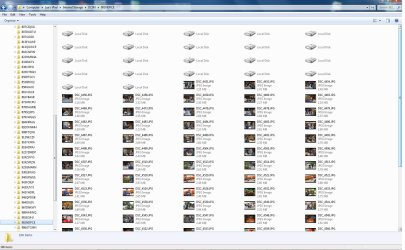
A little more info in case someone stumbles across this thread with the same dilemma. It appears that Windows doesn't like folders with the "local Disc" files included, whatever that is.

I found this by opening separate iterations of Windows explorer side by side with the iPad folders loaded onto one and the Windows folders on the other. I found that the folders without the *local disc* files copied fine. I manually selected only the JPGs from the folders with "local Disc" and dragged them to the appropriate windows folders and the transfer worked fine that way.
 

Attachments

  • iPad Files.jpg
    iPad Files.jpg
    190.3 KB · Views: 5

My Computer My Computer

At a glance

Win 7 pro 64 bitIntel Q6600 @ 2.4 GHz4 MB RAMRadeon 1 GB HD 4650
Computer type
PC/Desktop
Computer Manufacturer/Model Number
Dell Inspiron 530
OS
Win 7 pro 64 bit
CPU
Intel Q6600 @ 2.4 GHz
Memory
4 MB RAM
Graphics Card(s)
Radeon 1 GB HD 4650
Hard Drives
500 GB boot drive Samsung HD 501J ATA
1 TB rive Samsung HD 103UJ ATA
2 TB Seagate GoFlex USB drive for backup
PSU
750 Watt
Internet Speed
25 Mbps down; 1.7 Mbps up
Antivirus
Avast free
Browser
Google Chrome / IE 9
Other Info
Acronis True Image 2012 for backups
You can use iTunes to move photos from ipad to PC.
 

My Computer My Computer

At a glance

Windows 8 64 bit
Computer type
PC/Desktop
OS
Windows 8 64 bit
I like to use iExplorer to transfer the files to my PC from any other Apple devices.

iExplorer
 

My Computer My Computer

At a glance

Windows 8.1 Pro x64, Ubuntu 14.04 x64, and Wi...Core i7 620M Dual Core8GB Crucial Laptop MemoryIndel HD Graphics Arandale
Computer type
Laptop
Computer Manufacturer/Model Number
Dell Latitude E4310
OS
Windows 8.1 Pro x64, Ubuntu 14.04 x64, and Windows 10 Tech Preview
CPU
Core i7 620M Dual Core
Memory
8GB Crucial Laptop Memory
Graphics Card(s)
Indel HD Graphics Arandale
Monitor(s) Displays
Broken Dell Laptop Displays
Screen Resolution
1366 X 768
Hard Drives
Crucial M4 SSD 128GB, WD Scorpio Black 500GB
Internet Speed
145 MB/S
Browser
Chrome and Project Spartan
Other Info
Broken display
I like to use iExplorer to transfer the files to my PC from any other Apple devices.

iExplorer

I don't trust these apps to be honest, they are usually useless unless you buy them. How is this one?


Another method, you can install OneDrive on iPad and let it backup photos. Then download to where ever you want. You also get a 15GB bonus free space doing so.
 

My Computer My Computer

At a glance

Windows 7 Ultimate x64 SP1AMD Phenom 2 1090T2x8GB Kingston HyperX Fury Black 1600Mhz Unga...MSI GTX 970 Gaming 4G
Computer type
PC/Desktop
Computer Manufacturer/Model Number
Custom Build
OS
Windows 7 Ultimate x64 SP1
CPU
AMD Phenom 2 1090T
Motherboard
Gigabyte GA-890FXA-UD5
Memory
2x8GB Kingston HyperX Fury Black 1600Mhz Unganged
Graphics Card(s)
MSI GTX 970 Gaming 4G
Sound Card
Realtek On-Board HD 7.1 Audio / Logitech G35
Monitor(s) Displays
3xAcer GD245HQ
Screen Resolution
1920x1080
Hard Drives
Samsung 850 Pro 512GB SSD - OS /
WD Caviar Black SATA 3 - 1 TBx2 - Dynamic RAID 0 /
WD Caviar Green SATA 2 - 640GBx2 - Dynamic RAID 0 /
WD Caviar Green SATA 2 - 640GB - Internal Backup /
Seagate Barracude SATA 3 - 3TB - External Backup/ Sync
PSU
HighPower 1000W
Case
Cooler Master HAF 932
Cooling
Noctua NH-D14
Keyboard
Logitech G19
Mouse
Logitech G500
Internet Speed
100/4 Mbit Cable (100GB quota)
Antivirus
ZoneAlarm Extreme Security / MBAM Pro / MBAE Free / SAS Free
Browser
IE 11 - Firefox - Chrome
Other Info
Logitech F710/ G27/ G940/ Z5500 // TrackIR 5 // Nvidia 3D Surround Vision
I like to use iExplorer to transfer the files to my PC from any other Apple devices.

iExplorer

I don't trust these apps to be honest, they are usually useless unless you buy them. How is this one?


Another method, you can install OneDrive on iPad and let it backup photos. Then download to where ever you want. You also get a 15GB bonus free space doing so.
I need to transfer photos from iPad to computer. I never heard OneDrive. What is it?
 
Last edited:

My Computer My Computer

At a glance

Win 8Intel
Computer type
Laptop
Computer Manufacturer/Model Number
Dell
OS
Win 8
CPU
Intel

My Computers My Computers

  • At a glance

    Windows 11 Pro x64 [Latest Release and Releas...Ryzen 9 5950X, 3.8 - 5.2 MHz64GB [2 x 32GB] DDR4 3200MHz4GB NVIDIA GEFORCE GTX 1650 Ti
    Computer type
    PC/Desktop
    Computer Manufacturer/Model Number
    ChillBlast - Custom to my design
    OS
    Windows 11 Pro x64 [Latest Release and Release Preview]
    CPU
    Ryzen 9 5950X, 3.8 - 5.2 MHz
    Motherboard
    Asus Prime X570-Pro
    Memory
    64GB [2 x 32GB] DDR4 3200MHz
    Graphics Card(s)
    4GB NVIDIA GEFORCE GTX 1650 Ti
    Sound Card
    On-board SPDIF to 5.1 System + HDMI [5.1 system]
    Monitor(s) Displays
    32" UHD 32 Bit HDR Monitor + 43" UHD 4K 32Bit HDR TV
    Screen Resolution
    2 x 3840 x 2160 @60Hz
    Hard Drives
    1TB M2 SSD OS, 500GB Fast Access SSD, 2 x 8TB Data + Various Externals from 1TB to 4TB, 10TB NAS
    PSU
    NZXT C750 80 PLUS Gold 750W Modular PSU
    Case
    Workstation Case [Matt Black]
    Cooling
    NZXT Kraken X63 280mm CPU Cooler +2x Quiet Case fans
    Keyboard
    Logitech Wireless MX Keys & K400 + others
    Mouse
    Logitech Wireless MX Master 3S
    Internet Speed
    920 MB Down 50 MB Up
    Antivirus
    BitDefender Total Security Pro
    Browser
    Chrome (always run latest Non-Beta)
    Other Info
    Also run ...
    Laptop - Quad 8GB - Windows 10 Pro x64
    Nexus 7 Android tablet x2
    Samsung 10.2" tablet
    Blackview TAB 8 4G Android Tablet c/w Keyboard
    Wacom Intuos Pro Medium Pen Pad
    Wacom Intuos Pro Small Pen Pad
    Wacom Expresskeys Remote
    Loopdeck+ Graphics Controller
    Shuttle Pro v2 Control
  • At a glance

    Windows 11 Pro x64 Latest RPIntel I7 10750H 5.0GHz32GB [2x16GB] DDR4 2933 MHznVidia GTX1650Ti 4 GB GDDR6
    Computer type
    Laptop
    System Manufacturer/Model Number
    Dell XPS 17 10750H
    OS
    Windows 11 Pro x64 Latest RP
    CPU
    Intel I7 10750H 5.0GHz
    Motherboard
    Dell XPS
    Memory
    32GB [2x16GB] DDR4 2933 MHz
    Graphics Card(s)
    nVidia GTX1650Ti 4 GB GDDR6
    Sound Card
    Stock [Realtek] 4 Speaker
    Monitor(s) Displays
    17" IPS UHD+ Infinity Edge Touchscreen
    Screen Resolution
    3840 x 2400
    Hard Drives
    2TB M2 NVMe, 4TB External + various 500GB & 1TB External NVMe (also have access to spinner HDD from
    PSU
    Stock
    Case
    Stock XPS Aluminium & Carbon Fibre
    Cooling
    Stock - Active Fan Control
    Keyboard
    Backlit + Various Logitech
    Mouse
    Stock Track Pad + Logitech MX Trackball
    Internet Speed
    72 MB Down 18MB Up
    Browser
    Chrome
    Other Info
    Also run ...
    Laptop - Quad 8GB - Windows 10 Pro x64
    Nexus 7 Android tablet x2
    10.2" tablet
    Sony Z3 Android Smartphone
    Wacom Intuos Pro Medium Pen Pad
    Wacom Intuos Pro Small Pen Pad
    Wacom Expresskeys Remote
    Loopdeck+ Graphics Controller
    Shuttle Pro v2 Control Pad
    10TB NAS
There has been a bug though, sometimes OneDrive reports all pictures have been synced but misses some photos. Only way to correct this is to sync those photos manually. :mad:

USB method (I used to use it) would be nice if you could sort by date etc. Having 100s of folders is not productive. Is there an efficient way to use it?
 

My Computer My Computer

At a glance

Windows 7 Ultimate x64 SP1AMD Phenom 2 1090T2x8GB Kingston HyperX Fury Black 1600Mhz Unga...MSI GTX 970 Gaming 4G
Computer type
PC/Desktop
Computer Manufacturer/Model Number
Custom Build
OS
Windows 7 Ultimate x64 SP1
CPU
AMD Phenom 2 1090T
Motherboard
Gigabyte GA-890FXA-UD5
Memory
2x8GB Kingston HyperX Fury Black 1600Mhz Unganged
Graphics Card(s)
MSI GTX 970 Gaming 4G
Sound Card
Realtek On-Board HD 7.1 Audio / Logitech G35
Monitor(s) Displays
3xAcer GD245HQ
Screen Resolution
1920x1080
Hard Drives
Samsung 850 Pro 512GB SSD - OS /
WD Caviar Black SATA 3 - 1 TBx2 - Dynamic RAID 0 /
WD Caviar Green SATA 2 - 640GBx2 - Dynamic RAID 0 /
WD Caviar Green SATA 2 - 640GB - Internal Backup /
Seagate Barracude SATA 3 - 3TB - External Backup/ Sync
PSU
HighPower 1000W
Case
Cooler Master HAF 932
Cooling
Noctua NH-D14
Keyboard
Logitech G19
Mouse
Logitech G500
Internet Speed
100/4 Mbit Cable (100GB quota)
Antivirus
ZoneAlarm Extreme Security / MBAM Pro / MBAE Free / SAS Free
Browser
IE 11 - Firefox - Chrome
Other Info
Logitech F710/ G27/ G940/ Z5500 // TrackIR 5 // Nvidia 3D Surround Vision
I guess I've been lucky with Onedrive, Ive used it from the time when it was a trial of a thing called Mesh, without any issues at all.

I think the only way you could improve the functionality of explorer is to replace it with one of the many alternate file managers.

I am in a different position to most as I am a serious amateur photographer and all my transfers, and image organization, is done within Adobe Lightroom CC 2015.
 
Last edited:

My Computers My Computers

  • At a glance

    Windows 11 Pro x64 [Latest Release and Releas...Ryzen 9 5950X, 3.8 - 5.2 MHz64GB [2 x 32GB] DDR4 3200MHz4GB NVIDIA GEFORCE GTX 1650 Ti
    Computer type
    PC/Desktop
    Computer Manufacturer/Model Number
    ChillBlast - Custom to my design
    OS
    Windows 11 Pro x64 [Latest Release and Release Preview]
    CPU
    Ryzen 9 5950X, 3.8 - 5.2 MHz
    Motherboard
    Asus Prime X570-Pro
    Memory
    64GB [2 x 32GB] DDR4 3200MHz
    Graphics Card(s)
    4GB NVIDIA GEFORCE GTX 1650 Ti
    Sound Card
    On-board SPDIF to 5.1 System + HDMI [5.1 system]
    Monitor(s) Displays
    32" UHD 32 Bit HDR Monitor + 43" UHD 4K 32Bit HDR TV
    Screen Resolution
    2 x 3840 x 2160 @60Hz
    Hard Drives
    1TB M2 SSD OS, 500GB Fast Access SSD, 2 x 8TB Data + Various Externals from 1TB to 4TB, 10TB NAS
    PSU
    NZXT C750 80 PLUS Gold 750W Modular PSU
    Case
    Workstation Case [Matt Black]
    Cooling
    NZXT Kraken X63 280mm CPU Cooler +2x Quiet Case fans
    Keyboard
    Logitech Wireless MX Keys & K400 + others
    Mouse
    Logitech Wireless MX Master 3S
    Internet Speed
    920 MB Down 50 MB Up
    Antivirus
    BitDefender Total Security Pro
    Browser
    Chrome (always run latest Non-Beta)
    Other Info
    Also run ...
    Laptop - Quad 8GB - Windows 10 Pro x64
    Nexus 7 Android tablet x2
    Samsung 10.2" tablet
    Blackview TAB 8 4G Android Tablet c/w Keyboard
    Wacom Intuos Pro Medium Pen Pad
    Wacom Intuos Pro Small Pen Pad
    Wacom Expresskeys Remote
    Loopdeck+ Graphics Controller
    Shuttle Pro v2 Control
  • At a glance

    Windows 11 Pro x64 Latest RPIntel I7 10750H 5.0GHz32GB [2x16GB] DDR4 2933 MHznVidia GTX1650Ti 4 GB GDDR6
    Computer type
    Laptop
    System Manufacturer/Model Number
    Dell XPS 17 10750H
    OS
    Windows 11 Pro x64 Latest RP
    CPU
    Intel I7 10750H 5.0GHz
    Motherboard
    Dell XPS
    Memory
    32GB [2x16GB] DDR4 2933 MHz
    Graphics Card(s)
    nVidia GTX1650Ti 4 GB GDDR6
    Sound Card
    Stock [Realtek] 4 Speaker
    Monitor(s) Displays
    17" IPS UHD+ Infinity Edge Touchscreen
    Screen Resolution
    3840 x 2400
    Hard Drives
    2TB M2 NVMe, 4TB External + various 500GB & 1TB External NVMe (also have access to spinner HDD from
    PSU
    Stock
    Case
    Stock XPS Aluminium & Carbon Fibre
    Cooling
    Stock - Active Fan Control
    Keyboard
    Backlit + Various Logitech
    Mouse
    Stock Track Pad + Logitech MX Trackball
    Internet Speed
    72 MB Down 18MB Up
    Browser
    Chrome
    Other Info
    Also run ...
    Laptop - Quad 8GB - Windows 10 Pro x64
    Nexus 7 Android tablet x2
    10.2" tablet
    Sony Z3 Android Smartphone
    Wacom Intuos Pro Medium Pen Pad
    Wacom Intuos Pro Small Pen Pad
    Wacom Expresskeys Remote
    Loopdeck+ Graphics Controller
    Shuttle Pro v2 Control Pad
    10TB NAS
I thought I was alright too, until one day I got struck with it ;)
 

My Computer My Computer

At a glance

Windows 7 Ultimate x64 SP1AMD Phenom 2 1090T2x8GB Kingston HyperX Fury Black 1600Mhz Unga...MSI GTX 970 Gaming 4G
Computer type
PC/Desktop
Computer Manufacturer/Model Number
Custom Build
OS
Windows 7 Ultimate x64 SP1
CPU
AMD Phenom 2 1090T
Motherboard
Gigabyte GA-890FXA-UD5
Memory
2x8GB Kingston HyperX Fury Black 1600Mhz Unganged
Graphics Card(s)
MSI GTX 970 Gaming 4G
Sound Card
Realtek On-Board HD 7.1 Audio / Logitech G35
Monitor(s) Displays
3xAcer GD245HQ
Screen Resolution
1920x1080
Hard Drives
Samsung 850 Pro 512GB SSD - OS /
WD Caviar Black SATA 3 - 1 TBx2 - Dynamic RAID 0 /
WD Caviar Green SATA 2 - 640GBx2 - Dynamic RAID 0 /
WD Caviar Green SATA 2 - 640GB - Internal Backup /
Seagate Barracude SATA 3 - 3TB - External Backup/ Sync
PSU
HighPower 1000W
Case
Cooler Master HAF 932
Cooling
Noctua NH-D14
Keyboard
Logitech G19
Mouse
Logitech G500
Internet Speed
100/4 Mbit Cable (100GB quota)
Antivirus
ZoneAlarm Extreme Security / MBAM Pro / MBAE Free / SAS Free
Browser
IE 11 - Firefox - Chrome
Other Info
Logitech F710/ G27/ G940/ Z5500 // TrackIR 5 // Nvidia 3D Surround Vision
Yep the best most straight forward method is to upload to Onedrive manually = no waiting for it to engage :)

Also Onedrive app does not upload the original file size by default so anyone that uses Onedrive app should review the upload settings and make sure the original size is indeed being uploaded instead of a compressed version.

Otherwise Onedrive is good if used as what it is a website to go to and.....
 

My Computer My Computer

At a glance

Win-7-Pro64bit 7-H-Prem-64biti7-5930K 2nd i9-9940x both water blocked VRM'...Trident-z 3200C14 2nd Trident-z 3600C16EVGA 1080ti ftw3 2nd Titan Xp both water blocked
Computer type
PC/Desktop
Computer Manufacturer/Model Number
Custom assembled by me :}
OS
Win-7-Pro64bit 7-H-Prem-64bit
CPU
i7-5930K 2nd i9-9940x both water blocked VRM's too
Motherboard
ASUS SABERTOOTH X99 2nd ASUS x299 Apex
Memory
Trident-z 3200C14 2nd Trident-z 3600C16
Graphics Card(s)
EVGA 1080ti ftw3 2nd Titan Xp both water blocked
Sound Card
Built-in Realtek
Monitor(s) Displays
1-AOC G2460PG 24"G-Sync 144Hz/ 2nd 1-ASUS VG248QE 24" 144Hz
Screen Resolution
1920 x 1080 144Hz
Hard Drives
2-Samsung M.2 Evo & Evo Plus
2-Samsung 850 EVO 500GB SSD's/ 3-2.5 W.D. Black 1tb-&3-1tb/3-3.5 WD Black 1tb hdd's
PSU
EVGA SuperNOVA 1000-P2 2nd 1200-P2
Case
2-Corsair Obsidian Series 450D Black ATX Mid Tower
Cooling
Custom water loops
Keyboard
Logitech G710+/ 2nd Logitech G910
Mouse
2-RedDragon M901 Perdition 16400 dpi Gaming mouse = wired
Internet Speed
Comcast Ping 19ms 89.31mbps download speed 6.12mbps upload
Antivirus
Malwarebytes Pro/ Superantispyware Pro
Browser
FireFox & Pale moon
Other Info
2nd ASUS X299 Apex/Intel i9-9940x with Custom water loop/7H-Prem-x64/Corsair 450D case/Ram Trident-z 3600C16 4x8gb / Samsung970Evo plus 500gb SSD/Dual ssd EZ swap evo/PSU EVGA SuperNova 1200w-P2 80+Platinum/GPU Titan Xp /8-ML-140 on push-pull on 2-280GTX rads
Back
Top