
Windows Startup Repair query

When/ if you connect to another computer make sure it is either SATA-3 or usb3 or the interface speed will bottleneck and you won't achieve SSD's speed.

There is supposed to be a screen where you can setup a raid. You need to find that screen. This can be in Bios but for example my computer has a different screen right after bios (I need to press some key to enter it). I see "loading os" text afterwards.
 

My Computer My Computer

At a glance

Windows 7 Ultimate x64 SP1AMD Phenom 2 1090T2x8GB Kingston HyperX Fury Black 1600Mhz Unga...MSI GTX 970 Gaming 4G
Computer type
PC/Desktop
Computer Manufacturer/Model Number
Custom Build
OS
Windows 7 Ultimate x64 SP1
CPU
AMD Phenom 2 1090T
Motherboard
Gigabyte GA-890FXA-UD5
Memory
2x8GB Kingston HyperX Fury Black 1600Mhz Unganged
Graphics Card(s)
MSI GTX 970 Gaming 4G
Sound Card
Realtek On-Board HD 7.1 Audio / Logitech G35
Monitor(s) Displays
3xAcer GD245HQ
Screen Resolution
1920x1080
Hard Drives
Samsung 850 Pro 512GB SSD - OS /
WD Caviar Black SATA 3 - 1 TBx2 - Dynamic RAID 0 /
WD Caviar Green SATA 2 - 640GBx2 - Dynamic RAID 0 /
WD Caviar Green SATA 2 - 640GB - Internal Backup /
Seagate Barracude SATA 3 - 3TB - External Backup/ Sync
PSU
HighPower 1000W
Case
Cooler Master HAF 932
Cooling
Noctua NH-D14
Keyboard
Logitech G19
Mouse
Logitech G500
Internet Speed
100/4 Mbit Cable (100GB quota)
Antivirus
ZoneAlarm Extreme Security / MBAM Pro / MBAE Free / SAS Free
Browser
IE 11 - Firefox - Chrome
Other Info
Logitech F710/ G27/ G940/ Z5500 // TrackIR 5 // Nvidia 3D Surround Vision
When/ if you connect to another computer make sure it is either SATA-3 or usb3 or the interface speed will bottleneck and you won't achieve SSD's speed.

There is supposed to be a screen where you can setup a raid. You need to find that screen. This can be in Bios but for example my computer has a different screen right after bios (I need to press some key to enter it). I see "loading os" text afterwards.

A friend in work can check it next week he said.

To be honest I'm not too worried about the speed of the SSD, I can get in touch with Dell and they will possibly send someone out to replace it. If not the wipe I will do might fix it and failing that, I will simply buy a new SSD.

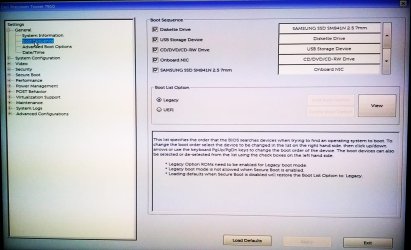
My main worry now is to just get the PC working without any weird errors like it gives me upon boot up. I'm referring to the message from last night where it said 'preferred boot device is missing' even though it was not missing. Here is a screenshot of my Boot Sequence screen, is that setup correctly or am I totally blind/silly here? The list on the right is the actual order sequence is that right? Apologies for the crooked photo.

Also, the 'Boot List Option' part - Will I try UEFI? Is this safe to give a try?
 

Attachments

  • Bios_Boot_Sequence.jpg
    Bios_Boot_Sequence.jpg
    115.3 KB · Views: 0

My Computer My Computer

At a glance

Microsoft Windows 7 Professional 64-bitDual Xeon(R) CPU E5-2687W v3 @ 3.10GHz32.00 GBNVIDIA Quadro K4200
Computer type
PC/Desktop
Computer Manufacturer/Model Number
Dell Precision Tower 7910 Workstation
OS
Microsoft Windows 7 Professional 64-bit
CPU
Dual Xeon(R) CPU E5-2687W v3 @ 3.10GHz
Motherboard
Dell Inc. 0215PR
Memory
32.00 GB
Graphics Card(s)
NVIDIA Quadro K4200
Sound Card
(1) NVIDIA High Definition Audio (2) High Definition Audio
Hard Drives
(1) SK hynix SC210 2.5 7MM 256GB ATA Device
(2) ATA WDC WD4003FZEX-0 SCSI Disk Device
Antivirus
Avast Free and Malwarebytes Free
Browser
Chrome
Other Info
BIOS: BIOS Date: 04/14/15 18:58:26 Ver: A07.00
Yes I would first try installing to UEFI which may requiring enabling elsewhere in BIOS setup if it was not previously. This gives you all of the features of the new EFI BIOS which have replaced old Legacy BIOS'. UEFI (Unified Extensible Firmware Interface) - Install Windows 7 with - Windows 7 Forums

You'll need to boot the installation media as a UEFI device which requires if using a flash stick special formatting from Option One of UEFI Bootable USB Flash Drive - Create in Windows.

Then using the Dell F12 boot menu choose the UEFI flash stick installer or DVD, delete all partitions on the target drive which should reset formatting if necessary to GPT for a UEFI install.

This will also force the Windows Boot Manager to appear as first boot device instead of SSD which is how UEFI installs boot. I would also entirely remove from Boot order the diskette drive and Onboard NIC.

You said that Dell might replace your SSD. The manufacturer warranties the device for one year from dated of purchase receipt, and will provide tech support until that time to test it and if necessary set up a return. We see this regularly here for SSD's.

I've asked you to query Dell about why exactly there is a RAID controller so that the questions are answered. If they are still under warranty they should be able to answer this question for you and people who find this thread with similar problems. I would also tell them I want the RAID controller disabled and to use the onboard SATA ports for your SSD and any other drives onboard, unless they can give you a good reason why not.
 
Last edited:
You can follow Greg's post after you receive the disk Dell sending of course.

I will try to find info on how to configure the raid controller after I help a friend with teamviewer
 

My Computer My Computer

At a glance

Windows 7 Ultimate x64 SP1AMD Phenom 2 1090T2x8GB Kingston HyperX Fury Black 1600Mhz Unga...MSI GTX 970 Gaming 4G
Computer type
PC/Desktop
Computer Manufacturer/Model Number
Custom Build
OS
Windows 7 Ultimate x64 SP1
CPU
AMD Phenom 2 1090T
Motherboard
Gigabyte GA-890FXA-UD5
Memory
2x8GB Kingston HyperX Fury Black 1600Mhz Unganged
Graphics Card(s)
MSI GTX 970 Gaming 4G
Sound Card
Realtek On-Board HD 7.1 Audio / Logitech G35
Monitor(s) Displays
3xAcer GD245HQ
Screen Resolution
1920x1080
Hard Drives
Samsung 850 Pro 512GB SSD - OS /
WD Caviar Black SATA 3 - 1 TBx2 - Dynamic RAID 0 /
WD Caviar Green SATA 2 - 640GBx2 - Dynamic RAID 0 /
WD Caviar Green SATA 2 - 640GB - Internal Backup /
Seagate Barracude SATA 3 - 3TB - External Backup/ Sync
PSU
HighPower 1000W
Case
Cooler Master HAF 932
Cooling
Noctua NH-D14
Keyboard
Logitech G19
Mouse
Logitech G500
Internet Speed
100/4 Mbit Cable (100GB quota)
Antivirus
ZoneAlarm Extreme Security / MBAM Pro / MBAE Free / SAS Free
Browser
IE 11 - Firefox - Chrome
Other Info
Logitech F710/ G27/ G940/ Z5500 // TrackIR 5 // Nvidia 3D Surround Vision
Hi Greg,

Cheers for the info. I can try that once I get the disc, as GokAy says.

I appreciate you keep mentioning the amount of people that did the clean install. I have nothing against that. That is what I want to do and is what I will be doing. About querying Dell, I have twice been in touch with them only to be put through to the 'correct support team' only to be told they are finished their shift. I also chatted with them on instant chat online twice, to no success. The support on this forum is far better in my experience. Not getting home from work till late doesn't help my situation either of course. I have a friend who offered to take my PC to his house and he will call the support and hopefully be put through to the correct team and go through it with them, as he will be there in his home all day working from home. My PC is still under warranty yes.
 

My Computer My Computer

At a glance

Microsoft Windows 7 Professional 64-bitDual Xeon(R) CPU E5-2687W v3 @ 3.10GHz32.00 GBNVIDIA Quadro K4200
Computer type
PC/Desktop
Computer Manufacturer/Model Number
Dell Precision Tower 7910 Workstation
OS
Microsoft Windows 7 Professional 64-bit
CPU
Dual Xeon(R) CPU E5-2687W v3 @ 3.10GHz
Motherboard
Dell Inc. 0215PR
Memory
32.00 GB
Graphics Card(s)
NVIDIA Quadro K4200
Sound Card
(1) NVIDIA High Definition Audio (2) High Definition Audio
Hard Drives
(1) SK hynix SC210 2.5 7MM 256GB ATA Device
(2) ATA WDC WD4003FZEX-0 SCSI Disk Device
Antivirus
Avast Free and Malwarebytes Free
Browser
Chrome
Other Info
BIOS: BIOS Date: 04/14/15 18:58:26 Ver: A07.00
Don't you get support from where you bought it? Or is it the local support that is being unhelpful?
 

My Computer My Computer

At a glance

Windows 7 Ultimate x64 SP1AMD Phenom 2 1090T2x8GB Kingston HyperX Fury Black 1600Mhz Unga...MSI GTX 970 Gaming 4G
Computer type
PC/Desktop
Computer Manufacturer/Model Number
Custom Build
OS
Windows 7 Ultimate x64 SP1
CPU
AMD Phenom 2 1090T
Motherboard
Gigabyte GA-890FXA-UD5
Memory
2x8GB Kingston HyperX Fury Black 1600Mhz Unganged
Graphics Card(s)
MSI GTX 970 Gaming 4G
Sound Card
Realtek On-Board HD 7.1 Audio / Logitech G35
Monitor(s) Displays
3xAcer GD245HQ
Screen Resolution
1920x1080
Hard Drives
Samsung 850 Pro 512GB SSD - OS /
WD Caviar Black SATA 3 - 1 TBx2 - Dynamic RAID 0 /
WD Caviar Green SATA 2 - 640GBx2 - Dynamic RAID 0 /
WD Caviar Green SATA 2 - 640GB - Internal Backup /
Seagate Barracude SATA 3 - 3TB - External Backup/ Sync
PSU
HighPower 1000W
Case
Cooler Master HAF 932
Cooling
Noctua NH-D14
Keyboard
Logitech G19
Mouse
Logitech G500
Internet Speed
100/4 Mbit Cable (100GB quota)
Antivirus
ZoneAlarm Extreme Security / MBAM Pro / MBAE Free / SAS Free
Browser
IE 11 - Firefox - Chrome
Other Info
Logitech F710/ G27/ G940/ Z5500 // TrackIR 5 // Nvidia 3D Surround Vision
Don't you get support from where you bought it? Or is it the local support that is being unhelpful?

I bought it through a friend, but it's from Dell. I just found the support on the chat not much help.

I'm seeing the following options in my Bios that I want to tell you about also:

In System Configuration>Miscellaneous Devices> there is an option here labelled 'Enable PCI Slot' that is set to enabled.

Just about that screenshot I posted of the boot sequence - is that correct? I will just disable the two options Greg mentioned. But otherwise it's all good?

I also want to show this screen, when I click on that View button in the Boot List Option part. I notice the 3rd box is empty too?
 

Attachments

  • View_Boot_Option.jpg
    View_Boot_Option.jpg
    95.4 KB · Views: 0

My Computer My Computer

At a glance

Microsoft Windows 7 Professional 64-bitDual Xeon(R) CPU E5-2687W v3 @ 3.10GHz32.00 GBNVIDIA Quadro K4200
Computer type
PC/Desktop
Computer Manufacturer/Model Number
Dell Precision Tower 7910 Workstation
OS
Microsoft Windows 7 Professional 64-bit
CPU
Dual Xeon(R) CPU E5-2687W v3 @ 3.10GHz
Motherboard
Dell Inc. 0215PR
Memory
32.00 GB
Graphics Card(s)
NVIDIA Quadro K4200
Sound Card
(1) NVIDIA High Definition Audio (2) High Definition Audio
Hard Drives
(1) SK hynix SC210 2.5 7MM 256GB ATA Device
(2) ATA WDC WD4003FZEX-0 SCSI Disk Device
Antivirus
Avast Free and Malwarebytes Free
Browser
Chrome
Other Info
BIOS: BIOS Date: 04/14/15 18:58:26 Ver: A07.00
Hey is this accurate of the screen you get warning after BIOS? especially the text in red (I cant see bottom from your screenshot)

*******************************************************************************
* LSI Logic MPT Setup Utility v6.02.00.00 (2005.07.08) *
* Adapter List Global Properties *
* Adapter PCI PCI PCI PCI FW Revision Status Boot *
* Bus Dev Fnc Slot Order *
* SAS1064 02 03 00 00 1.04.00.00-IR Enabled 0 *


* Esc = Exit Menu F1/Shift+1 = Help *
* Alt+N = Global Properties -/+ = Alter Boot Order Ins/Del = Alter Boot List *
*******************************************************************************

If so, press Ins/Del
and remove adaptor from boot list

also post screenshots of menu/menus if you cant make it out
 

My Computer My Computer

At a glance

Windows 7 Ultimate x64 SP1AMD Phenom 2 1090T2x8GB Kingston HyperX Fury Black 1600Mhz Unga...MSI GTX 970 Gaming 4G
Computer type
PC/Desktop
Computer Manufacturer/Model Number
Custom Build
OS
Windows 7 Ultimate x64 SP1
CPU
AMD Phenom 2 1090T
Motherboard
Gigabyte GA-890FXA-UD5
Memory
2x8GB Kingston HyperX Fury Black 1600Mhz Unganged
Graphics Card(s)
MSI GTX 970 Gaming 4G
Sound Card
Realtek On-Board HD 7.1 Audio / Logitech G35
Monitor(s) Displays
3xAcer GD245HQ
Screen Resolution
1920x1080
Hard Drives
Samsung 850 Pro 512GB SSD - OS /
WD Caviar Black SATA 3 - 1 TBx2 - Dynamic RAID 0 /
WD Caviar Green SATA 2 - 640GBx2 - Dynamic RAID 0 /
WD Caviar Green SATA 2 - 640GB - Internal Backup /
Seagate Barracude SATA 3 - 3TB - External Backup/ Sync
PSU
HighPower 1000W
Case
Cooler Master HAF 932
Cooling
Noctua NH-D14
Keyboard
Logitech G19
Mouse
Logitech G500
Internet Speed
100/4 Mbit Cable (100GB quota)
Antivirus
ZoneAlarm Extreme Security / MBAM Pro / MBAE Free / SAS Free
Browser
IE 11 - Firefox - Chrome
Other Info
Logitech F710/ G27/ G940/ Z5500 // TrackIR 5 // Nvidia 3D Surround Vision
I'm not too sure I will have to check that for you tomorrow GokAy. I will post here as soon as I check it when home from work
 

My Computer My Computer

At a glance

Microsoft Windows 7 Professional 64-bitDual Xeon(R) CPU E5-2687W v3 @ 3.10GHz32.00 GBNVIDIA Quadro K4200
Computer type
PC/Desktop
Computer Manufacturer/Model Number
Dell Precision Tower 7910 Workstation
OS
Microsoft Windows 7 Professional 64-bit
CPU
Dual Xeon(R) CPU E5-2687W v3 @ 3.10GHz
Motherboard
Dell Inc. 0215PR
Memory
32.00 GB
Graphics Card(s)
NVIDIA Quadro K4200
Sound Card
(1) NVIDIA High Definition Audio (2) High Definition Audio
Hard Drives
(1) SK hynix SC210 2.5 7MM 256GB ATA Device
(2) ATA WDC WD4003FZEX-0 SCSI Disk Device
Antivirus
Avast Free and Malwarebytes Free
Browser
Chrome
Other Info
BIOS: BIOS Date: 04/14/15 18:58:26 Ver: A07.00
Those in red are supposed to be at the bottom of screen by the way, try Ins/Del even if you don't see the text on that screen.
 

My Computer My Computer

At a glance

Windows 7 Ultimate x64 SP1AMD Phenom 2 1090T2x8GB Kingston HyperX Fury Black 1600Mhz Unga...MSI GTX 970 Gaming 4G
Computer type
PC/Desktop
Computer Manufacturer/Model Number
Custom Build
OS
Windows 7 Ultimate x64 SP1
CPU
AMD Phenom 2 1090T
Motherboard
Gigabyte GA-890FXA-UD5
Memory
2x8GB Kingston HyperX Fury Black 1600Mhz Unganged
Graphics Card(s)
MSI GTX 970 Gaming 4G
Sound Card
Realtek On-Board HD 7.1 Audio / Logitech G35
Monitor(s) Displays
3xAcer GD245HQ
Screen Resolution
1920x1080
Hard Drives
Samsung 850 Pro 512GB SSD - OS /
WD Caviar Black SATA 3 - 1 TBx2 - Dynamic RAID 0 /
WD Caviar Green SATA 2 - 640GBx2 - Dynamic RAID 0 /
WD Caviar Green SATA 2 - 640GB - Internal Backup /
Seagate Barracude SATA 3 - 3TB - External Backup/ Sync
PSU
HighPower 1000W
Case
Cooler Master HAF 932
Cooling
Noctua NH-D14
Keyboard
Logitech G19
Mouse
Logitech G500
Internet Speed
100/4 Mbit Cable (100GB quota)
Antivirus
ZoneAlarm Extreme Security / MBAM Pro / MBAE Free / SAS Free
Browser
IE 11 - Firefox - Chrome
Other Info
Logitech F710/ G27/ G940/ Z5500 // TrackIR 5 // Nvidia 3D Surround Vision
Those in red are supposed to be at the bottom of screen by the way, try Ins/Del even if you don't see the text on that screen.

Hi GokAy,

I checked that earlier and the screen is the same one that the pic I show in this post - http://www.sevenforums.com/general-discussion/349031-windows-startup-repair-query-13.html#post3068770

I didn't see any writing at the bottom of the screen either and when I pressed insert and delete keys the screen quickly passed, quicker than usual as a result of pressing the keys, then moved onto the usual 'Starting Windows' logo.
 

My Computer My Computer

At a glance

Microsoft Windows 7 Professional 64-bitDual Xeon(R) CPU E5-2687W v3 @ 3.10GHz32.00 GBNVIDIA Quadro K4200
Computer type
PC/Desktop
Computer Manufacturer/Model Number
Dell Precision Tower 7910 Workstation
OS
Microsoft Windows 7 Professional 64-bit
CPU
Dual Xeon(R) CPU E5-2687W v3 @ 3.10GHz
Motherboard
Dell Inc. 0215PR
Memory
32.00 GB
Graphics Card(s)
NVIDIA Quadro K4200
Sound Card
(1) NVIDIA High Definition Audio (2) High Definition Audio
Hard Drives
(1) SK hynix SC210 2.5 7MM 256GB ATA Device
(2) ATA WDC WD4003FZEX-0 SCSI Disk Device
Antivirus
Avast Free and Malwarebytes Free
Browser
Chrome
Other Info
BIOS: BIOS Date: 04/14/15 18:58:26 Ver: A07.00
Do you have a manual for BIOS? Can you go through that to see how you can configure SAS RAID?
 

My Computer My Computer

At a glance

Windows 7 Ultimate x64 SP1AMD Phenom 2 1090T2x8GB Kingston HyperX Fury Black 1600Mhz Unga...MSI GTX 970 Gaming 4G
Computer type
PC/Desktop
Computer Manufacturer/Model Number
Custom Build
OS
Windows 7 Ultimate x64 SP1
CPU
AMD Phenom 2 1090T
Motherboard
Gigabyte GA-890FXA-UD5
Memory
2x8GB Kingston HyperX Fury Black 1600Mhz Unganged
Graphics Card(s)
MSI GTX 970 Gaming 4G
Sound Card
Realtek On-Board HD 7.1 Audio / Logitech G35
Monitor(s) Displays
3xAcer GD245HQ
Screen Resolution
1920x1080
Hard Drives
Samsung 850 Pro 512GB SSD - OS /
WD Caviar Black SATA 3 - 1 TBx2 - Dynamic RAID 0 /
WD Caviar Green SATA 2 - 640GBx2 - Dynamic RAID 0 /
WD Caviar Green SATA 2 - 640GB - Internal Backup /
Seagate Barracude SATA 3 - 3TB - External Backup/ Sync
PSU
HighPower 1000W
Case
Cooler Master HAF 932
Cooling
Noctua NH-D14
Keyboard
Logitech G19
Mouse
Logitech G500
Internet Speed
100/4 Mbit Cable (100GB quota)
Antivirus
ZoneAlarm Extreme Security / MBAM Pro / MBAE Free / SAS Free
Browser
IE 11 - Firefox - Chrome
Other Info
Logitech F710/ G27/ G940/ Z5500 // TrackIR 5 // Nvidia 3D Surround Vision
My Computer My Computer

At a glance

Microsoft Windows 7 Professional 64-bitDual Xeon(R) CPU E5-2687W v3 @ 3.10GHz32.00 GBNVIDIA Quadro K4200
Computer type
PC/Desktop
Computer Manufacturer/Model Number
Dell Precision Tower 7910 Workstation
OS
Microsoft Windows 7 Professional 64-bit
CPU
Dual Xeon(R) CPU E5-2687W v3 @ 3.10GHz
Motherboard
Dell Inc. 0215PR
Memory
32.00 GB
Graphics Card(s)
NVIDIA Quadro K4200
Sound Card
(1) NVIDIA High Definition Audio (2) High Definition Audio
Hard Drives
(1) SK hynix SC210 2.5 7MM 256GB ATA Device
(2) ATA WDC WD4003FZEX-0 SCSI Disk Device
Antivirus
Avast Free and Malwarebytes Free
Browser
Chrome
Other Info
BIOS: BIOS Date: 04/14/15 18:58:26 Ver: A07.00
I'm still waiting on the Windows 7 disc to arrive, I will be back once I get that and am ready to install :)

Talk soon
 

My Computer My Computer

At a glance

Microsoft Windows 7 Professional 64-bitDual Xeon(R) CPU E5-2687W v3 @ 3.10GHz32.00 GBNVIDIA Quadro K4200
Computer type
PC/Desktop
Computer Manufacturer/Model Number
Dell Precision Tower 7910 Workstation
OS
Microsoft Windows 7 Professional 64-bit
CPU
Dual Xeon(R) CPU E5-2687W v3 @ 3.10GHz
Motherboard
Dell Inc. 0215PR
Memory
32.00 GB
Graphics Card(s)
NVIDIA Quadro K4200
Sound Card
(1) NVIDIA High Definition Audio (2) High Definition Audio
Hard Drives
(1) SK hynix SC210 2.5 7MM 256GB ATA Device
(2) ATA WDC WD4003FZEX-0 SCSI Disk Device
Antivirus
Avast Free and Malwarebytes Free
Browser
Chrome
Other Info
BIOS: BIOS Date: 04/14/15 18:58:26 Ver: A07.00
I wonder if you would get an option to change settings in the SAS RAID screen (where you are getting the warning at the moment) if you put the SSD back in SAS bay.
 

My Computer My Computer

At a glance

Windows 7 Ultimate x64 SP1AMD Phenom 2 1090T2x8GB Kingston HyperX Fury Black 1600Mhz Unga...MSI GTX 970 Gaming 4G
Computer type
PC/Desktop
Computer Manufacturer/Model Number
Custom Build
OS
Windows 7 Ultimate x64 SP1
CPU
AMD Phenom 2 1090T
Motherboard
Gigabyte GA-890FXA-UD5
Memory
2x8GB Kingston HyperX Fury Black 1600Mhz Unganged
Graphics Card(s)
MSI GTX 970 Gaming 4G
Sound Card
Realtek On-Board HD 7.1 Audio / Logitech G35
Monitor(s) Displays
3xAcer GD245HQ
Screen Resolution
1920x1080
Hard Drives
Samsung 850 Pro 512GB SSD - OS /
WD Caviar Black SATA 3 - 1 TBx2 - Dynamic RAID 0 /
WD Caviar Green SATA 2 - 640GBx2 - Dynamic RAID 0 /
WD Caviar Green SATA 2 - 640GB - Internal Backup /
Seagate Barracude SATA 3 - 3TB - External Backup/ Sync
PSU
HighPower 1000W
Case
Cooler Master HAF 932
Cooling
Noctua NH-D14
Keyboard
Logitech G19
Mouse
Logitech G500
Internet Speed
100/4 Mbit Cable (100GB quota)
Antivirus
ZoneAlarm Extreme Security / MBAM Pro / MBAE Free / SAS Free
Browser
IE 11 - Firefox - Chrome
Other Info
Logitech F710/ G27/ G940/ Z5500 // TrackIR 5 // Nvidia 3D Surround Vision
That's the only Manual you get. Did you read it? Anything about RAID card.

Why is it again you can't ask Dell about this? This is giving a lot of readers the impression Dell doesn't support their Products. I would call them and ask for a supervisor. Tell him we're waiting for answers about the RAID card in the top web tech forums. We want to know why it was installed, the exact advantages and how to disable it.

If this thread link was sent to Michael Dell you'd have an answer in a day!
 
Hi lads,

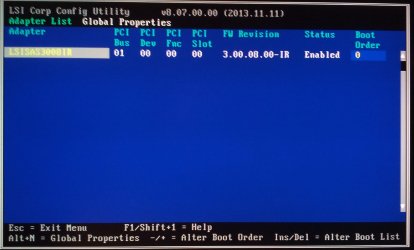
OK, I was on to Dell this morning. I can confirm there is no raid card set up on my PC. The guy got me to go into some screens that I had not been into before by using Ctrl + R. Ctrl + C also.

GokAy, in one of them screens I could see the options that you mentioned such as del/insert down the bottom of the screen, but he didn't get me to go into any of them.

He said that if there was a raid card set up, the PC wouldn't have booted with the SSD plugged into that SATA cable like I have now. (It's still in the side part of the PC)

Looking forward to getting this disk from Dell and wiping this thing clean and starting from fresh.
 

My Computer My Computer

At a glance

Microsoft Windows 7 Professional 64-bitDual Xeon(R) CPU E5-2687W v3 @ 3.10GHz32.00 GBNVIDIA Quadro K4200
Computer type
PC/Desktop
Computer Manufacturer/Model Number
Dell Precision Tower 7910 Workstation
OS
Microsoft Windows 7 Professional 64-bit
CPU
Dual Xeon(R) CPU E5-2687W v3 @ 3.10GHz
Motherboard
Dell Inc. 0215PR
Memory
32.00 GB
Graphics Card(s)
NVIDIA Quadro K4200
Sound Card
(1) NVIDIA High Definition Audio (2) High Definition Audio
Hard Drives
(1) SK hynix SC210 2.5 7MM 256GB ATA Device
(2) ATA WDC WD4003FZEX-0 SCSI Disk Device
Antivirus
Avast Free and Malwarebytes Free
Browser
Chrome
Other Info
BIOS: BIOS Date: 04/14/15 18:58:26 Ver: A07.00
Some progress at least :)

Can you post screenshots of those new screens please?

Regarding the Dell rep's comment about no raid card (don't feel offended not intended for you), I say a big pile of nonsense :zip:

How do you go into a non-existent screen with a key press?

Anyway, check this Serial Attached SCSI BIOS Configuration Utility
best info I found about "Serial Attached SCSI" (SAS) BIOS, believe it or not it lists CTRL+C too.

Scroll down to - F.3.2 Adapter List Screen: bold parts are important

Use the arrow keys to select an adapter, then press Enter to view and modify the selected adapter’s properties (and to access the other screens). After you select an adapter and press Enter, the adapter’s devices are scanned and the Adapter Properties Screen appears.

To change the Adapter boot order, use the -, +, Insert, and Delete keys while on the Boot Order field. Press Insert or Delete to add or remove an adapter to or from the boot order. Press the - and + keys to modify an adapter’s position in the boot order. If you make changes to the boot order, the Configuration Utility prompts you to save the changes before you exit the screen.

From the Adapter List screen (shown below), you can also press Alt+N to access the Global Properties screen. On this screen you can change global scope settings.

So in that screen try- select with arrow keys-Delete(Del key)
if that doesn't work maybe we can disable from-select with arrow-ENTER, and disable.

From the link above:The SAS BIOS Configuration Utility is a powerful tool. If, while using it, you somehow disable all of the controllers, press Ctrl+E (or Ctrl+A on versions earlier than 5.00) after memory initialization during reboot to re-enable and reconfigure the controllers.
 

My Computer My Computer

At a glance

Windows 7 Ultimate x64 SP1AMD Phenom 2 1090T2x8GB Kingston HyperX Fury Black 1600Mhz Unga...MSI GTX 970 Gaming 4G
Computer type
PC/Desktop
Computer Manufacturer/Model Number
Custom Build
OS
Windows 7 Ultimate x64 SP1
CPU
AMD Phenom 2 1090T
Motherboard
Gigabyte GA-890FXA-UD5
Memory
2x8GB Kingston HyperX Fury Black 1600Mhz Unganged
Graphics Card(s)
MSI GTX 970 Gaming 4G
Sound Card
Realtek On-Board HD 7.1 Audio / Logitech G35
Monitor(s) Displays
3xAcer GD245HQ
Screen Resolution
1920x1080
Hard Drives
Samsung 850 Pro 512GB SSD - OS /
WD Caviar Black SATA 3 - 1 TBx2 - Dynamic RAID 0 /
WD Caviar Green SATA 2 - 640GBx2 - Dynamic RAID 0 /
WD Caviar Green SATA 2 - 640GB - Internal Backup /
Seagate Barracude SATA 3 - 3TB - External Backup/ Sync
PSU
HighPower 1000W
Case
Cooler Master HAF 932
Cooling
Noctua NH-D14
Keyboard
Logitech G19
Mouse
Logitech G500
Internet Speed
100/4 Mbit Cable (100GB quota)
Antivirus
ZoneAlarm Extreme Security / MBAM Pro / MBAE Free / SAS Free
Browser
IE 11 - Firefox - Chrome
Other Info
Logitech F710/ G27/ G940/ Z5500 // TrackIR 5 // Nvidia 3D Surround Vision
Hi GokAy,

Yeah, well that's what the Dell guy on the phone told me. No raid card installed. I wasn't on the call for too long as I have to leave to go to work. Attached is the screen I got to when I hit Ctrl+C. Just before this screen appears it says "Invoking SAS Configuration Utility"

Sorry but just a bit confused. What makes you think the rep was talking nonsense?
 

Attachments

  • Ctrl&C_Screen.jpg
    Ctrl&C_Screen.jpg
    110.3 KB · Views: 0

My Computer My Computer

At a glance

Microsoft Windows 7 Professional 64-bitDual Xeon(R) CPU E5-2687W v3 @ 3.10GHz32.00 GBNVIDIA Quadro K4200
Computer type
PC/Desktop
Computer Manufacturer/Model Number
Dell Precision Tower 7910 Workstation
OS
Microsoft Windows 7 Professional 64-bit
CPU
Dual Xeon(R) CPU E5-2687W v3 @ 3.10GHz
Motherboard
Dell Inc. 0215PR
Memory
32.00 GB
Graphics Card(s)
NVIDIA Quadro K4200
Sound Card
(1) NVIDIA High Definition Audio (2) High Definition Audio
Hard Drives
(1) SK hynix SC210 2.5 7MM 256GB ATA Device
(2) ATA WDC WD4003FZEX-0 SCSI Disk Device
Antivirus
Avast Free and Malwarebytes Free
Browser
Chrome
Other Info
BIOS: BIOS Date: 04/14/15 18:58:26 Ver: A07.00
Just another thing, while waiting on this disc to arrive from Dell, is it any harm to try a factory restore on it using the F8 Repair My Computer option? I would just like to see if it fixes the issues with the SSD speed. I will still be wiping it no matter what, just curious.
 

My Computer My Computer

At a glance

Microsoft Windows 7 Professional 64-bitDual Xeon(R) CPU E5-2687W v3 @ 3.10GHz32.00 GBNVIDIA Quadro K4200
Computer type
PC/Desktop
Computer Manufacturer/Model Number
Dell Precision Tower 7910 Workstation
OS
Microsoft Windows 7 Professional 64-bit
CPU
Dual Xeon(R) CPU E5-2687W v3 @ 3.10GHz
Motherboard
Dell Inc. 0215PR
Memory
32.00 GB
Graphics Card(s)
NVIDIA Quadro K4200
Sound Card
(1) NVIDIA High Definition Audio (2) High Definition Audio
Hard Drives
(1) SK hynix SC210 2.5 7MM 256GB ATA Device
(2) ATA WDC WD4003FZEX-0 SCSI Disk Device
Antivirus
Avast Free and Malwarebytes Free
Browser
Chrome
Other Info
BIOS: BIOS Date: 04/14/15 18:58:26 Ver: A07.00
Back
Top