Going From 3GB RAM to 8GB RAM HELP!

bubbabvi

New member
Local time
11:14 AM
Messages
9
New Video Card Help!

First of all, I would like to know how much of a difference Going from 3GB to 8GB of RAM Will Make. Right now I have 2 1GB sticks and 2 512MB sticks, and im thinking of going to 4 2GB sticks. I would also like details on converting from a 32-bit windows to a 64-bit windows for free so i can fully use all 8GB of RAM. I have already looked over 64-bit compatibility and everything I have will convert except 1 game I just bought. :cry: Also I should put this in a different thread but I would like to upgrade my 128MB Video Card to a 512MB Video card and would like to know what would be the cheapest and best choice as far as video cards go. Also keep in mind the video card will have to be compatible with a 64-bit operating system. I already looked over to see if my computer was 64-bit capable and it is. I would like to make all of these changes myself, but have little knowledge in installing RAM or Video cards. Also how will I install 64-bit version of vista when I have 32-bit version?
 
Last edited:

My Computer My Computer

At a glance

Windows 7 Professional x64Dual Core 3.00 GHz8 GB512 MB
Computer Manufacturer/Model Number
HP- GX611AA-ABA m8300f
OS
Windows 7 Professional x64
CPU
Dual Core 3.00 GHz
Memory
8 GB
Graphics Card(s)
512 MB
Sound Card
Intergrated Sound Card
Monitor(s) Displays
1440x900
Hard Drives
C: 289GB
D:10GB
E:298GB
Media Drive: 2TB
Keyboard
Logitech-illuminated keyboard
Internet Speed
5 MBps
Other Info
Blu-ray Drive
First off, you will need a 64-bit version of Windows to use the 8GB's of memory, and you will NOT be able to "upgrade" your installation from 32-bit to 64-bit. The only way to transition from 32-bit to 64-bit is to do a clean install after formatting your OS hard drive.

Also, depending on the version of Windows you have, you may have to purchase a 64-bit edition. Did you buy your PC with Windows installed already? If so you may have to purchase a retail or OEM 64-bit copy of Windows, I suggest waiting for Windows 7 if you must make a purchase.

As for the difference, 3-8GB's will make a noticeable difference in load times and such. If you disable your paging file you will notice an even larger speed boost. I went from 3GB to 8GB, and I don't think I'll ever use anything less again!

As for your graphics card upgrade question, after looking at your System Specs I believe the following is your computer?
http://h10010.www1.hp.com/wwpc/ca/e...3158-12133158-12133158-81574412-81574610.html

If so, you should have an available PCI-Express x16 expansion slot available, meaning you may purchase and install any PCI-E graphics card that you wish. Installing RAM and video cards is fairly easy, you just slide them into their correct slots on the motherboard and then secure them using tabs and/or screws.
 

My Computer My Computer

At a glance

Windows 7 Professional SP1 64-bitIntel Core i7-4930k @ 4.2GHz16GB Corsair Dominator Platinum 1866MHz CL9 (...2x eVGA GeForce GTX TITAN 6GB in SLI
Computer type
PC/Desktop
Computer Manufacturer/Model Number
Me
OS
Windows 7 Professional SP1 64-bit
CPU
Intel Core i7-4930k @ 4.2GHz
Motherboard
ASUS Rampage IV Black Edition
Memory
16GB Corsair Dominator Platinum 1866MHz CL9 (4 x 4GB)
Graphics Card(s)
2x eVGA GeForce GTX TITAN 6GB in SLI
Sound Card
Onboard ASUS SupremeFX
Monitor(s) Displays
3x 24" ASUS PA248Q IPS in Nvidia Surround, Samsung 58" 3DTV
Screen Resolution
5760x1200, 1080p
Hard Drives
2x 256GB Samsung 840 Pro's (RAID 0)
2x Seagate 4TB ST4000DM000 (RAID 1)
PSU
Corsair AX1200i PSU
Case
Corsair 900D
Cooling
Corsair H100i w/4x 120mm, 3x 120mm front, 1x 140mm rear
Keyboard
Razer BlackWidow Ultimate 2013
Mouse
Razer DeathAdder 2013
Internet Speed
250Mbit/s Download, 15 Mbit/s Upload
How do I disable my paging file and what does that even mean?

Yes the link that you included in your post is my computer.

Thank you for telling me PCI-E video card, and the difference between RAM.

Still I need to know how to install my RAM and video cards a little bit better than that, and how do I go about Uninstalling and installing windows Vista to get to a 64-bit?

Also what is the best deal for a 512MB video card and 4 2GB RAM cards.
 

My Computer My Computer

At a glance

Windows 7 Professional x64Dual Core 3.00 GHz8 GB512 MB
Computer Manufacturer/Model Number
HP- GX611AA-ABA m8300f
OS
Windows 7 Professional x64
CPU
Dual Core 3.00 GHz
Memory
8 GB
Graphics Card(s)
512 MB
Sound Card
Intergrated Sound Card
Monitor(s) Displays
1440x900
Hard Drives
C: 289GB
D:10GB
E:298GB
Media Drive: 2TB
Keyboard
Logitech-illuminated keyboard
Internet Speed
5 MBps
Other Info
Blu-ray Drive
I have found a way to get 64-bit version for free by calling microsoft and giving them my key they will give me the 64-bit version key and then i can order a copy of the 64-bit dvd via online and they will send it to me though the mail.
 

My Computer My Computer

At a glance

Windows 7 Professional x64Dual Core 3.00 GHz8 GB512 MB
Computer Manufacturer/Model Number
HP- GX611AA-ABA m8300f
OS
Windows 7 Professional x64
CPU
Dual Core 3.00 GHz
Memory
8 GB
Graphics Card(s)
512 MB
Sound Card
Intergrated Sound Card
Monitor(s) Displays
1440x900
Hard Drives
C: 289GB
D:10GB
E:298GB
Media Drive: 2TB
Keyboard
Logitech-illuminated keyboard
Internet Speed
5 MBps
Other Info
Blu-ray Drive
Im thinking of getting a Galaxy NVIDIA GeForce 9400GT for a video card, and 2 2pack 2GB PC2 6400 DDR2 DIMM Memory Kits. Will all of this work on my computer and, are there any cheaper 2pack 2GB memory kits. Plus is that video card any good?
 

My Computer My Computer

At a glance

Windows 7 Professional x64Dual Core 3.00 GHz8 GB512 MB
Computer Manufacturer/Model Number
HP- GX611AA-ABA m8300f
OS
Windows 7 Professional x64
CPU
Dual Core 3.00 GHz
Memory
8 GB
Graphics Card(s)
512 MB
Sound Card
Intergrated Sound Card
Monitor(s) Displays
1440x900
Hard Drives
C: 289GB
D:10GB
E:298GB
Media Drive: 2TB
Keyboard
Logitech-illuminated keyboard
Internet Speed
5 MBps
Other Info
Blu-ray Drive
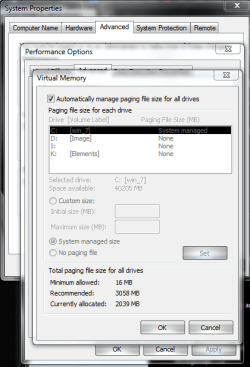
slow down there....you've asked 30 different questions without taking a breath. I will answer your first one. right click computer and select properties. choose advanced system settings. untick the top box, highlight the drive with the os on it and check no paging file then click set.
 

Attachments

  • Capture.PNG
    Capture.PNG
    27.8 KB · Views: 95

My Computer My Computer

At a glance

Windows 7 Ultimate (x64) SP1Intel 3770k 4.6GHz8GB (2x 4GB) Crucial BallistixSapphire 7950 (1060/1600)
Computer Manufacturer/Model Number
tw33k
OS
Windows 7 Ultimate (x64) SP1
CPU
Intel 3770k 4.6GHz
Motherboard
ASUS Maximus V Formula
Memory
8GB (2x 4GB) Crucial Ballistix
Graphics Card(s)
Sapphire 7950 (1060/1600)
Sound Card
On Board Realtek HD Audio
Monitor(s) Displays
27" Acer B273HU (via HDMI)
Screen Resolution
2048 x 1152
Hard Drives
Crucial M4 128GB
2TB WD Black
1TB Samsung F3 SATA
1TB WD Elite External
2TB WD USB 3.0
PSU
Corsair AX750 Gold
Case
Corsair Obsidian 800DW
Cooling
Corsair H100 (2x AP-121/2x UK-3000 push/pull)
Keyboard
Microsoft Wireless 5000
Mouse
Microsoft Wireless 5000
Internet Speed
5mb/s
Other Info
Logitech z-2300 2.1 speakers
Lamptron FC-5 v2
Hi there
2 Basic errors

1) There's no reason why a system with 8 GB RAM should boot quicker than 3 GB. The OS and its services will load completely into around 500 - 600 MB at boot. The extra RAM is used by applications etc etc.

If you pour 5 Litres of gas from a 5 litre can into say a bathtub or a large hole in the ground will the time taken to pour the gas be quicker when you pour it into the bathtub or the large hole in the ground. (I wouldn't attempt this experiment BTW) but the time taken will be the same.

2) Paging SHOULD NOT be turned off. sometimes the OS uses it even if you were to install 2 TB of RAM in your system. Having a paging file in a system with a decent amount of RAM does NOT slow it down.

Cheers
jimbo.
 

My Computer My Computer

At a glance

Linux CENTOS 7 / various Windows OS'es and se...Intel i7 Intel i58GB, 16GBOn Motherboard
Computer type
PC/Desktop
Computer Manufacturer/Model Number
Custom built, several laptops HP/ASUS
OS
Linux CENTOS 7 / various Windows OS'es and servers
CPU
Intel i7 Intel i5
Memory
8GB, 16GB
Graphics Card(s)
On Motherboard
Sound Card
Realtek HD audio
Monitor(s) Displays
Apple Cinema display, Samsung LCD
Screen Resolution
1920 X 1080
Hard Drives
4 X 1TB SATA
Mouse
Toshiba wireless laser
Internet Speed
> 20MB up
Also, a note of caution.

Many users are reporting motherboard/power issues with 4x 2GB RAM sticks. The easy solution is to boost the northbridge voltage by 0.1 or 0.2 volts. I have not looked at your mobo specs, but I suspect that the BIOS setting is not available.

I'll be busy for a bit. My bathtub is on fire.
 
Im thinking of getting a Galaxy NVIDIA GeForce 9400GT for a video card, and 2 2pack 2GB PC2 6400 DDR2 DIMM Memory Kits. Will all of this work on my computer and, are there any cheaper 2pack 2GB memory kits. Plus is that video card any good?

You need to find out what memory is currently in your computer.

Download this program,

SIW - System Information for Windows

Start it up, on the left side under 'Hardware' click 'Memory' and tell us what it says there.

Should be something like: PC2-5300 5-5-5-15 240pin DIMM
 

My Computer My Computer

At a glance

Windows 7 Ult x64 - SP1/ Windows 8 Pro x64Intel Core i5-3570K 4.6GHz8GB (2X4GB) DDR3 1600 Corsair Vengeance CL8 1.5vSapphire HD 7770 Vapor-X OC 1GB DDR5
Computer type
PC/Desktop
Computer Manufacturer/Model Number
76~2.0
OS
Windows 7 Ult x64 - SP1/ Windows 8 Pro x64
CPU
Intel Core i5-3570K 4.6GHz
Motherboard
Gigabyte GA-Z77X UD3H, f18
Memory
8GB (2X4GB) DDR3 1600 Corsair Vengeance CL8 1.5v
Graphics Card(s)
Sapphire HD 7770 Vapor-X OC 1GB DDR5
Sound Card
Onboard VIA VT2021
Monitor(s) Displays
22" LCD Dell
Screen Resolution
1680x1050
Hard Drives
Samsung 840Pro 128GB SSD,
Seagate Barracuda 500GB SATA2 7200rpm 32MB cache, Seagate Barracuda 1TB SATA2 7200rpm 32MB cache,
PSU
Corsair HX650W
Case
Cooler Master Storm Scout
Cooling
Corsair H80 2x12cm Noctua NF P12 , 2x14cm case fans
Keyboard
Logitech Wave
Mouse
CM Sentinel
Internet Speed
Dismal
Antivirus
Avast
Browser
Opera Next
Other Info
Haswell laptop: HP Envy 17t-j, i7-4700MQ, GeForce 740M 2GB DDR3, 17.3" Full HD 1920x1080, 16GB RAM, Samsung 840 Pro 128GB, 1TB Hitachi 7200 HDD,
Desktop: eSATA ports,
External eSATA Seagate 500GB SATA2 7200rpm,
External WD USB 500GB
2) Paging SHOULD NOT be turned off. sometimes the OS uses it even if you were to install 2 TB of RAM in your system. Having a paging file in a system with a decent amount of RAM does NOT slow it down.

It does actually, all of my memory related benchmarks improved after disabling the paging file.
 

My Computer My Computer

At a glance

Windows 7 Professional SP1 64-bitIntel Core i7-4930k @ 4.2GHz16GB Corsair Dominator Platinum 1866MHz CL9 (...2x eVGA GeForce GTX TITAN 6GB in SLI
Computer type
PC/Desktop
Computer Manufacturer/Model Number
Me
OS
Windows 7 Professional SP1 64-bit
CPU
Intel Core i7-4930k @ 4.2GHz
Motherboard
ASUS Rampage IV Black Edition
Memory
16GB Corsair Dominator Platinum 1866MHz CL9 (4 x 4GB)
Graphics Card(s)
2x eVGA GeForce GTX TITAN 6GB in SLI
Sound Card
Onboard ASUS SupremeFX
Monitor(s) Displays
3x 24" ASUS PA248Q IPS in Nvidia Surround, Samsung 58" 3DTV
Screen Resolution
5760x1200, 1080p
Hard Drives
2x 256GB Samsung 840 Pro's (RAID 0)
2x Seagate 4TB ST4000DM000 (RAID 1)
PSU
Corsair AX1200i PSU
Case
Corsair 900D
Cooling
Corsair H100i w/4x 120mm, 3x 120mm front, 1x 140mm rear
Keyboard
Razer BlackWidow Ultimate 2013
Mouse
Razer DeathAdder 2013
Internet Speed
250Mbit/s Download, 15 Mbit/s Upload
I got the memory part of it down but I would like to know does my computer have an extra port for a video card? I opened it up for the first time last night and I saw what I thought to be a pci-e port with nothing in it. Also im upgrading to windows 7 professional x64 hope most of my software is compatible:eek:
 

My Computer My Computer

At a glance

Windows 7 Professional x64Dual Core 3.00 GHz8 GB512 MB
Computer Manufacturer/Model Number
HP- GX611AA-ABA m8300f
OS
Windows 7 Professional x64
CPU
Dual Core 3.00 GHz
Memory
8 GB
Graphics Card(s)
512 MB
Sound Card
Intergrated Sound Card
Monitor(s) Displays
1440x900
Hard Drives
C: 289GB
D:10GB
E:298GB
Media Drive: 2TB
Keyboard
Logitech-illuminated keyboard
Internet Speed
5 MBps
Other Info
Blu-ray Drive
I got the memory part of it down but I would like to know does my computer have an extra port for a video card? I opened it up for the first time last night and I saw what I thought to be a pci-e port with nothing in it. Also im upgrading to windows 7 professional x64 hope most of my software is compatible:eek:
If you opened up your case and you see a PCI express slot open then yes you will be able to add whatever card you like.
One word of caution, HP set ups use a smaller cheaper PSU and you may not have the power to drive the card which will damage your system severely.
HP's normally configure their systems at 300-350 watts.
regards,
Adrian
 

My Computer My Computer

At a glance

Windows 7 7600 1 X64AMD PHENOM II X 550 PROCESSOR 3.1 ghzCorsair 4 gig ddr 3ati radeon 3300
Computer Manufacturer/Model Number
Custom Build
OS
Windows 7 7600 1 X64
CPU
AMD PHENOM II X 550 PROCESSOR 3.1 ghz
Motherboard
ASUS M4A78-TE
Memory
Corsair 4 gig ddr 3
Graphics Card(s)
ati radeon 3300
Sound Card
ati hd
Monitor(s) Displays
syncmaster 2033sw
Screen Resolution
1600X900 60 hz refresh
Hard Drives
twin_seagates SATA's 1 TB & 500 Gig, hitachi_slimline 160 gig
PSU
antec_550 watt
Case
cooler master GLite
Cooling
stock_heat sink
Internet Speed
20mbs up/ 1.5mbs down
Other Info
favorite child "stewie"
favorite dog "brian"
32-bit can only utilize 3GB, in some cases 4. If you want the OS to take full advantage of all 8 gigs, you NEED to install 64-bit.
 

My Computer My Computer

At a glance

Windows Vista UltimateAMD Athlon(tm) Dual Core Processor 4050e 2.10GHz4GBnVidia Geforce 6150SE
Computer Manufacturer/Model Number
eMachines ET1161-07
OS
Windows Vista Ultimate
CPU
AMD Athlon(tm) Dual Core Processor 4050e 2.10GHz
Memory
4GB
Graphics Card(s)
nVidia Geforce 6150SE
Monitor(s) Displays
eMachines E181H
if you go to crucial.com you can run a scan on your machine that will tell you slots available for RAM aswell as maximum amount able to be inserted.
 

My Computer My Computer

At a glance

Windows 8 ProfessionalAMD Phenom II X68 GBXFX ATI Radeon 4890
Computer Manufacturer/Model Number
Custom
OS
Windows 8 Professional
CPU
AMD Phenom II X6
Motherboard
ASUS
Memory
8 GB
Graphics Card(s)
XFX ATI Radeon 4890
Monitor(s) Displays
Dual 22" LCD
Screen Resolution
1680x1050
Hard Drives
PC Drives

HD0 = Crucial SSD 128gb Sata III
HD1 = 300gb (Seagate Barracuda)

NAS

HD0 = 1.5TB (Maxtor) Raid1
HD1 = 1.5TB (Maxtor) Raid1
HD2 = 1TB (Segate) Raid5
HD3 = 1TB (Segate) Raid5
HD4 = 1TB (Segate) Raid5
HD5 = 1TB (Segate) Raid5
PSU
750 watt
Mouse
Razr Mamba
Internet Speed
50 down 35 up FIOS

My Computer My Computer

At a glance

Windows 7 Professional x64Dual Core 3.00 GHz8 GB512 MB
Computer Manufacturer/Model Number
HP- GX611AA-ABA m8300f
OS
Windows 7 Professional x64
CPU
Dual Core 3.00 GHz
Memory
8 GB
Graphics Card(s)
512 MB
Sound Card
Intergrated Sound Card
Monitor(s) Displays
1440x900
Hard Drives
C: 289GB
D:10GB
E:298GB
Media Drive: 2TB
Keyboard
Logitech-illuminated keyboard
Internet Speed
5 MBps
Other Info
Blu-ray Drive
Also could I run that video card on a 64-bit OS?
 

My Computer My Computer

At a glance

Windows 7 Professional x64Dual Core 3.00 GHz8 GB512 MB
Computer Manufacturer/Model Number
HP- GX611AA-ABA m8300f
OS
Windows 7 Professional x64
CPU
Dual Core 3.00 GHz
Memory
8 GB
Graphics Card(s)
512 MB
Sound Card
Intergrated Sound Card
Monitor(s) Displays
1440x900
Hard Drives
C: 289GB
D:10GB
E:298GB
Media Drive: 2TB
Keyboard
Logitech-illuminated keyboard
Internet Speed
5 MBps
Other Info
Blu-ray Drive
that would be the last thing i would need to know.
 

My Computer My Computer

At a glance

Windows 7 Professional x64Dual Core 3.00 GHz8 GB512 MB
Computer Manufacturer/Model Number
HP- GX611AA-ABA m8300f
OS
Windows 7 Professional x64
CPU
Dual Core 3.00 GHz
Memory
8 GB
Graphics Card(s)
512 MB
Sound Card
Intergrated Sound Card
Monitor(s) Displays
1440x900
Hard Drives
C: 289GB
D:10GB
E:298GB
Media Drive: 2TB
Keyboard
Logitech-illuminated keyboard
Internet Speed
5 MBps
Other Info
Blu-ray Drive
OK well I already know the ram that I need now and I have upgraded to 64-bit already the only thing now is the graphics card. Someone said my pc may not have enough power? It says it runs on 300 watts. would that be enough to run this card?
Galaxy - NVIDIA GeForce 9400 GT 512MB DDR2 PCI Express Graphics Card - BB94GFE8HDFEXX

Also could I run that video card on a 64-bit OS?

that would be the last thing i would need to know.


Your graphics card choice will depend on what you are planning on using it for, heavy gaming, Video, etc.

Also the limits of your PSU, to help you decide look at this The Truth About Graphics Power Requirements V2 See how many watts you really need.

All cards will work on a 64bit OS, the main limitations are the connection type and power requirements.

In my opinion for that price range and power consumption you can likely find a better one. Check around.
 

My Computer My Computer

At a glance

Windows 7 Ult x64 - SP1/ Windows 8 Pro x64Intel Core i5-3570K 4.6GHz8GB (2X4GB) DDR3 1600 Corsair Vengeance CL8 1.5vSapphire HD 7770 Vapor-X OC 1GB DDR5
Computer type
PC/Desktop
Computer Manufacturer/Model Number
76~2.0
OS
Windows 7 Ult x64 - SP1/ Windows 8 Pro x64
CPU
Intel Core i5-3570K 4.6GHz
Motherboard
Gigabyte GA-Z77X UD3H, f18
Memory
8GB (2X4GB) DDR3 1600 Corsair Vengeance CL8 1.5v
Graphics Card(s)
Sapphire HD 7770 Vapor-X OC 1GB DDR5
Sound Card
Onboard VIA VT2021
Monitor(s) Displays
22" LCD Dell
Screen Resolution
1680x1050
Hard Drives
Samsung 840Pro 128GB SSD,
Seagate Barracuda 500GB SATA2 7200rpm 32MB cache, Seagate Barracuda 1TB SATA2 7200rpm 32MB cache,
PSU
Corsair HX650W
Case
Cooler Master Storm Scout
Cooling
Corsair H80 2x12cm Noctua NF P12 , 2x14cm case fans
Keyboard
Logitech Wave
Mouse
CM Sentinel
Internet Speed
Dismal
Antivirus
Avast
Browser
Opera Next
Other Info
Haswell laptop: HP Envy 17t-j, i7-4700MQ, GeForce 740M 2GB DDR3, 17.3" Full HD 1920x1080, 16GB RAM, Samsung 840 Pro 128GB, 1TB Hitachi 7200 HDD,
Desktop: eSATA ports,
External eSATA Seagate 500GB SATA2 7200rpm,
External WD USB 500GB
Thank you.
 

My Computer My Computer

At a glance

Windows 7 Professional x64Dual Core 3.00 GHz8 GB512 MB
Computer Manufacturer/Model Number
HP- GX611AA-ABA m8300f
OS
Windows 7 Professional x64
CPU
Dual Core 3.00 GHz
Memory
8 GB
Graphics Card(s)
512 MB
Sound Card
Intergrated Sound Card
Monitor(s) Displays
1440x900
Hard Drives
C: 289GB
D:10GB
E:298GB
Media Drive: 2TB
Keyboard
Logitech-illuminated keyboard
Internet Speed
5 MBps
Other Info
Blu-ray Drive
Back
Top