Laptop suddenly starts running slow after low battery

Scorcht

New member
Local time
10:30 AM
Messages
58
I was playing League of Legends one day, when my fps started to drop.
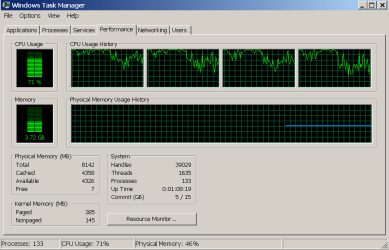
Over time, it got worse and worse, and I noticed my battery was low. Turned out, the charger fell out while I was moving my computer. So I plugged the charger in, fixed some problems with "plugged in, not charging", and continued to play. Battery was at 40%, and my fps in game still hovered about 2-20(I consider this bad, normally running at 144 fps), and decided to reboot my computer. After rebooting, I tested out my fps again, and it was at 2-12 fps this time. I finally decided to check my cpu usage, and it was hovering around 100% the whole time. I did a CCleaner registry clean, a MalwareBytes scan and clean, a CCleaner space clear, and the problem is still not fixed. Normally I am able to run League as well as many other programs at the same time without lag,I don't know why my computer suddenly started acting so slow, maybe it was because of the battery being low. Still, last time my battery was low my computer was just as fast, so I have no clue what happened. Also, its not just League that lags, Youtube and Twitch have spikes very frequently aswell. My computer also is slow, my browser freezes alot too.
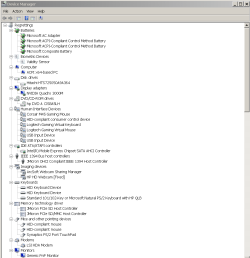
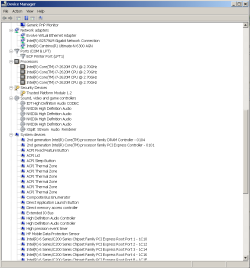
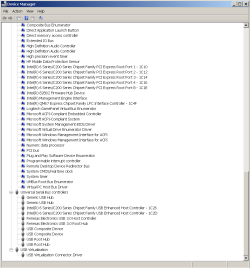
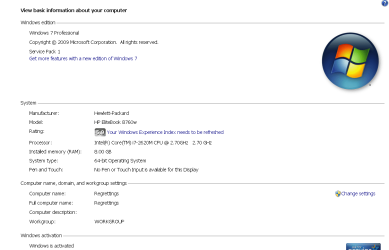
You can find my specs in the images below (I have windows 7, I just decided to use an XP look to make my computer run a little faster)
Thanks
 

Attachments
  • Capture.PNG
    Capture.PNG
    19.9 KB · Views: 0
  • Capture2.PNG
    Capture2.PNG
    2.5 KB · Views: 0
  • Capture3.PNG
    Capture3.PNG
    11 KB · Views: 0
  • Capture4.PNG
    Capture4.PNG
    21.1 KB · Views: 0
  • Capture5.PNG
    Capture5.PNG
    19.9 KB · Views: 0
  • Capture6.PNG
    Capture6.PNG
    19.6 KB · Views: 0

My Computer My Computer

At a glance

Windows 7 Home PremiumIntel(R) Core(TM) i3-2370M CPU @ 2.40GHz 2.40GHz4.00(3.85 GB usable)Laptop
Computer type
PC/Desktop
Computer Manufacturer/Model Number
Acer
OS
Windows 7 Home Premium
CPU
Intel(R) Core(TM) i3-2370M CPU @ 2.40GHz 2.40GHz
Motherboard
Laptop
Memory
4.00(3.85 GB usable)
Graphics Card(s)
Laptop
Hard Drives
Laptop
Antivirus
None (Because they all had annoying ads and did nothing)

My Computer My Computer

At a glance

Windows 7 Ultimate x64 SP1AMD Phenom 2 1090T2x8GB Kingston HyperX Fury Black 1600Mhz Unga...MSI GTX 970 Gaming 4G
Computer type
PC/Desktop
Computer Manufacturer/Model Number
Custom Build
OS
Windows 7 Ultimate x64 SP1
CPU
AMD Phenom 2 1090T
Motherboard
Gigabyte GA-890FXA-UD5
Memory
2x8GB Kingston HyperX Fury Black 1600Mhz Unganged
Graphics Card(s)
MSI GTX 970 Gaming 4G
Sound Card
Realtek On-Board HD 7.1 Audio / Logitech G35
Monitor(s) Displays
3xAcer GD245HQ
Screen Resolution
1920x1080
Hard Drives
Samsung 850 Pro 512GB SSD - OS /
WD Caviar Black SATA 3 - 1 TBx2 - Dynamic RAID 0 /
WD Caviar Green SATA 2 - 640GBx2 - Dynamic RAID 0 /
WD Caviar Green SATA 2 - 640GB - Internal Backup /
Seagate Barracude SATA 3 - 3TB - External Backup/ Sync
PSU
HighPower 1000W
Case
Cooler Master HAF 932
Cooling
Noctua NH-D14
Keyboard
Logitech G19
Mouse
Logitech G500
Internet Speed
100/4 Mbit Cable (100GB quota)
Antivirus
ZoneAlarm Extreme Security / MBAM Pro / MBAE Free / SAS Free
Browser
IE 11 - Firefox - Chrome
Other Info
Logitech F710/ G27/ G940/ Z5500 // TrackIR 5 // Nvidia 3D Surround Vision
Open processes and sort by CPU to see what's causing the spikes.
Try:
- Running the laptop without battery while AC power attached.
- Safe Mode - see if spikes happen
- if Safe Mode is ok, try a clean startup http://www.sevenforums.com/tutorial...ation-conflicts-performing-clean-startup.html
- Select high performance power option
- Load BIOS optimized defaults

Removing my battery whilst my computer was charging didn't work.
Safe mode worked, but I couldn't load League. I could tell it worked because the browser wasn't slow.
The clean startup didn't work
I've always used high performance.
I've no clue what "BIOS optimized defaults is, it would be great if you walked me through it.

Other than that, I think my cpu overheated or I burned something. I let my computer rest for a bit, and its still the same, so I probably burned something

Edit: I tried loading defaults for my bios. Did nothing, really. I found out also after some testing that running League makes my computer slower, and when its not open my computer is a little faster. I used to be able to run league perfectly as well as many more programs, what happened 0.0
 

My Computer My Computer

At a glance

Windows 7 Home PremiumIntel(R) Core(TM) i3-2370M CPU @ 2.40GHz 2.40GHz4.00(3.85 GB usable)Laptop
Computer type
PC/Desktop
Computer Manufacturer/Model Number
Acer
OS
Windows 7 Home Premium
CPU
Intel(R) Core(TM) i3-2370M CPU @ 2.40GHz 2.40GHz
Motherboard
Laptop
Memory
4.00(3.85 GB usable)
Graphics Card(s)
Laptop
Hard Drives
Laptop
Antivirus
None (Because they all had annoying ads and did nothing)
I hope you didn't remove battery while laptop was running!

When you say you burnt something, is this new symptom or just a new way to describe what you already had?

I see you have no AV, can you scan with Malwarebytes Anti-Malware free? https://www.malwarebytes.org/

Have you checked Processes with CPU sorted? which process is eating CPU time?
 

My Computer My Computer

At a glance

Windows 7 Ultimate x64 SP1AMD Phenom 2 1090T2x8GB Kingston HyperX Fury Black 1600Mhz Unga...MSI GTX 970 Gaming 4G
Computer type
PC/Desktop
Computer Manufacturer/Model Number
Custom Build
OS
Windows 7 Ultimate x64 SP1
CPU
AMD Phenom 2 1090T
Motherboard
Gigabyte GA-890FXA-UD5
Memory
2x8GB Kingston HyperX Fury Black 1600Mhz Unganged
Graphics Card(s)
MSI GTX 970 Gaming 4G
Sound Card
Realtek On-Board HD 7.1 Audio / Logitech G35
Monitor(s) Displays
3xAcer GD245HQ
Screen Resolution
1920x1080
Hard Drives
Samsung 850 Pro 512GB SSD - OS /
WD Caviar Black SATA 3 - 1 TBx2 - Dynamic RAID 0 /
WD Caviar Green SATA 2 - 640GBx2 - Dynamic RAID 0 /
WD Caviar Green SATA 2 - 640GB - Internal Backup /
Seagate Barracude SATA 3 - 3TB - External Backup/ Sync
PSU
HighPower 1000W
Case
Cooler Master HAF 932
Cooling
Noctua NH-D14
Keyboard
Logitech G19
Mouse
Logitech G500
Internet Speed
100/4 Mbit Cable (100GB quota)
Antivirus
ZoneAlarm Extreme Security / MBAM Pro / MBAE Free / SAS Free
Browser
IE 11 - Firefox - Chrome
Other Info
Logitech F710/ G27/ G940/ Z5500 // TrackIR 5 // Nvidia 3D Surround Vision
I hope you didn't remove battery while laptop was running!

When you say you burnt something, is this new symptom or just a new way to describe what you already had?

I see you have no AV, can you scan with Malwarebytes Anti-Malware free? https://www.malwarebytes.org/

Have you checked Processes with CPU sorted? which process is eating CPU time?

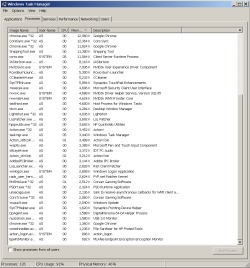
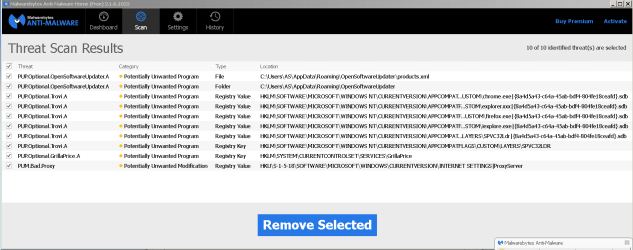
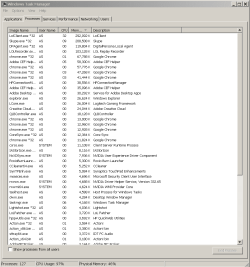
I took the battery out when it was running ;o, its just that is was plugged in. I have no idea what is going on, this has never happened to me before. Obviously League is taking most of the CPU up, but here's some screenshots of the processes. I'll also send a screenshot of the Malwarebytes scan.

Edit: MalwareBytes scan did not work. ;c
 

Attachments

  • Capture3.PNG
    Capture3.PNG
    35.2 KB · Views: 3
  • Capture.PNG
    Capture.PNG
    18.6 KB · Views: 1
  • Capture2.PNG
    Capture2.PNG
    20.2 KB · Views: 1
Last edited:

My Computer My Computer

At a glance

Windows 7 Home PremiumIntel(R) Core(TM) i3-2370M CPU @ 2.40GHz 2.40GHz4.00(3.85 GB usable)Laptop
Computer type
PC/Desktop
Computer Manufacturer/Model Number
Acer
OS
Windows 7 Home Premium
CPU
Intel(R) Core(TM) i3-2370M CPU @ 2.40GHz 2.40GHz
Motherboard
Laptop
Memory
4.00(3.85 GB usable)
Graphics Card(s)
Laptop
Hard Drives
Laptop
Antivirus
None (Because they all had annoying ads and did nothing)
Malwarebytes did work you just didnt clear the errors, that bottom one looks really suspicious.

You also seem to be running a lot of services that "talk" to their servers all of the time(checking for updates) on my own system i set a lot of them to manual and check for updates weekly,
>> my rule of thumb if i dont use it daily set it to manual, ie skype Adobe etc. <<

I also see that youve had Mcafee at some time it has not been fully uninstalled
 

My Computer My Computer

At a glance

W7 home premium 32bit/W7HP 64bit/w10 tp insid...E5300 dual core3gbNvidia Geforce 7100 Nforce 630i
Computer type
PC/Desktop
Computer Manufacturer/Model Number
medionl/Aspire 6930G/acer x55a
OS
W7 home premium 32bit/W7HP 64bit/w10 tp insider ring
CPU
E5300 dual core
Motherboard
medion MS7366
Memory
3gb
Graphics Card(s)
Nvidia Geforce 7100 Nforce 630i
Monitor(s) Displays
avixc
Internet Speed
n (isp resticted to 72)
Antivirus
mse/pands
Browser
palemoon
Other Info
Belkin Fd7050 n USB using Railink RT2870 drivers, more upto date
Back
Top