Move boot files from EFI partition to system partition?

Josep

New member
Local time
7:06 PM
Messages
3
Hello everyone,
I usually install my OS myself but when I bought this computer I asked the store to install the Windows 7 Professional x64 disc I purchased with it.
Today I decided to do a long long overdue backup to the system partition. My backup software of choice is DriveImage XML, been using it for years with good resaults, however, when examining my system partition, I couldn't find the boot manager. After some searching I found that the boot files are not in the system partition. I assume this because disc management shows a 100MB EFI partition and 'diskpart>list disk' shows the HDD to be GPT.
As far as I know, DriveImage XML cannot backup the EFI partition and backing up the Windows partition alone will not allow me to restore the computer in case of hard drive failure.

So my question is: Is it possible to remove this UEFI nonsense, copy the boot files to the system partition (aka Windows partition, drive C) and make windows boot from there without uninstalling the OS?
 

My Computer My Computer

At a glance

Windows 7 Professional x64 SP1
Computer type
PC/Desktop
OS
Windows 7 Professional x64 SP1
Just try using Macrium Reflect free edition to image both partitions before you make any changes.

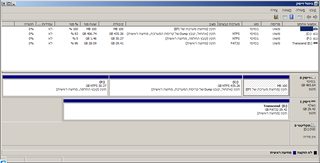
Please post a shot of disk management, fully expanded.
 

My Computer My Computer

At a glance

Windows 10 Pro x64Intel Core i7 6700KGSkill TridentZ RGB 16GB 3600 16-16-16-36EVGA GTX 980 Ti SC x2
Computer type
PC/Desktop
Computer Manufacturer/Model Number
Skylake Special #666
OS
Windows 10 Pro x64
CPU
Intel Core i7 6700K
Motherboard
Asus Sabertooth Z170 Mark 1
Memory
GSkill TridentZ RGB 16GB 3600 16-16-16-36
Graphics Card(s)
EVGA GTX 980 Ti SC x2
Sound Card
Realtek High Definition
Monitor(s) Displays
AOC G2460PG
Screen Resolution
1920 x 1080 144Hz
Hard Drives
Samsung 860 Pro 256GB, Seagate Barracuda 4TB x2
PSU
EVGA 1000 P2, EVGA White Custom Braided Cables
Case
Corsair Vengeance C70 Gunmetal Black
Cooling
Corsair H100i v2, Corsair ML120 x2, Thermal Grizzly Kryonaut
Keyboard
Logitech G910 Orion Spectrum
Mouse
Logitech G700s
Internet Speed
Verizon Fios Quantum Gateway 75/75
Antivirus
Windows Defender, Malwarebytes Free 3.8.3
Browser
Chrome
Other Info
Corsair SP120 x4, LG Blu-ray Drive, Durabrand HT-395 100 Watt Dolby Digital Amp, Corsair H2100 Wireless 7.1 Headset
Hey AddRAM, thanks for replying!
Trying other backup software is something I wanted to avoid, but if what I'm asking for isn't possible or very complicated I guess I won't have much choice :/
As for diskmgmt, it's not in English so I'm not sure it would help you deduce anything... Is there some specific information you're looking for?
 

My Computer My Computer

At a glance

Windows 7 Professional x64 SP1
Computer type
PC/Desktop
OS
Windows 7 Professional x64 SP1
If your imaging app supports the new UEFI BIOS' then it should include the EFI System partition and any accompanying hidden partitions by default. If not use Macrium Imaging - Windows 7 Help Forums as suggested which is easy, nearly effortless.

You must have the EFI System partition and often one other MSR hidden partition to boot an EFI install. Unlike MBR installs, this cannot be moved into C with Win7.
 
Last edited:
Just for FYI, to boot Windows on a UEFI motherboard not in legacy mode. You need the EFI partition.
 

My Computer My Computer

At a glance

Windows 10 Pro (x64)Intel Core i7-3930K (3.2GHz - 4.5GHz)4x Samsung 4GB PC3-12800 DDR3 (16GB 1600MHz)Nvidia Geforce GTX 690
Computer type
PC/Desktop
Computer Manufacturer/Model Number
Alienware Aurora ALX R4
OS
Windows 10 Pro (x64)
CPU
Intel Core i7-3930K (3.2GHz - 4.5GHz)
Motherboard
Alienware Aurora-R4 x79
Memory
4x Samsung 4GB PC3-12800 DDR3 (16GB 1600MHz)
Graphics Card(s)
Nvidia Geforce GTX 690
Sound Card
SteelSeries Siberia Elite
Monitor(s) Displays
Dell UltraSharp U3011
Screen Resolution
2560x1600
Hard Drives
Samsung 850 Pro 256 GB, Seagate 1TB Desktop Hybrid HDD, 2x Western Digital 4TB Green HDD
PSU
875W Some Dell PSU <.<
Case
Alienware Aurora ALX
Cooling
Custom Liquid Cooling (EK CPU & GPU blocks) dual EK 480RAD
Keyboard
Logitech G710+ Mechanical
Mouse
Logitech G700s
Internet Speed
Verizon Fios (50 mbps average)
Other Info
Server: Intel NUC D54250WYK: i5-4250U, 16GB, 256 GB mSATA, Windows Server 2012 R2
Just post the shot, we`ll figure it out, we know what we`re looking at :)
 

My Computer My Computer

At a glance

Windows 10 Pro x64Intel Core i7 6700KGSkill TridentZ RGB 16GB 3600 16-16-16-36EVGA GTX 980 Ti SC x2
Computer type
PC/Desktop
Computer Manufacturer/Model Number
Skylake Special #666
OS
Windows 10 Pro x64
CPU
Intel Core i7 6700K
Motherboard
Asus Sabertooth Z170 Mark 1
Memory
GSkill TridentZ RGB 16GB 3600 16-16-16-36
Graphics Card(s)
EVGA GTX 980 Ti SC x2
Sound Card
Realtek High Definition
Monitor(s) Displays
AOC G2460PG
Screen Resolution
1920 x 1080 144Hz
Hard Drives
Samsung 860 Pro 256GB, Seagate Barracuda 4TB x2
PSU
EVGA 1000 P2, EVGA White Custom Braided Cables
Case
Corsair Vengeance C70 Gunmetal Black
Cooling
Corsair H100i v2, Corsair ML120 x2, Thermal Grizzly Kryonaut
Keyboard
Logitech G910 Orion Spectrum
Mouse
Logitech G700s
Internet Speed
Verizon Fios Quantum Gateway 75/75
Antivirus
Windows Defender, Malwarebytes Free 3.8.3
Browser
Chrome
Other Info
Corsair SP120 x4, LG Blu-ray Drive, Durabrand HT-395 100 Watt Dolby Digital Amp, Corsair H2100 Wireless 7.1 Headset
If your imaging app supports the new UEFI BIOS' then it should include the EFI System partition and any accompanying hidden partitions by default. If not use Macrium Imaging - Windows 7 Help Forums as suggested which is easy, nearly effortless.
I'll probably try Reflect either way, but I still want to know if what I ask for is even possible.


Just for FYI, to boot Windows on a UEFI motherboard not in legacy mode. You need the EFI partition.
Yes, I did manage to figure this out myself, however, my question was if it is possible to change to legacy mode and then boot Windows 7 from a GPT drive without reinstalling.


Just post the shot, we`ll figure it out, we know what we`re looking at :)
Sure, here it is:


Thanks for all the help so far, guys.
 

My Computer My Computer

At a glance

Windows 7 Professional x64 SP1
Computer type
PC/Desktop
OS
Windows 7 Professional x64 SP1
When you install or boot Macrium app or boot disk, it will have the EFI partition and C pre-checked to select. Back those up to external or another hard drive.

When ready to restore the image, open Macrium or boot its disk, select Recover, browse to the image and open it, drag the two partitions down to the target disk which you've either already wiped or use the links below the partitions to delete. You can resize the C partition to desired size using the same link below the dragged partition. Then apply the image with all the presets that will handled everything by default.
 
Back
Top