No bootable device detected on first startup, second will be fine.

Hmm, I am not convinced to call this a hardware fault or an OS misconfiguration to be honest.

Did you check AAM/APM of the HDD yet (post #8)?

Then I would try in order:
- use another power connector from the PSU (a different cable coming out) but not the same plug on the PSU. I hope this one is clear.
- Then I would find any SATA harddisk (maybe you have one laying around or ask friends) and remove your current one/s and see if it is recognized by BIOS, even install Win7 on it just to test
- if the issue continue with the other HDD too, either BIOS at fault or just somehow misconfigured. Does your BIOS have an option to delay start or similar?


As for the AAM/APM, i dont know how to use it. I maxed the AAM to the right but nothing happened. I tried using another connecter from the PSU also (my generic PSU have two actually) but still it doesnt show. As for the SATA harddisk, I'll find one within this week. My bios actually have a fastboot settings (afaik it doesnt wait for the other pc parts to start to enter boot). I ticked it to enabled but still doesnt work. I ticked every settings under Boot options. And restarted but still it persists. I do have an additional problem. Sometimes, when I'm playing dota2 while using google chrome with few tabs (on windows 8.1) my windows task manager says that my disk is 100% at used. I've opened a few tabs (maybe four) and continued playing. Then my fps spikes up (inside game). It's only a browser so I think thats not normal because I've tried playing dota2 and dishonored simultaneously on win7 but theres no fps drop.

I repeat this started before I even try dual-boot. But I think the UEFI/Legacy is being messed up because Im using Win7 and Win8. I'll try to reformat this week to Windows 8.1 only.
 
Last edited:

My Computer My Computer

At a glance

Windows 7 Ultimate x64 Dual Boot with Windows...Amd A8 6600kKingston Fury 1866 4GBx1Integrated GPU Radeon HD 8530.
Computer type
PC/Desktop
OS
Windows 7 Ultimate x64 Dual Boot with Windows 8.1 x64
CPU
Amd A8 6600k
Motherboard
Gigabyte F2A78M-HD2
Memory
Kingston Fury 1866 4GBx1
Graphics Card(s)
Integrated GPU Radeon HD 8530.
Hard Drives
Seagate 500GB 7200rpm
AAM/APM: yes, slide to performance (right side)

Fast boot: I would keep it disabled (for win7), no idea about win8

Wait for a reformat until you test with another HDD
 

My Computer My Computer

At a glance

Windows 7 Ultimate x64 SP1AMD Phenom 2 1090T2x8GB Kingston HyperX Fury Black 1600Mhz Unga...MSI GTX 970 Gaming 4G
Computer type
PC/Desktop
Computer Manufacturer/Model Number
Custom Build
OS
Windows 7 Ultimate x64 SP1
CPU
AMD Phenom 2 1090T
Motherboard
Gigabyte GA-890FXA-UD5
Memory
2x8GB Kingston HyperX Fury Black 1600Mhz Unganged
Graphics Card(s)
MSI GTX 970 Gaming 4G
Sound Card
Realtek On-Board HD 7.1 Audio / Logitech G35
Monitor(s) Displays
3xAcer GD245HQ
Screen Resolution
1920x1080
Hard Drives
Samsung 850 Pro 512GB SSD - OS /
WD Caviar Black SATA 3 - 1 TBx2 - Dynamic RAID 0 /
WD Caviar Green SATA 2 - 640GBx2 - Dynamic RAID 0 /
WD Caviar Green SATA 2 - 640GB - Internal Backup /
Seagate Barracude SATA 3 - 3TB - External Backup/ Sync
PSU
HighPower 1000W
Case
Cooler Master HAF 932
Cooling
Noctua NH-D14
Keyboard
Logitech G19
Mouse
Logitech G500
Internet Speed
100/4 Mbit Cable (100GB quota)
Antivirus
ZoneAlarm Extreme Security / MBAM Pro / MBAE Free / SAS Free
Browser
IE 11 - Firefox - Chrome
Other Info
Logitech F710/ G27/ G940/ Z5500 // TrackIR 5 // Nvidia 3D Surround Vision
Still need to see Windows 7 Disk Mgmt screenshot to be sure but it appears both OS's are being booted from the old Win7 System Reserved partition which was only updated during the Windows 8 install. Do you get the old-style and not modern Windows 8 Boot Menu?

Try running from the Windows 8 disk an Automatic Repair - Run in Windows 8
to see if it will change to the Windows 8 modern Boot Menu and perhaps resolve the boot problem.
 
Still need to see Windows 7 Disk Mgmt screenshot to be sure but it appears both OS's are being booted from the old Win7 System Reserved partition which was only updated during the Windows 8 install. Do you get the old-style and not modern Windows 8 Boot Menu?

Try running from the Windows 8 disk an Automatic Repair - Run in Windows 8
to see if it will change to the Windows 8 modern Boot Menu and perhaps resolve the boot problem.

I'll give a screenshot of the Win7 Disk Management when I get home. I will also try running a Windows 8 Automatic Repair. Will drop by later. Thanks

Edit: I'll also update the drivers and win8.1 as well
 
Last edited:

My Computer My Computer

At a glance

Windows 7 Ultimate x64 Dual Boot with Windows...Amd A8 6600kKingston Fury 1866 4GBx1Integrated GPU Radeon HD 8530.
Computer type
PC/Desktop
OS
Windows 7 Ultimate x64 Dual Boot with Windows 8.1 x64
CPU
Amd A8 6600k
Motherboard
Gigabyte F2A78M-HD2
Memory
Kingston Fury 1866 4GBx1
Graphics Card(s)
Integrated GPU Radeon HD 8530.
Hard Drives
Seagate 500GB 7200rpm
Still need to see Windows 7 Disk Mgmt screenshot to be sure but it appears both OS's are being booted from the old Win7 System Reserved partition which was only updated during the Windows 8 install. Do you get the old-style and not modern Windows 8 Boot Menu?

Try running from the Windows 8 disk an Automatic Repair - Run in Windows 8
to see if it will change to the Windows 8 modern Boot Menu and perhaps resolve the boot problem.


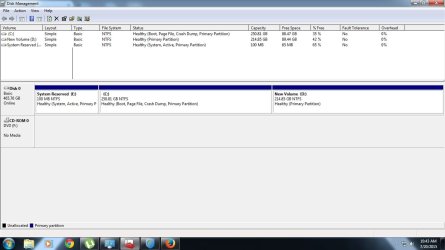
Here you go. Win7 Disk Management.
 

Attachments

  • Untitled.jpg
    Untitled.jpg
    71.7 KB · Views: 3

My Computer My Computer

At a glance

Windows 7 Ultimate x64 Dual Boot with Windows...Amd A8 6600kKingston Fury 1866 4GBx1Integrated GPU Radeon HD 8530.
Computer type
PC/Desktop
OS
Windows 7 Ultimate x64 Dual Boot with Windows 8.1 x64
CPU
Amd A8 6600k
Motherboard
Gigabyte F2A78M-HD2
Memory
Kingston Fury 1866 4GBx1
Graphics Card(s)
Integrated GPU Radeon HD 8530.
Hard Drives
Seagate 500GB 7200rpm
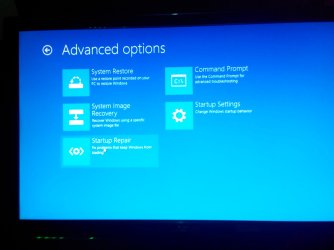
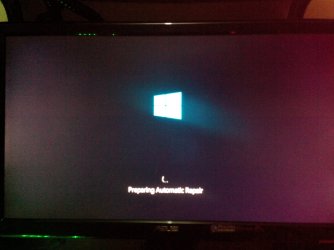
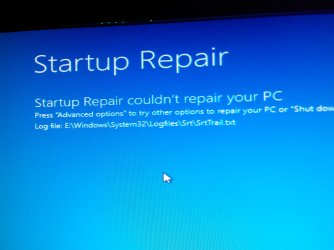
Here's what i get on system repair
 

Attachments

  • IMG_20150720_110422.jpg
    IMG_20150720_110422.jpg
    240 KB · Views: 0
  • IMG_20150720_110440.jpg
    IMG_20150720_110440.jpg
    1 MB · Views: 0
  • IMG_20150720_110534.jpg
    IMG_20150720_110534.jpg
    583.8 KB · Views: 0

My Computer My Computer

At a glance

Windows 7 Ultimate x64 Dual Boot with Windows...Amd A8 6600kKingston Fury 1866 4GBx1Integrated GPU Radeon HD 8530.
Computer type
PC/Desktop
OS
Windows 7 Ultimate x64 Dual Boot with Windows 8.1 x64
CPU
Amd A8 6600k
Motherboard
Gigabyte F2A78M-HD2
Memory
Kingston Fury 1866 4GBx1
Graphics Card(s)
Integrated GPU Radeon HD 8530.
Hard Drives
Seagate 500GB 7200rpm
Cant even find the logs
 

Attachments

  • 14373621269231666244325.jpg
    14373621269231666244325.jpg
    651.8 KB · Views: 0

My Computer My Computer

At a glance

Windows 7 Ultimate x64 Dual Boot with Windows...Amd A8 6600kKingston Fury 1866 4GBx1Integrated GPU Radeon HD 8530.
Computer type
PC/Desktop
OS
Windows 7 Ultimate x64 Dual Boot with Windows 8.1 x64
CPU
Amd A8 6600k
Motherboard
Gigabyte F2A78M-HD2
Memory
Kingston Fury 1866 4GBx1
Graphics Card(s)
Integrated GPU Radeon HD 8530.
Hard Drives
Seagate 500GB 7200rpm
You can run Win7 Startup Repair from its disk to see if it finds anything to repair which might solve your issue, or at least allow 8 Automatic Repair to complete.

I think your best approach is to make Windows 8 independently bootable with the modern interface, then add Windows 7 to a Dual Boot menu.

Normally Automatic Repair should accomplish this but there is apparently some corruption that is blocking it, likely in the Windows 7 System Reserved partition.

Further approaches are experimental so I'd save a backup image of the full System using Macrium Imaging - Windows 7 Help Forums which allows if necessary you to restore one or both images to places other than where they are now, which Win7 imaging doesn't.

Then you can try moving the Bootmgr - Move to C:\ with EasyBCD from within Windows 8. If it goes as planned it will reboot with the Windows 8 GUI and the WIndows 8 partition will become marked System Active meaning it is booting the System. This can also possibly be accomplished by first marking Windows 8 partition Active then running Automatic Repair to direct the boot files to C. If it will run then you'll know the corruption is on the System Reserved partition.

Once Windows 8 boots and is System Active, you can add Windows 7 in the EasyBCD Add New Entry tab by Name, Type of OS and Drive letter shown from Windows 8.
 
I think i can follow. But is reformatting my hdd to a single OS like win8.1 with no other partition would speed up the process and finish the problem on booting?? I dont have anything to backup anyway. I just use this PC on playing dota2.
 

My Computer My Computer

At a glance

Windows 7 Ultimate x64 Dual Boot with Windows...Amd A8 6600kKingston Fury 1866 4GBx1Integrated GPU Radeon HD 8530.
Computer type
PC/Desktop
OS
Windows 7 Ultimate x64 Dual Boot with Windows 8.1 x64
CPU
Amd A8 6600k
Motherboard
Gigabyte F2A78M-HD2
Memory
Kingston Fury 1866 4GBx1
Graphics Card(s)
Integrated GPU Radeon HD 8530.
Hard Drives
Seagate 500GB 7200rpm
Yes, but if you're going to do that you might as well experiment with moving the Bootloader to Windows 8 and adding WIndows 7 to a Dual Boot anyway. It might just solve your problem quickly.

Then to remove Windows 7 you'd only need to delete its partitions including System Reserved, once Windows 8 is System Active.

Is there any reason you prefer Windows 8? I'd use its license to Upgrade to Windows 10 myself. You can do a trial Upgrade of WIndows 8 to 10 using the same ISO from Download Windows 10 Insider Preview ISO File - Windows 10 Forums which will rewrite the boot files anyway and assert the Windows 10 boot loader to dual boot with Windows 7.

You could do the same with Win7 to Windows 10 Upgrade.

Either OS being Upgraded or doing a Clean Install Windows 10 Technical Preview should configure the remaining OS into a Dual Boot.
 
I prefer using windows 8 because the only game in there is dota2. no other programs so no updating. haha
 

My Computer My Computer

At a glance

Windows 7 Ultimate x64 Dual Boot with Windows...Amd A8 6600kKingston Fury 1866 4GBx1Integrated GPU Radeon HD 8530.
Computer type
PC/Desktop
OS
Windows 7 Ultimate x64 Dual Boot with Windows 8.1 x64
CPU
Amd A8 6600k
Motherboard
Gigabyte F2A78M-HD2
Memory
Kingston Fury 1866 4GBx1
Graphics Card(s)
Integrated GPU Radeon HD 8530.
Hard Drives
Seagate 500GB 7200rpm
I need some clarification. I installed win8 on Drive D: and windows 7 on Drive C. I will use this intruction given here right? I remembered I first installed win7 then dual boot win8 next. Does this info make a difference?
 

My Computer My Computer

At a glance

Windows 7 Ultimate x64 Dual Boot with Windows...Amd A8 6600kKingston Fury 1866 4GBx1Integrated GPU Radeon HD 8530.
Computer type
PC/Desktop
OS
Windows 7 Ultimate x64 Dual Boot with Windows 8.1 x64
CPU
Amd A8 6600k
Motherboard
Gigabyte F2A78M-HD2
Memory
Kingston Fury 1866 4GBx1
Graphics Card(s)
Integrated GPU Radeon HD 8530.
Hard Drives
Seagate 500GB 7200rpm
found it. even my windows update wont update because of error WindowsUpdate_80070570 OR WindowsUpdate_dt000. Shall i reformat my computer and erase all partitions and stick to one OS?
 

My Computer My Computer

At a glance

Windows 7 Ultimate x64 Dual Boot with Windows...Amd A8 6600kKingston Fury 1866 4GBx1Integrated GPU Radeon HD 8530.
Computer type
PC/Desktop
OS
Windows 7 Ultimate x64 Dual Boot with Windows 8.1 x64
CPU
Amd A8 6600k
Motherboard
Gigabyte F2A78M-HD2
Memory
Kingston Fury 1866 4GBx1
Graphics Card(s)
Integrated GPU Radeon HD 8530.
Hard Drives
Seagate 500GB 7200rpm
okay. will update you later when i get home. or tomorrow maybe because thats my day off
 

My Computer My Computer

At a glance

Windows 7 Ultimate x64 Dual Boot with Windows...Amd A8 6600kKingston Fury 1866 4GBx1Integrated GPU Radeon HD 8530.
Computer type
PC/Desktop
OS
Windows 7 Ultimate x64 Dual Boot with Windows 8.1 x64
CPU
Amd A8 6600k
Motherboard
Gigabyte F2A78M-HD2
Memory
Kingston Fury 1866 4GBx1
Graphics Card(s)
Integrated GPU Radeon HD 8530.
Hard Drives
Seagate 500GB 7200rpm
That's fine. Stick with these same steps to get and keep a perfect Clean Reinstall Windows 7
and it will be a perfect install for as long as you use only the tools and methods given.

still doesnt work. followed all your method from backup image to easybcd. will i reinstall os? one os this time so it will not mess up the boot i think?
 

My Computer My Computer

At a glance

Windows 7 Ultimate x64 Dual Boot with Windows...Amd A8 6600kKingston Fury 1866 4GBx1Integrated GPU Radeon HD 8530.
Computer type
PC/Desktop
OS
Windows 7 Ultimate x64 Dual Boot with Windows 8.1 x64
CPU
Amd A8 6600k
Motherboard
Gigabyte F2A78M-HD2
Memory
Kingston Fury 1866 4GBx1
Graphics Card(s)
Integrated GPU Radeon HD 8530.
Hard Drives
Seagate 500GB 7200rpm
Followed what method? You referenced Clean Reinstall in quote but then asked if you should reinstall. So exactly what method did you follow that didn't work?
 
Followed what method? You referenced Clean Reinstall in quote but then asked if you should reinstall. So exactly what method did you follow that didn't work?

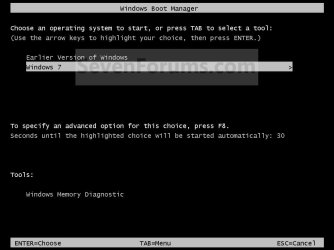
Im sorry. I followed your method only up to moving the bootmanager to C. Btw, when I moved it to C within win7, it shows something like the attachment. just replace earlier version of windows to win 8.1. then i run automatic repair within win 8. it just says repairing then instant shutdown. when i reset it, it goes back on the multiboot loader of windows 8.1 which uses the blue theme. then thats when i told you it doesnt work. maybe i'll clean reinstall both os. thanks for your time
 

Attachments

  • Example.jpg
    Example.jpg
    41.4 KB · Views: 0

My Computer My Computer

At a glance

Windows 7 Ultimate x64 Dual Boot with Windows...Amd A8 6600kKingston Fury 1866 4GBx1Integrated GPU Radeon HD 8530.
Computer type
PC/Desktop
OS
Windows 7 Ultimate x64 Dual Boot with Windows 8.1 x64
CPU
Amd A8 6600k
Motherboard
Gigabyte F2A78M-HD2
Memory
Kingston Fury 1866 4GBx1
Graphics Card(s)
Integrated GPU Radeon HD 8530.
Hard Drives
Seagate 500GB 7200rpm
Followed what method? You referenced Clean Reinstall in quote but then asked if you should reinstall. So exactly what method did you follow that didn't work?

Im sorry. I followed your method only up to moving the bootmanager to C. Btw, when I moved it to C within win7, it shows something like the attachment. just replace earlier version of windows to win 8.1. then i run automatic repair within win 8. it just says repairing then instant shutdown. when i reset it, it goes back on the multiboot loader of windows 8.1 which uses the blue theme. then thats when i told you it doesnt work. maybe i'll clean reinstall both os. thanks for your time

Did you try to move Bootmgr - Move to C:\ with EasyBCD - Windows 7 Forums while booted into Windows 8?

Try that to see if after reboot it will give the modern Boot Menu and move the System Active flags in Disk Mgmt to Windows 8.

If necessary you can then use EasyBCD to add Windows 7 to the Boot Menu if it won't respond, removing any old Windows 7 listing first if necessary.

Please post back a screenshot of Disk Management - Post a Screen Capture Image

If you really want to reinstall Windows 8 then simply delete its partition during reinstall and create/format a new one. This should configure Windows 7 into a Dual Boot, but if not you can use EasyBCD from the reinstalled 8 to add Windows 7 by drive letter showing in Windows 8. Be sure to delete any old listing of Windows 7 in EasyBCD that doesn't work before adding it again.
 
Followed what method? You referenced Clean Reinstall in quote but then asked if you should reinstall. So exactly what method did you follow that didn't work?

Im sorry. I followed your method only up to moving the bootmanager to C. Btw, when I moved it to C within win7, it shows something like the attachment. just replace earlier version of windows to win 8.1. then i run automatic repair within win 8. it just says repairing then instant shutdown. when i reset it, it goes back on the multiboot loader of windows 8.1 which uses the blue theme. then thats when i told you it doesnt work. maybe i'll clean reinstall both os. thanks for your time

Did you try to move Bootmgr - Move to C:\ with EasyBCD - Windows 7 Forums while booted into Windows 8?

Try that to see if after reboot it will give the modern Boot Menu and move the System Active flags in Disk Mgmt to Windows 8.

If necessary you can then use EasyBCD to add Windows 7 to the Boot Menu if it won't respond, removing any old Windows 7 listing first if necessary.

Please post back a screenshot of Disk Management - Post a Screen Capture Image

If you really want to reinstall Windows 8 then simply delete its partition during reinstall and create/format a new one. This should configure Windows 7 into a Dual Boot, but if not you can use EasyBCD from the reinstalled 8 to add Windows 7 by drive letter showing in Windows 8. Be sure to delete any old listing of Windows 7 in EasyBCD that doesn't work before adding it again.


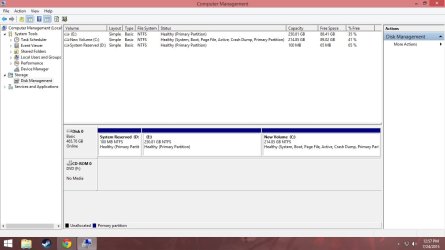
Here you go. The screenshot your asking for. I moved the boot to C:. So, what will I do next?
 

Attachments

  • Untitled.jpg
    Untitled.jpg
    74.2 KB · Views: 1

My Computer My Computer

At a glance

Windows 7 Ultimate x64 Dual Boot with Windows...Amd A8 6600kKingston Fury 1866 4GBx1Integrated GPU Radeon HD 8530.
Computer type
PC/Desktop
OS
Windows 7 Ultimate x64 Dual Boot with Windows 8.1 x64
CPU
Amd A8 6600k
Motherboard
Gigabyte F2A78M-HD2
Memory
Kingston Fury 1866 4GBx1
Graphics Card(s)
Integrated GPU Radeon HD 8530.
Hard Drives
Seagate 500GB 7200rpm
Back
Top