No bootable device detected on first startup, second will be fine.

Do you now have a working modern Windows 8-style Dual Boot menu with Windows 7 also starting from it? If not I've told you what to do several times now.

 
Do you now have a working modern Windows 8-style Dual Boot menu with Windows 7 also starting from it? If not I've told you what to do several times now.

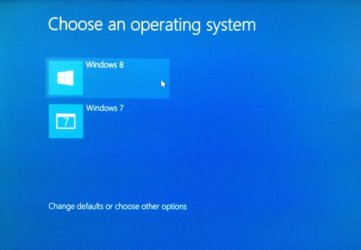
This one? I have this Dual Boot Menu since I had installed Win8.1 6 months ago afaik. Or am i wrong? thanks again :)
 

Attachments

  • startup-menu.jpg
    startup-menu.jpg
    22.3 KB · Views: 10

My Computer My Computer

Computer type
PC/Desktop
OS
Windows 7 Ultimate x64 Dual Boot with Windows 8.1 x64
CPU
Amd A8 6600k
Motherboard
Gigabyte F2A78M-HD2
Memory
Kingston Fury 1866 4GBx1
Graphics Card(s)
Integrated GPU Radeon HD 8530.
Hard Drives
Seagate 500GB 7200rpm
Do you now have a working modern Windows 8-style Dual Boot menu with Windows 7 also starting from it? If not I've told you what to do several times now.

"Im sorry. I followed your method only up to moving the bootmanager to C. Btw, when I moved it to C within win7, it shows something like the attachment. just replace earlier version of windows to win 8.1. then i run automatic repair within win 8. it just says repairing then instant shutdown. when i reset it, it goes back on the multiboot loader of windows 8.1 which uses the blue theme. then thats when i told you it doesnt work. maybe i'll clean reinstall both os. thanks for your time"

prior to my previous comment, this "i told you it doesnt work" means that i still get the no bootable device detected during start-up and yes the dual boot menu of windows 8.1 with windows 7 starting from it works. just to clear things up. thanks again
 

My Computer My Computer

Computer type
PC/Desktop
OS
Windows 7 Ultimate x64 Dual Boot with Windows 8.1 x64
CPU
Amd A8 6600k
Motherboard
Gigabyte F2A78M-HD2
Memory
Kingston Fury 1866 4GBx1
Graphics Card(s)
Integrated GPU Radeon HD 8530.
Hard Drives
Seagate 500GB 7200rpm
You haven't tried installing on a different HDD yet, right? :)
 

My Computer My Computer

Computer type
PC/Desktop
Computer Manufacturer/Model Number
Custom Build
OS
Windows 7 Ultimate x64 SP1
CPU
AMD Phenom 2 1090T
Motherboard
Gigabyte GA-890FXA-UD5
Memory
2x8GB Kingston HyperX Fury Black 1600Mhz Unganged
Graphics Card(s)
MSI GTX 970 Gaming 4G
Sound Card
Realtek On-Board HD 7.1 Audio / Logitech G35
Monitor(s) Displays
3xAcer GD245HQ
Screen Resolution
1920x1080
Hard Drives
Samsung 850 Pro 512GB SSD - OS /
WD Caviar Black SATA 3 - 1 TBx2 - Dynamic RAID 0 /
WD Caviar Green SATA 2 - 640GBx2 - Dynamic RAID 0 /
WD Caviar Green SATA 2 - 640GB - Internal Backup /
Seagate Barracude SATA 3 - 3TB - External Backup/ Sync
PSU
HighPower 1000W
Case
Cooler Master HAF 932
Cooling
Noctua NH-D14
Keyboard
Logitech G19
Mouse
Logitech G500
Internet Speed
100/4 Mbit Cable (100GB quota)
Antivirus
ZoneAlarm Extreme Security / MBAM Pro / MBAE Free / SAS Free
Browser
IE 11 - Firefox - Chrome
Other Info
Logitech F710/ G27/ G940/ Z5500 // TrackIR 5 // Nvidia 3D Surround Vision
Yes, that is the modern Windows 8 Boot Menu.

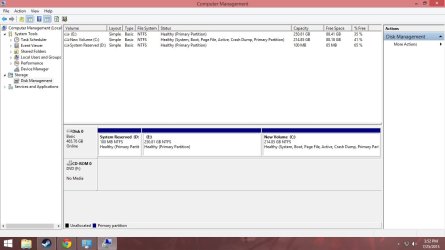
Please post back a screenshot of Windows 8 Disk Management - Post a Screen Capture Image
so we can see if the System Active flags (Bootmgr) were moved to Windows 8 partition while it was booted as C. The idea was to move the booting partition to Windows 8 to see if it corrected the boot problem.

If you are going to reinstall then putting the OS's on separate hard drives with each unplugged when the other is installed is always best.

I would also test the hard drive(s) with maker's HD Diagnostic extended CD scan, then use the Quick Wipe feature on the diagnostic CD to clear the drive of boot code.
 
Yes, that is the modern Windows 8 Boot Menu.

Please post back a screenshot of Windows 8 Disk Management - Post a Screen Capture Image
so we can see if the System Active flags (Bootmgr) were moved to Windows 8 partition while it was booted as C. The idea was to move the booting partition to Windows 8 to see if it corrected the boot problem.

If you are going to reinstall then putting the OS's on separate hard drives with each unplugged when the other is installed is always best.

I would also test the hard drive(s) with maker's HD Diagnostic extended CD scan, then use the Quick Wipe feature on the diagnostic CD to clear the drive of boot code.


Here you go. Will do the HD diagnostic extended CD scan. Gonna find a way to make it bootable to a USB flash drive cause i dont have a cd/dvd drive on my pc. hahaha thanks alot
 

Attachments

  • desktop.jpg
    desktop.jpg
    74.7 KB · Views: 1

My Computer My Computer

Computer type
PC/Desktop
OS
Windows 7 Ultimate x64 Dual Boot with Windows 8.1 x64
CPU
Amd A8 6600k
Motherboard
Gigabyte F2A78M-HD2
Memory
Kingston Fury 1866 4GBx1
Graphics Card(s)
Integrated GPU Radeon HD 8530.
Hard Drives
Seagate 500GB 7200rpm
You can use Rufus to make the USB.

I still believe this is a hardware issue, or some bizarre setting in BIOS :p

Try another HDD and see if it is detected at boot, I tell you! :D
 

My Computer My Computer

Computer type
PC/Desktop
Computer Manufacturer/Model Number
Custom Build
OS
Windows 7 Ultimate x64 SP1
CPU
AMD Phenom 2 1090T
Motherboard
Gigabyte GA-890FXA-UD5
Memory
2x8GB Kingston HyperX Fury Black 1600Mhz Unganged
Graphics Card(s)
MSI GTX 970 Gaming 4G
Sound Card
Realtek On-Board HD 7.1 Audio / Logitech G35
Monitor(s) Displays
3xAcer GD245HQ
Screen Resolution
1920x1080
Hard Drives
Samsung 850 Pro 512GB SSD - OS /
WD Caviar Black SATA 3 - 1 TBx2 - Dynamic RAID 0 /
WD Caviar Green SATA 2 - 640GBx2 - Dynamic RAID 0 /
WD Caviar Green SATA 2 - 640GB - Internal Backup /
Seagate Barracude SATA 3 - 3TB - External Backup/ Sync
PSU
HighPower 1000W
Case
Cooler Master HAF 932
Cooling
Noctua NH-D14
Keyboard
Logitech G19
Mouse
Logitech G500
Internet Speed
100/4 Mbit Cable (100GB quota)
Antivirus
ZoneAlarm Extreme Security / MBAM Pro / MBAE Free / SAS Free
Browser
IE 11 - Firefox - Chrome
Other Info
Logitech F710/ G27/ G940/ Z5500 // TrackIR 5 // Nvidia 3D Surround Vision
You can use Rufus to make the USB.

I still believe this is a hardware issue, or some bizarre setting in BIOS :p

Try another HDD and see if it is detected at boot, I tell you! :D

or try another mobo? hehe
 

My Computer My Computer

Computer type
PC/Desktop
OS
Windows 7 Ultimate x64 Dual Boot with Windows 8.1 x64
CPU
Amd A8 6600k
Motherboard
Gigabyte F2A78M-HD2
Memory
Kingston Fury 1866 4GBx1
Graphics Card(s)
Integrated GPU Radeon HD 8530.
Hard Drives
Seagate 500GB 7200rpm
Well, yes, you can try the HDD on a friend's PC, just attach it and go into BIOS to see if it is detected first thing.

Also get any HDD and just go into BIOS with it attached.
 

My Computer My Computer

Computer type
PC/Desktop
Computer Manufacturer/Model Number
Custom Build
OS
Windows 7 Ultimate x64 SP1
CPU
AMD Phenom 2 1090T
Motherboard
Gigabyte GA-890FXA-UD5
Memory
2x8GB Kingston HyperX Fury Black 1600Mhz Unganged
Graphics Card(s)
MSI GTX 970 Gaming 4G
Sound Card
Realtek On-Board HD 7.1 Audio / Logitech G35
Monitor(s) Displays
3xAcer GD245HQ
Screen Resolution
1920x1080
Hard Drives
Samsung 850 Pro 512GB SSD - OS /
WD Caviar Black SATA 3 - 1 TBx2 - Dynamic RAID 0 /
WD Caviar Green SATA 2 - 640GBx2 - Dynamic RAID 0 /
WD Caviar Green SATA 2 - 640GB - Internal Backup /
Seagate Barracude SATA 3 - 3TB - External Backup/ Sync
PSU
HighPower 1000W
Case
Cooler Master HAF 932
Cooling
Noctua NH-D14
Keyboard
Logitech G19
Mouse
Logitech G500
Internet Speed
100/4 Mbit Cable (100GB quota)
Antivirus
ZoneAlarm Extreme Security / MBAM Pro / MBAE Free / SAS Free
Browser
IE 11 - Firefox - Chrome
Other Info
Logitech F710/ G27/ G940/ Z5500 // TrackIR 5 // Nvidia 3D Surround Vision
Yes you did move the Boot files to WIndows 8, and your other screenshot shows you have the 8 Modern Boot Menu. Does Win7 boot from it? If not add it using EasyBCD.

I believe you said that the boot lag persists exactly as before?

Entrenched boot problems like this often require wiping the hard drive of all boot code which requires reinstall. Easiest is to use Diskpart Clean Command.

However you might be able to solve it by Rebuilding the BCD using the Bootrec commands in in Step 5 of Troubleshooting Windows 7 Failure to Start.
Again I would have a backup image of your full system to be safest.
 
Back
Top