Can't access partition on laptop hard drive

dslomer64

New member
Local time
3:37 AM
Messages
8
Here's where I am:

I just had to reformat my Dell laptop hard drive. Dell DataSafe backup failed miserably. So I'm on my own.

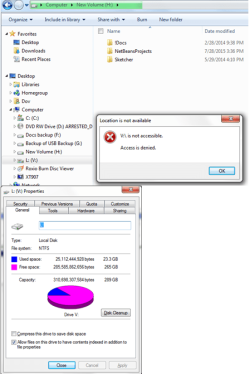
I have a partition L: that the message says IS NOT ACCESSIBLE.

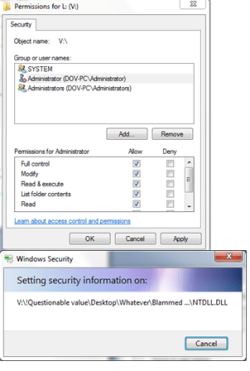
I have changed owner of L: to Me (Administrators (DOV-PC Administrator)), permissions (Me, Full control and all other), and other things. I get SETTING SECURITY INFORMATION popup (once per major change) but still no access. According to L:'s Properties, it's a 300GB drive with only 25GB used.

For some reason, the drive is displayed as L: (V:). Not sure why.

Any ideas about how to gain access?

(It's not the end of the world. Before reformatting, I copied (via Ubuntu; thank you Google for warning me how unreliable Dell DataUNsafe backup is) everything I needed, including a few drives such as L:. But it would be convenient to not have to restore 25GB from external hard drive.)
 

Attachments
  • L.PNG
    L.PNG
    39.6 KB · Views: 22
  • L2.PNG
    L2.PNG
    21.4 KB · Views: 22

My Computer My Computer

At a glance

Windows 7 SP1 64 bit Home PremiumIntel Core I5-2430 @ 2.4GHz8GB
Computer type
Laptop
Computer Manufacturer/Model Number
Dell
OS
Windows 7 SP1 64 bit Home Premium
CPU
Intel Core I5-2430 @ 2.4GHz
Memory
8GB
Try changing owner to your user account not the admin group.
 

My Computer My Computer

At a glance

Windows 7 Ultimate x64 SP1AMD Phenom 2 1090T2x8GB Kingston HyperX Fury Black 1600Mhz Unga...MSI GTX 970 Gaming 4G
Computer type
PC/Desktop
Computer Manufacturer/Model Number
Custom Build
OS
Windows 7 Ultimate x64 SP1
CPU
AMD Phenom 2 1090T
Motherboard
Gigabyte GA-890FXA-UD5
Memory
2x8GB Kingston HyperX Fury Black 1600Mhz Unganged
Graphics Card(s)
MSI GTX 970 Gaming 4G
Sound Card
Realtek On-Board HD 7.1 Audio / Logitech G35
Monitor(s) Displays
3xAcer GD245HQ
Screen Resolution
1920x1080
Hard Drives
Samsung 850 Pro 512GB SSD - OS /
WD Caviar Black SATA 3 - 1 TBx2 - Dynamic RAID 0 /
WD Caviar Green SATA 2 - 640GBx2 - Dynamic RAID 0 /
WD Caviar Green SATA 2 - 640GB - Internal Backup /
Seagate Barracude SATA 3 - 3TB - External Backup/ Sync
PSU
HighPower 1000W
Case
Cooler Master HAF 932
Cooling
Noctua NH-D14
Keyboard
Logitech G19
Mouse
Logitech G500
Internet Speed
100/4 Mbit Cable (100GB quota)
Antivirus
ZoneAlarm Extreme Security / MBAM Pro / MBAE Free / SAS Free
Browser
IE 11 - Firefox - Chrome
Other Info
Logitech F710/ G27/ G940/ Z5500 // TrackIR 5 // Nvidia 3D Surround Vision
Assuming you have already tried Windows' Disk Management, you can try a 3rd party utility similar to Acronis Disk Director which gives more power to fix partition than Disk Management; there are several very good free and fee utilities.
 

My Computer My Computer

At a glance

Windows 7 Professional 64-bitDesktop i5; Acers i5 & i7desktop 16GB; 1 Acer 8GB & 1 Acer 16GB
Computer type
PC/Desktop
Computer Manufacturer/Model Number
Antec desktop; Acer Aspire laptops
OS
Windows 7 Professional 64-bit
CPU
Desktop i5; Acers i5 & i7
Memory
desktop 16GB; 1 Acer 8GB & 1 Acer 16GB
Hard Drives
1TB split into 2 equal partitions [OS and data] usable by RJS
Internet Speed
AT&T DSL
Browser
FF, GChrome, msIE
Other Info
Windows 7 Firewall, Emsisoft AM/AV, MSE [scan-only], SpywareBlaster, Ruiware/BillP combine
Try changing owner to your user account not the admin group.

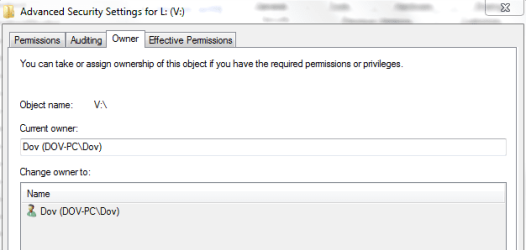
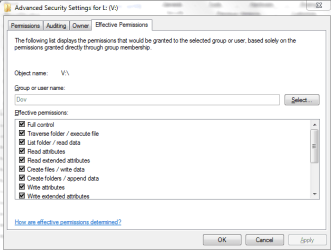
I already was owner. But that wasn't enough. I had to give myself "Effective Permission" See attached pics for details. But all the files in the root of this partition have locks showing over the folder or file icon.

What's that all about?

Anyway, I seem to be able to access all the files. THANKS for waking me up.
 

Attachments

  • owner.PNG
    owner.PNG
    9.2 KB · Views: 14
  • owner2.PNG
    owner2.PNG
    13.7 KB · Views: 14
  • owner3.PNG
    owner3.PNG
    10.4 KB · Views: 14

My Computer My Computer

At a glance

Windows 7 SP1 64 bit Home PremiumIntel Core I5-2430 @ 2.4GHz8GB
Computer type
Laptop
Computer Manufacturer/Model Number
Dell
OS
Windows 7 SP1 64 bit Home Premium
CPU
Intel Core I5-2430 @ 2.4GHz
Memory
8GB
Effective Permissions just shows exactly that, the effective permissions :)
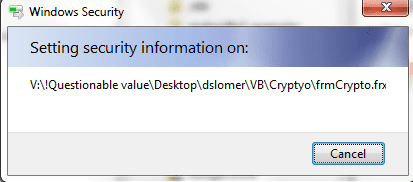
I have not seen this warning before, and a search didn't reveal much.

Can you post a screenshot of root V please?
 

My Computer My Computer

At a glance

Windows 7 Ultimate x64 SP1AMD Phenom 2 1090T2x8GB Kingston HyperX Fury Black 1600Mhz Unga...MSI GTX 970 Gaming 4G
Computer type
PC/Desktop
Computer Manufacturer/Model Number
Custom Build
OS
Windows 7 Ultimate x64 SP1
CPU
AMD Phenom 2 1090T
Motherboard
Gigabyte GA-890FXA-UD5
Memory
2x8GB Kingston HyperX Fury Black 1600Mhz Unganged
Graphics Card(s)
MSI GTX 970 Gaming 4G
Sound Card
Realtek On-Board HD 7.1 Audio / Logitech G35
Monitor(s) Displays
3xAcer GD245HQ
Screen Resolution
1920x1080
Hard Drives
Samsung 850 Pro 512GB SSD - OS /
WD Caviar Black SATA 3 - 1 TBx2 - Dynamic RAID 0 /
WD Caviar Green SATA 2 - 640GBx2 - Dynamic RAID 0 /
WD Caviar Green SATA 2 - 640GB - Internal Backup /
Seagate Barracude SATA 3 - 3TB - External Backup/ Sync
PSU
HighPower 1000W
Case
Cooler Master HAF 932
Cooling
Noctua NH-D14
Keyboard
Logitech G19
Mouse
Logitech G500
Internet Speed
100/4 Mbit Cable (100GB quota)
Antivirus
ZoneAlarm Extreme Security / MBAM Pro / MBAE Free / SAS Free
Browser
IE 11 - Firefox - Chrome
Other Info
Logitech F710/ G27/ G940/ Z5500 // TrackIR 5 // Nvidia 3D Surround Vision
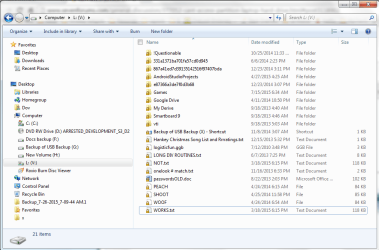
I'm able to open and delete any file or folder. One puzzle is why is drive L: aliased as V:? Or is it the other way around? I don't remember doing this recently or otherwise.

*EDIT*

Oh. If I right-click a file or folder and click Sharing, I find that the lock symbol is on the line saying "Share with nobody". If I click "Share with..." read or read/write, the lock goes away. If I click "Nobody", lock comes back over the folder. As I guess it should.

*EDIT 2*

I noticed that the lock didn't exactly go away immediately. Apparently behind the scenes the sharing is done on each file in the folder. Some folders are huge; hence longer delay.
 

Attachments

  • locked.PNG
    locked.PNG
    49.5 KB · Views: 0
Last edited:

My Computer My Computer

At a glance

Windows 7 SP1 64 bit Home PremiumIntel Core I5-2430 @ 2.4GHz8GB
Computer type
Laptop
Computer Manufacturer/Model Number
Dell
OS
Windows 7 SP1 64 bit Home Premium
CPU
Intel Core I5-2430 @ 2.4GHz
Memory
8GB

My Computer My Computer

At a glance

Windows 7 Ultimate x64 SP1AMD Phenom 2 1090T2x8GB Kingston HyperX Fury Black 1600Mhz Unga...MSI GTX 970 Gaming 4G
Computer type
PC/Desktop
Computer Manufacturer/Model Number
Custom Build
OS
Windows 7 Ultimate x64 SP1
CPU
AMD Phenom 2 1090T
Motherboard
Gigabyte GA-890FXA-UD5
Memory
2x8GB Kingston HyperX Fury Black 1600Mhz Unganged
Graphics Card(s)
MSI GTX 970 Gaming 4G
Sound Card
Realtek On-Board HD 7.1 Audio / Logitech G35
Monitor(s) Displays
3xAcer GD245HQ
Screen Resolution
1920x1080
Hard Drives
Samsung 850 Pro 512GB SSD - OS /
WD Caviar Black SATA 3 - 1 TBx2 - Dynamic RAID 0 /
WD Caviar Green SATA 2 - 640GBx2 - Dynamic RAID 0 /
WD Caviar Green SATA 2 - 640GB - Internal Backup /
Seagate Barracude SATA 3 - 3TB - External Backup/ Sync
PSU
HighPower 1000W
Case
Cooler Master HAF 932
Cooling
Noctua NH-D14
Keyboard
Logitech G19
Mouse
Logitech G500
Internet Speed
100/4 Mbit Cable (100GB quota)
Antivirus
ZoneAlarm Extreme Security / MBAM Pro / MBAE Free / SAS Free
Browser
IE 11 - Firefox - Chrome
Other Info
Logitech F710/ G27/ G940/ Z5500 // TrackIR 5 // Nvidia 3D Surround Vision
Back
Top