
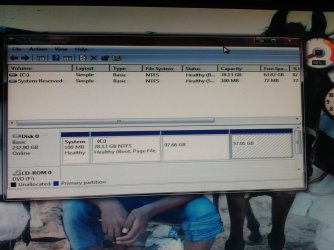
Solved windows not showing my disk partitions please help and it is showing

jagansat

New member
Local time
4:08 AM
Messages
7
windows not showing my disk partitions please help and it is showing my partitions like in the screenshot, please help me my all the memories in life are in those disks
 

Attachments

  • IMG_20150810_003355.jpg
    IMG_20150810_003355.jpg
    621.8 KB · Views: 6

My Computer My Computer

At a glance

Windows 7 professional 32 bitDual core2gb
Computer type
PC/Desktop
Computer Manufacturer/Model Number
Lenovo 8297DT7
OS
Windows 7 professional 32 bit
CPU
Dual core
Motherboard
945
Memory
2gb
Hard Drives
250 gb
Antivirus
no
Browser
firefox
As the screen says,it shows all the partitions :)
 

My Computer My Computer

At a glance

Win7 Ultimate/X84Intel Celeron 336/2.8GhzDDR3/2GB
Computer type
PC/Desktop
OS
Win7 Ultimate/X84
CPU
Intel Celeron 336/2.8Ghz
Motherboard
MS-7592
Memory
DDR3/2GB
Hard Drives
ATA-100/160GB
Browser
FirefoX
it is showing in disk management not in explorer in explorer it is showing only C partition
 

My Computer My Computer

At a glance

Windows 7 professional 32 bitDual core2gb
Computer type
PC/Desktop
Computer Manufacturer/Model Number
Lenovo 8297DT7
OS
Windows 7 professional 32 bit
CPU
Dual core
Motherboard
945
Memory
2gb
Hard Drives
250 gb
Antivirus
no
Browser
firefox
Ok, right-click on the D partition in Disk Management and click open,the partition should be opened in a few seconds.
If you can't find the partition in the explorer,then you can access it from here
 

My Computer My Computer

At a glance

Win7 Ultimate/X84Intel Celeron 336/2.8GhzDDR3/2GB
Computer type
PC/Desktop
OS
Win7 Ultimate/X84
CPU
Intel Celeron 336/2.8Ghz
Motherboard
MS-7592
Memory
DDR3/2GB
Hard Drives
ATA-100/160GB
Browser
FirefoX
all options are disabled in right click i cannot access even properties also
 

My Computer My Computer

At a glance

Windows 7 professional 32 bitDual core2gb
Computer type
PC/Desktop
Computer Manufacturer/Model Number
Lenovo 8297DT7
OS
Windows 7 professional 32 bit
CPU
Dual core
Motherboard
945
Memory
2gb
Hard Drives
250 gb
Antivirus
no
Browser
firefox
Wait,you wanna access the partition called "system reserved" ?
 

My Computer My Computer

At a glance

Win7 Ultimate/X84Intel Celeron 336/2.8GhzDDR3/2GB
Computer type
PC/Desktop
OS
Win7 Ultimate/X84
CPU
Intel Celeron 336/2.8Ghz
Motherboard
MS-7592
Memory
DDR3/2GB
Hard Drives
ATA-100/160GB
Browser
FirefoX
It looks like they want the other two that have seem to have lost their letters and mount points or even info about them. That's not good.
 

My Computer My Computer

At a glance

10 Pro x64Ryzen 9 3900X64GB(4x16GB) DDR4EVGA 1080ti FTW3
Computer type
PC/Desktop
Computer Manufacturer/Model Number
Custom
OS
10 Pro x64
CPU
Ryzen 9 3900X
Motherboard
Asrock x370 Tachi
Memory
64GB(4x16GB) DDR4
Graphics Card(s)
EVGA 1080ti FTW3
Sound Card
ASUS Xonar Essence STX (V4 Bursons), ODAC rev B, NFB-11, O2
Monitor(s) Displays
3xASUS PB278Q/R, Optoma HD142X
Screen Resolution
3x1440p, 1080p
Hard Drives
512GB 850 EVO(OS, Programs)
4TB (Movies)
3TB (Downloads)
3TB (Programs)
1TB HDD (Games)
2x6TB R1 (videos)
PSU
AX760
Case
Fractal Define R5
Cooling
NH-D15S
Keyboard
Massdrop Ctrl with Box Navy's
Mouse
G903, Alioth XXL Mat
Internet Speed
280/40
Antivirus
MBAM, ESET
Browser
Canary 64 Bit
Other Info
I also own a Thinkpad P50 Xeon 4K, X220T, X1C5
I think,he has only created one partition - C partition. The another one is just system reserved,system boot files are written there,so you should not touch that,removing that partition gives you nothing,it's only 100mb,so forget it and create a new partition:)
 

My Computer My Computer

At a glance

Win7 Ultimate/X84Intel Celeron 336/2.8GhzDDR3/2GB
Computer type
PC/Desktop
OS
Win7 Ultimate/X84
CPU
Intel Celeron 336/2.8Ghz
Motherboard
MS-7592
Memory
DDR3/2GB
Hard Drives
ATA-100/160GB
Browser
FirefoX
I think,he has only created one partition - C partition. The another one is just system reserved,system boot files are written there,so you should not touch that,removing that partition gives you nothing,it's only 100mb,so forget it and create a new partition:)

Judging by the sizes it looks like they were data partitions for like documents.
 

My Computer My Computer

At a glance

10 Pro x64Ryzen 9 3900X64GB(4x16GB) DDR4EVGA 1080ti FTW3
Computer type
PC/Desktop
Computer Manufacturer/Model Number
Custom
OS
10 Pro x64
CPU
Ryzen 9 3900X
Motherboard
Asrock x370 Tachi
Memory
64GB(4x16GB) DDR4
Graphics Card(s)
EVGA 1080ti FTW3
Sound Card
ASUS Xonar Essence STX (V4 Bursons), ODAC rev B, NFB-11, O2
Monitor(s) Displays
3xASUS PB278Q/R, Optoma HD142X
Screen Resolution
3x1440p, 1080p
Hard Drives
512GB 850 EVO(OS, Programs)
4TB (Movies)
3TB (Downloads)
3TB (Programs)
1TB HDD (Games)
2x6TB R1 (videos)
PSU
AX760
Case
Fractal Define R5
Cooling
NH-D15S
Keyboard
Massdrop Ctrl with Box Navy's
Mouse
G903, Alioth XXL Mat
Internet Speed
280/40
Antivirus
MBAM, ESET
Browser
Canary 64 Bit
Other Info
I also own a Thinkpad P50 Xeon 4K, X220T, X1C5
I think,he has only created one partition - C partition. The another one is just system reserved,system boot files are written there,so you should not touch that,removing that partition gives you nothing,it's only 100mb,so forget it and create a new partition:)

Judging by the sizes it looks like they were data partitions for like documents.
Maybe you're right (y)
 

My Computer My Computer

At a glance

Win7 Ultimate/X84Intel Celeron 336/2.8GhzDDR3/2GB
Computer type
PC/Desktop
OS
Win7 Ultimate/X84
CPU
Intel Celeron 336/2.8Ghz
Motherboard
MS-7592
Memory
DDR3/2GB
Hard Drives
ATA-100/160GB
Browser
FirefoX
i have created all that partitions which are showing. i tried to install Ubuntu through pendrive and i stopped it immediately after it asking location and restarted windows. from then it is showing only C drive and all other are not
 

My Computer My Computer

At a glance

Windows 7 professional 32 bitDual core2gb
Computer type
PC/Desktop
Computer Manufacturer/Model Number
Lenovo 8297DT7
OS
Windows 7 professional 32 bit
CPU
Dual core
Motherboard
945
Memory
2gb
Hard Drives
250 gb
Antivirus
no
Browser
firefox
i have created all that partitions which are showing. i tried to install Ubuntu through pendrive and i stopped it immediately after it asking location and restarted windows. from then it is showing only C drive and all other are not
How many partitions you had? two : C and D ? And what was the size of each partition,can you tell me please?
 

My Computer My Computer

At a glance

Win7 Ultimate/X84Intel Celeron 336/2.8GhzDDR3/2GB
Computer type
PC/Desktop
OS
Win7 Ultimate/X84
CPU
Intel Celeron 336/2.8Ghz
Motherboard
MS-7592
Memory
DDR3/2GB
Hard Drives
ATA-100/160GB
Browser
FirefoX

My Computer My Computer

At a glance

10 Pro x64Ryzen 9 3900X64GB(4x16GB) DDR4EVGA 1080ti FTW3
Computer type
PC/Desktop
Computer Manufacturer/Model Number
Custom
OS
10 Pro x64
CPU
Ryzen 9 3900X
Motherboard
Asrock x370 Tachi
Memory
64GB(4x16GB) DDR4
Graphics Card(s)
EVGA 1080ti FTW3
Sound Card
ASUS Xonar Essence STX (V4 Bursons), ODAC rev B, NFB-11, O2
Monitor(s) Displays
3xASUS PB278Q/R, Optoma HD142X
Screen Resolution
3x1440p, 1080p
Hard Drives
512GB 850 EVO(OS, Programs)
4TB (Movies)
3TB (Downloads)
3TB (Programs)
1TB HDD (Games)
2x6TB R1 (videos)
PSU
AX760
Case
Fractal Define R5
Cooling
NH-D15S
Keyboard
Massdrop Ctrl with Box Navy's
Mouse
G903, Alioth XXL Mat
Internet Speed
280/40
Antivirus
MBAM, ESET
Browser
Canary 64 Bit
Other Info
I also own a Thinkpad P50 Xeon 4K, X220T, X1C5
Right click on each partition ( the 97Gb and the 57Gb) one at a time And format them they should show up after that
 

My Computer My Computer

At a glance

Microsoft Windows 7 Ultimate 32-bit 7601Intel(R) Pentium(R) Dual CPU E2160 @ 1.80GHz4.00 GB(1) VNC Mirror Driver (2) Intel(R) G33/G31 Ex...
Computer type
PC/Desktop
Computer Manufacturer/Model Number
Compac
OS
Microsoft Windows 7 Ultimate 32-bit 7601
CPU
Intel(R) Pentium(R) Dual CPU E2160 @ 1.80GHz
Motherboard
MSI Boston
Memory
4.00 GB
Graphics Card(s)
(1) VNC Mirror Driver (2) Intel(R) G33/G31 Express Chipset
Sound Card
Disabled
Monitor(s) Displays
Headless
Screen Resolution
1280 x 960 x 32 bits (4294967296 colors) @ 60 Hz
Hard Drives
ST3320820AS ATA Device
Keyboard
Headless
Mouse
Headless
Antivirus
Malwarebytes pro
Other Info
Also
Windows 8.1 Laptop and Desktop both Acer
Right click on each partition And format them the should show up after that
Nice one ,but as he said ,right-click option is disabled for that "reserved" partition
 

My Computer My Computer

At a glance

Win7 Ultimate/X84Intel Celeron 336/2.8GhzDDR3/2GB
Computer type
PC/Desktop
OS
Win7 Ultimate/X84
CPU
Intel Celeron 336/2.8Ghz
Motherboard
MS-7592
Memory
DDR3/2GB
Hard Drives
ATA-100/160GB
Browser
FirefoX

My Computer My Computer

At a glance

Microsoft Windows 7 Ultimate 32-bit 7601Intel(R) Pentium(R) Dual CPU E2160 @ 1.80GHz4.00 GB(1) VNC Mirror Driver (2) Intel(R) G33/G31 Ex...
Computer type
PC/Desktop
Computer Manufacturer/Model Number
Compac
OS
Microsoft Windows 7 Ultimate 32-bit 7601
CPU
Intel(R) Pentium(R) Dual CPU E2160 @ 1.80GHz
Motherboard
MSI Boston
Memory
4.00 GB
Graphics Card(s)
(1) VNC Mirror Driver (2) Intel(R) G33/G31 Express Chipset
Sound Card
Disabled
Monitor(s) Displays
Headless
Screen Resolution
1280 x 960 x 32 bits (4294967296 colors) @ 60 Hz
Hard Drives
ST3320820AS ATA Device
Keyboard
Headless
Mouse
Headless
Antivirus
Malwarebytes pro
Other Info
Also
Windows 8.1 Laptop and Desktop both Acer
Try to right click on it and delete it then you can format it or join it to the 97Gb and then format it should show up or delete both of them and join them to C:
 
Last edited:

My Computer My Computer

At a glance

Microsoft Windows 7 Ultimate 32-bit 7601Intel(R) Pentium(R) Dual CPU E2160 @ 1.80GHz4.00 GB(1) VNC Mirror Driver (2) Intel(R) G33/G31 Ex...
Computer type
PC/Desktop
Computer Manufacturer/Model Number
Compac
OS
Microsoft Windows 7 Ultimate 32-bit 7601
CPU
Intel(R) Pentium(R) Dual CPU E2160 @ 1.80GHz
Motherboard
MSI Boston
Memory
4.00 GB
Graphics Card(s)
(1) VNC Mirror Driver (2) Intel(R) G33/G31 Express Chipset
Sound Card
Disabled
Monitor(s) Displays
Headless
Screen Resolution
1280 x 960 x 32 bits (4294967296 colors) @ 60 Hz
Hard Drives
ST3320820AS ATA Device
Keyboard
Headless
Mouse
Headless
Antivirus
Malwarebytes pro
Other Info
Also
Windows 8.1 Laptop and Desktop both Acer
Don't panic and start doing things on your own. In order to confirm this, please post a fresh screenshot how your Windows Disk Management shows your system drive now at this instant. Go through this http://www.sevenforums.com/tutorials/274797-disk-management-post-screen-capture-image.html and adhere to all the points to present an untruncated full screenshot showing all the information.

Please answer the following questions point by point.

1. You said you had created those two partitions. When was it? Was it just prior to your attempt to install Ubuntu?

2. If you had created those partitions much earlier, then what data is there in those two partitions?

3. Is that data so important that you would like to retrieve it, in case we are unable to reconstruct/retrieve those to the earlier condition?

4. Which version of Ubuntu were you trying to install? Please provide the weblink/s . For my research :).

5. Is this your Lenovo ThinkCentre A52 (8297DT7) laptop or your desktop? If Desktop provide the specs of the desktop.
 

My Computer My Computer

At a glance

Windows 7 Home Premium 32 bit
OS
Windows 7 Home Premium 32 bit
nothing working when i woke up in the morning trying to start PC it is showing Boot MGR missing . i am reinstalling My OS at this time what should i do for installing UBUNTU after this
 

My Computer My Computer

At a glance

Windows 7 professional 32 bitDual core2gb
Computer type
PC/Desktop
Computer Manufacturer/Model Number
Lenovo 8297DT7
OS
Windows 7 professional 32 bit
CPU
Dual core
Motherboard
945
Memory
2gb
Hard Drives
250 gb
Antivirus
no
Browser
firefox
So I now believe it is a custom-built desktop and you have started reinstalling Windows 7 ab-initio.You are now on your own.

I may not be of any help in installing Ubuntu except saying from wherever you downloaded Ubuntu, there should also be detailed instructions on how to install it and you should go by that or wait for someone more knowledgeable on that.
 

My Computer My Computer

At a glance

Windows 7 Home Premium 32 bit
OS
Windows 7 Home Premium 32 bit
Back
Top