Windows Explorer Status Bar: does not show file size

I am new to this forum and I am little confused on this subject. I dont have windows 7. I may get it this fall or at tax time. My computer may be on the last leg.

When you open a folder, what does it show in the status bar? If you highlight a file, does it show the file size? I use that feature a lot in xp.

It shows a bit more than that. (depending on the type of file.)

View attachment 31677

People like to nitpick, don't worry, if you give it some time,
you'll love it.

Greetings

NO. That is NOT the STATUS BAR, that is the DETAILS PANE.

gpatrick said:
I am new to this forum and I am little confused on this subject. I dont have windows 7. I may get it this fall or at tax time. My computer may be on the last leg. When you open a folder, what does it show in the status bar? If you highlight a file, does it show the file size? I use that feature a lot in xp.

NO. It does NOT show the file size in status bar, but it does show the file size in the details pane. HOWEVER, if you try to select more than 15 files, it DOES NOT show the total file size for all selected files unless you specifically click SHOW MORE DETAILS in the details pane . So if you want to see the new total after every new additional file you select(over 15 files), you MUST click show more details. It's repetitive, and it's highly annoying. If you use this kind of stuff a lot, i would suggest you remain using Vista or even XP for the time being until MS release a service pack or patch/update which addresses this issue.
 

My Computer My Computer

OS
Windows Seven
Just to rub more salt in the wounds.. Here's some in depth analysis with screenshots for you.
windozen.jpg
See how i have multiple files selected? It doesn't show you anything unless you click SHOW MORE DETAILS. So if i wanted to select another file, to see the new size i would have to stop what i'm doing or where i'm up to, and then move my mouse over and click that EVERY SINGLE TIME before i can tell just how big the new total size is. Needless to say, you can lose your place on the screen by doing this, you can accidently click the wrong thing and just stuff up your CTRL actions and deselect EVERYTHING and it's just a waste of time and a bad idea not to just show the total in the status bar(instead of showing max 15 files in details pane) like a normal functioning OS should do.
windoze1.jpg
In this one, i have mmatask selected, and it shows the file size for a single file. Pay attention to where the file size is listed in the details pane.
windoze2.jpg
Now look at this one. It's totally gone, and i don't know why or how i can make it show. You cannot add properties(like file size), but you can remove them. It's totally inconsistent and useless.
windoze3.jpg
And now to this one(the next file directly under the previous one, and as you can see it's the same file type). It shows the file size again. Why did i show this one you ask? Because compare it with my second pic(the one where i selected mmatask), and compare where the positioning of the file size is. They are in totally different positions. This is a waste of time and if you're using that to see file size, it will take you a long time to find the new position of where the file size is meant to be. It's totally inconsistent from one file to the next(in positioning), and even for the same FILE TYPE(mp3's), some show file size, and some don't. It's totally random. It's very annoying and inconvenient. Once again, i recommend that if you use explorer like how i do, not to use windows 7 until they have addressed and fixed this issue. The original status bar was consistent, served a purpose, and was easy to use and understand. The new details pane DOES NOT replace the old status bar in function, and it's totally inconsistent even if we don't bring up the old status bar to compare it with. Even by itself, it's a failure in design and functionality. I only need to know the FILESIZE and FILE NAME. I don't need to know all that other crap, if i wanted to know in detail, i would RIGHT CLICK AND PROPERTIES IT. Now i have to do that instead to see BASIC file information, while the useless **** i can see easily. What is this, BIZARRO WORLD and MS is trying to piss people off intentionally? PLEASE FIX MS.
 

My Computer My Computer

OS
Windows Seven
Curious question, A little off topic. I know in xp you can. Do they still have it where you can use windows classic toolbars and classic start menu?
 

My Computer My Computer

OS
Windows xp sp3
Curious question, A little off topic. I know in xp you can. Do they still have it where you can use windows classic toolbars and classic start menu?

no, classic is history, i'm afraid.
 

My Computer My Computer

Computer Manufacturer/Model Number
mickey megabyte 1234
OS
ultimate 64 sp1
CPU
i5 2500K [email protected]
Motherboard
MSI P67A-GD53
Memory
8 gigs GSkill Ripjaws 1600
Graphics Card(s)
amd hd6950
Sound Card
creative x-fi gamer
Monitor(s) Displays
samsung 24"
Screen Resolution
1920x1080
Hard Drives
ocz vertex 2e 60 gig, samsung f3 1tb, buffalo 2tb ext
PSU
antec 550
Case
antec three hundred
Cooling
i'm a cooling fan
Keyboard
saitek eclipse ii
Mouse
logitech g3
Internet Speed
about 4 Mbps
Other Info
i love win7
Curious question, A little off topic. I know in xp you can. Do they still have it where you can use windows classic toolbars and classic start menu?

no, classic is history, i'm afraid.

I hope your kidding. I use that all the time. I don't like the default xp theme. I like they way I can use scroll programs on the start menu.

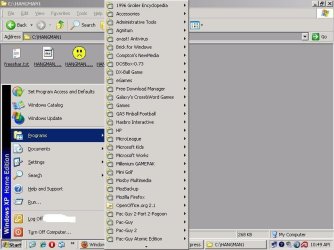
I have set where, you can go start button-program-than list of your programs (I use scroll menu).

I started a new thread, because it off topic for this thread.
That is my favorite feature that I used since windows 95 and I use that in xp.
 
Last edited:

My Computer My Computer

OS
Windows xp sp3
Curious question, A little off topic. I know in xp you can. Do they still have it where you can use windows classic toolbars and classic start menu?

no, classic is history, i'm afraid.

I hope your kidding. I use that all the time. I don't like the default xp theme. I like they way I can use scroll programs on the start menu.

I have set where, you can go start button-program-than list of your programs (I use scroll menu).

I started a new thread, because it off topic for this thread.
That is my favorite feature that I used since windows 95 and I use that in xp.
I hope you're kidding. Provide screen shots.
 
Here is what I have. Yes, I got some old programs.
 

Attachments

  • patrick.JPG
    patrick.JPG
    58.4 KB · Views: 741
Last edited:

My Computer My Computer

OS
Windows xp sp3
Here's some in depth analysis with screenshots for you...

PLEASE FIX MS.
HEAR HEAR (and great post and effort showing all that)! This is absolutely CRAP!
Is there something to fix this horrible flaw in windows explorer? I can't even see how big my fricken files are in explorer anymore! (with convenience like we used to.)

If I wanted to see how much stuff I had in a certain folder, I would simply go Ctrl+A and RIGHT AWAY I would know how much is in the folder I'm in. Not aymore - I can't even select folders (or urls) without it not working. It has to be certian types of files only (tedious as Ctrl+A is way faster) AND you have to click another thing to make it show the size half the time.

:horror:


My Computer My Computer

OS
Windows 7 Ultimate RTM x64
Welcome to Seven forums vfreak.

Try highlighting the folder and hitting ALT+Enter. That will give you the properties (including the size) of the folder. Hope this helps.
 

My Computer My Computer

Computer Manufacturer/Model Number
Gateway, Toshiba Laptop, and Home Brew
OS
Windows 7 x64 HP, Windows 7 HP, Windows 7 Ult
CPU
Intel I3, Cerelon, Pentium 4 @ 3Ghz
Motherboard
Intel, Intel, Asus
Memory
8G, 3G, 3G
Graphics Card(s)
On-board Intel, On-board nVidia, nVIDIA card
Sound Card
on-board, on-board, SoundBlaster
Monitor(s) Displays
Hannspree HF237, Toshiba, SyncMaster 931B
Screen Resolution
default (all)
Hard Drives
1T internal, 320G internal, 160G internal, 1T networked
PSU
300w, unk, 650w
Case
black, black, grey
Cooling
air (all)
Keyboard
standard wired (all)
Mouse
standard wired (all)
Internet Speed
6M down, 768K up
Other Info
Home LAN through Linksys hub to 4 port and wireless switch/router. Networked HP 2600n. Wife's computer running Windows 7, and spare laptop running Ubuntu "Karmic Kola" (9.10).
Welcome to Seven forums vfreak.

Try highlighting the folder and hitting ALT+Enter. That will give you the properties (including the size) of the folder. Hope this helps.

I assume he is well aware of that functionality. The issue is not how we are able to check how much disk space you have left or the total size of selected objects, but why we are left with such a roundabout way in Windows 7. Windows XP had it working well.
 

My Computer My Computer

OS
Windows 7
To a small degree, I do miss the limited usefulness of the XP status bar.

But

You will not hear me cry 'cause I do not sing the blues.
 
I do not like the "Show more details..." and that you have to click it again if you select any new files.
 

My Computer My Computer

Computer Manufacturer/Model Number
Asus V2-M3M8200 Barebones
OS
Windows 7 Professional x64
CPU
AMD Phenom II X4 925
Motherboard
V2-M3M8200 (basically a M3N78-VM)
Memory
4x1024mb Kingston HyperX DDR2-1066 KHX8500D2/1G
Graphics Card(s)
Asus GTS 450 OC
Sound Card
Creative Sound Blaster X-Fi Titanium PCIe
Monitor(s) Displays
Asus 24" LCD VH242H
Screen Resolution
1920x1080
Hard Drives
WDC WD5000AAKS
WDC WD5002ABYS
Seagate ST325062 USB-to-IDE
Fujitsu 160GB Pocket USB HDD
PSU
Antec Earthwatts EA-430D
Case
Asus V2-M3M8200
Cooling
120mm side fan & 80mm front & 92mm rear fan
Keyboard
Dell USB mini Multimedia
Mouse
Logitech MX518
Internet Speed
Comcast Xfinity
Other Info
Logitech Webcam Pro 9000
Accurian 40-1462 Speakers
little dot MKII Headphone Amp
Welcome to Seven forums vfreak.
Thanks TheSchaft. I've come over here from vistax64 forums, I guess I'll be popping in here every now and then from now on :).

Try highlighting the folder and hitting ALT+Enter. That will give you the properties (including the size) of the folder. Hope this helps.

Well, that's a pretty good trick that I've never known about, thanks for the tip! I can see where I will be using that now that I know it. thanks :)

BUT it's not the same as what we're after in this thread. It doesn't show the collective size of the files in the *current* folder only. E.g., say I want to free up some HDD space and I'm wondering if I've left any large files on the root C: folder (I make a lot of ISOs then forget about them). Usually I just go Ctrl+A in the C: folder and I immediately see in the status bar the size of the root C folder.

I can't do this BASIC thing in Win7! Doing Alt+Enter would give me the entire size of everything on the whole C drive. Yes, it helps, but with Alt+Enter you'd have to select *just* the current directory's files instead of selecting any folders too. Not only is this an extra step in the proicess which we shouldn't have to do (not to mention, involving the dreaded mouse), but in some cases it may be VERY tedious to isolate the files from the folders!

So we're still 2-3 steps away from Ctrl+A = boom (and no extra window to deal with either). GRR
 

My Computer My Computer

OS
Windows 7 Ultimate RTM x64
Does this still exist? Right click on empty space in the folder arrange icons by size?
 

My Computer My Computer

OS
Windows xp sp3
Let's just hope that next week when Windows 7 is launched, the final release has fixed this bug in Explorer, so we can all see our filesizes as we so wish. Maybe it's just something in the release candidate version - (build 7100)
 

My Computer My Computer

Computer Manufacturer/Model Number
HP
OS
Windows 7
CPU
Intel Core 2 Duo T7200
Memory
1.5 GB
Let's just hope that next week when Windows 7 is launched, the final release has fixed this bug in Explorer, so we can all see our filesizes as we so wish. Maybe it's just something in the release candidate version - (build 7100)

If not, I am sure someone will develop either a patch or a program that will restore that. I am sure it is a simple code.
 

My Computer My Computer

OS
Windows xp sp3
Let's just hope that next week when Windows 7 is launched, the final release has fixed this bug in Explorer, so we can all see our filesizes as we so wish. Maybe it's just something in the release candidate version - (build 7100)
It is not a *bug* and no its not going to change.
 

My Computer My Computer

Computer type
PC/Desktop
Computer Manufacturer/Model Number
Alienware Aurora ALX R4
OS
Windows 10 Pro (x64)
CPU
Intel Core i7-3930K (3.2GHz - 4.5GHz)
Motherboard
Alienware Aurora-R4 x79
Memory
4x Samsung 4GB PC3-12800 DDR3 (16GB 1600MHz)
Graphics Card(s)
Nvidia Geforce GTX 690
Sound Card
SteelSeries Siberia Elite
Monitor(s) Displays
Dell UltraSharp U3011
Screen Resolution
2560x1600
Hard Drives
Samsung 850 Pro 256 GB, Seagate 1TB Desktop Hybrid HDD, 2x Western Digital 4TB Green HDD
PSU
875W Some Dell PSU <.<
Case
Alienware Aurora ALX
Cooling
Custom Liquid Cooling (EK CPU & GPU blocks) dual EK 480RAD
Keyboard
Logitech G710+ Mechanical
Mouse
Logitech G700s
Internet Speed
Verizon Fios (50 mbps average)
Other Info
Server: Intel NUC D54250WYK: i5-4250U, 16GB, 256 GB mSATA, Windows Server 2012 R2
Does this still exist? Right click on empty space in the folder arrange icons by size?
Yes.

..but not exactly.

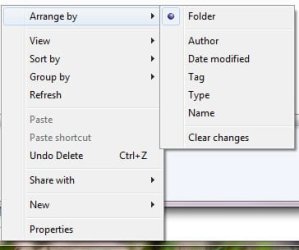
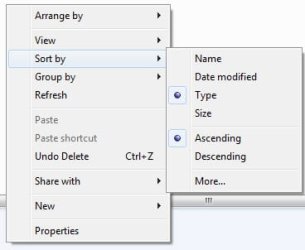
you can only 'arrange by' other criteria, but you can 'sort by' size...

*edit* just noticed that you can only use 'arrange by' inside libraries...
 

Attachments

  • arrange.jpg
    arrange.jpg
    13.6 KB · Views: 16
  • arr2.jpg
    arr2.jpg
    12.7 KB · Views: 19

My Computer My Computer

Computer Manufacturer/Model Number
mickey megabyte 1234
OS
ultimate 64 sp1
CPU
i5 2500K [email protected]
Motherboard
MSI P67A-GD53
Memory
8 gigs GSkill Ripjaws 1600
Graphics Card(s)
amd hd6950
Sound Card
creative x-fi gamer
Monitor(s) Displays
samsung 24"
Screen Resolution
1920x1080
Hard Drives
ocz vertex 2e 60 gig, samsung f3 1tb, buffalo 2tb ext
PSU
antec 550
Case
antec three hundred
Cooling
i'm a cooling fan
Keyboard
saitek eclipse ii
Mouse
logitech g3
Internet Speed
about 4 Mbps
Other Info
i love win7
Back
Top