Solved Transferring Paint image to email

techlearner

New member
Local time
9:04 PM
Messages
86
Location
UK
I tried to transfer a paint image to email but got a sign saying that "there is no email programme associated to perform the requested acton. Please install an email programme or, if one is already installed, create an association in the Defaults Programme control panel". This is despite Paint saying that it has all the defaults (?)

I have Windows Live Mail but I think I may need Windows Live Essentials in order to transfer paint to email...is that right? Are they connected?

Windows Live Essentials doesn't come up as a programme that I have, i.e. when I type Windows Live Essentials into the Start window it just says to go online to get it; however, it IS listed as a programme I have under the control panel (uninstall section), i.e. Windows Live Essentials 2011 so I guess it is out of date. (Do I delete this programme)

So, do I need to get the latest Windows Live Essentials in order to send an email from paint? (I have Windows Live Mail) If so, how do I do this?


I am in Windows 7 (Firefox browser).
 

My Computer My Computer

Computer type
Laptop
Computer Manufacturer/Model Number
Lenovo Thinkpad E550
OS
windows 7 professional
Memory
8.00 GB
Hard Drives
Windows 7_OS (C:) and Lenovo_Recovery (Q:)
Antivirus
McAfee and AVG
Browser
Mozilla Firefox
Hi,
Click the Start button and All programs
Windows essentials will be on the bottom of the list

You have to be signed into photo gallery to use the share

It's almost better to use a normal attachment to send inside the email.
 

My Computer My Computer

Computer type
PC/Desktop
Computer Manufacturer/Model Number
Custom assembled by me :}
OS
Win-7-Pro64bit 7-H-Prem-64bit
CPU
i7-5930K 2nd i9-9940x both water blocked VRM's too
Motherboard
ASUS SABERTOOTH X99 2nd ASUS x299 Apex
Memory
Trident-z 3200C14 2nd Trident-z 3600C16
Graphics Card(s)
EVGA 1080ti ftw3 2nd Titan Xp both water blocked
Sound Card
Built-in Realtek
Monitor(s) Displays
1-AOC G2460PG 24"G-Sync 144Hz/ 2nd 1-ASUS VG248QE 24" 144Hz
Screen Resolution
1920 x 1080 144Hz
Hard Drives
2-Samsung M.2 Evo & Evo Plus
2-Samsung 850 EVO 500GB SSD's/ 3-2.5 W.D. Black 1tb-&3-1tb/3-3.5 WD Black 1tb hdd's
PSU
EVGA SuperNOVA 1000-P2 2nd 1200-P2
Case
2-Corsair Obsidian Series 450D Black ATX Mid Tower
Cooling
Custom water loops
Keyboard
Logitech G710+/ 2nd Logitech G910
Mouse
2-RedDragon M901 Perdition 16400 dpi Gaming mouse = wired
Internet Speed
Comcast Ping 19ms 89.31mbps download speed 6.12mbps upload
Antivirus
Malwarebytes Pro/ Superantispyware Pro
Browser
FireFox & Pale moon
Other Info
2nd ASUS X299 Apex/Intel i9-9940x with Custom water loop/7H-Prem-x64/Corsair 450D case/Ram Trident-z 3600C16 4x8gb / Samsung970Evo plus 500gb SSD/Dual ssd EZ swap evo/PSU EVGA SuperNova 1200w-P2 80+Platinum/GPU Titan Xp /8-ML-140 on push-pull on 2-280GTX rads
Hi,
Click the Start button and All programs
Windows essentials will be on the bottom of the list

You have to be signed into photo gallery to use the share

It's almost better to use a normal attachment to send inside the email.
I only have windows essentials 2011 listed under "uninstall programmes" (perhaps due to it not being the recent version) i.e. not under all programmes, which is what I said in my OP

I disagree that sending a normal attachment is better (via Paint) than sending an email from Paint. This is because it is indirect, i.e. entails having to delete the file later so I would have preferred to learn how to send an email from Paint which is the reason I started this thread.

Are you saying it is necessary to use Windows Essentials in order to send an email in Paint section? If so, then I need to install the latest one i.e. 2012?
 

My Computer My Computer

Computer type
Laptop
Computer Manufacturer/Model Number
Lenovo Thinkpad E550
OS
windows 7 professional
Memory
8.00 GB
Hard Drives
Windows 7_OS (C:) and Lenovo_Recovery (Q:)
Antivirus
McAfee and AVG
Browser
Mozilla Firefox

My Computer My Computer

Computer type
PC/Desktop
Computer Manufacturer/Model Number
Custom assembled by me :}
OS
Win-7-Pro64bit 7-H-Prem-64bit
CPU
i7-5930K 2nd i9-9940x both water blocked VRM's too
Motherboard
ASUS SABERTOOTH X99 2nd ASUS x299 Apex
Memory
Trident-z 3200C14 2nd Trident-z 3600C16
Graphics Card(s)
EVGA 1080ti ftw3 2nd Titan Xp both water blocked
Sound Card
Built-in Realtek
Monitor(s) Displays
1-AOC G2460PG 24"G-Sync 144Hz/ 2nd 1-ASUS VG248QE 24" 144Hz
Screen Resolution
1920 x 1080 144Hz
Hard Drives
2-Samsung M.2 Evo & Evo Plus
2-Samsung 850 EVO 500GB SSD's/ 3-2.5 W.D. Black 1tb-&3-1tb/3-3.5 WD Black 1tb hdd's
PSU
EVGA SuperNOVA 1000-P2 2nd 1200-P2
Case
2-Corsair Obsidian Series 450D Black ATX Mid Tower
Cooling
Custom water loops
Keyboard
Logitech G710+/ 2nd Logitech G910
Mouse
2-RedDragon M901 Perdition 16400 dpi Gaming mouse = wired
Internet Speed
Comcast Ping 19ms 89.31mbps download speed 6.12mbps upload
Antivirus
Malwarebytes Pro/ Superantispyware Pro
Browser
FireFox & Pale moon
Other Info
2nd ASUS X299 Apex/Intel i9-9940x with Custom water loop/7H-Prem-x64/Corsair 450D case/Ram Trident-z 3600C16 4x8gb / Samsung970Evo plus 500gb SSD/Dual ssd EZ swap evo/PSU EVGA SuperNova 1200w-P2 80+Platinum/GPU Titan Xp /8-ML-140 on push-pull on 2-280GTX rads
Is this windows 8 or windows 7 or windows 10?

Iv seen this in a printer issue where the customer wanted to scan and send an eamil right away it was the default programs that was the issue go to the default options program and select windows live mail. if you dont know how to do that ill walk you through it.
 

My Computer My Computer

Computer type
PC/Desktop
Computer Manufacturer/Model Number
Custom
OS
Windows 7 x64
CPU
3.64
Motherboard
NVIDIA nForce 780i SLI FTW
Memory
4GB
Hard Drives
2
Antivirus
none
Browser
chrome
Is this windows 8 or windows 7 or windows 10?

Iv seen this in a printer issue where the customer wanted to scan and send an eamil right away it was the default programs that was the issue go to the default options program and select windows live mail. if you dont know how to do that ill walk you through it.

As mentioned in my OP, I am in Windows 7. Yes, I would appreciate your help in this matter. However, I already resent Windows Live Mail since it duplicates emails that I have in hotmail, i.e. is unwanted and takes up space. Ideally I would love to delete Windows Live Mail but there seems no way to do this (it is not listed as a programme under uninstall programme section). Is there a way of stopping this duplication or am I only able to get hotmail because of Windows Live Mail? Sorry this is a bit of a side issue.

To clarify, I just don't want to encourage more use of Windows Live Mail so, if aligning it to Paint does this then I would rather do without it.


My Computer My Computer

Computer type
Laptop
Computer Manufacturer/Model Number
Lenovo Thinkpad E550
OS
windows 7 professional
Memory
8.00 GB
Hard Drives
Windows 7_OS (C:) and Lenovo_Recovery (Q:)
Antivirus
McAfee and AVG
Browser
Mozilla Firefox
Is this windows 8 or windows 7 or windows 10?

Iv seen this in a printer issue where the customer wanted to scan and send an eamil right away it was the default programs that was the issue go to the default options program and select windows live mail. if you dont know how to do that ill walk you through it.

As mentioned in my OP, I am in Windows 7. Yes, I would appreciate your help in this matter. However, I already resent Windows Live Mail since it duplicates emails that I have in hotmail, i.e. is unwanted and takes up space. Ideally I would love to delete Windows Live Mail but there seems no way to do this (it is not listed as a programme under uninstall programme section). Is there a way of stopping this duplication or am I only able to get hotmail because of Windows Live Mail? Sorry this is a bit of a side issue.

To clarify, I just don't want to encourage more use of Windows Live Mail so, if aligning it to Paint does this then I would rather do without it.


Okay im looking this up sorry after seeing the edit it messed me up.
 
Last edited:

My Computer My Computer

Computer type
PC/Desktop
Computer Manufacturer/Model Number
Custom
OS
Windows 7 x64
CPU
3.64
Motherboard
NVIDIA nForce 780i SLI FTW
Memory
4GB
Hard Drives
2
Antivirus
none
Browser
chrome
Paint is a very old program and not ever going to get any updates
The protocols date very far back

Like I said before unless someone knows how to super geek this ?
Download the latest version of WE 2014
Sign into photo gallery and I believe live mail will also be updated to the most recent version too
And use photo galleries Share/ email listing.
 

My Computer My Computer

Computer type
PC/Desktop
Computer Manufacturer/Model Number
Custom assembled by me :}
OS
Win-7-Pro64bit 7-H-Prem-64bit
CPU
i7-5930K 2nd i9-9940x both water blocked VRM's too
Motherboard
ASUS SABERTOOTH X99 2nd ASUS x299 Apex
Memory
Trident-z 3200C14 2nd Trident-z 3600C16
Graphics Card(s)
EVGA 1080ti ftw3 2nd Titan Xp both water blocked
Sound Card
Built-in Realtek
Monitor(s) Displays
1-AOC G2460PG 24"G-Sync 144Hz/ 2nd 1-ASUS VG248QE 24" 144Hz
Screen Resolution
1920 x 1080 144Hz
Hard Drives
2-Samsung M.2 Evo & Evo Plus
2-Samsung 850 EVO 500GB SSD's/ 3-2.5 W.D. Black 1tb-&3-1tb/3-3.5 WD Black 1tb hdd's
PSU
EVGA SuperNOVA 1000-P2 2nd 1200-P2
Case
2-Corsair Obsidian Series 450D Black ATX Mid Tower
Cooling
Custom water loops
Keyboard
Logitech G710+/ 2nd Logitech G910
Mouse
2-RedDragon M901 Perdition 16400 dpi Gaming mouse = wired
Internet Speed
Comcast Ping 19ms 89.31mbps download speed 6.12mbps upload
Antivirus
Malwarebytes Pro/ Superantispyware Pro
Browser
FireFox & Pale moon
Other Info
2nd ASUS X299 Apex/Intel i9-9940x with Custom water loop/7H-Prem-x64/Corsair 450D case/Ram Trident-z 3600C16 4x8gb / Samsung970Evo plus 500gb SSD/Dual ssd EZ swap evo/PSU EVGA SuperNova 1200w-P2 80+Platinum/GPU Titan Xp /8-ML-140 on push-pull on 2-280GTX rads
couldnt you just try to save the image as like a .jpeg then send it as a attachment?>
 

My Computer My Computer

Computer type
PC/Desktop
Computer Manufacturer/Model Number
Custom
OS
Windows 7 x64
CPU
3.64
Motherboard
NVIDIA nForce 780i SLI FTW
Memory
4GB
Hard Drives
2
Antivirus
none
Browser
chrome
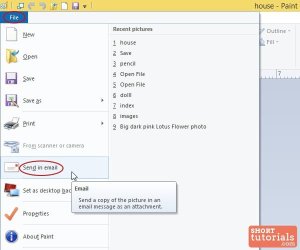
i have a attachment tell we if this is the one that it looks like if so, then you need to make windows live mail a default mail client. boom done.
 

Attachments

  • send-email-mspaint.jpg
    send-email-mspaint.jpg
    25.7 KB · Views: 11

My Computer My Computer

Computer type
PC/Desktop
Computer Manufacturer/Model Number
Custom
OS
Windows 7 x64
CPU
3.64
Motherboard
NVIDIA nForce 780i SLI FTW
Memory
4GB
Hard Drives
2
Antivirus
none
Browser
chrome
Yep Paint will work amazingly enough it does with office outlook 2007

So yea Click start and Default programs/ Set your default programs,
If live mail is listed on the left column click on it and set as default on the bottom
Should be all it takes or as stated = Boom :)

One quirk in outlook 2007 is I have to open outlook before anything is sent but it is ready Freddy ;)
 

My Computer My Computer

Computer type
PC/Desktop
Computer Manufacturer/Model Number
Custom assembled by me :}
OS
Win-7-Pro64bit 7-H-Prem-64bit
CPU
i7-5930K 2nd i9-9940x both water blocked VRM's too
Motherboard
ASUS SABERTOOTH X99 2nd ASUS x299 Apex
Memory
Trident-z 3200C14 2nd Trident-z 3600C16
Graphics Card(s)
EVGA 1080ti ftw3 2nd Titan Xp both water blocked
Sound Card
Built-in Realtek
Monitor(s) Displays
1-AOC G2460PG 24"G-Sync 144Hz/ 2nd 1-ASUS VG248QE 24" 144Hz
Screen Resolution
1920 x 1080 144Hz
Hard Drives
2-Samsung M.2 Evo & Evo Plus
2-Samsung 850 EVO 500GB SSD's/ 3-2.5 W.D. Black 1tb-&3-1tb/3-3.5 WD Black 1tb hdd's
PSU
EVGA SuperNOVA 1000-P2 2nd 1200-P2
Case
2-Corsair Obsidian Series 450D Black ATX Mid Tower
Cooling
Custom water loops
Keyboard
Logitech G710+/ 2nd Logitech G910
Mouse
2-RedDragon M901 Perdition 16400 dpi Gaming mouse = wired
Internet Speed
Comcast Ping 19ms 89.31mbps download speed 6.12mbps upload
Antivirus
Malwarebytes Pro/ Superantispyware Pro
Browser
FireFox & Pale moon
Other Info
2nd ASUS X299 Apex/Intel i9-9940x with Custom water loop/7H-Prem-x64/Corsair 450D case/Ram Trident-z 3600C16 4x8gb / Samsung970Evo plus 500gb SSD/Dual ssd EZ swap evo/PSU EVGA SuperNova 1200w-P2 80+Platinum/GPU Titan Xp /8-ML-140 on push-pull on 2-280GTX rads
Yep Paint will work amazingly enough it does with office outlook 2007

So yea Click start and Default programs/ Set your default programs,
If live mail is listed on the left column click on it and set as default on the bottom
Should be all it takes or as stated = Boom :)

One quirk in outlook 2007 is I have to open outlook before anything is sent but it is ready Freddy ;)

High five ;) Great minds think alike there my friend :D
 

My Computer My Computer

Computer type
PC/Desktop
Computer Manufacturer/Model Number
Custom
OS
Windows 7 x64
CPU
3.64
Motherboard
NVIDIA nForce 780i SLI FTW
Memory
4GB
Hard Drives
2
Antivirus
none
Browser
chrome
i have a attachment tell we if this is the one that it looks like if so, then you need to make windows live mail a default mail client. boom done.

Yes it is just like the photo you show. I am concerned about making windows live mail my default though for reasons already given in my previous post. It already copies emails from my hotmail account, i.e. I have no use for this duplication and dislike that it takes up space.

What will making Windows Live Mail my default mail client do? I want to DECREASE its activity, not add to it. If it makes no difference to what is already the case, then I welcome knowing how to make it my default mail client.

If it is likely to add to it, then I prefer to just use the 'save as' facility with Paint (which I tried to avoid since it means having to delete the link at some future stage, when no longer needed).


My Computer My Computer

Computer type
Laptop
Computer Manufacturer/Model Number
Lenovo Thinkpad E550
OS
windows 7 professional
Memory
8.00 GB
Hard Drives
Windows 7_OS (C:) and Lenovo_Recovery (Q:)
Antivirus
McAfee and AVG
Browser
Mozilla Firefox
i have a attachment tell we if this is the one that it looks like if so, then you need to make windows live mail a default mail client. boom done.

Yes it is just like the photo you show. I am concerned about making windows live mail my default though for reasons already given in my previous post. It already copies emails from my hotmail account, i.e. I have no use for this duplication and dislike that it takes up space.

What will making Windows Live Mail my default mail client do? I want to DECREASE its activity, not add to it. If it makes no difference to what is already the case, then I welcome knowing how to make it my default mail client.

If it is likely to add to it, then I prefer to just use the 'save as' facility with Paint (which I tried to avoid since it means having to delete the link at some future stage, when no longer needed).


Making it your default is making it so anything to do with email like programs saying send email will make Windows live mail pop up. You can always change it back, its like making google chrome your default broswer anything to do with a link it only opens in google chrome. Same thing with Email, only WLM will open those types of things.
 

My Computer My Computer

Computer type
PC/Desktop
Computer Manufacturer/Model Number
Custom
OS
Windows 7 x64
CPU
3.64
Motherboard
NVIDIA nForce 780i SLI FTW
Memory
4GB
Hard Drives
2
Antivirus
none
Browser
chrome
i have a attachment tell we if this is the one that it looks like if so, then you need to make windows live mail a default mail client. boom done.

Yes it is just like the photo you show. I am concerned about making windows live mail my default though for reasons already given in my previous post. It already copies emails from my hotmail account, i.e. I have no use for this duplication and dislike that it takes up space.

What will making Windows Live Mail my default mail client do? I want to DECREASE its activity, not add to it. If it makes no difference to what is already the case, then I welcome knowing how to make it my default mail client.

If it is likely to add to it, then I prefer to just use the 'save as' facility with Paint (which I tried to avoid since it means having to delete the link at some future stage, when no longer needed).


Making it your default is making it so anything to do with email like programs saying send email will make Windows live mail pop up. You can always change it back, its like making google chrome your default broswer anything to do with a link it only opens in google chrome. Same thing with Email, only WLM will open those types of things.

Well I wonder if you understood my situation? Already Windows Live Mail is duplicating/copying my hotmail info in the WLM section and I can't see how to undo this i.e. it is not set up as being my default programme so why should this be happening? Do you know how to undo it or is it compulsory in order to get an email account? This is more important to me to sort out than setting up Paint to access email.

I started a thread on this ages ago and got nowhere. There was a suggestion of Windows Essentials being linked to this situation though (which I have as a programme listed in the uninstall section, i.e. Windows Essentials 2011 but no mention WLM there...odd)!
 

My Computer My Computer

Computer type
Laptop
Computer Manufacturer/Model Number
Lenovo Thinkpad E550
OS
windows 7 professional
Memory
8.00 GB
Hard Drives
Windows 7_OS (C:) and Lenovo_Recovery (Q:)
Antivirus
McAfee and AVG
Browser
Mozilla Firefox
Hi,
Just go into live mail settings and review the options
I don't have it so I can't be specific on your concerns but there are a lot of setting to review and post screen shots so we can see them and possibly make suggestions

If you use the same email address as a online email account then you'll run into the issue but that feature actually is what most people want to download all email onto their machines
I've never understood the email foraging stuff to me emails are not a precious commodity and mostly delete them rather than saving them as food for the winter :p

Some people also get pretty weird about temp files from browsers wanting to keep them too :confused:
 

My Computer My Computer

Computer type
PC/Desktop
Computer Manufacturer/Model Number
Custom assembled by me :}
OS
Win-7-Pro64bit 7-H-Prem-64bit
CPU
i7-5930K 2nd i9-9940x both water blocked VRM's too
Motherboard
ASUS SABERTOOTH X99 2nd ASUS x299 Apex
Memory
Trident-z 3200C14 2nd Trident-z 3600C16
Graphics Card(s)
EVGA 1080ti ftw3 2nd Titan Xp both water blocked
Sound Card
Built-in Realtek
Monitor(s) Displays
1-AOC G2460PG 24"G-Sync 144Hz/ 2nd 1-ASUS VG248QE 24" 144Hz
Screen Resolution
1920 x 1080 144Hz
Hard Drives
2-Samsung M.2 Evo & Evo Plus
2-Samsung 850 EVO 500GB SSD's/ 3-2.5 W.D. Black 1tb-&3-1tb/3-3.5 WD Black 1tb hdd's
PSU
EVGA SuperNOVA 1000-P2 2nd 1200-P2
Case
2-Corsair Obsidian Series 450D Black ATX Mid Tower
Cooling
Custom water loops
Keyboard
Logitech G710+/ 2nd Logitech G910
Mouse
2-RedDragon M901 Perdition 16400 dpi Gaming mouse = wired
Internet Speed
Comcast Ping 19ms 89.31mbps download speed 6.12mbps upload
Antivirus
Malwarebytes Pro/ Superantispyware Pro
Browser
FireFox & Pale moon
Other Info
2nd ASUS X299 Apex/Intel i9-9940x with Custom water loop/7H-Prem-x64/Corsair 450D case/Ram Trident-z 3600C16 4x8gb / Samsung970Evo plus 500gb SSD/Dual ssd EZ swap evo/PSU EVGA SuperNova 1200w-P2 80+Platinum/GPU Titan Xp /8-ML-140 on push-pull on 2-280GTX rads
Hi,
Just go into live mail settings and review the options
I don't have it so I can't be specific on your concerns but there are a lot of setting to review and post screen shots so we can see them and possibly make suggestions

If you use the same email address as a online email account then you'll run into the issue but that feature actually is what most people want to download all email onto their machines
I've never understood the email foraging stuff to me emails are not a precious commodity and mostly delete them rather than saving them as food for the winter :p

Some people also get pretty weird about temp files from browsers wanting to keep them too :confused:
Strange situation. The emails that appeared in Windows Live Mail (WLM) are now all under the Pictures library section.(WLM is now empty in its inbox) To open my emails in the Pictures library section shows that WLM is my default programme! Is that only in this section, i.e. doesn't mean that WLM is the default programme for all sections/programmes?
 

My Computer My Computer

Computer type
Laptop
Computer Manufacturer/Model Number
Lenovo Thinkpad E550
OS
windows 7 professional
Memory
8.00 GB
Hard Drives
Windows 7_OS (C:) and Lenovo_Recovery (Q:)
Antivirus
McAfee and AVG
Browser
Mozilla Firefox

My Computer My Computer

Computer type
PC/Desktop
Computer Manufacturer/Model Number
Custom assembled by me :}
OS
Win-7-Pro64bit 7-H-Prem-64bit
CPU
i7-5930K 2nd i9-9940x both water blocked VRM's too
Motherboard
ASUS SABERTOOTH X99 2nd ASUS x299 Apex
Memory
Trident-z 3200C14 2nd Trident-z 3600C16
Graphics Card(s)
EVGA 1080ti ftw3 2nd Titan Xp both water blocked
Sound Card
Built-in Realtek
Monitor(s) Displays
1-AOC G2460PG 24"G-Sync 144Hz/ 2nd 1-ASUS VG248QE 24" 144Hz
Screen Resolution
1920 x 1080 144Hz
Hard Drives
2-Samsung M.2 Evo & Evo Plus
2-Samsung 850 EVO 500GB SSD's/ 3-2.5 W.D. Black 1tb-&3-1tb/3-3.5 WD Black 1tb hdd's
PSU
EVGA SuperNOVA 1000-P2 2nd 1200-P2
Case
2-Corsair Obsidian Series 450D Black ATX Mid Tower
Cooling
Custom water loops
Keyboard
Logitech G710+/ 2nd Logitech G910
Mouse
2-RedDragon M901 Perdition 16400 dpi Gaming mouse = wired
Internet Speed
Comcast Ping 19ms 89.31mbps download speed 6.12mbps upload
Antivirus
Malwarebytes Pro/ Superantispyware Pro
Browser
FireFox & Pale moon
Other Info
2nd ASUS X299 Apex/Intel i9-9940x with Custom water loop/7H-Prem-x64/Corsair 450D case/Ram Trident-z 3600C16 4x8gb / Samsung970Evo plus 500gb SSD/Dual ssd EZ swap evo/PSU EVGA SuperNova 1200w-P2 80+Platinum/GPU Titan Xp /8-ML-140 on push-pull on 2-280GTX rads
Thanks but this just changes the location i.e. when storage is a problem (which it isn't).

I think I have learnt that I cannot delete WLM since it is how I am able to get hotmail.

So, the situation now is this - if I make WLM my default programme for Paint, then will it make WLM
more active re. storing hotmail in the WLM section? (Currently the inbox there is empty)

If not, then how to I proceed to make WLM my default programme for Paint. I have been to the default programme section but cannot see a way to do this. When I go to the list and choose Paint it says that
there 'this programme has 4 out of the 14 defaults - but none of them are WLM - a lot are Windows Photo gallery.
 

My Computer My Computer

Computer type
Laptop
Computer Manufacturer/Model Number
Lenovo Thinkpad E550
OS
windows 7 professional
Memory
8.00 GB
Hard Drives
Windows 7_OS (C:) and Lenovo_Recovery (Q:)
Antivirus
McAfee and AVG
Browser
Mozilla Firefox
Hi,
I suppose that is referring to file types as the 14 defaults that photo viewer is the default viewer of.
You would need to change each file type manually or download a program that will do it for you for the file types it's able to view.
Most will ask you on install if you want it to be the default viewer.

I have no idea how to selectively make live mail default for your needs ?
You want to use it but then again you don't :confused:
 

My Computer My Computer

Computer type
PC/Desktop
Computer Manufacturer/Model Number
Custom assembled by me :}
OS
Win-7-Pro64bit 7-H-Prem-64bit
CPU
i7-5930K 2nd i9-9940x both water blocked VRM's too
Motherboard
ASUS SABERTOOTH X99 2nd ASUS x299 Apex
Memory
Trident-z 3200C14 2nd Trident-z 3600C16
Graphics Card(s)
EVGA 1080ti ftw3 2nd Titan Xp both water blocked
Sound Card
Built-in Realtek
Monitor(s) Displays
1-AOC G2460PG 24"G-Sync 144Hz/ 2nd 1-ASUS VG248QE 24" 144Hz
Screen Resolution
1920 x 1080 144Hz
Hard Drives
2-Samsung M.2 Evo & Evo Plus
2-Samsung 850 EVO 500GB SSD's/ 3-2.5 W.D. Black 1tb-&3-1tb/3-3.5 WD Black 1tb hdd's
PSU
EVGA SuperNOVA 1000-P2 2nd 1200-P2
Case
2-Corsair Obsidian Series 450D Black ATX Mid Tower
Cooling
Custom water loops
Keyboard
Logitech G710+/ 2nd Logitech G910
Mouse
2-RedDragon M901 Perdition 16400 dpi Gaming mouse = wired
Internet Speed
Comcast Ping 19ms 89.31mbps download speed 6.12mbps upload
Antivirus
Malwarebytes Pro/ Superantispyware Pro
Browser
FireFox & Pale moon
Other Info
2nd ASUS X299 Apex/Intel i9-9940x with Custom water loop/7H-Prem-x64/Corsair 450D case/Ram Trident-z 3600C16 4x8gb / Samsung970Evo plus 500gb SSD/Dual ssd EZ swap evo/PSU EVGA SuperNova 1200w-P2 80+Platinum/GPU Titan Xp /8-ML-140 on push-pull on 2-280GTX rads
Back
Top