3 TB Hard-Drive: Filesystem Unknown (RAW) after bad disconnection

Angar

New member
Local time
2:03 PM
Messages
34
Hi people!

Following Jumanji's instructions in another thread, I come here to post a help request about the issue I'm
currently having with one of my storage hard-disks.


1- The story:
Currently at my parents, using their old laptop.
I recently bought a huge USB hub (13 ports, no less!) to connect the gazillion USB peripherals I use (some of
them on a daily basis), like scanner/printer, Master MIDI keyboard, MIDI controller, joystick, driving wheel,
gamepad, digital joysticks adapter, several memory sticks and external enclosures for 2.5" and 3.5" Hard-Disks, laptop cooling fan, and not forgetting mouse dongle and retrolighted keyboard, etc.
I suspected 13 USB ports might cause trouble in terms of alim so I bought an external power supply for it (5V,
2A) instead of relying on its 2 USB plugs.
It went ok for a while (say, a couple weeks), then trouble finally came a few days ago: I only had 2 USB slots
working, out of the 13 of the hub (one was an external enclosure with 2,5" HD labeled under the drive letter J: by Windows, the other was another external enclosure with a 3,5" HD of 3 TB capacity, labelled O:\AudioContent" under Windows), when suddenly, the external 3,5" HD got disconnected under Vista for no apparent reason (no USB cable was even slightly moved, and no special operation on my part). I should add that I was only browsing the 3 TB hard drive when the disconnection happened. I was not doing any writing action (copying/moving/renaming files or whatever else). Of course, Windows on the other hand seems always eager to write to sensible sections, making a hot or unexpected unpluging always very perilous.

And sure enough, when I tried to connect the drive back (having removed the big 13 slots USB hub of course!), the drive was corrupt: it goes for about one minute with the external enclosure's LED blinking before the drive is finally detected under Windows as "O:\ Unknown Filesystem", followed by the classic message asking to format the drive in order to use it.

My first reaction was to try EaseUS Data Recovery Wizard to check what was still foundable on the drive: much (if not all...?) of its folders arborescence and many files (can't say whether they were ALL foundable, since the deepscan would have gone for more than 24hours to check it all).


2- The details:
- Computer: an old Compaq/HP Presario C750 laptop (2GB RAM) under Vista Home Premium Edition.
The Internal HD of the laptop is partitioned in 3 (partitions C:\, D:\ and E:\ are all the same internal drive of
the computer)
- Faulty HD: a Western Digital (WD30EZRX, cf. screenshot), 3,5" format, 3 TB capacity (actually made of 2 disks inside: one of 2199 GB, the 2nd of 801 GB -- only the first one of 2199 GB was ever used, formatted as NTFS GPT partition, and written to. The 2nd smaller one was left to be formatted for later once the 2st would have been filled up). This HD was connected via an external (openable) SATA USB enclosure, and labelled as "O:\AudioContent" (Now "O:\ Unknown Filesystem"). This drive should be in perfect shape still (Hard Disk Sentinel still reports it as 100% healthy & performance), it was bought about 8 months ago and was ONLY used as storage (ie. plugged, copied to, unplugged), hence very short total powered on and working time.
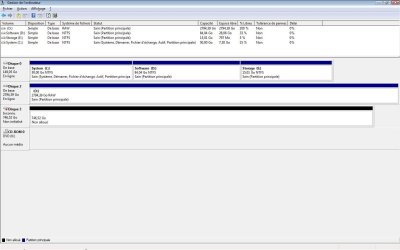
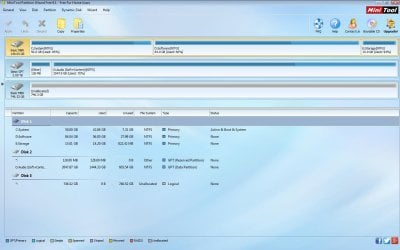
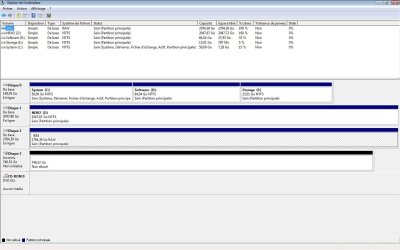
- In the Disk Manager: Filesystem appears as RAW (please check the attached screenshot -- sorry, it's in french because french Windows version here). Faulty drive is Disque 2 (O:\) _AND_ Disque 3 (Unallocated).
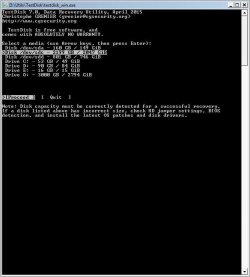
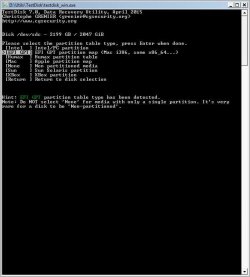
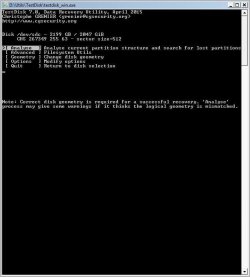
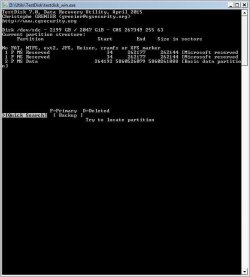
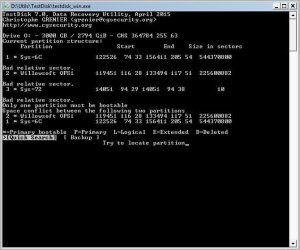
- In TestDisk: (please check the corresponding screenshots -- very last screenshot is when choosing Drive O: instead of disk /dev/sdc)


That's about it I guess (hopefully I didn't overdo it with all the screenshots!). I'm waiting for your advice and skillful help (as eagerly as you can imagine -- for about 2 TB of collected data over the last 5 years are stored on that drive!) as to what are the best steps to take now.

(NB: Please note that I'd be able to image my drive in the state it is now (with DD under Linux) so as to revert back to it (in case things go wrong with further steps taken), if you deem it useful... ?)


Now standing by for further intructions... (^_-)
-- Angar
 

Attachments

  • WD30EZRX.jpg
    WD30EZRX.jpg
    104.2 KB · Views: 2
  • WindowsDiskManagement.jpg
    WindowsDiskManagement.jpg
    80.8 KB · Views: 12
  • TestDisk_1.jpg
    TestDisk_1.jpg
    37.7 KB · Views: 7
  • TestDisk_2.jpg
    TestDisk_2.jpg
    36.7 KB · Views: 6
  • TestDisk_3.jpg
    TestDisk_3.jpg
    34.7 KB · Views: 6
  • TestDisk_4.jpg
    TestDisk_4.jpg
    34.1 KB · Views: 6
  • TestDisk_5.jpg
    TestDisk_5.jpg
    34 KB · Views: 7
  • TestDisk_(DiskO).jpg
    TestDisk_(DiskO).jpg
    43 KB · Views: 62

My Computer My Computer

At a glance

Vista Home Premium 32bit2 Gib
Computer type
Laptop
Computer Manufacturer/Model Number
Compaq/HP Presario C750
OS
Vista Home Premium 32bit
Memory
2 Gib
Hard Drives
Western Digital WD30EZRX
Western Digital WD40EZRX
OK, So the current position is that the 3TB HDD is put inside a third party enclosure and plugged into the Vista PC.

Now do not do anything with TestDisk until further instructions. Just close it.

Download install and run Minitool Partition Wizard Free Edition. Best Free Partition Manager for Windows | MiniTool Partition Free Post a screenshot of how your 3TB external drive looks in it. Your time is 20:15 now. My time 23:45 and hence retiring for the day. I shall see the screenshot after another 10hrs and we may continue thereafter.

Also tell me whether you have at anytime before put this 3TB drive in this particular enclosure and were able to see all the data inside. This question is important. Some of the older enclosures may not be able to deal with >2TB drives. Provide the manufacturer/model No of the enclosure. (Just for info see speedlever's post here. We were struggling. He bought a new enclosure and put it in and it resolved the problem. Solved Win 8.1 x64 and raw file system on external USB drive - Page 3 . Please do not do anything with TestDisk after reading that thread. Each case can be different. We have to dig out and find.)
 

My Computer My Computer

At a glance

Windows 7 Home Premium 32 bit
OS
Windows 7 Home Premium 32 bit
OK, So the current position is that the 3TB HDD is put inside a third party enclosure and plugged into the Vista PC.
Precisely. :)

Now do not do anything with TestDisk until further instructions. Just close it.
(Wouldn't have dared to go any further with it before getting some expert "green light" to do so anyway...)

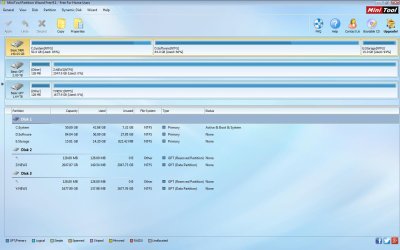
Download install and run Minitool Partition Wizard Free Edition. Post a screenshot of how your 3TB external drive looks in it.
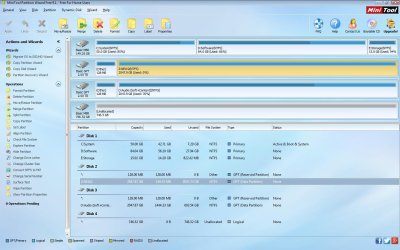
I attached the resulting capture (which makes total sense to me BTW, as it totally matches what I know of the drive, in particular the 1444 GB used / 603 GB free out of 2047 GB for "Disk 2", as I remember quite well noticing there was still 613 GB free on the drive short moments before it got disconnected and failed).

Also tell me whether you have at anytime before put this 3TB drive in this particular enclosure and were able to see all the data inside. This question is important. Some of the older enclosures may not be able to deal with >2TB drives. Provide the manufacturer/model No of the enclosure.
The external enclosure is from Advance. I can't tell what model n° unfortunately, since its metal case and packaging would be somewhat hard to put my hand on right now (I commonly remove the casing of all external enclosures to make it quicker to swap drives with it and help with the cooling). I can only say that it is indeed quite old: I bought it several years ago, something like around 2007 would be my best guess.
That being said, I can also confirm that the current unknown filesystem issue definitely occured because of the unexpected disconnection (most likely due to that low quality 13 USB ports hub!): I have been accessing most of my storage HDs (including that 3 TB one and another Western Digital of 4 TB) using that very enclosure for years now, without ever having a problem until now -- in fact, the 3 TB drive we're dealing with was even formatted and filled with data via that same enclosure.

Please do not do anything with TestDisk after reading that thread. Each case can be different. We have to dig out and find.)
I appreciate how delicate such matters are, believe me. And I certainly fully appreciate how thorough and serious your approach is (and once more: THANK YOU for that! :D). I'm in no hurry and ok to do whatever tests you may deem necessary, if it means increasing the chances for recovery.

-- Angar
 

Attachments

  • PartitionWizard.jpg
    PartitionWizard.jpg
    103.9 KB · Views: 11

My Computer My Computer

At a glance

Vista Home Premium 32bit2 Gib
Computer type
Laptop
Computer Manufacturer/Model Number
Compaq/HP Presario C750
OS
Vista Home Premium 32bit
Memory
2 Gib
Hard Drives
Western Digital WD30EZRX
Western Digital WD40EZRX
As you have rightly seen all your data is there. So you need not worry on that count.

Where exactly are you situated now?

Where exactly is your own PC and when will you have access to it?

In your current location, do you have another larger than 2TB external drive?

Now right click on the O: drive in Partition Wizard and explore. Do you see all your files?
 

My Computer My Computer

At a glance

Windows 7 Home Premium 32 bit
OS
Windows 7 Home Premium 32 bit
Where exactly are you situated now?
You mean geographically? I'm at my parents in NorthWest France.
My own PC is in Paris, and I'm gonna have access to it this sunday when I go back.

In your current location, do you have another larger than 2TB external drive?
Yes, I also have the 4 TB I mentioned before here with me right now.

Now right click on the O: drive in Partition Wizard and explore. Do you see all your files?
Hard to tell for 100% sure as ten thousands of files (mostly RAR archives) are stored in there, but as far as I can tell, yes they're all there! :)
 

My Computer My Computer

At a glance

Vista Home Premium 32bit2 Gib
Computer type
Laptop
Computer Manufacturer/Model Number
Compaq/HP Presario C750
OS
Vista Home Premium 32bit
Memory
2 Gib
Hard Drives
Western Digital WD30EZRX
Western Digital WD40EZRX
Is that 4TB drive a branded external drive or again a bare drive that you shove in into an external casing? To do a partition copy with Partition Wizard you need an empty external drive apart from your faulty external drive.

If you do not have an empty external drive then we shall do a test recovery using TestDisk. You need another external drive to be plugged in with adequate space - in your case 1.5GB data? - if you want to copy all the files. Or we will try to copy only a few files into available space. You can do a full recovery later when you have all ready if the test recovery is successful.
 

My Computer My Computer

At a glance

Windows 7 Home Premium 32 bit
OS
Windows 7 Home Premium 32 bit
Hello Angar!

I'm sorry for the issue with the 3TB drive! :/

I would listen to Jumanji, he has quite some experience with MiniTool Partition. Do as he details, coping the partition with your data from the 3TB.

After this is done, and you have your partition copy made, I would suggest you taking the 3TB WD Green drive and plugging it internally. Was there any specific reason you chose to connect it externally? Using the third party enclosure on a USB hub with so many ports, with at least another device connected, and performing reading processes on that problematic drive could have caused it to become RAW somehow. Nevertheless, I would try and connect it internally and even on another system, as common troubleshooting steps, to see if may be the drive wouldn't show up as it is supposed to.

After all this is done and tried, post back with the results! :)


CK_WD
 

My Computer My Computer

At a glance

Windows 7 Home Premium x64
Computer type
PC/Desktop
OS
Windows 7 Home Premium x64
Is that 4TB drive a branded external drive or again a bare drive that you shove in into an external casing?
It's another bare Western Digital drive (about the same exact model as the 3 TB, "WD Green" and all, but 4 TB).
I did quit buying complete branded enclosure+disk drives a long while ago (sth like 6-7 years ago), especially since most of them are purposely made unopenable, and I got tired pretty quick having to crack them open everytime any problem occured -- also, buying bare internal HD and using them in my already purchased enclosures is way cheaper!. Nowadays I always do this.


To do a partition copy with Partition Wizard you need an empty external drive apart from your faulty external drive.
Well, guess what: the 4 TB is brand new (purchased it less a couple of weeks ago) and still empty! So that's perfect! May I ask you to provide the best/safest way to do it using Partition Wizard? (I mean I can find my way around most software fine enough usually, but I would take even the slightest chance here, as you can guess! ;) Not when I have more pro people ready to monitor my actions, hehe).
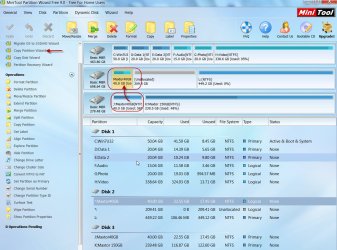
If you do not have an empty external drive then we shall do a test recovery using TestDisk. You need another external drive to be plugged in with adequate space - in your case 1.5GB data? - if you want to copy all the files. Or we will try to copy only a few files into available space. You can do a full recovery later when you have all ready if the test recovery is successful.
Not sure about that last part. Do you mean to say that the partition copy using Partition Wizard is the better alternative? I can do it. So I assume that will make the test recovery (copying all or part of the fles) using TestDisk redundant, exact? (Or is it like the logical next step to jump to anyway even after the partition copy was performed?)
Remains the full recovery process which we can move on to once the partition copy was successful, still right? I hope I don't misinterpret anything here!
 

My Computer My Computer

At a glance

Vista Home Premium 32bit2 Gib
Computer type
Laptop
Computer Manufacturer/Model Number
Compaq/HP Presario C750
OS
Vista Home Premium 32bit
Memory
2 Gib
Hard Drives
Western Digital WD30EZRX
Western Digital WD40EZRX
I'm sorry for the issue with the 3TB drive! :/
Thank you CKWD, I appreciate the concern believe me! :)

After this is done, and you have your partition copy made, I would suggest you taking the 3TB WD Green drive and plugging it internally. Was there any specific reason you chose to connect it externally?
I can't plug it internally, as it's a 3.5" drive and all I have is a laptop these days (I'm pretty sure I'll go again for a desktop for my next PC purchase though!).
Apart from that, the reason I chose to plug it via external enclosure is simple: I have a total of 8 HDs like this one (most are 2 TB, plus this one 3 TB and a 4 TB), which would make it uneasy to plug them ALL internally anyway, right? Hehehe... ;)
Also, all these are used as _storage_ devices only, the idea being to have them connected and working as little time as I can to ensure them as long a lifespan as possible (and hoping for a brighter future when a clever company would finally deliver the very first _long-lasting_ lifespan media to simple customers! ;))

Using the third party enclosure on a USB hub with so many ports, with at least another device connected, and performing reading processes on that problematic drive could have caused it to become RAW somehow.
I hear you. Except the drive was never faulty in any way, until that sudden disconnection (which happened once before BTW, because of that hub -- at the time I didn't recognize it as a nasty side effect of the hub though -- fortunately not causing any damage that previous time). I'm still convinced the origin of it was that disconnection, let alone how weird it was: Windows didn't acknowledge it instantly, instead reporting some error about a missing path or whatever when I tried to access a folder, THEN only popping up the message that the drive was "successfully removed" (but not by me anyway!!).

Nevertheless, I would try and connect it internally and even on another system, as common troubleshooting steps, to see if may be the drive wouldn't show up as it is supposed to.
I already did plug it on another laptop (still externally then) under Windows XP, which reported the same issue. I can still try it under an old Ubuntu distri if you believe that is useful?
 
Last edited:

My Computer My Computer

At a glance

Vista Home Premium 32bit2 Gib
Computer type
Laptop
Computer Manufacturer/Model Number
Compaq/HP Presario C750
OS
Vista Home Premium 32bit
Memory
2 Gib
Hard Drives
Western Digital WD30EZRX
Western Digital WD40EZRX
The second one - that is performing a Test Recovery with TestDisk - is an alternative to Partition copy using Partition Wizard in case in your present location you don't have the necessary external drive of required capacity to do the partition copy.

There has always been problems using third party enclosures/docks especially the old ones which can't deal with more than 2TB drives.

So right now you have another third party enclosure in which you can put the 4TB drive and use it as a destination drive to copy the partition on your 3TB external drive.

In this case we can try Copy Partition using Partition Wizard. We are only trying to copy the partition from your source 3TB drive onto the destination 4TB drive. Your source data will still be there even if we are not able to copy the source to destination successfully because of the limitations if the intervening enclosure interface of your 4TB external. The ideal data recovery situation will be to internally connect both the 3TB bare drive and 4TB bare drive doing away with the unpredictable enclosure interface.

Nevertheless, we are not going to lose any data in trying. ( I have just completed an experimental partition copy of a 40GB partition from a 300GB Maxtor external to a 750GB Seagate external. No problems here . Both are <2TB MBR initialised drives.)

17-09-2015 14-52-43.jpg

But before we start in your case, I would like to see your 4TB bare drive put inside the external enclosure you will be using, in Partition Wizard. So put it inside the enclosure and post a PW screenshot. I am assuming that you have no data whatsoever on your 4 TB drive.

Now and then I will go missing. That is inevitable. We shall go slow. There is absolutely no need to hurry up things.
 

My Computer My Computer

At a glance

Windows 7 Home Premium 32 bit
OS
Windows 7 Home Premium 32 bit
Now and then I will go missing. That is inevitable. We shall go slow. There is absolutely no need to hurry up things.
Couldn't agree more! (Same goes for me here anyway, given we're on totally different timezones...) Can't tell you how much I appreciate your patience with solving my problem!

I'm gonna post in a short while the screenshot you asked for of the 4 TB (via another external enclosure) in Partition Wizard. (Indeed the 4 TB is totally empty right now)
Although, since you mention it, I'm starting to think over the possibility of finding a desktop computer around (a neighbour's for instance) to connect both the 3 TB and 4 TB drives. Not sure I can find one immediately, but that may be worth a try...
Another alternative I'm thinking about is this: I have a total of 3 external enclosures for 3,5" drives + 2 more for 2,5" drives, and yet one more for everything (ie. it accepts both 2,5" and 3,5" SATA, as well as old ATA/IDE). That last polyvalent one started failing recently (couple of months ago) so I was thinking to replace it soon.
Do you believe it would be a good solution in the present situation to buy a recent external enclosure?
(If so, I'm of course open to your advised suggestions about what choice to make in the matter to ensure maximum safety and reliability, especially with my >2 TB drives)
 

My Computer My Computer

At a glance

Vista Home Premium 32bit2 Gib
Computer type
Laptop
Computer Manufacturer/Model Number
Compaq/HP Presario C750
OS
Vista Home Premium 32bit
Memory
2 Gib
Hard Drives
Western Digital WD30EZRX
Western Digital WD40EZRX
I can't plug it internally, as it's a 3.5" drive and all I have is a laptop these days (I'm pretty sure I'll go again for a desktop for my next PC purchase though!).
Apart from that, the reason I chose to plug it via external enclosure is simple: I have a total of 8 HDs like this one (most are 2 TB, plus this one 3 TB and a 4 TB), which would make it uneasy to plug them ALL internally anyway, right? Hehehe...
Also, all these are used as _storage_ devices only, the idea being to have them connected and working as little time as I can to ensure them as long a lifespan as possible (and hoping for a brighter future when a clever company would finally deliver the very first _long-lasting_ lifespan media to simple customers! )

In that case I would suggest you still finding a friend or colleague to give you access to his/her desktop to test the drive internally. You need to know if the drive could be successfully recognized in internal SATA connection. :)

I hear you. Except the drive was never faulty in any way, until that sudden disconnection (which happened once before BTW, because of that hub -- at the time I didn't recognize it as a nasty side effect of the hub though -- fortunately not causing any damage that previous time). I'm still convinced the origin of it was that disconnection, let alone how weird it was: Windows didn't acknowledge it instantly, instead reporting some error about a missing path or whatever when I tried to access a folder, THEN only popping up the message that the drive was "successfully removed" (but not by me anyway!!).

Sometimes huge USB hubs could have that problem by the more USB devices being connected to them at the same time. Sometimes, it is a real risk, not always. That is why back ups are always advised. :/

I already did plug it on another laptop (still externally then) under Windows XP, which reported the same issue. I can still try it under an old Ubuntu distri if you believe that is useful?

Yes, I would always believe that in such cases booting into Ubuntu/Linux Live CD could be helpful, as they have much simpler system and paths, in comparison to Windows. I advise it at this point.

Try all the tests you've been suggested here and post back! :)

Good luck!

CK_WD
 

My Computer My Computer

At a glance

Windows 7 Home Premium x64
Computer type
PC/Desktop
OS
Windows 7 Home Premium x64
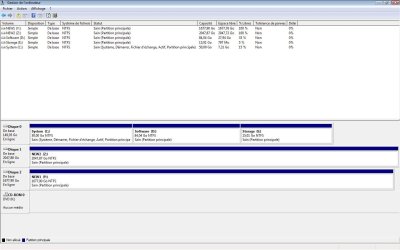
As Jumanji requested, I'm now posting a screen capture of Partition Wizard with both my faulty 3 TB and my 4 TB connected each via external enclosure. As predicted, old enclosures can't seem to manage over 2 TB well and the one I have left for the 4 TB only makes 2 TB appear under Partition Wizard, damn! (Disk2 - Z:NEW2)
Of course same thing under Disk Management (Disque 1 - Z:NEW2). Now that settles it, as I definitely need to buy a new external enclosure to manage these correctly! If there are some particular specifications I should be looking for while making my choice, please be so kind as to tell me which ones... :rolleyes:

In that case I would suggest you still finding a friend or colleague to give you access to his/her desktop to test the drive internally. You need to know if the drive could be successfully recognized in internal SATA connection. :)
I can do that, although the only slight problem is that it might be like over a week or even two at least before that can actually be done.

Sometimes huge USB hubs could have that problem by the more USB devices being connected to them at the same time. Sometimes, it is a real risk, not always. That is why back ups are always advised. :/
Hehe, I would backup if I could, trust me! I would use some kind of RAID system, only I'm not rich enough to invest into enough to backup all my storage (like I said, I have now close to 15 TB of collected data -- mostly video and audio rushes, but not only) and I just can't double that space to have backup of everything...
What disppoints me about that hub I purchased is that the failure (sudden disconnection) of my enclosure happened while only that (self-powered) enclosure + another 2,5" enclosure (USB-powered that one) were connected to it (remember that the hub itself was self-powered with a 5V 2A power supply) and it happened like a couple hours into me using them! It doesn't make much sense to me -- but I won't do the mistake of using it ever again (fortunately, it's a very recent Amazon order, ie. I can still send it back for refund).

Yes, I would always believe that in such cases booting into Ubuntu/Linux Live CD could be helpful, as they have much simpler system and paths, in comparison to Windows. I advise it at this point.

Try all the tests you've been suggested here and post back! :)
Duly noted then! I'm gonna try and connect the drive under Ubuntu Linux and see how it goes. I'll report back here later of course!

Good luck!
Thank you, I'll sure need some. ;)
 

Attachments

  • PartitionWizard(WithZ).jpg
    PartitionWizard(WithZ).jpg
    144 KB · Views: 4
  • WinDiskManager(withZ).jpg
    WinDiskManager(withZ).jpg
    107 KB · Views: 3

My Computer My Computer

At a glance

Vista Home Premium 32bit2 Gib
Computer type
Laptop
Computer Manufacturer/Model Number
Compaq/HP Presario C750
OS
Vista Home Premium 32bit
Memory
2 Gib
Hard Drives
Western Digital WD30EZRX
Western Digital WD40EZRX
Is it your 4TB drive inside the enclosure?

Is your 4TB drive in factory-formatted condition?

If you formatted it, please give details of the machine on which you formatted it and how you formatted it.

I have seen the same pictures for your 3TB drives in post#1 (WDM) and post#3 (PW) and now it is the same for the 4TB drive.

Windows Disk Management shows both your 3TB and 4TB drives as one 3 TB drive and another 800GB drive.

Partition Wizard shows both your 3TB and 4TB drives as one GPT 2TB drive and one MBR 800 GB drive.

Though I had noticed it in your posts#1 and 3, I did not raise the issue since our priority is to recover the data and not to investigate this ( It is in all probability and propensity due to the incompatible enclosure) and I planned to raise this issue after a successful/unsucessful recovery.

Even now we can skip this investigation and get on to data recovery. ( But I will be keeping my fingers crossed because of the above facts.:) Let us see how it goes.)

I do believe you are capable of handling the software yourself and unlike TestDisk where one may go wrong and ruin everything, there is no such risk in using Partition Wizard. So I shall allow you handle it with your wisdom :).

To be able to copy the GPT Partition on the 3TB external, you should make the GPT Partition on your 4TB external unallocated by deleteing that partition. Do this in PW with only your 4TB external connected so that you do not accidentally delete the partition in the 3TB external.

After this reboot your computer, connect both your 3TB and 4TB external drives and run Copy partition Wizard. Follow the prompts. Your 3TB drive GPT partition will be shown with the drive letter. Note down the Disk No.Your 4TB drive will show a 2TB unallocated.Note the disk No.

Copy Partition Wizard in left pane> Next > Select partition you would like to copy (the GPT partition on your 3TB disk no.) > Next >Where to create copy (select your 4TB disk no. unallocated space) > Next > Finish

Check operations pending in the left pane and click on Apply on top. When copy completes assign a drive letter to the copied partition in on your 4TB external.

Good Luck.

(Night calling to bed and shall be back after another 8-10 hours. You are on your own :))
 
Last edited:

My Computer My Computer

At a glance

Windows 7 Home Premium 32 bit
OS
Windows 7 Home Premium 32 bit
[EDIT]Just read Jumanji's last post after posting this, so I'm gonna edit it back later again to reply to him[/EDIT]

Alright, after an attempt to connect the drive under Linux (Ubuntu LiveCD), I'm sorry to report that the drive doesn't show up at all on the desktop as it should... :huh:

So my immediate alternatives are now:
- Proceed with the Partition copy using Partition Wizard (even though my 4 TB destination drive will only be recognised as a 2 TB)
- Wait until I could order a brand new external enclosure supporting over 2 TB drives (in which case, sorry to repeat, I'd love your advice on what specific kind of enclosure I should look for, otherwise I'll pretty much buy based on convenience instead of performance and reliability, which should be priorities!)
- Wait even more (couple of weeks is my guess) until I can internally plug both drives in someone's desktop PC case to proceed with the Partition copy.

I'm kinda ok with any of these, if you advise me one is the better for whatever reason. So once again, awaiting instructions... (^_-)
 

My Computer My Computer

At a glance

Vista Home Premium 32bit2 Gib
Computer type
Laptop
Computer Manufacturer/Model Number
Compaq/HP Presario C750
OS
Vista Home Premium 32bit
Memory
2 Gib
Hard Drives
Western Digital WD30EZRX
Western Digital WD40EZRX
I may not be competent to tell you which is the best third party enclosure or dock since I had never looked into that direction. I don't even have a 3TB drive much less an enclosure.

You may check this post by speedlever in eight forums Solved Win 8.1 x64 and raw file system on external USB drive - Page 3

You may also make a fresh and specific enquiry in this very forum on which would be the best enclosure in a new thread which may perhaps bring in those who have a knowledge on it.
 
Last edited:

My Computer My Computer

At a glance

Windows 7 Home Premium 32 bit
OS
Windows 7 Home Premium 32 bit
I may not be competent to tell you which is the best third party enclosure or dock since I had never looked into that direction. I don't even have a 3TB drive much less an enclosure.

You may check this post by speedlever in eight forums Solved Win 8.1 x64 and raw file system on external USB drive - Page 3

You may also make a fresh and specific enquiry in this very forum on which would be the best enclosure in a new thread which may perhaps bring in those who have a knowledge on it.
Alright! Thank you for the advice! I'm gonna check the thread you gave and prolly will post another request about external enclosures soon here!

Now, I had to take care of some adminstrative issue last evening and this morning (which explains my replying kinda late), but I'm now free to proceed with the partition copy attempt. I'll report back once it's done!
 

My Computer My Computer

At a glance

Vista Home Premium 32bit2 Gib
Computer type
Laptop
Computer Manufacturer/Model Number
Compaq/HP Presario C750
OS
Vista Home Premium 32bit
Memory
2 Gib
Hard Drives
Western Digital WD30EZRX
Western Digital WD40EZRX
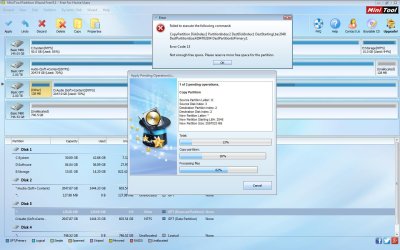
Back with not so good news (albeit not too bad either I hope): Partition Copy failed with Partition Wizard.
Basically, Wizard tells me it cannot copy the partition due to insufficient size on destination!!? (Refer to the attached screenshot for detailed error)
Let me stress right away that I did everything by the book I believe:
- Following your instructions, I erased the existing partitions on destination 4 TB drive, so it appeared unallocated, 2048 GB free.
- I copied the O:2047,87 GB partition as source (and not the whole disk as it may also be possible?)
- I tried using both copy WITH resize and then WITHOUT, to no avail each time...

Now, might I have better luck with the alternative process using TestDisk?
Or if (hopefully!) the origin of the fail is due to either/both external enclosures, should I wait until I can grab one (or two?) recent and more reliable and efficient one(s)?
Or should I even wait until I have access to a desktop computer in order to plug both source and destination disks internally?
And final question, if in your opinion it may be that the reason for the Partition copy failing is NOT due to unreliable external enclosures, what else may it be?


NB: Waiting for your answers to these few questions, I'm gonna post next some more precise screenshots+explanations about both 3 TB and 4 TB drives, the external enclosures I use here and how they handle and format/manage these >2 TB drives
 

Attachments

  • PartitionCopyFail.jpg
    PartitionCopyFail.jpg
    143.2 KB · Views: 3

My Computer My Computer

At a glance

Vista Home Premium 32bit2 Gib
Computer type
Laptop
Computer Manufacturer/Model Number
Compaq/HP Presario C750
OS
Vista Home Premium 32bit
Memory
2 Gib
Hard Drives
Western Digital WD30EZRX
Western Digital WD40EZRX
Here are first a few answers to previous questions of yours:

Is your 4TB drive in factory-formatted condition?
Nope, it wasn't (or didn't appear) formatted when I received it (not in NTFS anyway).
If you formatted it, please give details of the machine on which you formatted it and how you formatted it.
To format it, I used my (very recently stopped functioning though) "Multi" enclosure (as in multi-plug support, since it supports 2,5" ATA/IDE + 3,5" ATA/IDE + SATA). Specifically it is this model.
(Paid it much less than the Amazon price though! ^^)

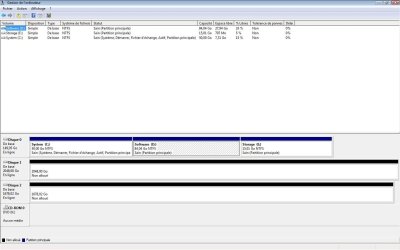
Once formatted, I ended up with 2 disks (upon detection by Windows) which you can see in the attached screenshots as Y:NEW1 and Z:NEW2 under PW and WDM.


I have seen the same pictures for your 3TB drives in post#1 (WDM) and post#3 (PW) and now it is the same for the 4TB drive.
Windows Disk Management shows both your 3TB and 4TB drives as one 3 TB drive and another 800GB drive.
Partition Wizard shows both your 3TB and 4TB drives as one GPT 2TB drive and one MBR 800 GB drive.
I'll try to explicit and clarify things as much as I can here:
I recently used 3 different enclosures: the "Multi/Advance" I mentioned above, another we shall call "Single/Advance", and a last one (which is the worst of the bunch since I recovered it from an external Bufallo bulk enclosure+drive I had to crack open) we therefore shall call "Single/Bufallo".

When I plug the 3 TB via either the "Multi/Advance" or the "Single/Advance" I got the same result: it is recognized as comprised of 2 disks: one of 2 TB capacity and a second one of 800 GB.
When I plug that 3 TB using the "Single/Bufallo", only the first 2 TB disk is detected, it's like the second 800 GB doesn't exist (obviously because that specific enclosure was made to support 2 TB drives at most).

Same scenario with the 4 TB (only the capacity of the second disk changes): via either the "Multi/Advance" or the "Single/Advance", it is recognized as comprised of 2 disks: one of 2 TB capacity and a second one of 1,64 TB.
Once again, using the "Single/Bufallo", only the first 2 TB disk is detected, it's like the second 1,64 TB doesn't exist.


Now, I really can't say whether my >2 TB drives are truly made of 2 separate disks internally (the way they are detected by Windows), or if that is a fake/biased detection due to bad or partial support of capacity over 2 TB by my two Advance enclosures... ? Probably someone on this forum might know whether Green Western Digital >2 TB drives are made of a single disk or of one of 2 TB + another to achieve the remaining needed capacity for the drive. (And what of Western Digital 6 TB capacity drives then? Two 2 TB disks + one more for the rest? Starting to sound a bit much but for all I know...)
 

Attachments

  • DiskManager-Non-Partitioned4TBPluggedViaEnclosureSingleAdv.jpg
    DiskManager-Non-Partitioned4TBPluggedViaEnclosureSingleAdv.jpg
    82.4 KB · Views: 0
  • PartitionWizard-Non-Partitioned4TBPluggedViaEnclosureSingleAdv.jpg
    PartitionWizard-Non-Partitioned4TBPluggedViaEnclosureSingleAdv.jpg
    97.9 KB · Views: 3
  • DiskManager-Formatted4TBPluggedViaEnclosureMultiAdv.jpg
    DiskManager-Formatted4TBPluggedViaEnclosureMultiAdv.jpg
    89.9 KB · Views: 0
  • PartitionWizard-Formatted4TBPluggedViaEnclosureMultiAdv.jpg
    PartitionWizard-Formatted4TBPluggedViaEnclosureMultiAdv.jpg
    109.1 KB · Views: 1

My Computer My Computer

At a glance

Vista Home Premium 32bit2 Gib
Computer type
Laptop
Computer Manufacturer/Model Number
Compaq/HP Presario C750
OS
Vista Home Premium 32bit
Memory
2 Gib
Hard Drives
Western Digital WD30EZRX
Western Digital WD40EZRX
Your Post No:18:

To me it appears that the partition has been copied though it may not be in the proper format.I see the 128MB at the end instead of in front. I can't guess how it could have happened.

I hope you have marked your 3TB external that contains the data and the 4TB external distinctively so that a mix-up does not occur.

Now keep your 3TB external having the data away beyond your hands reach.

Plug-in your 4TB external and post a screenshot of how it appears in PW.

Your post #19:

My head just twirls :D. I think anybody's will.

But I can say this much: All HDDs come out factory formatted so that these can be used straightaway by the user.

The 3TB and 4 TB Green internal drives would have mostly come out as GPT initialised.( I have to check this with CKWD.I know for certain that greater than 2TB external drives manufactured by Seagate, WD etc. were coming out as Advance Formatted MBR drives to make them compatible with Windows XP till recently.With Windows XP no longer supported by MS even these external drives have started coming out as GPT initialised drives)

If you had connected these 3TB and 4TB greens internally in Vista or 7 they would have shown their full capacity. There is no two drives inside. It all happened because you put those into incompatible enclosures.

Now I think it will be best to wait till you can connect them internally,

Till then we shall only be doing "research" to get the data out of this mess with whatever resources are available without harming the data on the original drive.We have already done some (research) because you said you won't be back in your Paris Den till Sunday. We are not modifying or writing anything into that data disk. But make sure that you don't keep changing the drives into the different enclosures.

Now don't forget to post the screenshot I asked for. I am more research-oriented. :D

Go ahead and buy some of the recent enclosures that can handle more than 2TB drives since you already have the drives.
 
Last edited:

My Computer My Computer

At a glance

Windows 7 Home Premium 32 bit
OS
Windows 7 Home Premium 32 bit
Back
Top