Dell latitude e6430 and dell latitude e6420

2009joseph

Member
Member
VIP
Local time
8:14 AM
Messages
247
hello i have both these laptops well i have bought a e6420 for my girlfriend as the other one she has is crap.well i have read that these e6420 get warm and well i found out they come with one pipe heatsink well i heard u can upgrade the heatsink to a 2 pipe one.(DUAL HEATPIPE heatsink DELL P/N - TYP01) i was wondering what else do i need to do this as when i get this laptop its second hand i7 pro in it 2.8ghz im going to clean it out and put new paste on it put i hear people are on about this copper shim to put on it.can this be done and well can i upgrade my dell latitude e6430 i5 pro 2.6ghz heatsink with the double heatsink as i know that one only comes with one pipe.love you guys info if you guys can help me would be class thanks

i got this info here GPU Temperature 103C on Latitude E6420 - General Hardware - Laptop - Dell Community
 

My Computer My Computer

At a glance

WINDOWS 7 64BIT ultimate8GB
Computer type
Laptop
Computer Manufacturer/Model Number
dell latitude e6430
OS
WINDOWS 7 64BIT ultimate
Memory
8GB
Hard Drives
sandisk extreme pro 480gb ssd
Antivirus
free avast
Joseph mate best leave as is after all it was made to function as it came. Now for the compound and copper shim personally I would not bother with the copper shim I can see no good reason for it the dual pipe again if it was made to work with one pipe then leave alone.

It is better if you renew the compound using a decent cleaner and compound and I can recommend these for that job

Arctic Silver Incorporated - ArctiClean for thorough cleaning and preparation and Arctic Silver Incorporated - Arctic Silver 5 for the compound.

Now it depends on who you listen to but I always use these products and after the old compound is thoroughly cleaned off and the surfaces prepped I spread the compound very thinly and across the both entire surface of the CPU and the heatsink with my finger inside a vinyl or latex glove and then place a rice grain sized piece of compound on the CPU and replace the heatsink. If you touch the surfaces after clean and prep then redo it.

While you are in there do make sure the fan and the radiator are really spotless and I sometimes relube the fan bearings to make sure the fan is running at full tilt when needed.
 

My Computer My Computer

At a glance

Desk1 7 Home Prem / Desk2 10 Pro / Main lap A...Desk1 i5 3750K / Laptop i7 GTX 860M / Desk2 i...Desk1 8GB (1866) / Desk2 16GB (1333) / Laptop...Desk 1& 2NVidia GTX 650 & Laptops on board Intel
Computer type
PC/Desktop
Computer Manufacturer/Model Number
Own build (new) Desk1 / Asus ROG Win 7 / Desk2 1st build
OS
Desk1 7 Home Prem / Desk2 10 Pro / Main lap Asus ROG 10 Pro 2 laptop Toshiba 7 Pro Asus P2520 7 & 10
CPU
Desk1 i5 3750K / Laptop i7 GTX 860M / Desk2 i5 2500
Motherboard
Desk1 Asus P877-V / Desk2 Gigabyte H67 UD3H / Laptop ?
Memory
Desk1 8GB (1866) / Desk2 16GB (1333) / Laptop 8Gb DDR3
Graphics Card(s)
Desk 1& 2NVidia GTX 650 & Laptops on board Intel
Sound Card
Desk 1 & 2 -XONAR DG Realtek High Def audio Laptop
Monitor(s) Displays
Desk 1 Benq HD 2450 / Desk2 Philips 24" / Laptop 17.5"
Screen Resolution
1920x1080 D1 & D2 & Laptop 1
Hard Drives
Desk1 Samsung 120GB 830 SSD
Asus ROG 256GB 850 Pro SSD
Desk2 Samsung 840 256 SSD
Toshiba 120GB EVO
PSU
Desk 1 Corsair HX 1050/ Laptop ? / Desk 2 Corsair HX 650
Case
Desk 1 Cooler HAF XM ? Toshiba laptop / Desk2 Coolermaster
Cooling
Fans on all Desk1 -2 Desk2 - all Coolermasters 5 Laptop ?
Keyboard
Desk 1 MS Sidewinder X6 Desk 2 MS Sidewinder X 4
Mouse
Desk 1&2 - Gigabyte MS 900 gamer - laptop - Logitec wireless
Internet Speed
ADSL2+
Other Info
One other Desktop (tester) and spare Toshba laptop both with SSD's
Running Kaspersky 2016 ISS on all machines config'd identically
Logitec audio stereo systems on each machine (x3)
Canon MG5250MFC
Router/modem TP-Link running WPA2SK
Joseph mate best leave as is after all it was made to function as it came. Now for the compound and copper shim personally I would not bother with the copper shim I can see no good reason for it the dual pipe again if it was made to work with one pipe then leave alone.

It is better if you renew the compound using a decent cleaner and compound and I can recommend these for that job

Arctic Silver Incorporated - ArctiClean for thorough cleaning and preparation and Arctic Silver Incorporated - Arctic Silver 5 for the compound.

Now it depends on who you listen to but I always use these products and after the old compound is thoroughly cleaned off and the surfaces prepped I spread the compound very thinly and across the both entire surface of the CPU and the heatsink with my finger inside a vinyl or latex glove and then place a rice grain sized piece of compound on the CPU and replace the heatsink. If you touch the surfaces after clean and prep then redo it.

While you are in there do make sure the fan and the radiator are really spotless and I sometimes relube the fan bearings to make sure the fan is running at full tilt when needed.


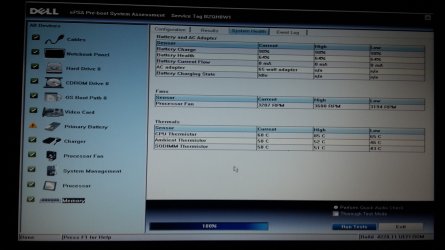
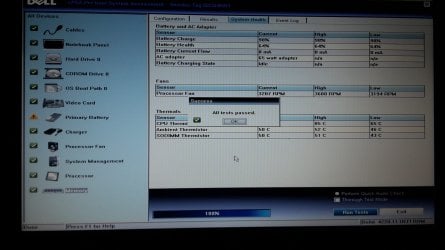
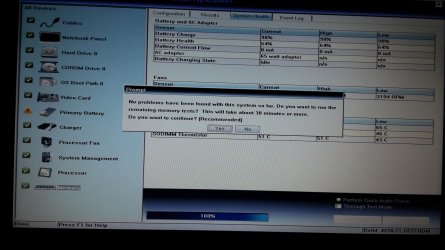
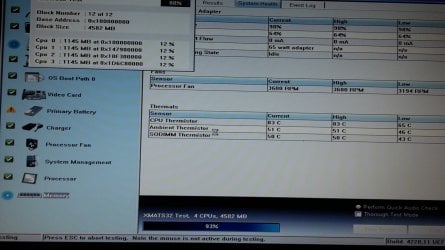
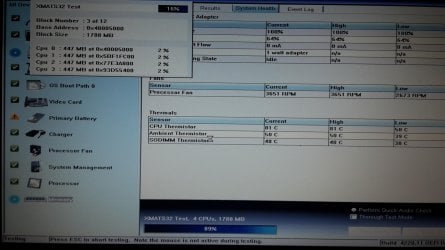
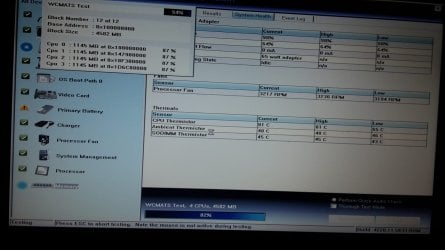
thanks ICIT2LOL you are the pc wizard.well stupid me i went and bought the copper shims but dont have to put them but i also bought the twin copper pipe heatsink for the dell e6420 as this one i have is a single pipe and tbh she runs hot i think up to 95c when i was installing windows 7 ultimate as the laptop came with win 10.never got around to checking the paste as was going to change the heatsink with the twin pipe one.i did a bit of research and well i heard that people do this.here is the pics of my dell e6430 test heat and rpm of the fan

was thinking might do this to my dell e6420 i7 dule core 2.
GPU Temperature 103C on Latitude E6420 - General Hardware - Laptop - Dell Community
 

Attachments

  • 100% 3.jpg
    100% 3.jpg
    288.7 KB · Views: 3
  • 100% 2.jpg
    100% 2.jpg
    353.5 KB · Views: 1
  • 100% 1.jpg
    100% 1.jpg
    446.8 KB · Views: 1
  • 93%.jpg
    93%.jpg
    383.4 KB · Views: 0
  • 89%.jpg
    89%.jpg
    403.7 KB · Views: 0
  • 82%.jpg
    82%.jpg
    347.1 KB · Views: 0
  • 84%.jpg
    84%.jpg
    734.3 KB · Views: 0
  • 88%.jpg
    88%.jpg
    618.1 KB · Views: 0
Last edited:

My Computer My Computer

At a glance

WINDOWS 7 64BIT ultimate8GB
Computer type
Laptop
Computer Manufacturer/Model Number
dell latitude e6430
OS
WINDOWS 7 64BIT ultimate
Memory
8GB
Hard Drives
sandisk extreme pro 480gb ssd
Antivirus
free avast
il do few pics of the dell e6420 i7 2.8ghz one when i get it up and going those picd were from a dell e6430 i5 2.6ghz
 

My Computer My Computer

At a glance

WINDOWS 7 64BIT ultimate8GB
Computer type
Laptop
Computer Manufacturer/Model Number
dell latitude e6430
OS
WINDOWS 7 64BIT ultimate
Memory
8GB
Hard Drives
sandisk extreme pro 480gb ssd
Antivirus
free avast
Yep well don't know about the wizard stuff some might disagree but well if you think it is worth a try then go for it because the temps are not exactly frightening but not what I would like in my laptops.

I am now wondering if there is some design problem with the Dells as the temps should not be a problem eh?

So did you end up with using the gear I linked?? as it I find good and there are others around that others will say is better - I have used Noctua N4 (some ceramic and diamond dust ones) in the past but they don't (as far as I know) do a clean and prep kit which I think is essential cleaning with just alcohol doesn't cut it for me.
 

My Computer My Computer

At a glance

Desk1 7 Home Prem / Desk2 10 Pro / Main lap A...Desk1 i5 3750K / Laptop i7 GTX 860M / Desk2 i...Desk1 8GB (1866) / Desk2 16GB (1333) / Laptop...Desk 1& 2NVidia GTX 650 & Laptops on board Intel
Computer type
PC/Desktop
Computer Manufacturer/Model Number
Own build (new) Desk1 / Asus ROG Win 7 / Desk2 1st build
OS
Desk1 7 Home Prem / Desk2 10 Pro / Main lap Asus ROG 10 Pro 2 laptop Toshiba 7 Pro Asus P2520 7 & 10
CPU
Desk1 i5 3750K / Laptop i7 GTX 860M / Desk2 i5 2500
Motherboard
Desk1 Asus P877-V / Desk2 Gigabyte H67 UD3H / Laptop ?
Memory
Desk1 8GB (1866) / Desk2 16GB (1333) / Laptop 8Gb DDR3
Graphics Card(s)
Desk 1& 2NVidia GTX 650 & Laptops on board Intel
Sound Card
Desk 1 & 2 -XONAR DG Realtek High Def audio Laptop
Monitor(s) Displays
Desk 1 Benq HD 2450 / Desk2 Philips 24" / Laptop 17.5"
Screen Resolution
1920x1080 D1 & D2 & Laptop 1
Hard Drives
Desk1 Samsung 120GB 830 SSD
Asus ROG 256GB 850 Pro SSD
Desk2 Samsung 840 256 SSD
Toshiba 120GB EVO
PSU
Desk 1 Corsair HX 1050/ Laptop ? / Desk 2 Corsair HX 650
Case
Desk 1 Cooler HAF XM ? Toshiba laptop / Desk2 Coolermaster
Cooling
Fans on all Desk1 -2 Desk2 - all Coolermasters 5 Laptop ?
Keyboard
Desk 1 MS Sidewinder X6 Desk 2 MS Sidewinder X 4
Mouse
Desk 1&2 - Gigabyte MS 900 gamer - laptop - Logitec wireless
Internet Speed
ADSL2+
Other Info
One other Desktop (tester) and spare Toshba laptop both with SSD's
Running Kaspersky 2016 ISS on all machines config'd identically
Logitec audio stereo systems on each machine (x3)
Canon MG5250MFC
Router/modem TP-Link running WPA2SK
Our Dell I7 laptops here at run stupidly hot..
In fact some senior staff have complained it burnt their legs when working on the table at home then move to the lounge.. My IT Manager runs 2 case fans and a cooling pad on his own laptop to keep it from crashing and locking up, but he does pound it fairly well with numerous programs and windows open, running 4 x 27in screens.

We have gone back to I5's and there is no problem. So, it could be a design fault.. but for the size of them its no wonder.

YMMV
 

My Computer My Computer

At a glance

Win 7 64bit
Computer type
PC/Desktop
Computer Manufacturer/Model Number
Dell at work - Home built at home
OS
Win 7 64bit
Our Dell I7 laptops here at run stupidly hot..
In fact some senior staff have complained it burnt their legs when working on the table at home then move to the lounge.. My IT Manager runs 2 case fans and a cooling pad on his own laptop to keep it from crashing and locking up, but he does pound it fairly well with numerous programs and windows open, running 4 x 27in screens.

We have gone back to I5's and there is no problem. So, it could be a design fault.. but for the size of them its no wonder.

YMMV

yea kinda wish i did buy another i5 again.instead of the dell e6420 i7 dule core one.tbh i dont see much difference with speed in them anyways.my delle6430 is a i5 2.6ghz dule core and the one i bought was a dell e6420 i7 2.8ghz dule core.they come with a single copper pipe heatsink so i went and bought the twin copper pipe heat sink for both the laptops so i hope this helps.someone said to me on the dell forum this

There are two different heatsink assemblies - one for Intel and the other for Intel/nVidia hybrid video -- but one won't fit the other system (i.e., you can't use the hybrid heatsink on an Intel-only board, and vice-versa)

so i hope i bought the right one.my dell e6420 has a intell chip and a nVIDIA NVS 4200MN graffics chip 2
 
Last edited:

My Computer My Computer

At a glance

WINDOWS 7 64BIT ultimate8GB
Computer type
Laptop
Computer Manufacturer/Model Number
dell latitude e6430
OS
WINDOWS 7 64BIT ultimate
Memory
8GB
Hard Drives
sandisk extreme pro 480gb ssd
Antivirus
free avast
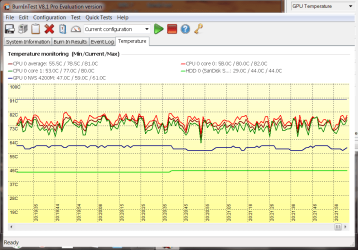
well here is it i have dont the dell e6420 twin copper pipe heatsink and copper shim upgrade on my core i7 with nvidia gpu so i put a 0.8mm copper shim on top of the nvidia chip but i used artic silver 5 paste on the nvidia chip thin piece then copper shim then more thin paste again i also put a think paste on the cpu as well the put down the twin pipe heatsink and ran this test called BurnInTest.here is the results.please tell me did i do this right you guys :)
 

Attachments

  • BurnInTestRes pic 2.png
    BurnInTestRes pic 2.png
    30.7 KB · Views: 0
  • BurnInTestRes pic.png
    BurnInTestRes pic.png
    30.4 KB · Views: 1

My Computer My Computer

At a glance

WINDOWS 7 64BIT ultimate8GB
Computer type
Laptop
Computer Manufacturer/Model Number
dell latitude e6430
OS
WINDOWS 7 64BIT ultimate
Memory
8GB
Hard Drives
sandisk extreme pro 480gb ssd
Antivirus
free avast
Back
Top