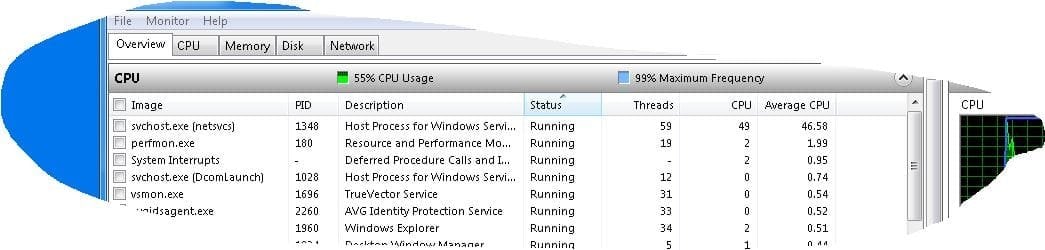
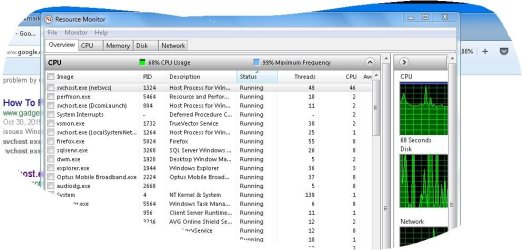
Suddenly this system, which was operating ok, has started to become very hot. I traced this heating to high CPU usage and further to an over-active svchost.exe (screen shot below).
I'm not very technical but from reading online I gather this may be associated with Microsoft Updates (Updates appears to be up to date). There was a hotfix offered by Microsoft but it concerned Windows Framework 3.0 (can't recall update number) but I checked thoroughly and couldn't find any such listing or update item.
So I'm rather stuck.
svchost is of course a legitimate and required Microsoft component but I find this overheating and taking up of all the CPU disconcerting and also it slows every other activity.
Any suggestions in as plain English as you can manage ... would be very helpful.
I'm not very technical but from reading online I gather this may be associated with Microsoft Updates (Updates appears to be up to date). There was a hotfix offered by Microsoft but it concerned Windows Framework 3.0 (can't recall update number) but I checked thoroughly and couldn't find any such listing or update item.
So I'm rather stuck.
svchost is of course a legitimate and required Microsoft component but I find this overheating and taking up of all the CPU disconcerting and also it slows every other activity.
Any suggestions in as plain English as you can manage ... would be very helpful.
Attachments
My Computer
- Computer type
- PC/Desktop
- Computer Manufacturer/Model Number
- Toshiba Satellite L500
- OS
- Windows 7 Pro 64bit SP1
- CPU
- Intel Core Duo CPU 2.20 GHz
- Motherboard
- Model KSWAA (U2E1) Version PSLS3A-01301D
- Memory
- 4 GB RAM
- Sound Card
- AMD High Definition Audio Device Realtek High Definition Aud
- Monitor(s) Displays
- Generic PnP Monitor on ATI Mobility Radeon HD 4600 Series