
svchost.exe taking CPU to 100%

nithig

New member
Member
VIP
Local time
12:39 AM
Messages
281
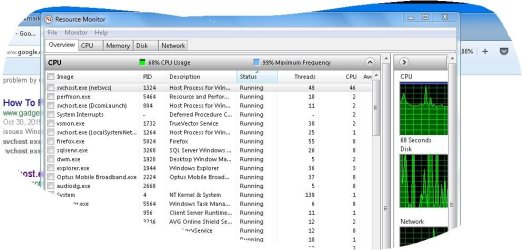
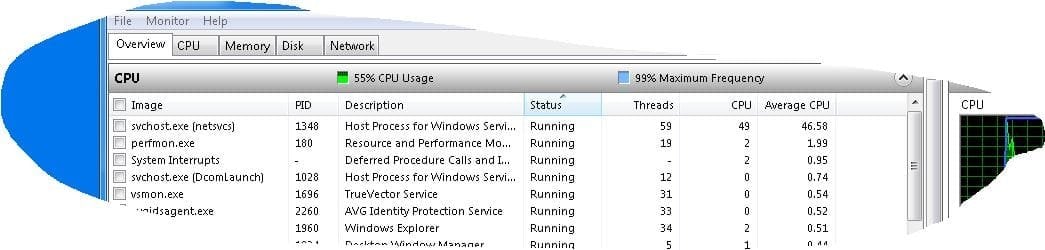
Suddenly this system, which was operating ok, has started to become very hot. I traced this heating to high CPU usage and further to an over-active svchost.exe (screen shot below).

I'm not very technical but from reading online I gather this may be associated with Microsoft Updates (Updates appears to be up to date). There was a hotfix offered by Microsoft but it concerned Windows Framework 3.0 (can't recall update number) but I checked thoroughly and couldn't find any such listing or update item.

So I'm rather stuck.
svchost is of course a legitimate and required Microsoft component but I find this overheating and taking up of all the CPU disconcerting and also it slows every other activity.

Any suggestions in as plain English as you can manage ... would be very helpful.
 

Attachments
  • Capture.JPG
    Capture.JPG
    82.1 KB · Views: 1

My Computer My Computer

Computer type
PC/Desktop
Computer Manufacturer/Model Number
Toshiba Satellite L500
OS
Windows 7 Pro 64bit SP1
CPU
Intel Core Duo CPU 2.20 GHz
Motherboard
Model KSWAA (U2E1) Version PSLS3A-01301D
Memory
4 GB RAM
Sound Card
AMD High Definition Audio Device Realtek High Definition Aud
Monitor(s) Displays
Generic PnP Monitor on ATI Mobility Radeon HD 4600 Series

My Computer My Computer

Computer type
Laptop
Computer Manufacturer/Model Number
Employer provided Dell Latitude
OS
W7 Pro SP1 64bit
CPU
i7
Memory
8GB
Graphics Card(s)
Intel HD Graphics
Hard Drives
crappy SSD
Antivirus
Employer mandated Symantec Endpoint Protection
Browser
Pale Moon 64bit, IE11 64bit & Chrome 64bit
Thank you UsernameIssues.
D/loaded that stand alone update however when double clicked it starts the "searching for updates on this computer" and this has been running for some time now with nothing else occurring.
Is this 'searching for updates' what is meant to be achieved with the d/load KB3112343?
 

My Computer My Computer

Computer type
PC/Desktop
Computer Manufacturer/Model Number
Toshiba Satellite L500
OS
Windows 7 Pro 64bit SP1
CPU
Intel Core Duo CPU 2.20 GHz
Motherboard
Model KSWAA (U2E1) Version PSLS3A-01301D
Memory
4 GB RAM
Sound Card
AMD High Definition Audio Device Realtek High Definition Aud
Monitor(s) Displays
Generic PnP Monitor on ATI Mobility Radeon HD 4600 Series
Hi,
Not at all sure that update is more related to monitoring win-10 upgrades than anything :/
Use Clean boot,
http://www.sevenforums.com/tutorial...ation-conflicts-performing-clean-startup.html
Click Start and type in the search box,
msconfig
Click on the suggestion on top or hit the Enter key,
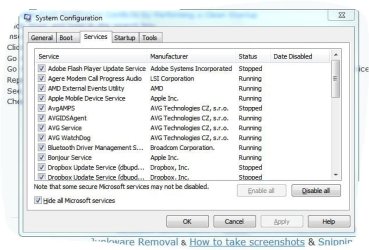
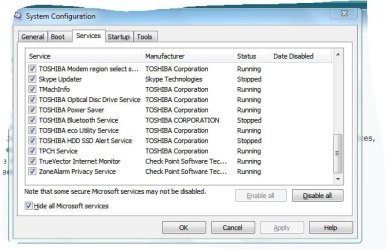
Go to the Startup section and take some screen shots for a complete list,
Go to the Services section and on the bottom left Check the box to Hide All Microsoft services,
Repeat the screen shots,
See the links above my signature on how to take and upload screen shots here,
Cheers.
 

My Computer My Computer

Computer type
PC/Desktop
Computer Manufacturer/Model Number
Custom assembled by me :}
OS
Win-7-Pro64bit 7-H-Prem-64bit
CPU
i7-5930K 2nd i9-9940x both water blocked VRM's too
Motherboard
ASUS SABERTOOTH X99 2nd ASUS x299 Apex
Memory
Trident-z 3200C14 2nd Trident-z 3600C16
Graphics Card(s)
EVGA 1080ti ftw3 2nd Titan Xp both water blocked
Sound Card
Built-in Realtek
Monitor(s) Displays
1-AOC G2460PG 24"G-Sync 144Hz/ 2nd 1-ASUS VG248QE 24" 144Hz
Screen Resolution
1920 x 1080 144Hz
Hard Drives
2-Samsung M.2 Evo & Evo Plus
2-Samsung 850 EVO 500GB SSD's/ 3-2.5 W.D. Black 1tb-&3-1tb/3-3.5 WD Black 1tb hdd's
PSU
EVGA SuperNOVA 1000-P2 2nd 1200-P2
Case
2-Corsair Obsidian Series 450D Black ATX Mid Tower
Cooling
Custom water loops
Keyboard
Logitech G710+/ 2nd Logitech G910
Mouse
2-RedDragon M901 Perdition 16400 dpi Gaming mouse = wired
Internet Speed
Comcast Ping 19ms 89.31mbps download speed 6.12mbps upload
Antivirus
Malwarebytes Pro/ Superantispyware Pro
Browser
FireFox & Pale moon
Other Info
2nd ASUS X299 Apex/Intel i9-9940x with Custom water loop/7H-Prem-x64/Corsair 450D case/Ram Trident-z 3600C16 4x8gb / Samsung970Evo plus 500gb SSD/Dual ssd EZ swap evo/PSU EVGA SuperNova 1200w-P2 80+Platinum/GPU Titan Xp /8-ML-140 on push-pull on 2-280GTX rads
Thank you UsernameIssues.
D/loaded that stand alone update however when double clicked it starts the "searching for updates on this computer" and this has been running for some time now with nothing else occurring.
Is this 'searching for updates' what is meant to be achieved with the d/load KB3112343?
The "searching for updates" is part of the installation. It is just checking to see that this update is needed/applicable. It should not take long to do that search. It is probably best to reset the Windows Update process using the tutorial that I linked to... then try installing that KB again.
 

My Computer My Computer

Computer type
Laptop
Computer Manufacturer/Model Number
Employer provided Dell Latitude
OS
W7 Pro SP1 64bit
CPU
i7
Memory
8GB
Graphics Card(s)
Intel HD Graphics
Hard Drives
crappy SSD
Antivirus
Employer mandated Symantec Endpoint Protection
Browser
Pale Moon 64bit, IE11 64bit & Chrome 64bit
Hi,
Not at all sure that update is more related to monitoring win-10 upgrades than anything :/
KB3112343 contains this fix:
Installing and searching for updates is slow and high CPU usage occurs in Windows 7...
 

My Computer My Computer

Computer type
Laptop
Computer Manufacturer/Model Number
Employer provided Dell Latitude
OS
W7 Pro SP1 64bit
CPU
i7
Memory
8GB
Graphics Card(s)
Intel HD Graphics
Hard Drives
crappy SSD
Antivirus
Employer mandated Symantec Endpoint Protection
Browser
Pale Moon 64bit, IE11 64bit & Chrome 64bit
Cause


This issue occurs because memory on the client computer is fragmented when Windows Update agent scans the client computer in System Center Configuration Manager 2007 R2.

Yea I don't even see how memory gets fragmented personally
This assumes someone never shuts down or something and only uses hibernation :/
 

My Computer My Computer

Computer type
PC/Desktop
Computer Manufacturer/Model Number
Custom assembled by me :}
OS
Win-7-Pro64bit 7-H-Prem-64bit
CPU
i7-5930K 2nd i9-9940x both water blocked VRM's too
Motherboard
ASUS SABERTOOTH X99 2nd ASUS x299 Apex
Memory
Trident-z 3200C14 2nd Trident-z 3600C16
Graphics Card(s)
EVGA 1080ti ftw3 2nd Titan Xp both water blocked
Sound Card
Built-in Realtek
Monitor(s) Displays
1-AOC G2460PG 24"G-Sync 144Hz/ 2nd 1-ASUS VG248QE 24" 144Hz
Screen Resolution
1920 x 1080 144Hz
Hard Drives
2-Samsung M.2 Evo & Evo Plus
2-Samsung 850 EVO 500GB SSD's/ 3-2.5 W.D. Black 1tb-&3-1tb/3-3.5 WD Black 1tb hdd's
PSU
EVGA SuperNOVA 1000-P2 2nd 1200-P2
Case
2-Corsair Obsidian Series 450D Black ATX Mid Tower
Cooling
Custom water loops
Keyboard
Logitech G710+/ 2nd Logitech G910
Mouse
2-RedDragon M901 Perdition 16400 dpi Gaming mouse = wired
Internet Speed
Comcast Ping 19ms 89.31mbps download speed 6.12mbps upload
Antivirus
Malwarebytes Pro/ Superantispyware Pro
Browser
FireFox & Pale moon
Other Info
2nd ASUS X299 Apex/Intel i9-9940x with Custom water loop/7H-Prem-x64/Corsair 450D case/Ram Trident-z 3600C16 4x8gb / Samsung970Evo plus 500gb SSD/Dual ssd EZ swap evo/PSU EVGA SuperNova 1200w-P2 80+Platinum/GPU Titan Xp /8-ML-140 on push-pull on 2-280GTX rads
Yea I don't even see how memory gets fragmented personally
This assumes someone never shuts down or something and only uses hibernation :/

hmmm... yes, I tend to leave the laptop in "Sleep" mode rather than full shut down.

Restarted "checking for updates" and again it is still running without result.
 

Attachments

  • startup.JPG
    startup.JPG
    60.8 KB · Views: 28
  • Services1.JPG
    Services1.JPG
    56.8 KB · Views: 28
  • Services2.JPG
    Services2.JPG
    52.4 KB · Views: 28
  • Services3.JPG
    Services3.JPG
    51.6 KB · Views: 28

My Computer My Computer

Computer type
PC/Desktop
Computer Manufacturer/Model Number
Toshiba Satellite L500
OS
Windows 7 Pro 64bit SP1
CPU
Intel Core Duo CPU 2.20 GHz
Motherboard
Model KSWAA (U2E1) Version PSLS3A-01301D
Memory
4 GB RAM
Sound Card
AMD High Definition Audio Device Realtek High Definition Aud
Monitor(s) Displays
Generic PnP Monitor on ATI Mobility Radeon HD 4600 Series
Sometimes restarting is not good enough completely shut down.
 

My Computer My Computer

Computer type
PC/Desktop
Computer Manufacturer/Model Number
Custom assembled by me :}
OS
Win-7-Pro64bit 7-H-Prem-64bit
CPU
i7-5930K 2nd i9-9940x both water blocked VRM's too
Motherboard
ASUS SABERTOOTH X99 2nd ASUS x299 Apex
Memory
Trident-z 3200C14 2nd Trident-z 3600C16
Graphics Card(s)
EVGA 1080ti ftw3 2nd Titan Xp both water blocked
Sound Card
Built-in Realtek
Monitor(s) Displays
1-AOC G2460PG 24"G-Sync 144Hz/ 2nd 1-ASUS VG248QE 24" 144Hz
Screen Resolution
1920 x 1080 144Hz
Hard Drives
2-Samsung M.2 Evo & Evo Plus
2-Samsung 850 EVO 500GB SSD's/ 3-2.5 W.D. Black 1tb-&3-1tb/3-3.5 WD Black 1tb hdd's
PSU
EVGA SuperNOVA 1000-P2 2nd 1200-P2
Case
2-Corsair Obsidian Series 450D Black ATX Mid Tower
Cooling
Custom water loops
Keyboard
Logitech G710+/ 2nd Logitech G910
Mouse
2-RedDragon M901 Perdition 16400 dpi Gaming mouse = wired
Internet Speed
Comcast Ping 19ms 89.31mbps download speed 6.12mbps upload
Antivirus
Malwarebytes Pro/ Superantispyware Pro
Browser
FireFox & Pale moon
Other Info
2nd ASUS X299 Apex/Intel i9-9940x with Custom water loop/7H-Prem-x64/Corsair 450D case/Ram Trident-z 3600C16 4x8gb / Samsung970Evo plus 500gb SSD/Dual ssd EZ swap evo/PSU EVGA SuperNova 1200w-P2 80+Platinum/GPU Titan Xp /8-ML-140 on push-pull on 2-280GTX rads
Yea I don't even see how memory gets fragmented personally
This assumes someone never shuts down or something and only uses hibernation :/
hmmm... yes, I tend to leave the laptop in "Sleep" mode rather than full shut down.

Restarted "checking for updates" and again it is still running without result.
You are probably not running the System Center Configuration Manager 2007 R2 client on your computer - so I would not worry about how often you restart.

The "Cause" section that ThrashZone quoted applies to the fixes that were added to the Windows Update Client with KB3112343. The fix that we are interested in came from KB3102810 and is included in KB3112343.


We leave thousands of work computers on 24/7. If it were not for updates, these computers would never reboot. The computers have work to do... data to gather. Those work computer run the System Center Configuration Manager 2012 R2 client.
 

My Computer My Computer

Computer type
Laptop
Computer Manufacturer/Model Number
Employer provided Dell Latitude
OS
W7 Pro SP1 64bit
CPU
i7
Memory
8GB
Graphics Card(s)
Intel HD Graphics
Hard Drives
crappy SSD
Antivirus
Employer mandated Symantec Endpoint Protection
Browser
Pale Moon 64bit, IE11 64bit & Chrome 64bit
Thanks again.
Relieved to read that leaving system on sleep ought not be a problem ... it is v. convenient.

So I'm back to square one ... have re-installed from the link UsernameIssues gave in first reply and now the Win. Standalone Installer is searching for updates ... I'll just leave it running and wait for it to eventually find what it requires.
I'll let you know what happens.
 

My Computer My Computer

Computer type
PC/Desktop
Computer Manufacturer/Model Number
Toshiba Satellite L500
OS
Windows 7 Pro 64bit SP1
CPU
Intel Core Duo CPU 2.20 GHz
Motherboard
Model KSWAA (U2E1) Version PSLS3A-01301D
Memory
4 GB RAM
Sound Card
AMD High Definition Audio Device Realtek High Definition Aud
Monitor(s) Displays
Generic PnP Monitor on ATI Mobility Radeon HD 4600 Series
Thanks again.
Relieved to read that leaving system on sleep ought not be a problem ... it is v. convenient.

So I'm back to square one ... have re-installed from the link UsernameIssues gave in first reply and now the Win. Standalone Installer is searching for updates ... I'll just leave it running and wait for it to eventually find what it requires.
I'll let you know what happens.
It will be interesting to see if the installation process finds anything when you leave it searching - perhaps overnight. If it does not continue with the installation, cancel the install via a cancel button (if available) or by restarting the computer. Then do these steps: http://www.sevenforums.com/tutorials/91738-windows-update-reset.html
 

My Computer My Computer

Computer type
Laptop
Computer Manufacturer/Model Number
Employer provided Dell Latitude
OS
W7 Pro SP1 64bit
CPU
i7
Memory
8GB
Graphics Card(s)
Intel HD Graphics
Hard Drives
crappy SSD
Antivirus
Employer mandated Symantec Endpoint Protection
Browser
Pale Moon 64bit, IE11 64bit & Chrome 64bit
It's now been running for about 3 & half hours and as you suggest 'perhaps overnight' I'll let it run during today and if that fails I''ll return to the steps you've kindly provided. Appreciate your imput UsernameIssues.
 

My Computer My Computer

Computer type
PC/Desktop
Computer Manufacturer/Model Number
Toshiba Satellite L500
OS
Windows 7 Pro 64bit SP1
CPU
Intel Core Duo CPU 2.20 GHz
Motherboard
Model KSWAA (U2E1) Version PSLS3A-01301D
Memory
4 GB RAM
Sound Card
AMD High Definition Audio Device Realtek High Definition Aud
Monitor(s) Displays
Generic PnP Monitor on ATI Mobility Radeon HD 4600 Series
After just over 5 hrs (mind you I have lousy i'net speeds here) KB3112343 was found and installed. Upon restart it doesn't appear to have solved the over taxing of CPU and curiously TrustedInstaller.exe is taking up to 50 on CPU reading in Resource Monitor and for now svchost seems to have quietened. Have to leave the computer so will leave a scan running and check again later.
If still high will continue to Win Update Reset as linked above.
 

My Computer My Computer

Computer type
PC/Desktop
Computer Manufacturer/Model Number
Toshiba Satellite L500
OS
Windows 7 Pro 64bit SP1
CPU
Intel Core Duo CPU 2.20 GHz
Motherboard
Model KSWAA (U2E1) Version PSLS3A-01301D
Memory
4 GB RAM
Sound Card
AMD High Definition Audio Device Realtek High Definition Aud
Monitor(s) Displays
Generic PnP Monitor on ATI Mobility Radeon HD 4600 Series
The problem may well be with windows update but IMHO I don't believe that KB is relevant in this case.

The user is running a standalone Windows 7 machine. As I read the KB info, that KB is for Windows 7 running in a Windows Server environment. (might also be why the KB hangs if it's looking for a server or server client running on the workstation - neither of which are there)

@nithig
Can't hurt to run the MS Fixit for Windows Update first.

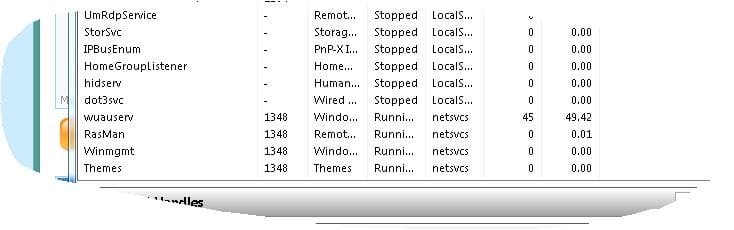
Don't know if it will help, but I'd try to see what service(s) are using that CPU. Your screenshot indicates the service group for the problem svchost is netsvcs. Go into Resource Manager and click CPU tab. Look in the Services section. Click on Group column header to sort by Group. Now you can scroll down to see all the services in the netsvcs group. Which of the netsvcs services are hogging the CPU? Take a screen shot

/* EDIT */
And question: Does the machine run high CPU right after or soon after reboot? Or does it take awhile? just curious...
 

My Computer My Computer

Computer type
PC/Desktop
Computer Manufacturer/Model Number
Dell Optiplex 360 and Optiplex 755
OS
Desk 1: Win 7 Pro x32; Desk 2: Windows 10 x64
Hard Drives
500GB Crucial SSD in both Desktops
Other Info
Buffalo 6TB NAS, Raid 1
Hello ComputerGeek,
here's what you directed me to: (and btw scvhost.exe (netscvs) is back up ...running high)
_____________________________
have run the MS Fixit and now it's back to "Detecting Problems: -checking for updates online"
 

Attachments

  • Capture1.JPG
    Capture1.JPG
    29.7 KB · Views: 0
  • Capture.JPG
    Capture.JPG
    45.1 KB · Views: 0
Last edited:

My Computer My Computer

Computer type
PC/Desktop
Computer Manufacturer/Model Number
Toshiba Satellite L500
OS
Windows 7 Pro 64bit SP1
CPU
Intel Core Duo CPU 2.20 GHz
Motherboard
Model KSWAA (U2E1) Version PSLS3A-01301D
Memory
4 GB RAM
Sound Card
AMD High Definition Audio Device Realtek High Definition Aud
Monitor(s) Displays
Generic PnP Monitor on ATI Mobility Radeon HD 4600 Series
""Detecting Problems: -checking for updates online" ran for hours with no result.
Then I took the step Update Reset from link above.
After restart there is no change... scvhost.exe (netscvs) is still taking up average of 50% CPU.

Also despite ceasing all Update checks and restarting the update process wuauserv continues to run at about 50% of CPU.

I've followed all directions provided so far.
This is a recent development ... and since I've added no new programs or activities it's a mystery what started this CPU and overheating problem.
Any further analysis welcome.
 

Attachments

  • Capture.JPG
    Capture.JPG
    16.1 KB · Views: 22

My Computer My Computer

Computer type
PC/Desktop
Computer Manufacturer/Model Number
Toshiba Satellite L500
OS
Windows 7 Pro 64bit SP1
CPU
Intel Core Duo CPU 2.20 GHz
Motherboard
Model KSWAA (U2E1) Version PSLS3A-01301D
Memory
4 GB RAM
Sound Card
AMD High Definition Audio Device Realtek High Definition Aud
Monitor(s) Displays
Generic PnP Monitor on ATI Mobility Radeon HD 4600 Series
The problem may well be with windows update but IMHO I don't believe that KB is relevant in this case.

The user is running a standalone Windows 7 machine. As I read the KB info, that KB is for Windows 7 running in a Windows Server environment. (might also be why the KB hangs if it's looking for a server or server client running on the workstation - neither of which are there)

@nithig
Can't hurt to run the MS Fixit for Windows Update first.

Don't know if it will help, but I'd try to see what service(s) are using that CPU. Your screenshot indicates the service group for the problem svchost is netsvcs. Go into Resource Manager and click CPU tab. Look in the Services section. Click on Group column header to sort by Group. Now you can scroll down to see all the services in the netsvcs group. Which of the netsvcs services are hogging the CPU? Take a screen shot

/* EDIT */
And question: Does the machine run high CPU right after or soon after reboot? Or does it take awhile? just curious...
Yes, several of the patches to the Windows Update Client (WUC) mention problems interacting with SCCM tools; however, several forum members have had RAM and CPU usage reduced just as soon as they apply the latest WUC. Updating the WUC probably fails to fix much on computers where some other part of Windows Update is messed up (e.g. the main database).
 

My Computer My Computer

Computer type
Laptop
Computer Manufacturer/Model Number
Employer provided Dell Latitude
OS
W7 Pro SP1 64bit
CPU
i7
Memory
8GB
Graphics Card(s)
Intel HD Graphics
Hard Drives
crappy SSD
Antivirus
Employer mandated Symantec Endpoint Protection
Browser
Pale Moon 64bit, IE11 64bit & Chrome 64bit
nithig,
Did you run the batch file (Reset_Windows_Update_Full.bat) from option three in the WU reset tut?


I would play with Process Monitor to see what the WU process is doing to consume all of those CPU cycles... but let's see what ComputerGeek can think of to try next - since Process Monitor can be a bit overwhelming.
 

My Computer My Computer

Computer type
Laptop
Computer Manufacturer/Model Number
Employer provided Dell Latitude
OS
W7 Pro SP1 64bit
CPU
i7
Memory
8GB
Graphics Card(s)
Intel HD Graphics
Hard Drives
crappy SSD
Antivirus
Employer mandated Symantec Endpoint Protection
Browser
Pale Moon 64bit, IE11 64bit & Chrome 64bit
The good news is we now know with certainty that Windows Update is the sole culprit - not malware (which can also cause high CPU in the svchost netsvcs group). The bad news is: it's not malware - malware can sometimes be easier to find and remove

Do you use or need HomeGroups in Windows 7? It's the only Win7 feature that needs ipv6 to work

Try disabling ipv6. Here's a simple one click method to disable / re-enable it. How to disable IPv6 or its components in Windows. Reboot. Anything different?
 
Last edited:

My Computer My Computer

Computer type
PC/Desktop
Computer Manufacturer/Model Number
Dell Optiplex 360 and Optiplex 755
OS
Desk 1: Win 7 Pro x32; Desk 2: Windows 10 x64
Hard Drives
500GB Crucial SSD in both Desktops
Other Info
Buffalo 6TB NAS, Raid 1
Back
Top
