Major Latency Issues - Video & Audio, dxkrnl.sys, ndis.sys, acpi.sys

apnonimus

New member
Local time
1:22 PM
Messages
17
Major Latency Issues - Video & Audio, dxkrnl.sys, ndis.sys, acpi.sys

Hi All,

I've been having issues with latency after a recent build and fresh install of Win 7 Home Premium. When playing video (especially online) I see horizontal bars flash randomly on the video screen. I also hear audio crackles / cut outs when I'm playing music through Foobar and browsing the web - usually when navigating to a new page, opening a new tab, mousing over an auto-dropdown, these types of things.

I've been reading up on these issues, and have updated my Realtek drivers. I've been using a Rosewill wireless USB adapter for internet, but have noticed the same issues when connected directly to my modem as well. Only thing is, I don't see iusb3xhc.sys affecting latency any longer when I'm connected directly.

When I disable my LAN controller, I see the issue with ndis.sys disappear and it's not affecting my latency as reported by Latency Monitor.

When directly connected, I do still see ndis.sys coming up as a latency issue in Latency Monitor.

I have just uninstalled my Nvidia video drivers to see what effect it would have on the Latency Monitor finding dxgkrnl.sys being the King of latency-causing affairs on my troubled system. Now, this file is not causing issues.

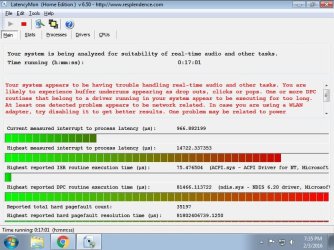
So, now, being directly connected to my modem, with no video drivers installed, the issues come up as seen in my attachment. ACPI.sys and ndis.sys.

I'm at wit's end, what is my next step to get this fixed?

Thanks ahead of time for your assistance!
 

Attachments
  • latencymon1.jpg
    latencymon1.jpg
    82.2 KB · Views: 2

My Computer My Computer

At a glance

Windows 7 Home Premium x64Intel i5-6500HyperX FURY 8GB 288-Pin DDR4 SDRAM 2133 (PC4Evga GEFORCE GTX 750TI PCI-E 3.0 2GB DDR5
Computer type
PC/Desktop
Computer Manufacturer/Model Number
Custom build
OS
Windows 7 Home Premium x64
CPU
Intel i5-6500
Motherboard
Gigabyte LGA1151 Intel H110 Micro ATX DDR4 Motherboard GA-H1
Memory
HyperX FURY 8GB 288-Pin DDR4 SDRAM 2133 (PC4
Graphics Card(s)
Evga GEFORCE GTX 750TI PCI-E 3.0 2GB DDR5
Hard Drives
Samsung 840 Pro 256GB
Antivirus
Norton
Browser
Chrome
What is your power profile set to, is it high performance? In foobar when you listen do you use WASAPI or Directsound?
 

My Computer My Computer

At a glance

10 Pro x64Ryzen 9 3900X64GB(4x16GB) DDR4EVGA 1080ti FTW3
Computer type
PC/Desktop
Computer Manufacturer/Model Number
Custom
OS
10 Pro x64
CPU
Ryzen 9 3900X
Motherboard
Asrock x370 Tachi
Memory
64GB(4x16GB) DDR4
Graphics Card(s)
EVGA 1080ti FTW3
Sound Card
ASUS Xonar Essence STX (V4 Bursons), ODAC rev B, NFB-11, O2
Monitor(s) Displays
3xASUS PB278Q/R, Optoma HD142X
Screen Resolution
3x1440p, 1080p
Hard Drives
512GB 850 EVO(OS, Programs)
4TB (Movies)
3TB (Downloads)
3TB (Programs)
1TB HDD (Games)
2x6TB R1 (videos)
PSU
AX760
Case
Fractal Define R5
Cooling
NH-D15S
Keyboard
Massdrop Ctrl with Box Navy's
Mouse
G903, Alioth XXL Mat
Internet Speed
280/40
Antivirus
MBAM, ESET
Browser
Canary 64 Bit
Other Info
I also own a Thinkpad P50 Xeon 4K, X220T, X1C5
My power profile is indeed set to high performance, and all of my audio goes through my Creative Sound Blaster Z.

The video issue (horizontal stripes and stuttering) happens even when Foobar isn't running. I've also made sure my computer is set to 4 cores at boot, and set Vertical Sync to Adaptive in the Nvidia control panel.

I've disabled digital audio in the Nvidia Control Panel as well, and have done just about everything I can find to try and fix this issue but it makes watching Netflix, for example, relatively irritating.

I haven't noticed the issue, however, when playing CSGO or Civilization V.

Thanks for replying rvcjew, I don't know if you're the first because my solution should be obvious to me and I should have seen something obvious, or if others are having the same issue and are as perplexed as I am.
 

My Computer My Computer

At a glance

Windows 7 Home Premium x64Intel i5-6500HyperX FURY 8GB 288-Pin DDR4 SDRAM 2133 (PC4Evga GEFORCE GTX 750TI PCI-E 3.0 2GB DDR5
Computer type
PC/Desktop
Computer Manufacturer/Model Number
Custom build
OS
Windows 7 Home Premium x64
CPU
Intel i5-6500
Motherboard
Gigabyte LGA1151 Intel H110 Micro ATX DDR4 Motherboard GA-H1
Memory
HyperX FURY 8GB 288-Pin DDR4 SDRAM 2133 (PC4
Graphics Card(s)
Evga GEFORCE GTX 750TI PCI-E 3.0 2GB DDR5
Hard Drives
Samsung 840 Pro 256GB
Antivirus
Norton
Browser
Chrome
Naw some times people just fall through the cracks, I think you have a bigger issue though if you have screen tearing at desktop apps with a 750ti. You should not need to have adaptive turned on for that type of application use. I would start by resetting your bios and just for checking disable your onboard sound then run that again with no sound to see if it is causing issues, also what version is your nvidia driver? It still tears with it set to application decides? It sounds like you just have a bunch of drivers conflicting atm.
 

My Computer My Computer

At a glance

10 Pro x64Ryzen 9 3900X64GB(4x16GB) DDR4EVGA 1080ti FTW3
Computer type
PC/Desktop
Computer Manufacturer/Model Number
Custom
OS
10 Pro x64
CPU
Ryzen 9 3900X
Motherboard
Asrock x370 Tachi
Memory
64GB(4x16GB) DDR4
Graphics Card(s)
EVGA 1080ti FTW3
Sound Card
ASUS Xonar Essence STX (V4 Bursons), ODAC rev B, NFB-11, O2
Monitor(s) Displays
3xASUS PB278Q/R, Optoma HD142X
Screen Resolution
3x1440p, 1080p
Hard Drives
512GB 850 EVO(OS, Programs)
4TB (Movies)
3TB (Downloads)
3TB (Programs)
1TB HDD (Games)
2x6TB R1 (videos)
PSU
AX760
Case
Fractal Define R5
Cooling
NH-D15S
Keyboard
Massdrop Ctrl with Box Navy's
Mouse
G903, Alioth XXL Mat
Internet Speed
280/40
Antivirus
MBAM, ESET
Browser
Canary 64 Bit
Other Info
I also own a Thinkpad P50 Xeon 4K, X220T, X1C5
I just reset the BIOS by clearing the CMOS, and selected "Load Optimal Settings" in the BIOS. I deactivated the onboard HD Audio, and I still see tearing (in Netflix, for example, and when I use VLC to play videos).

However, when I play games there is no tearing - I just ran a couple of benchmark tests in Just Cause 2 and there was no tearing whatsoever. This gives me hope!

My BIOS version is F2, whereas the latest (non-beta) version is F4 on Gigabyte's site. I may try using Q-Flash to update it.

The NVidia drivers are version 361.75. Oddly, even when I uninstalled the NVidia drivers and control panel, I still noticed tearing in Netflix etc.

Thanks for your help!
 

My Computer My Computer

At a glance

Windows 7 Home Premium x64Intel i5-6500HyperX FURY 8GB 288-Pin DDR4 SDRAM 2133 (PC4Evga GEFORCE GTX 750TI PCI-E 3.0 2GB DDR5
Computer type
PC/Desktop
Computer Manufacturer/Model Number
Custom build
OS
Windows 7 Home Premium x64
CPU
Intel i5-6500
Motherboard
Gigabyte LGA1151 Intel H110 Micro ATX DDR4 Motherboard GA-H1
Memory
HyperX FURY 8GB 288-Pin DDR4 SDRAM 2133 (PC4
Graphics Card(s)
Evga GEFORCE GTX 750TI PCI-E 3.0 2GB DDR5
Hard Drives
Samsung 840 Pro 256GB
Antivirus
Norton
Browser
Chrome
What browser are you using, I have the same driver so its not that. Do you have any refreshing software on your desktop like rainmeter, and does it tear in normal mode and in full screen for netflix? One last question I do not use netflix so is it a html5 player or using silverlight, and you have no errors showing in your device manager? EDIT: you should also put your motherboard model in the system specs as all you have now is the chipset it uses which does not help us.
 

My Computer My Computer

At a glance

10 Pro x64Ryzen 9 3900X64GB(4x16GB) DDR4EVGA 1080ti FTW3
Computer type
PC/Desktop
Computer Manufacturer/Model Number
Custom
OS
10 Pro x64
CPU
Ryzen 9 3900X
Motherboard
Asrock x370 Tachi
Memory
64GB(4x16GB) DDR4
Graphics Card(s)
EVGA 1080ti FTW3
Sound Card
ASUS Xonar Essence STX (V4 Bursons), ODAC rev B, NFB-11, O2
Monitor(s) Displays
3xASUS PB278Q/R, Optoma HD142X
Screen Resolution
3x1440p, 1080p
Hard Drives
512GB 850 EVO(OS, Programs)
4TB (Movies)
3TB (Downloads)
3TB (Programs)
1TB HDD (Games)
2x6TB R1 (videos)
PSU
AX760
Case
Fractal Define R5
Cooling
NH-D15S
Keyboard
Massdrop Ctrl with Box Navy's
Mouse
G903, Alioth XXL Mat
Internet Speed
280/40
Antivirus
MBAM, ESET
Browser
Canary 64 Bit
Other Info
I also own a Thinkpad P50 Xeon 4K, X220T, X1C5
I'm using Google Chrome, and I don't have any software that refreshes frequently. I've not put much at all on my PC as I've been dealing with this issue (I was having BSOD issues early on but I found it was due to EasyTune and the Gigabyte control panel that I've uninstalled, and no more BSOD).

Netflix uses Silverlight.

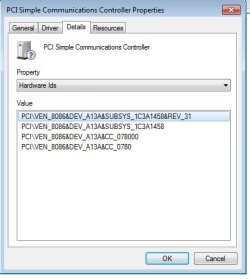
As far as in the Device Manager, the only anomalous thing is the driver that's lacking for "PCI Simple Communications Device," though all of my peripherals show up in Device Manager and are working properly.

Thanks!
 

My Computer My Computer

At a glance

Windows 7 Home Premium x64Intel i5-6500HyperX FURY 8GB 288-Pin DDR4 SDRAM 2133 (PC4Evga GEFORCE GTX 750TI PCI-E 3.0 2GB DDR5
Computer type
PC/Desktop
Computer Manufacturer/Model Number
Custom build
OS
Windows 7 Home Premium x64
CPU
Intel i5-6500
Motherboard
Gigabyte LGA1151 Intel H110 Micro ATX DDR4 Motherboard GA-H1
Memory
HyperX FURY 8GB 288-Pin DDR4 SDRAM 2133 (PC4
Graphics Card(s)
Evga GEFORCE GTX 750TI PCI-E 3.0 2GB DDR5
Hard Drives
Samsung 840 Pro 256GB
Antivirus
Norton
Browser
Chrome
Whats the hardware id for that device as shown below?
 

Attachments

  • hardware id.png
    hardware id.png
    22.6 KB · Views: 2

My Computer My Computer

At a glance

10 Pro x64Ryzen 9 3900X64GB(4x16GB) DDR4EVGA 1080ti FTW3
Computer type
PC/Desktop
Computer Manufacturer/Model Number
Custom
OS
10 Pro x64
CPU
Ryzen 9 3900X
Motherboard
Asrock x370 Tachi
Memory
64GB(4x16GB) DDR4
Graphics Card(s)
EVGA 1080ti FTW3
Sound Card
ASUS Xonar Essence STX (V4 Bursons), ODAC rev B, NFB-11, O2
Monitor(s) Displays
3xASUS PB278Q/R, Optoma HD142X
Screen Resolution
3x1440p, 1080p
Hard Drives
512GB 850 EVO(OS, Programs)
4TB (Movies)
3TB (Downloads)
3TB (Programs)
1TB HDD (Games)
2x6TB R1 (videos)
PSU
AX760
Case
Fractal Define R5
Cooling
NH-D15S
Keyboard
Massdrop Ctrl with Box Navy's
Mouse
G903, Alioth XXL Mat
Internet Speed
280/40
Antivirus
MBAM, ESET
Browser
Canary 64 Bit
Other Info
I also own a Thinkpad P50 Xeon 4K, X220T, X1C5
It's attached! Thanks.
 

Attachments

  • dvc.jpg
    dvc.jpg
    50.6 KB · Views: 21

My Computer My Computer

At a glance

Windows 7 Home Premium x64Intel i5-6500HyperX FURY 8GB 288-Pin DDR4 SDRAM 2133 (PC4Evga GEFORCE GTX 750TI PCI-E 3.0 2GB DDR5
Computer type
PC/Desktop
Computer Manufacturer/Model Number
Custom build
OS
Windows 7 Home Premium x64
CPU
Intel i5-6500
Motherboard
Gigabyte LGA1151 Intel H110 Micro ATX DDR4 Motherboard GA-H1
Memory
HyperX FURY 8GB 288-Pin DDR4 SDRAM 2133 (PC4
Graphics Card(s)
Evga GEFORCE GTX 750TI PCI-E 3.0 2GB DDR5
Hard Drives
Samsung 840 Pro 256GB
Antivirus
Norton
Browser
Chrome
It's attached! Thanks.

yeah looks like chipset drivers what model is the board it self? Sounds like one of them is out of date and if it is will prob cause latency on its own to be honest. You should try safemode with networking and see if you get the tearing in that mode.
 

My Computer My Computer

At a glance

10 Pro x64Ryzen 9 3900X64GB(4x16GB) DDR4EVGA 1080ti FTW3
Computer type
PC/Desktop
Computer Manufacturer/Model Number
Custom
OS
10 Pro x64
CPU
Ryzen 9 3900X
Motherboard
Asrock x370 Tachi
Memory
64GB(4x16GB) DDR4
Graphics Card(s)
EVGA 1080ti FTW3
Sound Card
ASUS Xonar Essence STX (V4 Bursons), ODAC rev B, NFB-11, O2
Monitor(s) Displays
3xASUS PB278Q/R, Optoma HD142X
Screen Resolution
3x1440p, 1080p
Hard Drives
512GB 850 EVO(OS, Programs)
4TB (Movies)
3TB (Downloads)
3TB (Programs)
1TB HDD (Games)
2x6TB R1 (videos)
PSU
AX760
Case
Fractal Define R5
Cooling
NH-D15S
Keyboard
Massdrop Ctrl with Box Navy's
Mouse
G903, Alioth XXL Mat
Internet Speed
280/40
Antivirus
MBAM, ESET
Browser
Canary 64 Bit
Other Info
I also own a Thinkpad P50 Xeon 4K, X220T, X1C5
I started in Safe Mode with Networking and - no tearing! My motherboard is:

GIGABYTE GA-H110M-A (rev. 1.0) LGA 1151 Intel H110 HDMI SATA 6Gb/s USB 3.0 Micro ATX Intel Motherboard
 

My Computer My Computer

At a glance

Windows 7 Home Premium x64Intel i5-6500HyperX FURY 8GB 288-Pin DDR4 SDRAM 2133 (PC4Evga GEFORCE GTX 750TI PCI-E 3.0 2GB DDR5
Computer type
PC/Desktop
Computer Manufacturer/Model Number
Custom build
OS
Windows 7 Home Premium x64
CPU
Intel i5-6500
Motherboard
Gigabyte LGA1151 Intel H110 Micro ATX DDR4 Motherboard GA-H1
Memory
HyperX FURY 8GB 288-Pin DDR4 SDRAM 2133 (PC4
Graphics Card(s)
Evga GEFORCE GTX 750TI PCI-E 3.0 2GB DDR5
Hard Drives
Samsung 840 Pro 256GB
Antivirus
Norton
Browser
Chrome

My Computer My Computer

At a glance

10 Pro x64Ryzen 9 3900X64GB(4x16GB) DDR4EVGA 1080ti FTW3
Computer type
PC/Desktop
Computer Manufacturer/Model Number
Custom
OS
10 Pro x64
CPU
Ryzen 9 3900X
Motherboard
Asrock x370 Tachi
Memory
64GB(4x16GB) DDR4
Graphics Card(s)
EVGA 1080ti FTW3
Sound Card
ASUS Xonar Essence STX (V4 Bursons), ODAC rev B, NFB-11, O2
Monitor(s) Displays
3xASUS PB278Q/R, Optoma HD142X
Screen Resolution
3x1440p, 1080p
Hard Drives
512GB 850 EVO(OS, Programs)
4TB (Movies)
3TB (Downloads)
3TB (Programs)
1TB HDD (Games)
2x6TB R1 (videos)
PSU
AX760
Case
Fractal Define R5
Cooling
NH-D15S
Keyboard
Massdrop Ctrl with Box Navy's
Mouse
G903, Alioth XXL Mat
Internet Speed
280/40
Antivirus
MBAM, ESET
Browser
Canary 64 Bit
Other Info
I also own a Thinkpad P50 Xeon 4K, X220T, X1C5
It looks like, as I do this clean boot process, that when I disable everything but the Microsoft services, one service won't let me disable it - it's my AntiVirus, which is currently Panda Free Antivirus. When I restart, this is the only one still checked in the Services box - and the problem with tearing persists. Should I try to uninstall Panda and see if the problem persists?
 

My Computer My Computer

At a glance

Windows 7 Home Premium x64Intel i5-6500HyperX FURY 8GB 288-Pin DDR4 SDRAM 2133 (PC4Evga GEFORCE GTX 750TI PCI-E 3.0 2GB DDR5
Computer type
PC/Desktop
Computer Manufacturer/Model Number
Custom build
OS
Windows 7 Home Premium x64
CPU
Intel i5-6500
Motherboard
Gigabyte LGA1151 Intel H110 Micro ATX DDR4 Motherboard GA-H1
Memory
HyperX FURY 8GB 288-Pin DDR4 SDRAM 2133 (PC4
Graphics Card(s)
Evga GEFORCE GTX 750TI PCI-E 3.0 2GB DDR5
Hard Drives
Samsung 840 Pro 256GB
Antivirus
Norton
Browser
Chrome
Some people have had issue with panda before so it might be worth a shot if you do don't stay online for very long, just enough to test and only open tabs you trust in chrome. Another question is what extensions you have installed in chrome atm.
 

My Computer My Computer

At a glance

10 Pro x64Ryzen 9 3900X64GB(4x16GB) DDR4EVGA 1080ti FTW3
Computer type
PC/Desktop
Computer Manufacturer/Model Number
Custom
OS
10 Pro x64
CPU
Ryzen 9 3900X
Motherboard
Asrock x370 Tachi
Memory
64GB(4x16GB) DDR4
Graphics Card(s)
EVGA 1080ti FTW3
Sound Card
ASUS Xonar Essence STX (V4 Bursons), ODAC rev B, NFB-11, O2
Monitor(s) Displays
3xASUS PB278Q/R, Optoma HD142X
Screen Resolution
3x1440p, 1080p
Hard Drives
512GB 850 EVO(OS, Programs)
4TB (Movies)
3TB (Downloads)
3TB (Programs)
1TB HDD (Games)
2x6TB R1 (videos)
PSU
AX760
Case
Fractal Define R5
Cooling
NH-D15S
Keyboard
Massdrop Ctrl with Box Navy's
Mouse
G903, Alioth XXL Mat
Internet Speed
280/40
Antivirus
MBAM, ESET
Browser
Canary 64 Bit
Other Info
I also own a Thinkpad P50 Xeon 4K, X220T, X1C5
After I uninstalled Panda, and all of the other services were disabled, the issue still persists.

Adblock, Adblock for Youtube, Apps Launcher for Drive, Google Docs and Docs Offline, Google Sheets and Google Slides are the only extensions installed.
 

My Computer My Computer

At a glance

Windows 7 Home Premium x64Intel i5-6500HyperX FURY 8GB 288-Pin DDR4 SDRAM 2133 (PC4Evga GEFORCE GTX 750TI PCI-E 3.0 2GB DDR5
Computer type
PC/Desktop
Computer Manufacturer/Model Number
Custom build
OS
Windows 7 Home Premium x64
CPU
Intel i5-6500
Motherboard
Gigabyte LGA1151 Intel H110 Micro ATX DDR4 Motherboard GA-H1
Memory
HyperX FURY 8GB 288-Pin DDR4 SDRAM 2133 (PC4
Graphics Card(s)
Evga GEFORCE GTX 750TI PCI-E 3.0 2GB DDR5
Hard Drives
Samsung 840 Pro 256GB
Antivirus
Norton
Browser
Chrome
After I uninstalled Panda, and all of the other services were disabled, the issue still persists.

Adblock, Adblock for Youtube, Apps Launcher for Drive, Google Docs and Docs Offline, Google Sheets and Google Slides are the only extensions installed.

If you uninstall your gpu drivers and remove it from the pc and use the on board gpu does it tear there? It's a lot of work I know sorry. But it will rule out the gpu doing something. I think it's some driver you have though. Edit: have you tried Netflix in Internet Explorer yet?
 

My Computer My Computer

At a glance

10 Pro x64Ryzen 9 3900X64GB(4x16GB) DDR4EVGA 1080ti FTW3
Computer type
PC/Desktop
Computer Manufacturer/Model Number
Custom
OS
10 Pro x64
CPU
Ryzen 9 3900X
Motherboard
Asrock x370 Tachi
Memory
64GB(4x16GB) DDR4
Graphics Card(s)
EVGA 1080ti FTW3
Sound Card
ASUS Xonar Essence STX (V4 Bursons), ODAC rev B, NFB-11, O2
Monitor(s) Displays
3xASUS PB278Q/R, Optoma HD142X
Screen Resolution
3x1440p, 1080p
Hard Drives
512GB 850 EVO(OS, Programs)
4TB (Movies)
3TB (Downloads)
3TB (Programs)
1TB HDD (Games)
2x6TB R1 (videos)
PSU
AX760
Case
Fractal Define R5
Cooling
NH-D15S
Keyboard
Massdrop Ctrl with Box Navy's
Mouse
G903, Alioth XXL Mat
Internet Speed
280/40
Antivirus
MBAM, ESET
Browser
Canary 64 Bit
Other Info
I also own a Thinkpad P50 Xeon 4K, X220T, X1C5
I'll uninstall the drivers a little later, going out for dinner. But yes, the tearing still happens in IE. Thanks!
 

My Computer My Computer

At a glance

Windows 7 Home Premium x64Intel i5-6500HyperX FURY 8GB 288-Pin DDR4 SDRAM 2133 (PC4Evga GEFORCE GTX 750TI PCI-E 3.0 2GB DDR5
Computer type
PC/Desktop
Computer Manufacturer/Model Number
Custom build
OS
Windows 7 Home Premium x64
CPU
Intel i5-6500
Motherboard
Gigabyte LGA1151 Intel H110 Micro ATX DDR4 Motherboard GA-H1
Memory
HyperX FURY 8GB 288-Pin DDR4 SDRAM 2133 (PC4
Graphics Card(s)
Evga GEFORCE GTX 750TI PCI-E 3.0 2GB DDR5
Hard Drives
Samsung 840 Pro 256GB
Antivirus
Norton
Browser
Chrome
Ah! So I'll need an HDMI cable and a monitor that supports HDMI to test this. That's going to throw a wrench into my troubleshooting for at least a few days. I'll try and get it sorted and let you know. Thanks!
 

My Computer My Computer

At a glance

Windows 7 Home Premium x64Intel i5-6500HyperX FURY 8GB 288-Pin DDR4 SDRAM 2133 (PC4Evga GEFORCE GTX 750TI PCI-E 3.0 2GB DDR5
Computer type
PC/Desktop
Computer Manufacturer/Model Number
Custom build
OS
Windows 7 Home Premium x64
CPU
Intel i5-6500
Motherboard
Gigabyte LGA1151 Intel H110 Micro ATX DDR4 Motherboard GA-H1
Memory
HyperX FURY 8GB 288-Pin DDR4 SDRAM 2133 (PC4
Graphics Card(s)
Evga GEFORCE GTX 750TI PCI-E 3.0 2GB DDR5
Hard Drives
Samsung 840 Pro 256GB
Antivirus
Norton
Browser
Chrome
Yeah, I wasn't sure if you were using DVI or not.
 

My Computer My Computer

At a glance

10 Pro x64Ryzen 9 3900X64GB(4x16GB) DDR4EVGA 1080ti FTW3
Computer type
PC/Desktop
Computer Manufacturer/Model Number
Custom
OS
10 Pro x64
CPU
Ryzen 9 3900X
Motherboard
Asrock x370 Tachi
Memory
64GB(4x16GB) DDR4
Graphics Card(s)
EVGA 1080ti FTW3
Sound Card
ASUS Xonar Essence STX (V4 Bursons), ODAC rev B, NFB-11, O2
Monitor(s) Displays
3xASUS PB278Q/R, Optoma HD142X
Screen Resolution
3x1440p, 1080p
Hard Drives
512GB 850 EVO(OS, Programs)
4TB (Movies)
3TB (Downloads)
3TB (Programs)
1TB HDD (Games)
2x6TB R1 (videos)
PSU
AX760
Case
Fractal Define R5
Cooling
NH-D15S
Keyboard
Massdrop Ctrl with Box Navy's
Mouse
G903, Alioth XXL Mat
Internet Speed
280/40
Antivirus
MBAM, ESET
Browser
Canary 64 Bit
Other Info
I also own a Thinkpad P50 Xeon 4K, X220T, X1C5
Hey rvcjew,

Sorry for the delay - I finally got the adapter for HDMI out of my motherboard. I still see tearing in video content, and this happens in safe mode with networking too. If you could advise the next steps I'd very much appreciate it!

Cheers,
 

My Computer My Computer

At a glance

Windows 7 Home Premium x64Intel i5-6500HyperX FURY 8GB 288-Pin DDR4 SDRAM 2133 (PC4Evga GEFORCE GTX 750TI PCI-E 3.0 2GB DDR5
Computer type
PC/Desktop
Computer Manufacturer/Model Number
Custom build
OS
Windows 7 Home Premium x64
CPU
Intel i5-6500
Motherboard
Gigabyte LGA1151 Intel H110 Micro ATX DDR4 Motherboard GA-H1
Memory
HyperX FURY 8GB 288-Pin DDR4 SDRAM 2133 (PC4
Graphics Card(s)
Evga GEFORCE GTX 750TI PCI-E 3.0 2GB DDR5
Hard Drives
Samsung 840 Pro 256GB
Antivirus
Norton
Browser
Chrome
Back
Top