Solved How to Have only one video controller driver in windows 7

Vishalshetty

New member
Local time
11:35 AM
Messages
51
Hey People,
so when i installed windows 7, it seemed to get random bsod everytime. So, later i found out that my graphics driver is the one causing this problem.

When i had installed windows vista, there was only one video controller not two and thats why it was running flawlessly in vista but in 7, when i installed it, it seemed to have to drivers for the same device. I just want to know, how to have one because iam very sure that the blue screens will stop coming if i have only one video controller.
 

My Computer My Computer

At a glance

Windows 7 Ultimate 32bitIntel Core 2 Duo T5750 @2.0ghz3GB DDR2Mobile Intel(R) 965 Express Chipset Family
Computer type
Laptop
Computer Manufacturer/Model Number
Acer
OS
Windows 7 Ultimate 32bit
CPU
Intel Core 2 Duo T5750 @2.0ghz
Memory
3GB DDR2
Graphics Card(s)
Mobile Intel(R) 965 Express Chipset Family
Screen Resolution
1280x800
Hard Drives
Toshiba MK1646GSX ATA device
Mouse
HID Compilant device
Browser
Google Chrome
Download the video driver you want to install. There should only be 1, you`d get it from Acer.com Acer | Explore Beyond Limits

Remove all the video driver/drivers and software from your PC. Control Panel/Programs and Features

Use ccleaner to cleanup the registry. https://www.piriform.com/ccleaner/download

Install the driver you downloaded.

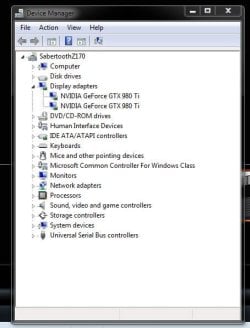
Could you please post a shot of Device Manager now and please expand display adapters, I want to see what you`re talking about.

Thank You.

Example:
 

Attachments

  • Capture.JPG
    Capture.JPG
    38.5 KB · Views: 27

My Computer My Computer

At a glance

Windows 10 Pro x64Intel Core i7 6700KGSkill TridentZ RGB 16GB 3600 16-16-16-36EVGA GTX 980 Ti SC x2
Computer type
PC/Desktop
Computer Manufacturer/Model Number
Skylake Special #666
OS
Windows 10 Pro x64
CPU
Intel Core i7 6700K
Motherboard
Asus Sabertooth Z170 Mark 1
Memory
GSkill TridentZ RGB 16GB 3600 16-16-16-36
Graphics Card(s)
EVGA GTX 980 Ti SC x2
Sound Card
Realtek High Definition
Monitor(s) Displays
AOC G2460PG
Screen Resolution
1920 x 1080 144Hz
Hard Drives
Samsung 860 Pro 256GB, Seagate Barracuda 4TB x2
PSU
EVGA 1000 P2, EVGA White Custom Braided Cables
Case
Corsair Vengeance C70 Gunmetal Black
Cooling
Corsair H100i v2, Corsair ML120 x2, Thermal Grizzly Kryonaut
Keyboard
Logitech G910 Orion Spectrum
Mouse
Logitech G700s
Internet Speed
Verizon Fios Quantum Gateway 75/75
Antivirus
Windows Defender, Malwarebytes Free 3.8.3
Browser
Chrome
Other Info
Corsair SP120 x4, LG Blu-ray Drive, Durabrand HT-395 100 Watt Dolby Digital Amp, Corsair H2100 Wireless 7.1 Headset
Download the video driver you want to install. There should only be 1, you`d get it from Acer.com Acer | Explore Beyond Limits

Remove all the video driver/drivers and software from your PC. Control Panel/Programs and Features

Use ccleaner to cleanup the registry. https://www.piriform.com/ccleaner/download

Install the driver you downloaded.

Could you please post a shot of Device Manager now and please expand display adapters, I want to see what you`re talking about.

Thank You.


Example:

Hey, there seem to be no drivers in the acer website for my gma!!
 

My Computer My Computer

At a glance

Windows 7 Ultimate 32bitIntel Core 2 Duo T5750 @2.0ghz3GB DDR2Mobile Intel(R) 965 Express Chipset Family
Computer type
Laptop
Computer Manufacturer/Model Number
Acer
OS
Windows 7 Ultimate 32bit
CPU
Intel Core 2 Duo T5750 @2.0ghz
Memory
3GB DDR2
Graphics Card(s)
Mobile Intel(R) 965 Express Chipset Family
Screen Resolution
1280x800
Hard Drives
Toshiba MK1646GSX ATA device
Mouse
HID Compilant device
Browser
Google Chrome

My Computer My Computer

At a glance

Windows 10 Pro x64Intel Core i7 6700KGSkill TridentZ RGB 16GB 3600 16-16-16-36EVGA GTX 980 Ti SC x2
Computer type
PC/Desktop
Computer Manufacturer/Model Number
Skylake Special #666
OS
Windows 10 Pro x64
CPU
Intel Core i7 6700K
Motherboard
Asus Sabertooth Z170 Mark 1
Memory
GSkill TridentZ RGB 16GB 3600 16-16-16-36
Graphics Card(s)
EVGA GTX 980 Ti SC x2
Sound Card
Realtek High Definition
Monitor(s) Displays
AOC G2460PG
Screen Resolution
1920 x 1080 144Hz
Hard Drives
Samsung 860 Pro 256GB, Seagate Barracuda 4TB x2
PSU
EVGA 1000 P2, EVGA White Custom Braided Cables
Case
Corsair Vengeance C70 Gunmetal Black
Cooling
Corsair H100i v2, Corsair ML120 x2, Thermal Grizzly Kryonaut
Keyboard
Logitech G910 Orion Spectrum
Mouse
Logitech G700s
Internet Speed
Verizon Fios Quantum Gateway 75/75
Antivirus
Windows Defender, Malwarebytes Free 3.8.3
Browser
Chrome
Other Info
Corsair SP120 x4, LG Blu-ray Drive, Durabrand HT-395 100 Watt Dolby Digital Amp, Corsair H2100 Wireless 7.1 Headset
This is from his msinfo report, Display section, in his BSOD thread,

Code:
Name	Mobile Intel(R) 965 Express Chipset Family
PNP Device ID	PCI\VEN_8086&DEV_2A02&SUBSYS_011F1025&REV_03\3&21436425&0&10
Adapter Type	Mobile Intel(R) 965 Express Chipset Family, Intel Corporation compatible
Adapter Description	Mobile Intel(R) 965 Express Chipset Family
Adapter RAM	384.00 MB (402,653,184 bytes)
Installed Drivers	igdumdx32.dll,igd10umd32.dll
Driver Version	8.15.10.1930
INF File	oem2.inf (i965GM0 section)
Color Planes	Not Available
Color Table Entries	65536
Resolution	1280 x 800 x 60 hertz
Bits/Pixel	16
Memory Address	0xFC000000-0xFC0FFFFF
Memory Address	0xD0000000-0xDFFFFFFF
I/O Port	0x00001800-0x00001807
IRQ Channel	IRQ 16
I/O Port	0x000003B0-0x000003BB
I/O Port	0x000003C0-0x000003DF
Memory Address	0xA0000-0xBFFFF
Driver	c:\windows\system32\drivers\igdkmd32.sys (8.14.10.1930, 4.59 MB (4,808,192 bytes), 9/23/2009 12:18 PM)


Name	Mobile Intel(R) 965 Express Chipset Family
PNP Device ID	PCI\VEN_8086&DEV_2A03&SUBSYS_011F1025&REV_03\3&21436425&0&11
Adapter Type	Not Available, Intel Corporation compatible
Adapter Description	Mobile Intel(R) 965 Express Chipset Family
Adapter RAM	Not Available
Installed Drivers	igdumdx32.dll,igd10umd32.dll
Driver Version	8.15.10.1930
INF File	oem2.inf (i965GM1 section)
Color Planes	Not Available
Color Table Entries	Not Available
Resolution	Not Available
Bits/Pixel	Not Available
Memory Address	0xFC100000-0xFC1FFFFF
Driver	c:\windows\system32\drivers\igdkmd32.sys (8.14.10.1930, 4.59 MB (4,808,192 bytes), 9/23/2009 12:18 PM)

There are drivers but they are under Vista,

Product support
 

My Computer My Computer

At a glance

Win 10 Pro x64Intel I5-2500K @3.3GHz16GB G.Skill Ripjaws X (4x4GB)EVGA GeForce 750 Ti SC 2GB
Computer type
PC/Desktop
Computer Manufacturer/Model Number
Self Built
OS
Win 10 Pro x64
CPU
Intel I5-2500K @3.3GHz
Motherboard
Asrock P67 Extreme4
Memory
16GB G.Skill Ripjaws X (4x4GB)
Graphics Card(s)
EVGA GeForce 750 Ti SC 2GB
Sound Card
ASUS Xonar DG 5.1 Channels 24-bit 96KHz PCI Interface Sound
Monitor(s) Displays
auria eq2367
Screen Resolution
1920 x 1080
Hard Drives
250GB Samsung 850 EVO SSD
1TB WD Blue
1TB Hitachi
PSU
SeaSonic X 650W 80 Plus Gold
Case
Corsair Obsidian 750D
Cooling
Corsair H60, Three 140mm case fans
Keyboard
Logitech Wireless Keyboard K520
Mouse
Logitech Wireless Mouse M310
Internet Speed
Wave Broadband ~ 100 dn 5 up
Antivirus
Windows Defender, Malwarebytes Premium
Browser
Edge, IE11, Chrome
Other Info
Laptop specs: HP g7-1365dx /
CPU: AMD A6-3420M APU with Radeon(tm) HD Graphics /
RAM: Crucial 8Gb (2x4Gb) /
SSD: Crucial M4-CT128M4SSD2 ATA Device/ FW 000F /
GFX: AMD Radeon HD 6520G /
OS: Windows 10 Pro x64
Then try Intel, since it`s an Intel chipset.

https://downloadcenter.intel.com/pr...s-for-Mobile-Intel-965-Express-Chipset-Family

I`m shocked Acer wouldn`t have the video driver.

Download Drivers and Manuals | Acer Official Site

Please post the requested snip.

Hey, i can't post snip as of now because im in safe mode.
But, here is the deal,
I did what u told me to with ccleaner and then when i logged into windows again. Only one driver got installed. Then it worked perfectly, no bsods at all but then suddenly when i was browsing the web, a bsod occured.

So, i went into safe mode and then device manager. there i saw that the second driver came back!!

That second driver is what causing this issue!
 

My Computer My Computer

At a glance

Windows 7 Ultimate 32bitIntel Core 2 Duo T5750 @2.0ghz3GB DDR2Mobile Intel(R) 965 Express Chipset Family
Computer type
Laptop
Computer Manufacturer/Model Number
Acer
OS
Windows 7 Ultimate 32bit
CPU
Intel Core 2 Duo T5750 @2.0ghz
Memory
3GB DDR2
Graphics Card(s)
Mobile Intel(R) 965 Express Chipset Family
Screen Resolution
1280x800
Hard Drives
Toshiba MK1646GSX ATA device
Mouse
HID Compilant device
Browser
Google Chrome
Hey,
Here is the snip!
 

Attachments

  • Capture.PNG
    Capture.PNG
    2.1 KB · Views: 23

My Computer My Computer

At a glance

Windows 7 Ultimate 32bitIntel Core 2 Duo T5750 @2.0ghz3GB DDR2Mobile Intel(R) 965 Express Chipset Family
Computer type
Laptop
Computer Manufacturer/Model Number
Acer
OS
Windows 7 Ultimate 32bit
CPU
Intel Core 2 Duo T5750 @2.0ghz
Memory
3GB DDR2
Graphics Card(s)
Mobile Intel(R) 965 Express Chipset Family
Screen Resolution
1280x800
Hard Drives
Toshiba MK1646GSX ATA device
Mouse
HID Compilant device
Browser
Google Chrome
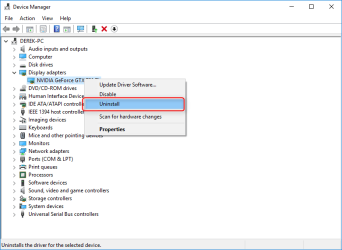
I think your problem is actually having two of the same adapters.

The second one is a ghost from something you did or something, look at the details of the lower one in my post above.

Try uninstalling that bottom one,

2016-03-14_22h05_21.png
 

My Computer My Computer

At a glance

Win 10 Pro x64Intel I5-2500K @3.3GHz16GB G.Skill Ripjaws X (4x4GB)EVGA GeForce 750 Ti SC 2GB
Computer type
PC/Desktop
Computer Manufacturer/Model Number
Self Built
OS
Win 10 Pro x64
CPU
Intel I5-2500K @3.3GHz
Motherboard
Asrock P67 Extreme4
Memory
16GB G.Skill Ripjaws X (4x4GB)
Graphics Card(s)
EVGA GeForce 750 Ti SC 2GB
Sound Card
ASUS Xonar DG 5.1 Channels 24-bit 96KHz PCI Interface Sound
Monitor(s) Displays
auria eq2367
Screen Resolution
1920 x 1080
Hard Drives
250GB Samsung 850 EVO SSD
1TB WD Blue
1TB Hitachi
PSU
SeaSonic X 650W 80 Plus Gold
Case
Corsair Obsidian 750D
Cooling
Corsair H60, Three 140mm case fans
Keyboard
Logitech Wireless Keyboard K520
Mouse
Logitech Wireless Mouse M310
Internet Speed
Wave Broadband ~ 100 dn 5 up
Antivirus
Windows Defender, Malwarebytes Premium
Browser
Edge, IE11, Chrome
Other Info
Laptop specs: HP g7-1365dx /
CPU: AMD A6-3420M APU with Radeon(tm) HD Graphics /
RAM: Crucial 8Gb (2x4Gb) /
SSD: Crucial M4-CT128M4SSD2 ATA Device/ FW 000F /
GFX: AMD Radeon HD 6520G /
OS: Windows 10 Pro x64
I think your problem is actually having two of the same adapters.

The second one is a ghost from something you did or something, look at the details of the lower one in my post above.

Try uninstalling that bottom one,

View attachment 383493

See,
Thats what i have been doing,

I uninstalled the second one and then restarted windows. After i log in, a small balloon at the bottom saying "Installing Driver for Mobile Intel(R) 965 Express Chipset. after some 5mins, a blue screen occurs and when i log into windows using safe mode, that second driver comes back!!
 

My Computer My Computer

At a glance

Windows 7 Ultimate 32bitIntel Core 2 Duo T5750 @2.0ghz3GB DDR2Mobile Intel(R) 965 Express Chipset Family
Computer type
Laptop
Computer Manufacturer/Model Number
Acer
OS
Windows 7 Ultimate 32bit
CPU
Intel Core 2 Duo T5750 @2.0ghz
Memory
3GB DDR2
Graphics Card(s)
Mobile Intel(R) 965 Express Chipset Family
Screen Resolution
1280x800
Hard Drives
Toshiba MK1646GSX ATA device
Mouse
HID Compilant device
Browser
Google Chrome

My Computer My Computer

At a glance

Win 10 Pro x64Intel I5-2500K @3.3GHz16GB G.Skill Ripjaws X (4x4GB)EVGA GeForce 750 Ti SC 2GB
Computer type
PC/Desktop
Computer Manufacturer/Model Number
Self Built
OS
Win 10 Pro x64
CPU
Intel I5-2500K @3.3GHz
Motherboard
Asrock P67 Extreme4
Memory
16GB G.Skill Ripjaws X (4x4GB)
Graphics Card(s)
EVGA GeForce 750 Ti SC 2GB
Sound Card
ASUS Xonar DG 5.1 Channels 24-bit 96KHz PCI Interface Sound
Monitor(s) Displays
auria eq2367
Screen Resolution
1920 x 1080
Hard Drives
250GB Samsung 850 EVO SSD
1TB WD Blue
1TB Hitachi
PSU
SeaSonic X 650W 80 Plus Gold
Case
Corsair Obsidian 750D
Cooling
Corsair H60, Three 140mm case fans
Keyboard
Logitech Wireless Keyboard K520
Mouse
Logitech Wireless Mouse M310
Internet Speed
Wave Broadband ~ 100 dn 5 up
Antivirus
Windows Defender, Malwarebytes Premium
Browser
Edge, IE11, Chrome
Other Info
Laptop specs: HP g7-1365dx /
CPU: AMD A6-3420M APU with Radeon(tm) HD Graphics /
RAM: Crucial 8Gb (2x4Gb) /
SSD: Crucial M4-CT128M4SSD2 ATA Device/ FW 000F /
GFX: AMD Radeon HD 6520G /
OS: Windows 10 Pro x64
Hey i did that,
it crashed again!!!

And also the second driver came back :(

Here is the dumpfile if u want to check.

Also, the analysis!!

*******************************************************************************
* *
* Bugcheck Analysis *
* *
*******************************************************************************

IRQL_NOT_LESS_OR_EQUAL (a)
An attempt was made to access a pageable (or completely invalid) address at an
interrupt request level (IRQL) that is too high. This is usually
caused by drivers using improper addresses.
If a kernel debugger is available get the stack backtrace.
Arguments:
Arg1: 08744810, memory referenced
Arg2: 000000ff, IRQL
Arg3: 00000000, bitfield :
bit 0 : value 0 = read operation, 1 = write operation
bit 3 : value 0 = not an execute operation, 1 = execute operation (only on chips which support this level of status)
Arg4: 82c24b74, address which referenced memory

Debugging Details:
------------------

TRIAGER: Could not open triage file : e:\dump_analysis\program\triage\modclass.ini, error 2

READ_ADDRESS: GetPointerFromAddress: unable to read from 82970718
Unable to read MiSystemVaType memory at 829501a0
08744810

CURRENT_IRQL: 2

FAULTING_IP:
hal!KeQueryPerformanceCounter+5e
82c24b74 8b0dc054c382 mov ecx,dword ptr [hal!HalpQueryPerformanceCounterSource (82c354c0)]

CUSTOMER_CRASH_COUNT: 1

DEFAULT_BUCKET_ID: WIN7_DRIVER_FAULT

BUGCHECK_STR: 0xA

PROCESS_NAME: System

TRAP_FRAME: 8292ec00 -- (.trap 0xffffffff8292ec00)
ErrCode = 00000000
eax=8292ec7f ebx=00000000 ecx=00000000 edx=00000000 esi=829350d8 edi=82931d20
eip=82c24b74 esp=8292ec74 ebp=8292ec80 iopl=0 nv up di pl nz na pe nc
cs=0008 ss=0010 ds=0023 es=0023 fs=0030 gs=0000 efl=00010006
hal!KeQueryPerformanceCounter+0x5e:
82c24b74 8b0dc054c382 mov ecx,dword ptr [hal!HalpQueryPerformanceCounterSource (82c354c0)] ds:0023:82c354c0=????????
Resetting default scope

LAST_CONTROL_TRANSFER: from 82c24b74 to 828475cb

STACK_TEXT:
8292ec00 82c24b74 badb0d00 00000000 00026160 nt!KiTrap0E+0x2cf
8292ec80 8288a65d 00000000 829350d8 00000000 hal!KeQueryPerformanceCounter+0x5e
8292ec98 82886408 85145d48 8293b380 82931c00 nt!PpmQueryTime+0x16
8292ed20 8287de0d 00000000 0000000e 00000000 nt!PoIdle+0x5ad
8292ed24 00000000 0000000e 00000000 00000000 nt!KiIdleLoop+0xd


STACK_COMMAND: kb

FOLLOWUP_IP:
nt!KiTrap0E+2cf
828475cb 833d04bb968200 cmp dword ptr [nt!KiFreezeFlag (8296bb04)],0

SYMBOL_STACK_INDEX: 0

SYMBOL_NAME: nt!KiTrap0E+2cf

FOLLOWUP_NAME: MachineOwner

MODULE_NAME: nt

IMAGE_NAME: ntkrpamp.exe

DEBUG_FLR_IMAGE_TIMESTAMP: 4ce78a09

FAILURE_BUCKET_ID: 0xA_nt!KiTrap0E+2cf

BUCKET_ID: 0xA_nt!KiTrap0E+2cf

Followup: MachineOwner
---------
 

Attachments

My Computer My Computer

At a glance

Windows 7 Ultimate 32bitIntel Core 2 Duo T5750 @2.0ghz3GB DDR2Mobile Intel(R) 965 Express Chipset Family
Computer type
Laptop
Computer Manufacturer/Model Number
Acer
OS
Windows 7 Ultimate 32bit
CPU
Intel Core 2 Duo T5750 @2.0ghz
Memory
3GB DDR2
Graphics Card(s)
Mobile Intel(R) 965 Express Chipset Family
Screen Resolution
1280x800
Hard Drives
Toshiba MK1646GSX ATA device
Mouse
HID Compilant device
Browser
Google Chrome
That`s exactly what I was going to suggest next Derek, great advice, but I have no clue what is causing this.

Even if he has only one adapter, he could have 20 drivers installed and the adapter would only need and use one, and there should be no issue, this is really odd.
 

My Computer My Computer

At a glance

Windows 10 Pro x64Intel Core i7 6700KGSkill TridentZ RGB 16GB 3600 16-16-16-36EVGA GTX 980 Ti SC x2
Computer type
PC/Desktop
Computer Manufacturer/Model Number
Skylake Special #666
OS
Windows 10 Pro x64
CPU
Intel Core i7 6700K
Motherboard
Asus Sabertooth Z170 Mark 1
Memory
GSkill TridentZ RGB 16GB 3600 16-16-16-36
Graphics Card(s)
EVGA GTX 980 Ti SC x2
Sound Card
Realtek High Definition
Monitor(s) Displays
AOC G2460PG
Screen Resolution
1920 x 1080 144Hz
Hard Drives
Samsung 860 Pro 256GB, Seagate Barracuda 4TB x2
PSU
EVGA 1000 P2, EVGA White Custom Braided Cables
Case
Corsair Vengeance C70 Gunmetal Black
Cooling
Corsair H100i v2, Corsair ML120 x2, Thermal Grizzly Kryonaut
Keyboard
Logitech G910 Orion Spectrum
Mouse
Logitech G700s
Internet Speed
Verizon Fios Quantum Gateway 75/75
Antivirus
Windows Defender, Malwarebytes Free 3.8.3
Browser
Chrome
Other Info
Corsair SP120 x4, LG Blu-ray Drive, Durabrand HT-395 100 Watt Dolby Digital Amp, Corsair H2100 Wireless 7.1 Headset
That`s exactly what I was going to suggest next Derek, great advice, but I have no clue what is causing this.

Even if he has only one adapter, he could have 20 drivers installed and the adapter would only need and use one, and there should be no issue, this is really odd.

So, what should i do next?
One thing is that this only happens in windows 7 not in vista.
 

My Computer My Computer

At a glance

Windows 7 Ultimate 32bitIntel Core 2 Duo T5750 @2.0ghz3GB DDR2Mobile Intel(R) 965 Express Chipset Family
Computer type
Laptop
Computer Manufacturer/Model Number
Acer
OS
Windows 7 Ultimate 32bit
CPU
Intel Core 2 Duo T5750 @2.0ghz
Memory
3GB DDR2
Graphics Card(s)
Mobile Intel(R) 965 Express Chipset Family
Screen Resolution
1280x800
Hard Drives
Toshiba MK1646GSX ATA device
Mouse
HID Compilant device
Browser
Google Chrome
OK, let`s leave the second adapter that showed up, uninstall the 1st from the list in Device manager and reboot, if you can do that.

Let`s see if windows installs another driver.

What is the exact make and model of this bewitched PC, I want to research it.

It would be nice if you put that in your specs so we don`t have to ask. :)
 

My Computer My Computer

At a glance

Windows 10 Pro x64Intel Core i7 6700KGSkill TridentZ RGB 16GB 3600 16-16-16-36EVGA GTX 980 Ti SC x2
Computer type
PC/Desktop
Computer Manufacturer/Model Number
Skylake Special #666
OS
Windows 10 Pro x64
CPU
Intel Core i7 6700K
Motherboard
Asus Sabertooth Z170 Mark 1
Memory
GSkill TridentZ RGB 16GB 3600 16-16-16-36
Graphics Card(s)
EVGA GTX 980 Ti SC x2
Sound Card
Realtek High Definition
Monitor(s) Displays
AOC G2460PG
Screen Resolution
1920 x 1080 144Hz
Hard Drives
Samsung 860 Pro 256GB, Seagate Barracuda 4TB x2
PSU
EVGA 1000 P2, EVGA White Custom Braided Cables
Case
Corsair Vengeance C70 Gunmetal Black
Cooling
Corsair H100i v2, Corsair ML120 x2, Thermal Grizzly Kryonaut
Keyboard
Logitech G910 Orion Spectrum
Mouse
Logitech G700s
Internet Speed
Verizon Fios Quantum Gateway 75/75
Antivirus
Windows Defender, Malwarebytes Free 3.8.3
Browser
Chrome
Other Info
Corsair SP120 x4, LG Blu-ray Drive, Durabrand HT-395 100 Watt Dolby Digital Amp, Corsair H2100 Wireless 7.1 Headset
OK, let`s leave the second adapter that showed up, uninstall the 1st from the list in Device manager and reboot, if you can do that.

Let`s see if windows installs another driver.

What is the exact make and model of this bewitched PC, I want to research it.

It would be nice if you put that in your specs so we don`t have to ask. :)

Ok, i'll try that,
my laptop is Acer Extensa 5620!


And thanks for your patience for helping me in solving this issue :)
 

My Computer My Computer

At a glance

Windows 7 Ultimate 32bitIntel Core 2 Duo T5750 @2.0ghz3GB DDR2Mobile Intel(R) 965 Express Chipset Family
Computer type
Laptop
Computer Manufacturer/Model Number
Acer
OS
Windows 7 Ultimate 32bit
CPU
Intel Core 2 Duo T5750 @2.0ghz
Memory
3GB DDR2
Graphics Card(s)
Mobile Intel(R) 965 Express Chipset Family
Screen Resolution
1280x800
Hard Drives
Toshiba MK1646GSX ATA device
Mouse
HID Compilant device
Browser
Google Chrome
Hey i did that,
it crashed again!!!

And also the second driver came back :(

Here is the dumpfile if u want to check.

Also, the analysis!!


---------

It's that driver,

Code:
Unable to load image \SystemRoot\system32\DRIVERS\igdkmd32.sys, Win32 error 0n2
*** WARNING: Unable to verify timestamp for igdkmd32.sys
*** ERROR: Module load completed but symbols could not be loaded for igdkmd32.sys

Code:
Loaded symbol image file: igdkmd32.sys
    Image path: \SystemRoot\system32\DRIVERS\igdkmd32.sys
    Image name: igdkmd32.sys
    Timestamp:        [B][COLOR="Red"]Wed May 06 11:13:40 2009[/COLOR][/B] (4A01D354)

That's not even a windows 7 driver.

It shouldn't be that big of a deal though.

You need to get rid of that second ghost adapter.

How did you do that installation of W7?

I've seen something similar from botched upgrade installs.

Have you tried uninstalling both and see if windows only reinstalls one?

The other thing I was thinking that it was possibly related to the chipset driver creating a second entry.
 

My Computer My Computer

At a glance

Win 10 Pro x64Intel I5-2500K @3.3GHz16GB G.Skill Ripjaws X (4x4GB)EVGA GeForce 750 Ti SC 2GB
Computer type
PC/Desktop
Computer Manufacturer/Model Number
Self Built
OS
Win 10 Pro x64
CPU
Intel I5-2500K @3.3GHz
Motherboard
Asrock P67 Extreme4
Memory
16GB G.Skill Ripjaws X (4x4GB)
Graphics Card(s)
EVGA GeForce 750 Ti SC 2GB
Sound Card
ASUS Xonar DG 5.1 Channels 24-bit 96KHz PCI Interface Sound
Monitor(s) Displays
auria eq2367
Screen Resolution
1920 x 1080
Hard Drives
250GB Samsung 850 EVO SSD
1TB WD Blue
1TB Hitachi
PSU
SeaSonic X 650W 80 Plus Gold
Case
Corsair Obsidian 750D
Cooling
Corsair H60, Three 140mm case fans
Keyboard
Logitech Wireless Keyboard K520
Mouse
Logitech Wireless Mouse M310
Internet Speed
Wave Broadband ~ 100 dn 5 up
Antivirus
Windows Defender, Malwarebytes Premium
Browser
Edge, IE11, Chrome
Other Info
Laptop specs: HP g7-1365dx /
CPU: AMD A6-3420M APU with Radeon(tm) HD Graphics /
RAM: Crucial 8Gb (2x4Gb) /
SSD: Crucial M4-CT128M4SSD2 ATA Device/ FW 000F /
GFX: AMD Radeon HD 6520G /
OS: Windows 10 Pro x64
That`s exactly what I was going to suggest next Derek, great advice, but I have no clue what is causing this.

Even if he has only one adapter, he could have 20 drivers installed and the adapter would only need and use one, and there should be no issue, this is really odd.

You're right, it is odd.
 

My Computer My Computer

At a glance

Win 10 Pro x64Intel I5-2500K @3.3GHz16GB G.Skill Ripjaws X (4x4GB)EVGA GeForce 750 Ti SC 2GB
Computer type
PC/Desktop
Computer Manufacturer/Model Number
Self Built
OS
Win 10 Pro x64
CPU
Intel I5-2500K @3.3GHz
Motherboard
Asrock P67 Extreme4
Memory
16GB G.Skill Ripjaws X (4x4GB)
Graphics Card(s)
EVGA GeForce 750 Ti SC 2GB
Sound Card
ASUS Xonar DG 5.1 Channels 24-bit 96KHz PCI Interface Sound
Monitor(s) Displays
auria eq2367
Screen Resolution
1920 x 1080
Hard Drives
250GB Samsung 850 EVO SSD
1TB WD Blue
1TB Hitachi
PSU
SeaSonic X 650W 80 Plus Gold
Case
Corsair Obsidian 750D
Cooling
Corsair H60, Three 140mm case fans
Keyboard
Logitech Wireless Keyboard K520
Mouse
Logitech Wireless Mouse M310
Internet Speed
Wave Broadband ~ 100 dn 5 up
Antivirus
Windows Defender, Malwarebytes Premium
Browser
Edge, IE11, Chrome
Other Info
Laptop specs: HP g7-1365dx /
CPU: AMD A6-3420M APU with Radeon(tm) HD Graphics /
RAM: Crucial 8Gb (2x4Gb) /
SSD: Crucial M4-CT128M4SSD2 ATA Device/ FW 000F /
GFX: AMD Radeon HD 6520G /
OS: Windows 10 Pro x64
That`s exactly what I was going to suggest next Derek, great advice, but I have no clue what is causing this.

Even if he has only one adapter, he could have 20 drivers installed and the adapter would only need and use one, and there should be no issue, this is really odd.

You're right, it is odd.

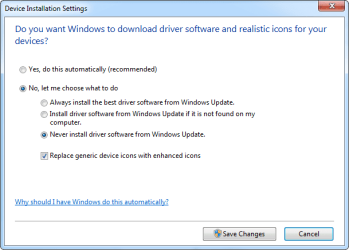
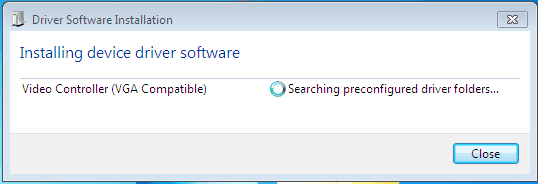
Hey, i did what ADDRAM told me to, here are some screen shots -


And i installed win 7 using usb and the usb tool is rufus!
 

Attachments

  • Capture2.PNG
    Capture2.PNG
    4.2 KB · Views: 13
  • Capture3.PNG
    Capture3.PNG
    2 KB · Views: 13

My Computer My Computer

At a glance

Windows 7 Ultimate 32bitIntel Core 2 Duo T5750 @2.0ghz3GB DDR2Mobile Intel(R) 965 Express Chipset Family
Computer type
Laptop
Computer Manufacturer/Model Number
Acer
OS
Windows 7 Ultimate 32bit
CPU
Intel Core 2 Duo T5750 @2.0ghz
Memory
3GB DDR2
Graphics Card(s)
Mobile Intel(R) 965 Express Chipset Family
Screen Resolution
1280x800
Hard Drives
Toshiba MK1646GSX ATA device
Mouse
HID Compilant device
Browser
Google Chrome
If that second adapter shows up again, let`s not try to get rid of it, just disable it, either that one or the other one, that should fix it permanently. It may not be right, but if it works that`s all that matters.
 

My Computer My Computer

At a glance

Windows 10 Pro x64Intel Core i7 6700KGSkill TridentZ RGB 16GB 3600 16-16-16-36EVGA GTX 980 Ti SC x2
Computer type
PC/Desktop
Computer Manufacturer/Model Number
Skylake Special #666
OS
Windows 10 Pro x64
CPU
Intel Core i7 6700K
Motherboard
Asus Sabertooth Z170 Mark 1
Memory
GSkill TridentZ RGB 16GB 3600 16-16-16-36
Graphics Card(s)
EVGA GTX 980 Ti SC x2
Sound Card
Realtek High Definition
Monitor(s) Displays
AOC G2460PG
Screen Resolution
1920 x 1080 144Hz
Hard Drives
Samsung 860 Pro 256GB, Seagate Barracuda 4TB x2
PSU
EVGA 1000 P2, EVGA White Custom Braided Cables
Case
Corsair Vengeance C70 Gunmetal Black
Cooling
Corsair H100i v2, Corsair ML120 x2, Thermal Grizzly Kryonaut
Keyboard
Logitech G910 Orion Spectrum
Mouse
Logitech G700s
Internet Speed
Verizon Fios Quantum Gateway 75/75
Antivirus
Windows Defender, Malwarebytes Free 3.8.3
Browser
Chrome
Other Info
Corsair SP120 x4, LG Blu-ray Drive, Durabrand HT-395 100 Watt Dolby Digital Amp, Corsair H2100 Wireless 7.1 Headset
I would just let windows install the driver it finds, you may need to go back and undo the device settings I had you change.
 

My Computer My Computer

At a glance

Win 10 Pro x64Intel I5-2500K @3.3GHz16GB G.Skill Ripjaws X (4x4GB)EVGA GeForce 750 Ti SC 2GB
Computer type
PC/Desktop
Computer Manufacturer/Model Number
Self Built
OS
Win 10 Pro x64
CPU
Intel I5-2500K @3.3GHz
Motherboard
Asrock P67 Extreme4
Memory
16GB G.Skill Ripjaws X (4x4GB)
Graphics Card(s)
EVGA GeForce 750 Ti SC 2GB
Sound Card
ASUS Xonar DG 5.1 Channels 24-bit 96KHz PCI Interface Sound
Monitor(s) Displays
auria eq2367
Screen Resolution
1920 x 1080
Hard Drives
250GB Samsung 850 EVO SSD
1TB WD Blue
1TB Hitachi
PSU
SeaSonic X 650W 80 Plus Gold
Case
Corsair Obsidian 750D
Cooling
Corsair H60, Three 140mm case fans
Keyboard
Logitech Wireless Keyboard K520
Mouse
Logitech Wireless Mouse M310
Internet Speed
Wave Broadband ~ 100 dn 5 up
Antivirus
Windows Defender, Malwarebytes Premium
Browser
Edge, IE11, Chrome
Other Info
Laptop specs: HP g7-1365dx /
CPU: AMD A6-3420M APU with Radeon(tm) HD Graphics /
RAM: Crucial 8Gb (2x4Gb) /
SSD: Crucial M4-CT128M4SSD2 ATA Device/ FW 000F /
GFX: AMD Radeon HD 6520G /
OS: Windows 10 Pro x64
Back
Top