Solved KB3058515 fails w/ code 80073712

bru

New member
Pro User
Local time
6:14 AM
Messages
417
Location
A suburb of Chicago
I have a lightly used Win 7 laptop. And I really do mean lightly used. For the past year or so it gets turned on every month or two, I do updates, surf the internet a bit and shut it down.

Doing the June updates KB3058515 failed to install. This is Cumulative Security Update for Internet Explorer 9... The error code is 80073712.

I see reports of problems with this update but mostly for the IE11 version. Some report it does get installed but when I check About IE it shows Update KB3049563, which was from last month. Tried several troubleshooting steps including:

1.Windows Update Troubleshooter - could not fix problem x80073712
2.sfc /scannow Found problem files but cannot fix them. And this got interesting as I was not able to access the cbs.logs. I get "access denied" which seems odd.
3. I tried to update to IE10 or IE11 using WU and both fail. I tried manually downloading/installing IE11 and it fails to install.
4. I uninstalled/reinstalled IE9 through Windows Features.
5. Did a system restore to last month. Reinstalled given updates and KB3058515 still fails.
6. Made sure I had installed every update, I had hidden a few over the years but now every update except Skype and one other (see below) is installed.
7. Check Disk for error.

I think that summarizes what I have tried. Many of the steps were done several times.

I am tempted to just wait until next month to see if that update will install because I think the only thing available otherwise is to do a system repair. But I am concerned about the error which seems to point to a problem with WU but other updates were able to be installed so it is somewhat working. Any thoughts?

I also had a failure with KB3068708 which is an optional update that replaced another problematic update. It also fails with the same error code 80073712.
 

My Computer My Computer

Computer Manufacturer/Model Number
HP p6608f
OS
Win 7 Home Premium x64
CPU
Intel Core i3-540 3.07 GHz
Motherboard
MS-7613 (Iona-GL8E)
Memory
4 GB (2 X 2) Dual-Channel PC-10600 DDR3 @ 665MHz (9-9-9-24)
Graphics Card(s)
Integrated Intel H57
Sound Card
Integrated Realtek ALC888S Audio
Monitor(s) Displays
17" SDM-HS73 (a vestige from my old computer)
Screen Resolution
1280 X 1024
Hard Drives
750GB SATA 7200 RPM
PSU
250W
Keyboard
HP USB keyboard
Mouse
HP USB optical mouse
Internet Speed
15Mbps/1Mbps

My Computer My Computer

Computer type
Laptop
Computer Manufacturer/Model Number
Employer provided Dell Latitude
OS
W7 Pro SP1 64bit
CPU
i7
Memory
8GB
Graphics Card(s)
Intel HD Graphics
Hard Drives
crappy SSD
Antivirus
Employer mandated Symantec Endpoint Protection
Browser
Pale Moon 64bit, IE11 64bit & Chrome 64bit
KB3022345 was never installed. Seeing there were problems when it was released I hid it. Now it doesn't show at all. I think it was replaced by KB3068708, which I also had not planned to install. But when I had the probem with KB3058515 I figured I would install everything to see if it made any difference. It didn't and KB3068708 failed. I have hidden KB3068708.

Regarding this issue:

KB3058515 fails. I can't install either IE10 or IE11 because of it. IE9 is not secure without the update. I ran the SURT, it said it installed successfully. KB3058515 still fails.

Error(s) found:
Code 80073712

I did create a .zip file of the CBS folder but it says its 98mb which is too large to attach. Even just doing the CBS notepad file inside it makes the .zip file 16mb. Have I done something wrong?

edit: I went ahead and attached checkSUR.log as I saw others included that.
 

Attachments

My Computer My Computer

Computer Manufacturer/Model Number
HP p6608f
OS
Win 7 Home Premium x64
CPU
Intel Core i3-540 3.07 GHz
Motherboard
MS-7613 (Iona-GL8E)
Memory
4 GB (2 X 2) Dual-Channel PC-10600 DDR3 @ 665MHz (9-9-9-24)
Graphics Card(s)
Integrated Intel H57
Sound Card
Integrated Realtek ALC888S Audio
Monitor(s) Displays
17" SDM-HS73 (a vestige from my old computer)
Screen Resolution
1280 X 1024
Hard Drives
750GB SATA 7200 RPM
PSU
250W
Keyboard
HP USB keyboard
Mouse
HP USB optical mouse
Internet Speed
15Mbps/1Mbps
Here's the error list from the CheckSUR log -
Code:
Summary:
Seconds executed: 1172
 Found 5 errors
  CSI Manifest Failed Catalog Check Total count: 5
Unavailable repair files:
 winsxs\manifests\x86_microsoft-windows-ie-extcompat_31bf3856ad364e35_9.4.8112.20758_none_559f819a0a0ff6db.manifest
 winsxs\manifests\wow64_microsoft-windows-mediafoundation_31bf3856ad364e35_6.1.7601.22948_none_0546fc1670f460ce.manifest
 winsxs\manifests\amd64_microsoft-windows-ie-ieproxy_31bf3856ad364e35_9.4.8112.20758_none_053d557a3663fe5c.manifest
 winsxs\manifests\amd64_microsoft-windows-js-debuggeride_31bf3856ad364e35_9.4.8112.16644_none_af83da6fd166184f.manifest
 winsxs\manifests\x86_microsoft-windows-msauditevtlog_31bf3856ad364e35_6.1.7601.22948_none_c9b70152efe1f7d6.manifest

I'll post a fix protocol when I can - probably tomorrow...
 

My Computer My Computer

Computer type
Laptop
Computer Manufacturer/Model Number
Asus K52F or Lenovo B51-80
OS
Win 7 x64 Home Premium (and x86 VirtualBox VM)/Win10
CPU
i3 370M/i7 6500U
Motherboard
Asus/Lenovo
Memory
8GB - finally :)/8GB
Graphics Card(s)
it's an i3, dude!/dual Intel&nVidia
Sound Card
onboard
Monitor(s) Displays
15.6" built-in
Screen Resolution
1366x768/1920x1080
Hard Drives
750GB Seagate internal
Sundry external drives attached to other computers on the local network
1TB SSD on the Lenovo
PSU
n/a
Internet Speed
as much as I can get - usually on a dongle/phone, so <1MB/s
Antivirus
MSE/Defender
Browser
IE11/12/Edge/Chrome/FF(if I must)
Here's the error list from the CheckSUR log -

I'll post a fix protocol when I can - probably tomorrow...
I had seen those entries. Will be ready whenever you post the fix. Thank you.
 

My Computer My Computer

Computer Manufacturer/Model Number
HP p6608f
OS
Win 7 Home Premium x64
CPU
Intel Core i3-540 3.07 GHz
Motherboard
MS-7613 (Iona-GL8E)
Memory
4 GB (2 X 2) Dual-Channel PC-10600 DDR3 @ 665MHz (9-9-9-24)
Graphics Card(s)
Integrated Intel H57
Sound Card
Integrated Realtek ALC888S Audio
Monitor(s) Displays
17" SDM-HS73 (a vestige from my old computer)
Screen Resolution
1280 X 1024
Hard Drives
750GB SATA 7200 RPM
PSU
250W
Keyboard
HP USB keyboard
Mouse
HP USB optical mouse
Internet Speed
15Mbps/1Mbps
I've uploaded a file - bruaa.zip - to my OneDrive at Noel's OneDrive

Please downloadand save it.

Right-click on the downloaded file, and select Extract all…
Extract to the default location - which will create a new folder bruaa in the same place.

Open this folder- there should be one folder inside it (Manifests)

Copy the content of the manifests folder (.manifest files) into this folder:

C:\Windows\Temp\CheckSur\Winsxs\Manifests

Now run the CheckSUR tool again (it may take a while)


Post the new CheckSUR.log file, and the CheckSUR.persist.log file.
 

My Computer My Computer

Computer type
Laptop
Computer Manufacturer/Model Number
Asus K52F or Lenovo B51-80
OS
Win 7 x64 Home Premium (and x86 VirtualBox VM)/Win10
CPU
i3 370M/i7 6500U
Motherboard
Asus/Lenovo
Memory
8GB - finally :)/8GB
Graphics Card(s)
it's an i3, dude!/dual Intel&nVidia
Sound Card
onboard
Monitor(s) Displays
15.6" built-in
Screen Resolution
1366x768/1920x1080
Hard Drives
750GB Seagate internal
Sundry external drives attached to other computers on the local network
1TB SSD on the Lenovo
PSU
n/a
Internet Speed
as much as I can get - usually on a dongle/phone, so <1MB/s
Antivirus
MSE/Defender
Browser
IE11/12/Edge/Chrome/FF(if I must)
Post the new CheckSUR.log file, and the CheckSUR.persist.log file.
I've attached the two requested logs. Looks to me as if the files were repaired. Have not done anything more, will await your directions.

Note: When I first followed your instructions there was no Winsxs/Manifests folder here C:\Windows\Temp\CheckSur\Winsxs\Manifests so I placed the .manifest files directly inside CheckSUR. Ran the tool and could see the file errors still existed but now C:\Windows\Temp\CheckSur\Winsxs\Manifests
was there so I placed the .manifest files inside and reran CheckSUR. I think that is why CheckSUR.persist.log has two different time entries.
 

Attachments

My Computer My Computer

Computer Manufacturer/Model Number
HP p6608f
OS
Win 7 Home Premium x64
CPU
Intel Core i3-540 3.07 GHz
Motherboard
MS-7613 (Iona-GL8E)
Memory
4 GB (2 X 2) Dual-Channel PC-10600 DDR3 @ 665MHz (9-9-9-24)
Graphics Card(s)
Integrated Intel H57
Sound Card
Integrated Realtek ALC888S Audio
Monitor(s) Displays
17" SDM-HS73 (a vestige from my old computer)
Screen Resolution
1280 X 1024
Hard Drives
750GB SATA 7200 RPM
PSU
250W
Keyboard
HP USB keyboard
Mouse
HP USB optical mouse
Internet Speed
15Mbps/1Mbps
Yep - CheckSUR is happy now ;)
Code:
Summary:
Seconds executed: 841
 Found 5 errors
 Fixed 5 errors
  CSI Manifest Failed Catalog Check Total count: 5
  Fixed: CSI Manifest Failed Catalog Check.  Total count: 5

Please run SFC /SCANNOW again, and post the new CBS.log file (compressed!)
 

My Computer My Computer

Computer type
Laptop
Computer Manufacturer/Model Number
Asus K52F or Lenovo B51-80
OS
Win 7 x64 Home Premium (and x86 VirtualBox VM)/Win10
CPU
i3 370M/i7 6500U
Motherboard
Asus/Lenovo
Memory
8GB - finally :)/8GB
Graphics Card(s)
it's an i3, dude!/dual Intel&nVidia
Sound Card
onboard
Monitor(s) Displays
15.6" built-in
Screen Resolution
1366x768/1920x1080
Hard Drives
750GB Seagate internal
Sundry external drives attached to other computers on the local network
1TB SSD on the Lenovo
PSU
n/a
Internet Speed
as much as I can get - usually on a dongle/phone, so <1MB/s
Antivirus
MSE/Defender
Browser
IE11/12/Edge/Chrome/FF(if I must)
Please run SFC /SCANNOW again, and post the new CBS.log file (compressed!)
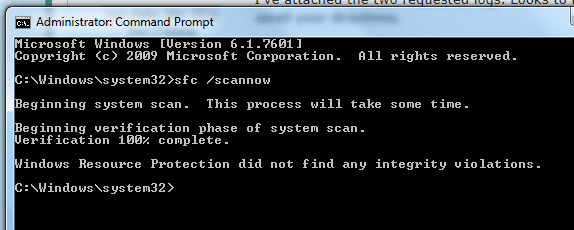
SFC comes up clean. CBS folder is still too large to attach even when zipped. Inside it are 5 Cabinet Files labeled Cbspersist_20150 with different 9 digit numbers starting with "704". Together those 5 add up to over 16MB. Without them the rest of the folder is tiny as it contains 4 items, all Text Documents, CBS, FilterList, CheckSUR and CheckSUR.persist. The latter two have been provided above and have not changed.

Should I delete the 5 Cabinet Files and then copy/zip/attach CBS folder?
 

Attachments

  • sfc.PNG
    sfc.PNG
    9.2 KB · Views: 12

My Computer My Computer

Computer Manufacturer/Model Number
HP p6608f
OS
Win 7 Home Premium x64
CPU
Intel Core i3-540 3.07 GHz
Motherboard
MS-7613 (Iona-GL8E)
Memory
4 GB (2 X 2) Dual-Channel PC-10600 DDR3 @ 665MHz (9-9-9-24)
Graphics Card(s)
Integrated Intel H57
Sound Card
Integrated Realtek ALC888S Audio
Monitor(s) Displays
17" SDM-HS73 (a vestige from my old computer)
Screen Resolution
1280 X 1024
Hard Drives
750GB SATA 7200 RPM
PSU
250W
Keyboard
HP USB keyboard
Mouse
HP USB optical mouse
Internet Speed
15Mbps/1Mbps
I really need only the CBS.log and the latest CBSPersist cab file
However, since SFC is also happy, we can try Windows Update now.
Do a Check for Updates, and attempt to install ONLY the latest update found - if it goes OK, try the rest.
If it fails, post the new C:\Windows\windowsupdate.log file.
 

My Computer My Computer

Computer type
Laptop
Computer Manufacturer/Model Number
Asus K52F or Lenovo B51-80
OS
Win 7 x64 Home Premium (and x86 VirtualBox VM)/Win10
CPU
i3 370M/i7 6500U
Motherboard
Asus/Lenovo
Memory
8GB - finally :)/8GB
Graphics Card(s)
it's an i3, dude!/dual Intel&nVidia
Sound Card
onboard
Monitor(s) Displays
15.6" built-in
Screen Resolution
1366x768/1920x1080
Hard Drives
750GB Seagate internal
Sundry external drives attached to other computers on the local network
1TB SSD on the Lenovo
PSU
n/a
Internet Speed
as much as I can get - usually on a dongle/phone, so <1MB/s
Antivirus
MSE/Defender
Browser
IE11/12/Edge/Chrome/FF(if I must)
Do a Check for Updates, and attempt to install ONLY the latest update found - if it goes OK, try the rest. If it fails, post the new C:\Windows\windowsupdate.log file.
The only Important update, KB3058515, which had previously failed, installed perfect. Only other available update is Definition Update for MSE which I asume will install fine as others installed during this issue.

In pursuing this issue I have previously installed every other available update, save for two related to Skype which I have hidden. Also IE10 and IE11 program updates which are also hidden. And going back to my initial post, KB3068708, which also failed with the same error code and based on initial advice is hidden. I know that one may be causing issues, should I just let it stay hidden? Or do I try to install to see if it works?
 

Attachments

  • ie9csu.PNG
    ie9csu.PNG
    3.2 KB · Views: 0

My Computer My Computer

Computer Manufacturer/Model Number
HP p6608f
OS
Win 7 Home Premium x64
CPU
Intel Core i3-540 3.07 GHz
Motherboard
MS-7613 (Iona-GL8E)
Memory
4 GB (2 X 2) Dual-Channel PC-10600 DDR3 @ 665MHz (9-9-9-24)
Graphics Card(s)
Integrated Intel H57
Sound Card
Integrated Realtek ALC888S Audio
Monitor(s) Displays
17" SDM-HS73 (a vestige from my old computer)
Screen Resolution
1280 X 1024
Hard Drives
750GB SATA 7200 RPM
PSU
250W
Keyboard
HP USB keyboard
Mouse
HP USB optical mouse
Internet Speed
15Mbps/1Mbps
No need to install any more - you'll get the chance in a week or so when the next updates come out ;)


Good luck!
 

My Computer My Computer

Computer type
Laptop
Computer Manufacturer/Model Number
Asus K52F or Lenovo B51-80
OS
Win 7 x64 Home Premium (and x86 VirtualBox VM)/Win10
CPU
i3 370M/i7 6500U
Motherboard
Asus/Lenovo
Memory
8GB - finally :)/8GB
Graphics Card(s)
it's an i3, dude!/dual Intel&nVidia
Sound Card
onboard
Monitor(s) Displays
15.6" built-in
Screen Resolution
1366x768/1920x1080
Hard Drives
750GB Seagate internal
Sundry external drives attached to other computers on the local network
1TB SSD on the Lenovo
PSU
n/a
Internet Speed
as much as I can get - usually on a dongle/phone, so <1MB/s
Antivirus
MSE/Defender
Browser
IE11/12/Edge/Chrome/FF(if I must)
  • Like
Reactions: bru
Much thanks to you for your assistance. :thumbsup:
 

My Computer My Computer

Computer Manufacturer/Model Number
HP p6608f
OS
Win 7 Home Premium x64
CPU
Intel Core i3-540 3.07 GHz
Motherboard
MS-7613 (Iona-GL8E)
Memory
4 GB (2 X 2) Dual-Channel PC-10600 DDR3 @ 665MHz (9-9-9-24)
Graphics Card(s)
Integrated Intel H57
Sound Card
Integrated Realtek ALC888S Audio
Monitor(s) Displays
17" SDM-HS73 (a vestige from my old computer)
Screen Resolution
1280 X 1024
Hard Drives
750GB SATA 7200 RPM
PSU
250W
Keyboard
HP USB keyboard
Mouse
HP USB optical mouse
Internet Speed
15Mbps/1Mbps
please noel upload again the bruu fix in your one note, i have the same problem i try found in your hard drive the file and i dont found mi laptop have windows 10 , and this is my CHECKSUR.log
 

Attachments

My Computer My Computer

Computer type
Laptop
Computer Manufacturer/Model Number
Acer
OS
Windows 10 pro
CPU
Intel Celeron
please noel upload again the bruu fix in your one note, i have the same problem i try found in your hard drive the file and i dont found mi laptop have windows 10 , and this is my CHECKSUR.log

It may seem the same, but those fixes are very specific.

You will get better help for Windows 10 at our sister site,

Windows 10 Forums
 

My Computer My Computer

Computer type
PC/Desktop
Computer Manufacturer/Model Number
Self Built
OS
Win 10 Pro x64
CPU
Intel I5-2500K @3.3GHz
Motherboard
Asrock P67 Extreme4
Memory
16GB G.Skill Ripjaws X (4x4GB)
Graphics Card(s)
EVGA GeForce 750 Ti SC 2GB
Sound Card
ASUS Xonar DG 5.1 Channels 24-bit 96KHz PCI Interface Sound
Monitor(s) Displays
auria eq2367
Screen Resolution
1920 x 1080
Hard Drives
250GB Samsung 850 EVO SSD
1TB WD Blue
1TB Hitachi
PSU
SeaSonic X 650W 80 Plus Gold
Case
Corsair Obsidian 750D
Cooling
Corsair H60, Three 140mm case fans
Keyboard
Logitech Wireless Keyboard K520
Mouse
Logitech Wireless Mouse M310
Internet Speed
Wave Broadband ~ 100 dn 5 up
Antivirus
Windows Defender, Malwarebytes Premium
Browser
Edge, IE11, Chrome
Other Info
Laptop specs: HP g7-1365dx /
CPU: AMD A6-3420M APU with Radeon(tm) HD Graphics /
RAM: Crucial 8Gb (2x4Gb) /
SSD: Crucial M4-CT128M4SSD2 ATA Device/ FW 000F /
GFX: AMD Radeon HD 6520G /
OS: Windows 10 Pro x64
Back
Top