I have a lightly used Win 7 laptop. And I really do mean lightly used. For the past year or so it gets turned on every month or two, I do updates, surf the internet a bit and shut it down.
Doing the June updates KB3058515 failed to install. This is Cumulative Security Update for Internet Explorer 9... The error code is 80073712.
I see reports of problems with this update but mostly for the IE11 version. Some report it does get installed but when I check About IE it shows Update KB3049563, which was from last month. Tried several troubleshooting steps including:
1.Windows Update Troubleshooter - could not fix problem x80073712
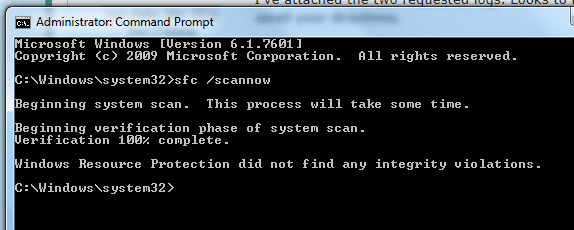
2.sfc /scannow Found problem files but cannot fix them. And this got interesting as I was not able to access the cbs.logs. I get "access denied" which seems odd.
3. I tried to update to IE10 or IE11 using WU and both fail. I tried manually downloading/installing IE11 and it fails to install.
4. I uninstalled/reinstalled IE9 through Windows Features.
5. Did a system restore to last month. Reinstalled given updates and KB3058515 still fails.
6. Made sure I had installed every update, I had hidden a few over the years but now every update except Skype and one other (see below) is installed.
7. Check Disk for error.
I think that summarizes what I have tried. Many of the steps were done several times.
I am tempted to just wait until next month to see if that update will install because I think the only thing available otherwise is to do a system repair. But I am concerned about the error which seems to point to a problem with WU but other updates were able to be installed so it is somewhat working. Any thoughts?
I also had a failure with KB3068708 which is an optional update that replaced another problematic update. It also fails with the same error code 80073712.
Doing the June updates KB3058515 failed to install. This is Cumulative Security Update for Internet Explorer 9... The error code is 80073712.
I see reports of problems with this update but mostly for the IE11 version. Some report it does get installed but when I check About IE it shows Update KB3049563, which was from last month. Tried several troubleshooting steps including:
1.Windows Update Troubleshooter - could not fix problem x80073712
2.sfc /scannow Found problem files but cannot fix them. And this got interesting as I was not able to access the cbs.logs. I get "access denied" which seems odd.
3. I tried to update to IE10 or IE11 using WU and both fail. I tried manually downloading/installing IE11 and it fails to install.
4. I uninstalled/reinstalled IE9 through Windows Features.
5. Did a system restore to last month. Reinstalled given updates and KB3058515 still fails.
6. Made sure I had installed every update, I had hidden a few over the years but now every update except Skype and one other (see below) is installed.
7. Check Disk for error.
I think that summarizes what I have tried. Many of the steps were done several times.
I am tempted to just wait until next month to see if that update will install because I think the only thing available otherwise is to do a system repair. But I am concerned about the error which seems to point to a problem with WU but other updates were able to be installed so it is somewhat working. Any thoughts?
I also had a failure with KB3068708 which is an optional update that replaced another problematic update. It also fails with the same error code 80073712.
My Computer
- Computer Manufacturer/Model Number
- HP p6608f
- OS
- Win 7 Home Premium x64
- CPU
- Intel Core i3-540 3.07 GHz
- Motherboard
- MS-7613 (Iona-GL8E)
- Memory
- 4 GB (2 X 2) Dual-Channel PC-10600 DDR3 @ 665MHz (9-9-9-24)
- Graphics Card(s)
- Integrated Intel H57
- Sound Card
- Integrated Realtek ALC888S Audio
- Monitor(s) Displays
- 17" SDM-HS73 (a vestige from my old computer)
- Screen Resolution
- 1280 X 1024
- Hard Drives
- 750GB SATA 7200 RPM
- PSU
- 250W
- Keyboard
- HP USB keyboard
- Mouse
- HP USB optical mouse
- Internet Speed
- 15Mbps/1Mbps