Solved No "Create new folder" option for a specific folder within Videos

electronicsguy

New member
Local time
3:43 AM
Messages
9
No "Create new folder" option for a specific folder within Videos

Hello,
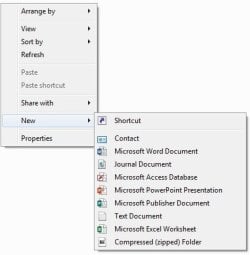
I am having a peculiar problem on my Windows 7 64-bit, which I noticed this week. Within the "Videos" folder, if I create a folder called "temp", I am not able to create any sub-folder within it through the right click menu. Picture attached. Now the funny thing is, if I create a sub-folder within it (thru linux since my laptop is dual boot), I can see everything in linux (files and folders). If I go back to Windows, the sub-folder is not visible. Only files are visible.

If I change the name of the main folder from "temp" to anything else, the sub-folders are then visible and so it the menu option.

This is not happening anywhere else on the disk, only within "Videos/temp". I have other folders within "Videos" and they behave fine.

Any thoughts?
 

Attachments
  • 1.jpg
    1.jpg
    18 KB · Views: 41

My Computer My Computer

At a glance

Windows 7 Professional x64Intel i58 GB
Computer type
Laptop
Computer Manufacturer/Model Number
Sony VAIO
OS
Windows 7 Professional x64
CPU
Intel i5
Memory
8 GB
Interesting, I don't even get New in the first context menu drop down for any folder created under Videos. This is on Windows 10, so there is something going on there (7, 8 and 10) that Microsoft thinks is important or useful.
 

My Computer My Computer

At a glance

Windows 10 Pro X64Intel Quad Core i7-4770 @ 3.4Ghz16.0GB PC3-12800 DDR3 SDRAM 1600 MHzIntel Integrated HD Graphics
Computer type
PC/Desktop
Computer Manufacturer/Model Number
Lenovo IdeaCenter 450
OS
Windows 10 Pro X64
CPU
Intel Quad Core i7-4770 @ 3.4Ghz
Memory
16.0GB PC3-12800 DDR3 SDRAM 1600 MHz
Graphics Card(s)
Intel Integrated HD Graphics
Sound Card
Realtek HD Audio
Monitor(s) Displays
HP 22" LCD
Screen Resolution
1680 x 1050
Hard Drives
250GB Samsung EVO SATA-3 SSD
2TB Seagate ST2000DM001 SATA-2
1.5TB Seagate ST3150041AS SATA
Keyboard
Dell USB
Mouse
Lenovo USB
Internet Speed
Cable via Road Runner 3MB Upload, 30MB Download
Antivirus
Windows Defender, MBAM Pro, MBAE
Browser
Seamonkey
Other Info
UEFI/GPT
PLDS DVD-RW DH16AERSH
Could you check if the issue remains if the folder is named: "temp1", "temp2" and "test" ?
 

My Computer My Computer

At a glance

Windows 7 Professional x64Intel i58 GB
Computer type
Laptop
Computer Manufacturer/Model Number
Sony VAIO
OS
Windows 7 Professional x64
CPU
Intel i5
Memory
8 GB
NTFS permission issue perhaps, did you check the permissions? Or some security software messing with a generic name as "temp".
 

My Computer My Computer

At a glance

Windows 7 Ultimate x64 SP1AMD Phenom 2 1090T2x8GB Kingston HyperX Fury Black 1600Mhz Unga...MSI GTX 970 Gaming 4G
Computer type
PC/Desktop
Computer Manufacturer/Model Number
Custom Build
OS
Windows 7 Ultimate x64 SP1
CPU
AMD Phenom 2 1090T
Motherboard
Gigabyte GA-890FXA-UD5
Memory
2x8GB Kingston HyperX Fury Black 1600Mhz Unganged
Graphics Card(s)
MSI GTX 970 Gaming 4G
Sound Card
Realtek On-Board HD 7.1 Audio / Logitech G35
Monitor(s) Displays
3xAcer GD245HQ
Screen Resolution
1920x1080
Hard Drives
Samsung 850 Pro 512GB SSD - OS /
WD Caviar Black SATA 3 - 1 TBx2 - Dynamic RAID 0 /
WD Caviar Green SATA 2 - 640GBx2 - Dynamic RAID 0 /
WD Caviar Green SATA 2 - 640GB - Internal Backup /
Seagate Barracude SATA 3 - 3TB - External Backup/ Sync
PSU
HighPower 1000W
Case
Cooler Master HAF 932
Cooling
Noctua NH-D14
Keyboard
Logitech G19
Mouse
Logitech G500
Internet Speed
100/4 Mbit Cable (100GB quota)
Antivirus
ZoneAlarm Extreme Security / MBAM Pro / MBAE Free / SAS Free
Browser
IE 11 - Firefox - Chrome
Other Info
Logitech F710/ G27/ G940/ Z5500 // TrackIR 5 // Nvidia 3D Surround Vision
NTFS permission issue perhaps, did you check the permissions? Or some security software messing with a generic name as "temp".
Agreed.

I just tried it on my W7:

  1. Navigated to the Videos folder
  2. Created a folder called temp
  3. Inside temp I created a new folder (using the default name New Folder)
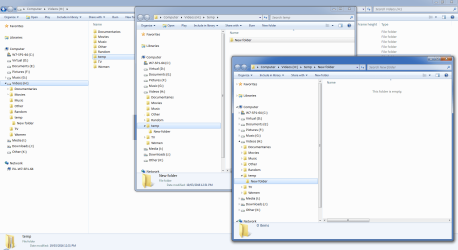
I can see both folders in Windows Explorer.

Note:
I have changed the location of my Video folder (using the Location tab in the Properties window).
It has its own partition.
Create New Folder in Video Temp Folder.png
 

My Computer My Computer

At a glance

W7 Ultimate SP1, LM19.2 MATE, W10 Home 1703, ...AMD Phenom II x6 1100T, 3.3 GHz12GB DDR3 1333 G-Skill (4GB x 2), G-Skill (2G...NVIDIA GeForce GTX 660
Computer type
PC/Desktop
Computer Manufacturer/Model Number
n/a
OS
W7 Ultimate SP1, LM19.2 MATE, W10 Home 1703, W10 Pro 1703 VM, #All 64 bit
CPU
AMD Phenom II x6 1100T, 3.3 GHz
Motherboard
ASUS M4A88T-M/USB3 (AM3)
Memory
12GB DDR3 1333 G-Skill (4GB x 2), G-Skill (2GB x 2)
Graphics Card(s)
NVIDIA GeForce GTX 660
Sound Card
Realtek?
Monitor(s) Displays
Samsung S23B350
Screen Resolution
1920x1080
Hard Drives
WD Green 2TB (SATA), WD Green 3TB (SATA), WD Blue 4TB (SATA), WD Blue 6TB (SATA)
PSU
Cooler Master
Case
Antec GX300 Tower
Cooling
3x Antec TRICOOL 120mm Fans
Mouse
Wired Optical
Internet Speed
DSL
Antivirus
Avast
Browser
Pale Moon (64 bit)
Other Info
2018-12-27 Upgraded HDDs
2015-12-10 Upgraded case, graphics card, storage
2015-08-15 Upgraded motherboard & RAM
2015-07-15 Upgraded LM17.1 to LM17.2
NTFS permission issue perhaps, did you check the permissions? Or some security software messing with a generic name as "temp".

I don't have any 3rd party anti-virus or security software. (I assume the windows inbuilt one is there). What specific permissions do I check for?
 

My Computer My Computer

At a glance

Windows 7 Professional x64Intel i58 GB
Computer type
Laptop
Computer Manufacturer/Model Number
Sony VAIO
OS
Windows 7 Professional x64
CPU
Intel i5
Memory
8 GB
NTFS permission issue perhaps, did you check the permissions? Or some security software messing with a generic name as "temp".

I don't have any 3rd party anti-virus or security software. (I assume the windows inbuilt one is there). What specific permissions do I check for?
That is scary. You are only using Windows Defender on Windows 7?

Anyway, this is what the permissions look like:

videos.png
 

My Computer My Computer

At a glance

W7 Pro SP1 64biti78GBIntel HD Graphics
Computer type
Laptop
Computer Manufacturer/Model Number
Employer provided Dell Latitude
OS
W7 Pro SP1 64bit
CPU
i7
Memory
8GB
Graphics Card(s)
Intel HD Graphics
Hard Drives
crappy SSD
Antivirus
Employer mandated Symantec Endpoint Protection
Browser
Pale Moon 64bit, IE11 64bit & Chrome 64bit
NTFS permission issue perhaps, did you check the permissions? Or some security software messing with a generic name as "temp".

I don't have any 3rd party anti-virus or security software. (I assume the windows inbuilt one is there). What specific permissions do I check for?
That is scary. You are only using Windows Defender on Windows 7?

Anyway, this is what the permissions look like:

View attachment 383913

haha. There's nothing scary about it if you know how things work and what you're doing. (doesn't mean I know everything). So let's not go down that route (no problem with viruses/malware/spyware for the past 10 years).

This is what my permissions look like:
========================
Code:
Microsoft Windows [Version 6.1.7601]
Copyright (c) 2009 Microsoft Corporation.  All rights reserved.

C:\Users\username>icacls Videos
Videos NT SERVICE\WMPNetworkSvc:(R)
       NT SERVICE\WMPNetworkSvc:(OI)(CI)(IO)(R)
       SONY\HomeUsers:(OI)(CI)(RX)
       NT AUTHORITY\SYSTEM:(I)(OI)(CI)(F)
       BUILTIN\Administrators:(I)(OI)(CI)(F)
       SONY\username:(I)(OI)(CI)(F)

Successfully processed 1 files; Failed processing 0 files

C:\Users\username>icacls Videos\temp
Videos\temp NT SERVICE\WMPNetworkSvc:(I)(OI)(CI)(R)
            MERASONY\HomeUsers:(I)(OI)(CI)(RX)
            NT AUTHORITY\SYSTEM:(I)(OI)(CI)(F)
            BUILTIN\Administrators:(I)(OI)(CI)(F)
            SONY\username:(I)(OI)(CI)(F)

Successfully processed 1 files; Failed processing 0 files

C:\Users\username>
 
Last edited:

My Computer My Computer

At a glance

Windows 7 Professional x64Intel i58 GB
Computer type
Laptop
Computer Manufacturer/Model Number
Sony VAIO
OS
Windows 7 Professional x64
CPU
Intel i5
Memory
8 GB

My Computer My Computer

At a glance

W7 Pro SP1 64biti78GBIntel HD Graphics
Computer type
Laptop
Computer Manufacturer/Model Number
Employer provided Dell Latitude
OS
W7 Pro SP1 64bit
CPU
i7
Memory
8GB
Graphics Card(s)
Intel HD Graphics
Hard Drives
crappy SSD
Antivirus
Employer mandated Symantec Endpoint Protection
Browser
Pale Moon 64bit, IE11 64bit & Chrome 64bit
Ok, I don't know exactly how, but it was simple to fix. Download CCleaner, run registry tools/fix all errors and bingo.
 

My Computer My Computer

At a glance

Windows 7 Professional x64Intel i58 GB
Computer type
Laptop
Computer Manufacturer/Model Number
Sony VAIO
OS
Windows 7 Professional x64
CPU
Intel i5
Memory
8 GB
Back
Top